
Reselling managed Documenso e-signature in 2026
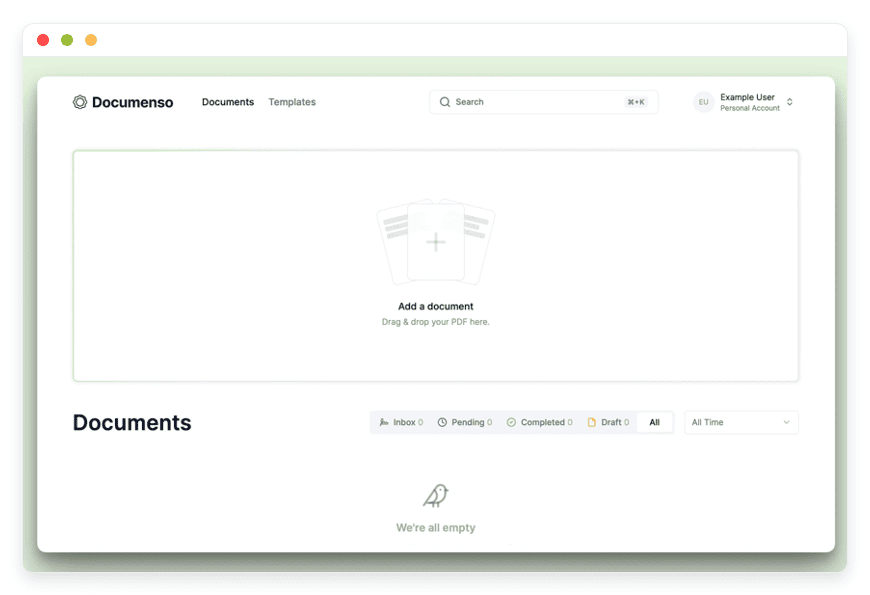
How agencies resell managed Documenso without running servers
TL;DR
- Reselling Documenso means one isolated instance per client, not a shared login. Your cost is the standard €9/month per instance, and you set the retail price.
- At a €25–50/month retail rate against a €9 cost, the margin runs €16–41 per client per month. Across 20 client instances, that is roughly €320–820/month recurring, before your support time.
- The client’s pain is structural. DocuSign bills per seat and caps most plans at 100 envelopes per user per year, then charges for each extra send. A flat managed instance has no per-envelope meter.
- Documenso is AGPL-licensed. Reselling standalone, unmodified instances as a hosted service is ordinary open-source use; embedding its code into your own closed product is the part that needs Documenso’s commercial licence.
- DANIAN runs each client instance — patching, daily off-site backups, monitoring, and 24/7 support. What is not built yet is a single dashboard across all your client instances. The gaps are named below.
A client asks if you can also run their contract signing, and you feel the trap: you do not want to become a hosting company. Reselling a managed open-source signer is the way to say yes without taking on servers. Documenso is the cleanest one to resell, and the arithmetic below is the reason.
The agency math — what reselling Documenso actually pays
Reselling managed Documenso is simple arithmetic. You place one instance per client at €9/month, your cost, and charge the client a retail rate of €25–50/month. That is a margin of €16–41 per client. Across 20 client instances, the recurring margin lands near €320–820/month, before you account for support time.
One Documenso per client matters for two reasons. Each client sees only their own documents, so there is no shared tenancy to explain in a security review. And the €9 is a fixed base price, not a metered bill, so your cost per client never moves with their sending volume. That is what makes the margin predictable.
Work a real book. Twenty clients at €40 retail is €800/month in revenue against €180 in cost, for €620/month of margin — about €7,440 a year from a line you did not have to staff. Smaller books work too: ten clients at €25 retail is €250 revenue against €90 cost, or €160/month of margin from a standing start. Signing tools are sticky once a client’s templates and signed documents live in one place, so the line tends to compound rather than churn.
Set the retail rate against what the client already pays. A client on DocuSign Standard with two senders is spending $50 a month before any overage, so anchoring your price near €40 reads as a saving and still leaves a clean margin. A solo client replacing a Personal plan supports €25. The number you pick is a pricing decision, not a cost-plus markup — the cost is fixed at €9, so the spread is yours to set.
Account for support honestly. The realistic load is a new template now and then, a client who needs a user added, or a “where is my signed copy” question. None of it is server work, because DANIAN patches, backs up, and monitors each instance. If a single client turns into a steady stream of bespoke requests, price that client higher or move them onto a retainer — the cost to you is your time, and your time has a rate. Budget an hour or two a month across the whole book and the margin still holds.
The margin is real for one reason worth stating plainly: you are not running the servers. If you were, the patching cadence, the backup discipline, and the 2am on-call would eat most of the difference.
See managed Documenso — €9/month per instance, with a 7-day free trial.
Why the client is overpaying for DocuSign
The reason a flat instance wins is how the proprietary tools bill. DocuSign’s Standard plan is $25 per user per month on annual billing and caps each user at 100 envelopes per year — roughly eight sends a month. Business Pro is $40 per user per month with the same cap. Past that limit, every send costs extra.
An envelope is one send, even when it carries several documents or several recipients. A correction that needs a resend burns another envelope. For any business signing client contracts on a regular cycle, eight sends a month is tight, and the cap arrives quietly. Overages are reported at roughly $3–8 per extra envelope, a figure DocuSign does not list on its own pricing page.
On top of the meter sits per-seat billing: every additional sender is another seat at the same monthly rate. Reported add-ons stack further — SMS delivery of signing requests at around $0.40 a send, identity verification at around $2.50 an attempt — so the real monthly figure often runs above the headline seat price. Support is gated, too: lower tiers limit or block opening a case, so a client with a problem cannot always reach a human quickly.
PandaDoc, Adobe Sign, and Dropbox Sign sit in the same shape — metered sends, per-seat pricing, or both. A managed Documenso instance removes both levers. There is no per-envelope meter and no per-seat tax inside the instance; the client sends what the work needs at one flat monthly price, and support is you plus DANIAN’s chat. That single sentence — predictable, not metered — is the pitch you make to the client.
| What the client pays | DocuSign Standard | DocuSign Business Pro | Managed Documenso (resold) |
|---|---|---|---|
| Headline price | $25/user/month (annual) | $40/user/month (annual) | €25–50/month flat (your retail) |
| Sends included | 100 envelopes/user/year (~8/month) | 100 envelopes/user/year (~8/month) | No per-envelope metering |
| Going over the limit | ~$3–8 per extra envelope (reported) | ~$3–8 per extra envelope (reported) | No envelope count to exceed |
| Adding a second sender | Another paid seat | Another paid seat | Within the one instance |
| Resending a correction | Burns another envelope | Burns another envelope | No envelope cost |
Per-seat prices and envelope caps from DocuSign’s published plans; the per-envelope overage range and add-on figures are from third-party reporting, since DocuSign does not publish those rates.
What “white-label” actually means with an open-source signer
“White-label” hides two separate questions. One is branding — your client’s logo, your sender name, a custom domain on the signing page. The other is the software licence. Documenso ships under AGPL v3, and the licence treats reselling instances very differently from embedding code. Keep the two apart and the picture is clear.
Branding first. On each Documenso instance you can set the workspace branding and point a custom domain, so the signing page carries your client’s identity rather than a generic vendor’s. Documenso’s own product includes Teams and white-label features for organising senders and branding, and those settings carry over on a managed instance — you are configuring the same software, just without running it yourself. It does not require touching the source code, and it does not change anything about the licence.
Now the licence. The practical line for an agency is short: running standalone, unmodified Documenso instances as a hosted service for clients is operating open-source software — the use the project documents and supports. Co-founder Timur Ercan describes the intended model as “self-hosted, hosted by us, or hybrid.” The AGPL’s source-availability obligation is met because the code is already public on GitHub. Where the licence asks more of you is in two cases: if you modify Documenso’s code and run that modified version as a service, the copyleft terms apply to your changes; and if you build Documenso’s components into your own closed product, that is embedded use, for which Documenso sells a commercial licence and a hosted Platform tier.
None of that is legal advice. Documenso publishes its own licence and fair-use pages, the project is built in public by Timur Ercan and Lucas Smith and a small team, and the repository has around 13,000 stars — so you can read the code and the terms yourself before you resell. For your specific setup, your own counsel is the right call.
The DANIAN partner setup today — honest about the gaps
Here is what DANIAN gives an agency today, and what it does not. Each client gets an isolated Documenso instance at €9/month, on its own subdomain, with a custom domain if you want. We patch, back up daily off-site, monitor, and answer support from a named human. You keep the client and bill at your retail rate.
What exists now: per-client isolation, with each client’s app running in its own hardened container rather than a shared tenant; the datacenter region you choose per instance; daily off-site backups; monitoring; 24/7 support; and resource bumps on request, only after you approve them. Two promises that matter to an agency holding client documents: we do not upgrade an instance’s resources or change the bill without asking, and if a card fails, we wait — we do not delete a client’s documents on a missed payment.
Where each client’s documents live is your choice per instance. You pick the datacenter region when you place the instance — useful when a client’s own customers or regulators expect documents to sit closer to home, or when latency to a particular country matters. The region is set per client, not once for your whole book, so a client in one country and a client in another can each sit where it suits them.
The gaps, named plainly. There is no single control plane that lists every client instance in one view. There is no automated client-billing pass-through — you bill your clients through your own stack, whether that is Stripe, an invoicing tool, or whatever you already run. There is no central branded-invoice layer from us to your clients. A central partner dashboard is on the roadmap; it is not live, and the brief here is not to promise what has not shipped.
The workaround is straightforward at agency scale. You manage instances individually — each has its own dashboard, with per-container terminal and file access if you ever need to dive in — and you run client billing through tools you already have. For a book of 10–30 clients that is workable. Past that, the missing control plane starts to cost you real time, and that is the point to weigh.
Placing several client instances? Talk to us about partner terms.
Three apps that resell well — and how they differ
Documenso is not the only signer worth reselling, and signing pairs naturally with storage. Three catalog apps cover most agency cases: Documenso for contract e-signing, DocuSeal for form-heavy fillable documents, and Nextcloud as the home for the finished PDFs. Each runs at the same €9 base, so the resale arithmetic is identical across all three.
Documenso — contract e-signing. Upload a PDF, drag signature fields onto it, send it, and the signer returns a sealed PDF carrying tamper-evident signing metadata: a record of who signed, when, and what they agreed to. Best for retainer agreements, NDAs, and statements of work. This is the lead resale, and it is what most clients picture when they say “e-signing.” Read the product page at managed Documenso.
DocuSeal — form-style signing. It leans toward fillable, templated documents: a client completes structured fields and signs in one pass. Best for onboarding packs, intake forms, and the repeated structured paperwork an agency processes for many clients. Same €9 base, same resale model. See DocuSeal for form-based signing when the document is more form than free-text contract.
Nextcloud — document storage and sharing. It is the place the signed PDFs live, with per-client folders and access control, rather than leaving finished agreements scattered across email. It pairs with either signer so the completed documents have a managed home. See managed Nextcloud for the storage side of the stack.
The arithmetic compounds. A client running a signer plus storage at, say, €70 retail against €18 cost is a €52 monthly margin on one relationship — and a stickier one, because moving both the signing flow and the documents elsewhere is real work the client will not undertake lightly. Stack two or three of these per client and the per-client margin grows on the same €9 base, without adding servers for you to run.
What reselling actually looks like
Standing up a client takes a handful of concrete steps, none of which involve a server. You provision one Documenso instance, set the workspace branding to the client’s logo and sender name, and point a subdomain or the client’s own domain at the signing page. Then you load the client’s recurring documents as templates — a retainer, an NDA, an onboarding form — and place the signature and date fields once, so each future send is a two-click job.
From there the client gets a link and signs in. DANIAN keeps the instance patched, backed up daily off-site, and monitored, and answers chat if something looks off. You are not in the patch cycle or the backup routine; your work is the client relationship, the templates, and the monthly invoice. When the client sends a contract, the signer returns a sealed PDF with tamper-evident signing metadata, and that file lands wherever you have pointed it — an email, a shared drive, or a managed Nextcloud folder.
When this works — and when it doesn’t
Reselling managed signing fits some agencies and not others. The honest test is whether you have recurring client documents and want to stop running servers, or whether you need a finished, branded platform today. Three signals point each way, and the unfit cases matter as much as the fit ones.
It works when:
- Your clients sign things on a cycle — retainers, NDAs, statements of work — and you already touch their domains and DNS, so adding a signing instance is a small step.
- A client has hit DocuSign’s envelope cap or felt the per-seat creep and has asked you to “just handle the signing.” You are filling a need they already named.
- You want recurring revenue without owning the patching, the backups, or the 2am on-call. The flat €9 cost is what lets you price a clean margin.
It doesn’t when:
- You need one branded control plane across every client instance today. That is not shipped, and the per-instance model will frustrate you at large scale.
- You want to embed signing inside your own proprietary product. AGPL makes that a commercial-licence conversation with Documenso, not a resale.
- You are optimising for the lowest possible per-instance cost and have an in-house developer who enjoys the work. Self-hosting on a VPS with an open-source platform like Coolify will cost less in money — and more in time, which is the trade you are making.
FAQ
Can I really resell Documenso, or does the licence stop me?
You can resell managed instances. Running standalone, unmodified Documenso as a hosted service for clients is ordinary open-source use, and the source is already public, so the AGPL obligation is met. Embedding Documenso’s code into your own closed product is the part that needs Documenso’s commercial licence. This is not legal advice.
Is Documenso a good DocuSign alternative for client work?
For agencies, yes — it removes the two costs that bite. DocuSign meters envelopes, capping most plans at 100 per user per year, and charges per seat. A managed Documenso instance has neither meter nor per-seat tax; you resell one isolated instance per client at a flat €9 base. The trade-off is no central multi-client dashboard yet.
Should I resell Documenso or DocuSeal?
Pick by document type. Documenso suits contracts you sign and send — retainers, NDAs, statements of work. DocuSeal suits fillable, templated forms a client completes in one pass, like onboarding or intake packs. Both run at the same €9 base with identical resale maths, and some agencies resell both. See DocuSeal for form-based signing.
What does each client instance cost me, and what can I charge?
Your cost is the standard €9/month per instance — one isolated Documenso per client. Agencies typically charge clients €25–50/month, a margin of €16–41 each. Across 20 client instances that is roughly €320–820/month recurring, before your support time. You set the retail price your market will carry.
How much can an agency make reselling e-signatures?
Your cost is €9 per client instance; agencies charge €25–50/month, a margin of €16–41 each. Ten clients at €25 is about €160/month of margin; twenty at €40 is roughly €620/month, near €7,440 a year — before your support time. The cost stays €9 no matter how much each client sends.
Do I pay per signature or per envelope with managed Documenso?
Neither. The €9/month base is flat — no per-signature charge and no per-envelope meter inside the instance, so a client sends what the work needs at one price. That is the structural difference from DocuSign, which caps most plans near eight sends a month and bills extra past the limit.
Is there a setup fee or minimum to resell Documenso?
No setup fee and no per-envelope commitment — each client instance is the standard €9/month, and you can start with one. If you are placing several instances, talk to us about partner terms. You bill your own clients through your own stack, and there is no contract minimum to begin.
Is it cheaper to self-host Documenso myself than to resell a managed instance?
On paper, slightly — in practice, rarely. A production-class VPS at about $24/month, plus backup and monitoring, runs near $44/month before your time, and patching, off-site backups, and on-call eat the difference fast. An open-source platform like Coolify cuts setup work, not upkeep. The managed instance is €9, with that upkeep included.
How do I start reselling e-signing to a client?
Pick a client who signs documents on a cycle, place one Documenso instance at €9, set the workspace branding to their logo, and point their domain at the signing page. Load their recurring documents as templates, then resell at a flat monthly rate. DANIAN patches, backs up, and monitors the instance; you keep the client relationship.
How do I move a client from DocuSign to Documenso?
Stand up one Documenso instance, rebuild the client’s recurring documents as templates — a retainer, an NDA, an onboarding form — and switch new sends to the new instance. Existing signed PDFs stay where they are; you do not need to migrate them. Run both in parallel for a billing cycle, then retire the old plan.
Do you give me one dashboard to manage every client instance?
Not today. Each instance has its own dashboard, with per-container terminal and file access if you need it, and you run client billing through your own tools. A central partner dashboard is on the roadmap. For a book of 10–30 clients the per-instance model is workable; talk to us if you are larger and the management overhead is the constraint.
Is self-hosted e-signing secure enough for client contracts?
Each client’s Documenso runs in its own hardened, isolated container — not a shared tenant — so one client’s documents stay separate from another’s. DANIAN patches the instance, takes daily off-site backups, and monitors it. The signer produces a sealed PDF with tamper-evident signing metadata recording who signed and when, and you pick the datacenter region per instance.
Where are my clients’ signed documents stored?
In the datacenter region you choose for each instance, across 21 regions on six continents. You set the region per client, not once for your whole book, so a client whose customers expect data closer to home can sit there. The signed PDFs live inside that client’s instance, or in a managed Nextcloud folder if you pair one.
Who can see my clients’ documents?
Only the people each client grants access to inside their own instance. Because every client gets a separate, isolated Documenso rather than a shared login, one client cannot see another’s documents, and neither can other agencies. DANIAN keeps the instance running and does not read the documents inside it.
What happens to my clients’ documents if I stop paying?
We do not delete a client’s documents on a missed payment. If a card fails, we wait and reach out rather than wiping the instance, so your data stays put while the billing issue is sorted. This is deliberate: an agency holding client contracts should not lose them over a payment hiccup.
Is an e-signature from Documenso legally valid?
Documenso produces a sealed PDF with tamper-evident signing metadata — a record of who signed, when, and what they agreed to. Whether that is valid for a given document depends on your jurisdiction and the type of agreement. Documenso publishes its own documentation on signature standards; check it, and your own counsel, for your case.
Are electronic signatures legally binding?
In many places, yes — but it depends on your jurisdiction and the type of document. Documenso produces a sealed PDF with tamper-evident signing metadata: a record of who signed, when, and what they agreed to. Whether that meets the bar for a given agreement is a question for your own counsel. This is not legal advice.
Can each client get their own branding and domain?
Yes. On each instance you can set the workspace branding and point a custom domain, so the signing page carries your client’s identity. That is a configuration matter, separate from the licence question. Branding an instance does not require modifying Documenso’s code, so it does not change your licence position.
Do my clients need to know the signing runs on Documenso?
That is your call. You can set each instance’s branding to the client’s own logo and sender name and point their domain at the signing page, so the experience carries their identity, not a vendor’s. Branding an instance does not modify Documenso’s code, so it does not change your licence position. Many agencies present it as their own service.
What kinds of documents can clients sign with Documenso?
PDFs — contracts, retainer agreements, NDAs, statements of work, and onboarding forms. You upload a PDF, drag signature and date fields onto it, and send it for signing. For heavily form-style documents a client fills in field by field, DocuSeal is the better fit; see DocuSeal for form-based signing.
What if a client outgrows the base instance?
The €9 base covers one vCPU and RAM unit, 30 GB of storage, and 1,000 GB of traffic — enough for most contract and form signing. A high-volume client can add resources: +€9 per vCPU/RAM unit, +€0.50 per GB of storage. We add resources only after you approve the change, so the bill never moves on its own.
What to do this week
The fastest way to test this is one client. Pick a client who signs documents on a cycle, place a single Documenso instance, point their domain at it, and resell it at a flat monthly rate. If it sticks — and quiet, metering-free signing tends to stick — add the next client.
The margin compounds one instance at a time, and you never touch a server. The licence and legal points above are guidance, not advice; confirm them for your own situation before you sign a client. When you are ready, start with one.





