
Self-hosted Spotify alternatives in 2026
Open-source alternatives to Spotify in 2026
Navidrome, Koel and Ampache are open-source music servers. Each one streams a library you already own — ripped CDs, purchased downloads, Bandcamp files — to any device. None of them replaces Spotify’s licensed catalogue or its recommendations. If you own a collection and want it everywhere, DANIAN runs any of the three for €9 a month, in the region you pick.
TL;DR
- These three stream music you own. They are not a catalogue replacement — there is no 100-million-track library and no algorithmic discovery feed.
- Navidrome (GPL-3.0, about 21,000 GitHub stars): a light Go server that speaks the Subsonic API and works with more than twenty mobile and desktop apps.
- Koel (MIT, about 16,500 stars): a web-first player with a clean browser interface. It needs a database to run.
- Ampache (AGPL-3.0, about 3,700 stars, first released in 2001): the mature, feature-broad option. It streams video as well as audio and suits larger or multi-user libraries.
- Spotify’s Individual plan rose to $12.99 a month in the United States in January 2026. DANIAN runs any of these for €9 a month flat, with patching, daily backups and support. You supply the files.
What these replace (and what they don’t)
A self-hosted music server replaces the job iTunes and a sync cable used to do: getting the music you own onto every device you use, over the internet, without copying files around by hand. It does not replace Spotify. Spotify rents you a catalogue of tens of millions of licensed tracks and recommends new ones. These apps stream the files already on your drive.
That distinction decides whether any of this is for you, so it is worth being blunt about three points.
- Spotify streams a licensed catalogue you rent month to month. Navidrome, Koel and Ampache stream files you have bought or ripped. The music is yours; the server makes it reachable from anywhere.
- There is no algorithmic discovery here, no editorial playlists, and no large podcast directory. You get your own albums, your own playlists, and scrobbling to Last.fm or ListenBrainz if you want a listening history.
- Plenty of people run both. Spotify stays open for discovery and the school run. The self-hosted server holds the collection that streaming does not — out-of-print pressings, live sets, DJ pools, full classical recordings, and Bandcamp or Qobuz purchases you would rather keep under your own control.
People sometimes call these tools “your own Spotify”. That framing oversells them. The interface can look like Spotify, but the catalogue is whatever you put in. If your music lives entirely inside a streaming subscription, there is nothing to migrate and none of this helps.
Why people run their own music server in 2026
The trigger is rarely a price tag. It is a collection. People who have spent years buying music reach a point where they want all of it in one place and reachable from a phone. A self-hosted server does exactly that, and a few specific frustrations push people toward it.
- Owned files outlast streaming catalogues. Albums get pulled when licences lapse, regional catalogues differ, and a favourite live record can vanish overnight. Files you bought or ripped do not move. A FLAC rip of your own CD plays the same in five years as it does today.
- Artist-direct and hi-res purchases pile up. Bandcamp Fridays, Qobuz and HDtracks downloads, and ripped CDs add up to a library that is scattered across folders and drives. A music server gathers it into one place you can reach from any device.
- Listening data stays private. On your own server there is no profile being built from what you play at 2am. The play counts and history live on the box you control.
- Full albums, gapless playback and odd formats just work. Classical recordings, DJ sets and concept albums that streaming chops up play end to end, in the order and quality you ripped them.
- Offline listening still works. Subsonic apps cache albums on your phone for trips and dead zones, the same way Spotify downloads do. The files come from your own server rather than a rented catalogue.
Spotify did raise prices again. The Individual plan went from $11.99 to $12.99 in the United States in January 2026 — the third increase in four years, after similar rises in the UK and Switzerland the previous autumn (Variety). That is a fair prompt to reassess. But Spotify also added lossless streaming in late 2025, so audio quality alone is a weaker reason to leave than it once was. Switching makes sense only if you already have your own files. If you do not, keep Spotify.
The shortlist
Navidrome
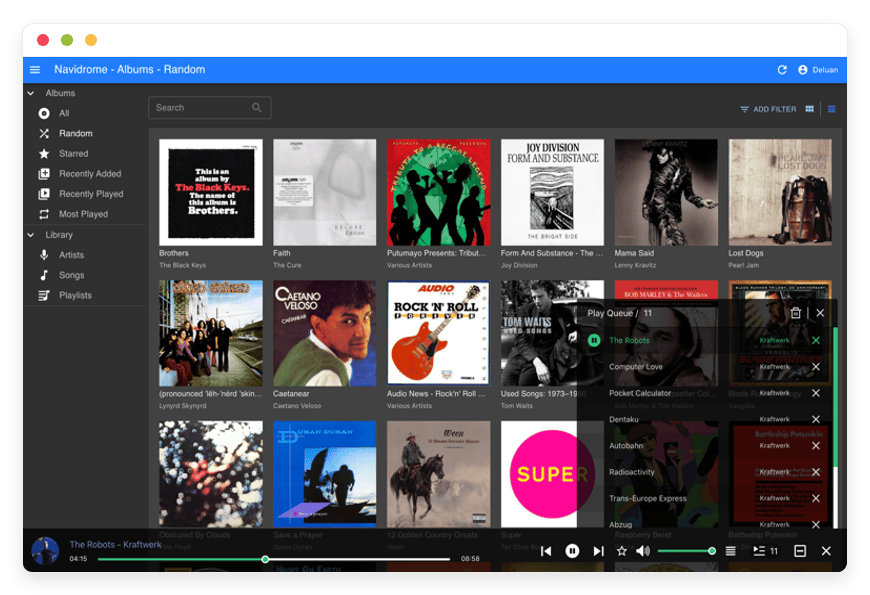
Navidrome is a light music server written in Go, released under the GPL-3.0 licence with about 21,000 GitHub stars (GitHub). It runs on hardware as small as a Raspberry Pi and keeps resource use very low (navidrome.org). Best for phone-first listeners who want a fast, no-fuss server. DANIAN runs a managed Navidrome music server for €9 a month.
The built-in web player is clean and quick, but Navidrome’s real advantage is what connects to it. It speaks the Subsonic API — a common protocol that more than twenty third-party apps support — so you are never locked into one player. It handles MP3, FLAC, OGG, Opus and the other formats ffmpeg knows, transcodes on the fly for slower connections, supports multiple users with separate play counts, and offers smart playlists plus scrobbling to Last.fm and ListenBrainz. It is music-only — no video, no podcast directory — which is exactly why it stays light.
A few touches make it pleasant to live in. It supports multiple libraries, so a household can keep separate collections on one server. There is a jukebox mode that plays through speakers attached to the server itself. Recent releases adopt the OpenSubsonic extensions, which add richer metadata and synced lyrics in compatible apps.
Koel
Koel is a web-first music server built on Laravel and Vue, released under the MIT licence with about 16,500 GitHub stars (koel.dev). The browser interface is the draw: clean, fast, and modelled on the players people already know. Best for listeners who mostly play music at a desk. Koel for a web-first player runs €9 a month on DANIAN.
Koel needs a database — MariaDB, MySQL or PostgreSQL — so it is heavier to run than Navidrome. The open-source core is free and full-featured: smart playlists, an equaliser, visualisers, transparent lossless support, multi-user libraries, and integrations with Last.fm, Spotify and MusicBrainz for metadata. A paid Koel Plus tier adds extras such as single sign-on, collaboration and white-labeling, which you do not need for personal use. There is an official Koel Player app for iOS and Android, and recent versions also speak the Subsonic API, so the wider app ecosystem works too.
Newer Koel builds reach past a plain music player. They handle podcasts alongside your own files, and the interface offers both light and dark themes. For a desk setup that doubles as your daily listening hub, that extra polish is welcome.
Ampache
Ampache is the elder of the three — first released in 2001, written in PHP, under the AGPL-3.0 licence with about 3,700 GitHub stars (ampache.org). It is feature-broad and streams video as well as audio. Best for large or shared libraries where breadth matters more than a modern interface. DANIAN runs managed Ampache for €9 a month.
Ampache expects an organised, well-tagged library. It presents your collection rather than tidying it, so the file housekeeping is on you. The interface looks its age next to Koel, and an Ampache 8 release is in progress. In return you get deep multi-user controls, video support, and broad client compatibility through both its own API and Subsonic.
The sharing features are where Ampache earns its keep. You can grant family or bandmates their own logins, with shared and private playlists for each. It still needs a database — MySQL, MariaDB or PostgreSQL — behind it, like Koel. For a whole household sharing one large collection, that control is the point.
One more is on the way. Funkwhale, a federated music server that lets separate instances share libraries across a network, is a planned addition to the DANIAN catalogue. It is not live yet, so it is not in the comparison below.
Navidrome vs Koel vs Ampache — at a glance
All three are free, open-source, and stream music you own. They differ in weight, interface and reach. Navidrome is the lightest and the most phone-friendly. Koel has the best browser experience. Ampache is the broadest and the only one that also handles video. The table sets them side by side.
| App | Licence | GitHub stars | Built with | Mobile listening | Video too? | DANIAN price |
|---|---|---|---|---|---|---|
| Navidrome | GPL-3.0 | ~21,000 | Go | 20+ Subsonic apps | No | €9/month |
| Koel | MIT | ~16,500 | Laravel + Vue | Koel Player + Subsonic | No | €9/month |
| Ampache | AGPL-3.0 | ~3,700 | PHP | Subsonic + Ampache apps | Yes | €9/month |
Star counts are from GitHub as of mid-2026 and move over time. On DANIAN, any of the three can run in any of 21 datacenter regions across six continents — pick the one closest to where you listen, for lower latency.
What it costs to run one of these
A personal music server is light to run, so the cost question is less about horsepower and more about who does the work. There are three honest paths: a production-class VPS you manage, a home server or NAS you already own, or a managed instance where someone else runs it. Here is the rough math for one server.
- A VPS you manage. A 2 vCPU / 4 GB production-class VPS runs about $24 a month. Add roughly $5 for off-site backups and $15 for monitoring, and the infrastructure sits near $44 a month. Then there is your time — initial setup plus an hour or two each month for updates, TLS renewal, backup checks and securing remote access. At freelance sysadmin rates that is €60–240 a month in time alone. A good path if you like this work and have an evening to give it.
- A home server or NAS. If you already own a NAS — a Synology DS923+ or similar — running Navidrome on it is close to free beyond electricity. That is the cheapest route for a single-user library, provided you have a static IP or a tunnel, off-site backups, and the patience to maintain it. Buying hardware new changes the math: amortised over three years, plus electricity, business-grade internet and off-site backup, a home setup lands well above the monthly cost of a managed instance once your time is counted.
- Managed by DANIAN. €9 a month per instance. We patch the app, take daily off-site backups, monitor it, and reply when something is off. Your operational time is zero. It is the lowest all-in cost at one instance once you value your own hours at a professional rate — and the right pick if you want the music to work without running a server.
The honest bottom line: if your time is free because the tinkering is the hobby, a NAS you own wins on cash. If you want it handled, €9 a month is the floor.
How to pick: three questions to ask yourself
The three apps overlap, but a few questions sort them quickly. Where you listen matters most, then the size and shape of your library, then who you want running the server. Answer these three and the choice is usually obvious.
- Do you listen mostly on your phone or in a browser? Phone-first points to Navidrome with a Subsonic app such as Symfonium or play:Sub. Desk-and-browser points to Koel.
- How big and how tidy is your library, and is there video? A large, multi-user, or video-bearing collection suits Ampache. A tidy, music-only library is happiest on Navidrome.
- Do you want to run the server, or have it run for you? Hands-on with spare time: a NAS or VPS. Hands-off: a managed instance at €9 a month.
Getting your library ready
All three apps stream files you provide, so a little preparation up front pays off. The work is mostly about formats, tags and getting the files onto the server. None of it is hard, and you do it once.
- Pick a format and stick with it. FLAC keeps a lossless copy and is the safe choice for an archive. MP3 or Opus save space if your drive is tight. All three servers transcode on the fly. So a FLAC library still streams smoothly to a phone on mobile data.
- Tag your files before you upload. Artist, album, track number and year drive how every server sorts your music. A free tool like MusicBrainz Picard fills these in from an online database. Ampache in particular rewards a tidy, well-tagged library, since it presents what it finds rather than guessing.
- Get the files onto the server. For a few albums, Koel and Ampache let you upload through the browser. For a large library, SFTP moves whole folders at once and is the better route. On DANIAN the server watches for new files and scans them in. They show up in the player once the copy finishes.
- Size the storage to the library. A FLAC collection runs to hundreds of gigabytes once it grows. Each DANIAN instance includes 30 GB, and more is €0.50 per GB a month. A ripped-CD library in MP3 fits the base allowance comfortably. A large lossless archive is where the extra storage comes in.
- Bring your playlists where you can. Standard .m3u files are the portable format, and Navidrome reads them straight from your music folder. Exports from older players such as iTunes or foobar2000 usually convert with a small free utility. Anything clever, like smart playlists, you rebuild inside the server you pick.
After the first import, growth is easy. New purchases drop into the same folder over SFTP or the web upload. The next scan picks them up. The library grows in one place instead of scattering across drives again.
Pricing
DANIAN runs Navidrome, Koel or Ampache for €9 a month per instance. That is a flat price — no per-seat fees and no usage calculator. It covers the server, patching, daily off-site backups, monitoring and support. You bring the music files — uploaded through the app or over SFTP — and we run the server. There is a 7-day free trial and no card is required to start.
Two promises worth stating plainly. We will not upgrade your resources or charge you more without your explicit consent. And if a card fails, we wait — we do not delete your data.
FAQ
Do these replace Spotify?
Not in the way most people mean. They stream music you already own — ripped, bought or downloaded — to any device. They do not give you Spotify’s licensed catalogue of tens of millions of tracks, its recommendations, or its podcast library. Many people run a self-hosted server for their collection and keep Spotify for discovery.
Do I need to provide my own music files?
Yes. Navidrome, Koel and Ampache organise and stream the files you give them — ripped CDs, purchased downloads, and Bandcamp or Qobuz files. They do not include any music. If your listening lives entirely inside a streaming subscription, there is nothing to import and one of these will not help.
Is it legal to stream my own music collection?
Streaming music you own to yourself is fine in most places. That covers ripping your own CDs and playing purchased downloads for personal use. Laws vary by country, so check your local rules. What changes things is sharing copyrighted music publicly or with people outside your household. For a private personal library, you are on safe ground.
Which one should I pick — Navidrome, Koel or Ampache?
Pick by where you listen and how big your library is. Phone-first and music-only: Navidrome. Mostly in a browser: Koel. Large, multi-user, or video as well as audio: Ampache. All three run on DANIAN for €9 a month, so you can start one, try it for a week, and switch if it does not fit.
Do I need technical skills to use a self-hosted music server?
To run one yourself, some — you handle setup, updates, backups and remote access. To use one that is managed for you, none. With DANIAN you upload your files and listen; we run the server. If you enjoy the tinkering, self-hosting on a NAS or VPS is a fine project instead.
How is this different from running it on a NAS at home?
A NAS you already own is cheaper, if you are happy to maintain it. The trade-offs are remote access, backups and upkeep. A home setup needs a static IP or tunnel to reach from outside. It also needs your own off-site backups and patching. Managed hosting handles those, with the server reachable anywhere for €9 a month.
How long does it take to get started?
The app itself is ready quickly. The part that takes time is uploading your library. That depends on its size and your connection. A few albums upload in minutes; a lossless collection of hundreds of gigabytes takes longer. Tagging files well before you upload saves the most time later.
How do I get my music onto the server?
Two ways, depending on size. For a few albums, Koel and Ampache let you upload through the browser. For a large library, SFTP moves whole folders at once and is the faster route. On DANIAN the server scans for new files automatically. They appear in the player once the copy finishes.
Can I bring my playlists from iTunes or another player?
Usually, yes. Playlists saved as standard .m3u files import into your server. Navidrome reads them straight from the music folder. Exports from iTunes or foobar2000 convert with a small free utility. What you cannot bring is a Spotify playlist of licensed tracks, because you do not own those files.
What music file formats do these support?
All the common ones. MP3, FLAC, OGG, Opus and AAC all play through any of the three. The servers transcode on the fly. A high-bitrate file still streams fine to a phone on mobile data. You can keep a lossless archive and stream a compressed copy when bandwidth is tight.
Will my own music sound as good as Spotify?
It can sound better. If your files are FLAC ripped from CD or bought as hi-res, they match Spotify’s lossless tier. Quality tracks your source files, not the server. All three apps stream lossless untouched and transcode only when a slow connection needs it.
How much storage do I need for my music library?
It depends on format. A library ripped to MP3 is fairly compact. Thousands of tracks fit in a few tens of gigabytes. A FLAC or hi-res collection is much larger and can run to hundreds of gigabytes. Each DANIAN instance includes 30 GB, and more is €0.50 per GB a month.
Can I listen on my phone?
Yes. All three speak the Subsonic API, a common protocol supported by more than twenty mobile and desktop apps — Symfonium and play:Sub among them. Koel also has its own Koel Player app for iOS and Android. You pick the player you like on each device and point it at your server.
Does my music work offline on my phone?
Yes, through the mobile app you choose. Subsonic apps such as Symfonium or play:Sub download albums to your phone for trips and dead zones. It works the same way Spotify downloads do. The difference is that the files come from your own server. The web player needs a connection; the apps do not.
Can I play my music in a web browser?
Yes. All three include a built-in web player, so you can listen on any computer without installing anything. Koel is the most polished in the browser, since that is its main focus. Navidrome and Ampache also have web players, alongside their mobile and third-party apps.
Can I stream to a Sonos speaker or Chromecast?
It depends on the player app, not the server. Several Subsonic apps support Chromecast and DLNA, so casting to a TV or speaker works through them. Native Sonos support is limited and varies by app. Navidrome also has a jukebox mode that plays through speakers wired to the server itself.
Can I listen to podcasts on these?
Partly. Koel can pull in podcasts alongside your music, so it doubles as a basic podcast player. Navidrome and Ampache are built for music and do not manage podcasts. None of them carries Spotify’s podcast directory. For a deep podcast library, a dedicated app is the better tool.
Can I share my server with my family?
Yes. All three support multiple users, each with their own login and play history. Ampache goes furthest, with shared and private playlists and per-user permissions. One €9 instance covers the household, with no per-seat charge.
Can I access my music when I’m away from home?
Yes. That is the main reason to run a server rather than a folder on a laptop. Your library streams over the internet to any device, anywhere, through a web browser or a mobile app. A NAS kept only on your home network cannot do that without extra setup.
What happens if my server goes down?
On a managed instance, we notice and fix it. We monitor the servers and usually resolve problems before customers feel them. Daily off-site backups sit behind that as a safety net. If you self-host, that monitoring and recovery is your job. That difference is most of what the €9 a month pays for.
What happens to my music if I leave DANIAN?
Your files stay yours. We take daily backups, and you can export your library over SFTP or download it whenever you want. The app is open-source and the music is your own, so both leave with you. There is no lock-in beyond the time it takes to move the files.
What does it cost to run one with DANIAN, and how does that compare to a VPS?
DANIAN is €9 a month flat per instance, with no ops work on your side. A production-class VPS you manage runs about $44 a month in infrastructure plus your time — €60–240 a month at freelance rates. A NAS you already own is cheaper still if you enjoy the upkeep. The €9 price buys you out of the upkeep.
Is there a free trial?
Yes. DANIAN has a 7-day free trial, and no card is required to start. You can spin up Navidrome, Koel or Ampache and upload some of your library. See how it fits before paying anything. If it is not right, you walk away with no charge.
Conclusion — what to do this week
Start with the question that matters most: do you have a collection you own and want everywhere? If the answer is no, keep Spotify. If yes, pick by where you listen — Navidrome for the phone, Koel for the browser, Ampache for a large or shared library — and decide whether you want to run the server yourself or have it run.
If you would rather not manage a server, you can start a 7-day trial and have a Navidrome, Koel or Ampache instance running in a region near you, with backups and support included. Bring your files; we run the rest.
Sources
Spotify Premium plans and pricing: https://www.spotify.com/premium/
Spotify US price increase, January 2026 (Variety): https://variety.com/2026/digital/news/spotify-price-increase-us-subscription-plans-1236632136/
Navidrome — official site: https://www.navidrome.org/
Navidrome — GitHub (licence, stars): https://github.com/navidrome/navidrome
Koel — official site: https://koel.dev/
Ampache — official site: https://ampache.org/





