
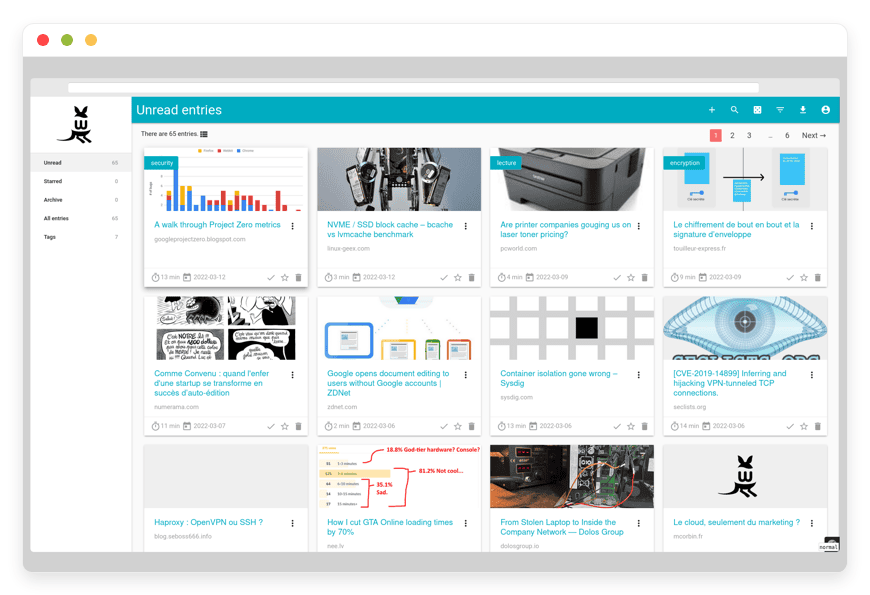
Managed Wallabag Hosting: Read Web Articles Without Distractions
TLDR: Quick Answer
Wallabag is a powerful, open-source application designed for saving web articles and reading them later. It strips away ads and pop-ups, giving you a clean, comfortable reading experience. When you choose Managed Wallabag Hosting, you get all the benefits of this amazing software without the stress of managing servers.
Clean Reading: Automatically extracts the text and removes annoying web elements.
Offline Access: Read your saved articles anywhere using native mobile apps.
Smart Organization: Apply automatic tagging rules to sort your reading list.
Easy Migration: Import your existing library from proprietary apps in minutes.
Immediate Value: Skip the complicated server setup and get right to reading.
Introduction
We all suffer from information overload. You find a great article, but you do not have time to read it right now. So, you leave the tab open. Soon, your browser is struggling under the weight of fifty open tabs. You need a reliable place to save these articles, clean them up, and read them when you are ready.
Wallabag solves this exact problem. It acts as your personal digital library, capturing web pages and turning them into clean, readable text. But running it yourself is a second job. Installing the required PHP dependencies, configuring the database, and managing background tasks takes away the time you wanted to spend reading.
You do not need to become a system administrator just to read articles in peace. DANIAN acts as your invisible infrastructure. We handle the technical setup, security, and updates so you can focus on building your knowledge base.
What is Wallabag?
Wallabag is a read-it-later application. Originally created by Nicolas Lœuillet under the name "Poche," the software has grown into a robust tool maintained by a dedicated open-source community. At its core, Wallabag downloads web pages, extracts the main article text, and formats it for comfortable reading.
It removes the heavy styling, advertisements, and navigation menus found on modern websites. You simply add a link, and Wallabag does the rest. You can read the cleaned-up articles directly in your browser, on your smartphone, or even on an e-reader.
Why is it trending?
People are tired of cluttered websites. Pop-ups, auto-playing videos, and cookie banners ruin the reading experience. Wallabag is trending because it brings the focus back to the text. It also appeals to users who want control over their digital libraries. Instead of relying on a company that might change its rules or shut down, you rely on transparent open-source software.
Why Choose Wallabag?
Choosing Wallabag means choosing open-source freedom. You are no longer bound by the limitations of proprietary software. Many popular read-it-later services restrict features behind monthly subscriptions or show you ads inside your own reading list. Wallabag offers premium features entirely for free.
The software gives you complete flexibility. You can export your data at any time in multiple formats like ePub, Mobi, or PDF. You can build custom applications using its extensive API. Hosting Wallabag yourself gives you full access to these tools, but using a managed service ensures the software runs smoothly without technical headaches.
Key Features of Wallabag
Wallabag is packed with powerful features designed to improve how you consume information. Here is a deep dive into what makes this software so capable and why it easily replaces closed-source alternatives.
Distraction-Free Reading Environment
The primary function of Wallabag is text extraction. When you save an article, the software parses the HTML and pulls out only the relevant content. It strips away sidebars, comments, and banner ads. You are left with a clean page that looks like a digital book. You can adjust the font size, switch to a dark theme for night reading, and customize the text alignment to suit your preferences.
Automated Tagging Rules
Organizing hundreds of articles manually takes too much time. Wallabag includes a powerful rule engine that tags articles automatically. You can set rules based on the content, title, or reading time. For example, you can tell Wallabag to add the tag "programming" if the article title contains the word "Python." You can also auto-tag articles that take less than five minutes to read. This workflow benefit means your library is always organized without any manual effort.
Highlights and Annotations
Reading is often an active process. Wallabag allows you to highlight text and add your own notes directly to the article. If you find a valuable quote or a complex concept, you can mark it for easy reference later. These annotations are saved alongside the article and can be exported, making Wallabag a fantastic tool for research and study.
Cross-Platform Accessibility
Your reading list should follow you everywhere. Wallabag supports official applications for both Android and iOS devices. You can save articles on your computer and read them on your phone during your commute. The mobile apps support offline reading, so you do not need an active internet connection to access your downloaded articles. The software also integrates directly with Kobo e-readers for an ink-on-paper experience.
Seamless Import Tools
Switching to Wallabag is incredibly easy. The software includes built-in import scripts for major read-it-later services. You can import your existing library from Pocket, Instapaper, or Pinboard with just a few clicks. It supports various file formats, including HTML and CSV. You simply upload your export file, and Wallabag recreates your entire reading history, complete with your original tags and read status.
Advanced Filtering and Smart Folders
Beyond simple tags, Wallabag allows you to create highly specific filters. You can build rules that act like smart folders. For instance, you can create a filter that exclusively shows unread articles from a specific domain published in the last week. Once you save this filter, you have an automatically updating feed of precisely the content you want to read.
Multi-User Management
A single installation of Wallabag is not limited to one person. The software supports full multi-user management. You can create accounts for your friends, family, or team members. Every user gets their own private, isolated reading space. They can configure their own tagging rules, manage their own RSS feeds, and connect their own mobile devices independently.
Custom RSS Feeds
Wallabag turns your reading list into an RSS feed. You can generate a unique, secure URL for your unread articles, your starred items, or specific tags. You can add this URL to your favorite feed reader. This feature bridges the gap between discovering new content and reading saved content, keeping everything in one unified workflow.
Asynchronous Background Fetching
When you save a massive article or trigger a large import from another service, Wallabag handles the heavy lifting in the background. It uses asynchronous fetching to process links. This means your interface never freezes while you wait for a web page to download. You simply add the link and move on; Wallabag processes it silently and notifies you when the clean text is ready.
Paywall Authentication Support
Many high-quality publications require a subscription. Wallabag can fetch content behind paywalls if you have an account with the site. You simply configure your credentials for specific websites within the Wallabag settings. When you save a link from that site, Wallabag logs in on your behalf and extracts the full premium article.
Extensive Developer API
For power users, Wallabag offers a comprehensive REST API. You can connect the software to automation tools, build custom browser extensions, or integrate it with your personal dashboard. The API allows you to fetch articles, add new links, modify tags, and manage users programmatically.
Custom Interface Theming
If you want complete control over your reading environment, Wallabag allows you to inject custom CSS. You can change background colors, adjust the line height, or completely reskin the dashboard to match your personal aesthetic. You dictate exactly how your digital library looks.
Solutions per Industry
Wallabag is versatile. Different professionals use it to solve unique problems in their daily workflows. Here is how various industries use this software to streamline their reading habits.
Education & Academic Research
Researchers and students handle massive amounts of reading material. When writing a paper, they need a central place to store references. Wallabag serves as a clean repository for academic journals, blog posts, and news articles. The annotation feature is particularly useful here. A student can highlight key arguments in an essay and add their own thoughts. They can then export the article as a PDF to share with study groups or professors.
Marketing & PR Agencies
Marketing professionals must stay updated on industry trends. They encounter dozens of articles daily about SEO updates, social media algorithms, and campaign strategies. A marketing team can use Wallabag to curate a shared library of essential reading. By using automated tagging rules, they can sort articles by topic automatically. This ensures that when an account manager needs inspiration for a new campaign, they have a searchable, organized database of relevant case studies ready to read.
Software Developers
Developers are constantly learning. They regularly find tutorials, documentation pages, and forum posts that explain complex coding concepts. Developers use Wallabag to save these technical resources. The distraction-free view is perfect for reading code blocks without visual clutter. Furthermore, developers often save long documentation pages to read offline while traveling, ensuring they can study new frameworks even without internet access.
Journalism & Freelance Writing
Writers need to consume vast amounts of information before drafting a piece. They must also preserve their sources securely. Web pages often change or disappear entirely, which breaks citations. Journalists use Wallabag to save a permanent, offline copy of their source material. Even if a news outlet edits an article or takes down a web page, the journalist still holds the exact text they saved on day one, fully highlighted and annotated for their upcoming draft.
Legal Professionals
Lawyers read constantly to stay sharp. They must review changing regulations, new case law precedents, and lengthy legal commentary. Reading complex legal documents on a cluttered website is exhausting. Legal professionals use Wallabag to strip away the distracting sidebars of legal blogs, leaving only the text. They highlight specific clauses and tag articles by practice area. They can then read these briefs on their tablets during flights or train rides to the courthouse.
Financial Analysts
The financial sector moves fast. Analysts track market reports, quarterly earnings summaries, and global economic news. A financial analyst can configure Wallabag with automatic tagging rules that spot keywords like "Q3 Earnings" or "Interest Rates." When they save an article, it immediately drops into the correct folder. This helps them organize a chaotic news cycle into a clean, prioritized reading list before a major strategy meeting.
Product Management
Product managers must monitor the market constantly. They read about user psychology, interface design trends, and direct competitor updates. Instead of keeping twenty tabs open for a competitive analysis report, they save every relevant article into Wallabag. When it is time to write the product specification, they filter their Wallabag library for the "competitor-research" tag and read through everything in a single, focused session.
Wallabag vs Other Softwares
Wallabag often replaces popular proprietary tools. Here is how it compares to the leading alternatives.
| Feature | Wallabag | Proprietary Alternative (Pocket) | Proprietary Alternative (Instapaper) |
| Open Source | Yes | No | No |
| Text Extraction | Yes | Yes | Yes |
| Offline Mobile Apps | Yes | Yes | Yes |
| Automated Tagging Rules | Yes | No | No |
| Annotations & Highlights | Free | Paid Feature | Paid Feature |
| API Access | Free | Restricted | Restricted |
| Custom RSS Export | Yes | Limited | Limited |
| E-reader Integration | Yes (Kobo) | Yes (Kobo) | Yes (Kindle) |
| Paywall Support | Yes | No | No |
Use Cases and Applications
Wallabag adapts to many different personal and professional scenarios. Here are a few practical ways to use it.
Daily Commute Reading
Instead of scrolling mindlessly on the train, you can read high-quality articles. Save long-form journalism to Wallabag throughout the week. Open the mobile app before you leave the house to sync the content. You can then read offline during your subway ride.
Content Curation for Newsletters
Writers who publish weekly newsletters need a constant stream of interesting links. Whenever you find a worthy article, save it to Wallabag with a specific tag like "Newsletter-Issue-5." When it is time to write, simply filter by that tag to see all your curated content in one place.
Archiving Important Tutorials
Websites disappear, and articles get deleted. If you find a step-by-step tutorial that solves a specific problem, saving a bookmark is risky. Wallabag downloads the actual text and images. Even if the original website goes offline, you still have the complete tutorial saved in your library.
Collaborative Team Research
You can create multiple user accounts within a single Wallabag setup. A small team can share resources and read the same curated list of articles. This is a highly effective way to distribute industry news among colleagues without clogging up their email inboxes.
How DANIAN Helps
Running an open-source application requires technical skill and constant attention. You have to configure web servers, manage databases, and monitor background tasks. Managed Wallabag Hosting removes this burden completely. We are the quiet enabler behind your software. We handle the mess; you get the glory.
Fully Managed Service
We handle the hosting. Our team manages everything from initial setup to regular updates, security patches, and performance monitoring. Your software is always optimized without you having to lift a finger. You simply log in and start reading.
Backup & Monitoring
Data loss is frustrating. We provide automated daily backups. These are configured automatically, stored securely, and offer a one-click restore process. If you ever accidentally delete an important tag or article, you can recover it instantly.
SSL & Firewall
With cybersecurity threats on the rise, we take security seriously. From automated updates to proactive monitoring and custom firewalls, we make sure your environment is secure 24/7. Your connection is encrypted by default, keeping your reading habits private.
Seamless Updates
Software needs regular maintenance to stay secure. Security patches and new versions are applied without your intervention. You always have access to the latest Wallabag features without running a single command line update script.
Guaranteed Performance
Downtime can be detrimental to your business. With our scalable infrastructure, we ensure consistent performance even as your user base grows. Whether you have ten articles or ten thousand, your reading interface remains fast and responsive. Issues are detected and often resolved before you notice.
7-Day Free Trial
Less Setup, More Development. Affordable from the Start. Real Help When You Need It. We offer a completely risk-free trial so you can experience the platform yourself.
How to Get Started
Step 1: Visit danian.co and sign up for an account.
Step 2: Select Wallabag from our extensive software catalog.
Step 3: Relax while DANIAN launches your software. We configure the database, set up the background tasks, and secure the connection.
FAQ
Is Wallabag really free to use?
The software itself is released under the MIT open-source license, meaning the code is completely free to use and modify. When you use our service, you pay for the managed hosting environment, the maintenance, and the automated backups.
Can I move my saved articles from Pocket?
Yes. Wallabag has a powerful, built-in import tool specifically designed for Pocket. You simply generate an HTML export file from your Pocket account and upload it to Wallabag. It will bring over your articles, tags, and read status.
Does Wallabag have a mobile application?
Yes. You can download the official Wallabag application for both Android and iOS devices. The mobile apps connect directly to your managed hosting URL and allow you to read your saved articles entirely offline.
How do I save articles to my library?
There are several ways to save content. You can install the official browser extension for Firefox or Chrome. You can use a simple bookmarklet in your bookmarks bar. You can also share links directly from your smartphone browser to the Wallabag mobile app.
How does Wallabag handle websites with paywalls?
Wallabag includes a site authentication feature. In the settings panel, you can enter your username and password for specific subscription websites. When you try to save an article from that site, Wallabag uses your credentials to log in and extract the full text.
Does Wallabag support e-readers?
Yes. Wallabag has native integration with Kobo e-readers. You can sync your unread articles directly to your device. You can also export individual articles or your entire list as ePub files to load onto other devices.
What happens if the original website goes offline?
Wallabag downloads and stores the actual content of the article at the moment you save it. Even if the original website deletes the article or goes completely offline, you will still have the full text and images saved safely in your Wallabag library.
Can I export my articles out of Wallabag?
Yes. You can export a single article or your entire list. Wallabag supports exporting files in multiple formats including PDF, ePub, Mobi, CSV, and JSON. You maintain complete control over the files you save.
Can multiple people use the same Wallabag setup?
Yes. Wallabag includes full user management. You can create distinct accounts for your friends or colleagues. Each person receives their own private dashboard and reading list, ensuring that reading habits stay private.
Conclusion
Information is valuable, but only if you can actually consume it. Wallabag transforms the chaotic web into a clean, organized, and personalized reading experience. It gives you the tools to save important articles, read them offline, and organize them exactly how you want.
You should spend your time reading, not managing server updates. Our managed service ensures your digital library is always fast, secure, and ready when you are.
Experience the power of fully managed open-source.


