
Managed TriliumNext Notes Hosting for Serious Knowledge Builders
TLDR: The Quick Answer
TriliumNext Notes is a hierarchical, knowledge-base application designed for power users who need to build large, structured personal libraries. Managed Hosting allows you to utilize this complex tool without the burden of server administration.
Why smart users choose Managed TriliumNext Hosting:
Immediate Access: Launch a fully functional instance in minutes without touching a Linux terminal.
Zero Maintenance: No need to manage Docker containers, Node.js dependencies, or reverse proxies.
Automated Safety: Daily backups are configured automatically, ensuring your life's work is never deleted by accident.
Secure by Default: We handle SSL certificates, firewalls, and security patches so your private notes remain private.
Focus on Content: You spend your time connecting ideas and writing code, not debugging server configs.
Introduction
We live in an era of digital hoarding. You bookmark articles you never read, you save code snippets in random text files, and you have great ideas that vanish because you didn't write them down—or worse, you did write them down, but you can’t remember which app you used.
The problem isn't a lack of information; it's a lack of structure. Most note-taking apps are flat. They treat notes like sticky pads on a messy desk. But your brain doesn't work like that. Your brain works in associations, hierarchies, and networks.
TriliumNext Notes solves this. It is not just a notepad; it is a "second brain." It allows you to build a massive, interconnected knowledge base that scales with you over decades. It is for people who want to architect their knowledge, not just store it.
However, great power usually comes with great complexity. To run TriliumNext properly, you need a server. You need to understand port forwarding, Nginx configuration, SSL certification, and database management. For many people, the friction of setting up the tool prevents them from ever using it.
Running your own infrastructure is a second job you don't need.
That is where DANIAN steps in. We provide the invisible infrastructure. We handle the heavy lifting of hosting, security, and backups so you can focus entirely on building your knowledge base. We turn a complex sysadmin project into a simple "Start" button.
What is TriliumNext Notes?
TriliumNext Notes is a hierarchical note-taking application designed for building large personal knowledge bases. It is the community-driven evolution (fork) of the original Trilium Notes project. It was created to ensure the software remains active, stable, and feature-rich, independent of any single developer's availability.
At its core, TriliumNext is built on web technologies (Node.js), but it functions as a comprehensive database for your life. Unlike standard apps that force you into a specific workflow, TriliumNext provides a toolkit for you to build your own workflow.
It distinguishes itself by being truly hierarchical. A note can be a child of another note. But it also breaks this hierarchy using "clones," allowing a single note to exist in multiple places in the tree simultaneously. This mirrors how human memory works: a memory of a specific "meeting" is related to "Work," "Project X," and "Date: Tuesday."
Why is it trending?
TriliumNext is exploding in popularity among developers, writers, and researchers because of the "Local-First" and "Self-Hosted" movement. Users are tired of SaaS subscriptions where features are locked behind paywalls or data is mined for advertising. TriliumNext offers an open-source alternative that is more powerful than the paid competition, provided you have a place to host it.
Why Choose Managed TriliumNext Hosting?
The primary reason to choose managed hosting for TriliumNext is reliability vs. effort.
TriliumNext is a stateful application. It relies on a database to store your notes, images, and file attachments. If you self-host on a cheap VPS or a home server and your SD card corrupts, or you mess up a Docker update, your data could be gone. Recovering a corrupted SQLite database is not how you want to spend your weekend.
By choosing DANIAN, you get the best of both worlds:
Software Freedom: You use the full, unadulterated open-source version of TriliumNext. No features are locked.
SaaS Convenience: You get the reliability, uptime, and support of a commercial product.
You essentially hire a team of sysadmins for the price of a few coffees a month, ensuring your "second brain" is always online, secure, and backed up.
Key Features of TriliumNext Notes
TriliumNext is dense with features. It is designed for users who want to go deep. Here is a detailed breakdown of the capabilities that make it a powerhouse.
1. The Attribute System (Promoted Attributes)
This is the feature that separates TriliumNext from every other note app. You can assign "Attributes" to notes. These act like metadata tags but are much more powerful.
Labels: Simple tags (e.g., #todo, #important).
Relations: Links that define how notes are connected (e.g., relatesTo, childOf, sourceMaterial).
Promoted Attributes: You can "promote" an attribute so it acts like a variable. For example, in a collection of "Book Reviews," you can have attributes for Author, Rating, and Year. TriliumNext can then query these attributes to generate tables and charts automatically.
2. Advanced Scripting Engine
TriliumNext exposes a comprehensive JavaScript API to the user. You can write scripts inside your notes to automate the application.
Frontend Scripts: Create custom buttons on your toolbar to trigger actions (e.g., "Create Today's Journal Entry").
Backend Scripts: Run tasks on the server, such as cleaning up old revisions or fetching data from external APIs to populate your notes.
If you know a little JavaScript, you can fundamentally rewrite how the application works for you without compiling any code.
3. Visual Knowledge Graph (Link Maps)
Text isn't always enough. TriliumNext generates visual graphs of your data.
Link Map: Shows how the current note connects to others.
Relation Map: A more complex view showing semantic relationships.
This allows you to visually explore your knowledge base. You might see that a specific concept is heavily linked to three different projects, revealing a connection you hadn't consciously realized.
4. Cloning vs. Moving
5. Rich Note Types
TriliumNext is not limited to Markdown. It supports a vast array of content types natively:
Code Notes: Syntax highlighting for over 100 languages.
Mermaid Diagrams: Define flowcharts, sequence diagrams, and gantt charts using text code, which renders into beautiful visuals.
Canvas: A free-form drawing board where you can place notes, draw arrows, and sketch ideas visually.
WebView: Embed external websites directly into your note pane.
6. The Web Clipper
A knowledge base is useless if it's hard to get information into it. The Trilium Web Clipper (a browser extension) allows you to save pages with one click.
It strips away ads and navigation bars, saving only the article text.
It saves a screenshot of the page.
It saves the source URL and date of access automatically as attributes.
7. Versioning and History
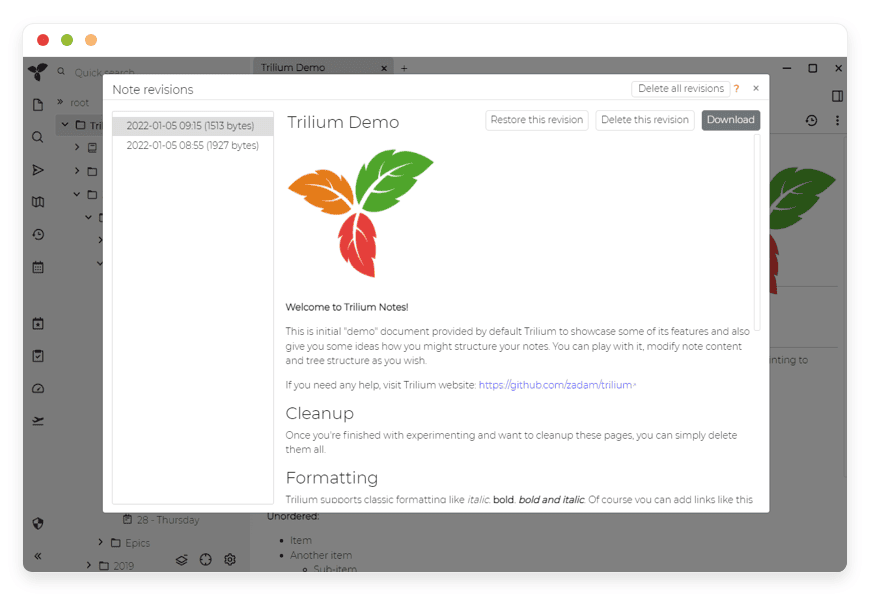
Every time you save a note, TriliumNext can keep a revision. This "Time Machine" for your notes means you can experiment with rewriting a paragraph, realize you hate it, and roll back to the version from yesterday with two clicks. This protection extends to deleted notes, which sit in a "Deleted" tree until you permanently purge them.
Solutions per Industry
TriliumNext is flexible enough to adapt to almost any profession that deals with high volumes of information. Here is how specific industries utilize it.
1. Software Engineering & DevOps
Developers often suffer from "tab overload" and fragmented documentation.
The Problem: You solve a complex Nginx config issue today, but six months later, you encounter it again and can't remember the fix.
The Trilium Solution: Engineers use TriliumNext as a personal StackOverflow. You create a "Code Snippets" tree organized by language (Python, JS, Bash). Using the code note type, you store the exact snippet.
Advanced Use: You can use the scripting API to pull your GitHub issues directly into a "Tasks" note. You can store your environment variables (encrypted) and server logs. The "Cloning" feature allows you to keep a snippet in your "General Library" while also cloning it into a specific "Project Documentation" folder.
2. Academic Research & PhD Candidates
A thesis involves managing thousands of citations, PDFs, and fleeting thoughts.
The Problem: keeping track of sources and synthesizing arguments from hundreds of papers.
The Trilium Solution: Researchers use the attribute system to manage citations. You create a template note for "Literature Review" with attributes for Author, Publication Year, and Status (Read/Unread).
Advanced Use: You utilize the "Relation Map." When you read Paper A, and it refutes Paper B, you create a semantic link between them (refutes). Later, you can visualize the graph to see which papers are the most controversial or central to your topic. The distraction-free "Zen Mode" is perfect for drafting chapters directly within the tool.
3. Creative Writing & World Building
Novelists and Game Masters (D&D/TTRPG) need to track consistency across massive fictional worlds.
The Problem: Remembering that a character on page 50 has green eyes, but on page 300 you wrote they have blue eyes.
The Trilium Solution: Writers use TriliumNext as a "Series Bible." You create a "Character" note type. Every character note automatically inherits a table where you define physical traits.
Advanced Use: You use the Canvas feature to draw relationship maps between characters (Family Trees). You can use the timeline feature (via scripts) to track events chronologically. If you rename a location, the "Backlinks" feature shows you every single scene where that location is mentioned, so you can update the narrative instantly.
4. Legal Professionals
Lawyers deal with case files, precedents, and timelines where details matter.
The Problem: Connecting a piece of evidence to a specific witness testimony across thousands of documents.
The Trilium Solution: Legal pros use the hierarchical tree to organize by Case -> Evidence -> Witness. They use the protected session feature to ensure that sensitive case notes are encrypted at rest and require a password re-entry to view.
Advanced Use: Creating a chronology. By assigning a Date attribute to every event or piece of evidence, a script can automatically generate a sorted timeline of the entire case. This reveals inconsistencies in testimony immediately.
5. Project Management & Agencies
Agencies juggle multiple clients, each with their own meeting minutes and requirements.
The Problem: Information siloed in email, Slack, and Google Docs makes it hard to get a "bird's eye view."
The Trilium Solution: Managers create a "Client Root" for each customer. Inside, they nest "Meeting Notes," "Deliverables," and "Credentials."
Advanced Use: The Task Manager workflow. You can create a Kanban board using Trilium's grid view. Tasks are notes with a State attribute (ToDo, Doing, Done). Moving a note from one column to another updates the attribute automatically. Because these are notes, a task isn't just a checkbox; it can contain full design specs, images, and file attachments.
TriliumNext vs Other Software
TriliumNext is often compared to other "second brain" apps. However, the distinction lies in ownership and architecture.
| Feature | TriliumNext Notes | Proprietary Alternatives (Notion/Evernote) |
| Data Structure | True Hierarchy + Clones | Block-based or Flat Tags |
| Scripting | Full JavaScript API access | Limited or No API access |
| Storage Location | Your Database (You control it) | Their Cloud (They control it) |
| Pricing | Free Software (Open Source) | Monthly Subscription per user |
| Offline Capability | Native Offline Support | Often requires internet connection |
| Privacy | Strong Encryption (Sub-tree) | Data readable by provider |
| Speed | Instant (Local/Fast Server) | Can be sluggish with large libraries |
The Critical Difference:
Proprietary apps like Notion are "Block-Based." Everything is a block. TriliumNext is "Note-Based." This sounds minor, but for large knowledge bases, the note-based approach with attributes is significantly faster and more scalable. Furthermore, with TriliumNext, you are not renting your knowledge; you own the database.
Use Cases and Applications
Beyond standard note-taking, users have pushed TriliumNext into unique territories:
The "Life OS": Users combine journal entries, financial tracking, and habit tracking into a single dashboard. Custom scripts calculate weekly adherence to habits and display progress bars on the home note.
Zettelkasten Implementation: The system is perfectly suited for the "Slip Box" method. You create atomic notes and use backlinking to connect thoughts, allowing complex ideas to emerge from simple observations.
Home Laboratory Documentation: For tech enthusiasts, TriliumNext serves as the central documentation hub for their entire home network, storing IP addresses, MAC addresses, and configuration snippets for other services.
Secure Journaling: Using the "Day Note" feature, the system automatically creates a new note for the current date. Protected by encryption, this becomes a highly secure digital diary that cannot be read by anyone else, even if they have physical access to the machine (if configured correctly).
Recipe Database: Store recipes with attributes for Ingredients, Cooking Time, and Calories. You can then run a query to "Show me all dinners that take less than 30 minutes to cook."
How DANIAN Helps
We position ourselves as the "Quiet Enabler." We don't want to be the star of the show; we want your knowledge base to be the star. We simply ensure the stage never collapses.
Fully Managed Infrastructure:
We handle the hosting. Our team manages everything from the initial provisioning of the server to the configuration of the Node.js environment. We ensure the underlying OS is patched and the dependencies are up to date. You never have to see a command line.Automated Backup & Monitoring:
Data loss is the enemy. We configure automated daily backups that are encrypted and stored securely off-site. Additionally, we run 24/7 monitoring scripts that ping your service to ensure it is responsive. If a process hangs, our systems detect it and restart it often before you even notice.SSL & Firewall Protection:
Security is not optional. We provision industry-standard SSL certificates (HTTPS) for your domain automatically. We also place your instance behind a custom firewall that filters out malicious bot traffic, ensuring your private notes are accessible only to you.Seamless Updates:
TriliumNext is an active project. When a new version drops with a cool new graph view or a security patch, we handle the upgrade process. We ensure database migrations are handled correctly so you don't wake up to a broken application.Guaranteed Performance:
TriliumNext is fast, but it requires resources. We host your instance on high-performance architecture with sufficient RAM and CPU to handle large databases. Whether you have 100 notes or 100,000, our infrastructure scales to keep your search queries instant.7-Day Free Trial:
We believe in the product. You can spin up a server, import your existing notes, test the latency, and verify the backup systems entirely risk-free. No obligation.
Less Setup, More Thinking. Affordable from the Start. Real Help When You Need It.
How to Get Started
Visit DANIAN: Navigate to danian.co and create your account.
Select TriliumNext: Browse our catalog of open-source applications and select TriliumNext.
Launch: Click start. Sit back. Within moments, your private knowledge base will be live.
Login: We provide you with your secure URL and administrative credentials.
FAQ
Is TriliumNext Notes free?
Yes, TriliumNext is open-source software licensed under the AGPL. When you choose DANIAN, you are paying for the managed hosting service—the servers, the bandwidth, the backups, and the support—not for the software license itself.
How do I migrate my existing notes to DANIAN?
TriliumNext has a native import/export feature. If you are currently running a local instance, simply export your database (or specific trees) as a .zip file. On your new DANIAN instance, right-click on the root and select "Import." Your structure, attributes, and images will transfer over perfectly.
Can I use custom themes and CSS?
Yes. Even on a managed host, you have full administrative access to the application layer. You can install custom CSS themes, change the icon packs, and modify the visual appearance of your notes to suit your aesthetic.
Is my data locked in?
Never. We do not believe in holding data hostage. You can export your entire database to HTML, Markdown, or OPML formats at any time. You can also download the raw SQLite database file if you decide to move to a different hosting provider or self-host in the future.
What happens if the server crashes?
Our infrastructure is built with redundancy in mind. However, in the unlikely event of a critical failure, we utilize our automated backups to restore your instance to its latest stable state.
Does TriliumNext support multi-user collaboration?
TriliumNext is primarily designed as a personal knowledge base. While you can technically share notes, it does not have real-time collaborative editing like Google Docs (e.g., two people typing in the same note effectively). It is built for the individual to master their own knowledge.
Conclusion
TriliumNext Notes is a tool for the long term. It is designed to hold a lifetime of learning, coding, writing, and planning. It rewards those who put in the effort to structure their thoughts with incredible recall and productivity.
But you shouldn't have to be a systems engineer to enjoy the benefits of a second brain. You shouldn't have to worry about update scripts, port collisions, or disk failures.
Let DANIAN handle the machine. You handle the mind.


