
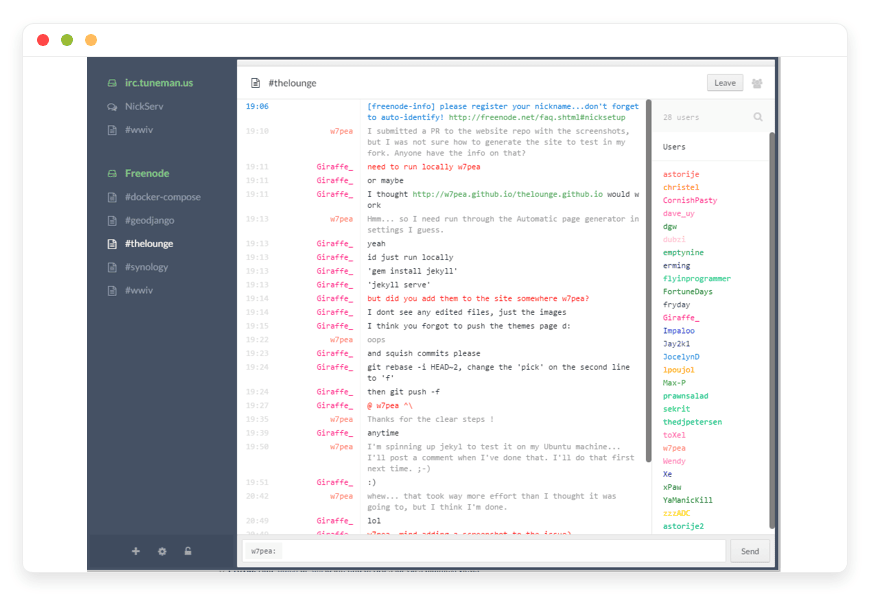
Stop Missing Messages: Your Guide to Managed The Lounge Hosting
TLDR - Quick Answer
The Lounge is a highly responsive, modern web client for Internet Relay Chat (IRC). It acts as a continuous bridge between your devices and your favorite IRC networks. Choosing Managed The Lounge Hosting means you get this seamless, always-on chat experience without touching a single server configuration file.
Always Connected: The software functions as an integrated IRC bouncer. You remain active in your channels even when your browser is closed.
Modern Interface: Experience rich media formatting, automated link previews, and drag-and-drop file uploads similar to modern chat applications.
Responsive Design: The interface adapts perfectly to your desktop, smartphone, or tablet screens.
Push Notifications: Receive instant native alerts on your devices when someone mentions your nickname.
Zero Maintenance: A managed hosting environment means you skip the command line. You get right back to communicating.
Introduction
Internet Relay Chat remains one of the fastest, most reliable ways to communicate across the globe. Thousands of technical communities, open-source developers, and specialized teams still depend on it daily. But traditional IRC has a major technical flaw. The exact second you close your laptop or lose your Wi-Fi connection, you disconnect from the server. You miss out on critical project conversations, context, and community announcements.
You need a reliable way to stay connected permanently. You need an IRC bouncer natively combined with a gorgeous web interface. That is exactly what The Lounge delivers. It brings the rich, responsive experience of modern chat applications directly to the classic IRC protocol.
But running this software yourself is a second job. Configuring Node.js environments, managing package managers, securing network ports, and applying continuous application security patches consumes hours of your valuable time. You want to chat with your community, not act as an unpaid system administrator fixing server dependencies.
That is where DANIAN steps in. We act as your invisible infrastructure. We handle the technical heavy lifting behind the scenes so you can enjoy a flawless, uninterrupted chat experience.
What is The Lounge?
The Lounge is a modern, self-hosted web IRC client built entirely with standard web technologies. Created and actively maintained by a passionate community of open-source developers, it fundamentally modernizes the traditional chat experience. Released under the MIT license, the project is completely open-source and freely available for review on GitHub.
Technically, The Lounge is a Node.js application. You install it on a remote server, configure it to connect to your preferred IRC networks, and then access it through any standard web browser. Because the application runs continuously on a server, that server maintains your active connection to the IRC networks. When you finally open your browser in the morning, you instantly sync up with every single message you missed overnight.
Why is it trending?
The Lounge bridges a massive generational and technical gap. Many developers and technical users prefer the speed, privacy, and simplicity of IRC. However, they also expect the standard conveniences of modern communication tools. They want image previews, file sharing, and push notifications directly on their mobile phones. The Lounge provides all these requested features without forcing established communities to migrate away from their beloved IRC networks. It gives you the absolute best of both worlds.
Why Choose The Lounge?
When evaluating your team's chat options, open-source freedom matters deeply. Proprietary chat platforms explicitly restrict your access, aggressively limit your message history, and dictate exactly how you communicate. By Hosting The Lounge, you take absolute control of your digital communication environment.
You do not have to rely on a third-party corporate service to hold your chat history hostage behind an expensive paywall. You get unlimited message retention and complete control over your user interface. Furthermore, you can connect to any IRC network in the world from a single, unified dashboard. It is a powerful, necessary upgrade for anyone who spends significant time on public networks like Libera Chat, OFTC, or private company servers.
Key Features of The Lounge
The Lounge is packed with specialized tools designed to make your chat experience feel brand new. Here is a comprehensive deep dive into the features that will instantly transform your daily communication workflow.
Integrated Always-On Connection
Traditional desktop IRC clients immediately disconnect you when you close the application. The Lounge solves this by staying connected to your IRC servers permanently. Your presence remains active in the channels at all times. More importantly, it securely records all conversations while you are away. When you log back in, you catch up instantly. This completely eliminates the confusion of jumping into the middle of a complex technical conversation without the proper context.
Modern, Responsive Interface
You do not need to install a dedicated application on your computer or phone. The Lounge is accessed directly through your favorite web browser. The user interface is fully responsive. It scales perfectly whether you are viewing it on a massive ultra-wide desktop monitor or a small smartphone screen. You get a consistent, highly intuitive experience everywhere you go.
Rich Media and Link Previews
Old IRC clients force you to click random links to see what they contain. The Lounge automatically fetches and displays accurate previews for URLs, YouTube videos, tweets, and images directly within the chat window. This dramatically speeds up your workflow. You can absorb information quickly without constantly switching between different browser tabs.
Simple Drag-and-Drop File Uploads
Sharing files on traditional IRC requires complex DCC transfers or relying on external, ad-filled image hosts. The Lounge completely simplifies this process. You can drag and drop images and documents directly into the active chat window. The server handles the entire upload process and provides a simple, clean link to the channel. This saves time and removes massive friction when sharing server logs or screenshots with your team.
Robust Multi-User Support
You can easily run The Lounge in either public mode or private mode. In private mode, you can create distinct accounts for multiple users. This is perfect for remote teams. Everyone gets their own secure, password-protected login. Each individual user can configure their own specific IRC networks, channels, and visual preferences independently, all running from a single unified installation.
Native Push Notifications
Never miss an important critical alert again. The Lounge fully supports native browser push notifications. If someone explicitly mentions your nickname or sends you a direct private message, you get an instant alert on your desktop or mobile device. You stay informed even when the chat tab is hidden away in the background.
Extensible with Themes and Plugins
The Lounge is highly customizable to fit your exact visual needs. You can browse the npm registry for distinct themes and plugins created by the open-source community. Whether you want a high-contrast dark mode, a custom brand color scheme, or specialized chat commands, you can modify the environment to fit your preferences.
Progressive Web App (PWA) Capabilities
You can install The Lounge directly to your smartphone or tablet home screen. It functions exactly like a native mobile application. It removes the browser address bar, runs in full screen, and integrates smoothly with your mobile operating system. This gives you a premium mobile IRC experience without downloading anything from a centralized app store.
Unread Message Markers
When you return to a busy channel, it can be hard to know where you left off. The Lounge places a distinct visual marker precisely where you stopped reading. You simply scroll up to the marker and read downward. This ensures you never skip over important project updates or community announcements.
Advanced Network Management
Managing multiple IRC servers is simple. The sidebar allows you to organize different networks neatly. You can connect to a public open-source network, a private gaming server, and your internal company chat simultaneously. You can collapse networks you are not currently focused on, keeping your workspace clean and highly organized.
Solutions per Industry
The Lounge solves complex communication challenges across a wide variety of professional sectors. Here is how different industries use it to improve their daily workflows.
Software Development Teams
Development teams frequently use private IRC networks to coordinate daily tasks, share complex code snippets, and monitor critical system alerts. CI/CD pipelines often send automated build statuses directly to specific IRC channels. With The Lounge, developers can easily track these automated alerts from anywhere. The multi-user mode allows the entire engineering team to access the company IRC server securely without configuring complex, heavy VPNs on their personal home devices.
Open-Source Communities
Open-source projects rely heavily on public IRC networks for ongoing community support and project coordination. Volunteer maintainers cannot be online every hour of the day. By using The Lounge, community managers can log off, sleep, and wake up to a full, neatly organized backlog of user questions and technical discussions. The persistent connection ensures they never miss a critical bug report or a pull request notification from contributors located in different global time zones.
Gaming Guilds and Clans
Many established gaming communities still operate on private IRC servers to organize weekly events, tournaments, and matches. The Lounge provides a perfect, simple gateway for new members. Instead of teaching a new recruit how to download, install, and configure a confusing traditional desktop IRC client, the guild leader simply sends them a web link. The modern interface makes the transition incredibly smooth for younger gamers who are only accustomed to newer chat applications.
Digital Marketing Agencies
Agencies move fast and handle multiple clients simultaneously. They often need internal communication channels that are completely separate from client-facing tools. The Lounge offers a distraction-free, lightning-fast text environment. Teams can share campaign URLs, review ad creatives through the built-in image previews, and keep a permanent, searchable record of internal strategy discussions. Because it runs in the browser, freelance contractors can be given temporary access without installing any company software on their personal machines.
Higher Education and Research Labs
Academic institutions and university research labs frequently collaborate on international projects. Many of these legacy academic networks still operate exclusively on IRC. The Lounge allows modern university students and young researchers to access these historic networks easily. They can join specialized academic channels, share research paper links, and communicate with senior professors globally using an interface they instantly understand.
Cryptocurrency and Web3 Projects
Privacy and decentralization are core values in the Web3 space. Many crypto projects avoid centralized, proprietary chat platforms because of censorship risks and aggressive data mining. They prefer the open protocols of IRC. The Lounge allows these development teams to maintain their strict privacy standards while still enjoying modern features. They can coordinate protocol upgrades, share transaction hashes, and manage community governance in a secure, self-hosted environment.
IT Support and Helpdesks
Internal IT departments use chat channels to manage active server outages and coordinate incident responses. During a major system failure, IT engineers need to copy and paste hundreds of lines of server logs. Traditional chat apps often crash or format these logs poorly. The Lounge handles large blocks of plain text perfectly. Furthermore, the persistent history ensures that the morning shift can read exactly what the night shift did to resolve the server outage.
The Lounge vs Other Softwares
How does The Lounge objectively compare to other popular communication tools on the market?
| Feature | The Lounge | IRCCloud | Standard IRC Clients (e.g., HexChat) | Slack |
| Application Type | Open-Source Web Client | Proprietary Service | Desktop Application | Proprietary Platform |
| Always-On History | Yes (Built-in bouncer) | Yes | No (Requires external bouncer) | Yes |
| Software License | MIT (Free) | Commercial/Proprietary | Various (Often GPL) | Commercial |
| Device Access | Any Web Browser | Web & App | Desktop Only | Web & App |
| Link & Media Previews | Yes | Yes | No | Yes |
| File Uploads | Yes | Yes | Complex (DCC required) | Yes |
| Self-Hosted | Yes | No | N/A | No |
Use Cases and Applications
Here are several practical ways you can start using The Lounge today to improve your digital communication.
Persistent Customer Support Channels
If you run a technical business that offers customer support via IRC, you absolutely need reliable logging. You can use The Lounge to monitor your public support channels continuously. Your support agents can log in from their web browsers, review the overnight chatter, and respond to international customers promptly without losing any context.
Bridging Modern Web to Old-School IRC
Many younger users hesitate to join IRC because traditional desktop clients look highly intimidating. You can use The Lounge as a welcoming, friendly frontend. By providing a clean, modern web interface, you lower the barrier to entry significantly. More people will join your community because the interface feels familiar and highly intuitive right from the start.
Private Team Communication Networks
Instead of relying on heavy, resource-intensive chat applications that drain your laptop battery, small teams can spin up a simple private IRC server and connect to it using The Lounge. This creates a lightweight, incredibly fast communication network that consumes very few system resources.
Flawless Mobile IRC Access
Using traditional IRC on a smartphone is notoriously difficult. Connections drop constantly as you switch between cellular towers or different Wi-Fi networks. By pointing your mobile browser to your managed installation of The Lounge, your remote server maintains the stable connection. You simply view the web interface, completely eliminating all mobile network disconnection issues.
Centralized Bouncer Replacement
Experienced IRC users often run complex terminal software like ZNC to act as a bouncer. The Lounge entirely removes the need for ZNC. It acts as the bouncer and the modern client simultaneously. You effectively consolidate your technical toolset into one powerful, easy-to-manage application.
How DANIAN Helps
Setting up a Node.js server, securing the network, and keeping it running requires continuous technical effort. We handle the mess; you get the glory. DANIAN is your quiet enabler, providing the absolute perfect environment for your open-source applications.
Fully Managed Hosting
We handle the hosting entirely. Our dedicated team manages everything from the initial server setup to regular system updates. We monitor application performance closely. Your software is always optimized without you having to lift a finger. You get a fully ready-to-use application immediately upon signup.
Automated Backup & Monitoring
Data loss is deeply frustrating. We configure automated daily backups and store them securely off-site. If you ever need to roll back a configuration, we offer a simple, one-click restore process. Your valuable chat history remains completely safe.
Secure by Default
With cybersecurity threats on the rise globally, we take your security seriously. From automated package updates to proactive system monitoring, we make sure your installation is protected 24/7. SSL certificates are installed automatically, ensuring your connection to the server is always fully encrypted.
Seamless System Updates
Software requires regular maintenance. Security patches and new functional versions of The Lounge are applied without your direct intervention. You always have immediate access to the latest features and critical bug fixes without running a single terminal command.
24/7 Proactive Monitoring
We keep a constant, watchful eye on your infrastructure. Technical issues are detected and often fully resolved before you even notice them. You can sleep soundly knowing your IRC connection is stable and actively monitored.
Guaranteed Performance
Downtime can be highly detrimental to your active community. With our scalable infrastructure, we ensure consistent, fast performance even as your user base grows significantly. The application stays incredibly snappy and responsive.
7-Day Free Trial
We believe in proving our value directly. We offer a completely no-risk trial so you can experience the platform yourself. Less setup, more communication. Affordable from the start, with real help available when you need it.
How to Get Started
Getting your web client running on DANIAN is incredibly fast. You do not need to read complex software documentation or configure proxy servers.
Step 1: Visit danian.co and easily create your account.
Step 2: Select The Lounge directly from our extensive application catalog.
Step 3: Relax while DANIAN launches your software in the background.
FAQ
What exactly is The Lounge?
It is an advanced, open-source web IRC client. It runs continuously on a remote server and keeps you connected to your IRC networks permanently. You access it seamlessly through any standard web browser.
Do I need my own IRC server to use this software?
No. You can connect it to any existing public IRC network globally, such as Libera Chat or OFTC. If you already have a private IRC server for your company, you can easily connect to that as well.
How is the pricing structured?
The software itself is licensed under the permissive MIT license, meaning it is completely free to use. You only pay DANIAN for the managed hosting environment, dedicated server resources, and continuous technical maintenance.
Does it have a dedicated native mobile app?
It does not need one. The web interface is built strictly with responsive design in mind. It functions perfectly as a Progressive Web App directly in your mobile browser, feeling exactly like a native application.
Can I use custom plugins and themes?
Yes. The platform fully supports extensibility through various plugins and themes readily available on the npm registry. You can easily customize the visual look and core functionality of your chat environment.
Is my complete chat history saved?
Yes. Because the application runs continuously on our secure servers, it carefully logs all public channel activity and private messages while you are away. You can review your complete history whenever you log back in.
How many users can connect to my specific installation?
You can configure the software directly in private mode to support multiple users. Each individual user will have their own separate login credentials and unique connection configurations.
Is the connection to the server secure?
Absolutely. We automatically provision and renew SSL certificates for your installation. All traffic between your web browser and your hosted application is securely encrypted.
Conclusion
Traditional IRC does not have to feel outdated or difficult to use. By combining the legendary speed and reliability of classic chat networks with a highly modern web interface, The Lounge delivers an exceptional daily communication tool. You instantly gain rich media previews, permanent digital connectivity, and a flawless mobile experience.
You deserve to enjoy these powerful features without the heavy burden of server administration. Let our technical experts handle the difficult installation, network security, and ongoing system updates. Stop missing critical community messages and start communicating better today.
Experience the power of fully managed open-source.


