
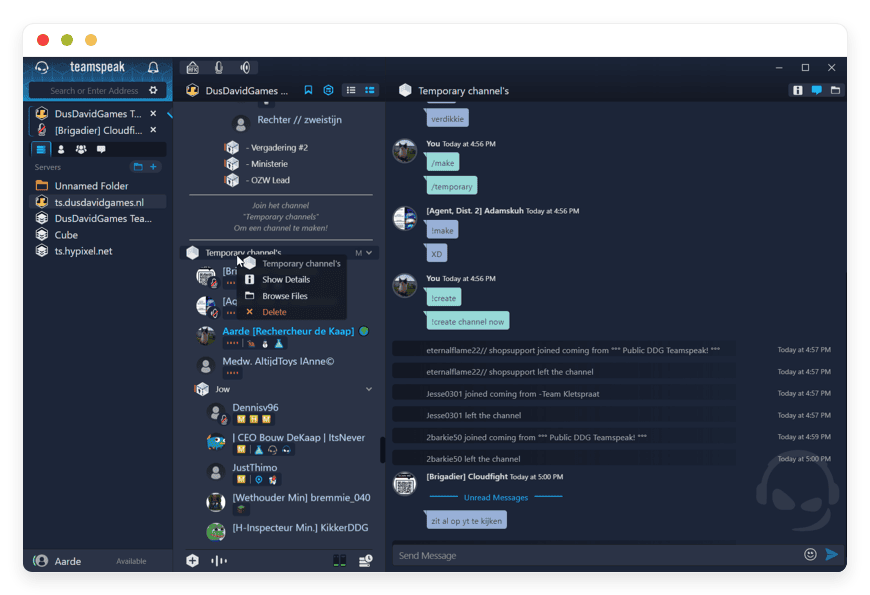
Managed Teamspeak Server Hosting: The Ultimate Guide
TLDR - Quick Answer
Teamspeak Server is a premier, low-latency voice chat tool. It gives you total control over your private team talks. Managed Teamspeak Server Hosting delivers all the speed benefits of this tool without the tedious server setup.
Here is the immediate value you get:
Instant Setup: Get a fully active voice hub running in minutes.
Total Safety: Secure your team talks with strong AES locks.
Flawless Audio: Enjoy crystal clear sound powered by the Opus tool.
Deep Control: Manage complex user rules and rooms effortlessly.
Zero Tasks: Let the host handle updates, saves, and fast speeds.
Introduction
Every winning team needs a rock solid voice tool. When seconds count, lag or dropped calls ruin everything. Public voice apps often suffer from bloated, heavy screens. They face random network drops during your peak hours. They force you to accept weird privacy rules. You need a space where you control the rules. You need perfect audio quality and total safety. You need a dedicated hub.
But running it yourself is a full second job. Setting up network blocks takes you hours. Updating core files takes you away from your actual work. Fixing database errors late at night is totally frustrating. You want the deep benefits of a private voice hub. You do not want the massive headache of daily server tasks.
DANIAN works as your completely invisible tech team. We handle the heavy lifting so your voice hub stays fast. Your chats stay safe and perfectly clear. You get a perfect team tool without the stress of backend tasks.
What is Teamspeak Server?
Created by TeamSpeak Systems, Inc., Teamspeak Server is a top tier voice chat software. It is built for clear, lag free team talks. It uses a highly smart client and server link. Users connect to a central hub that you own and run. The software provides amazing voice tools. It features active background noise cuts and echo stops. This makes it the top choice for users who demand crisp sound.
The software has a huge history of solid wins. Recent releases include the popular TeamSpeak 3 version. The new TeamSpeak 6 Beta pushes the limits even further. These versions offer deep setup choices for advanced users. They support easy SQLite setups and large MariaDB links. They allow custom port setups for extra safety.
Why is it trending?
Central, public chat platforms have become very risky. Users are sick of sudden network drops and bad audio. Teamspeak Server is trending because it offers a private path. You host the hub exactly where you want it. You control the strict safety rules yourself. You tell the server exactly who can join. Remote work and fast gaming demand tools that never fail. People want tech that works during crucial moments. Teamspeak Server delivers that deep trust perfectly.
Why Choose Teamspeak Server?
Trusting public voice networks means you accept their flaws. You suffer badly when their main servers crash. Hosting Teamspeak Server yourself solves these exact problems. It gives you true open-source freedom. You build your server exactly how you want it to look. You add custom plugins to change the screen layout. You use open SDK tools for smart app links. You completely control the server rules.
You replace closed, proprietary softwares easily. Those closed apps force you into bad daily workflows. They drop your calls during busy network hours. A private server stops all of that nonsense. You decide exactly who joins your private voice rooms. You choose the exact audio codecs for your team. You manage the precise access rules for every single user. You get a fully private voice hub. It grows smoothly as your team grows much bigger.
Key Features of Teamspeak Server
Teamspeak Server packs huge power into a very tiny size. It avoids the heavy drain found in modern web apps. Here are the core features that make it truly great.
Flawless Opus Voice Codec
Clear sound changes how teams work together. Teamspeak Server uses the powerful Opus audio tool. It also supports CELT and Speex tools. This makes every voice sound perfectly crisp. You hear the deep bass of a shout. You hear the sharp pitch of a whisper. The system stops annoying background noises fast. A loud fan near your desk gets muted instantly.
Smart Audio Adjustments
You never have to adjust volume sliders manually again. The software fixes bad mic levels on its own. Someone speaks too loudly into their mic? The system lowers their volume right away. Someone mumbles far from their desk? The tool boosts their sound instantly. It also stops voice echoes in empty rooms. Every single word comes through with perfect clarity.
Rock-Solid AES Safety
Your chats stay completely private from outside ears. Teamspeak Server uses strong AES locks for data. You can lock down the whole server easily. You can also lock specific private rooms. Bad actors cannot steal your voice data. Your private business talks stay strictly private. You control exactly who hears your secret plans.
Deep User Rules and Roles
You control exactly who joins your voice hub. You build detailed user roles for everyone. Admins get full control over the server. Guests get very basic access to public rooms. You decide who can talk in meetings. You choose who can share files in chats. Large groups stay perfectly organized with these strict rules.
3D Spatial Sound Output
You hear exactly where people stand in virtual spaces. The system places voices in a neat 3D space. You hear the team leader on your left side. You hear the new scout on your right side. This gives you a clear mental map always. It helps remote teams focus on distinct speakers. It helps gamers win fast by hearing team spots.
Tiny System Resource Draw
Heavy apps slow down your main work computer. Teamspeak Server is very light and super fast. It is built with fast C++ code. It uses very little memory to run smoothly. It barely touches your CPU during heavy calls. Your games run at maximum frames always. Your heavy work apps load super fast.
Custom SDK and App Tools
Developers love this software for its open nature. You can add voice chat to your own apps. The SDK tool makes this link very simple. You can write custom plugins for your hub. You can change how the client looks completely. You shape the tool to fit your exact daily needs.
Offline Local Network Play
The main internet goes down sometimes without warning. Public tools fail completely when this happens. Teamspeak Server keeps working offline without an issue. You can run it on a local closed network. Your team stays connected in the same building. Live events run smoothly without web access.
Easy File Sharing Hub
It is much more than just a voice tool. You can share files easily through the main screen. The system bypasses annoying network blocks quickly. It allows your team to store guides securely. You share images directly inside specific chat rooms. Everyone gets the right file at the perfect time.
Smart Mobile App Access
You never have to stay tied to your desk. The official mobile apps work great. They run perfectly on Android and Apple phones. You can talk to your team while walking around. You read text messages over your active screen. The app uses very little mobile phone data.
Solutions per Industry
Teamspeak Server adapts to many different work spaces easily. Here is how different groups use it daily.
eSports and Gaming Teams
Fast action requires completely flawless voice speeds. Pro gamers hate lag more than anything else. Heavy chat apps ruin their match timing entirely. Pro teams use this tool for fast, clear chats. The local server uses almost zero system memory. Games run at maximum frame rates always. The 3D sound tells players where friends stand. A player hears their scout on the left side. This gives teams a huge mental map advantage. Winning teams trust this fast tech completely.
Corporate Remote Staff
Remote teams discuss private plans every single day. Public chat apps are a big safety risk. Companies need strict privacy for their ideas. They use the AES safety tools here. Managers build locked project rooms for select staff. Only approved staff can join these secure rooms. File sharing happens safely inside the app. Secret business plans stay completely hidden from rivals. The crystal clear audio makes long meetings feel short. Teams get more work done with zero voice dropouts.
Software Dev Agencies
Coders need quiet focus to write good code. Heavy apps ruin their fast mental workflow. Dev teams run this light server daily. They hold quick morning syncs in a main room. They set up specific pair coding rooms. The voice quality is crisp and totally clear. They link the tool to their code platforms. Alerts pop up neatly in text rooms. The low memory use keeps local test servers fast. They push code live without stopping their talks.
Flight Sim Groups
Virtual pilots want real world details always. Public voice chats ruin the fun completely. They use custom plugins on this private hub. They mimic real air traffic radios perfectly. They add static noise to the local audio. They change radio channels easily during flights. The deep rule system creates pilot and tower roles. Only the tower boss can speak to everyone. The hobby feels incredibly real and highly structured. It trains pilots for actual real world flights.
Online School Classes
Teachers need full control over virtual class rooms. Open voice rooms turn into total loud chaos. Educators set up private study servers easily. They use strict rules to mute loud students. Students raise their virtual hands to talk safely. Teachers share class notes securely in the chat. The crystal clear audio helps language learning greatly. Students hear every single vowel clearly spoken. The classes run perfectly on a strict daily clock.
Radio Broadcast Shows
Live radio shows run on very tight clocks. Producers must talk to hosts very fast. They cannot interrupt the live broadcast feed. Teamspeak Server provides a hidden back channel. Producers whisper directly into the host's ear. They use custom hotkeys for fast audio cues. The audio stays flawless and lag free always. The host hears the cue and moves on. The radio audience never hears the secret talk. The show sounds highly professional and perfectly smooth.
Stage Event Crews
Running a big live concert is hard work. Stage crews need instant voice chats to coordinate. Two way radios are often too noisy. Event managers build local voice servers fast. The sound crew gets one locked secure room. The light crew gets another separate room. The event boss talks to everyone at once. They use the local network if the web fails. The concert runs perfectly on time without issues.
Fire and Rescue Teams
Rescue teams must act fast during bad crises. Their voice tools must never fail them. Open chat tools are not safe enough. Dispatch teams host private, secure servers locally. They record audio logs for later daily review. Strong encryption keeps private data totally safe. The clear audio saves lives in noisy spots. A loud siren does not block the dispatch voice. The team hears the exact address clearly once.
Sales Call Centers
Sales teams make hundreds of calls daily. They need active coaching while they work hard. Managers use the smart whisper tool here. They listen to a live sales phone call. They speak directly to the sales agent. The buyer never hears the hidden manager voice. The agent gets the tip and closes the deal. This live help speeds up team sales greatly. The quiet server runs smoothly in the background.
Tabletop Dice Gamers
Playing dice games online requires great mental focus. Story tellers need complete silence when they speak. Public chat apps often ruin the deep mood. Dice groups use this private server for gaming. The voice tools make the game feel totally real. The host uses plugins to play background music. They pipe rain sounds directly into the chat. The 3D sound tools place players around a table. The text chat handles dice rolls neatly.
Teamspeak Server vs Other Softwares
Choosing the right voice tool shapes your team speed. Here is how Teamspeak Server beats a common app.
| Feature | Teamspeak Server | Proprietary Alternative (Discord) |
Hosting Setup | Self-Hosted / Managed | Central Cloud Network |
System Drain | Extremely Low PC Need | Very High Web App |
Data Safety | Strict AES Locks | Opaque Data Rules |
User Control | Deep Role Rules | Basic Role Setup |
Tool Links | Open SDK & Plugins | Locked App Store |
Offline Work | Works on Local Web | Fails Completely |
Use Cases and Applications
Teamspeak Server is incredibly flexible for any big task. Here are five practical ways you can use it.
Massive MMO Guild Raids
Online games need coordination among hundreds of players. Guild leaders use Teamspeak Server for huge battles. They create nested channel groups for strike teams. The channel boss speaks over the general noise. This stops total chaos during crucial boss fights.
Secure Board Meetings
Company bosses discuss stock plans safely here. They set up a high security locked channel. The AES locks stop any possible data leaks. The crisp audio ensures no numbers get misheard. They share private finance sheets through the direct chat.
Daily Code Syncs
Dev teams talk every morning about their tasks. They join a fast voice room quickly. The low system drain keeps their heavy code tools fast. They paste log errors into the specific room chat. They fix the bugs together in real time.
Live Podcast Chats
Podcast hosts talk to guests from far away. They need flawless audio tracks for the final edit. They host a private server for the guest call. The active noise cuts stop annoying background hums. The final audio sounds like a real studio track.
Fast Tech Support
Tech agents help buyers fix tricky computer bugs. They invite the buyer to a private voice room. The clear sound helps them explain complex steps easily. They send fix guides via the file drop tool. The buyer solves their issue fast and happily.
How DANIAN Helps
Running your own voice hub is a huge power move. But managing the daily backend tasks is tedious work. DANIAN acts as your perfectly quiet tech team. We handle the heavy mess; you get the glory.
Fully Managed Servers
We handle the hosting from start to finish. Our team manages everything from the first setup to daily checks. Your software is always fast without you lifting a finger. You simply log in and start talking.
Smart Saves and Watch Tools
Bad mistakes happen, but your data stays totally safe. Backups are made daily without you asking. They are stored securely off site. We provide a simple one click restore button. You can fix a bad rule change instantly.
Strict Network Blocks
With web threats growing fast, we take safety seriously. We set up strict network blocks for your hub. We block bad traffic before it hits your server. We make sure your voice space is secure always.
Silent Fixes and Patches
Software needs constant care to stay totally safe. Security patches are applied without your manual help. New versions load smoothly in the background. You always run the latest, most stable release easily.
Always Watching the System
We watch the server speeds so you do not. Bad issues get fixed before you even notice them. Your server stays online through heavy load spikes. Your team can always talk without any sudden drops.
Steady Speed Promises
Voice lag can ruin your entire work day entirely. With our fast network, we promise flawless audio speeds. We ensure steady speeds even as your team grows huge. You get clear sound around the clock daily.
Test It Risk Free
We remove all the stress of trying new tools. Less setup work means more time for your team. Our hosting is affordable from the very first day. You get real help when you hit a snag. You test the full system on our trial perfectly.
How to Get Started
Getting your voice server running takes just a few clicks. You do not need a background in complex web tech.
Step 1: Visit danian.co and set up your quick profile.
Step 2: Select Teamspeak Server from our app list.
Step 3: Relax while DANIAN gets your voice hub running.
FAQ
Does Teamspeak Server slow down my old computer?
No. It is famous for its tiny system needs. The software uses fast C++ code under the hood. It uses very little memory or CPU power. You can host dozens of friends on basic hardware easily.
How does the voice lock system actually work?
The software uses strong AES locks for data traffic. You can turn this safety on for the whole hub. You can also lock specific private rooms easily. It keeps your private team talks completely safe from spies.
Can I use my old forum database for logins?
Yes. You can link your old user lists easily. The server supports common SQLite database file setups. It also supports large MariaDB links for huge sites. User logins sync up perfectly with your main site.
Is there a mobile app for my smart phone?
Yes. The team provides official mobile apps for phones. They run smoothly on both Android and Apple devices. You can talk to your team while walking to lunch.
How do I manage the specific user roles?
Rules are managed directly through your desktop screen. You get a unique admin key during the first setup. You enter this secret key to claim total control. This grants you the power to set all rules.
Does DANIAN pay for the main software license?
DANIAN provides the fast hosting web servers for you. You simply bring your own free or paid license key. The key size depends on how many users you need.
Can I run the new TeamSpeak 6 Beta app?
Yes. You can choose to run different software versions. This includes the new TeamSpeak 6 Beta test server. We update our systems to support the newest tech drops.
Can I run text bots on the server?
Yes. The open SDK tool lets you run custom bots. These bots can greet new users in the lobby. They can play music or kick out rude guests.
Conclusion
Clear, fast, and safe voice chats drive daily success. Teamspeak Server gives you the exact tools you need. From crisp audio tools to strict user rules, it wins. It easily beats public apps in speed and deep privacy. It gives you the complete total control you demand daily.
Managing complex servers should not ruin your free time. With DANIAN, you skip the confusing network rule setups. We run the backend systems so you can work fast. You focus entirely on building your grand team plans.
Experience the huge power of fully managed open-source hosting.


