
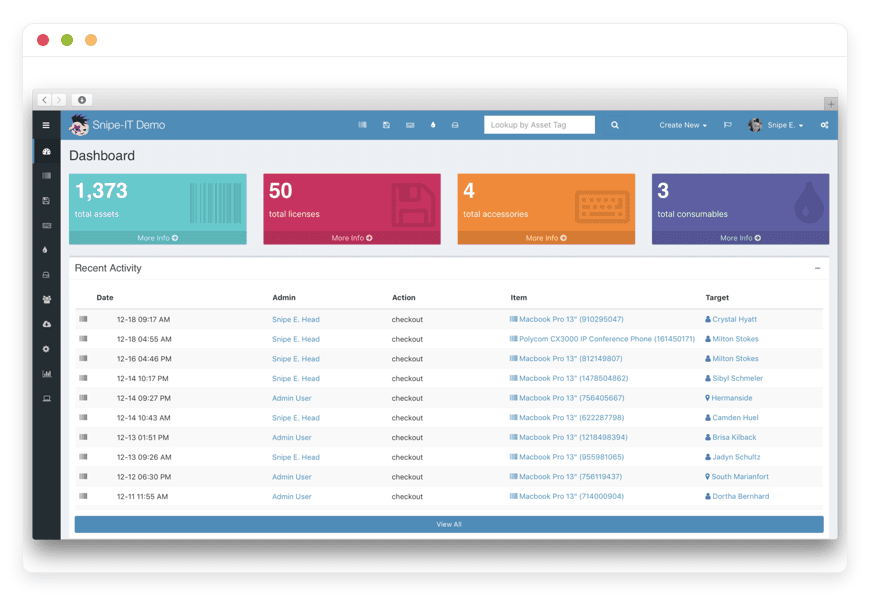
Managed Snipe-IT Hosting: The Definitive Guide to Asset Tracking
TLDR: Quick Answer
Snipe-IT is a powerful open-source IT asset management system designed to track hardware, software licenses, accessories, and consumables. Managed Snipe-IT Hosting gives you all the benefits of this incredible tool without the burden of server maintenance.
Immediate Clarity: Know exactly who has which laptop, monitor, or expensive software license at any given moment.
Automated Workflows: Simplify equipment check-outs with digital signatures, end-user agreements, and automatic email reminders.
Total Authority: Keep complete control over your information without restrictive proprietary contracts or forced upgrades.
Zero Maintenance: Skip the terminal configurations, PHP updates, database management, and backup schedules.
Seamless Integrations: Connect directly with the tools your team already uses, including JAMF, Kandji, LDAP, and Slack.
Introduction
Losing track of company laptops, specialized monitors, and expensive software licenses is a massive and expensive problem. When your team relies on messy spreadsheets to manage physical and digital equipment, important details slip through the cracks. Devices go missing during employee transitions. Expensive warranties expire without warning. New hires sit idle waiting days for their gear to arrive. Snipe-IT solves this operational chaos by giving you a clean, centralized dashboard for all your physical and digital assets.
But running this software yourself often turns into a second job. Setting up web servers, configuring MySQL databases, running security patches, and fixing broken dependencies takes you away from your actual work. You want to manage your IT inventory, not baby-sit a server. Dealing with command-line errors and broken updates is a frustrating waste of your valuable time.
That is exactly why Managed Snipe-IT Hosting changes the game. DANIAN steps in as your invisible infrastructure team. We handle the technical heavy lifting so you can focus entirely on keeping your business organized. You get the full power, flexibility, and transparency of open-source asset management without ever touching a command line or troubleshooting a server error.
What is Snipe-IT?
Snipe-IT is a free, open-source IT asset management application. It provides organizations with a secure, centralized database to track hardware, software, accessories, and everyday consumables. Instead of wondering where a specific MacBook or testing device went, you simply check your dashboard. You instantly see its exact location, assignment status, hardware specifications, and complete physical history.
The platform was created by Grokability, Inc., led by a team dedicated to building software that makes IT management accessible and straightforward. They built Snipe-IT specifically to replace clunky, outdated spreadsheets with a modern, fast, and mobile-friendly web interface. Over the years, Snipe-IT has evolved into a highly robust tool used by thousands of companies worldwide. It is backed by an incredibly active community of developers who constantly improve the codebase, add new features, and refine the user experience.
Why is it trending?
Companies are tired of paying exorbitant, ever-increasing fees for proprietary asset trackers that restrict access to their own information. Snipe-IT offers complete freedom. You get a transparent, secure, and actively developed platform without restrictive, long-term contracts. As remote work becomes the standard across the globe, organizations desperately need a reliable way to track expensive equipment distributed across different cities, states, and countries. Snipe-IT provides that exact solution through a clean interface and an incredibly powerful API, making it the top choice for modern IT departments.
Why Choose Snipe-IT?
Choosing an asset management system dictates exactly how smoothly your IT department operates every single day. Proprietary tools often trap you into rigid workflows and pricing models that punish you financially as your company grows. Every new employee means a new license fee. Every new asset means a higher monthly bill. Snipe-IT completely breaks that cycle by offering open-source freedom. You get full access to your information, easy export options, and a transparent development process where every code change is public and heavily scrutinized for security.
When evaluating your software options, Hosting Snipe-IT through a managed provider gives you the perfect middle ground. You retain the absolute flexibility and cost-effectiveness of open-source software, but you completely eliminate the technical overhead. Snipe-IT includes highly advanced features right out of the box. You get Active Directory syncing, SAML logins, comprehensive API access, and automatic barcode generation without paying extra for "premium" add-ons. It adapts perfectly to your specific internal processes instead of forcing your team to change how they work.
Key Features of Snipe-IT
Snipe-IT is packed with brilliant tools designed specifically to streamline your IT operations. Here is a deep dive into the extensive functionalities that make it a standout choice for modern asset management.
Comprehensive Asset Tracking and History Logs
You can track exactly where every single device is at any given time. Snipe-IT uses unique asset tags to identify specific hardware. This means you stop guessing which laptop an employee has. You know the exact model, serial number, purchase date, physical location, and purchase cost. The system keeps a permanent history log of every single action. You can see exactly who checked out an item, when it was returned, and who handled the transfer. This workflow prevents duplicate assignments and entirely eliminates the mystery of missing equipment.Frictionless Check-in and Check-out Workflows
Assigning equipment to team members takes just a few clicks. When you check out an asset, it is officially marked as deployed in your database. You can require end-user acceptance, meaning the employee must digitally sign a customized End User License Agreement (EULA) sent via email. When an employee leaves the company, you simply check the items back into your main inventory. This creates a crystal-clear, legally binding chain of custody.Smart Status Labels and Work States
Status labels tell your team the exact physical condition of an item instantly. You can label assets as Deployable, Undeployable, Pending, or Archived. If a laptop has a broken screen, you simply mark it "Undeployable" so no one accidentally assigns it to a new hire. If a computer is waiting for a fresh operating system install from the helpdesk, it stays in "Pending." This ensures your team only distributes ready-to-use, fully functional equipment.Detailed Software License Management
Managing digital software licenses is just as important as tracking physical laptops. Snipe-IT lets you handle complex multi-pack licenses smartly. You can assign specific software product keys to individual users or to specific computer assets. The system sends you automatic email alerts when a license is about to expire. This keeps your company legally compliant and prevents unexpected software downtime for your workers.Custom Fields and Flexible Fieldsets
Not every company tracks the same details. Snipe-IT includes an incredibly powerful custom fields engine. If you need to track the MAC address of a router, the IMEI number of a mobile phone, or the specific RAM configuration of a server, you can create a custom field for it. You then group these fields into "Fieldsets." When adding a new mobile phone, the system asks for the IMEI. When adding a desk chair, it only asks for the color. This keeps your database perfectly tailored to your needs.Built-in Mobile Accessibility and Barcode Generation
You do not need to be sitting at your desk to manage your company inventory. Snipe-IT is highly mobile-friendly, allowing you to update asset records on the go from any tablet or smartphone. Furthermore, you can generate 1D barcodes or 2D QR code labels directly from the dashboard. When you stick these printed labels on your physical devices, anyone on your team can scan them with a smartphone camera to bring up the asset’s complete history and check-out status instantly.Consumables and Accessories Management
Not everything in your office needs a unique serial number or an asset tag. Snipe-IT handles smaller accessories like computer mice, HDMI cables, and standard keyboards effortlessly. You can check these out to specific users without tracking individual ID tags. It also actively manages daily consumables like printer toner, branded pens, and copy paper. You simply log the bulk quantity, and the system deducts from the total count as users consume them.Component Tracking and Upgrades
Sometimes you need to track the parts inside a machine. Snipe-IT allows you to manage individual components like sticks of RAM, hard drives, or specialized graphics cards. You can check a 16GB RAM module out to a specific laptop asset. If that laptop is ever retired or recycled, the system reminds you that the RAM module is still inside, allowing you to harvest the component for future use.Advanced Physical Auditing Engine
Conducting an annual inventory audit is usually a nightmare. Snipe-IT features a dedicated auditing module. Your IT staff can walk through an office or warehouse, scan the barcode on every device they see, and click "Audited." The system instantly updates the last-seen date. You can then run a simple report to see exactly which items were not scanned, helping you quickly identify lost or stolen hardware.Automated Depreciation Calculations
Finance departments need to know the current value of your hardware. Snipe-IT includes automated straight-line depreciation tracking. You simply input the purchase cost and the expected lifespan of the device (for example, 36 months). The system automatically calculates the current depreciated value. You can export this data directly to your accounting team during tax season.Granular User Permissions and Roles
You control exactly who sees what. Snipe-IT features a highly detailed permission system. You can create Super Admins who control everything, standard Admins who manage inventory, and restricted users who can only view their own assigned assets. You can even restrict managers so they can only see and manage assets located in their specific city or building.Powerful API and Native Integrations
Snipe-IT plays nicely with the tools your company already uses. It features a robust JSON REST API for building completely custom workflows. It also supports seamless connections to modern endpoint management tools like JAMF and Kandji via native scripts. You can sync your user directory automatically with LDAP, Google Secure LDAP, or SCIM. It even integrates directly with Slack and Microsoft Teams to send instant notifications whenever an expensive item changes hands.
Solutions per Industry
Snipe-IT is versatile enough to adapt to almost any business model. Here is a close look at how different industries solve complex hardware problems using this software.
Creative Agencies and Production Studios
Agencies manage high-end, incredibly expensive equipment. Think 4K cinema cameras, drawing tablets, external solid-state drives, and specialized video editing laptops. Keeping track of this gear during chaotic video shoots or remote client work is difficult. Snipe-IT solves this by logging exactly which creative director or freelance contractor has the specific RED camera body and specific wide-angle lens. The check-out feature ensures freelancers acknowledge receipt of expensive hardware via email, protecting the agency financially from accidental loss or theft.
Education, Universities, and School Districts
Schools handle thousands of Chromebooks, tablets, smartboards, and projectors. Students borrow devices for the semester and must return them before summer break. Snipe-IT allows the school IT department to bulk-assign devices to an entire classroom of students at once. If a tablet comes back with a cracked screen, the staff can change its status to "Out for Repair" and easily trace the damage back to the specific student who borrowed it. Automated email reminders help administrators retrieve overdue equipment from staff and students efficiently before the semester ends.
eCommerce and Retail Warehouses
A busy retail operation relies heavily on wireless barcode scanners, point-of-sale terminals, and thermal receipt printers. If a handheld scanner breaks down during the holiday rush, it causes immediate shipping delays. Using Snipe-IT, warehouse managers track the exact warranty status of every single scanner on the floor. When a device fails, they instantly know if it is eligible for a free manufacturer replacement. The system also tracks vital consumable items like shipping labels, box tape, and thermal paper, ensuring the shipping department never runs out of essential supplies mid-shift.
Construction and Engineering Firms
Construction sites are harsh environments for technology. Engineering firms send expensive power tools, laser surveying equipment, rugged laptops, and specialized drones out into the field every day. Things get lost in the mud or broken on site. Snipe-IT allows equipment managers to track which foreman checked out which piece of machinery. By using custom fields, they track calibration dates for sensitive surveying tools. They also use the consumables feature to track Personal Protective Equipment (PPE) like hard hats, safety vests, and gloves distributed to the crew.
Hospitality, Hotels, and Resorts
Running a large hotel requires immense logistical coordination. Staff members rely on two-way radios, housekeeping tablets, master key cards, lobby display screens, and AV equipment for conference rooms. Shifts move fast, and radios are frequently misplaced. The hotel IT team uses Snipe-IT to check radios out to specific security guards at the start of a shift and check them back in at the end. The QR code labels make it easy for the front desk manager to scan a broken lobby display and immediately submit a repair ticket to the maintenance team.
Software Development Studios
Development houses have complex hardware needs. Programmers require high-powered compiling machines, multiple testing devices spanning different iOS and Android versions, and expensive Integrated Development Environment (IDE) software licenses. Snipe-IT tracks exactly who has the iPhone 14 test device and who currently holds the floating license for a specific database tool. It also allows system administrators to track individual server rack components, ensuring they know exactly which hard drives are installed in the testing server.
Non-Profit Organizations
Non-profits operate on notoriously tight budgets and rely heavily on donated hardware. They must be highly accountable to their donors and grant providers. Snipe-IT gives them a free, powerful tool to track every donated laptop and printer. When it is time to submit a grant compliance report, the non-profit director simply exports a clean, timestamped spreadsheet proving exactly how the grant money was spent and where every purchased asset currently resides.
Event Management and Live Production
Concerts and corporate events require massive amounts of temporary infrastructure. Production teams manage wireless microphones, soundboards, lighting rigs, and digital ticketing scanners. The gear moves from city to city every few days. Using Snipe-IT, the tour manager can quickly audit the equipment trunks before the trucks leave the venue. By scanning the barcodes on the road cases, they ensure no expensive lighting fixtures are left behind at the arena.
Local Government and Municipalities
City governments have strict requirements for taxpayer accountability. They must manage police body cameras, fleet vehicles, office workstations, and public library computers. Snipe-IT handles this massive scale easily. By utilizing custom fields, the city manager can track the license plate numbers and mileage of fleet vehicles right alongside the serial numbers of police laptops. The automated depreciation feature ensures the city finance department accurately reports the value of public assets every fiscal year.
Managed IT Service Providers (MSPs)
MSPs handle the technology needs for dozens of different client companies. They need a robust system to track which hardware belongs to which client. Snipe-IT allows the MSP to set up specific location categories for each client office. When an MSP technician visits a client site to replace a failing hard drive, they update the Snipe-IT database on their phone, checking the old drive out and assigning the new component to the client's desktop machine. This keeps billing accurate and client inventories perfectly organized.
Snipe-IT vs Other Softwares
When looking at IT asset management, it is incredibly helpful to compare Snipe-IT directly with proprietary software alternatives.
| Feature | Snipe-IT | Proprietary Alternatives |
| Pricing Model | Open-source core with zero license fees | Expensive per-user or per-asset monthly fees |
| Hosting Options | Self-host or easily use a fully managed provider | Restricted strictly to the vendor's private cloud |
| Customization | Massive flexibility (Open API, source code access) | Highly limited to built-in vendor settings |
| Integrations | Native JAMF, Kandji, LDAP, Google Workspace, Slack | Often requires paying for premium enterprise tiers |
| Information Export | Easy, transparent database access at any time | Restricted, complex, and intentional export hurdles |
| Mobile Access | Web-based mobile friendly with native QR codes | Often requires installing dedicated paid applications |
Proprietary software companies build their business models around trapping you in their ecosystem. They charge you per asset, meaning you are financially punished for growing your company. Snipe-IT flips this model entirely. You get full access to every feature from day one, and you never pay a penalty simply because you hired more people or bought more computers.
Use Cases and Applications
Here are practical, everyday ways successful companies use Snipe-IT to streamline their operations.
Streamlined Employee Onboarding: When a new hire joins the team, the IT department prepares a complete gear kit. They check out a laptop, a curved monitor, a USB docking station, and an Adobe software license to the user in one smooth motion. The new employee receives an automated welcome email asking them to accept the equipment terms digitally.
Rapid Physical Inventory Audits: During annual financial audits, companies must prove they physically possess the assets listed on their accounting balance sheets. Snipe-IT makes quick asset auditing simple. The IT manager uses a barcode scanner to audit a room in minutes, then exports a complete, timestamped report of every verified device and its current assignee.
Automated Device Syncing: Using the native Kandji or JAMF API integrations, a company can sync their entire Apple Mac fleet directly into Snipe-IT. When a new MacBook is purchased and enrolled in Kandji, it automatically appears in the Snipe-IT database, completely eliminating duplicate data entry and human error.
Proactive Warranty Management: An organization tracks the exact expiration date of expensive server warranties. Snipe-IT automatically sends an email notification to the infrastructure team 30 days before a critical warranty expires, giving them plenty of time to renew the support contract or plan a hardware replacement.
Managing Shared Office Equipment: A modern co-working space uses Snipe-IT to track shared projectors and specialized conference room adapters. Members simply scan the printed QR code on the projector to request a temporary check-out. This ensures everyone in the building knows exactly who is currently using the shared resource.
How DANIAN Helps
Running advanced asset management software should simplify your day, not add server maintenance to your endless to-do list. We act as your "quiet enabler". We handle all the technical mess in the background so you get the glory of running a perfectly organized IT department. Less setup, more tracking. Affordable from the start, with real help when you actually need it.
Fully Managed Hosting: We handle the underlying infrastructure completely. Our dedicated team manages everything from the initial database setup to regular software updates, performance monitoring, and server health checks. Your software is always optimized without you having to lift a single finger.
Backup & Monitoring: We take the safety of your hardware records seriously. Automated daily backups are configured automatically the moment you start, stored securely off-site, and feature a simple one-click restore process. If you ever make a massive data entry mistake, you can roll back the clock instantly.
SSL & Firewall: Secure by default. With cybersecurity threats constantly on the rise, we take your protection very seriously. From automated underlying updates to proactive monitoring and strict network traffic filtering, we make sure your environment is secure 24/7.
Silent Updates: Staying updated is crucial for web security. Vital security patches and exciting new feature versions of Snipe-IT are applied automatically without requiring your manual intervention. You always have access to the latest tools safely.
24/7 Monitoring: We watch your web system around the clock. Technical issues are detected early and often resolved by our monitoring team before you even notice a slowdown on your dashboard.
Guaranteed Performance: Application downtime can be detrimental to your daily business operations. With our highly scalable server infrastructure, we ensure consistent, incredibly fast performance even as your user base expands and your asset library grows to thousands of items.
7-Day Free Trial: Try the entire platform with absolute zero risk. You get a full week to test the workflows, import your spreadsheets, and see the immense value before making any financial commitment.
How to Get Started
Getting your customized Snipe-IT environment running takes only a few short minutes. You do absolutely not need any technical server experience to begin organizing your company.
Step 1: Visit danian.co and quickly create your user account.
Step 2: Select Snipe-IT from our extensive open-source software catalog.
Step 3: Relax while DANIAN gets your software running. We handle the database creation, domain routing, and secure SSL certificates completely automatically.
FAQ
Do I have to pay a license fee to use Snipe-IT?
No. Snipe-IT is free, open-source software built by Grokability. When you use a managed provider, you are only paying for the underlying hosting infrastructure, the automated backups, and the expert management of the web server, not an arbitrary software license.
Can I import my existing messy spreadsheet of assets?
Yes. Snipe-IT features an incredibly powerful importing tool. You can easily upload standard CSV files to map and import users, physical assets, accessories, software licenses, and office locations directly into the system in bulk.
How do the barcode and QR code labels actually work?
The software automatically generates a unique QR code or a standard 1D barcode for every single asset based on its internal asset tag. You can print these directly from your web browser onto standard Avery label sheets. Scanning the physical label with any smartphone opens the detailed record of that specific asset instantly.
Are there limits on how many API requests I can make?
The open-source Snipe-IT software itself does not arbitrarily rate-limit your API requests. The powerful JSON REST API allows you to build extensive custom scripts to automate your IT department exactly how you see fit.
Can I connect Snipe-IT to our Jira helpdesk?
Yes. There are robust third-party integrations available in the Atlassian ecosystem that allow you to display and manage Snipe-IT assets directly within your Jira service tickets, helping your technicians solve hardware problems faster.
Is there a strict limit to how many physical assets I can track?
No. The open-source software does not punish you for growing. It does not limit your asset count. Your only technical limit is the storage and performance capacity of your hosting plan. Our managed hosting infrastructure scales easily to accommodate your rapidly growing inventory.
Can I track different currencies for global offices?
Yes. Snipe-IT allows you to set a default currency for your main headquarters, but you can also define specific currencies for different regional locations, making international asset cost tracking perfectly accurate for your global finance team.
Conclusion
Snipe-IT completely transforms the chaotic, frustrating chore of IT asset tracking into a highly streamlined, deeply reliable process. By centralizing your hardware and software records, automating employee check-outs, and integrating natively with your existing IT tools, it saves your entire team countless hours of frustrating detective work. You gain absolute, immediate visibility over your valuable equipment.
However, configuring complex Linux web servers, troubleshooting PHP memory limits, and running MySQL database backups should absolutely not be a prerequisite for getting your office organized. With fully managed hosting, you skip the technical hurdles entirely and jump straight to the operational benefits.


