
The Definitive Guide to Managed Redmine Hosting
TLDR - Quick Answer
What is it? Redmine is a flexible, open-source project management and issue tracking tool built on the Ruby on Rails framework.
The Value of Managed Hosting:
Skip the complex Ruby on Rails installation process entirely.
Get instant access to multiple projects, Gantt charts, and advanced time tracking.
Rely on automated backups and continuous infrastructure monitoring.
Enjoy seamless core updates without breaking your underlying database.
Focus exclusively on managing your active projects while experts handle the servers.
Introduction
Tracking bugs, managing daily tasks, and keeping teams organized is incredibly hard work. You need a system that adapts to your specific workflow, rather than forcing you into a rigid box. This is exactly what Redmine does. It provides a highly robust, customizable environment for managing everything from simple task lists to complex software development lifecycles.
But running it yourself quickly becomes a second job. Setting up Ruby environments, configuring databases, and managing SSL certificates takes hours away from your actual work. You have to maintain the server infrastructure, apply critical security patches, and hope that a routine system update does not break your active projects.
Enter DANIAN. We act as your invisible infrastructure team for Managed Redmine Hosting. We handle the entire technical mess so you can simply log in and start organizing your work. Skip the terminal commands and server configurations.
What is Redmine?
Redmine is a free, web-based project management and issue tracking tool. Created originally by Jean-Philippe Lang in 2006, it allows users to manage multiple distinct projects and associated subprojects within a single, unified interface. The software is written entirely using the Ruby on Rails framework. It supports multiple database backends including MySQL, PostgreSQL, and SQLite.
The platform includes built-in features that professional teams use daily. These include dynamic calendars, automated Gantt charts, document management, and per-project wikis. It also integrates directly with version control systems like Git, Mercurial, and Subversion. This deep technical integration makes it a long-standing favorite among software development teams worldwide.
Why is it trending?
Redmine remains highly relevant today because it offers total workflow customization. Proprietary tools often force you into a specific, unchangeable way of working. Redmine allows you to define your own user roles, issue statuses, and task types. As software subscription costs continue to rise, modern teams are returning to reliable, open-source alternatives. Redmine delivers massive enterprise-level functionality without expensive per-user licensing fees.
Why Choose Redmine?
Choosing Redmine means choosing open-source freedom over expensive, rigid proprietary software. When you evaluate management tools for your team, you want something that scales predictably. Redmine handles a single basic project for a small team just as efficiently as it manages hundreds of active code repositories for a massive global organization.
Hosting Redmine transforms how your entire team operates on a daily basis. You get the robust functionality of expensive software—like advanced time tracking and custom role permissions—without the hefty monthly bills. You shape the software interface to match your exact internal processes. You control the workflow perfectly.
Key Features of Redmine
Redmine packs a tremendous amount of functionality into a single web application. The core design focuses entirely on adaptability. You can configure it for almost any management style or corporate structure.
Flexible Issue Tracking System
This is the absolute core engine of Redmine. You define your own issue types, which Redmine calls "Trackers." Common examples include "Bug," "Feature Request," or "Support Ticket." You also control the specific workflow transitions for each user role. For example, a junior developer can move an issue to the "Review" stage, but only a senior project manager can transition it to "Closed." This keeps your internal process strict, clear, and error-free.
Multiple Project and Subproject Support
You manage all your work from one central administrative dashboard. Each project operates independently with its own members and settings. You can assign different team members entirely specific roles per project. One user might act as a project manager on Project A, but only function as a basic reporter on Project B. You can also nest related projects as subprojects to keep large corporate initiatives neatly organized.
Built-in Gantt Charts and Calendars
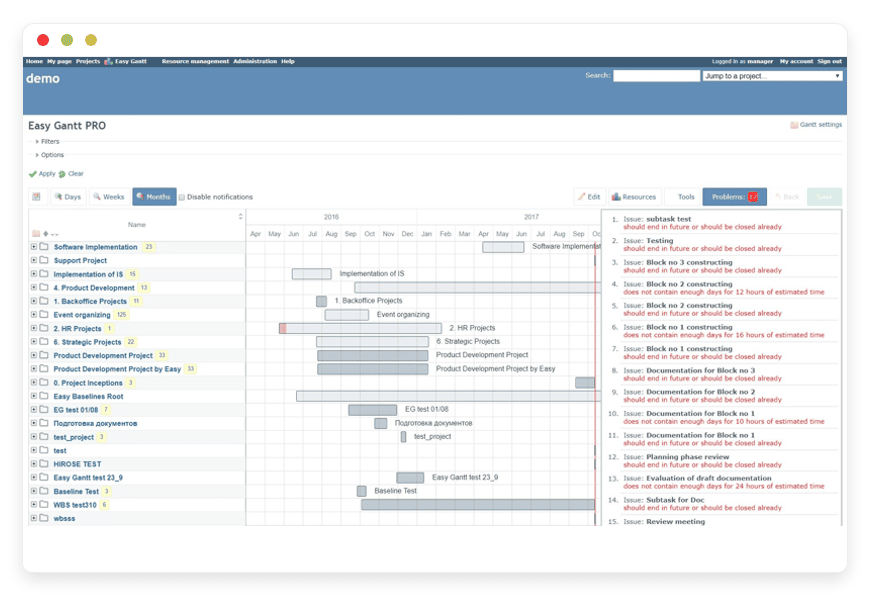
Visualizing long-term timelines is crucial for project success. Redmine automatically generates accurate Gantt charts and project calendars. These visual tools draw their data directly from the start dates and due dates assigned to your issues. You do not need to install a third-party plugin to see your project timeline. The system instantly helps you identify scheduling conflicts and production bottlenecks.
Comprehensive Time Tracking
Keep an accurate, minute-by-minute record of how much time your team spends on specific tasks. Users can log their hours directly on a specific issue or at the broader project level. Project managers can generate detailed reports to view spent time per user, category, or specific activity type. You can even configure the system to log time automatically via code commit messages if you connect a Git repository.
Repository Browser and Diff Viewer
Redmine connects seamlessly with your existing source code repositories. It supports Git, Subversion, Mercurial, CVS, and Bazaar natively. You can browse the entire codebase directly within the Redmine web interface. You can view individual changesets and use the built-in diff viewer to see exactly what code changed. This bridges the gap, linking project management directly to active code development.
Per-Project Wikis
Internal documentation is vital for any growing team. Every single project in Redmine can have its own dedicated wiki. The wiki system uses standard Textile or Markdown formatting syntax. It allows seamless, cross-page linking between different wiki articles and specific issue tickets. It is the perfect centralized place to store project guidelines, technical documentation, or weekly meeting notes.
Project Discussion Forums
Sometimes issues are too narrow for broad discussions. Redmine provides threaded discussion forums for every project. This gives your team a dedicated space to discuss broad architectural decisions, brainstorm new features, or ask general questions. The forums keep unstructured conversations out of your strict issue tracking workflows.
Custom Fields for Everything
Redmine adapts perfectly to your unique data collection requirements. You can add custom data fields to issues, time entries, projects, and even user profiles. Do you need a specific dropdown menu for "Operating System" on your bug reports? You can add it in seconds. These custom fields appear in your issue lists and act as powerful sorting filters.
Flexible Role-Based Access Control
Security and user access are highly customizable. You define specific roles from scratch and simply check boxes to grant distinct permissions. You have granular, exact control over who can view, edit, or delete items within any specific module of your project. You can restrict external clients so they only see specific public tasks, hiding your internal developer conversations.
Automated Email Integration
Redmine can automatically fetch emails from a designated inbox and convert them directly into project issues. This is perfect for setting up support helpdesks. When a customer emails your support address, Redmine creates a ticket. When your team updates the issue in Redmine, the system automatically emails the customer back with the resolution.
Centralized LDAP Authentication
Managing passwords across multiple tools is frustrating. Redmine integrates directly with LDAP directories and Active Directory environments. Your team members can log into Redmine using their existing company credentials. If an employee leaves the company, disabling their Active Directory account instantly revokes their Redmine access.
Extensive Multilanguage Support
Redmine is a truly global application. The user interface translates into 49 different languages. Each individual user can select their preferred language in their personal profile settings. A manager in France can view the dashboard in French, while a developer in Japan views the exact same project data in Japanese.
Solutions per Industry
Redmine is a chameleon. It shapes itself to fit the exact requirements of vastly different business sectors. Because the workflow is entirely modular, different industries utilize the software in completely different ways.
Software Development Agencies
Development agencies need extremely tight integration between task management and daily code execution. A dev team uses Redmine to track complex software bugs and plan weekly release sprints. Because Redmine features a powerful repository browser, developers link their daily Git commits directly to specific active issues. When a developer pushes code with a message reading "Fixes #123," Redmine parses the text. It automatically updates the issue status to "Resolved" and logs the associated development time. This creates a flawless, completely automated paper trail for every single code change. Managers can view the exact lines of code that resolved a specific bug without ever leaving the browser.
Marketing and Creative Agencies
Marketing teams juggle dozens of different client campaigns simultaneously. A creative agency uses Redmine's multiple project support to give each active client their own private, branded workspace. The team uses custom fields extensively to track monthly campaign budgets and client approval statuses. The automatic Gantt charts give account managers a clear, visual timeline of all creative deliverables. This ensures that blog posts, video ad creatives, and massive social media blasts launch exactly on time. Furthermore, the built-in time tracking makes end-of-month client billing perfectly accurate and totally transparent. Clients can even log in with restricted access to view the progress of their specific campaign.
Higher Education and Academic Research
University research departments require strict, reliable organization for long-term grants and multi-year studies. A research team uses Redmine to manage complex data collection tasks across different campus departments. They use the per-project wikis extensively to store standardized research protocols, laboratory procedures, and weekly meeting minutes. The flexible role-based access control is absolutely critical here. It ensures that sensitive research data is only visible to approved, tenured faculty members. Meanwhile, undergraduate student assistants only see the specific, menial tasks assigned directly to them. This maintains strict data compartmentalization across the entire university.
IT Support and Helpdesk Operations
Internal IT departments need a fast, reliable way to process employee hardware and software requests. IT teams configure Redmine to monitor a central support email address. When an employee emails a request, Redmine automatically parses the message and creates a new support ticket. The IT manager creates specific custom fields to track Service Level Agreements (SLAs). They use fields to track the "First Response Time" and the exact department the request originated from. The robust workflow engine automatically escalates tickets to senior network engineers if an issue remains unresolved for more than 48 hours.
Architecture and Engineering Firms
Large-scale construction projects require massive coordination between architects, structural engineers, and site contractors. Architecture firms utilize Redmine to keep these distinct disciplines aligned. They use the file management module to securely store massive CAD blueprints and architectural renderings. Redmine tracks multiple document versions, ensuring contractors always download the latest building plans. The visual Gantt charts are essential for mapping out physical construction phases. If pouring the concrete foundation is delayed by three days, the project manager updates the issue. Redmine then automatically shifts the subsequent framing and electrical timelines forward, keeping the entire team updated on the new schedule.
Game Development Studios
Creating video games requires tracking thousands of tiny graphical assets and fixing countless gameplay bugs. Game studios push Redmine to its absolute limits. During the crucial beta testing phase, studios use Redmine to process massive volumes of bug reports from testers. They configure custom fields specifically for game development. Fields like "Console Platform," "Graphics Card," and "Steps to Reproduce" help developers isolate specific hardware crashes. Project managers use the milestone features to group specific feature requests into upcoming patch versions. They create distinct roadmaps for the Alpha, Beta, and final Gold Master releases.
Non-Profit Organizations
Charities and non-profit organizations must maximize their impact while strictly minimizing their administrative overhead. Using expensive, proprietary management software drains funds away from their core mission. Non-profits use open-source Redmine to coordinate large networks of community volunteers. They create separate projects for annual fundraising galas, food drives, and community outreach programs. Volunteer coordinators use the task lists to assign specific duties for upcoming events. The low cost of running Redmine ensures that donor money goes directly toward the charity's mission, rather than funding expensive software licenses.
Legal Practices
Law firms deal with strict deadlines, massive document volumes, and absolute client confidentiality. A modern legal practice treats every single court case as an isolated project within Redmine. They use the file management system to store scanned court filings, depositions, and legal briefs securely. Because Redmine offers granular permissions, partners ensure that only the specific lawyers assigned to a case can access the case files. Lawyers also heavily utilize the time tracking module. They log their exact working hours in strict six-minute increments directly onto specific case tasks. This makes generating accurate, detailed client invoices completely effortless at the end of the month.
Event Planning Companies
Organizing large corporate conferences or music festivals requires perfect logistical timing. Event planners use Redmine to break massive events down into manageable subprojects. An annual tech conference might have subprojects dedicated to "Venue Logistics," "Catering," "Speaker Coordination," and "Marketing." Planners use the built-in calendar view daily. It provides a quick visual overview of critical deadlines, such as the final date to confirm dietary restrictions with the caterer. If a keynote speaker cancels, the planner updates the specific issue ticket, and all relevant team members receive an immediate email notification.
Manufacturing and Assembly Operations
Factory floors and physical supply chains require rigorous maintenance tracking. Manufacturing operations use Redmine to maintain their heavy machinery. Facility managers create a distinct project for the factory floor. They log recurring preventative maintenance tasks as specific issues assigned to floor technicians. If a piece of assembly equipment breaks down, workers submit a high-priority defect ticket. The technicians log the exact replacement parts used and the total time required to fix the machine. Over time, plant managers run detailed reports on these resolved issues to identify which machines break down most frequently, informing future purchasing decisions.
Redmine vs Other Softwares
If you are currently moving away from restrictive proprietary tools, you need to know exactly how Redmine stacks up against the modern alternatives.
| Feature | Redmine | Jira | Asana |
License Type | Open-Source (Free) | Proprietary (Costly per user) | Proprietary (Costly per user) |
Self-Hosting Options | Yes | No (Cloud only) | No (Cloud only) |
Issue Workflow | Highly Customizable | Highly Customizable | Basic Lis |
Time Tracking | Built-in Natively | Requires Paid Plugin | Requires Integration |
Code Repository Integration | Built-in Natively | Built-in Natively | Highly Limited |
Gantt Charts | Built-in Natively | Requires Premium Tier | Requires Premium Tier |
Custom Roles | Unlimited | Complex to configure | Limited predefined roles |
File Versioning | Built-in | Basic Attachments | Basic Attachments |
Use Cases and Applications
Redmine fits perfectly into countless professional scenarios. It acts as the central nervous system for thousands of businesses. Here are several more practical ways modern teams apply the software today:
Public Open-Source Projects: Many open-source software teams use Redmine as their public-facing bug tracker. Users worldwide can register an account, submit defect reports, and help improve the community software.
Product Roadmap Planning: Product managers use the robust milestone features to group tasks into specific software versions. The visual roadmap module shows satisfying progress bars for upcoming software releases.
Freelance Client Portals: Independent contractors and solo consultants create entirely separate projects for each client. They use the time tracking module to generate accurate end-of-month invoices based entirely on strictly logged hours.
Internal Company Intranet: Businesses use the forum and wiki modules to broadcast general company news, share updated HR documents, and discuss internal corporate policies in a centralized, highly searchable location.
Hardware Asset Management: IT departments create custom issue types specifically for tracking company laptops and mobile phones. They track repair requests, assign loaner devices, and maintain a strict history of all equipment assignments.
How DANIAN Helps
We know exactly what you want. You want the incredible power of Redmine without the constant headache of complex server management. DANIAN is your quiet, technical enabler. We handle the incredibly complex technical foundation so you get the glory of leading a perfectly organized team. Less setup, more development. Affordable from the start. Real help when you need it.
Fully Managed: We handle the hosting completely. Our expert team manages everything from the initial complex setup to regular framework updates, security patches, and daily performance monitoring. Your software is always optimized without you having to lift a single finger.
Backup & Monitoring: Configured automatically, stored securely, one-click restore. Your project data is always protected and instantly ready to recover if you accidentally delete a critical task.
SSL & Security: Secure by default. With cybersecurity threats constantly on the rise, we take your security seriously. From automated backend updates to proactive network monitoring and strict security rules, we make sure your environment is secure 24/7.
Updates: Critical security patches and exciting new versions applied without your direct intervention. You get the absolute latest management tools without the stress of performing manual server upgrades.
24/7 Monitoring: Potential infrastructure issues detected and often resolved before you even notice them. We keep a constant, vigilant watch on your system resources.
Guaranteed Performance: Sudden downtime can be highly detrimental to your daily business operations. With our highly scalable infrastructure, we ensure totally consistent performance even as your total user base grows rapidly.
7-Day Free Trial: No risk involved. Experience the full, unhindered platform and see the massive productivity difference immediately.
How to Get Started
Getting your entire team perfectly organized takes less than five minutes of your time.
Step 1: Visit danian.co and sign up for a new account.
Step 2: Select Redmine directly from the application catalog.
Step 3: Relax while DANIAN automatically launches your software.
FAQ
Is Redmine completely free to use?
Yes, the Redmine software itself is entirely open-source and free to use. You do not pay any per-user licensing fees to the creators. You only pay for the managed hosting resources required to keep the application fast and online.
Can I migrate my existing Redmine database to DANIAN?
Absolutely. If you are deeply tired of managing your own complex server, you can export your current database and files. Our support team will help you transition them safely to your new fully managed environment.
Does Redmine natively support Agile methodologies like Scrum or Kanban?
Out of the box, Redmine relies heavily on traditional lists and Gantt charts. However, the system features a massive plugin architecture. There are many robust, free plugins available online that add dedicated Kanban boards and visual Scrum sprint planning directly to your installation.
Can external clients access my Redmine projects safely?
Yes. You can easily create specific user accounts for your external clients and assign them a heavily restricted role. This ensures they only see the exact projects, wikis, and issues you explicitly grant them permission to view.
Does Redmine notify users via email when things change?
Yes. Redmine sends automated, detailed email notifications for issue updates, news posts, and forum replies. Users can individually customize their personal notification preferences to avoid unnecessary inbox clutter.
Is there a hard limit to how many projects I can create?
No. Redmine itself does not artificially limit the number of projects, users, custom fields, or issues you can create. Your only technical limitation is the physical storage space available on your chosen hosting plan.
Can I change the look and feel of Redmine?
Yes. Redmine fully supports custom visual themes. You can download modern themes to completely change the color scheme, layout, and overall aesthetics of the interface to match your corporate branding.
How does Redmine handle large file attachments?
Redmine allows users to attach files directly to specific issues, wiki pages, or the general project document repository. The system manages these files efficiently on the server. You can configure maximum file size limits within the administrative settings to prevent storage abuse.
Conclusion
Redmine is an absolute powerhouse for project management and detailed issue tracking. Its deep workflow customization, highly robust access controls, and powerful built-in tools like time tracking and repository browsing make it a vastly superior choice for professional teams. It gives you the exact same functionality found in expensive proprietary tools entirely without the restrictive, expensive per-user licenses.
Stop fighting endlessly with complex server configurations, broken Ruby dependencies, and failed database backups. Let us handle all the heavy lifting while you focus entirely on delivering great projects on time.
Experience the incredible power of fully managed open-source software today.


