
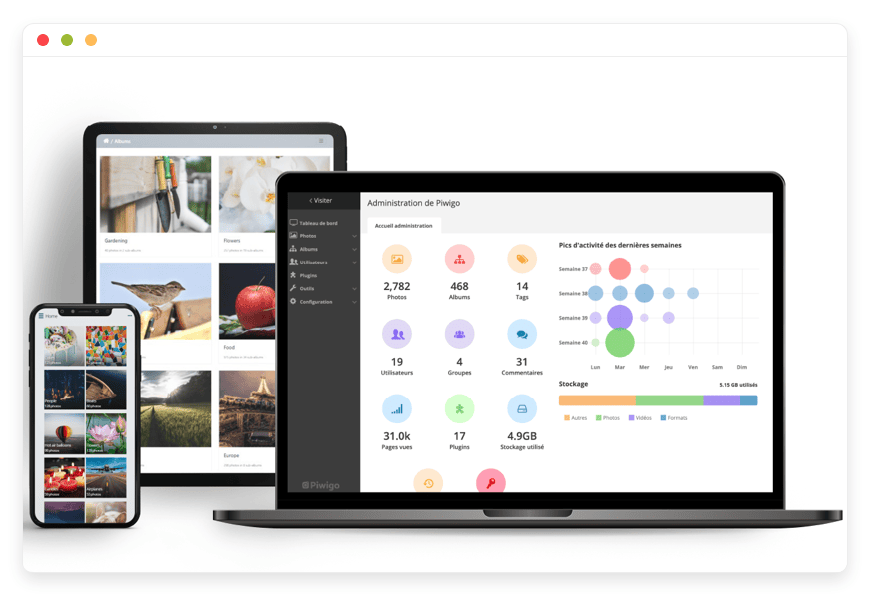
The Ultimate Guide to Managed Piwigo Hosting
TLDR - Quick Answer
Piwigo is a powerful open-source photo gallery tool built for serious file management. It helps you group, search, and share thousands of digital images easily.
Choosing Managed Piwigo Hosting gives you the full power of this tool without the technical stress. Here is the immediate value you get right away:
Zero Server Maintenance: You skip the command line entirely. We handle the technical setup so you can focus on uploading photos.
Instant Updates: The software stays current without any manual work. You never have to install a new version yourself.
Automated Security: Your private galleries stay totally private. We configure the server rules and apply patches in the background.
Worry-Free Backups: Your high-resolution files are kept safe. We run daily backups that come with simple one-click restores.
Introduction
Sorting thousands of digital photos is hard work. You might have folders scattered across different hard drives right now. Finding one specific image from a past project takes way too much time. You might also pay high monthly fees for popular cloud storage apps. These paid tools often limit how you share and view your own files. They compress your images and change their rules without any warning.
Piwigo offers a much better path forward. It is a powerful tool to manage your growing visual assets. You build a fast, highly searchable web gallery for your team or family.
But running it yourself is a second job.
You have to rent a server. You must set up a secure database. You need to apply security patches every single month. If the server crashes, you have to fix it completely alone. Every hour you spend fixing database errors is an hour wasted. You are a creator or a business leader, not a server manager.
This is where DANIAN steps in as your invisible tech team. We provide the servers, the security, and the ongoing upkeep. You get a fast, secure photo gallery ready to use on day one.
What is Piwigo?
Piwigo is a web app made to group and display digital photos. Pierrick Le Gall started the project back in 2002. Over two decades, it grew into a highly trusted tool. Many experts and groups around the world rely on it daily. The software runs on PHP and uses a standard database. It stores your album paths, text tags, and user details safely.
You upload your images into a clear catalog setup. You build deep folders to sort your work neatly. You add text details to make every photo easy to find. The tool also supports a huge list of extra plugins. These add-ons let you change how your gallery looks and works entirely.
Why is it trending?
Creative workers are tired of strict tech giants dictating rules. They want flexible tools that fit their exact daily habits. Piwigo is trending because it gives expert asset control for free. It rivals costly business software without the huge price tag. The active user base builds new plugins all the time. This keeps the software modern and highly useful for modern teams.
Why Choose Piwigo?
Choosing to start Hosting Piwigo gives you absolute control over your work. Paid photo platforms force you to follow their design choices. With Piwigo, you set your own rules and layouts completely. You can build hidden folders for private clients easily. You can make public pages for your fans to view. You can keep a strictly private archive for your personal life.
You decide exactly who sees your specific files. You grant download rights to exact user groups. You block access to certain folders with a simple click. The open-source freedom ensures you can change the code freely. You can install any add-on you need for your daily work. You can export your full library whenever you choose. The software grows right alongside your vast media library smoothly. It handles tens of thousands of images without slowing down. It is a fast, stable, and highly reliable image vault.
Key Features of Piwigo
Piwigo brings expert photo management right to your web browser. Here is a deep dive into the features that change how you work.
Deep Album Folders
Basic tools limit you to one level of folders. Piwigo lets you place folders inside other folders infinitely. This nested tree layout sorts massive photo collections perfectly. You can sort by year, then month, then exact event. When you need a photo, you know exactly where to click. Your massive catalog stays clean and highly visual.Fast Batch Manager
Fixing photo details one by one wastes your whole day. The Batch Manager lets you change hundreds of files at once. You select an entire folder with one quick click. You can add a new tag to every chosen image. You can change the privacy level for the whole group. You can assign a different author name instantly. This saves you hours of tedious manual clicking.Instant Text Extraction
Modern cameras save hidden text data inside your photo files. This includes camera settings, dates, and exact GPS spots. When you upload a file, Piwigo reads this data instantly. It pulls the details and saves them in the database. You skip the step of typing dates and camera types. Your entire library becomes searchable the moment you upload files.Strict User Access Controls
You need to control what your visitors can see online. Piwigo lets you set strict rules for every single user. You can create groups for clients, staff, or family members. You tie specific folders to these exact user groups. A basic user will never see a private client folder. Your confidential files stay locked away from public view.Huge Plugin Choices
The core software is light and fast by careful design. You add specific features using the vast plugin catalog. You will find hundreds of add-ons ready to install fast. You can add tools to place watermarks on your photos. You can turn on a map view for GPS tagged files. If you need a special tool, a plugin likely exists.Custom Brand Themes
Your public gallery should match your personal or brand style. Piwigo includes flexible visual themes built right in. You can choose a dark mode or a bright white layout. You can tweak the colors, fonts, and menu bars easily. You do not need to know complex web code. A few clicks will give your gallery a totally custom look.Smart Tagging System
Sometimes an image fits into more than one single category. Copying the file wastes your valuable server storage space. Instead of copying, you simply apply multiple text tags. You can tag a shot with "Sunset," "Beach," and "Summer." Visitors can click any of those tags to find it quickly. This links your whole gallery without wasting disk space.Virtual Smart Albums
You do not always want to move files around manually. Smart Albums let you build views based on saved searches. You tell the software to group all five-star photos together. The software builds a virtual folder showing those exact shots. When you rate a new photo, it appears there instantly. This keeps your best work grouped without extra effort.User Comments and Ratings
Feedback is vital when sharing work with clients or friends. You can let visitors leave comments on your uploaded files. You can also turn on a simple star rating system. This is perfect for letting a client pick their favorites. You review their choices and finish your photo edits faster. You control if comments are public or hidden entirely.Mobile Phone Apps
You need to manage your gallery when you travel often. Piwigo offers free native apps for your mobile phone. You can find them for both Apple and Android devices. You can upload new shots straight from your phone camera. You can build new folders and share links on the go. You stay connected to your full archive from anywhere.Multiple File Types
Your work is not limited to just basic JPG images. The software supports many different visual file types easily. You can upload clear PNG files or moving GIF images. By adding specific plugins, you can even upload video clips. Some add-ons let you store and show PDF document files. It acts as a complete hub for all visual media.Favorites and Lightboxes
Your visitors often want to save their top personal choices. The software lets logged-in users build a personal favorites list. They click a heart icon on the photos they really like. The system saves these choices in their own private view. This is highly useful for clients reviewing a long photoshoot. They send you their list, and you start working.
Solutions per Industry
Retail Stores and eCommerce
Online shops manage thousands of exact product images every single day. Finding the right shot for a web sale is hard. Piwigo gives retail teams a central hub for visual assets. You sort photos by product line, season, or exact color. Your marketing staff can log in and search by tags. They find the exact high-quality image they need instantly. They download it and post it to social media fast.
Design and Creative Agencies
Agencies handle secret graphics for many different paying clients. Mixing these files on one shared drive is very risky. With Piwigo, you build a locked folder for each client. You safely share a secret link for them to review. They look at the drafted ads and leave their feedback. The strict privacy ensures clients never see each other's files.
Schools and Colleges
Schools take thousands of photos at games, dances, and tours. They need a public spot for students and parents to look. Piwigo lets colleges build a massive, fast public gallery. The school can also keep a hidden section for staff. The batch upload tool helps staff add game photos quickly. Parents can search for tags to find their exact child.
Building Design Teams
Architects run long building projects that last for several years. They take hundreds of progress photos every single week. Finding an old photo of a hidden pipe takes hours. Piwigo solves this messy problem with clear nested folders. You make a main folder for the specific street address. You add date tags and notes about the exact room. Finding that pipe photo now takes only five seconds.
Factory Floor Teams
Factories must track product quality and document line errors strictly. They take photos of parts to check for exact visual flaws. Storing these on a basic shared drive is too messy. Piwigo lets floor managers upload photos of broken machine parts. They add detailed tags about the machine type and date. This creates a highly searchable visual log of factory faults. Managers track issues faster and fix machine problems sooner.
Charities and Non-Profits
Charity groups do important work in very remote global places. They need photos to show donors exactly how funds help. Piwigo acts as a perfect central library for field workers. A worker takes photos on their phone during a trip. They upload them straight to the server using the app. The home office sees the photos and writes donor updates. The clear tags keep stories sorted by country and project.
News and Media Desks
News outlets deal with a huge rush of incoming photos. Photographers send shots from live events as they happen quickly. Editors need to find the best shot to publish instantly. Piwigo handles this fast pace with ease and great speed. Photographers upload batches with embedded text details right away. Editors search the fresh tags, find the shot, and publish. The fast software keeps the news cycle moving without delay.
Real Estate Agents
Selling homes requires pristine, high-quality photos of every room. Agents handle dozens of different houses at the exact same time. Piwigo helps agents keep their property portfolios neat and clean. They build a folder for every single house they sell. They upload bright interior shots and add exact street tags. They send the folder link to interested buyers very quickly.
City Government Offices
Local cities run parks, fix roads, and host public events. They must keep a clear public record of city improvements. Piwigo is the perfect tool to build a secure civic archive. The city sorts photos of new parks and fixed bridges. Citizens can visit the public site to see the work. The city keeps hidden folders for internal staff planning needs. The setup builds public trust and keeps city files organized.
Medical Research Labs
Research scientists take countless photos of lab tests and samples. They must track subtle changes in these samples over months. Piwigo helps them log every visual result with clear notes. They tag images with exact dates and specific chemical names. They group the photos into locked folders for strict privacy. The search tool helps them pull past results for reports. The visual archive makes writing complex scientific papers much easier.
Piwigo vs Other Softwares
How does Piwigo compare to popular proprietary consumer photo apps?
Feature | Piwigo | Proprietary Alternatives |
| Software Model | Open-source | Closed-source |
| Folder Structure | Unlimited nested albums | Limited or no nested albums |
| Plugin Support | Hundreds of active plugins | None |
| User Permissions | Granular access control | Basic link sharing |
| Metadata Parsing | Advanced EXIF/IPTC support | Basic reading only |
| Visual Customization | Custom themes and CSS | Fixed interface |
| Image Compression | Original quality preserved | Often forced compression |
Use Cases and Applications
Here are a few highly practical ways you can use the software right now:
Family History Vault: Gather decades of old family photos. Scan paper albums, upload them, and share them safely online. Relatives across the world can view and comment on them easily.
Travel Photo Logs: Record your long trips with exact map spot tags. Sort your deep folders by continent, country, and specific city. Keep your travel memories safe and easy to browse forever.
Museum Asset Catalog: Historical groups can store pictures of old local artifacts. They use the deep text boxes to write long histories. This protects the visual record of fragile items from total loss.
Wedding Client Proofs: Wedding photographers must deliver draft photos to married couples fast. They build a locked album where the couple logs in safely. The couple uses the favorite tool to pick final shots.
Recipe Book Creation: Food bloggers take step-by-step photos of every cooking phase. They use the software to sort photos by exact meal type. They pull the perfect shot when writing a new post.
Sports Team Archives: Local sports leagues have hundreds of players and weekly games. They group game shots by season, team name, and player. Parents can easily find and download photos of their kids.
How DANIAN Helps
You want a fast, reliable photo gallery for your daily work. You do not want to learn complex Linux server administration. DANIAN acts as your quiet enabler behind the scenes. We handle the mess in the background, so you get all the glory of a perfect setup.
Here is exactly how we make your life much easier:
Fully Managed: We handle the hosting entirely. Our team manages everything from initial setup to regular updates, security patches, and performance monitoring. Your software is always optimized without you having to lift a finger.
Backup & Monitoring: Do not risk losing your hard work. Automated daily backups protect your files and are stored securely. They are configured automatically and come with a simple one-click restore.
SSL & Firewall: Your server is secure by default. With cybersecurity threats on the rise, we take security seriously. From automated updates to proactive monitoring and custom firewalls, we make sure your environment is secure 24/7.
Seamless Updates: Keeping software safe requires constant daily attention. Security patches and new versions are applied without your intervention. You always have the latest safe features ready to go.
24/7 Monitoring: We watch the server health all day and night. Issues are detected and often resolved before you notice them.
Guaranteed Performance: Downtime can be detrimental to your business. With our scalable infrastructure, we ensure consistent performance even as your user base grows. Your gallery will always load fast and run smoothly.
Zero Risk: Less Setup, More Development. It is affordable from the start, and you get real help when you need it. You can test everything today with a 7-Day Free Trial.
How to Get Started
Step 1: Visit danian.co and create your new user account.
Step 2: Select Piwigo from our growing application catalog.
Step 3: Relax while DANIAN launches your software in the background.
FAQ
Is Piwigo truly free to use?
Yes. The software itself is open-source and totally free to download. You only pay for the server resources and management services when you choose a hosting provider like DANIAN.
Can I import photos directly from my editing tools?
Yes. The user base has built helpful plugins for exact workflows. These allow you to publish photos straight from Adobe Lightroom right into your online gallery.
What happens if I upload the same photo twice?
The software recognizes duplicate files based on their names and properties. It spots them instantly. It helps you manage duplicates so you do not waste valuable storage space.
Does Piwigo support video files?
Yes. While it focuses mostly on static images, you can expand it. You can install the VideoJS plugin to upload and play video files directly within your albums.
Can visitors upload photos to my gallery?
Yes. You can install the Community plugin from the catalog. This allows you to grant specific users the right to upload their own photos into designated albums.
How do I handle my server backups?
If you host your gallery with DANIAN, we handle the backups automatically. We take daily snapshots of your database and your media files, keeping them totally safe.
Is there a limit to how many photos I can upload?
The software has no hard limit built into its code. Your only restriction is the actual storage capacity of your hosting plan. Piwigo easily handles hundreds of thousands of files smoothly.
Can I use my own custom website address?
Yes. You can link your gallery to your own custom web address. This makes your gallery look fully branded and highly professional for your visiting clients.
Do I need to know how to write code?
No. You manage your entire gallery through a clean web dashboard. You click simple buttons to make changes. You never have to touch a single line of raw code.
Can I take my files with me later?
Yes. You get total open-source freedom at all times. You can export your photos and your full database whenever you want. You are never trapped in the system.
Conclusion
Piwigo is a remarkable tool for anyone serious about managing digital images. It offers the organizational power, strict privacy controls, and pure flexibility that modern creators truly demand. It replaces chaotic desktop folders and expensive corporate subscriptions with a highly structured, expert platform.
You do not have to struggle with complex server setups to enjoy these great benefits. Let the experts handle the technical heavy lifting daily while you focus entirely on your photography.
Experience the amazing power of fully managed open-source today.


