
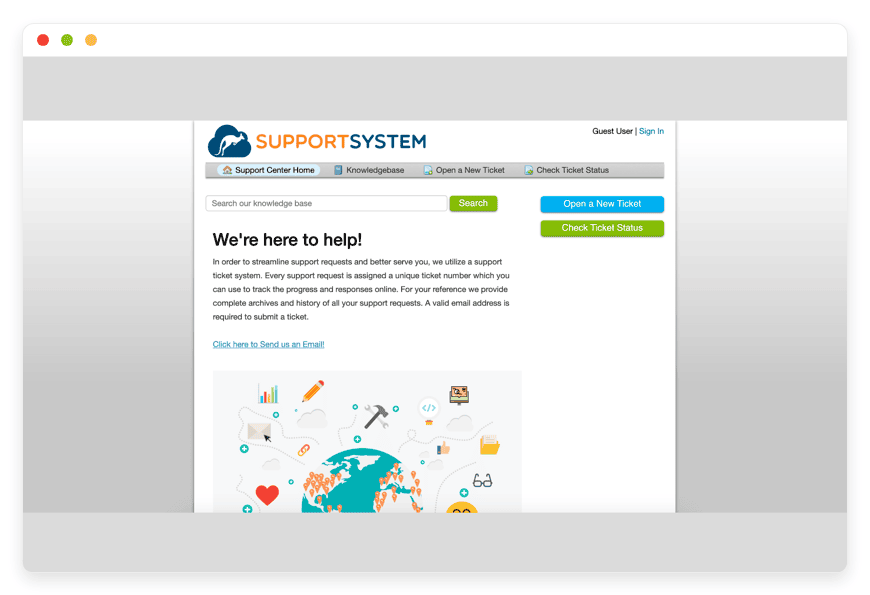
Managed osTicket Hosting: Build A Superior Helpdesk System
TLDR - Quick Answer
osTicket is a wildly popular, open-source support ticketing system. It converts inquiries created via email, web forms, and phone calls into manageable, simple-to-route tickets.
Choosing Managed Hosting for this system provides massive immediate value:
Zero server configuration: Skip the complex database setup and PHP extension requirements.
Cost predictability: Stop paying expensive, per-agent monthly fees typical of proprietary helpdesks.
Reliable uptime: Your support desk stays online and responsive, no matter how many tickets you receive.
Automated maintenance: Backups and security patches happen behind the scenes without your input.
Introduction
Customer support forms the foundation of any healthy business. When an issue arises, your clients expect a fast, accurate resolution. Managing these requests requires a specialized tool. You need a centralized platform that routes messages to the right department. You need a system that tracks response times and keeps your team organized.
osTicket solves this problem perfectly. It takes all your scattered communication channels and funnels them into a single, highly visible dashboard. Your agents can see exactly what needs their attention.
But running this software yourself is a second job. Managing a web server takes hours of tedious work. Configuring email polling scripts, updating software versions, and securing databases drains your energy. You want to focus on helping your customers. You do not want to act as a part-time system administrator.
This is where DANIAN steps in. We provide the invisible infrastructure that makes your software fly. We handle the technical heavy lifting so you can focus entirely on your support operations. Skip the terminal and get straight to work.
What is osTicket?
Originally created by the team at Enhancesoft, osTicket operates as a complete command center for your customer interactions. It is a highly respected open-source support ticket system used by thousands of organizations worldwide.
The software automatically captures incoming inquiries from various channels. Whether a customer emails your support address or fills out a form on your website, the interaction becomes a tracked ticket. Your team can then assign, transfer, and resolve these tickets collaboratively within a clean web interface.
Why is it trending?
Businesses are tired of software subscriptions that punish growth. Most helpdesk platforms charge you for every single agent you add. If you hire a new support representative, your monthly bill goes up immediately. osTicket operates differently. It provides high-end features like Service Level Agreements (SLAs), custom routing rules, and detailed reporting without the massive price tag. Companies realize they can get premium support capabilities while keeping their budgets under tight control.
Why Choose osTicket?
The open-source freedom provided by osTicket makes it a highly attractive choice for companies of all sizes. You gain total access to your system's configuration without restrictive commercial licenses.
When you choose Hosting osTicket, you select a system that adapts to your workflow. You do not have to force your team to adapt to rigid software limitations. You can mold the platform to fit your exact business rules. If you need a specific drop-down menu for bug reports, you can build it. If you want VIP clients to skip the regular queue, you can set that up easily. This level of granular control replaces the need for expensive, proprietary software packages.
osTicket managed correctly gives you total peace of mind. Your agents get a fast, reliable tool. Your management team gets detailed performance metrics. Your customers get quick, accurate answers. It is a win for everyone involved.
Key Features of osTicket
osTicket packs a massive punch when it comes to organizing support requests. Let us explore the core features that will transform how your team works.
Custom Fields and Forms
Not all support requests are the same. A billing question requires completely different details than a technical bug report. osTicket allows you to create custom fields and attach them to specific help topics. You can ask the right questions upfront before the ticket is even submitted. You can add drop-down menus, checkboxes, and short answer fields. This reduces the back-and-forth emails between agents and customers. It helps your team solve problems faster.
Advanced Ticket Filters and Routing
Manual ticket assignment wastes valuable time. osTicket includes a powerful filtering engine to automate this process. You can write rules to inspect incoming emails automatically. If an email contains the word "refund," the system can send it straight to the billing department. If a ticket comes from a specific client domain, it can route to a dedicated account manager. This automation speeds up response times significantly. The workflow benefit is massive. Your agents spend less time sorting emails and more time answering them.
Agent Collision Avoidance
There is nothing more frustrating than two agents spending time writing a reply to the same customer. osTicket prevents this wasted effort with a built-in lock mechanism. When an agent opens a ticket to reply, the system temporarily locks it. Other agents see a visual indicator showing who is currently working on the issue. This ensures effort is never duplicated. It prevents customers from receiving confusing, contradictory replies from different staff members.
Service Level Agreements (SLA) Plans
Meeting customer expectations is critical for retention. SLA plans help you track how long tickets remain open. You can set specific timeframes for resolution based on the topic or department. A critical server outage might have a two-hour SLA, while a general inquiry gets a 48-hour SLA. If a ticket sits unresolved for too long, the system triggers overdue alerts. It can even escalate the issue to a manager automatically. This keeps your team accountable.
Seamless Email Piping
Your customers hate logging into separate portals. They simply want to send an email. osTicket handles this beautifully through email piping. It connects directly to your support inbox using IMAP or POP3 protocols. It grabs new messages and turns them into trackable tickets instantly. When your team replies from the dashboard, the customer receives a standard email. The workflow remains perfectly smooth for the user. Your team stays highly organized behind the scenes.
Auto-Responders and Canned Responses
Communication consistency is key to customer satisfaction. When a new ticket arrives, osTicket instantly sends a personalized auto-reply. This confirms receipt and provides the customer with a tracking number. Beyond that, agents can use pre-written canned responses for common questions. Instead of typing out instructions for a password reset every single day, an agent inserts the canned response with one click. This ensures accurate answers and saves countless hours.
Customer Web Portal
Providing self-service options reduces your incoming ticket volume. osTicket includes a dedicated portal where customers can log in to view their ticket history. They can track the status of an ongoing issue without needing to send another email asking for updates. They can also browse your knowledge base articles to find answers themselves. This empowers your users and lightens the load on your staff.
Thread Actions and Internal Notes
Sometimes resolving an issue requires a private conversation. osTicket allows agents to post internal notes directly on a ticket thread. These notes remain completely invisible to the customer. A junior agent can tag a senior engineer to ask a technical question. The engineer replies internally. Once the answer is clear, the junior agent crafts the final public response. This keeps all context in one single place.
Comprehensive Dashboard Reports
You cannot improve what you do not measure. The software features a detailed reporting dashboard that provides deep insights into your support operations. You can track agent performance easily. You can monitor average response times across different departments. You can see exactly which help topics generate the most requests. This information helps you make smart staffing and training decisions.
Task Management Integration
Sometimes a single ticket requires multiple distinct actions. osTicket includes a robust task management system built right in. An agent can create separate tasks linked to a parent ticket. For example, a "New Employee Hire" ticket might spawn three tasks: one for IT to create an email account, one for Facilities to assign a desk, and one for HR to prepare paperwork. The parent ticket stays open until all related tasks are completed.
Advanced Search and Custom Queues
Finding old information quickly is crucial. The advanced search feature allows agents to filter through thousands of past tickets in seconds. Beyond basic searching, agents can build their own custom queues. A manager might create a queue showing only "Overdue Tickets from VIP Clients." This allows staff to organize their daily workspace exactly how they want it.
Secure Multi-Factor Authentication
Security matters more than ever. Your ticketing system holds sensitive customer data. osTicket supports Multi-Factor Authentication (MFA) to protect your accounts. Agents must verify their login using a secondary device or authenticator app. This simple step prevents unauthorized access even if a password is compromised.
Solutions per Industry
Every business model handles different types of communication. The flexibility of osTicket allows it to adapt to nearly any operational structure. Here is how specific industries use this powerful system to streamline their workflow.
E-Commerce Brands
Online stores live and die by their customer service. During holiday rushes, shoppers email constantly. They ask about shipping updates, process returns, and report missing items. A shared email inbox will crash under this weight. E-commerce teams use osTicket to channel multiple shared addresses (like returns@ , info@ , and sales@ ) into one clean dashboard.
Agents use pre-written templates to answer common shipping questions rapidly. They use the powerful search function to find past order histories instantly. By using custom routing, return requests go straight to the warehouse team, while billing errors go to accounting. This keeps customer satisfaction scores high even during peak shopping seasons.
IT and Managed Service Providers (MSPs)
IT agencies deal with a relentless volume of requests. From simple password resets to major network outages, the tickets never stop. They use osTicket to organize the daily chaos. By setting up specific help topics, they control the flow of work.
A "Network Down" alert automatically routes to the top-tier engineering queue and triggers an immediate SMS notification. Meanwhile, standard printer issues route quietly to junior technicians. The SLA features are crucial here. MSPs use them to ensure client contracts are honored precisely. They can track every single minute spent on a resolution to guarantee they meet their agreed-upon response times.
Educational Institutions
Schools and universities have incredibly diverse support needs. Students need help with login portals. Faculty members request new classroom equipment. Parents email the administration with scheduling questions. A single IT department cannot sort this manually.
Educational institutions implement custom forms within osTicket. The IT department gathers exact building names and room numbers before dispatching a technician. Robust filtering rules separate student questions from critical administrative requests automatically. This ensures professors get their projectors fixed before class starts, while student password resets are handled in batches.
Real Estate and Property Management
Property managers handle requests ranging from broken lights to severe plumbing emergencies. Tenants need a reliable way to report these issues. Relying on phone calls or text messages leads to forgotten repairs and angry renters.
Property firms use the osTicket customer portal for maintenance requests. Tenants log in, select their building from a drop-down menu, and describe the issue. The system routes these tickets to the correct regional maintenance crew automatically. Urgent issues like water leaks trigger immediate alerts. Managers can view the dashboard to see exactly which properties generate the most repair costs over time.
Non-Profit Organizations
Non-profits operate on tight budgets but still handle massive amounts of communication. They field donor inquiries, coordinate large groups of volunteers, and manage event logistics. Paying a high monthly fee for a commercial helpdesk drains funds that should go toward their mission.
Because osTicket is open-source, non-profits can add unlimited agents without paying per-seat costs. They use the system to assign grant application tasks to specific writers. They track volunteer availability using custom fields. Every dollar saved on software licensing goes directly back into making a positive impact.
Manufacturing and Logistics
Supply chains move fast. When a shipment is delayed or a raw material fails quality control, communication must be instant and tracked. Relying on scattered email threads between the factory floor and the shipping dock causes massive production delays.
Manufacturing firms use osTicket to manage internal and external logistics. If a supplier sends defective parts, the receiving dock opens a priority ticket. They attach photos of the defect directly to the thread. The system alerts the purchasing department instantly. The purchasing team then communicates with the supplier, keeping the entire history documented in one place for future audits.
Hospitality and Hotels
Hotels receive constant requests from guests. People need extra towels, room service, or help with the Wi-Fi. Front desk staff are often overwhelmed trying to relay these messages to housekeeping or maintenance via walkie-talkies. Requests get forgotten.
Hotels use osTicket as a central dispatch system. The front desk logs a request. It appears instantly on a tablet in the housekeeping department. The system tracks exactly how long it takes to deliver the extra towels. Management reviews these reports weekly to ensure guest satisfaction remains flawless.
Marketing and Creative Agencies
Creative work requires constant revisions and feedback. Clients email design changes, copy edits, and approval requests daily. Keeping track of which version is final can become a nightmare.
Marketing agencies use osTicket to manage client revisions. Clients submit revision requests through a custom web form, attaching their marked-up PDFs. The ticket routes to the assigned graphic designer. The designer posts an internal note asking the creative director for approval before sending the final file. The system keeps all files, notes, and client approvals in one perfectly organized timeline.
Healthcare Administration and Clinics
Medical clinics handle scheduling questions, insurance verifications, and billing disputes constantly. Front desk receptionists cannot manage this volume while also greeting patients in person.
Clinics use osTicket to handle non-urgent administrative tasks. Patients use the portal to ask questions about their upcoming bills. The billing department reviews the ticket, checks the insurance portal, and replies with a detailed explanation. This keeps the phone lines clear for actual medical emergencies and appointment scheduling.
osTicket vs Other Softwares
How does this open-source titan compare to standard, proprietary alternatives in the helpdesk space? If you are evaluating your options, the differences are stark. Commercial software often locks your data away and forces you into rigid pricing tiers.
Feature | osTicket | Proprietary alternatives (Zendesk, Freshdesk) |
| Pricing Model | Completely free software license | Expensive per-agent monthly fees |
| Agent Limit | Unlimited agents allowed | Strictly capped based on your paid plan |
| Ticket Routing | Advanced rules included by default | Often restricted to premium enterprise tiers |
| Custom Forms | Unlimited custom fields and forms | Severely limited in basic plans |
| Platform Flexibility | Total control over the environment | Locked into their specific infrastructure |
| Source Code | Open and fully inspectable | Closed, hidden, and proprietary |
Use Cases and Applications
The extreme flexibility of this software allows it to shine in numerous environments beyond standard customer support. Here are highly practical ways you can apply it within your organization.
Internal HR Helpdesk
Human Resources departments receive countless emails regarding payroll discrepancies, vacation requests, and benefits enrollment. An internal ticketing portal provides employees with a confidential, organized way to ask questions. HR staff can assign sensitive tickets to specific department managers. They use internal notes to discuss matters privately before replying to the employee. It creates a perfect audit trail for compliance.
Software Bug Tracking
Development teams need a highly structured way to receive bug reports from end users. By creating a custom form that requires the user's OS version, browser type, and exact steps to reproduce the error, developers get exactly the data they need. The system assigns these detailed reports directly to the Quality Assurance team for validation. Once confirmed, it moves to the engineering queue.
Facilities and Campus Management
Large corporate campuses and universities have massive maintenance needs. Employees or students can log into the customer portal and submit facilities requests. Whether the air conditioning is broken in a conference room or a sidewalk needs clearing of snow, the system captures it. It routes these tickets to the correct maintenance crew based on the building location selected in the custom drop-down menu.
Customer Success and Onboarding
Acquiring a new client often triggers a structured onboarding phase. You can use the task management features to track the completion of training sessions and documentation hand-offs. Agents guide new customers through the setup process step-by-step. They track every single interaction, training call, and answered question in a single thread. This ensures no client feels abandoned after signing a contract.
How DANIAN Helps
Software should make your life easier. It should not give you more daily chores. Managing servers, updating PHP versions, and configuring database permissions is frustrating work. Our platform acts as your quiet enabler. We handle the messy technical details. You get the glory of running a fast, reliable support desk.
Here is exactly how our service changes the game for your team:
Fully Managed: We handle the hosting entirely. Our team manages everything from initial setup to regular updates, security patches, and performance monitoring. Your software is always optimized without you having to lift a single finger.
Backup & Monitoring: Configured automatically, stored securely, one-click restore. We ensure your critical support data and ticket histories are never lost due to an accident.
SSL & Firewall: Secure by default. With cybersecurity threats on the rise, we take security seriously. From automated updates to proactive monitoring and custom firewalls, we make sure your environment is secure 24/7.
Updates: Security patches and new software versions are applied without your intervention. You always have access to the latest features and bug fixes effortlessly.
24/7 Monitoring: Issues detected and often resolved before you ever notice them. We keep a constant, vigilant watch on system health and resource usage.
Guaranteed Performance: Downtime can be detrimental to your business. If your support desk goes offline, customers panic. With our scalable infrastructure, we ensure consistent performance even as your user base grows rapidly.
7-Day Free Trial: No risk at all. Less setup, more development. Affordable from the start. Real help when you need it most.
How to Get Started
Getting your complete support system online takes just a few clicks. You do not need any technical experience to begin.
Step 1: Visit danian.co and create your new account in seconds.
Step 2: Browse the application catalog and select osTicket from the list.
Step 3: Relax while DANIAN automatically launches your software, provisions the database, and configures the environment.
FAQ
Do I have to pay a license fee per agent?
No. The software itself is entirely open-source. You can add as many support agents, managers, and administrators as your business requires without paying any additional software licensing fees.
How do emails actually turn into tickets?
The system uses standard IMAP or POP3 polling. It connects directly to your designated support email inbox. Every few minutes, it fetches new incoming emails, parses the text content, and converts them into organized tickets on your dashboard automatically.
Can I use my own custom domain?
Yes. You can easily map your helpdesk to a custom domain like support.yourcompany.com. This keeps your brand identity consistent and looks highly professional to your customers.
What happens if multiple customers report the exact same issue?
Agents can easily link or merge duplicate tickets together. If a main server goes down and fifty people email you, you can merge them all into one master ticket. This allows your team to send a single, mass reply to everyone experiencing the same problem simultaneously.
How do system updates work?
When you use a managed service, all updates are handled for you. Critical security patches and exciting new feature releases are applied automatically behind the scenes. Your system stays modern and secure without any manual effort.
Can customers send file attachments?
Yes. Both agents and customers can upload images, PDFs, and other necessary files. You can configure exact file size limits and dictate allowed file types to keep your system clean and secure.
What happens when my free trial ends?
Your system remains fully intact. You simply pick a simple, predictable hosting plan based on your resource needs. Your helpdesk continues running smoothly without any interruption or data loss.
Can I export my data later?
Yes. You have total access to your information. You can export your tickets, users, and settings at any time. You are never trapped in a closed ecosystem.
Conclusion
Running a professional business requires professional communication tools. Relying on basic email clients to manage customer inquiries ultimately leads to poor service, lost sales, and deeply frustrated staff. osTicket provides an incredibly powerful, scalable solution to organize, route, and resolve support requests efficiently. It gives you the high-end features of expensive alternatives without the restrictive, per-user costs.
Let us handle the servers, the security configurations, and the ongoing updates. Focus your energy on providing incredible support to your clients. Experience the power of fully managed open-source software today.


