
Managed OnlyOffice Docs Hosting: The Complete Guide
TLDR - Quick Answer
What is OnlyOffice Docs? It is a highly compatible, open-source office suite built for heavy document editing, complex spreadsheets, and professional presentations.
Why use Managed Hosting for your office suite?
Immediate Access: Launch your complete office environment in minutes without touching a complex server terminal.
Zero Maintenance: Software patches, system updates, and security fixes happen automatically in the background.
Built-in Security: Automatic SSL certificates and active network defenses protect your private business documents.
Constant Uptime: Proactive system monitoring keeps your collaborative tools online for your entire team.
Automated Backups: Daily snapshots ensure you never lose an important file or complex spreadsheet again.
Introduction
Modern teams need reliable office software to function properly. You write detailed client proposals every morning. You calculate project budgets in massive spreadsheets every afternoon. You build presentation decks for important meetings every single week. These tasks form the backbone of your daily business operations. Most companies pay extremely high monthly fees for mainstream proprietary office suites. OnlyOffice Docs offers a highly capable open-source alternative. It delivers everything your team needs to succeed in one unified platform.
But running it yourself is a second job.
Server setup takes hours of your valuable time. You must configure heavy web servers from scratch. You must open secure ports manually. You must schedule and verify daily backups constantly. One wrong terminal command can break your entire collaborative work environment. You want to edit documents and close deals. You do not want to manage heavy technical infrastructure.
DANIAN provides the invisible infrastructure for your growing team. We handle the difficult technical work entirely. We manage the servers so you can focus exclusively on your core business goals.
What is OnlyOffice Docs?
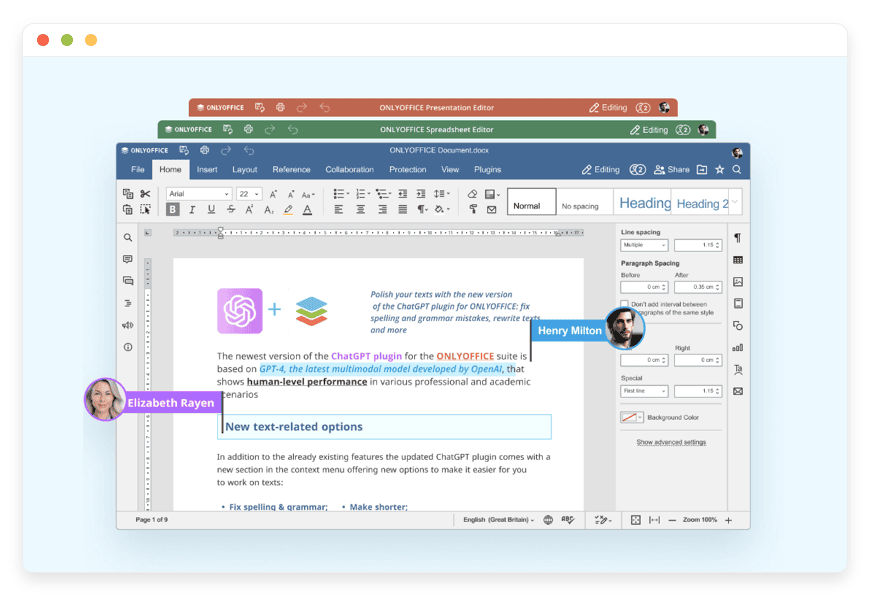
OnlyOffice Docs is a comprehensive online office suite designed for serious productivity. Ascensio System SIA created and developed this powerful software. It combines text documents, advanced spreadsheets, interactive slides, fillable forms, and PDF tools into one single platform. The developers designed it specifically to handle complex file formatting natively. The software works incredibly smoothly across web browsers, desktop applications, and mobile devices. It offers robust real-time collaboration features built directly into the core editing engine.
Why is it trending?
Professionals want reliable alternatives to proprietary tech giants. They want fast, responsive tools that respect their privacy entirely. OnlyOffice Docs delivers this exactly by using Office Open XML as its foundational core format. This ensures maximum compatibility with existing business files everywhere. You never lose complex text formatting when you open an older document. It also integrates smoothly with over 40 popular work platforms. You can connect it directly to Nextcloud, WordPress, Strapi, and Moodle seamlessly.
Why Choose OnlyOffice Docs?
Teams choose this software for absolute open-source freedom. You get premium editing features without the massive recurring costs of proprietary systems. Hosting OnlyOffice Docs gives you a highly private environment for your critical files. You maintain complete control over your internal information. You decide exactly who accesses your workspace. You determine exactly how individual files are shared externally.
This software replaces multiple disjointed tools instantly. You no longer need separate desktop applications for PDFs, digital forms, and spreadsheets. Everything happens inside one unified web interface. This significantly simplifies your daily office workflow. It heavily reduces the number of separate applications your team must learn.
Key Features of OnlyOffice Docs
Let us look closely at what makes this software so highly effective. It goes far beyond basic text editing on a screen.
Perfect MS Office Compatibility
Format breaking is the biggest fear when switching office suites. OnlyOffice Docs solves this frustrating problem completely. It uses Office Open XML natively for everything. This means DOCX, XLSX, and PPTX files open exactly as intended every time. Document margins stay perfectly aligned on the page. Complex spreadsheet charts remain fully intact and interactive. Custom typography and embedded fonts render correctly across all devices. You do not spend hours fixing broken layouts manually. You can share files directly with external clients who use mainstream suites. They will open your files without seeing any formatting errors. This specific workflow benefit removes friction from important external client communication.
Advanced Real-Time Collaboration Tools
Working together should be simple, fast, and organized. The software offers two distinct co-editing modes to fit your team style. Fast mode shows character-level changes instantly as someone types across the world. You see their cursor moving in real-time. Strict mode works differently for professional editing. It locks a specific paragraph completely while you edit it. This prevents eager team members from overwriting your words during heavy revisions. You get built-in team chat directly inside the document window. You can leave detailed comments and use specific user mentions easily. You can track all text changes and review the complete document history. You can easily compare two different versions of a document side-by-side.
Powerful Spreadsheet Data Engine
Business runs on accurate data calculation. The spreadsheet editor inside this suite is incredibly robust. It includes over 400 native functions for complex calculations. You can build advanced pivot tables in seconds to analyze massive datasets. You can apply complex conditional formatting to highlight important financial trends visually. The software supports automated macros written in JavaScript. This allows you to automate repetitive data entry tasks easily. You can set strict data validation rules to prevent team members from entering incorrect numbers. You never experience UI lag or browser freezing during heavy workloads. Your team can filter data simultaneously without disrupting another person's view.
Professional Presentation Builder
Visual communication matters deeply in modern business. The presentation editor helps you build stunning slide decks quickly. You can use master slides to ensure brand consistency across every single page. You can add complex animations and smooth transitions to keep your audience engaged. The editor supports rich media embedding perfectly. You can insert high-resolution images, videos, and complex shapes effortlessly. The dedicated Presenter View gives you ultimate control during a live pitch. You can see your private speaking notes while the audience only sees the slides. You can use the built-in digital laser pointer to highlight key data points on screen.
Comprehensive PDF Editing Tools
Most businesses rely heavily on PDF documents for official records. OnlyOffice Docs includes a highly powerful native PDF editor. You can view massive PDF manuals instantly without slowing down your browser. You can annotate text, draw shapes, and highlight crucial paragraphs easily. The software allows you to edit actual text directly inside the PDF file. You do not need to convert it to a Word document first. You can leave detailed review comments for your colleagues directly on the page. You can fill out interactive PDF forms and sign them digitally. This eliminates the need for expensive third-party PDF software subscriptions entirely.
Interactive Fillable Forms (OFORMs)
Collecting standardized data from clients is often a chaotic process. This suite lets you build professional fillable forms entirely from scratch. You start with a standard document template. You simply drag and drop text fields, checkboxes, and drop-down menus onto the page. You can customize the exact properties of every single input field. You can set specific fields as mandatory for the user to complete. You can share these forms online with a simple web link. Other users can fill these out cleanly in any modern web browser. You can save the final collected result as a standard secure PDF file.
Native E-book Creation System
Digital publishing is a massive industry today. The software includes dedicated tools for professional e-book creation. You can write your manuscript using standard text formatting tools. You can organize your chapters with automatic tables of contents. When your book is fully complete, you can export it perfectly. The software natively supports exporting to EPUB and FB2 file formats. These formats display perfectly on all modern digital e-readers and tablet devices. You do not need separate conversion software to publish your written work online.
Integrated AI Assistant Integration
Modern professional workflows demand absolute speed and maximum efficiency. OnlyOffice Docs supports integrated AI helpers directly inside the editing interface. You can connect tools like ChatGPT via official plugins. You can generate entire text blocks from a simple prompt. You can summarize long, complex reports into simple bullet points instantly. You can ask the AI to rewrite poorly worded paragraphs for better clarity. The AI can translate your selected text into multiple languages seamlessly. You do not have to open a separate browser tab to research a complex topic. You just ask the AI right inside your active document workspace.
Academic and Research Integrations
Writing long academic papers requires serious organization and citation management. The software integrates directly with popular academic tools like Mendeley and Zotero. You can access your complete personal library of research papers directly from the toolbar. You can insert accurate citations into your text with a single click. The software automatically generates a perfectly formatted bibliography at the end of your document. You can easily switch between different official citation styles like APA, MLA, or Chicago. This saves researchers and students countless hours of tedious manual formatting work.
Seamless Platform Integration Capabilities
Your office suite should connect flawlessly to your existing daily work tools. OnlyOffice Docs integrates beautifully with the platforms you already use. It connects perfectly to Nextcloud for highly private file syncing. It links directly to Moodle for comprehensive educational course management. It works smoothly with Odoo for complex business resource planning. You get access to over 40 ready-made official platform integrations. This means you can edit your critical documents directly inside your primary workflow application. You never have to switch context or download files manually again.
Solutions per Industry
eCommerce Brands
Online retail stores track massive amounts of complex product inventory data daily. Financial tracking spreadsheets get incredibly large and difficult to manage quickly. OnlyOffice Docs handles these heavy spreadsheets easily without ever lagging. eCommerce teams use it to build dynamic, responsive pricing models. You can collaborate on detailed product descriptions in real-time with your copywriters. You can securely share official supplier contracts and track legal changes before signing. You can export clean PDF invoices directly from your master order spreadsheet.
Creative and Advertising Agencies
Creative agencies live and die by their visual client proposals. Presentation visual quality matters greatly when pitching expensive new campaigns. You can build stunning slides and detailed campaign reports easily within the suite. The high file compatibility means you can export your work as a perfect PPTX file. Your clients receive professional files that look great on any operating system. Internal copy teams can use the strict co-editing mode effectively. They can review advertising copy without causing chaotic, overlapping edits on the same page.
Education and E-Learning Institutions
Schools, universities, and online course creators need reliable student document management. The software integrates directly into popular learning management systems like Moodle. Teachers can grade written assignments and add helpful comments directly inside the platform. Students can co-author extensive group research papers using the fast co-editing mode securely. The built-in AI plugin helps students research complex topics quickly. The integrated Zotero tool helps them manage their academic citations perfectly.
Law Firms and Legal Services
Legal professionals require absolute precision and strict document security. A single incorrect word in a contract can cost millions of dollars. Lawyers use the strict co-editing mode to draft complex legal agreements safely. They use the robust track changes feature to negotiate contract terms with opposing counsel. The software allows them to add secure watermarks to highly confidential documents easily. They can lock specific sections of a document to prevent unauthorized textual changes. The native PDF editor allows them to review massive case files effortlessly.
Real Estate Agencies
Real estate agents handle massive amounts of property paperwork constantly. They need fast tools to close deals before buyers lose interest. Agents use the presentation builder to create beautiful visual property brochures for clients. They use the OFORM feature to build interactive, fillable lease agreements. Prospective tenants can fill out their personal details online from their mobile phones. Agents can manage multiple complex property viewing schedules using shared online spreadsheets. They can export final signed contracts as secure PDF files instantly.
Non-Profit Organizations
Non-profit teams operate with limited budgets and high operational demands. They need professional tools without the burden of expensive enterprise software licenses. Organizations use the text editor to draft detailed grant proposals collaboratively. They use advanced spreadsheets to track highly specific donor contributions and operational budgets. They use the fillable forms feature to collect important volunteer registration data online. The open-source nature of the software aligns perfectly with their mission-driven operational values.
Financial Consultancies
Financial advisors analyze complex market data and client portfolios every single day. They require a spreadsheet engine that absolutely will not crash under heavy load. Consultants use the powerful advanced formulas to build intricate financial forecasting models. They use dynamic pivot tables to summarize massive raw data exports quickly. They can create highly professional quarterly financial reports combining text, charts, and data tables. They can share these final reports with clients securely using locked PDF formats.
Human Resources Departments
HR professionals manage the entire lifecycle of company employees constantly. They handle sensitive personal data that requires strict internal access controls. HR teams use the software to draft comprehensive employee onboarding handbooks collaboratively. They build interactive OFORMs for new hires to submit their tax and banking details securely. They track company-wide vacation schedules using shared, color-coded team spreadsheets. They update internal company policies and instantly distribute them as uneditable PDF files.
Software Development Teams
Engineering teams need clean, organized ways to document their complex codebases. They often integrate OnlyOffice Docs directly into their existing secure Nextcloud environments. Developers use the text editor to write detailed technical API specifications collaboratively. They use the integrated Draw.io plugin to build complex software architecture diagrams directly inside documents. Product managers use shared spreadsheets to track specific feature bugs and sprint progress. The entire team can review technical release notes together before launching a new product.
OnlyOffice Docs vs Other Softwares
Let us compare OnlyOffice Docs directly with other proprietary office software applications.
| Feature | OnlyOffice Docs | Microsoft Word Online | Google Docs |
Core Formatting Engine | Office Open XML | Office Open XML | Proprietary Web Format |
Open-Source Codebase | Yes | No | No |
Self-Hosting Capability | Yes | No | No |
Distinct Co-Editing Modes | Fast and Strict | Fast Only | Fast Only |
Native PDF Text Editing | Yes | Limited | Limited |
Interactive Fillable Forms | Yes | Yes | Limited |
Advanced Spreadsheet Macros | Yes (JavaScript) | Yes (VBA/TypeScript) | Yes (Apps Script) |
Integrated AI Tools | Yes | Paid Add-on Required | Paid Add-on Required |
Use Cases and Applications
Here are highly practical ways your team will use the software every single day.
Drafting Client Contracts: You write secure legal agreements from scratch. You use the track changes feature to negotiate specific terms with external partners. You accept or reject their edits easily. You export the final, agreed-upon version as a locked PDF file for digital signing.
Building Financial Budgets: You create complex financial spreadsheets for the new year. You use advanced mathematical formulas and dynamic charts to track monthly business expenses accurately. You use data validation to ensure team members only enter correct currency formats.
Creative Team Brainstorming: You open a completely blank text document. You invite your entire creative team via a simple secure link. You watch multiple colored cursors fly across the screen as fresh ideas flow in real-time.
Standard Operating Procedures (SOPs): You create highly detailed internal company process guides. You embed instructional images and process flowcharts directly into the text. You store them securely in your workspace. You update them collaboratively as your business processes naturally evolve over time.
Managing Event Planning: You build custom, interactive fillable forms for your upcoming industry conference. You send the form link to potential attendees. You collect their dietary restrictions and session preferences easily. You compile this data directly into a master tracking spreadsheet automatically.
How DANIAN Helps
DANIAN acts as your absolute quiet enabler. We handle the frustrating technical mess strictly behind the scenes. You simply get the glory of a lightning-fast, highly reliable digital workspace.
Fully Managed: We handle the hosting. Our team manages everything from initial setup to regular updates, security patches, and performance monitoring. Your software is always optimized without you having to lift a finger.
Backup & Monitoring: Automated daily backups are configured automatically and stored securely. You can perform a fast, one-click restore anytime you need to recover a lost file.
SSL & Firewall: Secure by default. With cybersecurity threats on the rise, we take security seriously. From automated updates to proactive monitoring and strict firewall rules, we make sure your environment is secure 24/7.
Updates: Critical security patches and exciting new software versions are applied without your manual intervention. You always have the latest features immediately.
24/7 Monitoring: Technical issues are detected instantly and often resolved completely before you ever notice a problem.
Guaranteed Performance: System downtime can be highly detrimental to your daily business operations. With our scalable infrastructure, we ensure consistent platform performance even as your active user base grows rapidly.
7-Day Free Trial: Zero financial risk. You can test the entire hosted environment completely free.
Less Setup, More Development. Affordable from the Start. Real Help When You Need It.
How to Get Started
Getting your brand new collaborative workspace running is incredibly simple and fast.
Visit danian.co and sign up for your secure user account.
Select OnlyOffice Docs immediately from our clean application catalog.
Relax completely while DANIAN gets your software running perfectly in the background.
FAQ
Is OnlyOffice Docs truly compatible with Microsoft Office files?
Yes, absolutely. It uses Office Open XML natively as its core engine. Your existing DOCX, XLSX, and PPTX files open flawlessly every single time. You will not lose any of your original complex formatting, margins, or embedded custom fonts.
Do I have to pay for a separate OnlyOffice license?
No. OnlyOffice offers a highly capable, free open-source community edition. This specific version provides all the core editing and collaboration features perfectly suited for most small to medium professional teams.
How is strict co-editing actually different from fast co-editing?
Fast mode shows document changes character-by-character instantly as they happen on screen. Strict mode securely locks a specific text paragraph while you actively edit it. Your changes only appear to other users when you finish typing and click save.
Does the software support external third-party plugins?
Yes, it does. You can install official plugins to extend your basic editing functionality easily. You can add powerful AI writing tools, direct translation services, and advanced bibliography managers directly into your main editor interface.
Can I create my own interactive fillable forms?
Yes. The suite includes a dedicated feature called OFORM. You can build professional forms with text boxes, drop-down menus, and checkboxes. You can easily share these online to collect standardized data from clients or employees quickly.
Is my private business data actually secure?
Yes. By using Managed OnlyOffice Docs Hosting, you get a highly private environment. We secure your installation with automated SSL certificates and strict network defenses. You maintain complete administrative control over exactly who accesses your internal workspace.
Will the spreadsheet editor crash with large files?
No. The spreadsheet engine is highly optimized for heavy professional workloads. It can handle massive datasets, complex dynamic pivot tables, and hundreds of mathematical formulas without causing browser lag or system freezing.
How do I migrate my existing files to this platform?
Migration is incredibly straightforward. You simply upload your existing document folders directly into your new hosted workspace. Because the software uses standard file formats natively, your files are immediately ready for active editing and team sharing.
Conclusion
OnlyOffice Docs is an absolutely brilliant tool for modern digital teams. It uniquely combines perfect file format compatibility with incredibly robust real-time collaboration features. You get a complete, professional suite for drafting text, building complex spreadsheets, and designing stunning presentations. You also gain powerful tools for editing PDFs and building interactive forms within the exact same interface.
Hosting this complex software yourself takes far too much time and technical effort. DANIAN removes that specific barrier completely. We provide the stable, secure digital foundation your business needs to thrive daily. You get all the massive benefits of open-source software with absolutely none of the stressful server maintenance.
Experience the absolute power of fully managed open-source software today.


