
The Ultimate Guide to Managed Omeka S Hosting
TLDR - Quick Answer
Omeka S is a powerful open-source web publishing platform designed for universities, libraries, archives, and museums. It connects digital collections with linked open data, making your archives accessible across the web.
Here is the immediate value of Managed Omeka S Hosting:
Launch multiple digital exhibition sites from one central backend database.
Share linked open data seamlessly across the semantic web using standard formats.
Organize massive media files and metadata using built-in vocabularies like Dublin Core.
Skip complex server setups, database tuning, and constant technical maintenance.
Focus purely on curating collections while experts handle the background infrastructure.
Introduction
Organizing and publishing a massive digital collection is a huge undertaking. You likely have thousands of historical photos, physical documents, and audio files. Each individual item needs accurate metadata. Each file requires secure storage. Every collection demands a beautiful public interface so people can actually find it. Omeka S handles all of this perfectly. It provides the exact structure academic and cultural institutions need to catalog items and present them to the world.
But running it yourself is a second job.
To get Omeka S running, you have to configure a complete LAMP stack. You must manage specific PHP versions and tweak MySQL databases. You have to install complex server extensions like ImageMagick to handle photo processing. Then you have to monitor the server daily. You must apply security patches before vulnerabilities are exploited. You have to handle daily backups and ensure they actually work. You want to curate history, but instead, you are fighting with server commands and database errors.
You do not have to do this. DANIAN acts as your invisible infrastructure team. We provide fully Managed Omeka S Hosting, handling the technical mess so you can focus on building your digital exhibits. We maintain the servers, monitor the performance, and secure your data.
What is Omeka S?
Omeka S is a next-generation web publishing platform created specifically for institutions interested in connecting digital cultural heritage collections. It was developed and is maintained by the Roy Rosenzweig Center for History and New Media at George Mason University.
The "S" in the name stands for Semantic. Older software systems just display static web pages. Omeka S is fundamentally different. It publishes information as linked open data. It uses the JSON-LD format natively to structure your information. This means search engines, academic networks, and other institutions can easily read and connect with your data.
You create a single, centralized pool of items, media files, and metadata properties. From that single pool, you can build endless distinct websites. You can create different sites for different exhibits, academic departments, or ongoing research projects.
Why is it trending?
Digital archives are moving away from closed, isolated silos. Institutions want their collections to talk to each other across the internet. Omeka S is trending heavily because it makes linked open data accessible to non-technical users. You do not need a computer science degree to format items in Dublin Core. You do not need to know how to code to link items to external authorities. The software handles the complex data structures in the background. It leaves you with a clean, intuitive dashboard where you just fill in the blanks.
Why Choose Omeka S?
Many institutions rely on expensive, closed gallery software. These proprietary platforms trap your annual budget in expensive licensing fees. They also strictly limit how you can format your own data. Omeka S offers pure open-source freedom. You get professional-grade cataloging tools without paying a software license fee.
When you choose Hosting Omeka S through a managed provider, you get the absolute best of both worlds. You gain access to a platform built strictly for academic and cultural institutions. At the same time, you completely avoid the technical burden of server management. You maintain complete administrative control over your public interfaces. You control user permissions and metadata structures. Hosting Omeka S correctly ensures your high-resolution media loads instantly and your databases remain incredibly secure.
Key Features of Omeka S
Omeka S is built for complex, large-scale archiving projects. It includes dozens of features designed to make cataloging faster and more accurate. Here is a deep dive into the features that transform how you manage digital collections.
Multi-Site Architecture
This is the core functional strength of Omeka S. You install the software exactly once. From that single administrative dashboard, you can build an unlimited number of public-facing websites. Each site operates independently on the front end. Each site can have its own theme, navigation menu, and specific item pool. For example, a university library can hold one million total items in the backend. They can build one site for a local history class exhibit. They can build another site for their rare book collection. Both sites pull from the same central database. This eliminates the need to upload the same photograph twice. It keeps your storage clean and your workflow fast.
Native Linked Open Data
Every single item, item set, and media file in Omeka S gets a unique URI (Uniform Resource Identifier). The system formats this data using JSON-LD automatically. This allows your collection to participate actively in the semantic web. When you catalog a photo of a historical figure, you can link directly to their Wikidata entry or Library of Congress record. Your archive becomes part of a massive, global web of knowledge. This makes your items dramatically easier to find, cite, and connect.
Standardized and Custom Vocabularies
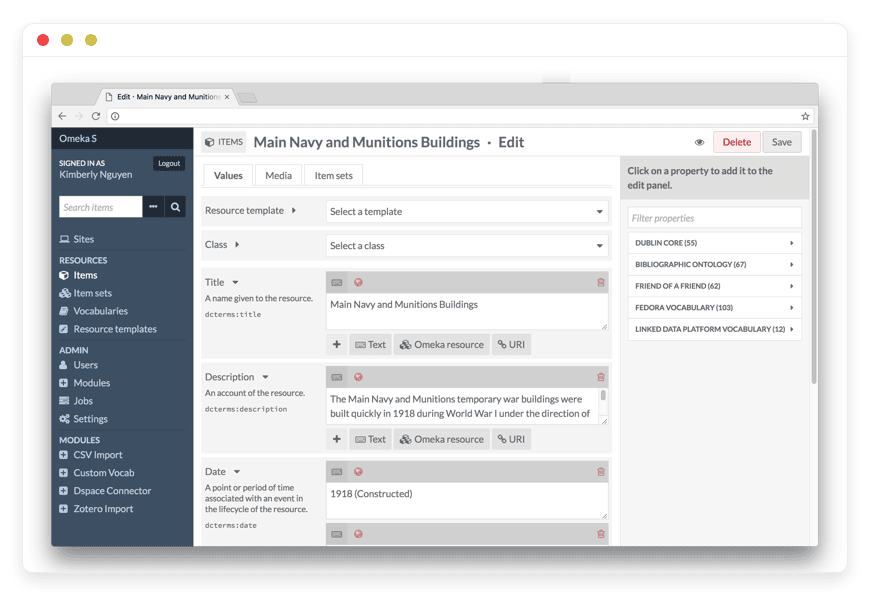
Consistency is crucial for any serious archive. Omeka S comes pre-loaded with major standard metadata vocabularies. You get Dublin Core, FOAF (Friend of a Friend), and BIBO (Bibliographic Ontology) right out of the box. If your institution uses a highly specific metadata schema, you are not stuck. You can easily import custom RDF vocabularies into the system. This ensures every staff member describes items using the exact same approved properties.
Resource Templates
Blank text forms lead to messy, inconsistent data. Resource Templates solve this exact problem. You can create specific architectural blueprints for different types of items. A "Book" template might strictly require an Author, a Publisher, and an ISBN. A "Photograph" template might require a Photographer, a Date, and a Geographic Location. You decide exactly which fields are optional and which are strictly required. When your staff adds a new item, they select a template. Omeka S then guides them through the exact fields they need to fill out, ignoring the rest.
Advanced Module Ecosystem
Omeka S keeps its core code very lightweight. It uses modules to add powerful functional features. The official directory offers dozens of specialized tools. The CSV Import module lets you bulk-upload thousands of items from a standard spreadsheet. The Mapping module adds interactive geographic maps using Leaflet. The Zotero Import module pulls in complex academic bibliographies. The Data Cleaning module helps you fix typos across hundreds of records at once. You only install the modules you actually need. This keeps your administrative workspace clean and incredibly fast.
Granular User Permissions
Managing a large team requires strict access control. Omeka S handles this beautifully. You can assign specific roles to different users. A Global Administrator has full access to everything. A Site Administrator can only manage a specific website. An Editor can edit items across the system. A Reviewer can look at items but cannot change them. An Author can only create and edit their own specific items. This strict hierarchy prevents accidental deletions and keeps your workflow organized.
Powerful Media Management
Digital collections require extremely heavy media files. Omeka S handles massive high-resolution images, multi-page PDFs, and long audio files effortlessly. It can extract text from PDFs automatically using the Extract Text module. It also fully supports the IIIF (International Image Interoperability Framework) Presentation module. This crucial feature allows you to serve massive, deep-zoomable images to your visitors without slowing down your website performance.
Comprehensive REST API
Omeka S is designed to play well with other academic software. Every installation includes a powerful REST API built right in. This allows your developers to write custom scripts that read, create, update, or delete items automatically. You can connect Omeka S to your existing campus systems, mobile applications, or external research databases seamlessly.
Theming and Display Options
Presentation matters just as much as data. Omeka S provides a robust theming engine. You can use official themes to get a clean, accessible website running in minutes. If you have specific branding guidelines, you can build a custom theme using standard HTML, CSS, and PHP. The platform also includes the CSS Editor module. This lets you make quick visual adjustments directly from the dashboard without touching the server files.
Solutions per Industry
Omeka S adapts perfectly to the specific needs of vastly different organizations. Every sector handles data differently. Here is how eight different industries use the software to solve daily operational challenges.
Higher Education Universities
University libraries manage hundreds of different requests from various professors. A history professor might want a public website to display student research on local architecture. A biology department might need a closed archive for field laboratory photos. With Omeka S, the core library staff manages one single central installation. They create a new, distinct site for each professor in minutes. Students get access to specific course projects. They add their research and upload media. The library then retains a permanent, properly formatted digital record of the coursework.
Cultural Heritage (Museums and Archives)
Museums have massive physical collections hidden away in storage. They need a highly structured way to bring these artifacts to the general public. Omeka S allows museum curators to digitize their physical collections and organize them logically online. They use strict Resource Templates to ensure the physical dimensions, origin, material, and era of each artifact are recorded accurately. Using the Mapping module, they can show visitors exactly where each historical item was originally discovered on an interactive digital map.
Research Agencies
Field researchers collect vast amounts of raw data. This includes recorded interviews, handwritten field notes, and digital photographs. Keeping this raw data organized across a large, distributed team is extremely difficult. Omeka S provides a central, secure repository. Researchers can upload their media directly into specific, pre-defined Item Sets. Because Omeka S supports highly customized user permissions, administrators can decide exactly who can view, edit, or delete sensitive research materials before they are published.
Local Historical Societies
Small town historical societies often run on passion and volunteer hours. They have boxes of letters, diaries, and photographs from the 1800s. They need an easy way to digitize this history without requiring coding knowledge. Omeka S is perfect for this. The society director sets up simple Resource Templates. When a volunteer comes in to catalog old letters, the system tells them exactly what to type. The Faceted Browse module then allows community members to filter these documents by specific decades, family names, or street addresses easily.
Public Libraries
Public libraries serve a broad community with varying interests. They frequently host digital exhibits covering local sports history, civic development, and community events. A public library can use Omeka S to digitize their local newspaper microfilm collection. By using the Extract Text module, they make every single page of those old newspapers fully searchable. A citizen researching their family tree can type a surname into the search bar and instantly find an obituary from fifty years ago.
Corporate Archives
Large corporations have rich histories. They have decades of product prototypes, old advertising campaigns, and foundational corporate documents. A company can use Omeka S to build a secure internal archive. They use the platform to maintain their brand history. A marketing team launching a retro campaign can search the Omeka S archive to find high-resolution scans of original product packaging from the 1970s. By restricting site access, they ensure this internal history remains private to employees while keeping the files highly organized.
Digital Humanities Centers
Digital humanities scholars deal with incredibly complex semantic mapping. They need to connect disparate collections from around the world. Omeka S handles this massive data manipulation easily. A digital humanities center can use the Numeric Data Types module to store exact measurements and dates. They can use the Custom Vocab module to create highly specific terms for a niche area of study. The software acts as a powerful relational database that turns abstract historical concepts into structured, analyzable data.
Fine Art Galleries
Art galleries manage extensive portfolios for numerous artists. They track exhibition histories, provenance records, and high-resolution artwork scans. Omeka S allows a gallery to build a beautiful, minimalist digital catalog. They can use the IIIF Presentation module to allow potential buyers or researchers to zoom incredibly deep into a painting to see the exact brushstrokes. They can create a separate Omeka S site for every major exhibition, preserving a digital walkthrough of the gallery space long after the physical show closes.
Omeka S vs Other Softwares
Choosing the right archiving software is a monumental decision for your institution. You must understand how the tools differ fundamentally. Here is how Omeka S compares to other popular software options on the market.
| Feature | Omeka S | WordPress | Proprietary Archive Tools |
Primary Focus | Linked open data and digital exhibits | General blogging and marketing sites | Institutional cataloging |
Multi-Site from Core | Yes, native, seamless, and intuitive | Requires complex network setup | Often requires expensive extra licenses |
Metadata Standards | Native Dublin Core, FOAF, custom RDF | Non-standard, requires heavy plugins | Standard, but rigidly locked |
Cost of Software | Free and Open-Source | Free and Open-Source | Very expensive annual fees |
Underlying Data Format | JSON-LD / Semantic Web optimized | HTML / Standard Relational Database | Varies, often closed formats |
Media Handling | Optimized for massive collections | Struggles with bulk high-res media | Optimized, but storage costs extra |
Resource Templates | Built-in, highly customizable | Requires custom post-type plugins | Built-in, but difficult to alter |
Use Cases and Applications
The sheer flexibility of Omeka S allows you to build highly specialized digital experiences. It is not just a filing cabinet. It is a presentation engine. Here are five practical examples of what you can build today.
Geospatial Historical Archives
Many historical societies have thousands of old street photographs sitting in boxes. Using Omeka S and the Mapping module, you can attach exact GPS coordinates to every single photo. You can then publish a beautiful public website where visitors explore a modern digital map of the city. When they click on a specific street corner, they see the photograph of what that exact spot looked like one hundred years ago.
Oral History Portals
Collecting audio and video interviews is crucial for modern historians. Omeka S excels at presenting this specific type of media. By using the OHMS (Oral History Metadata Synchronizer) Embed module, you can upload long audio or video interviews. You can link text transcripts directly to audio timestamps. A visitor can search the site for a specific keyword, find the exact moment that word is spoken in a two-hour interview, and start listening instantly.
Bulk Institutional Repositories
Libraries often face the nightmare task of migrating thousands of records from older, failing systems. Doing this manually is impossible. Using the CSV Import module, you can map columns from a massive Excel spreadsheet directly to Omeka S properties. You can import 10,000 items, attach their associated media files, and categorize them into specific Item Sets in a single afternoon.
Open-Access Bibliographies
Research centers frequently compile extensive reading lists and bibliographies for public use. Instead of typing these manually into a static website, they use the Zotero Import module. The research staff maintains their active library in the Zotero application. Omeka S then automatically imports those precise citations. It maps the authors, publishers, and publication dates directly into the correct metadata fields, creating a highly searchable public bibliography.
Crowdsourced Community Archives
Sometimes you want the public to contribute to your historical collection. By using the Collecting module, you can build a public submission form on your Omeka S site. Community members can upload their own family photos or historical documents directly to your server. The items go into a pending queue. Your staff reviews the submission, fixes the metadata, and publishes the item to the live exhibit.
How DANIAN Helps
Building robust digital archives requires intense focus and a clear mind. You need to spend your valuable time standardizing metadata vocabularies. You need to write compelling exhibit text. You need to organize media logically. You should absolutely not spend your time reading complex server error logs or configuring firewall rules.
DANIAN is the quiet enabler behind your archiving project. We handle the technical mess; you get the glory of a perfect exhibit. Here is exactly how our Managed Omeka S Hosting improves your daily workflow:
Fully Managed Infrastructure
We handle the hosting comprehensively from start to finish. Our expert team manages everything from initial server setup to regular system updates, security patches, and database performance monitoring. Your software is always optimized without you having to lift a single finger. You log in via your browser and start cataloging items immediately.
Reliable Backup & Monitoring
Hardware fails eventually. Human mistakes happen constantly. We protect your hard work with automated daily backups. These are configured automatically the moment you start your server. They are stored securely off-site. If a staff member accidentally deletes a crucial item set, you do not have to panic. You can rely on our simple, one-click restore process to bring everything back exactly as it was.
Robust SSL & Firewall
With global cybersecurity threats on the rise constantly, we take network security seriously. Every site on our platform includes automatic, renewing SSL certificates. From automated background updates to proactive traffic monitoring and custom server firewalls, we make sure your environment is secure 24/7. Your historical data stays completely safe from malicious automated traffic.
Seamless System Updates
The Omeka S development team regularly releases new software versions and module updates. Applying these manually via command line can break your site if done incorrectly. We completely remove this risk. We ensure critical security patches and new software versions are applied smoothly without your direct intervention. You always run the safest, fastest version of the software available.
Guaranteed Performance Under Load
Downtime can be detrimental to your institutional goals and your public image. High-resolution archival images demand serious server power to load quickly. With our scalable server infrastructure, we ensure consistent, rapid performance even as your user base grows. Your digital exhibit sites load fast, no matter how many visitors explore your collections at the same time.
7-Day Free Trial
We firmly believe in letting the actual technical results speak for themselves. You can test our Managed Omeka S Hosting platform with absolutely zero financial risk. We offer less setup and more actual development. We are highly affordable from the very start. You get real, human help exactly when you need it.
How to Get Started
You are three simple, rapid steps away from starting your next great digital exhibit. You do not need to read a server manual to begin.
Visit danian.co: Go directly to our website and sign up for an account. The registration process takes less than a minute.
Select Omeka S: Browse our extensive open-source software catalog and choose Omeka S from the list of applications.
Relax: We will launch your software immediately in the background. You will receive an email shortly with your secure administrative login details.
Ready to build your digital archive the right way?
FAQ
What is the primary difference between Omeka Classic and Omeka S?
Omeka Classic is an older system built for single, standalone websites. It is excellent but limited. Omeka S is the modern upgrade designed specifically for institutions that need to manage multiple different websites from one central installation. Omeka S also focuses heavily on semantic linked open data.
Is the Omeka S software itself actually free?
Yes. Omeka S is released openly under the GNU General Public License. The core software itself is completely free to use. You only pay for the managed hosting environment that keeps the software online, fast, and completely secure.
What specific server requirements does Omeka S need to run?
It strictly requires a Linux server environment, an Apache HTTP server, PHP (version 7.4 or higher), and a reliable MySQL or MariaDB database. It also strongly requires the ImageMagick extension to process large media files properly. With our Managed Hosting, all of these complex requirements are pre-configured perfectly for you.
Can I import my existing archival data from a spreadsheet?
Yes, absolutely. By using the official CSV Import module, you can easily map your existing spreadsheet columns directly to Dublin Core or custom vocabularies. This feature allows you to import thousands of legacy items at once, saving months of manual data entry.
Does Omeka S support highly custom metadata vocabularies?
Yes. While it includes standard, globally recognized vocabularies like Dublin Core right out of the box, you are not restricted to them. You can import any valid RDF vocabulary to completely suit the specific, nuanced descriptive needs of your academic institution.
Can multiple staff members work on the system at the same time?
Yes. Omeka S is designed for collaborative team environments. Multiple users can log in simultaneously. Because of the granular user permission system, you can ensure that an intern only edits specific items while the head archivist maintains total control over the system settings.
Conclusion
Omeka S fundamentally changes how modern institutions share history, art, and academic research. It moves your valuable physical collections out of isolated databases and directly onto the semantic web. By using linked open data, robust customizable resource templates, and a brilliant multi-site architecture, it gives you absolute control over your digital narrative.
You have incredible, historically significant items to share with the wider world. Do not let complex server configuration and database management slow your mission down. Let DANIAN handle the heavy infrastructure in the background so you can do what you actually do best: curate, organize, and educate. Experience the sheer power of fully managed open-source software without the traditional headaches.


