
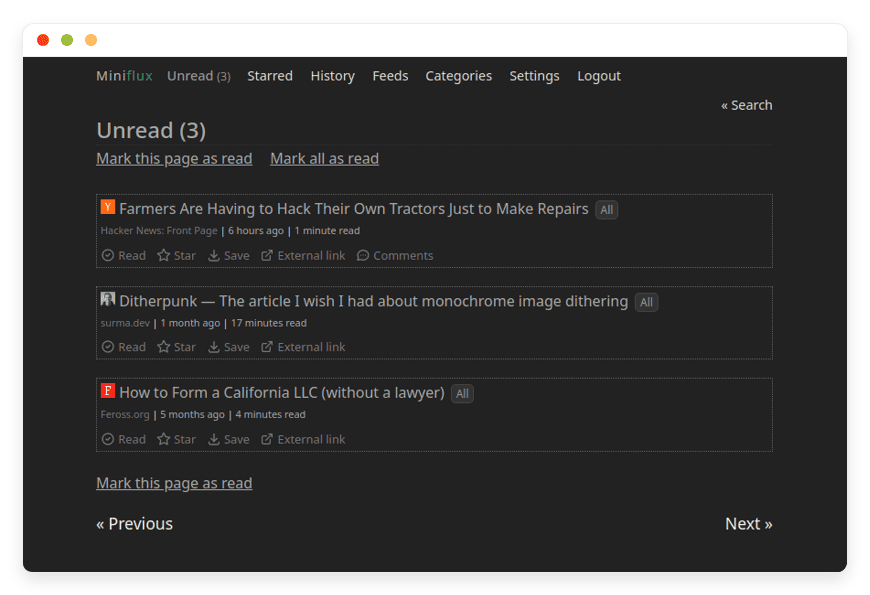
Managed Miniflux Hosting: Focus on Reading, Not Maintenance
TLDR - Quick Answer
Miniflux is a lightning-fast, minimalist RSS feed reader designed to strip away distractions and tracking scripts. It focuses entirely on a clean reading experience without algorithms or social features. Choosing Managed Miniflux Hosting gives you the benefits of this powerful open-source tool without the headache of server management.
Immediate Value: Read full articles natively using the built-in content extraction tool.
Total Privacy: Automatically blocks pixel trackers and scrubs tracking parameters from URLs.
Seamless Integrations: Connects directly with Wallabag, Instapaper, Readwise, and dozens of other apps.
Zero Maintenance: We handle the server, database, and system updates automatically.
Instant Access: Get your reader running in minutes without touching a command line.
Introduction
Modern feed readers are completely cluttered. They push algorithmic recommendations, insert intrusive ads, and track every click you make. You just want to read your favorite blogs, newsletters, and news sites in peace. Miniflux solves this exact problem by offering a purely functional, stripped-down reading experience. It removes the visual noise so you can focus strictly on the text.
But running it yourself is a second job. You have to configure a Linux server, set up a PostgreSQL database, manage SSL certificates, and keep the software updated. When a database error occurs, your reading stops until you fix the technical issue. You spend more time tinkering with the server than actually reading your feeds.
This is where Miniflux managed hosting from DANIAN steps in as your invisible infrastructure. We handle the technical setup, security, and maintenance entirely in the background. You simply log in, add your feeds, and start reading immediately.
What is Miniflux?
Miniflux is an opinionated, minimalist feed reader. Frédéric Guillot created it for people who value speed and simplicity above all else. Built using Go (Golang) and relying exclusively on PostgreSQL, it is incredibly fast and highly resource-efficient. It supports RSS, Atom, and JSON feeds, covering almost every modern publishing standard available today.
The software is intentionally basic in its visual design. You will not find social sharing buttons, algorithmic timelines, or bloated user interfaces. Instead, you get a clean layout optimized for quickly scanning entries. The design takes heavy inspiration from text-focused sites like Hacker News and Pinboard.
The developers chose to avoid heavy JavaScript frameworks. Miniflux uses server-side template rendering and modern vanilla JavaScript only where absolutely necessary. This makes the application incredibly fast, accessible, and highly secure over the long term.
Why is it Trending?
Readers are tired of platforms dictating what they should see. Mainstream news aggregators prioritize engagement over quality, burying the content you actually care about. Miniflux is trending because it returns power to the reader. It presents your feeds chronologically, strips away the visual clutter, and actively protects your privacy. It is the ultimate tool for focused, intentional information consumption.
Why Choose Miniflux?
Choosing Miniflux means embracing open-source freedom and regaining control over your reading habits. You escape the limitations, paywalls, and subscription fees of proprietary feed readers. It replaces bloated, slow applications with a streamlined web interface that works perfectly across all your devices, from massive desktop monitors to small smartphone screens.
When you look into hosting Miniflux, you secure a highly private reading environment. The software does not sell your reading habits to advertisers. It acts as a protective shield between you and the websites you follow. It actively removes tracking parameters from links and proxies media to keep your IP address completely hidden from publishers. You read on your terms, without leaving a digital footprint.
Key Features of Miniflux
Miniflux packs a massive amount of functionality behind its minimal interface. The features are designed to enhance your reading workflow, not to keep you endlessly scrolling.
Advanced Content Extraction
Many websites publish partial RSS feeds to force you to visit their site and view their ads. Miniflux fixes this immediately. It includes a local Readability parser that fetches the original article and extracts the full text. You can read the entire piece natively within your feed reader. For sites with complex layouts, you can write custom scraper rules based on precise CSS selectors to grab exactly what you want.Granular Filtering Rules
You do not have to read everything a website publishes. Miniflux allows you to create powerful filtering rules using regular expressions. You can set up "Block Rules" to automatically ignore articles containing specific keywords like "Celebrity" or "Sponsored." Conversely, you can use "Keep Rules" to automatically star or bookmark articles that mention topics you heavily research. This turns your reader into an automated research assistant.Uncompromising Privacy Protection
Miniflux takes your privacy seriously. It automatically removes pixel trackers embedded in articles and strips marketing parameters like utm_source or fbclid from URLs. It also provides a built-in media proxy. This prevents mixed content warnings and stops third-party servers from logging your IP address when you load an image. Furthermore, all external links open with strict no-referrer attributes to prevent data leakage to other sites.Bot Protection Bypass Mechanisms
Some publishers aggressively block standard RSS scrapers using tools like Cloudflare. Miniflux provides several tools to bypass these restrictions. You can configure custom user agents to mimic a regular web browser. You can disable HTTP/2 to mitigate browser fingerprinting. You can even add custom cookies to bypass paywalls for sites where you hold a valid subscription. This ensures you can fetch content from heavily protected sources.Extensive Third-Party Integrations
Miniflux connects seamlessly with over 25 external services. You can save important articles to bookmarking tools like Wallabag, Instapaper, Pinboard, Linkding, and Readwise Reader. It also supports webhooks, allowing you to trigger real-time notifications to external chat applications like Slack, Discord, Matrix, or Telegram when a specific feed updates.Keyboard-Driven Navigation
If you love efficiency, Miniflux delivers. It includes a comprehensive set of keyboard shortcuts for rapid navigation. You can press 'j' to move to the next item, 'k' for the previous, 'm' to mark as read, or 's' to save it for later. You can process hundreds of articles without ever touching your mouse. For mobile users, it also supports intuitive touch gestures for horizontal swiping.API Compatibility and Integrations
While Miniflux is a highly responsive progressive web app, it also supports popular legacy APIs. You can connect existing third-party mobile applications that rely on the Fever API or the Google Reader API. This provides alternative native mobile experiences if you prefer using a dedicated app on your phone rather than the browser.Built-In Media Playback
Miniflux handles rich media elegantly. It supports multiple enclosures, meaning podcasts, videos, and music files load directly in the interface. It even plays YouTube videos directly inside the reader. To protect your privacy, it automatically routes YouTube videos through the privacy-focused youtube-nocookie.com domain to stop Google from tracking your viewing habits.Customization and Theming
Despite its minimalist nature, Miniflux adapts to your visual preferences. It includes several built-in themes like Light, Dark, Serif, and Sans-Serif. If you want total control, you can write custom CSS to change font sizes, colors, and layout widths. You can create the exact reading environment that works best for your eyes.
Solutions per Industry
Technology and Software Development
Developers need to track software releases, security advisories, and technical blogs. Standard social media moves too fast, and important updates get lost in the noise. Miniflux serves as a centralized, quiet hub for GitHub release feeds, engineering blogs, and Common Vulnerabilities and Exposures (CVE) trackers. Its raw speed ensures you can scan hundreds of technical updates in minutes. The clean interface keeps code snippets perfectly readable without formatting errors.
Financial Analysts and Traders
The financial markets move on information. Analysts need instant updates from SEC Edgar filings, market news, and economic indicator reports. Relying on bloated news websites introduces lag and distractions. By routing financial RSS feeds into Miniflux, traders get a chronological, unmanipulated stream of information. You can use the filtering rules to instantly highlight press releases mentioning specific ticker symbols, giving you a quiet edge in a noisy market.
Marketing and Public Relations
PR professionals monitor brand mentions, competitor announcements, and industry news constantly. Traditional media monitoring tools are incredibly expensive and loaded with tracking scripts. Miniflux provides a clean way to aggregate Google Alerts and industry publications via RSS. You can read the news and track competitor announcements without triggering tracking pixels that alert your competitors to your monitoring habits.
Legal Professionals
Lawyers and paralegals spend hours tracking case law updates, government legislative changes, and legal blogs. Government websites are notoriously difficult to navigate and rarely feature modern designs. By pulling these updates via RSS into Miniflux, legal professionals get a standardized, clean reading experience. You can organize feeds by specific practice areas or active cases, ensuring no crucial regulatory update slips through the cracks.
Education and Academic Research
Researchers and students follow numerous academic journals and university publications. These sites often use complex, outdated layouts and aggressive popups promoting other publications. Miniflux simplifies this by pulling the abstract or full text directly into a distraction-free environment. Researchers can then use the built-in integrations to send important academic papers straight to their reference managers or external bookmarking tools for citation later.
Freelance Writers and Journalists
Journalists must monitor a massive variety of sources, from local city council agendas to niche topic blogs. Keeping dozens of tabs open slows down your computer and fragments your attention. Miniflux allows journalists to build custom categories for different reporting beats. You can aggregate police blotters, local news competitors, and press release wires into one fast interface. The keyboard shortcuts allow you to clear your reading queue quickly before you start writing.
Creative Agencies and Designers
Designers constantly seek inspiration from typography blogs, CSS galleries, and portfolio updates. However, modern design blogs are often heavy, slow to load, and packed with affiliate links. Miniflux pulls the core content and images directly into a fast, neutral interface. It allows creatives to review visual inspiration quickly without waiting for heavy scripts to execute on every single website they visit.
Miniflux vs Other Softwares
When evaluating feed readers, you must consider privacy, speed, and cost. Proprietary readers often hide their best features behind expensive monthly subscriptions. Here is how Miniflux compares to popular proprietary options.
| Feature | Miniflux | Feedly | Inoreader |
| Software Model | Open-Source | Proprietary | Proprietary |
| Interface Style | Minimalist | Magazine/Visual | Magazine/Visual |
| Ad-Free Reading | Yes | No (Free tier) | No (Free tier) |
| Full-Text Extraction | Built-in | Paid upgrade | Paid upgrade |
| Privacy Protections | Proxies media & strips trackers | Tracks user behavior | Tracks user behavior |
| Database Architecture | PostgreSQL | Closed system | Closed system |
Use Cases and Applications
Miniflux adapts to various reading workflows. Here are several practical ways you can use it daily to improve your information diet.
Consuming YouTube Subscriptions Privately
You can subscribe directly to YouTube channels via RSS in Miniflux. As mentioned earlier, it routes the videos through a privacy-focused domain. You can watch your favorite creators cleanly, entirely bypassing YouTube's addictive recommendation algorithm and comment sections.
Bypassing Annoying Website Popups
Many news sites bombard you with newsletter popups, cookie banners, and auto-playing videos before you can read the first paragraph. Miniflux bypasses this entirely. The local Readability parser grabs the text and images, leaving the digital junk behind on the publisher's server.
Building a Personal Knowledge Base
As you read, you often find articles you want to keep for future reference. Using the native integrations, you can send articles directly to Notion, Shaarli, or RainDrop with a single click. Miniflux acts as the perfect funnel for your personal knowledge management system, capturing ideas before they vanish.
Consolidating Email Newsletters
Instead of cluttering your primary email inbox, you can route newsletters to Miniflux using tools like Kill the Newsletter. This turns email subscriptions into standard RSS feeds. It keeps your inbox strictly reserved for personal communication and puts long-form reading in a dedicated space.
Monitoring Job Boards
Searching for a new role is tedious when you have to visit ten different job boards daily. Most modern job boards offer RSS feeds for specific search queries. You can aggregate these into a Miniflux category, ensuring you see new job postings the minute they go live, without dealing with annoying job site interfaces.
Following Reddit and Hacker News Quietly
Social news sites are highly addictive. You go to read one specific thread and end up scrolling for an hour. Miniflux allows you to subscribe to specific subreddits or Hacker News feeds via RSS. You get the top links and discussions delivered chronologically, breaking the cycle of infinite scrolling.
How DANIAN Helps
Running your own server takes time away from actual reading. Setting up Go environments, configuring reverse proxies, and optimizing PostgreSQL databases is tedious work. DANIAN acts as your quiet enabler. We handle the mess; you get the glory. Our entire goal is to give you less setup and more reading.
Fully Managed: We handle the hosting completely. Our team manages everything from initial setup to regular updates, security patches, and performance monitoring. Your software is always optimized without you having to lift a finger or read a server manual.
Backup & Monitoring: Your reading history is safe. Automated daily backups are configured automatically, stored securely off-site, and are ready for a quick, one-click restore if you ever make a mistake.
SSL & Firewall: Your reader is secure by default. With cybersecurity threats on the rise, we take security seriously. From automated updates to proactive monitoring and custom firewalls, we make sure your environment is secure 24/7 against unauthorized access.
Updates: Security patches and new Miniflux versions are applied smoothly in the background without your intervention. You always have the latest features.
24/7 Monitoring: Issues are detected rapidly and often resolved by our automated systems before you even notice a slowdown.
Guaranteed Performance: Downtime can be detrimental to your reading routine. With our scalable infrastructure, we ensure consistent, lightning-fast performance even as your feed list grows to thousands of subscriptions.
7-Day Free Trial: There is absolutely no risk to try. We offer less setup, more development time for your actual work, and it is affordable from the start. You get real help from real humans when you need it.
How to Get Started
Getting your private Miniflux reader online takes just a few clicks. You do not need any technical experience to begin.
Visit danian.co and sign up for an account.
Select Miniflux from our extensive software catalog.
Relax while DANIAN launches your software in the background.
FAQ
What feed formats does Miniflux natively support?
Miniflux supports Atom 0.3 and 1.0, RSS 1.0 and 2.0, and JSON Feed 1.0 and 1.1. It covers nearly every feed format currently in use across the web, ensuring you can subscribe to almost anything.
Does Miniflux have a dedicated native mobile app?
No, and this is highly intentional. Miniflux is a highly optimized progressive web app (PWA). You can pin it to your phone's home screen, and it behaves exactly like a native app. The interface automatically adapts perfectly to your screen size.
Can I import my existing feeds from another reader like Feedly?
Yes, absolutely. Miniflux fully supports importing and exporting standard OPML files. You can transition your entire feed library from tools like Feedly, Inoreader, or Old Reader in just a few seconds.
Is Miniflux completely free to use?
The software code itself is open-source and free. However, running it effectively and securely requires server resources. You pay for the hosting infrastructure, security, and ongoing management when using a dedicated service provider like DANIAN.
Does Miniflux support custom themes or dark mode?
Yes. It comes with several built-in themes including Light, Dark, Serif, and Sans-Serif options. You can also inject your own custom CSS to completely personalize the visual interface to your exact reading preferences.
How does Miniflux handle articles locked behind paywalls?
Miniflux allows you to configure custom web scrapers using CSS selectors. It also lets you add custom authentication cookies for specific sites. This allows you to authenticate and fetch the full content of premium sites you legally subscribe to.
Can I use third-party mobile apps with Miniflux?
Yes. Miniflux supports the popular Fever API and the Google Reader API. Any mobile application or desktop client (like Reeder or Unread) that supports these legacy APIs can sync directly with your Miniflux database.
What programming language powers the Miniflux backend?
Miniflux is written entirely in Go (Golang). The developers chose Go because it handles concurrent tasks highly efficiently and compiles into a single executable binary, ensuring maximum speed and rock-solid stability.
Can multiple users share one Miniflux installation?
Yes. Miniflux supports multiple user accounts on a single installation. Each user gets their own private database of feeds, reading history, and custom settings, completely isolated from other users.
Conclusion
Miniflux strips away the noise, ads, and algorithms of the modern web. It provides a fast, clean, and entirely private way to consume information. You dictate exactly what you read, when you read it, and how it is presented on your screen. It is the ultimate tool for focused knowledge workers and avid readers.
By choosing a managed approach, you eliminate the massive friction of server administration. You get all the benefits of powerful open-source software without writing a single line of code, managing database backups, or worrying about security updates.
Experience the power of fully managed open-source.


