
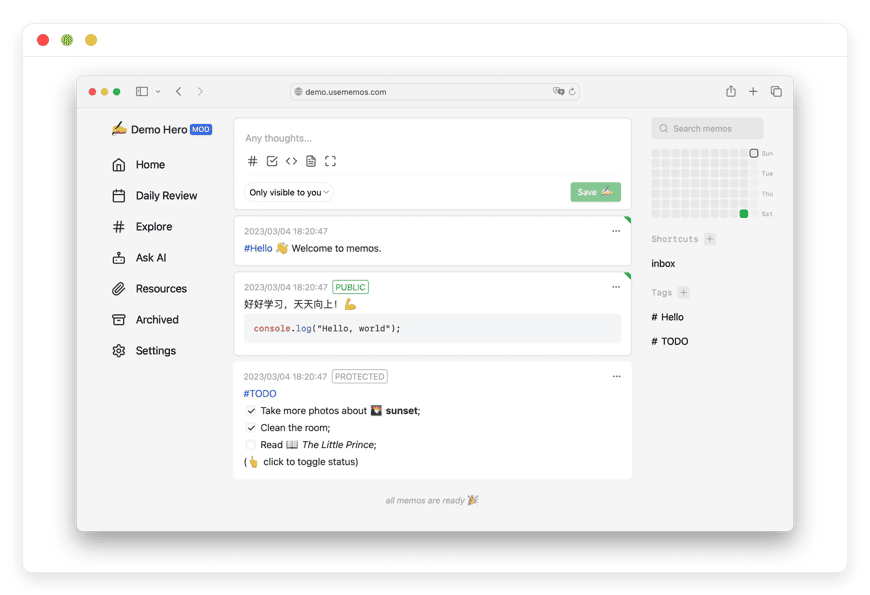
Managed Memos Hosting: Capture Thoughts Instantly
TLDR - Quick Answer
Memos is a lightweight, open-source note-taking tool built for rapid thought capture. It offers a timeline-first interface where you can write down ideas instantly using simple text formatting. Choosing Managed Memos Hosting means you get all the benefits of this fast, privacy-focused application without dealing with server upkeep.
Immediate Capture: Write down ideas the moment they strike. You skip complex folders entirely.
Plain Text Storage: Your notes remain in simple formats, ensuring they are always readable and accessible.
Instant Sharing: Turn private notes into a public microblog with a single click.
Zero Server Chores: We handle the server configuration, database connections, and system updates.
Always Online: Your workspace remains fast, secure, and ready whenever inspiration hits.
Introduction
Most note-taking apps force you into a rigid structure. You open the application, navigate through endless folders, name a document, and finally start typing. By that time, the core idea is gone. The friction kills your momentum. You need a fast, timeline-based tool that respects your workflow. Memos solves this exact problem. It gives you a clean, distraction-free space to record thoughts the moment they happen.
But running it yourself is a second job. Setting up databases, managing server ports, routing custom domains, and updating the software takes hours out of your week. Every minute spent tinkering with the command line is a minute you lose for actual writing or development. You want to write notes, not manage servers.
This is where Managed Memos Hosting changes the game. DANIAN acts as your invisible infrastructure. We provide the servers, apply the updates, and manage all the technical details behind the scenes. You simply log in and start writing. We handle the mess so you can focus entirely on your ideas.
What is Memos?
Memos is a highly popular open-source, self-hosted note-taking tool. It functions like a personal timeline for your brain. Instead of treating notes as long, heavy documents, Memos treats them as quick entries. You type your thought, hit save, and it joins your chronological feed. It is the perfect bridge between a personal diary and a professional knowledge base.
The project has massive community support. Built by a dedicated group of contributors and originally spearheaded by developers like boojack, it boasts over 20,000 stars on GitHub. The community actively builds new features, fixes bugs, and improves the platform daily. It is written in Go and uses modern web technologies like React and TypeScript. This technical stack ensures a snappy, highly responsive interface.
Under the hood, it relies on straightforward databases like SQLite, MySQL, or PostgreSQL to store your information securely. The application is extremely lightweight. It loads in milliseconds, ensuring you never have to wait to write down a fleeting thought.
Why is it trending?
Memos removes friction. People are tired of heavy applications that take ten seconds to load. They want a fast, local-first feeling tool that works instantly. Since it relies heavily on plain text input, users know their words will always remain readable. It combines the speed of a social media feed with the privacy of a personal notebook. Professionals across various fields are migrating to Memos because it matches the speed of human thought.
Why Choose Memos?
Hosting Memos gives you complete control over your personal knowledge base. When you use proprietary software, your notes sit on someone else's servers. Those companies can scan your text for targeted ads, change their pricing models overnight, or shut down entirely. You lose access to your life's work.
Memos is strictly open-source under the permissive MIT license. It includes zero telemetry and no hidden tracking scripts. You get the freedom to manage your thoughts securely. You can also turn Memos into a public microblog easily. You decide exactly what stays private and what the world sees.
The application scales beautifully. It grows from a private scratchpad to a shared team knowledge base without asking you to upgrade to a premium tier. Every feature is free and available immediately. By choosing Memos Managed services, you get this open-source freedom without the technical burden.
Key Features of Memos
Memos packs an incredible number of powerful tools into a very small footprint. The development team focused on speed, reliability, and ease of use. Here is a deep dive into exactly what makes this software stand out.
Timeline-First Interface
Forget about endless nested folders and complex hierarchies. Memos organizes your entries chronologically. You view your thoughts exactly as they happened. This workflow encourages rapid capturing. You open the application, type your idea, and move on. It looks and feels like a private social media feed. When you review your notes at the end of the week, you see a natural progression of your ideas. This reduces cognitive load significantly. You never have to ask yourself, "Which folder should this thought go into?"
Rich Markdown Support
You write in plain text using Markdown. You can add bold text, italics, blockquotes, and lists effortlessly without taking your hands off the keyboard. It supports advanced formatting like code blocks with language-specific syntax highlighting. You can even write complex mathematical formulas using LaTeX expressions. The interface highlights the syntax as you type. This makes formatting incredibly fast and keeps your text clean. When you export your notes, they remain in this universal plain text format.
Universal Search and Hierarchical Tags
Finding old notes is instant. You can assign custom tags to any entry. Memos supports hierarchical tagging. You can use tags like #project/website or #client/smith. This creates a flexible organizational structure that adapts to your needs. The universal search function scans your entire database in milliseconds. You can filter your search by specific tags, date ranges, or visibility settings. You will never lose a good idea just because you forgot exactly when you saved it.
Media and File Attachments
Memos handles much more than just plain text. You can drag and drop images, videos, audio files, and PDF documents directly into the editor. The application attaches them to your specific note seamlessly. It generates thumbnails automatically. This makes it a fantastic tool for saving visual inspiration, storing voice memos, or keeping important reference documents attached to your project notes.
Powerful API and Webhooks
Memos provides full REST and gRPC APIs]. You can connect it to other tools in your daily workflow easily. You can build custom frontends or integrate it into mobile shortcuts. Furthermore, Memos supports Webhooks. You can configure the system to send an automated payload to another service whenever a new note is created. You can use this to trigger automated build processes, send notifications to a team chat, or update an external database.
Telegram Bot Integration
This is one of the most beloved features in the community. You can link your Memos account to a custom Telegram bot. Once configured, you simply send a text message or forward an image to your bot on Telegram. The bot instantly saves that message as a new entry in your Memos timeline. This turns your favorite messaging app into an immediate thought-capture tool. You can save notes while walking, commuting, or standing in line, all without opening a web browser.
Flexible Storage Options
While Memos uses standard databases for text, it offers great flexibility for storing your media files. You can store images directly on the local server file system. If your media library grows massively, Memos allows you to connect S3-compatible object storage. This means you can store terabytes of photos and videos externally while keeping the main application blazing fast.
Single Sign-On (SSO) Support
If you run a team or an agency, managing passwords for every tool is frustrating. Memos supports modern authentication protocols. You can configure Single Sign-On using OIDC, GitHub, or GitLab. Team members can log in with one click using their existing credentials. This improves security and makes onboarding new users completely painless.
Public and Private Workspaces
Every single note in Memos has a specific visibility setting. You can set a note to "Private" so only you can see it. You can set it to "Protected" so other logged-in users on your Memos system can view it. Finally, you can set it to "Public". Public notes are visible to anyone on the internet who has the link. This granular control allows you to mix a highly private journal with a public-facing blog on the exact same platform.
Solutions per Industry
Memos adapts to various professional environments perfectly. Its flexible design means different industries use it to solve completely different pain points.
Software Developers and Engineers
Developers process massive amounts of technical information daily. They need a reliable place to store code snippets, terminal commands, stack traces, and error logs. Heavy documentation tools slow down the coding process. They take too long to load and require too much clicking.
With Memos Hosting, a developer can quickly paste a block of complex code, tag it with #bugfix/auth, and immediately get back to their compiler. The built-in syntax highlighting ensures the code remains perfectly readable. The robust API allows developers to send automated server alerts or deployment logs directly into their Memos feed using simple scripts. Three months later, when that same bug reappears, the developer searches the tag and finds the exact solution instantly. It saves hours of frustrating redundant work.
Digital Marketing Agencies
Agencies manage multiple clients, rapid deadlines, and endless streams of creative ideas. Account managers need a place to drop quick thoughts during intense client calls. Traditional document tools become a chaotic mess of untitled files.
Memos solves this by providing a chronological feed of client interactions. A marketer can log a quick idea for an ad campaign, attach an inspiration image, and tag it with #client/acme-corp. They can set the visibility to "Protected" so other team members can see the idea and comment on it. The webhook integration can even push these new ideas automatically into the agency's main Slack or Discord channel. It creates a seamless flow of creative communication without the bloat of traditional project management software.
eCommerce Store Owners
Running an online store requires juggling customer support, inventory management, and marketing schedules simultaneously. Store owners often work from their phones while managing physical stock.
By utilizing the Telegram bot integration, an eCommerce owner can take a photo of a damaged return, text it to their bot with the tag #return/order-105, and move on. The image and note are safely stored in their Memos timeline. Later, when they sit down at their computer, they have a chronological list of everything that happened that day. They can draft quick email replies to customers or jot down ideas for an upcoming holiday sale. The speed of Memos matches the fast pace of retail perfectly.
Academic Researchers and Educators
Academic research requires gathering raw information from hundreds of disparate sources. Students and professors read constantly and need a place to synthesize their findings.
Researchers use Memos to save exact quotes, URLs, and quick summaries of academic papers. The ability to render complex LaTeX mathematical formulas makes it an absolute necessity for science, technology, engineering, and mathematics students. Instead of struggling with complicated math formatting in traditional word processors, they simply type the LaTeX code, and Memos renders it beautifully. The timeline view helps students review their study notes chronologically before a major exam, recreating their exact learning journey.
Writers and Journalists
Writers generate dozens of scattered ideas, character names, and plot twists daily. Managing these creative fragments is incredibly tough. Ideas often strike when writers are away from their main desks.
Memos acts as the ultimate digital scratchpad. A journalist conducting field research can use Memos on their mobile browser to capture exact interview quotes in real-time. Since the application supports Markdown natively, the formatting translates perfectly when they move the text into their formal publishing platform later. They never have to worry about weird spacing or broken fonts. It provides a pure, distraction-free writing experience.
Project Managers
Project managers sit at the center of team communication. They conduct daily stand-up meetings, track workflow blockers, and provide status updates to stakeholders.
Using Memos Hosting, a project manager can keep a running log of daily stand-ups. They write quick bullet points noting what each team member achieved and what is blocking them. They tag these notes with #sprint-12. This creates a permanent, searchable historical record of the project's velocity. If a stakeholder asks why a specific feature was delayed last month, the manager can search the timeline and find the exact daily note explaining the technical blocker.
Freelance Consultants
Freelancers wear every hat in their business. They handle sales, execution, and billing. They need a lightweight tool to track their daily activities without paying for expensive corporate software.
A freelance consultant can use Memos to log client calls instantly. They type out a quick summary of the agreed-upon deliverables immediately after hanging up the phone. They can also use it for simple time tracking by noting when they start and stop a specific task. At the end of the month, they filter their Memos feed by the tag #billable/client-name and instantly have all the data they need to generate an accurate invoice.
Memos vs Other Softwares
Understanding how Memos compares to proprietary alternatives highlights its unique value. Many popular note-taking applications have become bloated, slow, and expensive. Memos offers a refreshing alternative.
| Feature | Memos | Proprietary Alternatives |
Input Speed | Instant, timeline-first capture. | Slow, requires heavy folder navigation. |
Text Format | Pure Markdown native. | Proprietary rich-text blocks. |
Privacy Focus | Zero telemetry. Open-source. | Scans content, tracks user habits. |
Financial Cost | 100% Free features forever. | Expensive monthly subscriptions required. |
Data Export | Standard Markdown, JSON, CSV files. | Difficult, messy formatting exports. |
Mobile Access | Progressive Web App capabilities. | Often requires an active data connection. |
| Customization | API access, Webhooks, custom CSS. | Locked ecosystem, zero modifications. |
Use Cases and Applications
Memos is an incredibly flexible application. Because it focuses on simple text and tags, you can tailor it to fit nearly any information-gathering task. Here are several practical ways you can apply this software today.
Personal Microblogging
You can share your daily thoughts, interesting web links, and personal images publicly without relying on massive social media networks. By setting specific notes to "Public," your Memos page becomes a clean, chronological blog. You can even inject custom CSS to change the visual styling of your public page.
Building a Second Brain
You can use Memos to build a comprehensive personal knowledge base. By utilizing the hierarchical tagging system, you can link related concepts together for future reference. It becomes a searchable extension of your memory.
Creating a Swipe File
Marketers and designers constantly look for inspiration. Memos is the perfect swipe file. You can save beautiful design inspiration, highly converting marketing copy, or interesting quotes you find across the web. You drag the image into Memos, tag it #inspiration/landing-page, and build a massive library of creative references.
Daily Journaling
The timeline interface makes Memos an exceptional digital diary. You can log your mood, track daily habits, or simply write down your private thoughts at the end of the day. The simple interface removes the pressure of writing long entries. A single sentence is perfectly acceptable.
Team Noticeboard
You can run a shared Memos workspace where multiple team members log in. It serves as an internal noticeboard where people drop quick updates, useful industry links, or general announcements for everyone to see. It reduces internal email clutter significantly.
Code Snippet Library
Developers can replace clunky tools like GitHub Gists with a private Memos installation. They store reusable code functions, complex SQL queries, and server configuration templates. The universal search guarantees they can retrieve that code block in seconds.
How DANIAN Helps
Running an open-source tool should be exciting, not exhausting. You want the power of Memos, but you do not want to learn Linux server administration. DANIAN handles all the heavy lifting so you can focus entirely on writing and organizing your thoughts.
Fully Managed Infrastructure
We handle the hosting from start to finish. Our expert team manages the initial server setup, configures the database connections, applies regular software updates, and monitors system performance continuously. Your workspace remains highly optimized without you having to lift a single finger.
Automated Backup & Monitoring
We protect your personal notes rigorously. Backups are configured automatically on a daily schedule and stored securely off-site. If you ever make a mistake and delete an important entry, you can use our simple one-click restore feature to bring your data back instantly.
Strict Security & Firewalls
Cybersecurity threats require strict, constant attention. We take the security of your private thoughts very seriously. Through automated operating system updates, proactive network monitoring, and custom security rules, we make sure your environment stays completely secure 24/7.
Seamless Software Updates
The open-source community evolves software rapidly. Memos releases new features and bug fixes frequently. We apply the latest security patches and new Memos versions seamlessly behind the scenes. You always have access to the newest features without any manual intervention.
24/7 System Monitoring
We watch your system around the clock. Our automated internal alerts detect technical issues instantly. We often step in and resolve these underlying problems before you even notice your workspace had a hiccup.
Guaranteed High Performance
Slow loading times ruin the rapid note-taking experience. The entire point of Memos is speed. With our scalable, modern infrastructure, we ensure consistent, high-speed performance. Whether you have ten notes or ten thousand, your timeline will load in milliseconds.
Risk-Free 7-Day Free Trial
Try the entire platform completely risk-free. See exactly how easy it is to use managed open-source software when experts handle the technical side.
Less server setup, more actual writing. Affordable from the start. Real technical help when you actually need it.
How to Get Started
Launching your new note-taking workspace is fast. You do not need to read any technical documentation or open a terminal window.
Visit danian.co and create your secure account.
Select Memos from our extensive open-source software catalog.
Relax while DANIAN automatically configures the database, routes the networking, and gets your software running.
FAQ
Does Memos support mobile devices and tablets?
Yes. Memos operates incredibly smoothly as a Progressive Web App (PWA). You can save the website directly to your home screen on any modern iOS or Android smartphone. It behaves exactly like a native mobile application, giving you full-screen access for quick typing.
Can I import my existing notes into Memos from other apps?
The Memos community actively builds and maintains various import tools. You can easily bring in plain text files, standard Markdown files, and CSV exports from other legacy systems.
Is the Memos software truly free to use?
Absolutely. The Memos application is licensed under the MIT open-source license. It has zero premium tiers and no hidden paywalls. Every single feature—from the APIs to the SSO integration—is unlocked by default for all users.
What is the difference between the software license and hosting?
The Memos software code itself is completely free to download, modify, and use. The hosting fee you pay to DANIAN covers the physical server costs, network bandwidth, automated backup storage, and the expert technical maintenance required to keep the application online, fast, and secure.
Can I use Memos with my own custom domain name?
Yes. You can attach your own personal custom domain to your workspace easily. This is highly recommended if you plan to use Memos as a public-facing microblog or portfolio site.
How exactly does the Telegram bot integration work?
You create a new bot using the official Telegram BotFather tool. You take the provided token and paste it into your Memos admin settings. From that point on, any text message, link, or image you send to that specific bot chat in Telegram automatically appears in your private Memos timeline.
What underlying database does Memos use?
Memos supports SQLite by default, which is incredibly fast and perfect for most personal and small team setups. It also supports robust databases like PostgreSQL and MySQL for larger, more complex organizational environments. We configure the optimal database for your specific performance needs.
Can multiple users collaborate on the same Memos system?
Yes. You can invite friends, family, or colleagues to create their own accounts on your Memos workspace. You can set specific notes to "Protected" so they can read and interact with your shared updates, making it a great lightweight collaboration tool.
Does Memos support dark mode?
Yes. The interface includes a beautiful, native dark mode built right in. It respects your system preferences automatically, or you can toggle it manually for comfortable late-night writing sessions.
Can I export my data if I decide to leave?
Yes. Because Memos respects your freedom, it offers comprehensive export options. You can download all your entries as standard Markdown files, or export the entire database to JSON or CSV formats. You are never trapped in the system.
Conclusion
Memos strips away the heavy complexity of traditional note-taking applications. It provides a incredibly fast, clean, timeline-based environment where you can capture ideas instantly. With its rich Markdown support, hierarchical tags, and powerful API integrations, it adapts perfectly to your unique personal workflow. Whether you are a developer logging server errors, a writer drafting dialogue, or an agency tracking client feedback, Memos speeds up your thought process.
You deserve a simple note-taking tool that works for you, not against you. By choosing Managed Memos Hosting, you eliminate all server headaches completely. We keep the system blazing fast, properly updated, and highly secure.
Experience the genuine power of fully managed open-source software.


