
Managed Meemo Hosting: Reclaim Your Thoughts Without the Server Headache
TLDR: What is Managed Meemo Hosting?
Meemo Defined: Meemo is an open-source personal data manager that acts as a continuous feed for notes, bookmarks, and to-do lists.
Immediate Value: Managed Meemo Hosting removes the burden of server maintenance so you can focus entirely on capturing your ideas.
Zero Configuration: Skip the manual server setup. Your workspace is ready immediately.
Automated Upkeep: We handle background updates, security patches, and daily backups.
Seamless Access: Reach your notes and bookmarks from any device without worrying about uptime.
The Modern Note-Taking Dilemma
Information overload is a real problem. We consume articles, brainstorm ideas, and create endless to-do lists. Managing this fragmented information often feels chaotic. Meemo solves this by giving you a unified, continuous feed for your brain. It replaces scattered lists with a single, searchable stream of thoughts.
But running it yourself is a second job.
Setting up a server, configuring databases, and maintaining SSL certificates drains your time. You want to capture ideas, not troubleshoot backend server errors. That is exactly where DANIAN steps in as your invisible infrastructure. We offer fully Managed Meemo Hosting so you never have to touch a terminal. You get the pure software experience while we handle the technical heavy lifting behind the scenes.
What is Meemo?
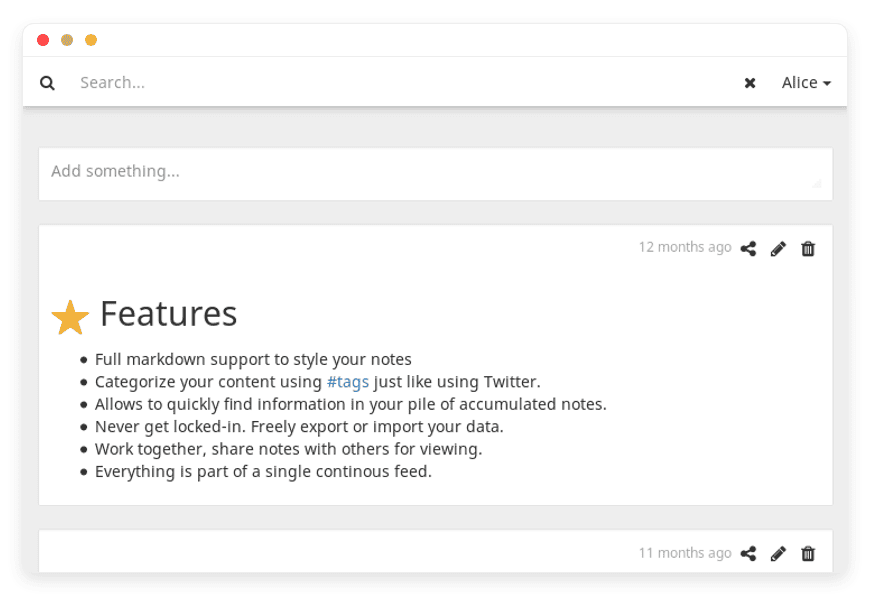
Meemo is an open-source application designed to simplify your life by capturing what is on your mind. Created by Johannes Zellner, Meemo functions as a personal data manager, bookmark manager, and to-do list all rolled into one. Instead of forcing you into complex folder structures, Meemo presents your information in a continuous, chronological news feed.
Whether you have a quick idea, a lengthy research note, or a link you want to read later, Meemo stores it instantly. It relies heavily on hashtags for organization, making categorization as simple as typing a word. With full Markdown support, you can style your notes beautifully without leaving your keyboard. Meemo also includes dedicated web extensions for Chrome and Firefox, allowing you to save web pages with a single click.
Why is it trending?
People are tired of bloated productivity applications. Many mainstream tools require a steep learning curve and constant organizing. Meemo is trending because it embraces simplicity. The continuous feed approach mirrors how we naturally consume information on social media. It reduces friction. You write your thought, add a hashtag, and move on. When you need it later, the powerful full-text search pulls it up instantly. Open-source advocates also appreciate Meemo because it guarantees control over where your personal information lives, away from prying corporate algorithms.
Why Choose Meemo?
Choosing to use an open-source note-taking tool gives you complete autonomy. Proprietary software often dictates how you should work. They force you into specific workflows, limit your export options, and charge recurring fees for basic features. Meemo respects your process and your wallet.
When you opt for Hosting Meemo through a managed provider, you get the perfect balance. You enjoy the raw freedom of open-source software combined with high-tier reliability. Meemo allows you to freely export or import your information anytime. You are never stuck. You control your workflow, your organization system, and your collaborative spaces. It handles everything from short inspiration bursts to lengthy, detailed memories. By switching to Meemo, you escape the subscription traps of mainstream apps and build a personal knowledge base that works exactly how you want it to.
Key Features of Meemo
Meemo is packed with thoughtful features designed to make capturing and retrieving information effortless. Here is exactly what makes this software a powerful addition to your daily routine.
Continuous Feed Interface
Unlike traditional note apps that rely on nested folders, Meemo uses a continuous feed. This resembles a social media timeline. You see your most recent thoughts first. This design removes the cognitive load of deciding where a note belongs. You simply write it and post it. This workflow drastically speeds up the process of capturing fleeting ideas before they disappear. You spend less time organizing and more time creating.
Instant Hashtag Organization
Categorization in Meemo is intuitive and fast. You categorize your content using #tags, just like using Twitter or Instagram. If you are working on a marketing campaign, you just append #marketing to your note. When you click that tag later, Meemo filters your entire feed to show only related items. You can combine multiple tags to narrow down your focus instantly, creating a dynamic filing system that adapts to your needs.
Powerful Full-Text Search Engine
Sometimes you forget to tag a note. Meemo anticipates this with an advanced full-text search engine. It scans the entire body of your accumulated notes to find specific words or phrases. You will never lose an idea again. This robust search capability allows you to retrieve crucial information from months or years ago in milliseconds, ensuring your knowledge base is always highly accessible.
Native To-Do List Integration
Meemo does not just store text; it helps you take action. You can integrate checklists directly into your continuous feed. By using simple formatting, you create actionable items that sit right alongside your notes and bookmarks. When you complete a task, check it off. This keeps your daily objectives visible without requiring a separate task management application.
Full Markdown Support
Formatting should not slow you down. Meemo offers full Markdown support to style your notes. You can create headers, bold text, lists, blockquotes, and code blocks using simple keyboard strokes. This is perfect for developers, writers, and researchers who want clean, readable notes without clicking through formatting menus. The software renders your Markdown beautifully, making your feed a pleasure to read.
Dedicated Browser Extensions for Bookmarking
Meemo acts as an exceptional bookmark manager. It offers dedicated web extensions for both Chrome and Firefox browsers. When you find an interesting article, tool, or resource online, you can save it directly to your Meemo feed with a single click. You can add context or tags right from the browser extension popup, keeping your research workflow completely uninterrupted.
Unrestricted Import and Export
Meemo believes your information belongs strictly to you. The software includes built-in tools to freely export or import your data. If you ever decide to move your notes elsewhere, you can take everything with you in standard formats. This flexibility ensures you are never trapped by a software ecosystem, giving you total peace of mind.
Solutions per Industry
Meemo adapts easily to various professional workflows. Because it is highly flexible, professionals across different sectors use it to manage their daily chaos. Here is how specific industries use this versatile tool.
Creative Agencies and Freelancers
Freelancers and creative professionals juggle multiple clients, deadlines, and inspiration sources simultaneously. Traditional project management tools are often too rigid for spontaneous brainstorming. Meemo solves this perfectly. A freelance graphic designer can use the browser extension to instantly bookmark design inspiration, tagging it with #inspiration and #clientname. Later, they can compile specific notes or mood board links directly for a client pitch. The continuous feed ensures no fleeting creative thought is lost during a busy workday.
Academic Researchers and Students
Research requires gathering massive amounts of disparate information: quotes, PDFs, web links, and personal insights. Organizing this in rigid folders quickly becomes a nightmare. Researchers use Meemo to capture literature reviews efficiently. They can paste a quote, format it with Markdown, and tag it with #thesis and #chapter2. The full-text search becomes a lifesaver when writing the final paper, allowing the student to instantly recall a specific source or thought they saved months prior without digging through dozens of documents.
Software Development Teams
Developers need a reliable place to store code snippets, bug reports, and terminal commands. Meemo is an ideal fit for this because of its native Markdown support. A developer can quickly save a useful piece of code within a fenced code block, ensuring the formatting and syntax remain intact. By tagging notes with #python, #bugfix, or #frontend, they build a highly searchable personal wiki. They can quickly pull up a terminal command they figured out three months ago in seconds.
Real Estate Agents
Real estate professionals spend most of their time on the road, viewing properties and meeting clients. They need a fast way to capture details on the fly. Meemo allows an agent to type a quick note on their phone right after a viewing. They can write "Client loved the backyard, hated the kitchen cabinets" and tag it with #smith-family and #feedback. They can also use the browser extension to save property listings directly into their feed. The chronological timeline helps them remember exactly when they showed a specific house.
Independent Journalists and Writers
Investigative journalism involves connecting dots over long periods. Writers collect interviews, news clippings, and stray thoughts that eventually turn into an article. Meemo acts as a digital corkboard for these professionals. A journalist can save an online article using the browser extension, add a quick summary, and tag it #local-politics. Because Meemo displays notes in a chronological feed, the writer can easily scroll through their timeline to see how a story developed over the past few weeks, finding angles they might have missed otherwise.
Event Planners
Event planners coordinate dozens of moving parts: caterers, florists, venues, and guest lists. Dropping the ball on one detail can cause chaos. Meemo serves as an excellent central hub for these details. A planner can create Markdown checklists for a specific event and tag it #summer-gala. When they find a great floral arrangement idea online, they bookmark it to the feed. The simplicity of the application means they are not bogged down in complex project management software while they are running from meeting to meeting.
E-commerce Store Owners
Managing an online store requires keeping a close eye on competitors, marketing trends, and inventory issues. E-commerce operators use Meemo to track this fast-paced environment. An owner might see a competitor running a great ad campaign. They can bookmark the link to Meemo and tag it #ad-ideas and #black-friday. They can also use the continuous feed to log daily store metrics or note down sudden website bugs, tagging them with #urgent-fix. This keeps all their business intelligence centralized and easily searchable.
Meemo vs Other Softwares
How does Meemo stack up against expensive, mainstream productivity applications? Let us look at the feature comparison.
| Feature | Meemo | Proprietary Note Apps (e.g., Evernote, Notion) |
| Pricing Model | 100% Free & Open-Source | High recurring monthly subscriptions |
| Core Interface | Continuous Timeline Feed | Complex, nested folder hierarchies |
| Data Export | Free and unrestricted in standard formats | Often restricted or requires premium tiers |
| Formatting | Full native Markdown support | Proprietary block editors or rich text |
| Organization | Agile Hashtags (#tags) | Rigid Notebooks and Sub-pages |
| Browser Extension | Yes (Chrome & Firefox) | Yes |
| Simplicity | Clean, fast, minimal distraction | Often bloated with unused features |
Use Cases and Applications
Meemo is highly adaptable for personal use as well. Here are a few practical ways you can integrate it into your daily routine.
Building a Read-It-Later Queue
We all find fascinating articles during the day that we do not have time to read. Use the Meemo browser extension to save these links instantly. Tag them with #toread. When you have free time on the weekend, pull up the tag and work through your personal reading list without distraction.
Managing Daily Standups and To-Do Lists
Create a new note every morning detailing your tasks for the day. Use Markdown checklists to track your progress. Tag the note with #todo and #daily. This creates a historical record of your accomplishments, which is incredibly helpful when writing weekly reports or tracking your productivity over time.
Compiling a Recipe Database
Forget clunky recipe websites filled with ads and long stories. When you find a recipe you love, copy the ingredients and instructions into Meemo. Tag it with #recipe, #dinner, or #vegetarian. The full-text search lets you find that specific chicken recipe instantly when you are standing in the grocery store aisle.
Tracking Meeting Minutes
During a client call, open Meemo and jot down key decisions and action items. Because the interface is a continuous feed, you do not have to waste time finding the correct folder before the meeting starts. Just write, tag it with #meeting and the client's name, and move on with your day.
Creating a Personal Journal
Meemo serves as an excellent private journal. Capture your daily thoughts, milestones, or memorable events. Since the feed is chronological, scrolling back through your notes feels like reading a well-organized timeline of your life. Tag entries with #journal or #memories to keep them distinct from your professional work tasks.
How DANIAN Helps
Running an open-source application requires serious technical commitment. You have to provision a server, configure the database, install updates, and monitor security. That is exhausting. DANIAN acts as your quiet enabler. We handle the mess; you get the glory.
Here is how our Managed Meemo Hosting transforms your experience:
Fully Managed Infrastructure
We handle the hosting completely. Our team manages everything from initial setup to regular updates, security patches, and performance monitoring. Your software is always optimized without you having to lift a finger. You get the pure application experience.
Automated Backup & Monitoring
Losing your notes is a nightmare. With DANIAN, automated daily backups are configured automatically and stored securely. If you ever make a mistake and delete an important entry, you can rely on a simple one-click restore. We protect your peace of mind.
Secure SSL & Firewall
With cybersecurity threats on the rise, we take security seriously. From automated updates to proactive monitoring and strict firewalls, we make sure your environment is secure 24/7. Your private thoughts remain entirely private.
Silent Updates
Software updates are critical for security and new features, but manual upgrades often break things. Security patches and new versions are applied silently without your intervention. You always run the latest, safest version of the software.
24/7 Proactive Monitoring
We watch your setup around the clock. Issues are detected and often resolved before you even notice them. Our systems ensure your application remains healthy and responsive at all hours of the day.
Guaranteed Performance
Downtime can disrupt your entire workflow. With our scalable infrastructure, we ensure consistent performance even as your user base or note collection grows. Meemo will load instantly, whether you have ten notes or ten thousand.
Zero Risk Entry
We offer a 7-Day Free Trial so you can experience the speed and convenience firsthand. There is no risk. Less setup means more time for actual work. It is affordable from the start, providing real help when you need it.
How to Get Started
Ready to revolutionize how you take notes and manage bookmarks? Getting started with DANIAN is incredibly fast and simple.
Step 1: Visit danian.co and sign up for an account.
Step 2: Select Meemo from our extensive software catalog.
Step 3: Relax while DANIAN gets your software running.
You do not need to read technical documentation or open a command line. We build your environment automatically so you can start organizing your thoughts immediately.
Frequently Asked Questions
What is the difference between the Meemo license and hosting fees?
Meemo is open-source and completely free to use. You do not pay any licensing fees for the software itself. The monthly fee you pay to DANIAN strictly covers the managed hosting, server resources, automated backups, and expert technical maintenance.
Can I migrate my existing notes into Meemo?
Yes. Meemo includes comprehensive import tools. If you have notes in standard text or Markdown formats from other applications, you can easily bring them into your new Meemo environment without losing your information.
Is my information secure on DANIAN?
Absolutely. We configure your application to be secure by default. This includes automated SSL certificates for encrypted traffic, strict firewall rules, and daily isolated backups to ensure your private notes stay protected at all times.
How does the full-text search work?
The search engine indexes every word within your notes. When you type a query into the search bar, Meemo scans your entire history and displays the results instantly, highlighting the relevant text. It works flawlessly alongside the hashtag system to find exactly what you need.
Do the web extensions cost extra?
No. The Chrome and Firefox extensions are completely free. You simply install them from your browser's extension store and connect them to your Meemo URL hosted on DANIAN.
Can I access Meemo from my mobile device?
Yes. Meemo features a highly responsive web design. It functions perfectly on mobile browsers, allowing you to capture thoughts and search your feed smoothly while on the go.
What happens if the software needs an update?
DANIAN handles all updates automatically. We test new releases and apply them to your environment seamlessly. You will always have the latest features, bug fixes, and security patches without doing any manual configuration.
Conclusion
Managing your thoughts, tasks, and bookmarks should not feel like a heavy chore. Meemo offers a brilliantly simple, continuous feed that adapts to how your brain actually works. With powerful Markdown support, instant hashtag filtering, and robust search capabilities, it replaces bloated proprietary apps with elegant open-source efficiency.
You deserve a personal data manager that just works, without the burden of server maintenance holding you back. Let DANIAN provide the invisible infrastructure so you can focus entirely on your ideas and productivity.
Experience the power of fully managed open-source.


