
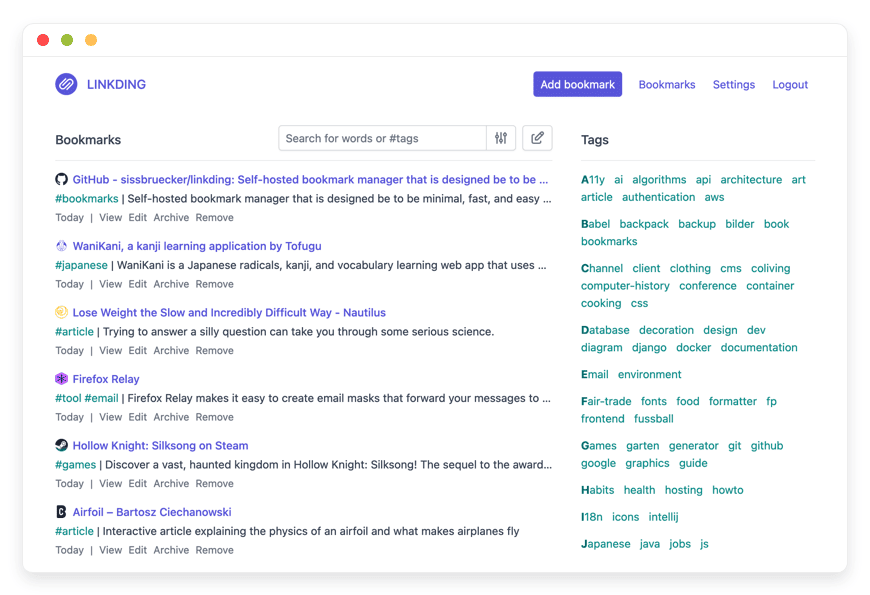
Managed Linkding Hosting - The Ultimate Bookmark Manager
TLDR - Quick Answer
Linkding is a minimal, blazing-fast open-source bookmark manager created to organize your links, articles, and research without distractions. Choosing Managed Linkding Hosting means you get all the benefits of this powerful software without touching a command line.
Instant Access: Get running in minutes without complex server configurations.
Automatic Archiving: Save permanent HTML snapshots of your bookmarks effortlessly.
Browser Integration: Add and search links directly from Chrome or Firefox.
Zero Maintenance: We handle the necessary updates, database backups, and security patches.
Immediate Value: Skip the technical setup and start organizing your digital life immediately.
Introduction
We all know the struggle of a cluttered web browser. You find an amazing article, bookmark it, and then never look at it again. Or worse, you organize your research into a folder, only to find the webpage deleted a year later. Modern internet users suffer from information overload. Proprietary bookmark managers often bloat their applications with unnecessary social feeds. They also tend to lock your most valuable links behind premium paywalls.
Linkding solves this problem completely. It is a lightweight, self-hosted bookmarking tool designed for pure readability, speed, and focus.
But running it yourself is a second job. Configuring environments, managing SQLite databases, and keeping the server updated takes valuable hours away from your actual work. Troubleshooting broken dependencies is an exhausting process.
That is where DANIAN comes in. We act as your invisible infrastructure. We handle the technical heavy lifting so you can enjoy a flawless bookmarking experience. You get the ultimate open-source tool without the operational headaches.
What is Linkding?
Created by developer sissbruecker, Linkding is a self-hosted bookmark manager built using the robust Django web framework. The name cleverly combines "link" (a URL) and "ding" (the German word for thing). It is literally "a thing for your links." It functions as a centralized, private hub for saving, reading, and archiving web pages.
The software utilizes a lightweight SQLite backend. This ensures the application runs incredibly fast, even when managing thousands of saved websites. It is built to be a low-maintenance, high-performance utility for people who value organization.
Why is it trending?
Linkding is gaining massive popularity because it does exactly one thing and does it perfectly. Instead of overwhelming users with complex organizational trees, it relies on a clean interface. It features robust tag auto-completion and blazing-fast search capabilities. When you save a link, the software extracts titles, descriptions, and icons automatically. Furthermore, its ability to save offline snapshots ensures your digital library survives even if a target website goes offline.
Why Choose Linkding?
When you rely on proprietary bookmarking tools, you are at the mercy of their pricing updates. They can change features or introduce annoying advertisements at any moment. Hosting Linkding gives you total authority over your digital library.
This software represents open-source freedom at its finest. It comfortably replaces subscription-based read-it-later applications. It keeps your reading environment completely ad-free. Because it uses the standard Netscape HTML format, you can easily export your entire collection at any time. This immense flexibility makes Hosting Linkding the absolute smartest choice for anyone serious about preserving their web discoveries.
Key Features of Linkding
Linkding packs a powerful punch despite its highly minimalist design. Here is a deep dive into the specific features that make this software exceptional.
Clean, Distraction-Free Interface
The user interface is completely optimized for readability. It strips away unnecessary visual noise, allowing you to quickly add and find bookmarks. You can switch between light, dark, or auto themes based on your system preferences. The typography is clear, and the layout emphasizes your saved content above all else.
Automated Metadata Extraction
You do not have to manually type out details for every saved link. When you add a new URL, Linkding automatically fetches the page title, description, favicon, and preview image. This functionality turns a simple list of text links into a highly visual, easy-to-browse library. It saves you countless hours of manual data entry.
Advanced Web Archiving
Web pages disappear from the internet all the time. Linkding solves this permanent problem by automatically creating snapshots of bookmarked websites. By using the integrated singlefile-cli tool in the background, it converts web pages into single HTML files. If a site goes offline, you still have the exact content stored safely. If you link directly to a PDF document, the system will download the actual PDF instead of creating an HTML snapshot.
Browser Extensions & Seamless Workflow
Linkding fits perfectly into your daily internet routine. The official browser extensions for Firefox and Chrome allow you to add bookmarks with two simple clicks. You can even search your entire Linkding database directly from your browser's address bar. This removes the friction of opening a separate application just to find a saved link.
Multi-User Collaboration
Linkding supports multiple users out of the box. You can create separate profiles for your team members, students, or family. It also includes the ability to share specific bookmarks with other users. You can even make specific links visible to guests. This is an absolutely perfect feature for collaborative research projects.
Bulk Editing and Markdown Notes
Managing hundreds of links is completely effortless. You can apply bulk operations to add tags, delete entries, or modify multiple bookmarks at once. Additionally, Linkding supports Markdown notes. This allows you to add personal commentary, formatted text, or detailed summaries to any saved link.
Developer-Friendly REST API
For those who love automation, Linkding offers a comprehensive REST API. You can write custom scripts to interact with your bookmark database. Developers use this to build third-party applications, automate link saving from chat platforms, or integrate Linkding into massive enterprise workflows.
Progressive Web App (PWA) Support
While there is no native mobile application, Linkding is built as a highly responsive PWA. You can install it directly to your phone's home screen from your mobile browser. It behaves exactly like a native app, offering a fast and fluid experience on both iOS and Android devices.
Solutions per Industry
eCommerce
Running a successful online store requires constant, aggressive market research. eCommerce managers use Linkding to save competitor product pages, pricing strategies, and marketing inspiration. With the automatic archiving feature, they can capture a permanent snapshot of a competitor's landing page. If the competitor changes their price or redesigns their store later, the eCommerce manager still has the original HTML file saved for direct comparison.
Agency
Creative and marketing agencies deal with massive amounts of client assets. They also manage huge inspiration boards for upcoming campaigns. Instead of scattering important links across chaotic chat channels, agencies use Linkding to create shared collections. A team can tag bookmarks with specific client names or project types. This gives every designer and copywriter a single source of truth. They can quickly locate campaign inspiration, software tutorials, and brand guidelines without asking colleagues for links.
Education
Educators and university students process hundreds of academic journals daily. Linkding provides a pristine, distraction-free environment to build comprehensive reading lists. Students can attach detailed Markdown notes to complex academic articles. They can summarize key points directly alongside the link for their thesis. The automatic PDF download feature ensures that direct links to research papers are saved as physical assets. This prevents broken links when university databases inevitably update their URL structures.
Linkding vs Other Softwares
When choosing a bookmark manager, it helps to see how open-source solutions stack up against proprietary applications.
| Feature | Linkding | Raindrop.io | |
| Price | Free (Open-Source) | Monthly Subscription | Monthly Subscription |
Offline Archiving | Yes (HTML & PDF) | Premium Only | Premium Only |
Markdown Notes | Yes | No | No |
Custom Tags | Unlimited | Limited on Free | Yes |
Multi-User Sharing | Yes | No | Team Plan Required |
Ad-Free Interface | Always | No (on Free) | Yes |
Use Cases and Applications
Read-It-Later Lists
Turn Linkding into your ultimate personal reading queue. Save long-form articles during the busy workday. Read them later on your tablet in the evening. The clean UI ensures you focus entirely on the text without distracting sidebars, pop-ups, or floating menus.
Asset Libraries for Designers
Digital designers constantly hunt for SVG icons, font pairings, and CSS tricks. By using a strict tag structure like "Typography", "Color Palettes", and "Vectors", creatives can build a highly organized visual library. Because Linkding fetches preview images, this library is highly visual and searchable in mere milliseconds.
Code Snippet Repository for Developers
Software developers read countless GitHub repositories and StackOverflow threads. Linkding allows developers to save these vital links. More importantly, they can use the Markdown notes feature to paste the exact code snippet they need. This creates a highly customized, searchable knowledge base for daily coding tasks.
Permanent Web Archiving
Investigative journalists and professional researchers need to reference web pages that might be deleted. They cannot rely on live URLs that change without warning. By using Linkding's automatic HTML snapshot capability, they create an immutable, offline archive of critical information that remains accessible forever.
Customer Support Knowledge Base
Small customer support teams can use Linkding to store internal tutorials and standard operating procedures. By enabling shared bookmarks, the team instantly creates a lightweight wiki. It requires zero training to use, allowing new hires to find answers to customer questions instantly.
How DANIAN Helps
We act as the quiet enabler behind your software. We handle the mess; you get the glory. Running a web server, managing databases, and keeping software updated is a frustrating experience. We eliminate that friction entirely so you can focus on your work.
Fully Managed
We handle the hosting entirely. Our team manages everything from initial setup to regular updates, security patches, and performance monitoring. Your software is always optimized without you having to lift a finger.
Backup & Monitoring
Losing your digital library is a nightmare. We provide automated daily backups, stored securely. Everything is configured automatically, stored securely, and features one-click restore capabilities if you ever need them.
SSL & Firewall
With cybersecurity threats on the rise, we take security seriously. Secure by default, your system is protected. From automated updates to proactive monitoring and strict firewalls, we make sure your environment is secure 24/7.
Seamless Updates
Software requires constant maintenance to stay secure. We ensure security patches and new versions applied without your intervention. You always enjoy the latest Linkding features without reading complex release notes.
24/7 Monitoring
We keep a constant watch over your infrastructure. Issues detected and often resolved before you notice a slowdown or interruption in your daily workflow.
Guaranteed Performance
Downtime can be detrimental to your business. With our scalable infrastructure, we ensure consistent performance even as your user base grows. Your bookmark searches will remain blazing fast.
7-Day Free Trial
There is zero financial risk. Test the full capabilities of the software with our 7-Day Free Trial. Less Setup, More Development. Affordable from the Start. Real Help When You Need It.
How to Get Started
Starting your own Linkding environment is incredibly simple with DANIAN. You do not need to configure servers, set up databases, or understand complex networking rules.
Step 1: Visit danian.co and quickly create your account.
Step 2: Select Linkding from our extensive software catalog.
Step 3: Relax while DANIAN launches your software in the background.
FAQ
Does Linkding have a mobile app?
While there is no official native mobile app in the app stores, Linkding is built as a Progressive Web App (PWA). You can install it directly to your phone's home screen from your mobile browser for an app-like experience.
Can I import my existing bookmarks?
Yes. Linkding fully supports importing bookmarks via the standard Netscape HTML format. You can easily migrate your entire library from Chrome, Firefox, Safari, or other bookmark managers in seconds.
How does the Singlefile archiving work?
Linkding integrates seamlessly with the Singlefile browser extension. When you save a link, the extension captures the exact state of the web page. It then uploads it as a single HTML file directly to your Linkding server.
Can I manage multiple users on one account?
Yes. Linkding supports multiple user profiles. You can share access with team members or family. This allows everyone to maintain their own private lists or share specific links with the group.
Do I have to pay a license fee for Linkding?
No. Linkding is completely free and open-source under the MIT license. You only pay for the reliable managed hosting infrastructure provided seamlessly by DANIAN.
Does it support Single Sign-On (SSO)?
Yes. Linkding supports SSO via OIDC or authentication proxies. This makes it incredibly easy to integrate the bookmark manager into your existing team environments and corporate identity providers.
How do I search my bookmarks?
You can search via the web interface using keywords, specific tags, or domain names. If you use the browser extension, you can even search your Linkding database directly from your browser's URL bar.
What happens if a saved website goes offline?
If you have the archiving feature enabled, you will still have access to the website. Linkding saves an offline HTML snapshot or PDF file at the exact moment you bookmark the page.
Conclusion
Linkding is the ultimate solution for organizing your web discoveries. It offers unparalleled speed, robust offline archiving, and a beautiful, distraction-free interface. It gives you complete authority over your bookmarks without the clutter of traditional read-it-later applications. You will never lose an important link again.
Experience the power of fully managed open-source.


