
Managed Komga Hosting: Build Your Ultimate Digital Comic Server
TLDR - Quick Answer
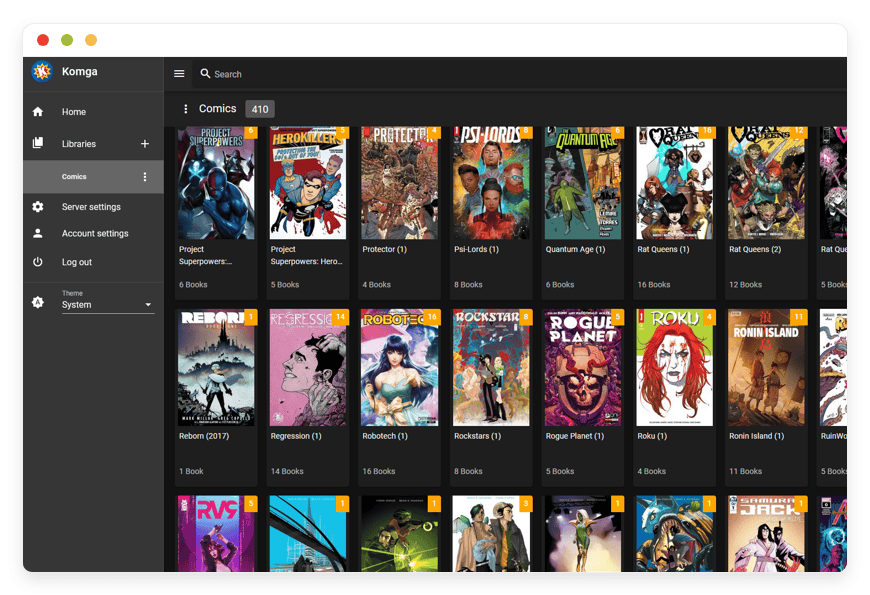
Komga is a dedicated, open-source media server built specifically for your comics, mangas, magazines, and eBooks. Hosting it provides a central, streaming-friendly library for all your digital reading material.
Universal Streaming: Read your entire collection on any device without downloading massive files locally.
Format Flexibility: Natively supports CBZ, CBR, EPUB, and PDF formats.
App Integration: Connects seamlessly with popular mobile readers like Mihon, Komelia, and Panels.
Immediate Value: Managed Komga Hosting removes the frustration of server configuration. You focus entirely on reading and organizing your collection.
Introduction
Managing a massive digital collection manually is a frustrating experience. You likely have thousands of comic and eBook files. They sit scattered across external hard drives and local computer folders. Finding the right issue is slow. Moving it to your tablet via a USB cable feels outdated. Tracking your reading progress across different devices is nearly impossible. You want a seamless experience for your digital reading material. You need a central library that looks beautiful. It should track your progress accurately. It should stream instantly to whatever screen you have in your hand.
But running a media server yourself is a second job. Configuring Java runtime environments takes hours. Handling complex Docker setups is tedious. Mapping internal network ports causes headaches. Troubleshooting remote access takes away from your actual reading time. Every software update risks breaking your library configuration.
DANIAN acts as your invisible infrastructure. We provide a fully Managed Komga Hosting environment that eliminates technical friction. You get the powerful media server you want. You never have to open a command line terminal. You never have to read a complex error log.
What is Komga?
Komga is a highly specialized media server built for visual and text documents. It handles comics, mangas, magazines, and eBooks. Developed by the open-source contributor known as Gotson, it scans your local digital library. It then serves it up through a clean, modern web interface. The software understands the structure of sequential art and book metadata. It extracts cover images automatically. It categorizes your issues by series. It remembers exactly which page you stopped reading on.
The platform is designed to run silently in the background. You point the server to the folders containing your media files. It handles the heavy lifting of indexing and organizing automatically. You access the interface from any standard web browser. You can also connect dedicated reading applications directly to the server database.
Why is it trending?
Readers are exhausted by fragmented digital libraries. Buying comics and eBooks from multiple digital storefronts is annoying. You end up juggling four different apps just to read your own purchases. This software unifies everything into one central hub. With built-in OPDS support and a robust REST API, it communicates perfectly with community-favorite reader apps. The ability to host your own private, customized reading platform makes this software an essential tool.
Why Choose Komga?
Choosing an open-source media server gives you complete control over your media. You never worry about a digital storefront suddenly closing down. You never worry about losing access to your purchased books. You hold the files. The software simply makes them beautiful and accessible.
When you look into Hosting Komga, you are building a personal cloud library. You replace restrictive, proprietary reading platforms. Those platforms dictate how, when, and where you consume your media. This software does not serve you ads. It does not track your reading habits for marketing purposes. It does not force you to maintain an active internet connection to a corporate server. You get the polish of a premium commercial application with the freedom of open-source software. Opting for a Komga Managed environment guarantees that your setup is always fast and available.
Key Features of Komga
The software includes powerful tools designed specifically to make reading and organizing large digital libraries effortless. The feature set goes far beyond basic file storage.
Extensive File Format Compatibility
The server natively reads comic book archives like CBZ and CBR. It reads text-based eBooks in EPUB format. It also handles standard PDF documents effortlessly. You drop your folders into the designated library directory. The system processes them instantly. Handling modern RAR5 archives usually causes massive headaches on basic setups. This is because they require specific native Java decoding libraries. With a properly configured environment, the server extracts these newer archive types flawlessly. The workflow benefit is massive. You stop wasting hours running batch conversions on your computer. Your files remain exactly as they are. They are ready to stream instantly.Universal OPDS and API Integrations
The software broadcasts your entire library using the Open Publication Distribution System. It supports both OPDS v1.2 and v2. This protocol allows external mobile reader applications to communicate securely with your server. Mobile apps like Mihon, Komelia, Panels on iOS, and CDisplayEx recognize this feed natively. The workflow benefit shines brightly when you switch devices. You can read a few chapters on your desktop web interface. You can grab your tablet for the commute. You pick up exactly on the page you left off. The robust REST API handles sync progress seamlessly in the background.Precision Web-Based Readers for Manga and Comics
You do not always need a dedicated mobile app to enjoy your collection. The server includes a specialized web reader called DIVINA. It is built specifically for sequential art. It supports double-page spreads perfectly. It offers distinct right-to-left reading modes, which is essential for manga. You can also adjust page scaling and set custom background colors. The workflow benefit is immediate accessibility. You can log into your server from any desktop browser and enjoy a premium reading experience instantly.Intelligent Duplicate File and Page Detection
Managing a massive archive over several years leads to duplicate files. It also leads to overlapping pages across different volumes. The software includes a specialized analysis engine. It hashes and compares images inside your compressed archives. It accurately identifies duplicate files across separate folders. It flags identical pages within different books. The workflow benefit is twofold. First, you save valuable storage space by safely deleting redundant archives. Second, you drastically improve your reading experience. You easily strip out repetitive ad pages or tedious recap pages that interrupt the story.Advanced Metadata and Organization Management
The system scrapes metadata from standard formats. This allows the server to populate author, artist, synopsis, and publication dates automatically. When the automatic scraping misses the mark, you can manually edit the metadata. You do this directly from the web dashboard. Furthermore, you can organize series into macro-level Collections. You can group all separate Batman runs easily. You can also build specific sequential Readlists. This helps you track the exact reading order for a massive crossover event. The workflow benefit translates to pure enjoyment. You stop manually numbering file folders to force a reading order. You curate perfect playlists of comics instead.Granular User Roles and Restrictions
A massive, curated comic library is meant to be shared. The platform provides a comprehensive user management system. You can invite friends and family to your server easily. As the administrator, you configure specific access rules per account. You can restrict access to specific libraries containing mature themes. You can set strict password requirements. You can also monitor overall server activity. The workflow benefit is peace of mind and personalization. Every user gets their own tracking history. They get custom bookmarks and recommendations without altering your main profile.Local Artwork and Custom Asset Overrides
Sometimes automatic metadata scrapers fail to find high-quality covers for obscure titles. The software handles this gracefully by prioritizing local assets. You simply place an image named cover.jpg or poster.png inside the series folder. The server applies it instantly. The workflow benefit is aesthetic control. You ensure your digital library always looks exactly how you want it to look. You bypass slow scrapers and maintain a visually perfect gallery.
Solutions per Industry
While primarily built for individual readers, the robust organizational tools make this software highly valuable across various professional and collaborative sectors.
Independent Publishers and Creators
Distributing digital review copies to critics is traditionally a very messy process. Sending huge ZIP files via email attachments results in broken downloads. Temporary cloud links expire quickly and frustrate reviewers. By running a dedicated media server, independent publishers solve this immediately. They grant secure, temporary user accounts to reviewers. Critics log in via a clean web interface or their favorite tablet application. They read the unreleased material smoothly. Access can be revoked instantly at any time. This keeps unreleased works secure from unauthorized distribution. The workflow benefit is a highly professional, controlled review process.
Educational Institutions
Schools, public libraries, and university archives rely on graphic novels for their curriculums. Providing student access to digital versions usually means navigating awful library software. Setting up this specific software creates a highly accessible digital library. Teachers build precise Readlists for specific courses. This ensures students read chapters in the exact chronological order required for their assignments. The native EPUB and PDF support is also a huge advantage. Standard text documents and textbooks sit perfectly alongside the graphic novels in one central location.
Creative Agencies and Archivists
Storyboard artists and professional illustrators generate massive amounts of sequential art. Storing these visual assets in standard cloud drives makes browsing a nightmare. Packaging these assets into CBZ files and serving them via a comic server changes everything. It turns a static file dump into a highly visual, searchable gallery. Creative directors can swipe through high-resolution storyboards on an iPad during a client pitch. They read it just like a digital magazine. They use full-screen web readers without downloading gigabytes of raw files beforehand.
Translation and Scanlation Teams
Groups that translate foreign manga into English face massive logistical challenges. They have teams of cleaners, redrawers, translators, and typesetters. Moving huge RAW image files back and forth via chat apps causes heavy compression and confusion. By hosting a central server, scanlation teams create a private hub. Translators can upload rough drafts directly to a hidden library folder. Proofreaders log into the server and read the chapter exactly as an end-user would. This helps them spot dialogue flow issues visually before releasing the final chapter to the public.
E-Learning and Corporate Training Content
Corporate environments often generate hundreds of internal training manuals. Distributing these as plain PDFs via email chains leads to outdated versions circulating around the office. Hosting this software provides an elegant internal documentation library. HR departments upload employee handbooks and technical EPUB guides. They use the Collections feature to group manuals by specific departments. Employees log in and find exactly what they need visually. The server tracks which pages they have read, making it easy to resume long technical documents.
Historical Societies and Museums
Preserving delicate, out-of-print periodicals or historical newspaper strips is a major challenge for archivists. Scanning them is only the first step. Displaying them to researchers in an accessible way is the real hurdle. Traditional text-based file directories fail to capture the visual nature of these documents. This software generates high-quality thumbnails for every single page. Researchers visually browse through decades of scanned public domain material seamlessly. They can zoom into specific panels using the web reader without risking damage to the original physical copies.
Komga vs Other Softwares
When evaluating how to manage your reading material, you might consider relying on massive corporate storefronts or generic file viewers. Here is how hosting your own media server compares to using proprietary commercial apps.
| Feature | Komga | Proprietary Commercial Apps |
| Supported Formats | CBZ, CBR, EPUB, PDF | Locked strictly to proprietary, encrypted formats |
| Offline Reading | Native support via multiple OPDS client apps | App-specific, often restricted by DRM checks |
| Content Censorship | Complete freedom over your library | Subject to strict platform store guidelines and removals |
| Library Organization | Custom Collections, Readlists, and manual tagging | Rigid, algorithm-driven sorting interfaces |
| Multi-User Access | Free, unlimited distinct user accounts | Requires individual, expensive paid subscriptions |
Use Cases and Applications
The flexibility of this media server opens up several practical, everyday applications for digital media enthusiasts.
Archiving Rare Manga Scans: If you collect rare, out-of-print manga scans that are not available on official digital storefronts, preserving them is crucial. The software gives these rare files a permanent home. The intelligent metadata tagging ensures that obscure titles are correctly categorized by genre, author, and original publication date. They become instantly searchable.
Managing Massive Comic Crossovers: Reading big comic book events is incredibly confusing because the story jumps between ten different series. By utilizing the Readlists feature, you place individual issues from completely different series into one continuous playlist. You hit play on issue one and read straight through the entire event without returning to a menu.
Curating Digital Magazines: Many people hold vast archives of digital magazines in PDF format. Navigating large PDFs on a computer is slow and clunky. The server treats these PDFs exactly like sequential art. It generates sharp cover thumbnails and allows you to flip through pages smoothly on a mobile device. You effectively create a personalized digital newsstand.
Centralized Family eBook Library: Because the platform handles EPUB files flawlessly, it doubles as a highly capable standard eBook server. A family can upload their collective eBook purchases into a single shared directory. Kids log into restricted accounts to access educational material safely. Parents maintain separate libraries for their own reading. Everything is tracked individually.
Testing Comic Book Exports: Independent comic creators export their pages to digital formats constantly to check formatting. Instead of copying files to a tablet manually every time, they export directly to the server folder. The server updates the library instantly. The creator opens their tablet app and previews the new export immediately. This tightens the quality control loop significantly.
How DANIAN Helps
Setting up a media server requires significant technical effort. Managing Java updates, configuring network routing, and ensuring your library remains accessible remotely can quickly become overwhelming. DANIAN steps in as the quiet enabler. We handle the mess. You get the glory of a perfect reading experience.
Fully Managed: We handle the hosting. Our team manages everything from initial setup to regular updates, security patches, and performance monitoring. Your software is always optimized without you having to lift a finger.
Backup & Monitoring: Configured automatically, stored securely, one-click restore. Your entire library metadata, custom readlists, and reading progress are always safe.
SSL & Firewall: Secure by default. With cybersecurity threats on the rise, we take security seriously. From automated updates to proactive monitoring and custom firewalls, we make sure your environment is secure 24/7.
Updates: Security patches and new versions applied without your intervention. The open-source community moves fast. You always have the latest features immediately.
24/7 monitoring: Issues detected and often resolved before you notice. Your reading experience remains completely uninterrupted.
Guaranteed Performance: Downtime can be detrimental to your business. With our scalable infrastructure, we ensure consistent performance even as your user base grows.
7-Day Free Trial: No risk. Less Setup, More Development. Affordable from the Start. Real Help When You Need It.
How to Get Started
You are only a few clicks away from a beautifully organized, easily accessible digital comic library. The setup process is remarkably simple.
Visit danian.co and sign up for a new account.
Select Komga from our extensive software catalog.
Relax while DANIAN gets your server running in the background.
Once the server is active, simply upload your files and start reading immediately.
FAQ
Does the software modify my original files?
No. The server operates on a strict read-only basis for your media files. It scans the archives, extracts the necessary images to display to you, and stores the metadata in a separate internal database. Your original files remain completely untouched and unaltered.
What is OPDS and why do I need it?
OPDS stands for Open Publication Distribution System. It is a standardized syndication format for electronic publications. You need it because it allows dedicated mobile reading apps to talk directly to your server. It functions like an RSS feed specifically built for books and comics.
Do I need a separate app to read on my phone?
No, you do not absolutely need one. The built-in web interface is fully responsive. It features excellent web readers for both visual and text documents. However, connecting a specialized mobile app via OPDS often provides smoother page transitions and offline downloading capabilities.
Why are my newer archive files not loading properly?
If you have comics packaged in the newer RAR5 format, they require specific native C++ libraries to decode via Java. On basic self-hosted setups, this often fails and causes errors. On a managed hosting environment, these dependencies are pre-configured. Your archives will open effortlessly.
How does read progress syncing actually work?
As you flip pages, the client sends a small ping to the server's REST API. It notes your current page number. The server records this in the database under your specific user profile. When you log in on a different device, it drops you right where you left off.
Can multiple people read at the exact same time?
Yes. The server is highly efficient and fully concurrent. Multiple users can stream different books, or even the exact same book, simultaneously. This happens without causing conflicts or slowing down the reading experience.
Is there a limit to how many files I can add?
The software itself does not impose any artificial limits on library size. It easily indexes tens of thousands of issues. The only limitation is the physical storage space available on your hosting plan.
How do I fix incorrect comic book metadata?
The platform features a powerful manual editing tool inside the web dashboard. You simply click on the pencil icon on any series or book. You can manually type in the correct title, author, release date, and summary instantly.
Conclusion
Managing a massive digital collection of comics, mangas, and eBooks should not feel like a chore. Komga transforms a disorganized pile of files into a beautiful, highly functional streaming library. This library follows you across all your devices flawlessly. By utilizing smart organization features, deep metadata integration, and broad format support, it elevates the way you experience digital reading material.
Stop wasting your weekends fighting with server configurations and port forwarding. Let professional infrastructure handle the hard work. You can focus entirely on curating and enjoying your digital collection.
Experience the power of fully managed open-source.


