
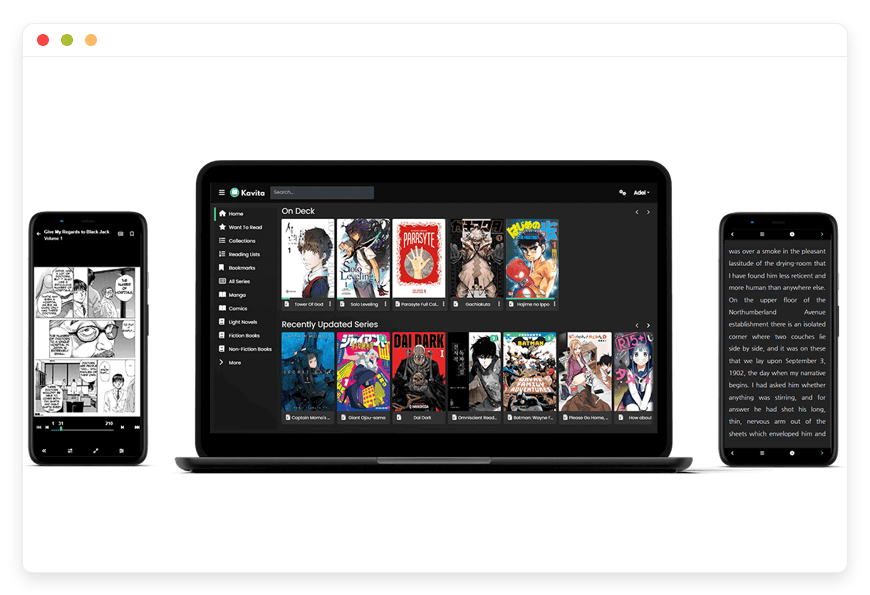
Managed Kavita Hosting: Build Your Digital Library
TLDR - Quick Answer
What is it: Kavita is a fast, self-hosted digital library designed for reading comics, manga, PDFs, and EPUB files.
The Problem: Setting up the server, configuring complex network settings, and keeping your libraries synced takes hours of terminal work.
The Value of Managed Hosting: You get the software running immediately without touching a single command line.
Immediate Benefit: Focus entirely on reading and organizing your books. The server maintenance, daily backups, and security updates run silently in the background.
Introduction
You have gigabytes of comics, manga chapters, and EPUB books stored across different hard drives. Finding the exact file you want and reading it comfortably on your tablet is often a frustrating experience. Managing large media collections manually leads to lost files, broken reading orders, and a terrible user experience. Kavita solves this massive problem. It turns your disorganized file folders into a beautiful, highly accessible digital library.
But running it yourself is a second job. Configuring network settings, setting up file permissions, dealing with reverse proxies, and troubleshooting database errors drains your free time. You want to read your books. You do not want to act as a full-time system administrator.
This is where DANIAN steps in. We offer premium managed Kavita hosting. We act as your invisible infrastructure. You simply upload your files, and we handle the complex background tasks.
What is Kavita?
Kavita is an open-source, cross-platform reading server. It functions as a complete solution for all your digital reading needs. You start a server, upload your files, and access your reading material from any device with a web browser. The project was created by developers under the moniker Kareadita, led by the primary creator majora2007. They built a tool that respects your media collection.
The software is built using C# and is heavily optimized for speed. It supports a massive variety of formats. You can upload CBR, CBZ, ZIP, RAR, 7ZIP, raw images, EPUB, and PDF files directly. Whether you are consuming graphic novels on an iPad or studying PDF textbooks on a desktop computer, Kavita handles the formatting perfectly.
Why is it trending?
Readers are tired of fragmented digital ecosystems. If you buy a comic on one platform and an ebook on another, you must use multiple proprietary apps. Kavita is trending heavily because it centralizes everything into one fast, unified interface. It gives you complete control over your library. It does not inject ads into your books. It does not track your reading habits for marketing. It does not force you into a monthly subscription just to access your own files. You have total freedom over your reading experience.
Why Choose Kavita?
Hosting Kavita is about embracing open-source freedom. You do not have to rely on big tech platforms to read your favorite graphic novels, webtoons, or textbooks.
Proprietary reading apps often remove features without warning. They change their layouts unexpectedly. They limit how you can organize your own content. With Kavita, you decide exactly how your collections look and function. You can share your server easily with friends and family. You can assign specific permissions to each user. It replaces the need for locked-in platforms by giving you a unified, highly customized space for all written media. The platform is continuously updated based on real community feedback. The features you actually want are prioritized and implemented quickly by the development team.
Key Features of Kavita
Kavita is packed with tools designed to make reading and organizing an effortless experience. Every single feature is built to improve your workflow and reading enjoyment. Here is a deep dive into the core features.
Dedicated Built-in Readers
Reading a massive PDF textbook requires a very different layout than reading a vertical scrolling webtoon. Kavita includes hand-crafted readers optimized specifically for each file format. You can switch instantly between webtoon mode, single-page view, or dual-page spreads. This means you never have to zoom awkwardly or deal with broken formatting on a small screen. The software automatically adjusts the page to fit your screen size perfectly. It even supports right-to-left reading directions for traditional manga files.Rich Metadata Integration and Scanning
A digital library is completely useless if you cannot search it properly. Kavita automatically scans and parses metadata from your filenames. It also reads embedded files like ComicInfo.xml. This allows you to filter your massive library by author, genre, publisher, or publication year in just seconds. Your workflow becomes significantly faster because the software organizes the files for you automatically. You do not have to manually type in the author names for a thousand comic books.OPDS Feed Support for External Apps
OPDS is an open standard that allows external reading apps to browse your server directly. Kavita has OPDS support enabled by default. You might prefer using a specific mobile app like Chunky, Moon+ Reader, or Panels on your tablet. You can connect those apps directly to your Kavita library using a simple link. Kavita even encodes your current reading progress directly into the OPDS item title. Your progress remains visible across multiple apps. This gives you the ultimate flexibility to read exactly how you want.Granular User Management and Access Control
If you share your server with your family, you likely want to restrict certain content. Kavita allows you to manage users with highly detailed access controls. You can apply specific age restrictions to accounts. You can enforce content rating limits. You can even hide specific libraries entirely from certain users. This keeps your personal work documents completely private while sharing your vast comic collection freely with your friends.Custom Smart Filters and Dashboards
You can customize your navigation sidebar and homepage extensively with smart filters. Perhaps you only want to see unread manga on your dashboard. You can set that up easily. You can build highly curated collections. You can pin specific reading lists to the top of your screen. You can track exactly what you want to read next. The dashboard adapts to your specific reading habits.Automated Folder Watching for Easy Imports
Adding new content to your library is completely painless. Kavita features a very reliable automatic folder watching tool. You simply drop a new EPUB or CBZ file into your watched folder. The software immediately detects the new file. It scans the metadata in the background. It adds the book to your library and downloads the cover art. You do not have to click a manual refresh button every time you buy a new book.Bookmarking and External Annotations
If you read heavily for research, you need to take detailed notes. Kavita lets you place digital bookmarks anywhere in your texts. You can leave detailed notes attached to specific pages. You can share those annotations with other users on your server. Kavita also supports exporting these notes directly to external text tools like Obsidian. This transforms Kavita from a simple reader into a very powerful academic study tool.Reading Relationships and Linking
Managing huge comic book universes is difficult. Marvel and DC comics often have massive crossover events spanning dozens of different series. Kavita allows you to define complex reading relationships. You can link prequels, sequels, spin-offs, and alternative timeline stories together. When you finish reading the main event comic, Kavita immediately suggests the correct tie-in comic next. This keeps your reading order perfectly accurate.Scrobbling and Progress Tracking
Tracking what you read is a popular hobby. Kavita supports automated progress tracking, often called scrobbling. Through the optional Kavita+ system, you can connect your server directly to tracking websites like AniList. When you finish reading a manga volume on your tablet, Kavita silently updates your AniList profile in the background. You never have to log your reading hours manually again.External Tool Ecosystem
Kavita plays perfectly with external library tools. You can connect it with software like MangaManager, Komf, and ComicTagger. These tools help you scrape better metadata from the internet and clean up your messy filenames before importing them. Kavita acts as the central brain, while these external tools keep your file system perfectly clean.
Solutions per Industry
Kavita managed hosting is not just for comic book collectors. Many different professional fields use this software to solve massive document management problems. Here is how different industries use the platform to improve their daily workflow.
Education and Universities
Teachers and university professors often distribute dozens of PDF case studies, research papers, and open-source textbooks every single semester. Sending these massive files via email creates chaos. Students lose the emails, or the files are too large to attach. By hosting a Kavita server, educators can upload all course materials into one structured, searchable library. Students log in with unique accounts. They read the required texts natively in their web browsers. They use the bookmarking tools to highlight important passages for their final assignments. The teacher can create specific weekly reading lists. This ensures students always know exactly what to study for the upcoming exam.
Creative and Advertising Agencies
Agencies that produce digital magazines, extensive brand guidelines, or large marketing PDFs need a clean way to present these documents to clients. Instead of sending bulky zip attachments that clog up client inboxes, the agency can provide the client with a secure login to a private Kavita library. The client logs in and gets a beautiful, interactive reading experience. They can flip through the digital magazine smoothly on their tablet. This presentation makes the agency's hard work look highly professional, polished, and modern.
Independent Book Publishers
Indie comic creators and small book publishing houses often struggle to distribute digital copies directly to their reviewers, editors, or top fans. Sending files through cloud storage links feels cheap and disorganized. Kavita acts as a perfect private distribution hub for publishers. They can create specific collections for upcoming book releases. They can track which users have accessed the review copies. They can gather feedback through shared annotations left on the pages. It provides a clean, heavily branded experience without relying on third-party storefronts.
Legal Firms and Attorneys
Lawyers process an incredible amount of written documentation. A single court case might involve thousands of pages of PDF transcripts, signed affidavits, and historical case law examples. Searching through unorganized folders on a shared network drive wastes billable hours. A law firm can use Kavita to index all their closed case files. The powerful search function instantly pulls up every PDF containing a specific keyword or witness name. Paralegals can read the documents clearly in the fast PDF viewer. They can bookmark crucial testimonies and share the exact page link directly with the lead attorney.
Medical Research Teams
Medical researchers and hospital departments constantly share heavy PDF journals, clinical trial reports, and textbook chapters. Keeping a research team updated on the latest medical literature is vital. A research department can set up a Kavita server to act as their central knowledge base. They can tag documents by specific medical specialties like cardiology or neurology. When a doctor has a few free minutes between patients, they can open the server on their phone. They can read the latest uploaded journal article instantly without downloading large files over a slow hospital network.
Game Development Studios
Video game development requires massive amounts of written lore, character design bibles, and concept art books. These documents guide the entire creative vision of the game. Having multiple outdated versions floating around a chat channel causes confusion. A game studio can compile their concept art and story bibles into high-resolution PDFs or CBZ files. They upload these to Kavita. The 3D artists and writers can then browse the official lore directly from their workstations. They can even use OPDS to link the art books directly into their drawing tablet software for quick visual reference while they work.
Local Archives and Historical Societies
Local libraries and historical societies often digitize old newspapers, town records, and historical photographs. Storing these raw image files on a hard drive makes them completely inaccessible to the public. By zipping these scanned images into CBZ files and uploading them to Kavita, the historical society creates a modern public archive. Community members can log in and read historical newspaper scans using the continuous scrolling feature. The society preserves history while making it incredibly easy for regular people to explore their past.
Kavita vs Other Softwares
When you look at proprietary reading platforms, Kavita stands out instantly. It offers incredible format flexibility and deep organizational freedom. Here is a quick comparison showing exactly why an open-source solution wins.
| Feature | Kavita | Proprietary Alternatives |
Supported Media Formats | EPUB, PDF, CBZ, CBR, ZIP, RAW Images | Strictly locked to specific extensions |
Custom Organization | Smart filters, Collections, Reading Lists | Limited predefined categories |
User Sharing Limits | Unlimited users with custom permissions | Restricted or completely blocked by paywalls |
External App Access | Yes, works with third-party apps via OPDS | No, locked tightly into a walled garden |
Specialized Reading Modes | Webtoon, Dual-page, Continuous scroll | Basic single-page and zoom only |
Notes and Annotations | Exportable directly to Obsidian | Locked permanently inside the app |
Offline Caching | Direct download to local devices | Often requires constant internet connection |
Use Cases and Applications
People use Kavita for a huge variety of specific, everyday tasks. Here are a few practical examples of how people use the software daily.
Manga and Webtoon Archiving: Vertical scrolling comics require very specific reader mechanics. Regular PDF viewers break the panels. Kavita handles continuous vertical scrolling perfectly. It merges the pages seamlessly, making it the ideal home for archived webtoons.
Academic Study Preparation: Storing hundreds of PDF research papers is tedious. Kavita’s fast indexing and robust annotation export make reviewing literature a breeze. You can highlight text in Kavita, export the notes to Obsidian, and start writing your thesis immediately.
Comic Book Collecting: Managing long-running comic series with multiple crossover events is highly complicated. Kavita reads complex metadata tags to keep your reading orders completely accurate. It groups series perfectly on your dashboard.
Family Ebook Library Management: A household can easily maintain a single digital library. Parents can access lengthy novels on their ereaders. Kids can access age-appropriate picture books on the family iPad through securely restricted child accounts.
Offline Travel Preparation: Users can utilize the direct download feature to push specific files directly to their e-ink readers or tablets. You can load up an entire fantasy series before taking a long flight or heading off the grid for a camping trip.
Language Learning: People learning Japanese often read raw manga scans to practice. Kavita allows them to organize raw image folders cleanly. They can zoom in clearly on complex kanji characters without losing image quality.
How DANIAN Helps
We believe software should serve you, not the other way around. Running your own server involves fixing broken software updates, securing open network ports, monitoring hardware limits, and spending hours reading complex documentation. DANIAN handles all the mess so you get the glory of a perfect reading server.
Fully Managed Infrastructure: We handle the hosting. Our expert team manages everything from the initial setup to regular application updates. Your software is always optimized without you having to lift a finger. You just log in and start reading.
Secure Backup & Monitoring: Automated daily backups are configured automatically and stored securely. We offer one-click restore options. Your digital library is incredibly valuable, and we ensure it is completely protected against accidental file deletions or unexpected hardware failures.
Advanced SSL & Network Protection: Your server is secure by default. With cybersecurity threats constantly on the rise, we take your security seriously. From automated operating system updates to proactive monitoring and custom network protections, we make sure your reading environment is secure 24/7.
Seamless Application Updates: Security patches and new Kavita versions are applied completely without your intervention. You gain access to the newest features, updated readers, and bug fixes the exact moment the developers release them to the public.
Continuous System Monitoring: Technical issues are detected instantly. They are often resolved entirely before you even notice them. We keep a close, constant eye on your system health and memory usage.
Guaranteed Server Performance: Server downtime can ruin your relaxing reading routine. With our highly scalable infrastructure, we ensure fast, consistent performance even as your user base grows and your file library expands to thousands of books.
7-Day Free Trial: There is absolutely no risk to try. You get less setup time and more reading time. It is affordable from the very start. You get real help from real humans when you need it.
How to Get Started
Getting your massive digital library online is incredibly simple. You do not need to know anything about Linux commands or server administration.
Step 1: Visit danian.co and sign up for a quick account.
Step 2: Select Kavita from our extensive software catalog.
Step 3: Relax while DANIAN gets your software running perfectly in the background.
FAQ
Is Kavita free to use?
Yes, the core Kavita application is completely open-source and free to use. When you use DANIAN, you are paying for the premium managed hosting, the server resources, the automated backups, and the expert maintenance. You are not paying for the software license itself.
Can I read my books offline?
Yes. Kavita has a native direct download feature that allows you to pull files onto your local device easily. You can also use the OPDS feed to sync your library with external mobile apps that support offline caching and downloading.
Does Kavita support audiobooks or video files?
No. Kavita is strictly focused on written and visual media. It handles EPUBs, PDFs, comics, manga, and raw images beautifully. It does not natively support audiobook formats, music playback, or video files.
How does OPDS work with Kavita?
OPDS generates a unique URL link and an API key. You copy that link and plug it into compatible mobile reading apps on your phone or tablet. This allows the third-party app to fetch, display, and read the books hosted directly on your private server.
What is Kavita+?
Kavita+ is an optional, premium subscription offered directly by the Kavita development team. It unlocks extra advanced features. These include automated external metadata fetching, highly personalized book recommendations, and progress syncing with tracking sites like AniList. You can run Kavita+ perfectly on your DANIAN hosted server.
Can I restrict what my kids read on the server?
Absolutely. Kavita features highly robust user management tools. You can create completely separate accounts for your children. You can restrict their access based on specific folders, library tags, or content age ratings.
How fast is the search function with a large library?
Kavita utilizes a very fast, index-backed search system. Even if you have thousands of large PDF files and heavy comic books, the search function will filter through metadata, authors, and book titles in a mere fraction of a second.
Can I customize the look of my reading server?
Yes. Kavita includes several built-in themes out of the box. You can easily switch between light mode, dark mode, and OLED-optimized themes. The developers also support custom CSS, allowing you to tweak the visual interface exactly to your liking.
Does Kavita alter my original files?
No. Kavita is entirely non-destructive. It reads your files and stores the metadata in its own separate database. It will never rename, move, delete, or alter your original EPUB or CBZ files without your explicit permission. Your source files remain completely untouched.
Conclusion
Kavita is a complete masterclass in open-source software design. It takes disorganized folders of heavy comics, text-heavy books, and massive PDFs and transforms them into a lightning-fast, highly customizable digital library. The built-in format readers are absolutely fantastic. The powerful metadata tools keep everything perfectly organized without manual effort. The ability to share the server easily transforms solitary reading into a wonderful communal experience with your friends and family.
However, the real magic happens when you remove the friction of constant server management. By choosing managed hosting, you skip the frustrating technical hurdles. You go straight to enjoying your content securely. Experience the true power of fully managed open-source software today.


