
Managed IT-Tools Hosting: Your Private Developer Toolkit
Every coder knows the daily pain. You need to decode a string. You need to format a messy text file. You need a quick cron schedule. You open a new browser tab. You search for a free online tool. You paste your secret data into a random web page. You hope the site owners do not save your text. This broken process wastes your time. It also risks your privacy.
You need a better way to work. You need all your daily utilities in one safe place.
TLDR - Quick Answer
Managed IT-Tools Hosting gives you a private suite of coding utilities. It runs without the headache of server chores. IT-Tools replaces dozens of scattered sites with a single, clean dashboard.
Here is the immediate value of running IT-Tools:
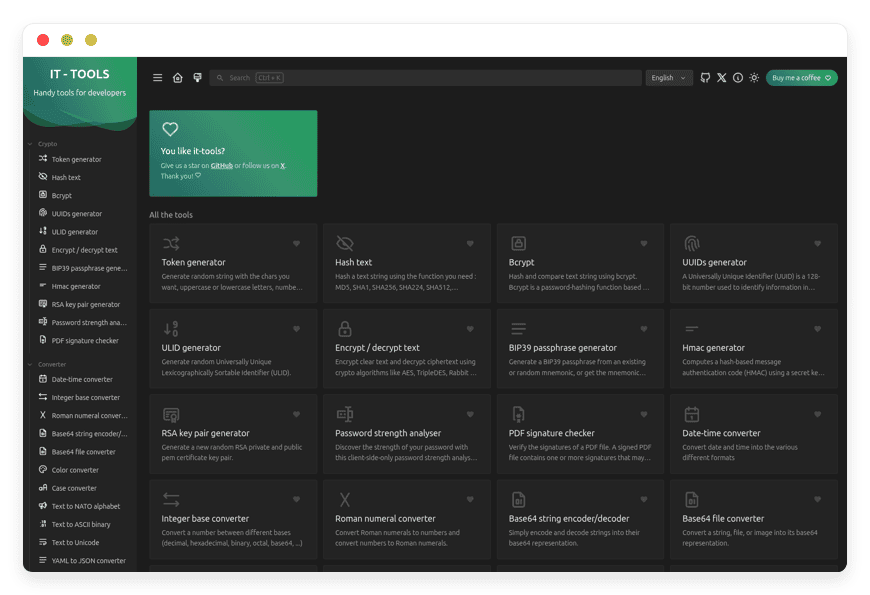
Centralized Utilities: Access over 80 coding tools in one clean screen.
Total Privacy: Keep your secret code and API keys off public servers.
Lightning Fast: Tools load instantly without ads or tracking scripts.
Unified Workflow: Move from text diffs to regex checks without changing tabs.
Zero Server Chores: A managed service handles the updates and security for you.
Introduction
Coders spend hours doing small, repetitive tasks. You convert dates. You hash passwords. You test regular expressions. You make placeholder images. Each task requires a different web page. Over time, your browser fills up with random sites. Some of these sites load slowly. Others are packed with awful ads. Worse, many of them log the exact text you paste. If you paste a live database string into a free online parser, you expose your system.
You need a private collection of tools. You need IT-Tools.
But running it yourself is a second job. You have to buy a server. You must set up the web routing. You have to handle SSL certs. You must keep the software updated. You already have enough code to manage. You do not need to manage the tools that help you write code.
DANIAN is your invisible infrastructure. We run the servers. We handle the updates. We keep the lights on. You simply log in and get to work.
What is IT-Tools?
IT-Tools is a free, open-source collection of handy online utilities. It helps software builders and IT pros do their jobs faster. Created and maintained by CorentinTh, it is built with Vue.js. This makes the software incredibly fast. The project gathers the most commonly used utilities into one responsive screen.
Instead of saving fifty different web links, you use one app. It includes categories for crypto, web building, network checks, math, text formatting, and images. It is licensed under the GPL-3.0 license. This ensures the code remains open and free to read.
Why is it trending?
IT-Tools is massively popular because it solves a huge problem. Tech workers are tired of terrible utility sites. They want a clean, ad-free screen. They want tools that work fast. Above all, they want privacy. By keeping all these utilities in a single open-source package, IT-Tools keeps your data safe. The sleek design and instant search bar make finding the exact tool easy. It is much faster than searching the web.
Why Choose IT-Tools?
The freedom of open-source software is very powerful. IT-Tools gives you that freedom. It replaces closed, ad-supported sites with a single tool.
When you choose Hosting IT-Tools through a managed service, you get the best setup. You get the privacy of open-source code. You get the solid base of a pro server. You never worry about a tool going offline. You never worry about a site changing its price. You control the workspace.
You also speed up your daily work. Instead of opening a JWT parser from one company and a regex tool from another, you have one hub. Every tool shares the same clean design. Every tool works right away.
Key Features of IT-Tools
IT-Tools is a massive app. It covers almost every minor task a coder faces. The built-in tools replace dozens of web searches. Here is a deep dive into the exact features that make this software amazing.
Crypto and Security Tools
Token Generators: Instantly build secure strings, UUIDs, and ULIDs. You can pick exact lengths and character rules. You never have to write a quick script just to get a random string.
Text Hashing: Quickly hash text using common algorithms. This is perfect for testing database inputs.
Bcrypt Generator: Generate and compare bcrypt hashes. You can set the exact salt rounds. This makes testing secure login flows simple.
Encryption Tools: Encrypt and decrypt text easily. Keep secret notes safe before sending them.
BIP39 Generator: Create valid mnemonic phrases. This is highly useful for crypto and blockchain builders.
HMAC Generator: Build strict hash-based message codes. Use this to verify third-party webhooks safely.
RSA Key Pair: Generate public and private keys in seconds. You can choose the exact bit size.
Password Strength: Check how strong a password is. Ensure your test accounts meet strict rules. You do this without sending the passwords to an outside server.
PDF Signature Checker: Verify digital signatures on PDF files. Ensure the file has not been altered.
Data Format Converters
JSON to YAML & TOML: Convert complex JSON files into clean YAML or TOML. This is great for setting up config files.
XML to JSON: Turn older XML feeds into modern JSON strings.
YAML to JSON: Move strict YAML configs into portable JSON chunks.
List Converter: Change column lists into comma-separated strings.
Base64 Converters: Encode or decode strings to Base64. You can also upload a small file and get the Base64 string for inline CSS.
Date Converter: Turn confusing epoch timestamps into human dates.
Base and Color Converters: Swap between HEX, RGB, and HSL colors. Swap numbers between binary, octal, and hex bases.
Web Building and Parsing
URL Encoder and Parser: Safely encode web links. Parse complex links to see exact query strings and paths.
JWT Parser: Decode JSON Web Tokens. Read headers and payloads safely. Check user claims inside your private setup.
HTML Entities: Escape or unescape HTML characters easily.
OG Meta Generator: Build Open Graph tags for social media sharing. Ensure your web links look great on Twitter and Facebook.
Basic Auth Generator: Create the exact base64 header needed for basic web logins.
MIME Types: Search and find the exact MIME type for any file extension.
Safelink Decoder: Unwrap wrapped links from email scanners. See the real link before you click it.
User Agent Parser: Paste a browser agent string. See the exact OS, browser, and device type.
Slugify String: Turn normal titles into web-safe URL slugs.
DevOps and Server Tools
Docker Run to Compose: This tool saves hours of typing. Paste a long docker run command. IT-Tools instantly builds the exact docker-compose.yml code.
Crontab Generator: Stop guessing cron rules. Use the visual clicks to pick the days and times. Copy the exact * * * * * string to your server.
Chmod Calculator: Manage file rules with visual boxes. Check read, write, and execute. Get the exact number code to run on Linux.
IPv4 Subnet Calculator: Plan your server networks. Enter an IP and a CIDR block. Get the broadcast address and usable IP range.
MAC Address Lookup: Find the vendor of any network card using its MAC address.
Random Port Generator: Find a safe, unused high port for your new web app.
Git Memo: Quickly look up complex Git commands.
Text and Code Formatting
Prettify and Minify: Make messy JSON or SQL easy to read. Or, crush large JSON files into tiny strings for faster network calls.
Regex Tester and Memo: Regular rules are hard to read. The built-in tester lets you test your rules against real text. It highlights matches right away.
Text Diff: Paste two blocks of text. See the exact missing or added lines. This is perfect for finding errors in staging servers.
Markdown to HTML: Type quick Markdown notes. Get raw HTML code instantly.
Text Stats: Count exact words, letters, and bytes in a text block.
String Obfuscator: Hide text to prevent simple bots from reading it.
Generators and Math
QR Code Creators: Make normal QR codes or custom Wi-Fi login codes.
SVG Placeholder: Make fast dummy images for frontend layouts.
Math Evaluator: Type complex math sums and get instant answers.
ETA Calculator: Figure out exact end times based on speed and progress.
Lorem Ipsum: Generate dummy text paragraphs for empty web pages.
Benchmark Builder: Write small bits of code. See how fast they run inside your browser.
Phone and IBAN: Parse international phone numbers to check formatting. Validate bank IBAN numbers for correct length and check digits.
Every single feature focuses on speed. You search for the tool. You paste your text. You get your output right away. There are no loading screens. There are no slow network calls.
Solutions per Industry
Different jobs face distinct tech hurdles. IT-Tools bends to fit your daily needs. By having so many tools, it solves problems across many fields.
For Software Agencies
Agencies build many apps at once. Coders constantly switch between different coding stacks. One hour you work on a Python backend. The next hour you fix a Vue frontend. IT-Tools acts as the central hub for your team. When a coder needs to convert a base64 file sent by a client, they use the private IT-Tools screen. When they need to verify an RSA key pair for a new server launch, the tool is right there. It unifies the toolset across the whole agency. This ensures no one uses risky public sites for private client data. It keeps your agency fast and safe.
For eCommerce Teams
Running an online store takes a lot of data work. You handle massive product feeds. You deal with payment APIs. You manage secure buyer data. eCommerce tech teams often get huge JSON or XML files from suppliers. IT-Tools makes it simple to prettify a huge JSON file. You can easily find a missing price trait. The HMAC tool helps teams test secure webhooks from payment gateways. The URL encoder ensures marketing campaign links are perfectly shaped before they go live. You can even use the JSON to CSV tool to export order data for the sales team.
For Education and Training
Teaching computer skills is much easier with visual tools. Teachers can use IT-Tools to show complex rules in real-time. The IPv4 subnet tool is perfect for showing students how IP blocks work. The basic auth tool and the bcrypt hash tool help explain how passwords stay safe on the web. Because all the tools live in one place, students do not get lost. They do not have to click through different random sites during a class. It keeps the lesson focused and clear.
For Quality Assurance (QA) Teams
Software testers have a tough job. They must try to break the code. QA teams need to make lots of fake data. IT-Tools gives them a massive sandbox. They can use the Lorem Ipsum tool to fill text boxes. They can use the phone parser to build fake numbers from different countries. When testing strict password rules, they use the strength checker. If they need to test file uploads, they use the SVG placeholder maker. The Regex tester lets QA staff check if email input boxes correctly block bad formats. Having this all in one private space makes testing much faster.
For Digital Marketing Agencies
Marketers rely heavily on data tracking. They need links to work perfectly. A broken link wastes ad money. Marketing teams use IT-Tools to build clean URLs. They use the URL parser to check their UTM tracking tags. If a tracking link gets wrapped by a strict email filter, they use the Safelink decoder to read the true path. The team can also use the QR code maker. They can build instant, scannable links for print ads or trade show banners. The OG Meta tool helps them preview how a blog post will look on social media before they hit publish.
For Freelance Web Designers
Freelancers must wear many hats. You are the designer, the coder, and the server admin. IT-Tools acts like a trusted helper. When you build a landing page, you use the CSS color converter to match brand guides. You use the case converter to fix messy client copy. You use the Markdown to HTML tool to quickly format blog posts. When setting up a hidden staging site for a client review, you use the Basic Auth generator. It gives you the exact header needed to lock the site. You save hours of searching for small helpers.
For Network Administrators
Managing a network requires strict exactness. One wrong digit can take down an office. Network admins use IT-Tools daily. They use the IPv4 range expander to plan new router layouts. They use the MAC address lookup to figure out which brand of phone is hogging the office Wi-Fi. When setting up strict internal networks, they use the IPv6 ULA generator. The random port tool gives them safe ports for new internal web apps. They also use the Chmod tool constantly to fix file errors on Linux servers. It is the perfect admin sidekick.
For Financial Tech (FinTech) Startups
FinTech builders deal with strict money rules. They handle bank data. They handle payment routing. They cannot ever paste test data into a public site. Doing so breaks trust. IT-Tools is perfect for FinTech because it can be hosted privately. Coders use the IBAN validator to check European bank routing codes safely. They use the HMAC tool to sign secure money transfers between servers. They use the UUID tool to tag unique money trades. The private setup ensures no financial test data ever leaks to the public web.
IT-Tools vs Other Softwares
How does IT-Tools stack up against other utility hubs?
| Feature | IT-Tools | CyberChef | Public Utility Sites |
| Speed | Instant loading | Fast, but complex UI | Very slow, ad-heavy |
User View | Clean, neat design | Highly strict design | Cluttered, messy |
| Privacy | 100% Private | Runs locally | Unknown, often tracks you |
Tool Scope | Broad (Web, Network, Text) | Deep focus on Crypto | Very limited per site |
Finding Tools | Universal search bar | Drag-and-drop nodes | Relies on Google search |
Mobile Use | Yes, highly fluid | Hard on small screens | Breaks on mobile |
Use Cases and Applications
Here are practical ways you can use IT-Tools in your daily work.
1. Fixing Webhooks in Real-Time
You add a new payment API to your app. The API sends a webhook to your server. But your app rejects the code. You need to know why it fails. You open the HMAC tool in IT-Tools. You paste the raw webhook text. You enter your secret key. You click generate. You look at the hash and compare it to the header sent by the API. You instantly spot a small space error in your code. You fix the bug in two minutes.
2. Moving Legacy Server Setups
You are moving an old app to a modern code base. The past coder left a massive, tricky docker run command. It has dozens of mount flags. You paste that command into the Docker Run converter. IT-Tools builds a clean, perfectly spaced docker-compose.yml file in one second. You paste it into your server and start the app flawlessly.
3. Planning Server Networks
You are setting up a new cloud workspace. You need to divide a large IP block into smaller chunks for your web and cache servers. You open the IPv4 Subnet tool. You type your main CIDR block. You quickly map out the exact IP ranges for each server group. You ensure no server overlaps with another.
4. Cleaning Messy Client Data
A client sends you a massive file of user data. The text rules are terrible. You export it to JSON, but it is one massive block of text. You drop the file into the JSON Prettify tool. Once you can read it, you see all the emails have mixed caps. You run the data through the Case Converter tool to make everything lowercase. The clean data is now ready for your database.
5. Scheduling Fast Backups
You need to write a cron rule that runs a backup script every Tuesday at 2:15 AM. You always forget the exact syntax for the days of the week. You open the Crontab Generator. You click the visual buttons for the time and day. You copy the resulting 15 2 * * 2 string directly into your server file. The backup runs perfectly.
How DANIAN Helps
Running your own setup takes time away from actual coding. You have to lock down the server. You have to route the web traffic. You must manage DNS records. You have to apply security patches.
DANIAN is the quiet enabler behind your success. We handle the mess; you get the glory. Less setup, more development. Affordable from the start. Real help when you need it.
Here is what you get when you host with us:
Fully Managed: We handle the hosting. Our team manages everything from initial setup to regular updates, security patches, and performance tuning. Your software is always ready without you having to lift a finger.
Backup & Monitoring: Automated daily backups are configured automatically, stored securely, and offer a one-click restore. You never lose your custom settings.
SSL & Firewall: Secure by default. With cybersecurity threats on the rise, we take security seriously. From automated updates to proactive checking and custom firewalls, we make sure your workspace is secure 24/7.
Updates: Security patches and new versions are applied without your help. You always have the newest tools.
24/7 monitoring: Issues are detected and often resolved before you notice. We keep the system running fast and smooth.
Guaranteed Performance: Downtime can hurt your daily progress. With our scalable servers, we ensure smooth speeds even as your team grows.
7-Day Free Trial: No risk. Test the platform and see the speed for yourself.
How to Get Started
Getting your private utility hub running takes less than five minutes.
Step 1: Visit danian.co and sign up for a fast account.
Step 2: Select IT-Tools from the app catalog.
Step 3: Relax while DANIAN launches your software. We prep the server, secure the web links, and hand you a ready-to-use URL.
FAQ
What exactly is IT-Tools?
It is an open-source hub of over 80 web-based utilities. It helps coders with common tasks like formatting text, building tokens, checking regex rules, and converting files.
Why should I use a managed host for this?
A managed host stops server chores. You get a private, safe version of the software without having to manage Linux updates, web servers, or SSL certs yourself.
Are the tools safe to use with private code?
Yes. When you use your own private version, the data you paste into the tools stays entirely within your control. It does not get sent to public trackers or ad networks.
Does IT-Tools include a database?
No. IT-Tools runs inside the web browser view. The tools process your data directly in your active window. This makes it extremely fast and very secure.
Is the software free?
The software itself is open-source and free under the GPL-3.0 rules. You only pay for the managed hosting service that keeps it running on a fast, safe, and solid server.
Can I access my tools on a phone?
Yes. The view is highly fluid. It works perfectly on smartphones and small tablets.
How do I get updates when new tools are added?
When you use DANIAN, we handle the updates smoothly. When the creator puts out a new tool, your site gets the update without any manual work on your end.
Conclusion
Coders waste far too much time searching for simple web utilities. Trusting random, ad-filled, and unsafe websites slows down your work. It also brings needless risk to your daily tasks. IT-Tools fixes this by giving you a unified, lightning-fast hub of over 80 essential tools in one clean screen.
You deserve a better way to work. You deserve a private toolkit that is always ready when you need it. Let us handle the server work so you can focus on building great software.
Experience the power of fully managed open-source.


