
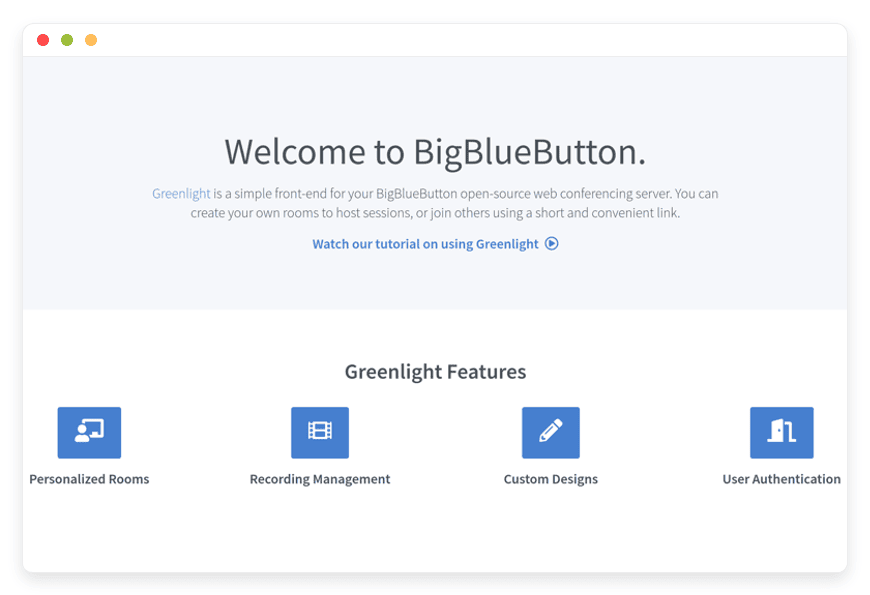
Managed Greenlight Hosting: Build Your Web Conferencing Hub
TLDR: Quick Answer
Greenlight is the official, open-source user interface designed specifically for BigBlueButton. It gives you a complete web conferencing platform where your team and clients can create accounts, manage meeting rooms, and share recordings.
Managed Greenlight Hosting means we handle the backend servers, the software updates, and the routine maintenance. You focus on hosting your meetings.
Instant Setup: Launch your frontend interface in minutes.
Zero Maintenance: We handle the complex backend updates and security.
Automated Backups: Your room settings, roles, and user data stay safe.
High Performance: Smooth, reliable access for all your participants.
Ready to Connect: Link it straight to your existing BigBlueButton server.
Introduction
Running a BigBlueButton server is only half the battle when building a communication platform. The video engine is highly capable, but your users need a simple way to interact with it. They need a place to create accounts, set up their meeting rooms, invite guests, and access their past recordings. Greenlight is the perfect tool for this exact job. It transforms a powerful audio and video engine into a friendly, accessible platform. Anyone can use it without prior technical training.
But running it yourself is a second job. You have to mess with Docker containers, configure complex environment variables, and manage reverse proxies. When a new software update drops, you cross your fingers and hope the terminal commands do not break your live production environment. You have to constantly monitor server logs and fix routing problems.
You have better things to do than troubleshoot Ruby on Rails errors. Your focus should be on building your community and communicating with your audience. This is where DANIAN steps in as your invisible infrastructure team. We handle the technical mess behind the scenes so you can host your meetings in peace.
What is Greenlight?
Greenlight is a robust, open-source web application licensed under the LGPL-3.0 agreement. Developed and maintained by the creators at BigBlueButton Inc., it acts as the primary end-user interface for the BigBlueButton web conferencing system. Before Greenlight, administrators had to build their own custom portals to let users access BigBlueButton. Now, this software provides a complete, out-of-the-box solution.
Under the hood, Greenlight version 3 is a complete modernization of the platform. It is built using the latest versions of Ruby on Rails for the backend and React for the frontend interface. This is a highly stable technology stack adopted by thousands of major web projects globally. It connects directly to your BigBlueButton backend via an API. It acts as the bridge between your users and your video server.
With Greenlight, organizations can quickly launch a fully functional web conferencing portal. It is friendly enough for regular, non-technical users. Yet, it is packed with advanced configuration features for system administrators.
Why is it Trending?
Remote communication is a permanent fixture in modern business and education. Schools, universities, and corporate teams need reliable video conferencing. However, paying per-user monthly fees for commercial software quickly drains budgets. BigBlueButton provides a free video engine, but on its own, it lacks a built-in user portal.
Greenlight fills that critical gap perfectly. It is trending heavily because it allows any organization to build a complete, branded alternative to massive commercial platforms. You get a professional login screen, individual user accounts, and structured meeting rooms without paying for expensive software licenses. It makes high-quality video conferencing accessible to everyone.
Why Choose Greenlight?
Choosing open-source software gives you total control over your digital environment. Hosting Greenlight means you dictate the exact rules of your platform. You decide who gets an account, how long meeting recordings stay active, and what specific features your users can access.
Proprietary platforms often force you into expensive subscription tiers just to get basic management tools. Tools like user roles or custom branding are heavily restricted. Greenlight gives you those tools out of the box for free. You get unlimited users, highly customizable rooms, and complete branding freedom. Because it is designed specifically for BigBlueButton, the integration is flawless. Your audio, video, and screen sharing remain fast and reliable.
When you invest in Hosting Greenlight, you are investing in a system that scales with you. You are not penalized with higher fees just because you hired more employees or enrolled more students. You control the software, you control the user experience, and you keep your costs predictable.
Key Features of Greenlight
Greenlight is packed with deep functionality to make managing web conferences incredibly simple. Version 3 introduced massive improvements to the interface and administrative controls. Here is a detailed look at what makes this software so effective for daily use.
Personal Room Management
Every single user gets their own personal meeting room the moment they sign up. This is known as their "Home Room." They can customize the room name to suit their needs and generate a unique access link. They can share it instantly via email or chat. Users can also create multiple distinct rooms for different purposes. A teacher can have one permanent room for weekly office hours and another separate room for a specific science class. This approach keeps communication highly organized. It eliminates the chaos of generating new links for every single meeting.
Deep Room Configurations
Users do not just create rooms; they control exactly how those rooms behave. Greenlight allows room owners to set specific entry rules. You can configure a room to "Mute users on join" to prevent background noise when a large class starts. You can toggle "Require moderator approval before joining" to create a secure waiting room. You can also allow any registered user to start the meeting, even if the room owner is absent. This level of control makes every meeting run smoother.
Shared Room Access
Sometimes, multiple people need to manage the same virtual space. Greenlight includes a powerful shared access feature. A room owner can grant specific users permission to access and start their room. This is the perfect workflow for co-teachers or co-hosts. One person creates the permanent link, but both people have the authority to launch the session and moderate the participants. It prevents bottlenecks when the primary host is running late.
External Authentication Support
By default, the system handles user accounts locally. People sign up directly on your platform. But if you have an existing directory of users, you do not need to force them to create new passwords. Greenlight version 3 supports OpenID Connect natively. You can seamlessly link it to your existing identity provider. Users simply log in with the credentials they already know and use every day. This significantly reduces login friction and cuts down on password reset requests.
Advanced Recording Management
Session recordings are completely useless if people cannot find them later. Greenlight automatically pulls completed recordings directly from your BigBlueButton server. It displays them cleanly in the user dashboard. From there, users can rename their recordings or change the visibility settings. They can set a recording to Public, Unlisted, or Protected. Administrators can also step in and configure default recording visibilities at the system level. This keeps sensitive meetings hidden by default.
Granular User Roles and Permissions
Not everyone on your communication platform should have the exact same capabilities. Greenlight includes a highly robust role management system. You can clearly define what a standard user, a moderator, and an administrator can do. You can limit who is allowed to record live sessions. You can specify exactly who can create new meeting rooms. This keeps your digital environment secure, organized, and free from unauthorized usage.
Comprehensive Administrator Dashboard
Managing hundreds of users requires a clean administrative interface. The Greenlight admin panel lets you view the exact status of every account. You can see who is active, who is pending approval, and who is banned. Administrators can force password resets, change user roles with a single click, and configure site-wide settings. You can even mandate that new users accept your specific Terms and Conditions before they finish registering.
Custom Branding and Styling
Your meeting platform should look like it belongs entirely to your organization. Greenlight lets you upload your own custom logos and change the primary and secondary color schemes. You can customize the welcome text on the homepage. When your clients or students log in, they see your distinct brand. They do not see a generic third-party software interface. It provides a highly professional, cohesive experience from the very first click.
Solutions per Industry
Greenlight serves a massive variety of organizations. Its flexible room management and custom branding make it the perfect frontend for almost any sector. Here is how different industries use the software to solve their specific communication problems.
Education and Universities
Schools and large universities need a centralized, reliable place for students to access their virtual classrooms. Greenlight provides a secure, branded portal where teachers create dedicated rooms for specific academic courses. The pain point for schools is managing hundreds of confusing, temporary meeting links. Greenlight solves this by allowing teachers to create permanent, named rooms. Students simply log in, see their class schedule, and join the correct virtual room with a single click. Teachers easily manage their session recordings after the lecture ends and share them directly with absent students.
Coaching and Consulting
Independent coaches and professional consultants need a sleek, professional front for their client meetings. Sending generic video links looks amateurish. By using Greenlight, a consultant can set up a custom branded waiting room. Clients click the meeting link and wait securely in the lobby until the coach allows them in. The coach can record the session, keep it entirely private, and later send a secure link to the client for their personal review. The custom branding makes the independent consultant look like an established, premium firm.
Corporate Teams and Agencies
Growing companies need a safe, internal environment for department meetings and weekly town halls. The primary pain point here is onboarding new employees to multiple different software tools. Greenlight solves this instantly. It allows the IT department to integrate the video platform tightly with the company directory using OpenID Connect. Employees simply log in with their standard company email address. Department managers create permanent project rooms where team members jump in and out for quick collaboration.
Non-Profit Organizations
Charities and non-profit organizations often operate on incredibly tight budgets. Paying expensive monthly per-user fees for commercial video conferencing limits their ability to spend money on their actual mission. Greenlight completely eliminates this software licensing cost. Non-profits can host secure board meetings, train remote volunteers, and host online fundraising discussions. They get a premium, branded communication platform without the premium price tag. Predictable hosting costs allow them to plan their annual budgets accurately.
Government and Municipalities
Local city councils and municipal governments frequently host public meetings online. The challenge is balancing public accessibility with strict meeting moderation. Greenlight allows government administrators to create dedicated public meeting rooms. Citizens can join as guests without needing to register for an account. Administrators can configure the room to mute all users upon entry, preventing disruptions during important public addresses. Afterward, the meeting recording is easily set to "Public" so absent citizens can watch the proceedings transparently.
Language Schools and Independent Tutors
Online language tutoring relies heavily on repeated, weekly one-on-one sessions. Managing dozens of individual students can become a scheduling nightmare if you constantly generate new meeting IDs. Greenlight solves this directly. A tutor creates a persistent room for "John's Tuesday Spanish Lesson." That specific URL never changes. The student simply clicks the exact same link every week. The shared whiteboard in BigBlueButton makes the interactive lesson highly effective, and Greenlight keeps the access incredibly simple.
Freelance Agencies and Client Services
Design and development agencies need to pitch concepts to new clients securely. Using consumer-grade video chat tools diminishes the perceived value of their expensive creative work. Greenlight allows an agency to build a fully branded client portal. When an agency pitches a new website design, they invite the client to a professional, custom-styled room. The waiting room feature ensures the agency team can prepare their screens before admitting the client. It builds immense trust and credibility from the very start of the relationship.
Greenlight vs Other Softwares
How does a BigBlueButton setup running Greenlight compare to mainstream commercial video platforms?
| Feature | Greenlight (BigBlueButton) | Zoom | Google Meet |
| Pricing Model | Free open-source software | Per-host monthly fee | Per-user monthly subscription |
| Custom Branding | Full control over logos and colors | Limited to certain paid tiers | Extremely limited |
| User Interface | Dedicated frontend portal | Closed proprietary application | Tied heavily to Google ecosystem |
| Whiteboard Tools | Deeply integrated, multi-user | Basic annotation tools | Requires external app integration |
| Waiting Rooms | Built-in and highly customizable | Built-in | Built-in |
| External Auth (OpenID) | Supported natively for free | Requires expensive Enterprise plan | Restricted to Google Workspace |
Use Cases and Applications
Greenlight adapts to almost any scenario where people need to gather and talk online. Here are a few practical ways organizations apply the software every day.
Remote Company Town Halls
Gather your entire company in a single virtual room for quarterly updates. Use the Greenlight portal to restrict access so only authenticated employees can join the stream. This prevents uninvited guests from interrupting important company announcements.
Virtual Study Groups
University students can log in and create their own temporary rooms for late-night collaboration. They can work together using the shared whiteboard, study for upcoming exams, and close the room permanently when they finish their session.
Product Demonstrations
Software companies can host live product demonstrations for potential buyers. They create a dedicated webinar room in Greenlight. They can require moderator approval to enter, ensuring they know exactly who is watching the live pitch.
Remote Technical Support
IT support teams can use a permanent room to assist remote employees. When an employee has a laptop issue, they click the permanent support link. The IT technician lets them in, uses the screen-sharing tools to diagnose the problem, and resolves the issue quickly.
Community Board Meetings
Local organizations can host their monthly meetings online. They easily record the entire session. They then post the direct link publicly on the Greenlight portal for residents who missed the live discussion.
How DANIAN Helps
Setting up Greenlight manually involves pulling Docker containers, configuring Nginx web servers, and carefully managing secret API keys. It requires solid command-line skills and constant, ongoing attention. DANIAN works as your quiet enabler. We handle the heavy lifting behind the scenes so you get the glory of a perfectly running platform.
Fully Managed
We handle the hosting from start to finish. Our team manages everything from the initial setup to regular updates. Your software is always optimized without you having to lift a finger.
Backup & Monitoring
Disasters happen, but you will be completely ready. We provide automated daily backups. These are configured automatically, stored securely, and allow for a simple one-click restore if you ever need it.
SSL & Firewall
Secure by default. With cybersecurity threats on the rise, we take security seriously. From automated updates to proactive monitoring and custom firewalls, we make sure your environment is secure 24/7.
Effortless Updates
Keeping Ruby on Rails applications updated securely can be tricky. Security patches and new software versions are applied smoothly without your intervention. This keeps your system safe and highly functional.
24/7 Monitoring
We watch your servers closely so you can sleep comfortably. Issues are detected and often resolved entirely before you even notice a problem on your end.
Guaranteed Performance
Downtime can be detrimental to your business. With our scalable infrastructure, we ensure consistent performance even as your user base grows.
7-Day Free Trial
Try it completely risk-free. See how easy it is to manage your meetings when you do not have to manage the underlying servers.
Less setup, more development. Affordable from the start. Real help exactly when you need it.
How to Get Started
Getting your highly professional conference portal online takes just a few short minutes with DANIAN.
Sign Up: Visit danian.co and create your new account.
Select the App: Find Greenlight in our extensive software catalog and select it.
Launch: Relax while DANIAN configures the server, sets up the database, and gets your software running.
FAQ
Do I still need a BigBlueButton server if I use Greenlight?
Yes. Greenlight is strictly the user interface and management portal. It must connect to your existing BigBlueButton server to actually host the live audio and video traffic.
Can I change the language of the interface?
Yes. Greenlight supports multiple languages natively. You can set a global default language. Individual users can also choose their personal preferred language in their account settings.
Is it possible to brand the portal with my own logo?
Absolutely. You can upload your own logos, change the primary colors, and update the welcome text to perfectly match your organization.
How does pricing work for Greenlight?
The Greenlight software itself is completely free and open-source. You do not pay any software licensing fees at all. You only pay for the hosting infrastructure required to run the application smoothly.
Can users create their own meeting rooms?
Yes. By default, every user gets a personal room upon signing up. Depending on the exact permissions you set as the administrator, users can create additional rooms as needed.
Can I connect Greenlight to my company active directory?
Yes. Version 3 of the software supports OpenID Connect. You can configure it to use your existing identity provider for simple, seamless user authentication.
Are my recordings safe?
Yes. The actual video recordings are stored on your BigBlueButton server, but Greenlight provides a secure way to manage access to them. With our managed hosting, your Greenlight configuration, room settings, and user database are backed up daily.
Can multiple people moderate the same room?
Yes. The shared room access feature allows a room owner to grant start and moderation privileges to other registered users on the platform.
Conclusion
Greenlight is the missing piece for any organization actively using BigBlueButton. It turns a raw conferencing engine into a friendly, professional platform for your users. You get all the robust features of expensive commercial tools without the hefty price tag. You gain total control over your meetings, your user accounts, and your branding.
But you should not have to spend your weekends configuring web servers and running stressful terminal scripts. Let us handle the complicated infrastructure while you handle the important conversations.
Experience the power of fully managed open-source.


