
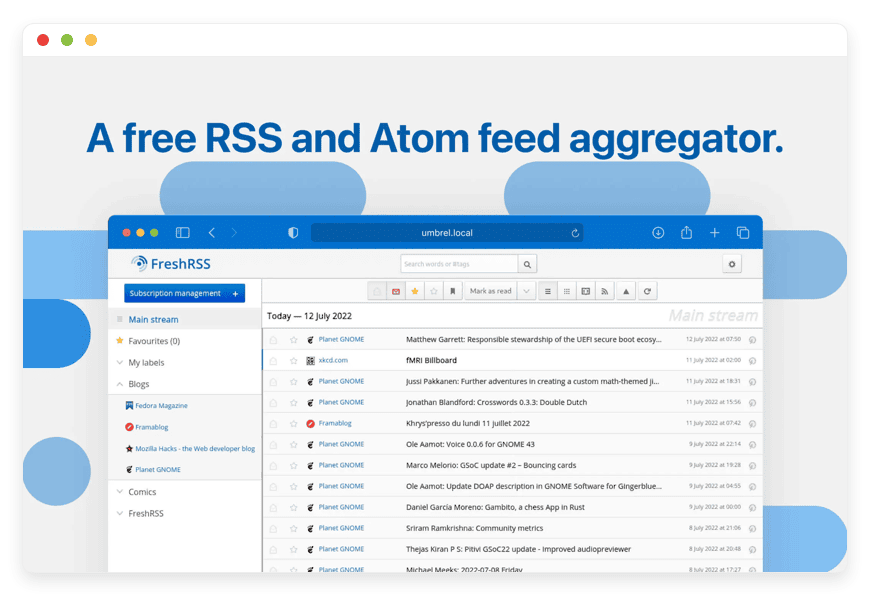
Managed FreshRSS Hosting: Reclaim Your News Feed
Social platforms control what you read today. They hide important updates, bury industry news, and push viral junk to your screen. You need a way to filter the noise and follow your favorite sources directly.
This is exactly where Managed FreshRSS Hosting steps in. FreshRSS gives you a chronological, clean feed of the sites and blogs you actually care about. You control what you see.
But running it yourself is a second job. Setting up servers, managing databases, and applying security patches takes time away from your real work.
DANIAN acts as your invisible tech team. We handle the technical setup so you can start reading right away.
TLDR: The Value of Managed FreshRSS Hosting
Want to bypass the long read? Here is a quick summary of FreshRSS and the immediate value of a managed setup:
Clean Reading: Read content chronologically. No hidden posts or sponsored blocks.
Massive Speed: FreshRSS handles over 100,000 articles without slowing down at all.
Mobile Sync: It connects smoothly with popular mobile apps like Reeder, FeedMe, and Readwise.
Zero Server Headaches: A managed host takes care of the server, database, and SSL certificates.
Silent Upgrades: New software versions and security patches happen quietly in the background.
Introduction: The Problem with Modern News
Finding reliable news is harder than ever. When you rely on large platforms to gather your news, you trade control for ease of use. You miss crucial software release notes. You miss local industry updates. You miss competitor blog posts. You miss them simply because an unseen code decided not to show them.
The best answer is an RSS reader. Feed readers pull direct updates from websites straight to a central dashboard. You see everything as it gets published online.
FreshRSS is the standout tool for this job. It is incredibly fast, highly tunable, and open-source. But maintaining server software requires constant care. You must watch the server, update the PHP environment, and back up your database. If something breaks, you fix it alone.
With DANIAN, you get the software you want without the heavy upkeep. We make the technical details disappear entirely.
What is FreshRSS?
FreshRSS is a self-hosted, lightweight feed reader. It pulls feeds from websites and puts them into a clean, easy-to-read view.
Marien Fressinaud created the project in 2012. Today, Alkarex and a huge open-source community actively maintain it. The software runs on PHP. It supports databases like MySQL, PostgreSQL, and SQLite. FreshRSS recently reached version 1.28.1, bringing even more stability to its huge user base.
Unlike heavy, slow feed readers, FreshRSS stays incredibly fast. It works perfectly on desktop web browsers. It adapts beautifully to mobile screens. You can manage tens of thousands of articles without hurting the system speed.
Why is it Trending?
People are tired of noisy timelines. Professionals are returning to RSS tools because they need reliable, structured reading habits. FreshRSS stands out because it offers a clean interface alongside powerful tech tools. It bridges the gap between simple reading and advanced news tracking. You get total control over your feeds.
Why Choose FreshRSS?
When you choose Hosting FreshRSS, you choose an open standard. You decide exactly how your reading setup looks and works.
You do not have to endure banner ads disguised as articles. You do not have to pay expensive monthly tiers just to search through your own saved content. FreshRSS delivers premium features right out of the box.
It handles multiple users on a single setup. This means you can invite your whole team or family to use the same system. They get their own private accounts. You gain full admin control over user rights, feed refreshing speeds, and reading display modes.
Key Features of FreshRSS
FreshRSS packs a serious punch when it comes to daily tools. It is not just a basic reader. Here is a deep dive into what makes this software so effective.
Native Mobile App Sync
FreshRSS does not force you to use a clunky web wrapper on your phone. It has built-in support for the Google Reader API and the Fever API. This means you can connect FreshRSS directly to the most popular reading apps. Apps like Reeder, FeedMe, EasyRSS, and Readwise Reader sync perfectly. You read on your phone, and the read status updates instantly on your computer.
Real-Time WebSub Support
Normally, an RSS reader must "poll" a website every hour to check for new posts. FreshRSS supports the WebSub protocol. When you follow a website that also uses WebSub, you get new articles pushed to your reader instantly. There is no waiting. The moment an author clicks publish, the text appears in your feed.
Advanced XPath Web Scraping
Not every modern website gives you an RSS feed. This is usually a dealbreaker for most feed readers. FreshRSS solves this problem easily. Using its advanced web scraping tools, you can use XPath selectors to pull content from a regular web page. FreshRSS looks at the HTML structure and makes a feed for you.
Custom User Queries
If you follow hundreds of feeds, finding specific topics gets tricky. FreshRSS allows you to build custom user queries. You can set up smart filters to look for specific keywords, author names, or tags.
Smart Filtering Rules
Beyond simple searches, you can automate your reading flow. You can auto-star articles that mention a vital topic. You can instantly mark articles as read if they contain keywords you want to avoid. This keeps your unread count strictly focused on what matters to you.
Full-Text Fetching
Many websites only give a short summary in their feed. They force you to click a link to read the full text on their site. FreshRSS fixes this fast. With a single click, it reaches out to the original site, extracts the full text, and shows it within your reader. You never have to leave your feed.
Multi-User Management
Most feed readers charge you per user. FreshRSS includes advanced multi-user management for free. As the admin, you can set rules on how often users can refresh feeds. You can set limits on how many articles each user can store. You can also enforce specific password policies.
Flexible Authentication
Security is vital for any web tool. FreshRSS supports standard web logins, but it also supports advanced methods. You can integrate OpenID Connect or tools like Authentik. This allows you to protect your feed reader behind your preferred single sign-on system.
Database Flexibility
Under the hood, FreshRSS scales to your exact needs. If you are a solo user, it runs perfectly on SQLite. If you plan to host thousands of feeds for a huge team, it connects smoothly to MySQL or PostgreSQL. This ensures your search speeds stay fast even with a massive archive.
Custom Themes and CSS
You stare at your feed reader every single day. It should look exactly how you want it to look. FreshRSS supports custom themes. The community has built many distinct styles, including deep dark modes for night reading. If you know a little coding, you can add custom CSS to tweak every single pixel on the screen.
Robust Extensions Library
The community has built a rich library of extensions to add new tools. You can add extensions for YouTube subscriptions. You can add read-time estimators to see how long an article takes to finish. You can add direct sharing tools to send posts to apps like Wallabag and Pocket.
OPML Import and Export
Switching to FreshRSS is easy. It fully supports the OPML standard. You can export your list of feeds from any other reader and import it into FreshRSS with one click. You can also export your list at any time to share your curated feeds with friends or coworkers.
Solutions per Industry
Different fields require different tools for tracking news. FreshRSS adapts easily to a wide variety of professional jobs. Here is how various industries use this exact software.
Marketing and Public Relations Agencies
Marketing teams must track brand mentions daily. They monitor competitor blogs and keep up with industry trends. Using FreshRSS, an agency can create shared categories for different clients. They can use XPath scraping to track competitor web pages that lack standard feeds. Smart filters instantly highlight posts mentioning specific brand names. This saves countless hours of manual web searching. The whole team stays updated on client news.
Education and Academic Research
Researchers must track dozens of science journals and preprint servers. Professors need to follow specific university updates. FreshRSS allows these academic pros to gather thousands of sources into one quiet, clean screen. Because it supports OPML imports, a professor can easily share a list of required reading feeds with their students. Students get a direct pipeline to the latest studies without clicking through distracting social feeds.
Software Development and IT Operations
IT professionals use RSS to watch vital system updates. Developers track GitHub releases, CVE flaw reports, and server status pages. Hosting FreshRSS ensures that these alerts come through instantly via WebSub. IT teams can set up a multi-user space where every systems admin has access to the same alert feeds. When a critical software flaw hits the news, the IT team knows about it first.
eCommerce and Retail
Running an online store requires strict market awareness. eCommerce managers must watch competitor pricing changes and supply chain news. Many retail sites do not offer feeds for their product pages. Using FreshRSS and XPath scraping, a retail manager can track specific product pages on competitor sites. If a competitor drops their price, the RSS feed updates to reflect the change. The store manager can then adjust their own prices instantly.
Journalism and Investigative Reporting
News moves fast. Journalists must monitor local police blotters, court dockets, and press release wires. Waiting to read news on a social timeline means you are already too late. FreshRSS gives reporters a direct, real-time feed of local events. They can set up custom queries for specific politicians, city names, or local businesses. When a major story breaks on a tiny local blog, the reporter sees it the very second it goes live.
Financial Analysis and Trading
Traders and finance pros live or die by information speed. They must track SEC filings, market wire services, and global bank updates. Refreshing a web browser is too slow. FreshRSS pulls all these finance feeds into one unified dashboard. A trader can set up strict filters to only show news containing specific stock tickers. This removes the noise and delivers pure market intelligence.
Legal Professionals and Law Firms
Lawyers must stay current on case law changes. They track patent office updates, court opinion releases, and legal blogs. Missing a tiny change in local laws can ruin a case. FreshRSS allows a law firm to build a shared library of legal feeds. Junior clerks can monitor the feeds and star important updates for senior partners. The firm stays sharp, informed, and ahead of the curve.
Healthcare Administration
Hospital admins and medical planners deal with a massive flow of public health data. They track updates from the CDC, WHO press releases, and medical device recall feeds. Keeping patients safe means knowing about drug recalls instantly. FreshRSS gathers all these disparate health feeds into one secure, searchable archive. Admins can search past feeds to find exact dates of specific health alerts.
Content Creators and Podcasters
Finding fresh ideas is the hardest part of making content. Podcasters and writers must track niche topics to stay relevant. FreshRSS allows creators to track obscure blogs, niche forums, and rare YouTube channels without fighting the algorithm. A tech podcaster can track 50 different gadget blogs in one place. When it is time to write the weekly script, all the ideas are waiting neatly in the feed.
FreshRSS vs Other Softwares
How does FreshRSS compare to standard proprietary feed readers? Here is a quick look at the core differences between the tools.
| Feature | FreshRSS | Proprietary Apps (e.g., Feedly) |
| Price | Free open-source software | Expensive monthly fees |
Interface Ads | Zero ads | Ads often injected into the feed |
Web Scraping | Built-in (XPath) | Usually blocked or strictly paid |
API Sync (Mobile) | Included (Google Reader / Fever) | Restricted to official apps |
Multi-User Rules | Unlimited users included | Per-seat pricing |
Full-Text Fetching | Included | Often paywalled |
Smart Filtering | Built-in and limitless | Strictly limited on free tiers |
Use Cases and Applications
Here are a few practical ways you can use FreshRSS in your daily routine to stay organized.
1. Managing Podcast Subscriptions
Many people do not know that podcasts run on RSS. You can add your favorite podcast feeds into FreshRSS. It handles media files beautifully. This allows you to organize your audio shows right alongside your written news.
2. Following YouTube Channels Cleanly
The YouTube feed often hides videos from channels you actually follow. By pulling YouTube channel RSS links into FreshRSS, you see a strict chronological list. You see every single video published by your favorite creators, without the distraction of viral clips.
3. Curating Niche Hobby Content
If you love woodworking, vintage cameras, or niche board games, news is scattered across dozens of small sites. FreshRSS pulls all these tiny, slow updates into one place. You never have to remember to check a blog that only posts once a month.
4. Tracking Job Postings
Many remote job boards provide RSS feeds for specific search terms. You can set up a search for your exact job title, grab the RSS link, and add it to FreshRSS. You will get an immediate feed of new job postings as soon as they hit the web.
5. Monitoring Classified Ads
Looking for a specific vintage car or piece of used gear? Many classified sites offer RSS feeds for search results. You can plug that search into FreshRSS. The exact moment a seller posts the item you want, you get an alert in your reader.
How DANIAN Helps
You want the power of FreshRSS, but you do not want to manage a server. That is exactly what we do at DANIAN. We are the quiet enabler behind your software. We handle the mess; you get the glory.
Here is how our service works for you:
Fully Managed Setup
We handle the hosting entirely. Our team manages everything from initial setup to regular updates, security patches, and performance checks. Your software is always optimized without you having to lift a finger.
Backup & Monitoring
Disasters happen, but you will not lose your carefully built feeds. Backups are configured automatically, stored securely, and available for a one-click restore if you ever need them.
SSL & Firewall
Secure by default. With cybersecurity threats on the rise, we take security seriously. From automated updates to proactive checking and custom firewalls, we make sure your setup is secure 24/7. Your reading habits remain private.
Silent Updates
Software requires care. Security patches and new versions are applied without your intervention. You always run the latest, fastest version of the software.
Continuous 24/7 Monitoring
Our team watches the servers around the clock. Issues are detected and often resolved before you notice a slowdown.
Guaranteed Performance
A slow feed reader is a useless feed reader. Downtime can be detrimental to your daily work. With our scalable servers, we ensure consistent speed even as your user base grows.
We believe in less setup and more reading. Our service is affordable from the start, and we provide real help when you need it. Plus, you get a 7-Day Free Trial to try it out safely.
How to Get Started
Getting your news setup running takes less than five minutes. There are no confusing commands to learn.
Step 1: Visit danian.co and create your account.
Step 2: Select FreshRSS from our huge software catalog.
Step 3: Relax while DANIAN goes to work. We automatically launch your software, configure the database, and secure the connection.
Once the setup finishes, you can log in, import your OPML files, and start reading immediately.
FAQ
Does FreshRSS support mobile apps?
Yes. FreshRSS has built-in support for the Google Reader API and the Fever API. This allows it to sync perfectly with popular mobile apps like Reeder, FeedMe, and Readwise Reader.
How much does a FreshRSS license cost?
The software is completely free and open-source. You do not pay any software fees. When you use DANIAN, you only pay for the managed server hosting and daily maintenance.
Can I import my existing feeds from another reader?
Yes. FreshRSS fully supports OPML files. You can export your subscription list from any other reader (like Feedly or Inoreader) and import it directly into FreshRSS with one easy click.
Can multiple people use the same FreshRSS setup?
Yes. FreshRSS has built-in multi-user tools. The main admin can create separate accounts for different team members. This gives everyone their own private feeds and read lists.
What database does FreshRSS use?
FreshRSS works with SQLite, MySQL, and PostgreSQL. For managed setups, we use a robust backend like MySQL to ensure blazing-fast search speeds for huge article lists.
Can I read full articles if the feed only gives a summary?
Yes. FreshRSS includes a full-text tool. Using CSS selectors or XPath, you can configure it to fetch the full text of an article directly into your reading screen.
How do I share articles to read-it-later tools?
FreshRSS supports sharing tools natively and through community extensions. You can easily send articles to services like Wallabag, Pocket, or even via email directly from the reading view.
Is it easy to track websites that do not have RSS feeds?
Yes. You can use the built-in XPath scraping tool. You point FreshRSS to the web page, tell it which HTML blocks hold the text, and it builds a working feed for you.
Can I change how the reader looks?
Absolutely. You get access to multiple custom themes. You can also inject your own custom CSS if you want to tweak colors, fonts, and layout sizes.
Conclusion
Information overload is a real problem, but your tools should not add to the stress. FreshRSS provides a calm, clean, and highly tuned reading screen. It removes the algorithms and puts you back in charge of your daily news diet.
Setting it up yourself is entirely possible, but your time is valuable. By choosing a managed hosting route, you remove the server burden entirely. You get the stability, speed, and safety of a professional server without ever touching a command line.
Experience the power of fully managed open-source tools.


