
Streamline Your Knowledge Base with Managed Documize Community Hosting
TLDR - Quick Answer
Documize Community is a fast, open-source documentation platform built for modern teams. It replaces messy folders and scattered files with structured, easy-to-read content blocks.
Choosing Managed Documize Community Hosting means you get all the benefits of this powerful software immediately, without touching a server.
Ready Instantly: Skip the complex database setup and command-line rules.
Built for Teams: Easily connect Trello, Jira, and your current login systems.
Always Secure: Automatic updates and strict network rules keep your internal files safe.
Zero Maintenance: Let experts handle the systems while you focus on writing great guides.
Introduction
Every growing team hits the exact same wall. Information gets lost. Onboarding guides live in Google Drive. Release notes sit in old Slack threads. Standard operating procedures exist only in the minds of senior staff. When a new person joins, finding the right guide is a daily struggle. You need a central knowledge base to fix this chaos.
Documize Community solves this problem beautifully. It organizes your internal knowledge into clear spaces and categories. It keeps your team aligned and informed. But running it yourself is a second job. You have to configure a complex database. You must handle network routing, monitor server health, and manually apply code updates. You have to secure the network from outside threats. Time spent tinkering with servers is time stolen from your actual business tasks.
This is where DANIAN changes the equation. We serve as your invisible infrastructure. We handle the mess; you get the glory. You get a perfect, fast-running wiki from day one.
What is Documize Community?
Documize Community is an open-source knowledge management tool. It unifies technical guides and business rules in one place. The core Documize team created it to solve the massive clutter found in older wiki platforms. They built it using the Go programming language. This means it compiles down to a single file. This unique design makes it incredibly fast and efficient compared to older, heavy wiki engines.
Instead of rigid, boring pages, Documize treats content as distinct blocks. You can combine normal text, code samples, and live data from other tools into a single document. It feels modern, clean, and highly responsive.
Why is it Trending?
Teams are tired of slow, complex documentation platforms that require a manual just to use. Documize is trending because it removes total friction. You can import existing Word documents directly into the system. You can assign review tasks to specific users. You can set up approval rules without writing complex scripts. It focuses heavily on simple reading and smart organization. It ensures vital information is easy to find, easy to read, and easy to share.
Why Choose Documize Community?
When you evaluate documentation tools, open-source freedom matters highly. You want software that adapts to your daily workflow. You do not want software that forces you to change how you work.
Hosting Documize Community allows you to merge all your internal tools. It brings project tracking, technical specs, and general business rules under one roof. You get the polish of premium software combined with deep integration traits. You get all this without paying huge, per-user license fees just to read your own company documents. It is lean, focused, and built strictly for getting work done.
Key Features of Documize Community
Documize does not just store plain text. It improves how your entire team creates, reads, and reviews information. Here is a deep dive into the features that matter most to daily work.
Spaces, Categories, and Labels
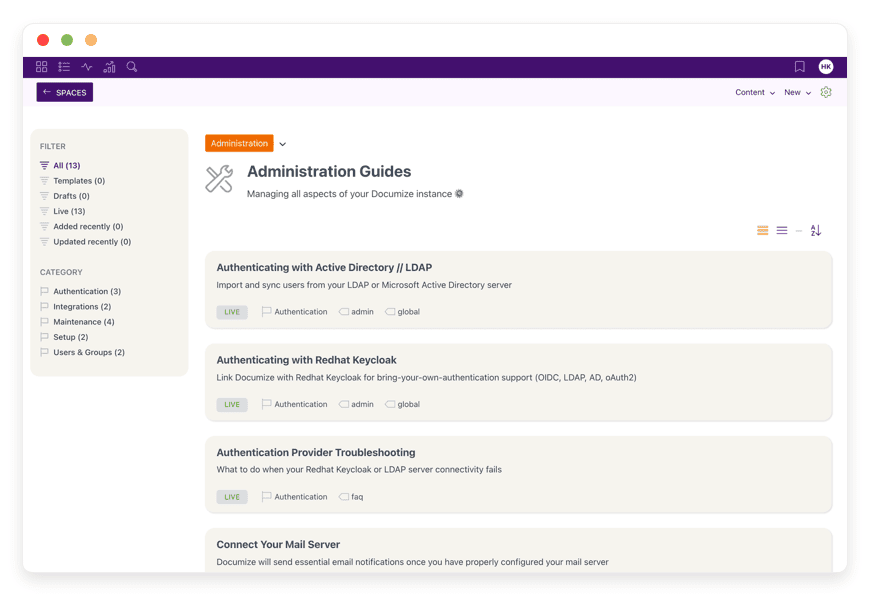
Chaos is the enemy of a good wiki. Documize organizes your content clearly. You create broad Spaces for different departments. You might have a Space for Sales and a Space for Engineering. Inside those spaces, you define specific Categories. Finally, you apply custom Labels to documents. This groups them across different areas. This strict, three-tier system guarantees your team will find what they need. They can browse simple menus or use the fast internal search bar.
Document Snippets and Reusability
Writing the same text twice leads to outdated guides. Documize supports reusable snippets. This is a massive time saver. You can draft a standard server setup guide or a strict company policy. You then embed that single snippet across dozens of different pages. When you update the main source snippet, every single document containing it updates instantly. This ensures total truth and consistency across your entire knowledge base.
Change Control and Versioning
Business guides need strict accountability. Documize provides built-in change control rules. You can establish firm baselines for important files. If someone edits a major operating procedure, Documize creates a brand new version. It perfectly preserves the exact state of the previous baseline. You can easily view detailed audit logs. You will see exactly who changed what line, and exactly when they did it.
Active Directory and Keycloak Authentication
Managing separate passwords for your wiki is frustrating and unsafe. Documize Community connects directly with Active Directory, LDAP, and RedHat Keycloak. This means your team uses their normal daily corporate login details to access the wiki. As an administrator, you control group rules directly from your central directory. When an employee leaves, you disable one account, and they instantly lose access to the wiki.
Seamless Atlassian Jira and Trello Integrations
Documentation often lives right next to project management. Documize allows you to embed live Trello boards directly into your pages. You can also embed live Jira issues. If a developer updates a Jira ticket status, that change shows up instantly inside the Documize project page. It bridges the big gap between static text files and active, moving development tasks.
Rich Search Engine Capabilities
A wiki is useless if you cannot find your files. Documize features a highly tuned internal search engine. It indexes every single word within your blocks. You can search by exact match, filter by specific Labels, or narrow down by Spaces. If you move a massive amount of old files into the system, administrators can rebuild the search index with one click. This ensures every single new word is instantly ready to be found.
Comments and Direct Feedback
Sending emails to discuss a wiki page is a waste of time. Documize features inline comments and feedback tools. Team members can highlight a specific block of text and leave a remark. The original author gets a swift alert. They can reply, update the text, and resolve the comment right on the page. This keeps all discussions tied strictly to the document itself.
Making and Sharing Document Templates
Starting from a blank white screen slows people down. Documize lets you build standard templates for common tasks. If your team writes a weekly progress report, you can create a fixed layout. Add a title block, a date block, and a bullet list block. When a worker starts a new report, they just pick the template and fill in the blanks. This keeps all company reports looking uniform and professional.
Connecting Your Mail Server
Alerts keep work moving forward. You can connect Documize directly to your own mail server. By adding your simple SMTP details, the system handles alerts perfectly. It sends emails when a new task is assigned. It sends alerts when a document needs a strict review. It alerts authors when someone leaves a comment. This ensures nobody misses a vital update.
Assigning and Managing Actions
Sometimes a document requires real-world action. Documize allows managers to assign specific tasks right inside a page. You can ask a team member to review a new policy block. You can assign a due date. The system tracks these actions globally. A manager can view a simple dashboard to see which tasks are pending and which guides still need a final review.
Solutions per Industry
Documize Community adapts smoothly to very distinct business spaces. Here is exactly how different industries use it to solve their specific daily pain points.
eCommerce Businesses
Online stores run on strict processes. Managing inventory, handling returns, and speaking to customers require perfect rules. Store owners use Documize to house their entire customer service scripts. They build a specific Space for the support team. When a refund policy changes, they update the central reusable snippet. Every script updates at once. Warehouse workers use it to read packaging rules. New hires read the onboarding Space to learn the software tools. It keeps the whole store running without pauses.
Software Development Agencies
Agencies juggle many different clients. Each client has their own server setups, code rules, and project scopes. Relying on shared text files leads to major code errors. Documize allows agency owners to create a strict, private Space for each distinct client. Developers embed live Jira boards right into the technical spec pages. The strict versioning system ensures that every architecture change is tracked. It provides a clear, proven audit trail for final client sign-offs.
Educational Institutions
Schools and universities produce massive amounts of paper. They have curriculum guides, grading policies, and large faculty handbooks. Keeping these guides updated across different school wings is hard. Educational staff use Documize to centralize this material completely. They use the templates feature for standard daily lesson plans. If the main grading policy changes, an administrator updates the central block. The change flows through every single departmental syllabus automatically.
Marketing and Design Teams
Marketing moves fast. Teams need quick access to brand guidelines, exact color codes, and old campaign briefs. Putting these in a chat room means they get lost in an hour. Marketing managers build specific Categories in Documize for each major brand asset. They document the exact tone of voice rules. They log the exact steps for launching a new social media ad. When a new designer joins the team, they just read the core brand Space. They get up to speed in hours, not weeks.
Customer Support Call Centers
Support agents need accurate answers instantly while talking on a live phone call. Slow search bars or outdated files result in very angry customers. Documize gives support teams a blazing fast, searchable knowledge base. Managers organize detailed troubleshooting guides with clear Labels. When a brand new product launches, managers draft the new guides in secret. They set up a review workflow for quality checks. Once approved, they publish the guides instantly for the entire support floor to see.
Manufacturing and Assembly Floors
Building physical products requires extreme safety and precision. Factory managers must ensure every worker knows the exact steps to operate heavy machines. They use Documize to write clear, step-by-step safety manuals. They upload diagrams directly into the content blocks. Because of the strict version control, factory auditors can review the exact history of a safety manual. If a machine process changes, the updated guide is tracked, stamped, and shared instantly.
Law Firms and Legal Practices
Legal teams drown in standard formats and compliance rules. Missing a filing deadline or using the wrong case format causes major issues. Law firms use Documize as their firm-wide rulebook. They create deep spaces for state laws and federal laws. They build standard case filing checklists. Junior clerks use the wiki to find the exact steps for submitting court documents. The strict baseline features ensure that old firm policies are never deleted, just securely archived.
Non-Profit Organizations
Non-profits rely heavily on shifting groups of volunteers. Training new volunteers every single week takes too much time. Organizers build a public-facing Space in Documize strictly for volunteer training. They outline the exact event steps, the dress codes, and the safety rules. For the internal staff, they create separate private spaces for grant writing templates and funding rules. It keeps the core team focused on the mission, rather than repeating basic instructions.
Documize Community vs Other Softwares
How does Documize compare to the popular software alternatives on the market?
| Feature | Documize Community | Confluence | Notion |
| Primary Focus | Technical & Business Docs | Heavy Corporate Wiki | Personal & Team Notes |
| Content Structure | Spaces, Categories, Labels | Spaces and Page Trees | Nested Pages and Databases |
| Reusable Snippets | Yes, native core support | Requires extra macros | Synced blocks |
| Change Workflows | Built-in approvals | Requires plugins | Manual tracking |
| Active Directory | Native support included | Native support included | Paid extra required |
| License Type | Open-source platform | Proprietary platform | Proprietary platform |
Documize Community focuses purely on structured documentation. Confluence offers similar traits but comes with heavy bloat and slow load times. Notion is highly flexible but lacks the strict, native approval workflows needed for formal business rules. Documize bridges the gap. It is fast, strict enough for business, and fully open-source.
Use Cases and Applications
Standard Operating Procedures (SOPs)
Healthy businesses run on repeated daily processes. Documize is the absolute perfect home for SOPs. You can format step-by-step actions clearly. You can embed external workflow diagrams. You can mandate strict review cycles for each process. This ensures your daily processes are always well documented and totally current.
Employee Onboarding Portals
New hires face a massive wave of information on day one. You can build a welcoming onboarding space in Documize. Fill it with company policies, software setup guides, and clear team structures. Grouping this information into a logical reading flow helps new workers get up to speed fast. They stop asking the same repetitive questions.
API and Technical Documentation
Software developers need clear, highly structured formats for reading code. Documize handles code blocks gracefully. Technical teams use it to outline REST endpoints, map database schemas, and draw server maps. The blazing fast search ensures developers find exactly what text variable they need in mere seconds.
Meeting Notes and Action Items
Tracking vital business decisions over time requires a solid system. Teams use Documize to log their weekly meeting minutes. The built-in action tools allow managers to assign specific tasks to team members directly within the meeting notes. This ensures strict follow-through on every single promise made during the call.
Product Release Notes
When you launch new software features, your team needs to know. Product managers create a specific Category just for release notes. They draft the new changes using the block editor. They embed screenshots of the new software. They publish the note, and the entire support team reads it instantly. It keeps everyone on the exact same page.
How DANIAN Helps
You want a fast, reliable wiki. You do not want to be a system administrator. DANIAN is the "quiet enabler" behind your daily work. We handle the technical heavy lifting so you get the glory of a perfect documentation hub.
Fully Managed
We handle the hosting. Our team manages everything from initial setup to regular updates, security patches, and performance monitoring. Your software is always optimized without you having to lift a finger. You just log in and start writing.
Backup & Monitoring
Data loss is simply not an option for your central knowledge base. We provide automated daily backups. These are configured automatically, stored securely, and offer a simple one-click restore process. If you ever delete an important file by accident, you can get it back fast.
SSL & Firewall
With cybersecurity threats on the rise, we take security seriously. From automated updates to proactive monitoring and custom firewalls, we make sure your environment is secure 24/7. HTTPS encryption comes standard. It protects all your internal reading from outside eyes.
Updates
When the core team releases a new version of the software, you do not have to read confusing release notes. You do not have to run complex database scripts. Security patches and new versions are applied without your intervention. Your system stays safe, modern, and totally fresh.
24/7 Monitoring
Servers require constant, daily attention. We watch your application around the clock. Issues are detected and often resolved before you even notice a slowdown. You never have to wake up early to restart a frozen server.
Guaranteed Performance
Downtime can be detrimental to your business. If your team cannot access their guides, daily work completely stops. With our scalable infrastructure, we ensure consistent performance even as your user base and document library grow massively.
7-Day Free Trial
We believe in proving our actual value. You can test our managed service completely risk-free. Less setup, more development. Affordable from the start. Real help when you really need it.
How to Get Started
Getting your entire documentation organized takes less than five minutes. Skip the long tutorials and complex server scripts.
Step 1: Visit danian.co and easily sign up for an account.
Step 2: Select Documize Community straight from our simple catalog.
Step 3: Relax while DANIAN automatically launches your software and connects the database.
FAQ
How does the internal search indexing work?
The software uses a highly tuned internal search engine. Occasionally, after massive bulk data imports, the search index needs a quick refresh. Administrators can trigger a full search index rebuild directly from the settings panel.
Is it possible to export documents for offline reading?
Yes. The platform understands that sometimes documentation needs to leave the wiki. You can easily export your guides into standard formats, including clean PDF files. This makes it simple to share finished manuals with clients.
How do I manage user reading permissions?
Permissions are handled very gracefully. You can create distinct User Groups and map them directly to specific Spaces. You can grant read-only access to certain teams while giving edit rights to others.
Can I integrate my existing LDAP directory?
Yes. You can connect directly to Active Directory or standard LDAP servers. This allows your team to use their existing daily passwords to log in. You manage their core access from your central company directory.
Does the software support custom branding?
Yes. Administrators can adjust basic branding elements. You can upload your own company logo and adjust the primary color schemes to match your brand rules. This makes the wiki feel like a true internal company tool.
How do I handle document approvals?
The system has a built-in change control workflow. Authors draft their text and then request a formal review. A designated manager reads the draft and approves it. Once approved, it becomes the new official baseline version.
Is it easy to copy or move content around?
Very easy. If you restructure your company, you can easily move entire Categories from one Space to another. You can also copy existing documents to use as a base for a brand new guide.
What happens if I need to restore a backup?
With DANIAN hosting, your backups are fully automated. If you face a major data error, you can use our simple dashboard to select a recent daily backup. A single click restores your entire wiki to that exact point in time.
Conclusion
Documize Community brings total order to your scattered internal knowledge. It drops the heavy, outdated wiki mechanics in favor of a fast, clean, block-based system. It is a system your team will actually want to open and read. By combining reusable snippets, strict version control, and deep project integrations, it acts as the single source of truth for your entire business.
Stop wasting valuable hours configuring databases, fighting firewalls, and managing manual server updates. Let the experts handle the heavy systems. You focus on building great guides and growing your business.


