
Streamline Your IT Automation with Managed Ctfreak Hosting
TLDR - Quick Answer
Ctfreak is a lightweight IT task scheduler. It centralizes scripts, cron jobs, and workflows across your entire infrastructure.
It operates entirely without background agents. It connects securely via standard SSH or WinRM to execute tasks on remote servers.
Managed Ctfreak Hosting gives you an instant, production-ready environment without the ongoing maintenance burden.
You get automated daily backups, routine system updates, and continuous monitoring built right in.
Skip the terminal setup and server configuration. Focus purely on writing great scripts and orchestrating your workflows.
Introduction
IT teams waste countless hours managing automation. You write shell scripts. You configure basic cron jobs. You manually track execution logs across dozens of scattered servers. When an execution fails, panic sets in. You have to log into multiple remote machines just to figure out what broke. It is a slow, frustrating process.
Ctfreak solves this problem by giving you a single command center. But running a centralized task scheduler yourself is a second job. You have to provision a server. You have to secure the network. You must handle database connections. You have to guarantee the scheduler never goes offline.
DANIAN acts as your invisible infrastructure. We handle the setup, security, and ongoing maintenance. You can start scheduling tasks immediately. We quietly manage the technical heavy lifting behind the scenes. We keep the engine running smoothly.
What is Ctfreak?
Created by JYP Software, Ctfreak is a fast, lightweight IT task scheduler. It features a unique mobile-first interface. It provides system administrators, developers, and data engineers a single dashboard to schedule, execute, and monitor automation tasks. You no longer have to scatter isolated cron jobs across hundreds of machines. Ctfreak connects remotely to execute local commands, shell scripts, Ansible playbooks, and complex SQL queries. It handles everything from one central hub.
Why is it trending?
IT professionals are tired of heavy, resource-hungry automation platforms. Many traditional schedulers require excessive memory and slow down your hardware. Ctfreak is different. It is built in Go. It compiles to a single, highly efficient binary. It uses minimal CPU and memory. Yet, it still offers powerful features like workflow nesting, concurrent executions, and incoming webhooks. It solves complex orchestration problems without wasting system resources.
Why Choose Ctfreak?
Hosting Ctfreak gives you complete control over your automation workflows. You easily bypass the restrictive limits of closed-ecosystem, proprietary schedulers. You gain the freedom to design an infrastructure that operates exactly how you want it to.
Because it supports a wide variety of task types and multiple operating systems, you can orchestrate tasks on Windows, Linux, macOS, and databases simultaneously. You are not forced into a specific vendor ecosystem. You use the tools you already know. You write the scripts you already trust. Hosting Ctfreak simply gives you a better way to organize them.
Key Features of Ctfreak
Ctfreak packs a massive amount of functionality into a very small footprint. Here is a deep dive into the features that make it an essential tool for modern IT automation.
Agentless Architecture: You do not install background software on your target servers. Ctfreak connects securely via standard SSH and WinRM protocols. This keeps your remote servers completely clean. You avoid software conflicts. You never have to update agent binaries on hundreds of machines.
Extensive Task Types: You are never limited to basic shell commands. You can execute Bash scripts for Unix. You can run PowerShell scripts for Windows. You can trigger Ansible playbooks. You can run raw SQL scripts. You can even execute simple HTTP requests to trigger external web APIs. Everything lives in one place.
Mobile-First Interface: You manage your entire infrastructure from your phone. The user interface is highly responsive. Whether you are at your desk or traveling on a train, you remain in control. You can check execution logs, monitor system status, or restart a failed task right from your mobile browser.
Robust Notifiers: You instantly know when a task fails. You can attach multiple notifiers to a single task. For example, if a nightly database backup fails, Ctfreak reacts immediately. It can message your team on Slack. It can send a detailed email to the IT manager. It can even trigger a webhook to create an incident ticket.
Workflow Orchestration: You build complex sequences easily. You chain individual tasks together sequentially or concurrently. You can design a workflow that runs a SQL data export, transfers the file to an external SFTP server, and then triggers a success notification. If one step fails, the workflow stops, and you get an alert.
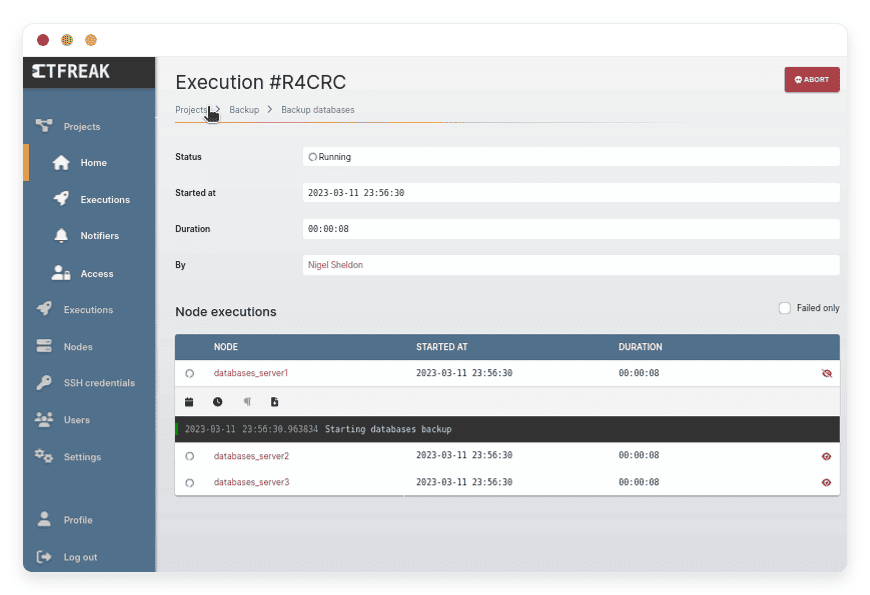
Centralized Logging: You never hunt through individual server logs again. Every execution records its output. Both successful jobs and failed errors log back to your central dashboard. You get rapid troubleshooting. You also get a perfect audit trail of who ran what, and when.
Secure Credential Management: You stop hardcoding passwords in your scripts. Ctfreak includes a secure vault for your secrets. You store SSH keys, database passwords, and API tokens safely. You reference these secrets inside your scripts using simple variables. Your sensitive information remains protected.
Visual SQL Reports: You turn raw data into readable charts. Ctfreak allows you to run SQL queries and instantly format the output. You can generate data tables, pie charts, and bar graphs. You can then schedule these reports to email your team every morning. It replaces the need for heavy business intelligence tools for basic reporting.
Webhook Triggers: You can start automation tasks using external events. Ctfreak generates unique, secure webhook URLs for your tasks. Your monitoring system can hit that URL to trigger an automatic restart script. Your Git repository can hit that URL to start a code deployment. It connects your entire toolchain.
Solutions per Industry
Ctfreak adapts to almost any environment. By centralizing scripts, different industries solve highly specific technical challenges. Here is how various sectors utilize this powerful scheduler.
E-Commerce and Retail
E-commerce websites handle massive amounts of traffic and data. Speed and accuracy are critical. An e-commerce team uses Ctfreak to manage repetitive database maintenance. You can schedule hourly SQL scripts to identify and clear abandoned shopping carts from the database. You can run automated scripts to synchronize local warehouse inventory numbers with the live website database. If a front-end cache needs clearing during a high-traffic sale event, you can trigger a script that clears the cache across twenty web servers simultaneously.
Digital Agencies
Digital agencies manage web hosting for hundreds of different clients. Logging into each client server manually is impossible. Agencies use Ctfreak to centralize their maintenance routines. You can organize client servers using tags. You can schedule a weekly Bash script that runs WP-CLI commands to update WordPress plugins across fifty different client websites at once. You also automate nightly backups for every client, piping the success or failure logs directly into the agency's dedicated Slack channel.
Higher Education
Universities manage complex, legacy IT environments. They process massive amounts of student data daily. IT departments in higher education use Ctfreak to orchestrate large batch jobs. You can schedule scripts that run at midnight to process huge CSV files containing new student enrollments. You can automate the synchronization between the university directory service and the library access system. You can also run automated PowerShell scripts to reset and clean up public lab computers every weekend.
Logistics and Supply Chain
Supply chain companies rely heavily on daily data transfers. Information flows constantly between suppliers, warehouses, and delivery partners. Logistics IT teams use Ctfreak to tame these data transfers at scale. You can schedule reliable tasks that pull shipping manifests from a vendor's SFTP server every morning. You use workflow features to parse that data, insert it into your internal Oracle database, and email a summary report to the warehouse manager. Ctfreak ensures these critical files move securely and predictably.
Financial Services and Accounting
Financial institutions require strict auditing and regular reporting. Data security is paramount. Accounting teams use Ctfreak to generate secure end-of-month reports. You can write complex SQL scripts that calculate monthly revenue totals. Ctfreak runs these scripts against your secure internal database. It formats the results into visual charts and detailed CSV files. It then emails those reports directly to stakeholders. Because Ctfreak uses internal OIDC authentication and strict user roles, only authorized financial officers can view or execute these specific tasks.
IT Operations and Sysadmins
Managing system updates across thousands of servers is notoriously difficult. With Ctfreak, system administrators group servers using YAML tags. You can run non-interactive OS update scripts concurrently. If a few servers drop their connection during the update process, Ctfreak logs the exact failure. You can easily isolate the failed nodes. You click a single button to retry the script only on the failed machines, without affecting the successful ones. It turns a weekend-long patching job into a five-minute task.
Software Development Teams
Developers need reliable ways to automate code deployments and environment setups. Software teams use Ctfreak to trigger actions based on code commits. You can configure a webhook in your code repository. When a developer merges code into the main branch, the repository pings Ctfreak. Ctfreak then executes an Ansible playbook to pull the new code, build the application, and restart the necessary web services on the staging server. Developers can also use the dashboard to run safe, pre-approved database seed scripts with a single click.
Ctfreak vs Other Softwares
When choosing an automation platform, you must compare the software capabilities. Here is how Ctfreak stacks up against other popular open-source job schedulers.
| Feature | Ctfreak | Rundeck | Cronicle |
| Resource Usage | Extremely lightweight (Go) | Heavy, Java-based | Moderate, Node.js based |
| Mobile Interface | Built-in mobile optimization | Poor mobile experience | Desktop focused UI |
| Agent Requirement | Agentless (SSH/WinRM) | Agentless | Requires agents on nodes |
| Native SQL Reports | Yes, creates tables and charts | Requires custom plugins | Not natively supported |
| Setup Complexity | Very simple and fast | Complex configuration | Moderate setup |
Use Cases and Applications
Here are practical, everyday examples of how you can use Ctfreak to simplify your workload.
Automating Server Updates: Run patching scripts across thousands of Linux and Windows machines concurrently. Keep your fleet secure without manual logins.
Self-Hosted CI/CD Pipelines: Trigger code build and deployment scripts automatically. Use incoming webhooks from your repository to start the deployment workflow.
Daily Data Transfers: Manage reliable daily file transfers. Set strict concurrency limits to prevent server network overload while moving massive files.
Routine Database Maintenance: Schedule automatic vacuum, reindex, or cleanup scripts. Keep your PostgreSQL or MySQL databases running fast without manual intervention.
Visual Business Reporting: Generate and distribute visual SQL reports. Send beautifully formatted data to management teams without needing a dedicated, expensive business intelligence application.
How DANIAN Helps
The "Quiet Enabler." We handle the mess; you get the glory.
Fully Managed: We handle the hosting. Our team manages everything from initial setup to regular updates, security patches, and performance monitoring. Your software is always optimized without you having to lift a finger.
Backup & Monitoring: Automated daily backups are configured automatically and stored securely. If you ever make a mistake, you can easily initiate a one-click restore.
SSL & Firewall: Secure by default. With cybersecurity threats on the rise, we take security seriously. From automated updates to proactive monitoring and custom firewalls, we make sure your environment is secure 24/7.
Updates: Security patches and new versions of Ctfreak are applied without your intervention. You always have the latest features.
24/7 Monitoring: Issues are detected and often resolved before you even notice them. We monitor the server health around the clock.
Guaranteed Performance: Downtime can be detrimental to your business operations. With our scalable infrastructure, we ensure consistent performance even as your scheduled tasks grow in complexity.
7-Day Free Trial: Zero risk to test the waters. You can evaluate the platform completely free.
Less Setup, More Development. Affordable from the Start. Real Help When You Need It.
How to Get Started
Visit danian.co and sign up for an account.
Select Ctfreak from our extensive application catalog.
Relax while DANIAN launches your software and configures the environment.
FAQ
Can Ctfreak fully replace traditional cron jobs?
Yes. It completely centralizes your schedules. It provides immediate execution history, instant alerts, and remote triggers that standard cron simply cannot offer.
Does Ctfreak require background agents on my servers?
No. It connects strictly through standard, secure protocols. It uses SSH for Unix environments and WinRM for Windows environments. Your remote servers remain untouched.
What operating systems can I target with my scripts?
You can target Linux, macOS, OpenBSD, FreeBSD, Windows, and more. If you can reach it via SSH or WinRM, you can automate it.
Is there an API available for custom integrations?
Yes. Ctfreak includes a comprehensive REST API. You can use it to create tasks in bulk, trigger executions remotely, or integrate the scheduler deeply with your internal tools.
What databases are supported for SQL tasks and reports?
You can seamlessly execute scripts and build visual reports on PostgreSQL, MySQL, MariaDB, Oracle, and SQL Server databases.
How do I handle authentication for a large team?
Ctfreak supports OpenID Connect (OIDC). You can connect it to your existing identity provider. You then map your users into Teams and assign specific Roles to control exactly who can view or run specific tasks.
Does Ctfreak hosting include the software license?
Hosting covers the underlying infrastructure and our ongoing management. You can use the generous Free Edition of Ctfreak by default. If your team requires unlimited tasks or advanced concurrent executions, you can purchase a Pro or Business license directly from JYP Software and apply it to your managed environment.
Is it safe to store my SSH keys in the application?
Yes. Ctfreak features a dedicated credential vault. It encrypts and safely stores your SSH keys, passwords, and API tokens so they are never exposed in your raw scripts.
Conclusion
Ctfreak is an incredible tool for bringing order to chaotic automation scripts. It empowers you to build highly reliable workflows. It helps you track script failures instantly. It allows you to manage thousands of servers from a clean, mobile-friendly interface.
By opting for a managed solution, you completely eliminate the burden of server maintenance. You never have to worry about the scheduler going offline. You can dedicate all your energy to writing great scripts, designing efficient workflows, and improving your IT operations.
Experience the power of fully managed open-source software.


