
Is Managed CryptPad Hosting the Right Move for Your Team?
TLDR: The Value of Managed CryptPad Hosting
CryptPad is a zero-knowledge, open-source collaborative office suite.
It encrypts all your files, documents, and chats inside your browser before sending them anywhere.
Managing the software requires constant updates and technical server maintenance.
Managed CryptPad Hosting gives you total privacy without any server chores.
You get instant setup, automatic backups, and seamless software updates.
Ditch the Trackers, Keep the Collaboration
You want to work with your team online. But you do not want big tech scanning your documents. You need a secure space to share ideas. You need to track projects and crunch numbers safely. CryptPad solves this exact problem with end-to-end encryption.
But running it yourself is a second job. You have to configure the server environment from scratch. You must set up the database and handle routine software updates. You constantly worry about backups failing or security certificates expiring. Time spent managing servers is time taken away from your actual work.
DANIAN acts as your invisible infrastructure. We take care of the technical heavy lifting. You can focus entirely on building your projects.
What is CryptPad?
CryptPad is a complete office suite that runs entirely in your web browser. It features rich text editors, spreadsheets, kanban boards, and whiteboards. The big difference is its security model. All content is encrypted on your device before it leaves your browser. The server never sees your plain text files.
The project was created by XWiki SAS. They built CryptPad to prove that real-time editing could happen without sacrificing privacy. Funded by research grants and open-source backers, CryptPad offers a robust alternative to mainstream cloud suites. The creators developed a special engine called ChainPad. This engine resolves typing conflicts in real time while keeping data completely scrambled.
XWiki SAS has built open-source tools for two decades. A dedicated team called the "CryptPad Squad" maintains the code. Their continuous work ensures that the platform remains fast, reliable, and secure. They rely on community support through platforms like Open Collective to fund ongoing development.
Why is CryptPad Trending?
People are tired of having their work scanned. They do not want their documents used for artificial intelligence training. CryptPad gives you total control over your files. The entire platform runs on an open-source AGPL license.
You can review the underlying code. You can verify the encryption methods yourself. You can trust the mathematical process behind the software. It is the ultimate tool for teams that value absolute privacy above all else. You get the convenience of the cloud with the security of a locked vault.
Why Choose CryptPad?
Hosting CryptPad changes how your team works. You get the familiar feel of standard document editors. But you also get absolute privacy. You do not even need to register an email address to start a document. You simply create a link and share it securely.
This open-source freedom replaces the need for invasive proprietary tools. You gain a powerful suite of apps that do not track your clicks. They do not read your text. Your files remain yours alone.
When you choose managed hosting, you amplify these benefits. You avoid the hidden costs of downtime. You skip the steep learning curve of server administration. You simply log in and start working securely.
Key Features of CryptPad
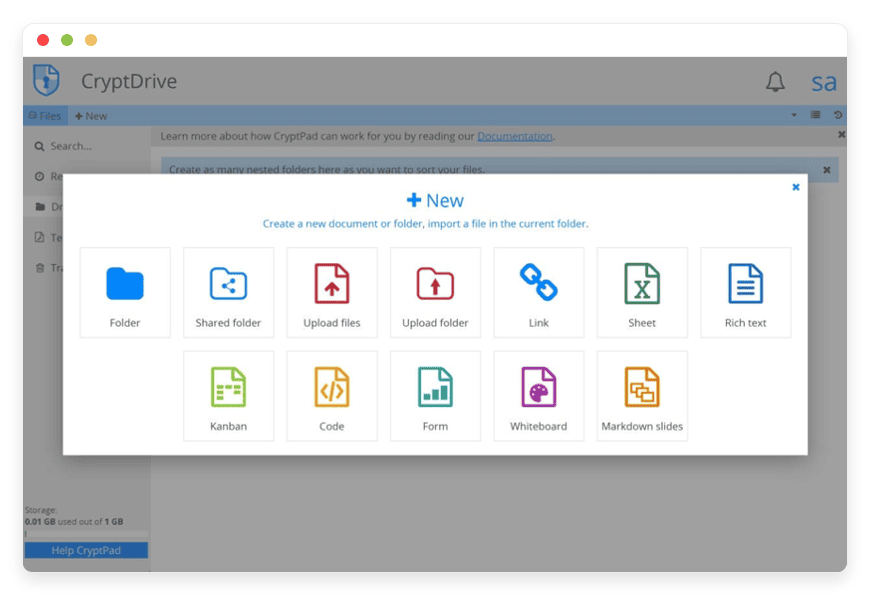
CryptPad packs a serious punch when it comes to daily workflow tools. It goes far beyond a simple text editor. The suite offers a massive variety of applications to handle any business task. Every single feature is built with zero-knowledge encryption from the ground up.
Zero-Knowledge Encryption Architecture
CryptPad uses advanced cryptography to secure your work. The software relies on the XSalsa20-Poly1305 algorithm for encrypting data. It uses Ed25519 for digital signatures. Your browser encrypts the data before it travels over your internet connection. Even the database only holds scrambled code. The server administrator cannot read your files. Your team holds the only keys. This removes the risk of central server breaches exposing your work.
Rich Text and Documents
Write articles, reports, and meeting notes together in real time. The interface feels familiar instantly. You can format text, add headers, and track edits without skipping a beat. The rich text application allows you to embed images directly into the document. You can export your finished work to standard formats like PDF or standard text files. The toolbar offers quick shortcuts to speed up your writing process.
Powerful Spreadsheets
Crunch numbers and build complex formulas safely. The spreadsheet application handles budgets, project plans, and financial models. Multiple users can edit cells at the same time. The system prevents you from overwriting each other. You can create multiple sheet tabs, generate charts, and style your data tables. The spreadsheet tool relies on an integration with OnlyOffice, but it applies CryptPad's strict encryption rules to the entire process.
Visual Kanban Boards
Track tasks and project statuses visually. Move cards through custom columns to track progress. You can change column colors, assign tags, and add detailed descriptions to each card. It is perfect for software sprints or content calendars. You stay organized without feeding project details to third-party tracking companies.
Creative Whiteboards
Brainstorm ideas on a blank canvas. Draw shapes, map concepts, and connect thoughts visually. You can add text boxes and change brush colors. Remote teams can sketch out plans together as if they were in the same room. It is a highly fluid way to visualize complex workflows during strategy meetings.
Forms and Polls
Gather feedback or organize events securely. The form builder lets you create surveys and collect answers. You can use multiple-choice questions, text boxes, and grid selections. The responses are encrypted instantly in the user's browser. This makes it perfectly safe for collecting sensitive customer feedback or internal team surveys.
Presentations and Slides
CryptPad gives you two distinct ways to build presentations. The first is a traditional presentation builder where you can drag and drop text boxes and images onto slides. The second is the "Slides" app, which uses Markdown. You type standard Markdown text, and the application instantly turns your headers and bullet points into a clean, formatted slide deck. It is the fastest way to build a presentation for a technical meeting.
Flowcharts and Diagrams
Map out complex systems with the built-in diagram tool. This application uses the popular Draw.io engine, wrapped in CryptPad's secure encryption. You can drag and drop shapes to build network maps, organizational charts, or user flow diagrams. You can connect shapes with smart arrows that adjust automatically when you move elements around the screen.
Markdown and Code Editor
Developers can collaborate on code snippets. The editor features syntax highlighting for many programming languages. You can change the color theme to suit your preferences. It is a fast way to draft technical documentation with your team. You can easily switch between edit mode and live preview.
Secure Drive and Folders
Organize all your files in one secure virtual drive. Create folders, manage access permissions, and find your work easily. You can add color-coded tags to documents for rapid sorting. The drive maintains a detailed history of your actions, and includes a secure trash bin to recover accidentally deleted files. You control exactly who can view or edit every single file in your workspace.
Custom Document Templates
Stop rebuilding the same documents from scratch. CryptPad allows you to save any document, spreadsheet, or kanban board as a template. When you start a new project, you simply select your custom template. This ensures consistency across all your team reports and meeting notes.
Team Management and Contacts
Connect with your colleagues directly within the platform. You can verify contacts using a secure code to ensure you are talking to the right person. Create dedicated team spaces with shared drives. The suite includes a calendar application to track shared events. You can also chat securely within the document interface while editing.
Advanced Security Settings
You maintain absolute control over who sees your work. You can set specific passwords on individual folders and documents. You can create self-destructing links that expire after a single view or a set amount of time. The system allows you to remotely disconnect active sessions from other devices. It also blocks remote content by default to prevent tracking pixels from loading inside your documents.
Accessibility and Interface Customization
CryptPad respects diverse user needs. The interface includes a dedicated dark mode to reduce eye strain. It also features a specific font setting for users with dyslexia, making text much easier to read. The entire platform supports extensive keyboard shortcuts, allowing power users to navigate the drive and format documents without ever touching a mouse.
Solutions per Industry
Creative Agencies
Agencies handle sensitive client pitches daily. They manage brand strategies and unreleased product designs. A leaked marketing campaign can ruin a multi-million dollar product launch. CryptPad allows your creative agency to draft advertising copy securely. You can plan content schedules on kanban boards without fear of exposure.
You can share access links with clients that expire automatically after the pitch is over. You can restrict their access to view-only mode so they cannot accidentally delete your work. Your creative process stays confidential from start to finish. You deliver high-quality work while proving to clients that you take their privacy seriously.
Education and Academic Research
Academic researchers gather highly sensitive data that requires strict privacy protocols. CryptPad lets research teams write joint papers securely across different universities. They can compile qualitative survey results without exposing participant details to external cloud providers. The forms application collects field data safely and encrypts it immediately.
Students and teachers can collaborate on group projects effortlessly. They do not need personal accounts to join a shared document. They do not have to give up their browsing habits to tech giants just to finish homework. The platform provides a neutral, highly secure ground for academic debate and data analysis.
Non-Profit Organizations and NGOs
Non-profits often deal with vulnerable populations and sensitive international operations. They manage sensitive legal cases, activist networks, and private donor information. Protecting internal communications is incredibly critical to their mission and safety.
With CryptPad, charity workers can coordinate global events safely. They can track anonymous donations on encrypted spreadsheets without risking a data breach. They can draft press releases collaboratively before going public. The zero-knowledge model ensures that external parties or hostile entities cannot access their internal strategies. They can focus purely on their mission instead of worrying about digital surveillance.
Legal Professionals and Law Firms
Lawyers manage mountains of confidential client data. Client-attorney privilege requires absolute secrecy. Standard cloud tools often scan documents for advertising or machine learning, which presents a massive professional risk. CryptPad eliminates this risk entirely.
Legal teams can draft contracts and case notes in real-time. They can build detailed timelines on the whiteboard application. They can share secure, password-protected document links with opposing counsel for review. Because CryptPad uses zero-knowledge encryption, even the server host cannot read the legal briefs. It provides total peace of mind for high-stakes litigation prep.
Journalism and Investigative Reporting
Investigative journalists rely on protecting their sources. A leaked document can endanger a whistleblower's life or ruin a breaking story. Journalists need a way to collaborate with editors without leaving a digital trail on public cloud servers.
CryptPad offers the perfect secure newsroom environment. Reporters can draft stories in the rich text editor while an editor reviews the text simultaneously. They can store leaked documents in the secure drive using self-destructing access links. The built-in chat function allows secure communication directly inside the article draft. The platform ensures that the story remains under wraps until publication day.
Financial Advisors and Accounting Firms
Financial planners handle the most sensitive data possible: personal wealth, tax documents, and corporate financial models. A single breach can destroy an accounting firm's reputation permanently.
CryptPad allows accountants to build complex budget models in the spreadsheet app. They can track investment portfolios securely. Advisors can send encrypted intake forms to new clients to gather financial histories safely. They can share a view-only spreadsheet link with clients to show quarterly projections. The zero-knowledge architecture ensures that financial data is never exposed to external data brokers.
Software Development Teams
Software developers deal with proprietary code and complex release schedules. They need agile tools that do not compromise their intellectual property. CryptPad fits perfectly into the modern development workflow.
Teams can manage sprint cycles using the visual kanban board. They can store meeting notes and architecture plans in the secure drive. The markdown app features syntax highlighting, allowing developers to draft technical documentation and code snippets collaboratively. They can draw out database structures using the diagram tool. It keeps all technical planning secure and centralized.
Therapy and Counseling Clinics
Mental health professionals manage highly sensitive patient records. They require tools that respect patient confidentiality to the highest possible degree. Standard office software often falls short of strict privacy requirements.
Therapists can use CryptPad to write session notes securely. They can create encrypted forms for patient intake and mental health assessments. Clinic managers can use the spreadsheet tool to handle scheduling without exposing patient names. The zero-knowledge model ensures that deeply personal health information remains locked away from corporate algorithms and data miners.
CryptPad vs Other Softwares
When comparing workflow tools, it is vital to look at the underlying technology. Mainstream options offer convenience but trade away your privacy. CryptPad offers both convenience and complete secrecy.
| Feature | CryptPad | Google Workspace | Microsoft 365 | Notion | Obsidian |
End-to-End Encryption | Yes (Default) | No | No | No | Optional (Paid) |
Open-Source Code | Yes (AGPL) | No | No | No | No |
Anonymous Usage | Yes | No | No | No | Yes |
Real-Time Collaboration | Yes | Yes | Yes | Yes | No |
Built-in Kanban | Yes | No | Planner | Yes | Plugins Required |
Self-Destructing Links | Yes | No | No | No | No |
Account Requirement | Optional | Mandatory | Mandatory | Mandatory | Optional |
Use Cases and Applications
CryptPad adapts to many different work styles and environments. It handles simple notes and complex project management easily. Here are practical ways to integrate the suite into your daily operations.
Secure Client Onboarding
Create a secure form to collect initial details from a new client. You can ask for their contact details, business history, and project requirements. The data flows directly into an encrypted spreadsheet inside your drive. Your team can review the answers safely. You protect the client's sensitive business details from day one.
Software Sprint Planning
Set up a kanban board for your next software release cycle. Create columns for Backlog, In Progress, Review, and Completed. Assign specific tasks to team members using colored tags. Use a linked markdown document for the technical specifications. The developers can write code snippets together in the markdown app.
Everything stays securely linked in your team drive.
Quarterly Financial Planning
Build your annual budget using the spreadsheet application. Create complex formulas to project revenue and track expenses across different departments. Generate charts to visualize the financial runway. Share an encrypted, view-only link with your board members before the quarterly meeting. You ensure that internal financial data never leaks to competitors or the public.
Remote Strategy Brainstorming
Open a whiteboard during your weekly video call. Map out user flows or new marketing funnels visually. Everyone on the team contributes shapes, arrows, and text in real time. You can group ideas together and color-code different strategies. You can save the final canvas to your shared drive for future reference when executing the project.
Weekly Executive Meeting Notes
Start a rich text document for your weekly executive sync. Everyone can type their department updates simultaneously. The ChainPad system resolves typing conflicts smoothly so nobody overwrites another person's notes. You can highlight action items and assign them in the text. You can export the final notes as a PDF to archive them securely in your company records.
How DANIAN Helps
Running a server takes your focus away from your real goals. The "Quiet Enabler" approach is our core philosophy. We handle the mess; you get the glory. Less setup means more time for your actual development. We make it affordable from the start. We provide real help when you need it.
Fully Managed Hosting
We handle the hosting completely. Our team manages everything from initial setup to regular updates, security patches, and performance monitoring. Your software is always optimized without you having to lift a finger. You skip the steep learning curve entirely.
Backup & Monitoring
We protect your hard work against accidents. Backups are configured automatically, stored securely, and offer a simple one-click restore process. If you ever make a mistake or delete a crucial file, you can roll back your system quickly. You never lose an important document again.
SSL & Firewall
Your platform is secure by default. With cybersecurity threats on the rise, we take security seriously. From automated updates to proactive monitoring and custom firewalls, we make sure your environment is secure 24/7. Your data stays protected at the network level, blocking malicious traffic before it reaches your applications.
Seamless Updates
Software requires constant maintenance to stay safe. Security patches and new versions are applied without your intervention. You always have the latest tools and features available to your team. You never have to read complex changelogs or run terminal commands to upgrade your system.
Proactive 24/7 Monitoring
Our systems watch your setup constantly. Issues are detected early and often resolved before you notice them. This proactive approach ensures you enjoy a smooth, uninterrupted workflow throughout your entire workday.
Guaranteed Performance
Downtime can be detrimental to your business. With our scalable infrastructure, we ensure consistent performance even as your user base grows. The application remains fast, responsive, and ready to handle large documents and complex spreadsheets without lagging.
7-Day Free Trial
There is zero risk to try it out. Test the waters. Invite your team and start building documents. See exactly how smooth the platform runs before making any long-term commitments.
How to Get Started
Getting your secure workspace online is incredibly fast. You do not need to read technical server manuals. You do not need to configure databases or install security certificates. We have simplified the entire process so you can get to work immediately.
Step 1: Visit the DANIAN website and sign up for an account.
Step 2: Select CryptPad from our wide software catalog.
Step 3: Relax while DANIAN gets your software running in the background.
You will receive your login details shortly. You can immediately log into your new dashboard, start creating secure documents, and share links with your team.
Frequently Asked Questions
Is CryptPad entirely free to use?
The software code itself is open-source and free to download. However, running it requires active server resources, memory, and storage space. You pay for the managed hosting environment. This keeps the software online, updated, and completely secure without requiring your own IT team.
Do I need an account to use the software?
No. You can create documents and share them as an anonymous guest. This is perfect for quick collaborations. However, creating a free profile within your platform helps you save files permanently to your personal encrypted drive and manage folder structures.
Can CryptPad open standard office files?
Yes. You can import and export common file formats. The platform translates them locally in your browser. You can then edit them securely using the rich text or spreadsheet applications. Once finished, you can export them back to standard formats.
How does the encryption actually work?
CryptPad uses local browser encryption. Your computer scrambles the text using complex math algorithms before sending it over the internet. The server only receives the scrambled text. When you open a document, your browser downloads the scrambled text and decrypts it locally.
What happens if I forget my password?
Because CryptPad uses strict zero-knowledge encryption, your password is the literal mathematical key to your files. If you lose it, the server cannot recover it. We cannot reset it for you. Always keep your credentials safe in a reliable password manager.
Is there a dedicated mobile app available?
CryptPad is designed to work smoothly on mobile web browsers through responsive design. You do not need to download a specific application from a centralized app store. You simply log in through your phone or tablet browser to access your drive.
Can I share files with people outside my team?
Absolutely. You can generate secure access links for external clients or partners. You can set specific passwords on those links for extra security. You can restrict their permissions to view-only mode. You can even make the links expire automatically after a certain time limit.
Can the server administrator read my documents?
No. Because the encryption happens entirely in your browser, the server administrator only sees encrypted data blocks. They cannot read your text, view your spreadsheets, or look at your whiteboards. Your privacy is mathematically guaranteed.
How does real-time editing work with encryption?
The creators built a unique technology called ChainPad. It acts similarly to a block-chain for text edits. It tracks who typed what and when. It resolves conflicts mathematically without needing the server to read or merge the actual plain text.
Can I host forms on a public website?
Yes. You can embed CryptPad forms securely on external websites using an iframe. The responses typed by your visitors are still encrypted in their browser before being sent to your central results spreadsheet. It is a highly secure way to gather public data.
Secure Your Work Today
CryptPad offers a brilliant way to work together online. You never have to give up your privacy to get things done effectively. It provides all the professional tools you need in one centralized hub. You can write proposals, plan development sprints, and calculate financial models safely. You keep total control over your files while enjoying seamless real-time collaboration.
Do not let server maintenance hold your team back. Stop wasting valuable time configuring environments and updating databases. Let us handle the complex technical details behind the scenes. You deserve a workspace that respects your focus, your time, and your privacy. Experience the power of fully managed open-source software without the headaches.


