
Managed CalibreWeb Hosting: Build Your Ultimate Digital Library
TLDR - Quick Answer
Managed CalibreWeb Hosting transforms your messy folder of digital books into a beautiful, centralized web application. You get all the benefits of a modern reading platform without the headache of server administration.
Here is the immediate value you get:
Universal Access: Read your entire EPUB, PDF, and comic collection from any web browser.
Direct Device Sync: Send books straight to your Kindle or sync your reading progress with Kobo devices natively.
Zero Server Maintenance: We handle the complex Linux setup, reverse proxies, and Python code behind the scenes.
Instant Setup: Skip the command line entirely. Get your library running immediately on our optimized infrastructure.
Granular Control: Organize your shelves, manage user access, and share specific books exactly how you want.
Introduction
You likely have hundreds of digital books, manuals, and comic files scattered across multiple hard drives. Finding a specific EPUB or PDF is a frustrating chore. The standard desktop software works perfectly on your local machine. However, it traps your entire collection on a single computer. You want to browse your library from your phone. You want to share a specific novel with a friend. You want to send a book straight to your eReader while you are traveling away from home.
This is the exact problem CalibreWeb solves. It gives your digital book collection a beautiful, centralized home on the web. It replaces messy folders with a clean, visual interface.
But running it yourself is a second job. Configuring a Linux server takes significant effort. Setting up reverse proxies, handling Python requirements, and securing your network demands hours of deep technical work. You want to read your books, not troubleshoot firewall rules on a weekend.
Enter DANIAN. We provide the invisible infrastructure that runs your software perfectly. Our Managed CalibreWeb Hosting gives you the ideal reading experience instantly.
What is CalibreWeb?
CalibreWeb is a powerful, open-source web application. It provides a clean, intuitive interface for browsing, reading, and downloading digital books. It uses an existing Calibre database to function. The project was originally created and maintained by the developer Janeczku. A dedicated community of contributors continues to support it heavily. The software is proudly licensed under the GPL 3.0 license.
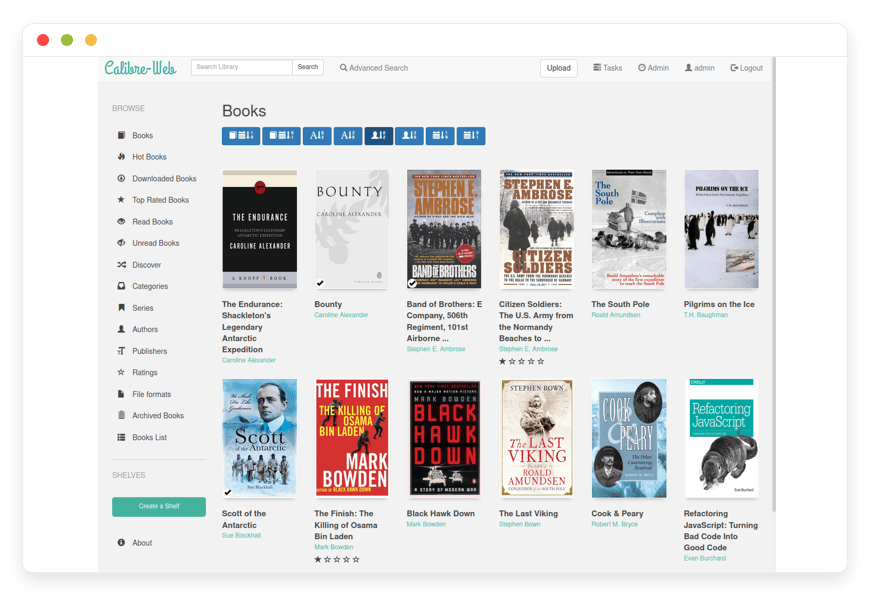
Instead of navigating a cluttered directory on your computer, CalibreWeb displays your digital library like a modern streaming platform. It reads the standard metadata.db file from your existing collection. It then generates a highly responsive website. You can search your entire library by author, custom tag, or book series in milliseconds.
Why is it trending?
Self-hosted reading libraries are booming in popularity right now. Readers are exhausted by fragmented software ecosystems. Amazon restricts what you can easily load onto your Kindle device. Apple limits your reading experience exclusively to iOS and macOS devices. CalibreWeb breaks these rigid boundaries entirely. It gives you a gorgeous, unified interface that works across every operating system on the market. You define the rules of the library, and CalibreWeb makes the experience beautiful.
Why Choose CalibreWeb?
Choosing to run this software gives you absolute control over your digital reading experience. You dictate exactly how your library is organized. You decide exactly who gets access to your files. Hosting CalibreWeb means you can easily replace proprietary applications like Amazon Kindle Cloud or Google Play Books.
You completely avoid the frustration of books mysteriously disappearing from your device due to corporate licensing disputes. Your personal library remains intact, perfectly searchable, and instantly available at all times. You also gain incredible freedom to connect third-party reading applications using standard OPDS feeds. This level of flexibility is completely unmatched in the digital reading space today.
Key Features of CalibreWeb
The feature set of this software goes far beyond a simple file directory. It is a complete ecosystem for readers. Using CalibreWeb Managed through DANIAN gives you instant access to these powerful tools without the setup friction. Here is a deep dive into the specific workflows that make this software exceptional.
Beautiful Browser Interface
The user interface is stunning and highly responsive. It displays high-resolution book covers, detailed synopses, and custom tags beautifully. You can easily switch between grid and list views depending on your preference. The interface configuration is incredibly customizable. You can toggle specific views on or off. You can adjust the default display language. The community has translated the interface into dozens of global languages.
Advanced In-Browser Reader
You never actually need to download a file to read it. CalibreWeb includes a powerful in-browser reader built directly into the software. You can open EPUBs, PDFs, and text files directly in your Chrome, Safari, or Firefox window. The reader remembers your exact reading position. It also supports popular comic book formats like CBZ and CBR natively. This makes it a perfect hub for your graphic novels.
Seamless Kobo Integration
This specific feature is a massive advantage for Kobo users. CalibreWeb can act as a native sync server for your Kobo eReader. You simply configure a specific endpoint URL in the software. Your Kobo device will then sync directly with your web library as if it were the official store. It downloads books directly over Wi-Fi. It updates your metadata automatically. It even synchronizes your reading progress back to your server.
Direct Send-to-Kindle Support
Amazon Kindle users get an equally smooth experience. You can configure your SMTP mail server settings directly inside the software dashboard. Once you configure this, a "Send to Kindle" button appears next to every compatible book in your library. You click the button, and the server automatically emails the MOBI or EPUB file directly to your personal Kindle email address. The book appears on your device in seconds.
OPDS Feed for Mobile Apps
The Open Publication Distribution System (OPDS) is an industry-standard format. CalibreWeb generates an active OPDS feed for your entire library automatically. You can plug this specific URL into popular mobile reading apps like Moon+ Reader, FBReader, or Marvin. The mobile app will securely connect to your library. You can browse, search, and download books directly inside your favorite mobile reading app.
Granular User Permissions
If you want to share your library, you can do so safely and securely. The software includes robust user management tools. You can create distinct accounts for friends or family members. You can assign highly precise permissions to each person. Some users can only view and read books in the browser. Other users can download the actual files. You can also grant full admin rights to trusted users, allowing them to upload new books or edit metadata directly from the web interface.
Google Drive Integration
Local storage limits can become a problem if you have a massive library of large PDFs or audiobooks. CalibreWeb offers native Google Drive integration to solve this. You can configure the software to host the actual book files on your remote Google Drive account. The database remains fast and responsive on the main server. This clever setup drastically reduces your server storage requirements while maintaining a seamless user experience.
Advanced Single Sign-On (SSO) Support
Security and convenience are built deeply into the application. For advanced setups, the software supports LDAP login for centralized user authentication. You can also configure OAuth logins using Google or Github accounts. This means you and your authorized users can log in with a single click. You completely bypass the need to create and remember another set of passwords.
Powerful Metadata Management
Your books need accurate details to be searchable. The software allows you to fetch new metadata easily. You can pull accurate book descriptions, author details, and high-quality cover art from sources like Goodreads and Google Books. You do this with a single click in the admin dashboard. You can manually edit titles, fix broken tags, and sort books into custom public or private shelves.
Advanced Identifiers
Serious book collectors rely on precise cataloging. CalibreWeb supports advanced identifiers perfectly. You can attach specific ISBN numbers, Amazon IDs, or Goodreads IDs to every single book. This ensures your library remains highly organized. It makes cross-referencing your collection with external databases incredibly simple and accurate.
Solutions per Industry
Reading and document management extend far beyond personal use. Organizations across the world struggle with distributing digital text securely. Here is how different industries use this software to solve critical workflow problems.
Education and Universities
Schools and universities constantly struggle with distributing course materials effectively. Textbooks, heavy research papers, and class syllabi get lost in cluttered email threads. Clunky learning management systems are slow and confusing for students. CalibreWeb provides a clean, centralized reading hub for an entire academic department. Professors can tag required readings by specific course codes. Students can log in, click their specific class tag, and read PDFs directly in their browsers. They do not need to download massive files to their personal laptops.
Publishing and Literary Agencies
Literary agencies handle thousands of unreleased manuscripts every year. Editors need a secure way to read early drafts on the go. An agency can launch their internal library easily on this software. Editors can connect their iPad reading apps via the OPDS feed. They can securely access advance reader copies (ARCs) or unedited manuscripts while commuting. The granular permissions ensure that only authorized personnel can access highly sensitive, unreleased materials.
Corporate and Human Resources
Onboarding new employees requires distributing a massive amount of documentation. Handbooks, training guides, and strict policy manuals are often difficult to track. Companies can build a secure, internal reading library quickly. The human resources team can upload every PDF and training module into the system. New hires can easily search for "Benefits Guide" or "Security Protocol." They can read the exact documents instantly from any device without requesting files from their manager.
Legal Practices and Law Firms
Lawyers deal with an overwhelming amount of text. Case files, legal precedents, and trial transcripts generate thousands of massive PDF documents. Storing these on a shared local drive makes them hard to search remotely. A legal practice can use this software to archive every case file. They can create custom tags for specific legal categories or trial dates. Attorneys can log in from the courthouse, search a tag, and pull up a specific 500-page PDF instantly in their browser.
Medical and Healthcare Training
Medical students and active clinicians rely heavily on dense reference materials. Medical journals, anatomy textbooks, and drug interaction guides are essential but heavy. A clinic or teaching hospital can host these reference books centrally. Doctors can use tablets to access the OPDS feed. They can quickly search for a specific medical journal during their rounds. The web reader allows them to zoom in on complex anatomical diagrams clearly without needing specialized desktop software.
Software Development Teams
Engineering teams produce massive amounts of internal documentation. They also rely on extensive technical libraries, like O'Reilly programming books or API manuals. Instead of passing EPUB files around on Slack, a development team can create a central technical library. Junior developers can log in and browse shelves dedicated to specific programming languages. They can read Python or Rust manuals directly in their browser on a second monitor while writing code.
Non-Profit Organizations and NGOs
Field workers in non-profit organizations often operate in areas with poor internet connectivity. They need access to agricultural manuals, medical field guides, or educational outreach materials. An NGO can host a central library of essential texts. Field workers can download the necessary EPUB or PDF files to their mobile devices via the OPDS feed before heading into remote areas. The software handles low-bandwidth text distribution perfectly.
Freelance Researchers and Academics
Independent researchers download hundreds of PDF journals every month. Organizing them locally in simple folders is a nightmare. CalibreWeb allows a researcher to upload raw PDFs, attach highly specific custom tags, and assign advanced identifiers. When writing a comprehensive paper, the researcher can search the exact topic tag. They find every related PDF instantly. The custom shelves feature allows them to group specific papers for distinct research projects.
CalibreWeb vs Other Softwares
When comparing digital library management tools, the functional differences become clear. You need software that respects your files and offers maximum compatibility. Here is how it stands against popular proprietary alternatives.
| Feature | CalibreWeb | Amazon Kindle Cloud | Apple Books | Google Play Books |
| Open-Source Software | Yes | No | No | No |
| In-Browser Reading | Yes (EPUB, PDF, CBZ) | Limited | No | Yes |
| OPDS Feed Support | Yes | No | No | No |
| Native Kobo Sync | Yes | No | No | No |
| Send-to-Kindle | Yes | N/A | No | No |
| User Access Control | Granular Permissions | None | Family Only | None |
| Storage Limitations | Unlimited (Server Size) | Restricted | Restricted | Restricted |
| Custom Tags/Shelves | Unlimited | Basic Collections | Basic Collections | Basic Shelves |
| Offline OPDS Sync | Yes | No | No | No |
Use Cases and Applications
Hosting CalibreWeb unlocks several powerful daily workflows for your personal life. Here are five practical ways people use the software every day.
The Ultimate Family Library
Many households share a deep passion for reading. Instead of buying the same digital book twice on different accounts, one family member uploads the file to the web library. Everyone else in the house gets instant access. Parents can easily restrict certain tags or shelves. This ensures young children only see age-appropriate books when they log in to their specific accounts.
The Comic Book Archive
Comic collectors deal with massive CBZ and CBR files constantly. Storing hundreds of these on an iPad quickly fills up the local hard drive. By hosting them centrally, you can use the in-browser reader to view high-resolution comic pages on a tablet. You consume zero local storage space. You keep your tablet fast and free for other applications.
The Audiobook Backup System
While primarily designed for text reading, you can adapt the software to manage digital audio files. You can upload large MP3 or M4B files packaged with beautiful covers and descriptions. Users can browse the library visually. They can download these specific audio files directly to their phones for offline listening during a commute.
The Recipe and Cookbook Collection
Cooking enthusiasts often collect dozens of digital cookbooks and PDF recipe guides. Keeping them on a laptop in the kitchen is inconvenient and risky. You can host your entire cookbook collection on this software. When you are ready to cook, you pull up the web interface on your phone or a cheap tablet in the kitchen. The screen stays clean, and your recipes are perfectly organized by cuisine tags.
Magazine and Periodical Archiving
Digital magazines arrive in large PDF formats. They are visually dense and hard to organize by date locally. You can upload monthly issues to the software. You can tag them by year and publication name. The web reader displays the magazine layouts perfectly. You can flip through high-quality pages in your browser seamlessly.
How DANIAN Helps
Building this digital library sounds incredibly exciting. But setting it up requires configuring Linux environments. It requires managing reverse proxies, handling complex system dependencies, and setting strict network rules. That is a heavy, stressful burden.
We act as your quiet enabler. We handle the technical mess completely so you get the glory of a perfect reading platform. Here is exactly how CalibreWeb Hosting through DANIAN transforms your experience.
Fully Managed
We handle the hosting entirely. Our team manages everything from the initial setup to regular updates, critical security patches, and daily performance monitoring. Your software is always optimized without you having to lift a single finger. You simply log in and start reading.
Backup & Monitoring
We protect your digital library rigorously. Your setup includes automated daily backups. These are configured automatically, stored securely off-site, and allow for a seamless one-click restore. If you accidentally delete a vital metadata file or an entire shelf, you can recover it instantly.
SSL & Firewall
Secure by default. With cybersecurity threats on the rise constantly, we take security very seriously. From automated system updates to proactive network monitoring and custom firewalls, we make sure your environment is secure 24/7. Your login credentials, user data, and personal library files remain completely private.
Updates
Open-source software moves very fast. Security patches and major new versions are applied to your system without your intervention. You always have the latest features and bug fixes. This ensures your Kobo sync endpoints and OPDS feeds never break due to outdated code.
24/7 Monitoring
Issues are detected and often resolved before you even notice them. Our internal systems constantly watch your application’s health metrics. If a specific background process hangs, we restart it automatically. Your library is always ready exactly when you want to read.
Guaranteed Performance
Downtime can be detrimental to your business or your personal reading workflow. With our scalable infrastructure, we ensure consistent performance even as your active user base grows. Whether you are searching a small database of 100 books or a massive archive of 10,000 PDFs, the interface remains lightning fast.
7-Day Free Trial
There is absolutely no risk. Less setup, more development. Affordable from the start. Real help exactly when you need it. You can test the full power of our infrastructure and the software entirely for free.
How to Get Started
Step 1: Visit the DANIAN website and create your user account.
Step 2: Select CalibreWeb directly from our extensive software catalog.
Step 3: Relax completely while DANIAN automatically provisions the server, configures the database structure, and launches your software.
You will receive an email shortly with your secure login credentials and your dedicated web URL. You can immediately begin uploading your EPUB and PDF files.
FAQ
Do I need the desktop application to use this software?
You need the desktop app initially to create your blank metadata.db file. Once that database file is created, you simply upload it to your server. From that point forward, you can manage, edit, and read your library entirely through the web interface without opening the desktop app again.
Can I edit book metadata directly from the web browser?
Yes. You can edit book titles, authors, descriptions, and custom tags directly from the web interface. You can also fetch brand new metadata and high-quality cover art from external sources with a single click in the admin dashboard.
Does this software support public user registration?
Yes. You can allow open public registration if you want to build a community library. Alternatively, you can keep it strictly invite-only. You control the main admin dashboard. You dictate exactly who can access your files.
Can I read my books on my mobile phone?
Absolutely. You have two distinct options. You can read directly in your mobile web browser using the responsive web reader. Alternatively, you can use the OPDS feed link. You connect a dedicated mobile reading app like Moon+ Reader directly to your server for a native experience.
How do I update the software when a new version releases?
When you use DANIAN for hosting, you do not update anything manually. We apply all software updates and critical security patches automatically in the background. Your software remains cutting-edge automatically.
Does the software support comic books and graphic novels?
Yes. It natively supports popular comic book file formats like CBZ and CBR. The in-browser reader displays high-resolution comic pages beautifully. You can swipe or click through the pages easily.
Can I use external storage for my large PDF files?
Yes. You can configure the software to integrate directly with Google Drive. You store the heavy files remotely. The server runs the database quickly. This saves you significant local server storage space.
Is the software available in languages other than English?
Yes. The open-source community has translated the user interface into dozens of languages. You can easily select your preferred language directly in the user settings menu.
Is CalibreWeb totally free to use?
The software itself is completely free and open-source. It is published under the GPL 3.0 license. You only pay for the managed infrastructure and premium server hosting provided by DANIAN.
Conclusion
CalibreWeb is the ultimate solution for organizing, reading, and sharing your digital book collection. It frees your personal library from a single desktop hard drive and puts it beautifully on the web. It offers seamless integration with Kobo devices, Amazon Kindle, and mobile reading applications. It gives you a highly professional-grade reading platform.
But managing Linux servers is a tedious, stressful distraction. You deserve a seamless, fast, and secure library without the administrative headache. Let our reliable infrastructure handle the heavy lifting for you.
Experience the true power of fully managed open-source software today.


