
Managed AdGuard Home Hosting: Block Network Ads Instantly
Every device on your network is constantly talking. Your smart television reports your viewing habits. Your phone loads hidden trackers in the background. Your smart refrigerator phones home with background metrics. Installing an ad blocker on a single web browser simply does not cut it anymore. You need protection that covers your entire network by default.
TLDR - Quick Answer
AdGuard Home is a network-wide software for blocking ads and tracking. Operating as a DNS sinkhole, it stops devices from connecting to known ad servers and malicious domains.
Choosing Managed AdGuard Home Hosting delivers immediate value:
Universal Protection: Blocks ads on devices like smart televisions and consoles where you cannot install extensions.
Instant Privacy: Stops background metrics and tracking requests from leaving your network.
Zero Maintenance: No need to configure Linux servers or handle port forwarding yourself.
Family Safety: Built-in parental controls enforce safe search automatically across all devices.
Ready Instantly: Skip the terminal and get running in minutes.
Introduction
If you want a fast, clean, and secure internet experience, a network-wide blocker is the answer. AdGuard Home sits between your devices and the internet. It catches requests to ad servers and drops them before they even load. The result is a faster network, less bandwidth usage, and a dramatic drop in tracking.
But running it yourself is a second job. You have to provision a server, secure the environment, map the DNS ports correctly, and monitor it constantly. If your self-hosted DNS server goes offline, your entire internet connection stops working. Troubleshooting DNS configuration errors on a weekend is not a productive use of your time.
DANIAN acts as your invisible infrastructure. We provide Managed AdGuard Home Hosting so you get all the benefits of a clean network without the technical headache. We keep the server online, secure, and updated.
What is AdGuard Home?
AdGuard Home is a powerful DNS server that blocks ads and tracking domains across your entire network. Created by the AdGuard Team, it is built as an open-source project. You set your router or devices to use AdGuard Home as their primary DNS server. When a device tries to load an ad or a tracking script, AdGuard Home responds with a void address, preventing the connection entirely.
Why is it trending?
People are tired of invasive tracking. Modern households and offices are full of connected devices. You cannot install traditional ad-blocking software on a smart thermostat or a streaming stick. AdGuard Home solves this by handling the filtering at the network level.
Furthermore, it supports modern privacy protocols like DNS-over-HTTPS (DoH), DNS-over-TLS (DoT), and DNS-over-QUIC (DoQ) straight out of the box. This encrypts your DNS traffic, preventing your internet service provider from seeing the websites you visit.
Why Choose AdGuard Home?
When you prioritize privacy, open-source freedom is essential. AdGuard Home replaces proprietary network filters and expensive router-level subscriptions. You get complete visibility into what your network is doing.
Hosting AdGuard Home gives you the power to choose exactly which blocklists to apply. You are not tied to the arbitrary rules of a closed ecosystem. You can whitelist domains that matter to your work and strictly block the tracking networks that drain your bandwidth. This level of control is why technical professionals prefer it over standard, off-the-shelf security solutions.
Key Features of AdGuard Home
AdGuard Home is packed with features that go far beyond basic ad blocking. By filtering traffic at the DNS level, it completely changes how you manage your network. Here is a deep dive into what makes this software exceptional.
Network-Wide Ad Blocking
The biggest advantage is universal coverage. Once AdGuard Home is active, every device on your network benefits. You no longer need to install individual browser extensions. This means mobile apps, smart televisions, gaming consoles, and smart home appliances instantly stop loading invasive ads. The workflow benefit is simple: set it once at the router level, and every new device you connect is automatically protected.Robust Tracker and Telemetry Prevention
Many devices collect usage data in the background and send it to third-party servers. AdGuard Home acts as a DNS sinkhole. It references extensive, community-maintained blocklists. When a device requests a tracking domain, the request is instantly dropped. This prevents your devices from leaking metrics and conserves your bandwidth for the traffic that actually matters.Native Encrypted DNS (DoH, DoT, DoQ)
Standard DNS requests are sent in plain text. This means your internet service provider can see every website you visit. AdGuard Home supports DNS encryption natively. By using protocols like DNS-over-HTTPS or DNS-over-QUIC, your requests are encrypted. Your internet provider only sees a secure connection, ensuring your browsing habits remain completely private.Integrated Parental Controls
Managing internet access for children is often a difficult task. AdGuard Home includes a built-in parental control module. With a simple toggle, you can block adult content across the entire network. You can also enforce "Safe Search" on major search engines like Google, Bing, and YouTube. This ensures inappropriate results are filtered out before they reach the screen.Specific Service Blocking
Sometimes you need to block a specific application rather than an entire category. AdGuard Home features a dedicated "Blocked Services" section. You can restrict access to platforms like TikTok, Facebook, WhatsApp, or Roblox with a single click. This is incredibly useful for minimizing distractions during work hours or managing screen time for specific devices.Client Management and Identification
Not every device needs the same rules. AdGuard Home allows you to identify individual clients by their IP or MAC address. You can apply specific filtering rules to specific devices. For example, you can block social media on an office computer while leaving it accessible on your personal phone. You can create custom tags for different devices to organize your network easily.Built-In DHCP Server
By default, your router assigns IP addresses to devices on your network using a DHCP server. AdGuard Home includes its own built-in DHCP server. You can replace your router's default server with AdGuard Home. This makes it much easier to identify specific devices by their MAC addresses. It ensures that every new device joining the network automatically receives the correct DNS settings without manual configuration.Custom Filtering and Rewrite Rules
You are not limited to the default blocklists. AdGuard Home allows you to write your own custom filtering rules. You can use standard syntax to block specific domains or entire ranges of subdomains. The software also includes a rewrite feature. This allows you to redirect specific DNS requests to a completely different IP address. This is helpful for local network routing and testing environments.Detailed Analytics and Visual Dashboard
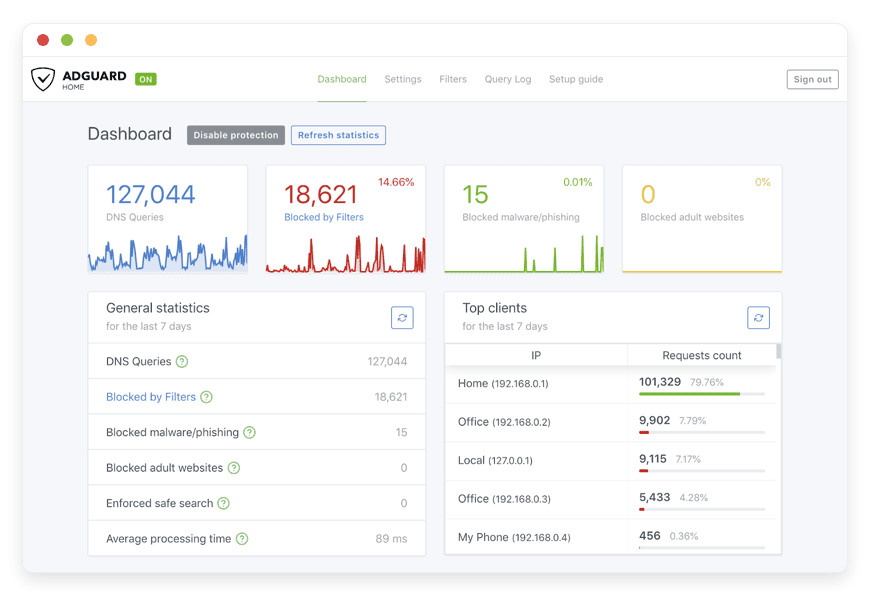
Understanding your network traffic is crucial. AdGuard Home provides a beautiful, fast web interface. You can view comprehensive statistics about your network. The dashboard shows the total number of DNS queries, the percentage of blocked requests, and the top queried domains. This transparency helps you identify which devices are generating suspicious traffic or failing to connect properly.Protection Against Malicious Domains
AdGuard Home uses browsing security web services to check requests against known hazardous domains. It proactively blocks malicious websites and phishing attempts. Before a device on your network can load a dangerous page, the connection is stopped. This adds an essential layer of security to your daily browsing.Query Log Monitoring
The query log is a powerful diagnostic tool. It shows you exactly what your devices are doing in real time. You can see which domains a specific smart appliance is trying to contact. From the query log, you can manually block or unblock specific requests with a single click. This instantly updates your custom filtering rules and provides immediate control over your network traffic.
Solutions per Industry
AdGuard Home is highly adaptable. It provides specific benefits depending on the environment it operates in. Here are examples of how different industries use this software to solve specific pain points.
Creative Agencies
Agencies manage multiple workstations, guest networks, and high-bandwidth asset transfers. Every bit of internet speed counts when uploading massive video files or sending design assets. AdGuard Home stops malicious ads from infecting designer workstations. It also prevents background metrics from eating up network bandwidth. By blocking access to distracting websites during core hours, teams can maintain better focus on project deadlines.
Education and Schools
Schools require strict content filtering to protect students. Instead of installing monitoring software on every single tablet and laptop, AdGuard Home filters the entire school network at the source. Administrators can enforce safe search universally and block adult domains automatically. The specific service blocking feature easily stops access to distracting social media platforms during school hours.
Remote Work Teams
When working from home, your residential network shares traffic between your work computer and personal smart devices. AdGuard Home Hosting allows remote workers to sanitize their home network. It stops smart televisions and appliances from consuming bandwidth with background updates and tracking. This ensures clear, uninterrupted connectivity for video calls and remote server access.
Hospitality and Cafes
Cafes and hotels often offer free public Wi-Fi to their guests. However, managing this public network is difficult. Guests might accidentally access malicious websites or download suspicious files. AdGuard Home protects the public network by automatically blocking phishing domains and malware sources. It also prevents access to inappropriate adult content, ensuring a safe browsing environment for all guests on the premises.
Retail Stores
Retail stores rely heavily on connected Point of Sale systems and inventory tablets. These devices must remain fast and secure at all times. AdGuard Home blocks employees from accessing distracting websites on company tablets. It also stops hidden tracking scripts from slowing down the inventory software. Keeping the store network clean ensures that transactions process quickly without interference from background network noise.
Healthcare Clinics
Clinics use a variety of connected devices, from smart displays in waiting rooms to reception computers. Protecting patient privacy is the absolute highest priority. AdGuard Home stops telemetry from leaving these smart devices. It blocks known tracking networks from collecting data about browsing habits. This added layer of security helps keep clinic networks locked down and focused entirely on operational tasks.
Co-Working Spaces
Co-working spaces host dozens of different freelancers and small companies on a single shared network. Bandwidth management is a constant struggle. Video ads, background tracking, and auto-playing media consume massive amounts of shared data. AdGuard Home drops these requests at the DNS level. This drastically reduces the total bandwidth load on the network, providing a faster and more stable internet connection for all paying members.
Manufacturing Facilities
Modern manufacturing floors are filled with industrial sensors, connected machinery, and smart monitoring tools. These devices often send unnecessary diagnostic data back to their manufacturers. AdGuard Home allows factory administrators to block these specific tracking domains. By stopping unauthorized outbound data, the internal network remains secure, fast, and dedicated entirely to the production process.
AdGuard Home vs Other Softwares
How does AdGuard Home compare to other DNS filtering software? Here is a clear look at how it stacks up against a popular open-source alternative (Pi-hole) and a proprietary service (NextDNS).
| Feature | AdGuard Home | Pi-hole | NextDNS (Proprietary) |
Open Source | Yes | Yes | No |
Native Encrypted DNS | Yes (DoH, DoT, DoQ) | No (Requires extra software) | Yes |
Visual Interface | Modern, Fast | Functional, Classic | Cloud Dashboard |
Specific Service Blocking | 1-Click Toggles | Requires manual rules | 1-Click Toggles |
Parental Controls | Built-in | Requires blocklist hunting | Built-in |
Setup Complexity | Single binary | Multiple dependencies | Managed service |
AdGuard Home shines by offering the modern features of paid, proprietary services while remaining completely open-source and transparent.
Use Cases and Applications
The flexibility of AdGuard Home allows for a variety of practical applications in everyday networking.
Smart Home Sanitization: Smart televisions and connected appliances are notorious for tracking user behavior. AdGuard Home easily blocks the domains these devices use to report your activity. You regain privacy without losing device functionality.
Malware and Phishing Defense: By subscribing to security-focused blocklists, you prevent devices from accidentally resolving domains known for hosting malware or phishing scams. This protects less technical users on your network from clicking dangerous links.
Bandwidth Conservation: Video ads and auto-playing media consume massive amounts of data. By dropping these requests at the DNS level, pages load faster and overall bandwidth usage drops significantly. This is perfect for connections with strict data caps.
Focus and Productivity: Freelancers and remote workers can configure specific times to block access to news sites and social media. This creates a distraction-free work environment during important project sprints.
Guest Network Management: If you host a public Wi-Fi network for a cafe or office, applying AdGuard Home ensures guests cannot access inappropriate or illegal content while using your connection.
How DANIAN Helps
Managing a DNS server requires perfect uptime. If your DNS goes down, the internet appears completely broken to every device on the network. DANIAN operates as the quiet enabler behind your infrastructure. We handle the mess; you get the glory of a perfectly clean, fast network.
Fully Managed
We handle the hosting. Our team manages everything from the initial setup to regular updates. Your software is always optimized without you having to lift a finger. You get direct access to the AdGuard Home dashboard, while we manage the server underneath.Backup & Monitoring
Your custom rules and blocklist configurations are vital. We provide automated daily backups. These are configured automatically and stored securely. If you ever make a mistake with a custom rule, you can initiate a one-click restore to bring your settings back instantly.SSL & Firewall
Secure by default. With cybersecurity threats on the rise, we take security seriously. From automated updates to proactive monitoring and custom firewalls, we make sure your environment is secure 24/7. Your dashboard is protected with strong encryption from the moment it boots up.Updates
AdGuard Home frequently releases new features and updated filter protocols. Security patches and new versions are applied without your intervention. You always run the latest, most secure version without needing to read release notes or run terminal commands.24/7 Monitoring
DNS must be reliable. Our systems watch your server around the clock. Issues are detected and often resolved before you even notice a slow page load. We ensure your internet remains functional and fast.Guaranteed Performance
Downtime can be detrimental to your daily workflow. With our scalable infrastructure, we ensure consistent performance even as your network handles thousands of queries a minute. Your requests process instantly.7-Day Free Trial
Test the platform with no risk. See the difference a managed service makes to your daily internet experience.
Less Setup, More Development. Affordable from the Start. Real Help When You Need It.
How to Get Started
Getting your network protected is incredibly straightforward. You do not need to read technical manuals or configure command-line interfaces.
Step 1: Visit danian.co and sign up for an account.
Step 2: Select AdGuard Home from the software catalog.
Step 3: Relax while DANIAN launches your software. Once it is running, simply point your router's DNS settings to your new server IP.
FAQ
What is the difference between AdGuard Home and the AdGuard app?
The AdGuard app is software you install on a specific device like your phone or laptop. AdGuard Home is a network-wide DNS server that protects all devices connected to your router without needing any apps installed on those devices.
Is AdGuard Home free to use?
Yes, the AdGuard Home software itself is open-source and free. When you use DANIAN, you are paying for the reliable managed hosting, server maintenance, and guaranteed uptime, not the software license itself.
Can I add my own blocklists?
Absolutely. You have full administrative access to your AdGuard Home dashboard. You can add any custom blocklist URL, whitelist specific domains, and write your own custom filtering rules directly from the interface.
Does AdGuard Home block YouTube ads?
DNS-level blockers struggle with first-party served ads on platforms like YouTube. Because YouTube serves ads from the same domains as the actual video content, a DNS blocker cannot easily block the ad without breaking the video. For YouTube, a browser-based extension is still recommended alongside AdGuard Home.
What is DNS-over-HTTPS (DoH)?
DoH is a protocol that encrypts your DNS queries. Instead of sending your website requests in plain text where your internet provider can read them, DoH hides the requests inside normal, encrypted HTTPS web traffic. AdGuard Home supports this natively.
Will this slow down my internet?
No. In fact, it usually speeds it up. By blocking ads and trackers at the DNS level, your devices download less data. Pages render faster because the heavy tracking scripts are never loaded in the first place.
Can I use this on my mobile phone when away from home?
Yes. You can configure your smartphone to use your Managed AdGuard Home server as its Private DNS provider. This ensures you get ad blocking and privacy protection even on cellular data or public Wi-Fi networks.
Do I need a powerful router to use this?
No. All the heavy lifting is done on your Managed AdGuard Home server. Your router simply forwards the DNS requests to the server. Any basic home or office router that allows you to change custom DNS settings will work perfectly.
How often are the blocklists updated?
AdGuard Home updates your subscribed blocklists automatically. You can configure the update frequency in the settings dashboard to ensure you are always protected against the newest tracking domains and malicious websites.
Conclusion
AdGuard Home is an incredible tool for modern internet privacy. It takes the burden of ad blocking off your individual devices and secures your entire network at the source. From robust parental controls to native encrypted DNS, it provides everything you need to take back control of your bandwidth and your privacy.
But managing a critical DNS server is a heavy responsibility. With DANIAN, you get the full power of the software without the stress of server maintenance. We keep it online, fast, and secure.
Experience the power of fully managed open-source.


