
Open-source DocuSign alternatives in 2026
TL;DR
- DocuSign Personal sits at $15/month with a 5-envelope cap. Business Pro runs $45/user/month on monthly billing — $2,700 a year at five users.
- Documenso (12.6k GitHub stars, AGPL-3.0, TypeScript) and DocuSeal (11.4k stars, AGPL-3.0, Ruby on Rails) cover the core sign-and-deliver workflow.
- Both produce ESIGN- and UETA-valid signatures in the United States and eIDAS Simple Electronic Signatures recognised across the 27 member states.
- Self-hosting either project costs nothing in software and €100–280/month in operational time.
- Managed hosting at DANIAN runs €9/month per app — flat, with daily backups, patching, and human support included.
Why people are leaving DocuSign in 2026
DocuSign Personal costs $15 a month.
The cap is five envelopes.
A six-envelope month forces the upgrade to Standard at $25/user/month annual or $45/user/month monthly.
Business Pro adds the API and bulk send at $40/user/month annual or $45/user/month monthly.
Add SMS delivery at $0.40 per send, ID verification at $2.50 per attempt, and overage envelopes above the 100-per-user-per-year cap, and the bill drifts.
The math gets sharp around the fifth user.
Five users on Business Pro monthly billing equals $225 per month or $2,700 per year.
Ten users equals $5,400 per year.
Twenty users on the annual contract at $40 each equals $9,600 per year — committed up front.
DocuSign serves roughly 1.7 million customers and reported $2.98 billion in FY25 revenue.
The product has deep brand recognition in the category, integrations into Salesforce and Workday, and a feature set tuned for enterprise procurement workflows. None of that is in dispute. What is in dispute is whether a five-person team needs all of it.
For small teams, three concrete things drove the search for alternatives through 2025 and 2026:
- The 5-envelope cap on Personal and the $25–$45/user/month jump to Standard once a team crosses one sender.
- The API gate on Business Pro at $40–$65 per user.
- The 100-envelope/user/year cap on annual plans, which a 10-person sales team can blow through inside nine months.
Add the renewal price increases that show up in every review aggregator, and the 2024 round that cut about 400 staff, and the typical 5-to-25-person buyer starts looking for a sturdier economic model.
The renewal cycle is where the search usually starts. A team signs an annual contract at five users, doubles to ten over the year, and gets a renewal quote priced against the higher seat count plus the standard list-price increase. The annual line moves from $2,700 to $6,500 in a single procurement step. That email is the trigger event. Most teams paying that quote already know what an open-source PDF signer looks like; they just have not had a reason to switch until the next invoice arrives.
What “alternative” actually means here
Three replacement paths exist. They are not interchangeable.
Path 1 — A cheaper SaaS. Dropbox Sign, PandaDoc, SignNow, Adobe Acrobat Sign. Different brand, same shape. Per-seat pricing, hosted by the vendor, single point of cancellation. Real savings versus DocuSign at small scale; the per-seat economics still bite at twenty users.
Path 2 — Self-host an open-source project. Download Documenso or DocuSeal from GitHub, run them on a server you rent or own. Software cost is zero. Server, backups, SMTP relay, patching, certificate renewal, on-call — all yours. At a freelance sysadmin rate, the running cost lands in the €100–280/month range plus the $44/month infrastructure floor.
Path 3 — Managed open-source. Someone else runs the open-source project on infrastructure they operate, you keep the same software stack and the same data exports. DANIAN’s price is €9 per month per app, flat, regardless of users or envelopes. Daily off-site backups, 24/7 support, patching, and the SMTP relay are included.
The first path is a brand swap. The second path is a build. The third path is the open-source software with operations bought rather than built.
The shortlist
Two projects do enough work to compare at the level a buyer cares about. A third gets a courtesy mention so the picture is complete.
Documenso
The rising star of open-source e-signature.
Started in January 2023 by Timur Ercan and Lucas Smith, backed by OSS Capital with $1.54 million in pre-seed funding, and now sitting at 12.6k GitHub stars under AGPL-3.0.
The stack is TypeScript, React, Prisma, PostgreSQL.
Documenso is signature-first. The interface targets the same workflow a DocuSign user already knows: upload a PDF, place fields, set recipient order, send. Field types include signature, initials, text, date, dropdown, checkbox, number, email, and name. Recipient roles cover signer, viewer, CC, and approver. Templates and direct-link signing both work. Webhooks fire on every state change, the REST API is public, and the Zapier integration ships ready.
The differentiator for builders is embedded signing. From the Teams tier upward, Documenso supports iFrame embedding so the signing surface drops into your own product. White-label branding is included on the Platform tier.
Every signed document is sealed cryptographically using the PAdES standard. The seal binds the signing event log — signer name, email, IP address, timestamp, authentication method — to the PDF so post-signing edits are detectable.
Documenso’s own cloud runs from $25/month for a single user and climbs to $250/month for the Platform tier. Self-hosting is free and AGPL-3.0. Managed Documenso hosting at DANIAN is €9/month per instance — the open-source community edition, hosted by us with the operations and support included.
Try managed Documenso hosting for 7 days. No card.
DocuSeal
The form-builder cousin.
Started in November 2023 by Pete Matsyburka, Bootstrapped, based in Chicago.
11.4k GitHub stars, AGPL-3.0, Ruby on Rails.
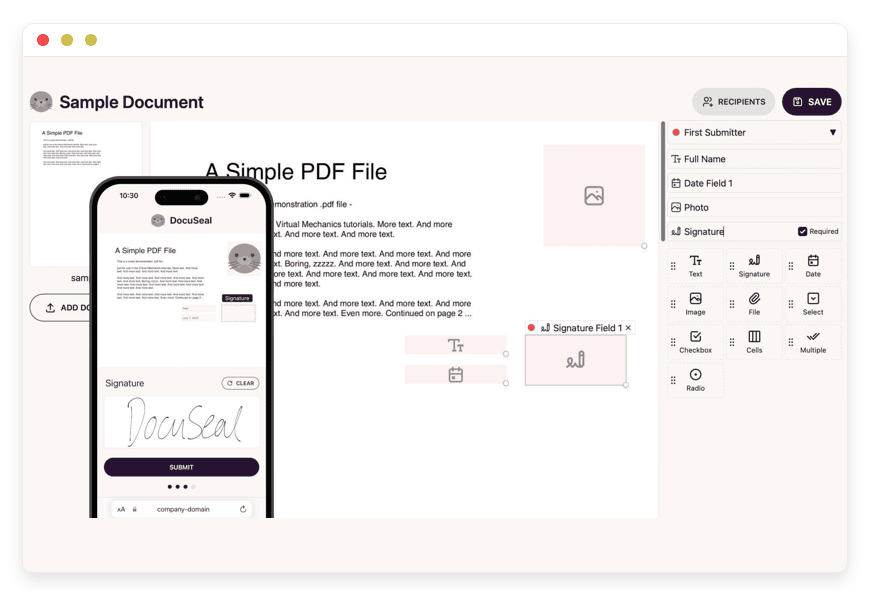
DocuSeal is field-first rather than signature-first. The flow is: open the PDF in the WYSIWYG builder, drag fields onto the page, save as a template, send. Twelve field types are available including signature, date, text, file upload, checkbox, initials, image, stamp, payment, phone, number, and select. Multi-signer flows and signing order both work. Field-tag syntax lets you embed signature placeholders directly in source PDFs or DOCX files, which speeds up template construction at scale.
The platform supports its own SMTP, storage on disk or S3-compatible buckets, and a one-line Docker quickstart. Embedded signing is on the Pro tier with SDKs for React, Vue, Angular, and vanilla JavaScript.
One feature DocuSeal already offers that Documenso has on the roadmap: Qualified Electronic Signature (QES) as a paid per-signature add-on at $2 to $4 per signature. For workflows that statutorily require QES — certain notarial acts, some real-estate transfers, regulated consumer credit in some member states — DocuSeal is the shorter path today.
DocuSeal’s hosted Pro tier is $20/user/month. The self-hosted community edition is free under AGPL-3.0. Managed DocuSeal hosting at DANIAN is €9/month per instance, with the same scope of operations as the Documenso plan.
Test DocuSeal on a 7-day free trial.
OpenSign — courtesy mention
OpenSign is the third notable open-source name in the category.
Node.js plus React, MongoDB-backed, AGPL-3.0, smaller feature set than Documenso or DocuSeal but real.
Worth knowing about; not yet at the maturity tier most buyers cross without a developer in-house.
How the alternatives compare
| Dimension | DocuSign Business Pro | Documenso (managed at €9) | DocuSeal (managed at €9) |
|---|---|---|---|
| Cost at 10 users | $5,400/year | €108/year | €108/year |
| Per-envelope cap | 100/user/year on annual plans | None | None |
| API access | Business Pro and above | Included on every tier | Included on every tier |
| GitHub stars | Closed source | 12.6k | 11.4k |
| License | Proprietary | AGPL-3.0 | AGPL-3.0 |
| Embedded signing | Available | Yes (iFrame) | Yes (JS / React / Vue / Angular) |
| Built-in QES | Yes (extra cost) | Roadmap | Yes — paid add-on $2–$4 |
| Self-host option | No | Yes (Docker) | Yes (Docker) |
| Region choice | Vendor-controlled | 21 regions, 6 continents | 21 regions, 6 continents |
| Switching effort | Locked in until renewal | ~1 hour per template | ~1 hour per template |
The 10-user comparison is the most honest one.
DocuSign’s $5,400/year buys brand recognition, deep Salesforce and Workday integration, and an enterprise procurement footprint. €108/year on managed open-source buys the core sign-and-deliver workflow, the same signing event log inside a sealed PDF, and full data ownership.
Whether the $5,292 spread is worth it depends on which side of the procurement table you sit on.
How to pick
Three questions filter the decision cleanly.
1. Will your counterparties refuse to sign without a DocuSign envelope? For most commercial contracts — NDAs, SOWs, employment agreements, vendor agreements, SaaS orders — the answer is no. Recipients get a sealed PDF with a working signing event log and a valid signature under ESIGN, UETA, or eIDAS SES. If you sign mortgages, regulated consumer credit, or contracts with Fortune 500 procurement teams that have a DocuSign clause in their playbook, stay where the playbook is written.
2. How many users actually need to send documents? One user, low volume, no API need — DocuSign Personal at $15/month is fine, until the 5-envelope cap bites. Five-plus senders or any API need pushes the bill into the $2,700-to-$9,600/year band, where the gap to managed open-source becomes the load-bearing comparison.
3. Do you need the workflow to drop into your own product? If you’re building a SaaS or a portal that signs documents inside the customer’s session, embedded signing decides the answer. Documenso ships iFrame embedding on the Teams plan upward. DocuSeal ships SDKs for the common frontend frameworks. DocuSign offers it as well, with the Business Pro pricing attached.
FAQ
Are Documenso and DocuSeal really open source, or is there a hidden catch?
Both ship under AGPL-3.0, which is a strong open-source licence recognised by the Open Source Initiative. Source code lives on GitHub, runs without phoning home, and self-hosts on infrastructure you own. The paid cloud tiers and white-label features are optional commercial layers built on top of the same source you can download for free.
Do my customers need a Documenso or DocuSeal account to sign?
No. Recipients receive a signing link by email, click through, sign in the browser, and submit. No account creation, no app install, no software to learn. The signer experience matches the DocuSign signer flow recipients already recognise.
Can signature emails come from my own domain?
Yes. Both Documenso and DocuSeal support custom SMTP and custom sender domains. Managed instances at DANIAN ship with an SMTP relay configured; replacing it with your own domain takes a DNS edit on your side and a settings change in the dashboard. Signing emails arrive from your domain, not from a third-party brand.
Which should I pick — Documenso or DocuSeal — for a small team?
Pick Documenso for a workflow that looks and feels like DocuSign, especially if you plan to embed signing into a SaaS product later. Pick DocuSeal for a forms-first workflow with twelve field types, drag-and-drop PDF design, and same-day QES availability. Both run at €9/month managed; both produce legally valid signatures. The pick is about how your team works.
Is there a free trial of managed Documenso at DANIAN?
Yes. The trial runs seven days, no credit card needed. You get the full Documenso instance — your subdomain, full admin, the signing UI, the API, webhooks — with the operations and support already running. If the trial fits, the instance converts to a €9/month subscription. If it does not, the instance retires at day seven.
What kind of support comes with managed Documenso?
Email and the ticket section in the client portal, with a human reply. The support scope covers DNS edits, SMTP configuration, integration setup, custom domain provisioning, resource upgrades, and the patching and backup work that runs in the background. The same scope applies to DocuSeal and to every other app in the DANIAN catalog.
How much does Documenso save me compared to DocuSign Business Pro at 10 users?
DocuSign Business Pro at 10 users on monthly billing runs $650 per month — $7,800 a year. Managed Documenso at DANIAN runs €9 per month for one shared team instance regardless of user count. The headline gap is roughly $7,700 a year before any DocuSign add-ons like SMS delivery or ID verification stack on top.
Does DANIAN charge per envelope or per signer the way DocuSign does?
No. The €9 per month covers the running Documenso instance — the user accounts, the documents, the signers, and the storage included in the base tier. Adding signers or sending more envelopes does not change the bill. Upgrading vCPU, RAM, or storage past the included resources is the only path that adds cost.
Why is managed Documenso at €9 cheaper than DocuSign Personal at $15?
DocuSign Personal is priced per individual sender and caps at five envelopes a month. Managed Documenso is priced per running instance and has no per-envelope cap on the base tier. A single user sending one document a week stays well inside DANIAN’s plan and would already exceed the DocuSign Personal envelope limit.
Can I self-host Documenso without paying anything?
Yes. The Documenso community edition is AGPL-3.0 on GitHub and runs on hardware you own or any server you rent. A real production setup needs PostgreSQL, Node.js 22 or newer, an SMTP relay, an HTTPS certificate, and an off-site backup target. Time and operating cost are the actual expense, not the software.
What server resources does Documenso need to run?
Documenso runs on Node.js 22 or newer with PostgreSQL as the database. A small-team production workload sits comfortably on 1 vCPU and 1/2 GB of RAM. Storage scales with document volume — small teams rarely cross 10 GB in a year. Docker images are published for one-line deployment.
Why pay €9 a month for managed Documenso when the software is free?
Because €9 covers the parts of self-hosting that are not free. Server rental, daily off-site backups, the SMTP relay, security patches, the HTTPS certificate, version upgrades, and a human engineer when something breaks at 2 a.m. — all included. Self-hosting saves the €9 and spends the weekend.
Does Documenso have a public API?
Yes. The REST API is available on every paid Documenso cloud tier, on every self-hosted instance, and on managed Documenso at DANIAN. Webhooks fire on document creation, sending, signing, and completion. The reference documentation lives on the Documenso docs site with examples for the common SaaS languages.
Can I embed Documenso signing into my own product?
Yes. Documenso supports iFrame embedded signing from the Teams plan upward, with white-label branding from the Platform tier. The signing surface drops into a SaaS dashboard, a customer portal, or an onboarding flow without sending users to a third-party site. The embed token is scoped per document.
What does DocuSeal do differently from Documenso?
DocuSeal is form-builder-first: drag fields onto a PDF, then send for signing. It runs on Ruby on Rails, ships an official Docker image, and supports twelve field types including payment, ID, and stamp. Documenso is signature-first and TypeScript-based, with a heavier focus on API-led embedded use. Pick by workflow.
Are Documenso e-signatures legally valid in the United States?
Yes. Documenso signatures meet the ESIGN Act and the UETA framework adopted by 49 states plus DC. Both standards require intent to sign, consent to do business electronically, association of the signature with the record, and retention. Documenso produces all four. Ordinary commercial contracts, NDAs, SOWs, and SaaS orders are covered.
Does Documenso support eIDAS Qualified Electronic Signatures?
Not today. Documenso defaults to eIDAS Simple Electronic Signature (SES), which is valid for most B2B and B2C contracts under eIDAS. The documentation lists Advanced (AES) and Qualified (QES) as planned via a third-party trust provider. DocuSeal already offers QES today as a paid per-signature add-on at $2 to $4.
What’s the practical difference between SES, AES, and QES under eIDAS?
SES is a typed name, drawn signature, or click-to-agree. AES uniquely identifies the signer and detects post-signing change. QES adds a qualified certificate from a listed trust service provider and is legally equivalent to a handwritten signature across all 27 member states. Most commercial agreements only need SES.
How do I migrate templates from DocuSign to Documenso or DocuSeal?
No one-click migration exists. Download the source PDF or DOCX from DocuSign, upload it into Documenso or DocuSeal, and redraw the signing fields on the document. DocuSeal also accepts a structured DocuSign template export for faster rebuilds. Plan roughly one hour per template for a clean migration.
Will my counterparties accept signatures from an open-source e-signature tool?
Most will. Recipients get a signed PDF carrying the same cryptographic seal, the same signer name, email, IP, and timestamp inside the signing event log, and the same legal standing under ESIGN, UETA, or eIDAS as a DocuSign-signed PDF. The brand banner is the only thing they will not see.
What happens to my documents if I cancel managed Documenso at DANIAN?
They remain yours. The PDFs, the templates, the database export, and the stored files all download on request — the open-source software runs in your instance, and the documents inside it are your documents. The “How to leave” guide on the dashboard walks through the export path step by step.
Conclusion — what to do this week
Pull last quarter’s DocuSign invoice and run the user-count math.
If the annual line lands above $2,000, the comparison to managed open-source is no longer theoretical.
Spin up a parallel instance, migrate three live templates, send a real document, and ask the counterparty whether they care which tool produced the PDF. If they don’t, the decision is made.
To put your hand on the wheel, you can test e-signature on a 7-day trial of managed Documenso or DocuSeal. The trial runs without a credit card.
Sources
• DocuSign eSignature pricing — https://ecom.docusign.com/plans-and-pricing/esignature
• DocuSign Quarterly financial results — https://investor.docusign.com/results-and-financials/quarterly-results/default.aspx
• Documenso — official site — https://documenso.com/
• Documenso — GitHub repository (stars, licence, releases) — https://github.com/documenso/documenso
• Documenso — signature levels documentation — https://docs.documenso.com/users/compliance/signature-levels
• DocuSeal — official site and pricing — https://www.docuseal.com/
• DocuSeal — GitHub repository (stars, licence, releases) — https://github.com/docusealco/docuseal





