
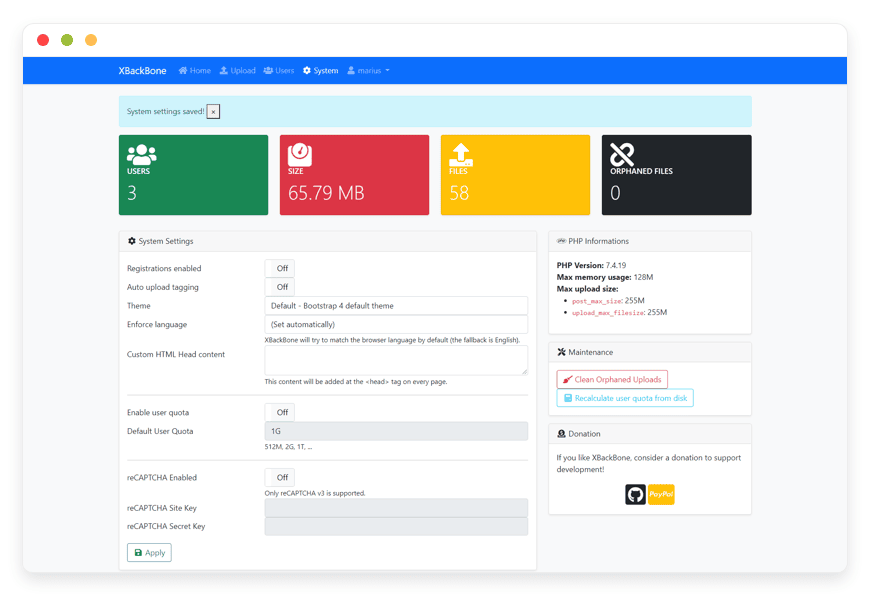
Fully Managed XBackBone Hosting: Simplify Your File Sharing
TLDR - Quick Answer
XBackBone is a lightweight PHP file manager designed specifically to integrate with instant sharing tools like ShareX. Managed hosting provides the infrastructure to run this software without any manual server maintenance.
Instant Client Connection: Ready to link with ShareX, Screencloud, and uPic immediately.
Broad File Support: Upload images, videos, PDFs, and syntax-highlighted code seamlessly.
Zero Server Maintenance: Skip the web server configuration and PHP environment setup.
Automated Security: Enjoy daily backups and continuous updates without lifting a finger.
Rich Previews: Generate instant direct links that display beautifully on Discord and Telegram.
Introduction
Quickly sharing a screen capture or a block of code should be instantaneous. When you rely on public hosting services, you surrender control over your files. The links might expire, or the service might change its terms overnight. You need a reliable destination for your daily uploads, and open-source software provides that freedom.
But running it yourself is a second job. Configuring a web server, securing the PHP environment, setting up database connections, and managing ongoing security patches takes hours out of your week. You want to share files, not manage infrastructure.
This is where DANIAN steps in as your invisible infrastructure. We handle the technical heavy lifting so you can focus entirely on your workflow.
What is XBackBone?
Created by developer Sergio Brighenti, XBackBone is a simple, lightweight PHP file manager. It operates as a centralized web interface and storage destination for your files, images, and text snippets. It was built with a primary focus on supporting *NIX systems and instant sharing applications like ShareX.
Instead of saving a screenshot to your desktop, opening a browser, and manually uploading it to a website, XBackBone accepts the file directly from your desktop application. It then generates a unique URL and copies it straight to your clipboard. The web interface allows you to view past uploads, manage multiple users, and organize your media gallery with a robust search function.
Why is it trending?
Professionals are tired of fragmented sharing tools. Having one app for code snippets, another for image hosting, and a third for large video files creates unnecessary friction. XBackBone unifies these tasks. It handles formatting for code, provides a web player for video and audio, and renders PDFs inside the browser. Teams also love the low memory footprint and the ability to integrate existing LDAP directories for easy user management.
Why Choose XBackBone?
Choosing open-source software means you maintain total authority over your assets. You decide exactly how long a file stays online, who has access to it, and how it is organized. You are never restricted by the arbitrary limits or premium paywalls of proprietary software.
When you consider Hosting XBackBone, you are choosing a system that scales with your needs. It supports multiple storage backends, meaning you can keep your files on local storage or route them to external cloud storage providers. It replaces the need for separate subscriptions to generic cloud drives or dedicated text-pasting websites. You get a unified, responsive dashboard that works beautifully on both desktop and mobile devices.
Key Features of XBackBone
XBackBone packs a massive amount of functionality into a lightweight footprint. The tool is designed to remove friction from the moment you capture an image to the moment you organize it in your gallery. Here is a deep dive into the features that make it an excellent choice for individuals and teams.
Instant Client Integration
XBackBone shines because it connects directly to your desktop workflow. The software includes a built-in configuration generator for ShareX and Screencloud. You simply click a button in the web dashboard to download the configuration file. Import it into your desktop app, and your setup is complete. Every time you capture your screen, the file uploads automatically through the API. The short link is instantly ready in your clipboard. You never have to open a browser window to share a file again.
Comprehensive Media Handling
This tool goes far beyond basic image hosting. It includes a built-in web player for video and audio files. When you share a recording, recipients can watch or listen directly in their browser. They do not have to download an unknown media file to their computer. If you upload a PDF document, XBackBone renders it using an integrated viewer. For developers, code uploads receive automatic syntax highlighting. This turns the platform into a private, powerful alternative to public pastebin services.
Advanced User Management
If you manage a team, you need fine-grained control over who can upload files. XBackBone offers robust multi-user features. You can assign specific administrative roles to users. You can set strict disk storage quotas for individual accounts. This ensures no single user fills up your server storage. The software also supports LDAP authentication. This allows you to connect it to your existing corporate directory for streamlined login management. A built-in registration system makes onboarding new team members fast and simple. You can even restrict registration to an invite-only system for privacy.
Rich Social Previews
When you share a link on platforms like Discord, Telegram, or Facebook, you want the image to display clearly in the chat. XBackBone natively supports direct image link previews using OpenGraph tags. It generates the correct meta tags automatically. Your screenshots unfurl perfectly in social feeds and messaging apps. There is even a dedicated feature inside the web interface to share your past uploads directly to Telegram with a single click.
Flexible Storage Options
You are never forced to keep all your files on a single drive. XBackBone supports multiple storage backends. You can save files to the local disk. You can also connect the software to Amazon S3-compatible storage buckets, Google Cloud Storage, Dropbox, or even a remote FTP server. This flexibility ensures you can scale your storage capacity infinitely. You can expand your backend storage without ever changing your front-end upload workflow.
Intelligent Organization and Tagging
Finding a specific screenshot from six months ago can be challenging. XBackBone solves this with an automatic uploads tagging system. The software can categorize files as they arrive. You can also apply custom text tags to any upload manually. The interface features a highly responsive web gallery powered by customizable Bootswatch themes. Combined with powerful search support, retrieving an old mockup, video, or code block takes seconds.
Developer Friendly Access
For those working in command-line environments, the software provides custom generated scripts for Linux systems. You can perform direct downloads using standard curl or wget commands straight from your terminal. The software also features an extensive internal logging system. This tracks system events and API calls, making troubleshooting straightforward for technical administrators.
Solutions per Industry
Different industries experience unique friction when sharing files. Generic cloud drives are often too slow, and chat applications compress attachments heavily. Here is how XBackBone solves specific pain points across various professional fields.
Software Development
Developers constantly share error logs, JSON API responses, and visual bug reports. Pasting code into Slack or Teams often ruins the formatting. Sending screenshots through these apps can compress the image, obscuring vital details. XBackBone provides an immediate solution. Developers can upload long code snippets with perfect syntax highlighting. Bug screenshots are hosted in full resolution. This ensures the Quality Assurance team sees exactly what went wrong without visual distortion.
Creative Agencies
Designers and video editors need to share drafts with clients rapidly. Uploading a quick video render or a high-resolution PDF mockup to a bulky project management tool is slow. With XBackBone, a designer can trigger a keyboard shortcut to upload the draft instantly. They can then send a clean, unbranded link to the client. The client can view the video in the native web player or read the PDF directly in the browser. They do not need to install any specific software to view the assets.
Customer Support Teams
Support agents need to resolve tickets quickly. Writing long paragraphs explaining how to navigate a software interface is inefficient. Instead, an agent can record a quick screencast of the solution. Using XBackBone linked to ShareX, the video uploads automatically. The agent simply pastes the generated link into Zendesk or Intercom. This bypasses the strict file attachment size limits found in most helpdesk software. Customers get a clear visual guide, and tickets close faster.
eCommerce Teams
Managing a fast-paced online store requires constant collaboration. Marketing and product teams need a central, accessible home for visual assets. The tagging system in XBackBone allows the marketing team to categorize imagery by campaign, season, or product line. When a social media manager needs a specific product photo, they can search the tags in the gallery. They can grab the direct link instantly and paste it into their publishing tool.
Education and E-Learning
Instructors constantly share resources with their students. Distributing code snippets for computer science classes, PDF reading materials, or short video explanations can clutter an email inbox quickly. XBackBone gives educators a fast way to distribute materials. An instructor can upload a syllabus PDF, generate a link, and post it to the class forum. The built-in viewers ensure students can access the materials on any device without downloading them first.
Real Estate Professionals
Real estate agents rely heavily on visual media. They need to share high-resolution property photos, PDF floor plans, and video walkthroughs with potential buyers. Sending these large files over WhatsApp or iMessage often fails due to size limits. By hosting these files on XBackBone, agents can send simple text links. The rich social preview feature ensures the property photos display beautifully right inside the buyer's text messaging app. This creates a highly professional impression.
Independent Freelancers
Freelancers manage assets for multiple clients simultaneously. Keeping these files organized is critical. A freelancer can use XBackBone to store client deliverables securely. They can apply custom tags to separate files by client name or project phase. Instead of sending an unprofessional public Imgur link, they can share links using their own custom domain name. This elevates their professional brand while keeping their workflow incredibly fast.
XBackBone vs Other Softwares
When evaluating your file sharing options, it is helpful to see how XBackBone compares to popular proprietary alternatives.
| Feature | XBackBone | Google Drive | Imgur | Pastebin |
| ShareX Config Generator | Yes | No | Yes | No |
| Code Syntax Highlighting | Yes | No | No | Yes |
| Direct Web Player (Video/Audio) | Yes | Yes | Limited | No |
| Custom Tagging System | Yes | Limited | Yes | No |
| LDAP Authentication | Yes | No | No | No |
| Open-Source Freedom | Yes | No | No | No |
| Multi-Storage Routing | Yes | No | No | No |
Use Cases and Applications
The flexibility of XBackBone makes it suitable for numerous practical applications. Here are a few ways you can integrate it into your daily routine.
Automated Screenshot Hosting for Gamers
Gamers frequently capture incredible moments or funny visual bugs. By linking XBackBone with ShareX, players can capture their screen and instantly paste the resulting link into a Discord channel. The rich embed support ensures the image displays perfectly in the chat.
Centralized Asset Drop for Remote Workers
Remote teams often struggle with scattered files. Using XBackBone, a company can create individual accounts for employees. Workers can upload necessary documents, apply custom project tags, and share the links in the company chat. The disk quota feature ensures no single user hoards server storage space.
Private Code Snippet Repository
Developers frequently need to save blocks of code for future reference. Instead of relying on public pasting websites, they can upload the snippets to XBackBone. The syntax highlighting makes it easy to read, and the private upload setting ensures sensitive code remains secure.
Streamlined Mobile Sharing
The responsive Bootswatch themes ensure the web interface works perfectly on mobile phones. You can easily upload photos from your mobile device directly to your server. This keeps your personal photos separate from third-party cloud services.
How DANIAN Helps
Setting up a web server, configuring PHP extensions, and securing your database requires serious technical knowledge. We act as your quiet enabler. We handle the mess in the background, so you get all the glory of a perfect, fast workflow. XBackBone Managed services give you the software without the headache.
Fully Managed: We handle the hosting. Our team manages everything from initial setup to regular updates, security patches, and performance monitoring. Your software is always optimized without you having to lift a finger.
Backup & Monitoring: Configured automatically, stored securely, one-click restore. Your files are protected against accidental deletion with our automated daily backups.
SSL & Firewall: Secure by default. With cybersecurity threats on the rise, we take security seriously. From automated updates to proactive monitoring and custom firewalls, we make sure your environment is secure 24/7.
Updates: Security patches and new versions applied without your intervention. You always have the latest features from the open-source community.
24/7 Monitoring: Issues detected and often resolved before you notice. We keep a watchful eye on server health so your links never go dead.
Guaranteed Performance: Downtime can be detrimental to your business. With our scalable infrastructure, we ensure consistent performance even as your user base grows.
7-Day Free Trial: No risk. Less setup, more development. Affordable from the start, with real help when you need it.
How to Get Started
Step 1: Visit danian.co and sign up for a new account.
Step 2: Select XBackBone from our extensive software catalog.
Step 3: Relax while DANIAN launches your software.
FAQ
Is XBackBone free to use?
Yes, the software itself is open-source and distributed under the AGPL v3.0 license. You only pay for the managed hosting resources required to run the application smoothly.
How do I connect my desktop application?
The software includes an easy-to-use configuration generator. You log into the web interface, download the config file for ShareX or Screencloud, and import it directly into your desktop client.
Can I upload large video files?
Yes. You can upload video files and view them using the built-in web player. The file size limit depends entirely on the storage capacity of your hosting plan.
What is the difference between the software license and hosting pricing?
The software is created by independent developers and is free to download. Our pricing covers the server resources, daily backups, security monitoring, and automated updates required to keep the software online.
Will my links expire automatically?
No. You maintain complete control over your uploads. Files will stay online and links will remain active until you decide to delete them from your dashboard.
Can I use my own domain name?
Absolutely. You can map your custom domain name to your managed environment. This ensures all your shared links carry your personal or company branding.
How does DANIAN handle updates?
We apply system updates, new versions, and security patches automatically in the background. Your software remains up-to-date without any FTP or command-line work required on your end.
Conclusion
XBackBone is a powerful, lightweight tool that transforms how you share media and text. By unifying image hosting, video playback, and code snippet sharing into one responsive dashboard, it eliminates the need for multiple fragmented services. The seamless integration with desktop tools like ShareX makes your daily workflow incredibly efficient.
Experience the power of fully managed open-source. Let us handle the server maintenance, backups, and security so you can focus on your work.


