
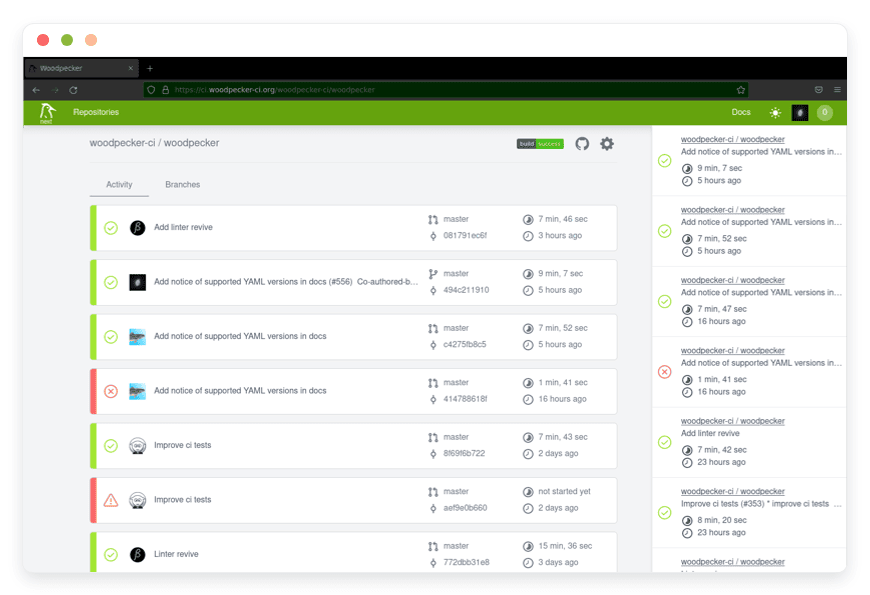
The Ultimate Guide to Managed Woodpecker CI Hosting
Continuous integration should speed up your work. It should never slow you down. If you spend your day fixing a broken build server, you are losing valuable time. Your team needs a reliable system to test and ship code. This is exactly where Managed Woodpecker CI Hosting comes in. Woodpecker CI offers a remarkably clean approach to automation. Every single step runs inside a standard container. The configuration is simple. The outcome is always predictable.
TLDR - Quick Answer
Woodpecker CI is a fast, lightweight open-source continuous integration and continuous delivery (CI/CD) engine. It uses a basic YAML file to define your build pipelines. Every task executes within an isolated container environment.
Choosing Managed Woodpecker CI Hosting gives you immediate value:
Zero Maintenance: You never have to update a server or install missing packages again.
Fixed Costs: You run unlimited pipelines without paying extra for build minutes.
Instant Reliability: Your continuous integration system is always online and ready for pushes.
Complete Focus: Your team writes code while experts handle the heavy infrastructure work.
Seamless Integration: It connects instantly to your existing Git platforms.
Introduction
Modern software development demands automated testing. When a developer writes code, that code needs immediate verification. A fast CI/CD pipeline catches errors right away. It builds your application. It pushes the final updates to your live servers. This automated cycle is essential for shipping software that actually works.
But running it yourself is a second job. You have to launch a server. You have to install the core software. You must configure background agents to run your specific builds. When the server runs out of disk space, everything stops until you fix it. When a security vulnerability is announced, you must drop everything to apply the patch. Your focus shifts entirely away from your product. You suddenly become a full-time system administrator.
DANIAN acts as your invisible infrastructure team. We handle all the background complexity. We keep the servers fast, secure, and constantly updated. You get a pristine, ready-to-use continuous integration environment. You control the pipelines, but you carry zero responsibility for the hardware.
What is Woodpecker CI?
Woodpecker CI is a powerful, straightforward CI/CD engine. The project began as a community-driven fork of Drone CI. When the original project changed its licensing model, the community organized a massive effort. They created Woodpecker to keep a simple, container-focused automation tool available under the permissive Apache 2.0 license.
The software links directly to your source code repository. When you push new code, Woodpecker looks for a file named .woodpecker.yml. It reads the instructions inside this file. It then pulls down the specified Docker images and runs your commands inside them. Once the pipeline finishes, the containers are deleted. This guarantees your next build starts in a perfectly clean environment.
Why is it Trending?
Developers appreciate simplicity. Many popular CI tools force you to learn a complex, custom scripting language. Woodpecker avoids this completely by relying strictly on containers. If you can run a command in your local terminal, you can run it in Woodpecker CI.
It is also incredibly adaptable. It natively supports a wide variety of popular git platforms. You can easily connect it to Gitea, Forgejo, GitHub, GitLab, and Bitbucket. As more teams search for capable open-source tools to replace expensive proprietary options, Woodpecker naturally stands out. It delivers powerful automation without any unnecessary friction.
Why Choose Woodpecker CI?
Your continuous integration pipeline is the absolute core of your daily workflow. When you rely on proprietary SaaS platforms, you follow their strict rules. They limit how many minutes you can build each month. They restrict how many jobs you can run at the same time. They control exactly which operating systems are available to you.
Hosting Woodpecker CI removes these artificial limits. You enjoy total open-source freedom. You can run as many pipelines as your hardware allows. You define the exact software environment your code requires.
Woodpecker uses a smart architecture that separates the server from the agent. The main server handles the web interface and receives webhooks from your git repository. The background agents do the actual work of running your pipelines. This clear separation makes the system highly resilient. You can add more agents as your team expands. You never have to wait in a slow build queue again.
Key Features of Woodpecker CI
Woodpecker packs a massive amount of functionality into a very efficient package. Let us examine the specific features that make this software so effective for daily work.
Container-First Workflows
Woodpecker builds its entire architecture around containers. Every step in your pipeline is an isolated container. This entirely eliminates the "it works on my machine" problem. You never have to worry about conflicting software versions. If your first step requires Node.js version 18, and your second step requires Python 3.10, they will not conflict. You specify the exact image for each step. The container starts, the command runs, and the container vanishes. This workflow benefit means your builds are perfectly reproducible every single time.
Multi-Forge Compatibility
Many CI systems force you to use a specific version control provider. Woodpecker stays completely neutral. It integrates smoothly with multiple version control platforms, which are known as "forges." You can connect Woodpecker directly to GitHub, GitLab, Bitbucket, Gitea, or Forgejo. The setup process is simple. You register an OAuth application, give the keys to Woodpecker, and it automatically imports your repositories. The workflow benefit here is immense if your company uses different git providers for different departments.
Matrix Workflows
Testing your application against different versions of a language is usually a tedious process. Matrix workflows solve this problem effortlessly. You can write a single pipeline definition that runs multiple times with different variables. For example, you can test your new Go application against versions 1.20, 1.21, and 1.22 all at once. Woodpecker automatically spawns a separate pipeline run for each combination. This workflow benefit catches compatibility bugs immediately without requiring you to copy and paste code blocks.
Language-Agnostic Plugins
Most automation systems use complicated, proprietary plugin architectures. Woodpecker takes a brilliant and simple approach: a plugin is just a container. If you want to send a Discord message, you use the Discord plugin container. If you want to upload a file to a remote server, you use the FTP plugin container. You do not have to learn a custom API to write your own plugin. You can write a script in Bash, Python, or Rust. You just package it into an image. This workflow benefit empowers your team to create custom tools rapidly.
Granular Secrets Management
Pipelines frequently require sensitive information to function. You need access to API keys, database passwords, and remote deployment tokens. Woodpecker manages these securely. You store your secrets within the Woodpecker web interface or via the command line. You can assign them globally across all projects, or limit them to a single repository. During a build, Woodpecker securely injects these secrets into the container. They never show up in your plain text logs. This workflow benefit keeps your credentials safe from accidental exposure.
Cron Scheduling Integration
Not all automated tasks should trigger from a code push. Sometimes you need background tasks to run on a set schedule. Woodpecker features full cron support. You can set pipelines to run nightly, weekly, or at any specific time interval. This is ideal for running deep security vulnerability scans. It is also perfect for cleaning up temporary files on a remote server. This workflow benefit allows you to handle routine maintenance without manual intervention.
Detached Service Containers
Testing a user interface or an API often requires a database. Mocking a database is complicated and unreliable. Woodpecker handles this beautifully with "Services." Services are background containers that run alongside your main pipeline steps. You can launch a real PostgreSQL container and a Redis cache container as services. Your main pipeline then runs integration tests against this fully functioning, temporary setup. This workflow benefit guarantees that your code works against actual database software.
Powerful Agent Autoscaling
If you run heavy workloads, you might need more processing power during the day than at night. Woodpecker includes autoscaler support. The autoscaler watches your build queue. When the queue gets long, it automatically creates new agent machines using your chosen cloud provider. When the queue is empty, it destroys those machines. This workflow benefit saves you massive amounts of money. You only use computing resources when you actually need them.
Advanced Agent Routing
You need precise control over where your pipelines execute. By adding custom tags to your agents, you can route specific jobs to specific machines. If you have an intensive machine learning build that requires a graphics card, you tag an agent with gpu. You then instruct your YAML file to only run on agents with the gpu tag. This workflow benefit ensures your heavy tasks run on capable hardware while simple linting tasks run on basic machines.
Pipeline Linting and Validation
Writing YAML files can sometimes lead to simple syntax mistakes. A missed space or a typo can break a pipeline. Woodpecker provides built-in linting tools. You can validate your .woodpecker.yml file before you even commit your code. This workflow benefit prevents you from pushing broken configurations to your repository. It saves your team from dealing with annoying, preventable build failures.
Local Command Line Execution
Testing a complex pipeline usually requires pushing a commit, waiting for the server, and checking the logs. This clutters your git history. Woodpecker offers a powerful Command Line Interface (CLI) tool. You can use this CLI to execute your pipeline locally on your own laptop. It pulls the images and runs the steps exactly as the server would. This workflow benefit drastically speeds up your development cycle when you are creating new automation rules.
Configuration Extensions
Large organizations often need to enforce specific pipeline rules across hundreds of repositories. Woodpecker supports configuration extensions. Instead of reading the YAML file directly from the repository, Woodpecker can ask an external server for the configuration. You can write a service that dynamically generates the pipeline based on company standards. This workflow benefit allows administrators to mandate security scans on every project without editing hundreds of individual files.
Solutions per Industry
Different industries encounter highly specific technical hurdles. Woodpecker adapts smoothly to solve complex problems across varied professional sectors.
Software Development Agencies
Agencies manage dozens of different clients at the same time. Each client might demand a different code hosting platform. One client prefers GitHub, while another insists on a private Gitea server. Woodpecker serves as a unified build hub. The agency can standardize their internal deployment processes across all clients. They use matrix workflows to test client web applications across multiple browser environments simultaneously. This centralized approach guarantees quality control and drastically speeds up the delivery of new features.
eCommerce Operations
Running an online store requires constant, careful updates. A broken checkout button costs the company money every single second. eCommerce teams rely on Woodpecker to run rigorous test suites before every single release. When a developer pushes an update to the shopping cart, Woodpecker launches an isolated testing environment. It runs automated, headless browser tests against the new code. If all the tests pass perfectly, the pipeline safely syncs the new code to the live production servers.
Education and Academic Research
Universities handle massive amounts of data processing. They also process complex documentation formatting. Researchers use Woodpecker to automate the creation of massive LaTeX documents. Instead of compiling a heavily formatted 400-page research paper locally, they push raw text files to a repository. Woodpecker pulls a specific LaTeX container, compiles the final PDF, and attaches it directly to the release page. Professors also use Woodpecker to automatically run predefined test cases against student code submissions.
Indie Game Studios
Game development requires building massive files for multiple operating systems. A small studio needs to compile their game for Windows, Mac, and Linux. Doing this manually takes hours. They use Woodpecker to automate the entire build process. When the team tags a final release version, Woodpecker routes the jobs to specific agents. One agent builds the Windows executable. Another agent compiles the Linux version. The pipeline then automatically packages all the assets and uploads them to a central distribution server.
Digital Marketing Agencies
Marketing campaigns move extremely fast. Agencies often need to publish dozens of landing pages in a single afternoon. They use static site generators like Hugo or Eleventy to create these pages. Woodpecker makes updating these sites completely effortless. A copywriter writes the page text in markdown and saves it. Woodpecker instantly launches a container, generates the raw HTML files, and pushes the files directly to the web hosting server. The new marketing campaign goes live in seconds without any developer intervention.
Hardware Engineering and IoT
Internet of Things (IoT) creators build software that runs on small physical devices. This means they must compile code for different hardware architectures, like ARM processors. Woodpecker handles this cross-compiling process perfectly. When the engineering team updates the device firmware, Woodpecker pulls specialized compiler images. It builds the exact firmware needed for each specific hardware version. It then publishes the final binary files to a secure server where the physical devices can download their automatic updates.
Accounting Software Providers
Financial software requires absolute precision. A tiny calculation error can ruin a business. Accounting software teams use Woodpecker to run massive, complex test suites every single day. They use detached service containers to launch a fresh, isolated database. The pipeline then runs thousands of mathematical calculations against this database to ensure the core logic is flawless. If a single penny is calculated incorrectly, Woodpecker immediately halts the pipeline and alerts the engineering team.
Media and News Publishing
News organizations must publish articles the exact moment a story breaks. Their web platforms must handle sudden, massive spikes in global traffic. They often use static architectures to ensure fast loading times. When a journalist submits a breaking story, Woodpecker triggers immediately. It processes the text, optimizes all the uploaded images for mobile devices, and rebuilds the website cache. Within seconds, the new article is distributed across the globe with zero manual formatting required.
Woodpecker CI vs Other Softwares
How does Woodpecker compare to other popular automation tools? It stands out by offering extreme simplicity and highly efficient resource usage.
Feature | Woodpecker CI | GitHub Actions | GitLab CI |
Execution Model | Strict Container Isolation | Virtual Machines / Containers | Runners / Containers |
Pipeline Syntax | Simple YAML (.woodpecker.yml) | Verbose YAML | Verbose YAML |
Plugin Architecture | Any Docker Image | Custom Action Scripts | Included CI Templates |
Self-Hosted Complexity | Very Low | High | Medium |
Repository Integration | Neutral (Works with any forge) | Locked to GitHub | Locked to GitLab |
Local Testing | Excellent (Via Woodpecker CLI) | Poor (Requires 3rd party tools) | Moderate |
Use Cases and Applications
Woodpecker serves as a highly flexible automation engine for daily tasks. Here are practical examples of how teams apply it to their workflow.
Linting and Formatting Code
Maintaining consistent code quality is difficult for large teams. You can easily configure a pipeline that activates on every single pull request. Woodpecker pulls a small, fast container equipped with standard linting software. It scans the new code for formatting errors or messy syntax. If the code fails the automated check, Woodpecker blocks the merge request. This process enforces strict coding standards automatically.
Publishing Docker Images
Modern web applications usually ship as containers. Woodpecker automates this entire packaging routine. When you tag a new software release in your git repository, the pipeline starts. It builds your application from scratch. It packages the application into a fresh image. It then securely authenticates with your private image registry and pushes the file. Your application is instantly ready for your live servers to download.
Deploying Static Websites
Static site generators are incredibly fast and popular. Woodpecker removes all the friction of updating them. You write a blog post and push it to your main branch. Woodpecker launches a processing container. It generates the final HTML and CSS files. It then uses a built-in sync plugin to transfer the finished files directly to your live web server.
Running End-to-End Tests
Testing user interfaces requires complicated background setups. Woodpecker manages this gracefully. You can write a pipeline that includes background service containers. You can start a database and a backend API server as services. Your main testing pipeline then runs complex browser tests against this temporary environment. Once the tests finish, the entire environment is deleted safely.
Automating Database Migrations
Changing a database schema manually is highly risky. You can integrate a robust migration tool into your pipeline. When your code merges into the production branch, Woodpecker connects securely to your staging database. It applies the SQL migrations automatically. If the staging process succeeds, it repeats the process on the production database. This guarantees your database always matches your software requirements.
How DANIAN Helps
Managing infrastructure completely distracts you from your core mission. DANIAN operates as the quiet enabler behind your daily success. We handle the messy, tedious parts of server administration. You get the glory of a perfect, uninterrupted development process.
Our entire approach focuses on giving you total peace of mind. Here is exactly how we support your automation workflow.
Fully Managed: We handle the hosting. Our team manages everything from initial setup to regular updates, security patches, and performance monitoring. Your software is always optimized without you having to lift a finger.
Backup & Monitoring: Automated daily backups. Configured automatically, stored securely, one-click restore. Your pipeline configurations are always safe.
SSL & Firewalls: Secure by default. With cybersecurity threats on the rise, we take security seriously. From automated updates to proactive monitoring and robust firewalls, we make sure your environment is secure 24/7.
Updates: Security patches and new versions applied without your intervention. You always benefit from the latest Woodpecker improvements.
24/7 Monitoring: Issues detected and often resolved before you notice. Your automation tools stay online continuously.
Guaranteed Performance: Downtime can be detrimental to your business. With our scalable infrastructure, we ensure consistent performance even as your user base grows.
7-Day Free Trial: No risk. You can test the entire platform without any upfront commitment.
Less Setup, More Development. Affordable from the Start. Real Help When You Need It.
How to Get Started
Setting up your powerful CI/CD environment takes only a few simple minutes. We designed the entire onboarding process to be completely smooth and intuitive.
Visit the Platform: Go to danian.co and create your secure account. The main dashboard is incredibly clean and easy to read.
Select Woodpecker CI: Choose Woodpecker CI from our extensive application catalog. Pick the server location that provides the best speed for your development team.
Launch Your Server: Click the final launch button. Relax while DANIAN gets your software running. We provision the hardware, configure the environment, and apply the required SSL certificate automatically.
FAQ
Does Woodpecker CI require my code to be public?
No. Woodpecker works flawlessly with private repositories. When you connect it to your chosen git platform, it strictly respects all existing privacy rules and access controls. Your proprietary source code remains completely confidential at all times.
Do I need to learn a custom programming language to use Woodpecker?
No. You write pipelines using simple, standard YAML files. If you know basic terminal commands like npm install or make build, you can easily write a Woodpecker pipeline. There is no complex proprietary syntax to master before you can be productive.
Can I run Woodpecker pipelines on my local machine before pushing code?
Yes. Woodpecker provides a highly useful Command Line Interface (CLI). You can use this CLI tool to execute your .woodpecker.yml file directly on your own laptop. This allows you to debug complex pipelines rapidly without creating messy test commits in your git history.
How do Woodpecker plugins actually function?
A Woodpecker plugin is simply a standard Docker image that performs a specific task. You pass variables to the container directly through your YAML file. The container executes its logic and exits. Because they are just standard containers, you can write a plugin in Python, Go, Bash, or any language you prefer.
Is there an expensive license fee for Woodpecker CI?
No. Woodpecker CI is entirely open-source software distributed under the permissive Apache 2.0 license. The software itself is completely free. You only pay for the Managed Woodpecker CI Hosting services provided by DANIAN to keep the platform running perfectly online.
Can Woodpecker CI build multiple repositories at the exact same time?
Yes. Woodpecker handles concurrent builds effortlessly. As long as you have enough agents available in your environment, the server will process multiple pipelines in parallel. This ensures your development team keeps moving quickly without waiting in line.
How do I manage secure items like API keys and passwords?
Woodpecker includes a highly secure built-in secrets manager. You enter your API keys in the web interface. You can restrict them to specific repositories so they cannot be misused. During a pipeline run, these secrets are safely injected as environment variables.
What happens if a pipeline step fails during a build?
If any step in your pipeline returns an error code, Woodpecker immediately halts the entire process. It marks the build as failed and updates the status on your git platform. You can then review the detailed logs in the Woodpecker interface to see exactly what went wrong.
Can I manually approve a deployment before it goes live?
Yes. Woodpecker supports approval gates for critical environments. You can configure a pipeline to pause automatically before the final deployment step. An administrator must log into the Woodpecker dashboard and click an approval button before the pipeline continues.
Does Woodpecker clean up old container images automatically?
Yes. Woodpecker agents are designed to maintain a clean working environment. They automatically remove the temporary containers used during your pipeline runs. This prevents your server storage from filling up with abandoned files over time.
Conclusion
Woodpecker CI brings pure sanity back to the continuous integration process. By treating every single task as an isolated container, it completely eliminates annoying dependency conflicts. Its simple YAML syntax allows developers to define highly complex workflows quickly. It integrates flawlessly with excellent tools like Gitea, GitHub, and GitLab.
Managing the background servers required to run these pipelines takes your attention away from your actual product. You should be writing excellent code, not updating build agents late at night. Managed Woodpecker CI Hosting removes all the tedious friction. You get a reliable, secure, and blazing-fast CI/CD environment instantly. We handle the strict maintenance, the daily backups, and the deep performance tuning.
Experience the power of fully managed open-source software. Build your applications faster, test them better, and ship your releases with absolute confidence.


