
Managed Wiki.js Hosting: The Modern Knowledge Base Solution
Documentation is the backbone of any successful project, yet it is often the most neglected part of the technical stack. We all know we need it. We know that without it, institutional knowledge walks out the door when employees leave, and users get frustrated when they cannot figure out how to use a product. But the tools available to solve this problem usually fall into two frustrating categories: expensive proprietary silos that trap your data, or ugly, outdated open-source scripts that look like they belong in the late 90s.
That was the reality until Wiki.js arrived.
If you are looking for a documentation platform that is fast, beautiful, and integrates seamlessly with the tools you already use, you are in the right place. Wiki.js has redefined what an open-source wiki can look like. It is modern, modular, and incredibly powerful.
However, great software still needs a home. Getting a Node.js application running perfectly with a PostgreSQL database, configuring SSL certificates, managing background workers, and keeping the operating system patched can be a massive time sink. Suddenly, your "free" software is costing you hours of engineering time every month.
This comprehensive guide explains why Wiki.js is the superior choice for modern documentation and how Managed Wiki.js Hosting allows you to focus on writing content while we handle the dirty work of infrastructure.
TLDR: The Quick Answer
If you need a modern, lightweight, and powerful wiki without the hassle of server administration, Managed Wiki.js Hosting is the answer.
The Software: Wiki.js is the most powerful and extensible open-source wiki software, built on Node.js.
The Value: It offers a beautiful interface, multiple content editors, and syncs directly with Git repositories.
The Problem: Self-hosting requires managing Node environments, databases, search engines, and security updates.
The Solution: DANIAN provides fully managed hosting. We keep the lights on so you can write.
Immediate Action: You can have a production-ready instance running in minutes.
Introduction
We have all been there. You finish a great project, define a new company process, or launch a new product. Now comes the inevitable task: documenting it. You open a standard word processor or a legacy wiki tool, and the enthusiasm drains out of you. The formatting fights you, the search function is broken, and nobody reads it because the user interface is hostile.
Wiki.js changes the equation. It makes documentation enjoyable to write and easy to read. It transforms a chore into an asset. It treats documentation with the same respect as your code.
But here is the catch: running modern web software requires maintenance. To run Wiki.js effectively, you have to worry about database connections, Node.js version compatibility, search engine indexing, and security patches. If you are a developer, this is time away from your product. If you are a business owner, this is a distraction from your core goals.
At DANIAN, we believe your time is better spent building your business and documenting your success, not debugging server logs or configuring firewalls. We provide the invisible infrastructure that keeps your knowledge base running smoothly.
What is Wiki.js?
Wiki.js is widely considered the most powerful and extensible open-source wiki software available today. Created by Requarks, it was built to solve the "ugly wiki" problem. It is designed on a modern technology stack using Node.js for the backend and Vue.js for the frontend.
Unlike older platforms that rely on archaic file structures, confusing markup languages, or PHP scripts that haven't been updated in a decade, Wiki.js is built for performance. It runs on an asynchronous I/O engine, making it blazing fast. It is responsive, accessible, and designed to look professional on any device—mobile, tablet, or desktop—right out of the box.
Why is it Trending?
The popularity of Wiki.js has exploded among developers, startups, and enterprises. The project has garnered massive support on GitHub because it respects the user.
Performance: It handles concurrent requests efficiently, ensuring your documentation loads instantly even under load.
Design: The default interface is clean and supports Dark Mode natively. It looks like a modern SaaS product, not a dusty archive.
Flexibility: It fits just as well in a small startup as it does in a large educational institution, thanks to its modular architecture.
Why Choose Wiki.js?
Choosing Managed Wiki.js Hosting is about balancing freedom with efficiency.
When you use proprietary software, you are renting your knowledge. If that company raises prices or shuts down, your data is trapped in a format that is difficult to export. Wiki.js offers the freedom of open-source. You own your content. You can export it, modify it, and move it.
However, "open source" often means "you break it, you fix it." That is where Managed Hosting comes in. When you choose a managed solution, you are ensuring that your knowledge base is treated as a critical production asset. You get the stability of a dedicated infrastructure team without the overhead of hiring one. You get the best of both worlds: the freedom of open code and the reliability of a managed service.
Key Features of Wiki.js
Wiki.js is packed with features that make it stand out from the crowd. It is not just a text editor; it is a comprehensive content management system for knowledge. Let’s dive deep into the specific capabilities that make this software a powerhouse.
1. The Strategy of "Documentation as Code" (Git Sync)
This is arguably the most distinct and powerful feature of Wiki.js. While the software uses a database (like PostgreSQL) for high-speed access and search indexing, it can sync all your content to a remote Git repository.
Supported providers include GitHub, GitLab, Bitbucket, Azure DevOps, and generic Git servers.
Backup: Your documentation exists as physical Markdown files in your repo. If the server explodes, your data is safe in Git.
Workflow: Developers can write documentation in their favorite IDE (VS Code, IntelliJ) and push changes to the repo. Wiki.js detects the commit and updates the site automatically.
Versioning: You get the full power of Git version control. You can see exactly who changed what line of text and when.
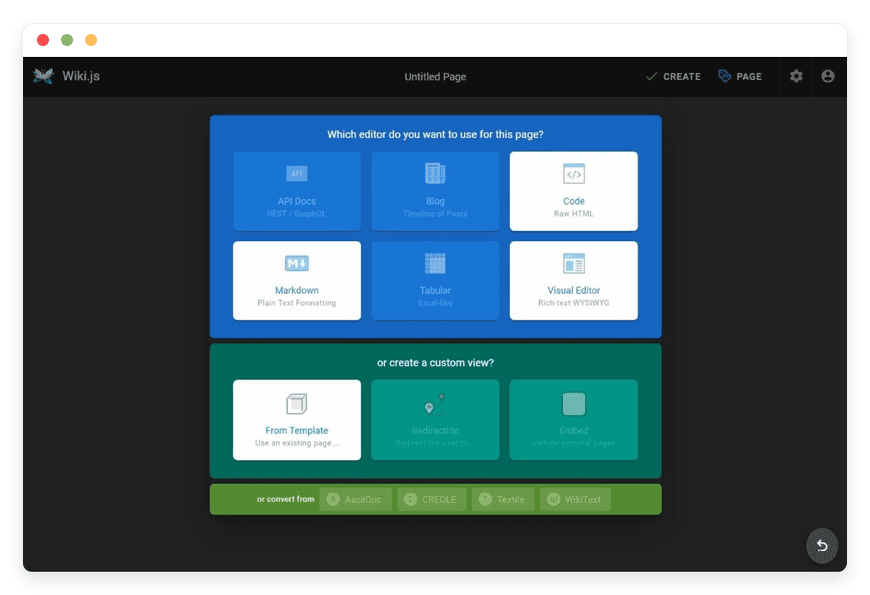
2. Multiple Content Editors
Most wikis force you to learn a specific syntax (like MediaWiki or DokuWiki syntax). Wiki.js respects your preference and offers different editors for different types of users.
Markdown Editor: The standard for developers. It supports live preview, toolbar shortcuts, and standard CommonMark syntax. It is fast, clean, and portable.
Visual Editor (WYSIWYG): Perfect for non-technical users. It looks and feels like Microsoft Word or Google Docs. You can drag and drop images, format text with buttons, and create tables without writing a single line of code.
Raw HTML: For when you need absolute control over the layout or need to embed complex scripts.
OpenAPI (Swagger): A dedicated editor for API documentation. You paste your OpenAPI spec, and Wiki.js renders a beautiful, interactive API reference guide.
3. Intelligent Search Engine
A wiki is useless if you cannot find information. Wiki.js abstracts the search layer, allowing you to choose the engine that fits your scale.
Database Search: ideal for small to medium installations. It uses the native full-text search capabilities of PostgreSQL.
Elasticsearch / Algolia / Manticore: For enterprise-scale installations with thousands of pages, you can connect Wiki.js to these dedicated search engines. This provides typo-tolerance, faceted search, and millisecond response times across massive datasets.
4. Granular Access Control & Permissions
Security is not an afterthought; it is baked into the core. Wiki.js allows you to define complex permission structures that mimic your organization's hierarchy.
Groups: Create groups like "Admins," "Editors," "Viewers," or "HR Dept."
Rules: Assign specific permissions to groups. You can allow a group to view a page but not edit it. You can allow them to edit content but not delete it.
Page-Level Security: You can lock down specific paths. For example, the /hr/salaries path can be restricted to only the HR group and Senior Management, while /handbook is public.
5. Comprehensive Authentication Modules
You do not need to manage a separate set of passwords for your wiki. Wiki.js integrates with almost every major authentication strategy.
Social Login: Enable one-click login using Google, Facebook, GitHub, Discord, or Microsoft accounts.
Enterprise Auth: Integrate seamlessly with your corporate identity provider using LDAP, SAML 2.0, CAS, Okta, Auth0, or Azure AD.
Generic Standards: Full support for OAuth2 and OpenID Connect (OIDC).
This means your team can use their existing company credentials to log in, reducing friction and increasing security.
6. Asset Management
Stop fighting with broken image links or messy file uploads. Wiki.js has a built-in asset manager that lets you upload, categorize, and insert images and files directly into your content.
Storage Targets: You aren't limited to the server's hard drive. You can configure Wiki.js to store uploads on AWS S3, DigitalOcean Spaces, Azure Blob Storage, or any S3-compatible provider.
Media Handling: It handles images, videos, and documents with ease, generating thumbnails and optimizing delivery.
7. Localization and Multilingual Support
If your organization spans multiple countries, Wiki.js is ready. It has native support for multilingual content.
Translation: You can write a page in English and create linked translations in Spanish, French, German, etc.
Interface: The Wiki.js interface itself has been translated into dozens of languages by the community.
8. Theming and Customization
You don't want your wiki to look generic. Wiki.js allows for extensive customization without hacking the code.
Dark Mode: Built-in and toggleable by the user.
Code Injection: You can inject custom CSS and JavaScript into the header or body. This allows you to add your analytics scripts (Google Analytics, Plausible), chat widgets (Intercom), or custom branding styles to match your corporate identity.
Solutions per Industry
Wiki.js is versatile enough to adapt to various professional environments. While it is often used by software teams, its visual editor and granular permissions make it a strong candidate for almost any industry. Here is how specific sectors use Wiki.js to solve their documentation headaches.
Software Development Agencies
The Pain: Developers hate switching contexts. Documentation often rots because it lives in a separate system (like a Word doc or a proprietary web portal) from the code.
The Fix: With the Git Sync feature, documentation lives alongside the code. Developers can write Markdown files in their IDE, commit them to the repo, and have them automatically appear on the wiki.
The Result: Documentation becomes part of the Definition of Done (DoD). API references are always up to date because they are generated from the code. Client handovers are smoother because the manual is hosted online, secure, and professional.
Education and Academia
The Pain: Universities and schools struggle to distribute course materials, syllabus updates, and administrative guidelines securely. Learning Management Systems (LMS) are often clunky, slow, and hard to navigate for simple content.
The Fix: Schools use Wiki.js to build modern student handbooks, lab manuals, and course wikis. The granular permissions allow faculty to edit content while students have read-only access.
The Result: Students actually read the material because the interface is fast and mobile-friendly. Departments can maintain their own "spaces" within the same wiki instance, sharing resources while keeping their specific data organized.
eCommerce and Retail
The Fix: Retailers use Wiki.js as a dual-purpose tool.
Public: A highly searchable FAQ and Help Center for customers to reduce ticket volume.
Private: A locked-down section for internal staff housing operational procedures, supplier contacts, and troubleshooting guides for the warehouse team.
The Result: Faster onboarding for new support agents and a significant reduction in customer service costs.
Healthcare and Biotech
The Pain: This industry lives and dies by Standard Operating Procedures (SOPs). Compliance requires that every process be documented, versioned, and accessible only to authorized personnel. Paper binders are a liability; they are hard to search and harder to update.
The Fix: Wiki.js serves as the central repository for SOPs. The version history tracks exactly when a protocol was changed. The "Read-Only" permissions ensure that junior lab technicians can view the protocols on a tablet at their station but cannot accidentally modify them.
The Result: Audit readiness. When an auditor asks for the latest safety protocol, you can pull it up instantly, complete with a history of edits.
Legal and Finance
The Pain: Law firms and financial institutions deal with massive amounts of internal knowledge—case precedents, compliance regulations, and firm policies. Security is paramount; this data cannot leak.
The Fix: Using a self-hosted instance of Wiki.js (managed by DANIAN) ensures that data never sits on a public cloud shared with thousands of others. The granular group permissions allow partners to see sensitive financial data while associates only see the case files relevant to them.
The Result: A secure, searchable "Brain" of the firm that retains knowledge even as staff turns over.
Manufacturing and Engineering
The Pain: Factory floors and engineering firms have complex machinery and processes. Manuals are often PDF files buried in a network drive that takes ten minutes to open.
The Fix: Wiki.js renders technical documentation as web pages. An engineer on the floor can scan a QR code on a machine that links directly to the Wiki.js page for that specific equipment, loading the maintenance manual instantly on their phone.
The Result: Reduced downtime. Information is available at the point of need, not locked in a back office.
Game Development Studios
The Pain: Building a game requires a "Game Design Document" (GDD) and a "Lore Bible." These documents are living, breathing things that change daily. Keeping the art team, the coding team, and the writers on the same page is a nightmare.
The Fix: Game studios use Wiki.js to build their internal "World Wiki." Writers document the history of the game world, artists upload concept art to the asset manager, and programmers document the game mechanics.
The Result: A cohesive creative vision. New team members can browse the wiki to understand the game's story and mechanics without needing a senior developer to explain it to them for three hours.
Non-Profits and NGOs
The Pain: Non-profits often rely on volunteers. Training volunteers is resource-intensive, and volunteer turnover is high. They need a cost-effective way to train people quickly.
The Fix: A public-facing Wiki.js instance serves as a "Volunteer Handbook." It contains videos, guides, and scripts for fundraising or field operations. Because Wiki.js is open-source, there are no per-user licensing fees, which is critical for organizations with tight budgets and hundreds of volunteers.
The Result: Scalable training. Volunteers can self-educate before they even start their first shift.
Wiki.js vs Other Softwares
It is important to understand where Wiki.js sits in the landscape of documentation tools. It competes primarily with proprietary giants and older open-source tools. The key differentiator is usually data ownership and rendering speed.
| Feature | Wiki.js | Proprietary Alternatives (e.g., Confluence) | Legacy Open Source (e.g., MediaWiki) |
| License | Open Source (AGPLv3) | Closed Source / Subscription | Open Source (GPL) |
| Cost | Free Software (Pay for Hosting) | High Per-User Fees | Free |
| Storage Format | Standard Markdown / Git | Proprietary Database | Wikitext (Complex Syntax) |
| Performance | Lightweight (Node.js) | Often Heavy / Slow | Moderate (PHP) |
| Interface | Modern, Responsive, Dark Mode | Corporate, Complex | Dated, non-responsive |
| Customization | Full Code Access | Limited to Marketplace Plugins | High, but requires PHP skills |
| Data Control | You control the files | Data locked in their cloud | Database Only |
The Proprietary Trap: Many proprietary tools hook you with a low entry price, but as your team grows, the per-user licensing fees skyrocket. Furthermore, if you ever try to leave, you find that your "export" is a mess of proprietary files that don't look right anywhere else. Wiki.js avoids this by using Markdown—the universal language of the web.
Use Cases and Applications
The flexibility of Wiki.js allows it to serve many roles beyond a simple "wiki."
Internal Knowledge Base: The central nervous system of your company. This is the most common use case. It houses HR policies, IT troubleshooting guides, and brand assets.
API Documentation: Using the OpenAPI editor, you can present beautiful, readable API references to external developers. This replaces expensive standalone API doc tools.
Customer Support Portal: A public-facing site where users can find answers, manuals, and troubleshooting steps. By connecting a custom domain, it looks exactly like a high-end support center.
Personal Second Brain: A private, secure place to organize your thoughts, research, and project notes. Since it supports Markdown, it's great for taking notes during meetings and organizing them later.
Collaborative Writing: Teams can work together on specifications and long-form content. The version history ensures that no idea is ever lost, even if it is deleted from the current version.
How DANIAN Helps
We position ourselves as the "Quiet Enabler." You know the value of the software; we simply make sure it works without interruption. Running Wiki.js yourself involves setting up a reverse proxy (like Nginx), configuring a PostgreSQL database, managing the Node.js process with PM2 or Docker, and ensuring SSL certificates auto-renew.
If you are a solo developer, that might be fun for a weekend. If you are a business, that is a liability.
Here is how DANIAN simplifies this:
Fully Managed Infrastructure: We handle the hosting. From the initial launch to the operating system tweaks, we manage the environment so you don't have to. You get a dedicated environment that is optimized for Node.js applications.
Backup & Monitoring: We configure automated daily backups that are stored securely off-site. If you delete a critical page or a database corruption occurs, we can help you restore it one-click. We also monitor uptime 24/7.
SSL & Firewall: Security is standard, not an upgrade. Your wiki is protected by a custom firewall to block malicious traffic, and we automatically provision and renew SSL certificates so your site is always HTTPS-secure.
Updates & Patching: When Wiki.js releases a security patch or a new feature version, we apply the updates. You get the new features without the risk of breaking your installation during a manual upgrade.
Guaranteed Performance: Our infrastructure is built for scale. Whether you have 10 users or 10,000, we ensure your wiki loads instantly. We use high-performance storage and optimized caching layers.
7-Day Free Trial: We are confident you will prefer our platform. You can try the full service with zero risk.
"Less Setup, More Writing." That is our promise.
How to Get Started
Getting your own instance of Wiki.js running on DANIAN is incredibly simple. You do not need to touch a command line, you do not need to know how to install Node.js, and you do not need to configure a database.
Visit DANIAN: Go to danian.co and create your account.
Select Wiki.js: Browse our extensive catalog of open-source applications and click on Wiki.js.
Launch: Click start. Our automation takes over. It provisions a server, installs the dependencies, configures the database, sets up the security, and launches the application.
Login: You will have a live URL. You log in, create your admin account, and start writing.
FAQ
Is Wiki.js really free?
The software itself is open-source (AGPLv3) and free to download and modify. However, running it requires server resources (CPU, RAM, Storage). DANIAN provides the managed infrastructure to run the software reliably for a simple monthly fee, saving you the cost of hiring a DevOps engineer.
Can I use my own domain name?
Yes. You can easily connect your custom domain (e.g., docs.yourcompany.com or wiki.yourbrand.com) to your DANIAN Wiki.js instance. We handle the SSL certificate generation for your domain automatically using Let's Encrypt.
Do I need to use Git Sync?
No, it is optional. Wiki.js works perfectly fine using just its database to store your content. However, we highly recommend setting up Git Sync if you want an external backup of your content in a readable format or if you want to integrate with a developer workflow.
How do I handle upgrades?
You don't. DANIAN handles the software updates for you. We ensure that your instance is running a secure and stable version of Wiki.js.
Is my content private?
By default, you can configure Wiki.js to be completely private, requiring a login to view any content. You have full control over who sees what via the administration panel. You can make the whole site public, the whole site private, or mix and match.
Can I export my data if I leave?
Absolutely. This is the beauty of open source. Since Wiki.js can sync to Git, you always have a copy of your data in standard Markdown format. You are never locked into our platform or the software itself.
Conclusion
Wiki.js represents the future of documentation. It combines the ethical and technical advantages of open-source software with a user experience that rivals the best proprietary tools on the market. It is fast, beautiful, and respects your control over your content.
Whether you are a startup looking to document your API, a university needing a student handbook, or a large enterprise needing a secure internal knowledge base, Wiki.js is the tool for the job.
However, the complexity of hosting it yourself should not stop you from using it. You shouldn't have to be a Linux system administrator to have great documentation. With Managed Wiki.js Hosting, you bypass the technical hurdles and jump straight to the value.
Stop wrestling with servers. Stop apologizing for your outdated docs. Start documenting your genius.


