
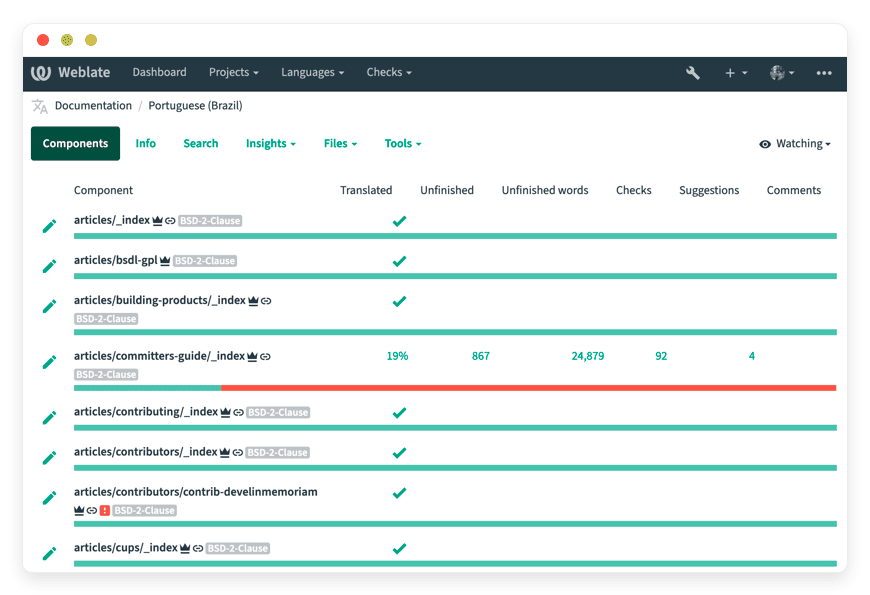
Managed Weblate Hosting: The Definitive Guide to Continuous Localization
TLDR - Quick Answer
Weblate is a powerful open-source continuous localization platform built for tight integration with version control systems. Managed Weblate Hosting removes the server maintenance burden, giving your team immediate access to an optimized translation environment.
Here is the immediate value you get:
Automated Sync: Translations commit directly to your Git repository in real-time.
Rich Context: Translators see screenshots and nearby strings for accurate work.
Format Flexibility: Built-in support for dozens of file types, from JSON to Android XML.
Zero Server Chores: We handle the installation, maintenance, and security.
Introduction
Translating a software project is a complex logistical challenge. Developers write code and create new text strings daily. Translators need to see those strings, understand their context, and write accurate translations. Project managers are left trying to stitch everything together, often relying on messy spreadsheets or manual file transfers.
Weblate solves this exact problem. It acts as a bridge, giving translators a clean, intuitive web interface while automatically syncing their work directly into your code repository. The translation process becomes continuous, running seamlessly alongside your development cycle.
But running it yourself is a second job. Configuring databases, setting up secure connections, maintaining servers, and handling sudden software updates drains your time. You want to build and translate software, not manage server infrastructure.
This is where Managed Weblate Hosting becomes essential. DANIAN serves as your invisible infrastructure. We handle the complex technical setup, the security patches, and the ongoing maintenance so you can start translating immediately.
What is Weblate?
Weblate is a comprehensive web-based translation tool designed for continuous localization. Created in 2012 by Michal Čihař, the platform was born out of a clear need for a localization tool that treated version control as a first-class citizen.
Instead of building a standalone tool that required manual file uploads, the creator built Weblate to communicate natively with Git and Mercurial. When a translator completes a string in the Weblate web interface, the system can automatically create a commit and push it to the appropriate branch in your repository.
The platform supports over 500 languages right out of the box and is licensed under the GNU General Public License. This ensures the software remains open and accessible to communities worldwide.
Why is it trending?
Weblate is trending because it fundamentally changes how teams handle localization. Traditional translation workflows are linear and slow. Developers finish a feature, extract the text, send it to translators, wait weeks, and then manually merge the files back into the project.
Weblate makes translation continuous. As soon as a developer pushes new code with new text strings, Weblate detects the changes. Translators are notified instantly. They translate the text, and Weblate pushes the finished localized files back to the code repository. This constant, automated loop saves countless hours and prevents merge conflicts.
Why Choose Weblate?
Choosing open-source software gives you absolute control over your localization environment. When Hosting Weblate, you gain access to a platform that matches and often exceeds the capabilities of costly proprietary translation tools.
You get the freedom to scale your translation efforts without worrying about arbitrary per-user licensing fees or restrictive project limits. You can invite your entire community of users, external contractors, and internal staff to collaborate freely. It provides a robust, professional-grade localization environment while protecting your budget.
Key Features of Weblate
Weblate is packed with features designed to speed up the translation process while maintaining high accuracy. The platform offers deep technical capabilities wrapped in an intuitive interface. Here is a deep dive into what makes this software so effective.
Continuous Localization Pipeline
Weblate connects directly to your version control systems, including Git and Mercurial. It natively supports collaboration platforms like GitHub, GitLab, Bitbucket, and Azure. The workflow benefit here is immense. Your developers do not have to pause their work to package translation files. They simply push their code to the repository. Weblate automatically pulls the new text, presents it to the translators, and pushes the finished translations back. This eliminates the manual middleman completely, preventing delays in your release schedule.
Exhaustive File Format Support
Software projects use many different formats to store text. Weblate handles almost all of them natively. Whether your team uses Android string resources (strings.xml), Apple iOS strings (.strings), GNU gettext (.po), JSON, YAML, HTML, or Markdown, Weblate can read and write the files. You can even configure specific parameters, like adjusting JSON indentation styles or line wrapping for long strings. The benefit to your workflow is standardization. You can manage the translations for your mobile app, your web application, and your marketing website all from a single dashboard.
Customizable Translation Workflows
Not every project requires the same level of scrutiny. Weblate allows you to configure specific workflows based on your team structure. For small teams, you can enable direct translation where any user can edit strings. For larger projects, you can enforce a peer review system where suggestions require a predetermined number of votes before becoming official translations. You can also assign dedicated reviewers who act as the final quality gate. This flexibility ensures that your translation process matches your organizational hierarchy exactly.
Quality Gateway and Intermediate Languages
Developers often write initial text strings in English, but they might not be native speakers. Weblate solves this with the Intermediate Language feature. You can set an intermediate file where proofreaders correct the original developer text before it reaches the global translators. This polished, monolingual base language file then serves as the high-quality source for all other languages. This guarantees that your translators are working from clear, correct instructions, reducing errors downstream.
Rich Translation Context and Visuals
Translators often struggle when they receive isolated text strings without any context. A word like "Book" could mean a physical novel or the action of reserving a flight. Weblate solves this by providing rich context. Translators can see nearby strings, read developer comments, and even view attached screenshots of the software interface. Weblate also shows the exact location of the string in the source code. This deep context leads to accurate translations on the first try, reducing the need for endless revision cycles.
Matrix View for Language Comparison
When managing multiple languages, finding missing translations can be tedious. Weblate offers a powerful Matrix View. This tool displays different languages side-by-side in a grid format. Project managers can quickly scan the matrix to spot missing strings across multiple regions simultaneously. You can click directly into a cell to add the missing translation. This drastically speeds up the final audit before a major software release.
Advanced Pluralization Engine
Translating numbers is grammatically complex. English has a simple singular and plural system, but languages like Arabic or Czech have multiple plural forms based on specific number ranges. Weblate handles this natively using the Language Plural Rules defined by the Unicode Consortium. Translators are presented with exactly the right number of input fields for their specific language. This ensures your software sounds natural and grammatically correct, no matter how complex the counting rules are.
Zen Mode and Keyboard Efficiency
Translating thousands of words requires focus. Weblate includes a Zen Mode that removes all extra UI elements, leaving only the source text and the input field. To further speed up the process, Weblate supports extensive keyboard shortcuts. Translators can jump between strings, submit translations, and copy source text without ever touching the mouse. Additionally, a built-in visual keyboard provides quick access to language-specific special characters and punctuation marks.
Automated Quality Checks and Flags
Translation errors can break software applications. A missing placeholder or an incorrect HTML tag can cause a page to crash. Weblate includes customizable quality checks that run automatically. It verifies that translators have included the correct formatting tags, punctuation, and placeholders. If a translator makes a mistake, the system flags it immediately. You can also apply specific translation flags to restrict maximum string lengths, ensuring text fits perfectly within tight UI buttons.
Translation Memory and Glossaries
Translating the same word or phrase multiple times is inefficient. Weblate features a robust translation memory that stores previously translated phrases. When a similar string appears, Weblate suggests the past translation. You can even perform a concordance search across the entire memory database. Furthermore, project managers can create custom glossaries to define specific terminology. This ensures that your brand vocabulary remains consistent across all supported languages.
Machine Translation Integration
Sometimes you need to get a rough translation quickly to test a layout. Weblate integrates smoothly with external machine translation services and AI tools. Translators can use these automated suggestions as a starting point, refining the text rather than writing it entirely from scratch. Weblate also includes a bulk auto-translation feature, allowing you to bootstrap an entirely new language using translation memory or external APIs in seconds.
Granular Access Control
Security and privacy matter when handling unreleased software features. Weblate provides highly detailed access control. You can restrict access at the project level, or even down to specific components. You can define who can translate, who can review, and who can modify settings. This is incredibly useful when working with external translation agencies, as you can grant them access only to the specific files they need.
Solutions per Industry
Different industries face unique localization challenges. Here is how Weblate adapts to specific professional environments, streamlining their daily workflows.
Software Development (SaaS & Desktop Apps)
Software teams update their products constantly. A manual translation process simply cannot keep up with a fast agile sprint. Weblate solves this for software teams by integrating directly into the continuous integration pipeline. When a developer creates a new feature branch in Git, Weblate tracks the new strings on that specific branch automatically. The localization team can translate the new feature before it even merges into the main codebase. This guarantees that every software update ships fully localized on day one.
Game Development Studios
Video games contain thousands of dialogue lines, menu items, and complex item descriptions. Context is everything in game localization. Weblate helps game studios by allowing them to attach screenshots directly to specific dialogue strings. Translators can see the exact scene where the character is speaking, ensuring the tone and gender phrasing are accurate. Furthermore, the robust glossary feature ensures that fantasy character names, locations, and specific lore terminology remain strictly consistent across dozens of languages.
eCommerce and Retail
An eCommerce platform frequently updates product descriptions, promotional banners, and checkout flows. Speed to market is critical for global sales campaigns. Weblate helps retail teams manage these updates seamlessly. Marketing teams can write new promotional copy in English, and Weblate will immediately notify the global translation team. Because Weblate handles formats like JSON and Markdown effortlessly, it connects easily to modern headless content management systems. This keeps international storefronts perfectly synchronized.
Mobile App Development
Mobile development often requires managing distinct codebases for different platforms. Android uses strings.xml while iOS relies on .strings files. Keeping these files synchronized manually is a nightmare. Weblate solves this by parsing both formats natively. A cross-platform mobile studio can link both their Android and iOS repositories to a single Weblate project. Translators work in one unified interface, and Weblate automatically generates the correct, perfectly formatted files for both operating systems.
Open-Source Communities
Many open-source projects rely entirely on volunteers to translate their software. Weblate makes it incredibly easy to open your project to the public. You can configure granular access controls, allowing anonymous users to suggest translations. You can then enforce a peer review workflow where trusted community members vote on the suggestions. Once a suggestion receives enough votes, it is automatically approved and pushed to the repository. This harnesses the power of the crowd while maintaining strict quality control.
Marketing and Content Agencies
Digital agencies often manage complex, multilingual content campaigns for various global clients. They deal with blog posts, email templates, and landing pages. Weblate handles HTML and Markdown formats perfectly. A marketing team can connect Weblate to a client's website repository. When a copywriter publishes a new blog post, translators can localize the text paragraph by paragraph inside Weblate. The system preserves the exact HTML formatting tags, ensuring the final webpage renders perfectly without developer intervention.
Education and E-Learning
Online education platforms host massive catalogs of course material, quizzes, and video transcripts. Localizing this volume of text requires extreme efficiency. E-Learning platforms benefit heavily from Weblate's Translation Memory feature. Because educational content often repeats specific instructions or phrasing, the translation memory automatically suggests past translations. This dramatically speeds up the localization of new courses and ensures that educational terminology remains uniform across the entire learning management system.
FinTech and Financial Services
Financial applications require absolute precision. A mistranslated term in a banking app or a compliance document can lead to severe confusion or legal trouble. FinTech companies use Weblate's rigorous quality checks to maintain accuracy. The platform flags missing punctuation or broken placeholders in transaction emails immediately. Additionally, the strict glossary ensures that complex financial terminology is translated precisely the same way every time, satisfying global compliance requirements and protecting user trust.
Travel and Hospitality
Booking engines, airline apps, and hotel portals deal with dynamic content like room types, flight statuses, and localized pricing tiers. Travel platforms move fast and operate globally. Weblate allows these platforms to group string variants easily. If a hotel portal has different text layouts for a mobile screen versus a desktop browser, Weblate links these strings together. Translators can see the full picture and adapt the character length to fit the UI, ensuring travelers get a flawless booking experience.
Weblate vs Other Softwares
When evaluating localization platforms, it helps to see how Weblate compares to popular proprietary alternatives.
| Feature | Weblate | Proprietary Alternatives |
Open-Source License | Yes (GNU GPLv3) | No |
Self-Hosting Option | Yes | No |
Version Control Sync | Native, real-time two-way sync | Often requires middleware |
User Limits | Unlimited | Strictly metered by pricing tier |
Project Limits | Unlimited | Strictly metered by pricing tier |
Branch Support | Deep integration for parallel work | Basic or requires premium plans |
Weblate stands out by offering unrestricted collaboration. Proprietary tools often penalize you for growing your team by charging per seat. Weblate encourages you to bring everyone on board, from internal developers to external agency contractors, without worrying about ballooning costs.
Use Cases and Applications
Weblate is flexible enough to handle a wide variety of localization tasks beyond simple software strings. Here are several practical ways teams use the platform daily.
Synchronizing Documentation Repositories
Technical documentation must evolve alongside the software it describes. Teams use Weblate to translate their Sphinx or AsciiDoc documentation repositories. By linking the documentation Git repository to Weblate, technical writers can update the English source files, and translators can immediately adapt the changes. The platform handles the underlying markup languages flawlessly, ensuring the localized documentation builds correctly.
Managing Multilingual Customer Support Bots
Modern customer support relies heavily on automated chatbots. These bots operate using large JSON files containing intent triggers and response dialogue. Teams connect Weblate directly to their chatbot configuration repositories. Translators can localize the bot responses, ensuring the tone remains helpful and natural in every region. The automated checks prevent missing variables, so the bot always inserts the correct customer name or order number.
Localizing Desktop Application Interfaces
Traditional desktop applications often use formats like Windows RC files or Qt Linguist .ts files. Weblate supports these older, complex formats natively. A team maintaining a legacy desktop application can modernize their localization workflow simply by pointing Weblate at their repository. Translators get a modern web interface, while the developers receive properly formatted .ts files ready for compilation.
Streamlining Agency Translation Deliverables
Translation agencies often deal with clients who send flat CSV or Excel files. Weblate can import these files seamlessly. The agency can upload the client's spreadsheet into Weblate, assign it to their translators, utilize the translation memory, and then export the finished product back into an exact copy of the original spreadsheet format. This turns a messy manual process into an organized, professional workflow.
How DANIAN Helps
Running a continuous localization server requires constant attention. You have to monitor server resources, configure secure connections, maintain database backups, and apply software patches promptly.
DANIAN acts as your quiet enabler. We handle the messy infrastructure work so you get the glory of a perfectly synchronized localization pipeline.
Here is how our managed hosting environment supports your project:
Fully Managed: We handle the hosting entirely. Our team manages everything from the initial setup to regular software updates, security patches, and active performance monitoring. Your Weblate software is always optimized without you having to lift a finger.
Backup & Monitoring: Your translation data is critical. Backups are configured automatically, stored securely off-site, and feature a simple one-click restore process.
SSL & Firewall: Secure by default. With cybersecurity threats on the rise, we take security seriously. From automated updates to proactive monitoring and tailored firewalls, we make sure your environment is secure 24/7.
Silent Updates: Security patches and new Weblate versions are applied automatically without requiring your intervention.
24/7 Monitoring: Our systems watch your server around the clock. Issues are detected and often resolved before you even notice a slowdown.
Guaranteed Performance: Downtime can be detrimental to your development cycle. With our scalable infrastructure, we ensure consistent performance even as your user base grows and your translation files expand.
7-Day Free Trial: Less setup, more development. Affordable from the start, with real help when you need it. Test the platform completely risk-free.
How to Get Started
Step 1: Visit danian.co and create your account.
Step 2: Select Weblate from our extensive software catalog.
Step 3: Relax while DANIAN launches your software and configures the databases.
FAQ
What is continuous localization?
Continuous localization is a workflow where translations happen simultaneously with software development. As developers write new code and create new text strings, the translation platform automatically detects them, allowing translators to work immediately rather than waiting for a release cycle to finish.
Does Weblate support machine translation?
Yes. Weblate integrates with various popular machine translation and AI services. Translators can use these integrations to generate automated suggestions, which they can then review and refine inside the editor.
What file formats does Weblate support?
Weblate supports dozens of common localization formats. This includes GNU gettext (.po), JSON, YAML, Android strings, Apple iOS strings, HTML, Markdown, CSV, and XLIFF. It can also handle specific framework formats like Laravel PHP strings and React Intl.
How does pricing work for licensing versus hosting?
Weblate is open-source software, meaning there is no license fee to use the application itself. You can have unlimited users and unlimited projects. When you choose managed hosting, you are simply paying for the server resources, security, and the expert maintenance required to keep the platform running smoothly.
Do I need technical skills to use Weblate?
Setting up Weblate from scratch requires strong system administration skills. However, using the Weblate interface as a translator or project manager is very intuitive. By using a managed hosting provider, you eliminate the technical server setup completely.
Can Weblate handle right-to-left languages?
Yes. The Weblate user interface and the underlying translation engine fully support right-to-left languages such as Arabic and Hebrew, ensuring the text renders correctly for translators and exports cleanly to your code.
Is Weblate compatible with GitHub and GitLab?
Absolutely. Weblate features native support for major code collaboration platforms including GitHub, GitLab, Bitbucket, and Gitea. It connects seamlessly to these services to monitor repositories and push commits automatically.
Can I limit translation length for UI elements?
Yes. You can configure specific translation flags within Weblate to restrict the maximum character length or even the maximum rendered pixel size. This ensures the translated text fits neatly into your application buttons and menus.
How does Weblate handle duplicate strings?
Weblate is highly efficient with duplicate text. If a string appears multiple times across your project, the platform can link them together. Translating the string once updates it everywhere, saving significant time and maintaining consistency.
Conclusion
Managing software translations does not have to involve endless email chains, broken spreadsheets, and merge conflicts. Weblate provides a professional, continuous localization environment that keeps your developers and translators in perfect sync.
By choosing a managed hosting solution, you remove the entire burden of server administration. Your team gets immediate access to powerful translation memory, rich contextual tools, and automated Git integration.
Experience the power of fully managed open-source.


