
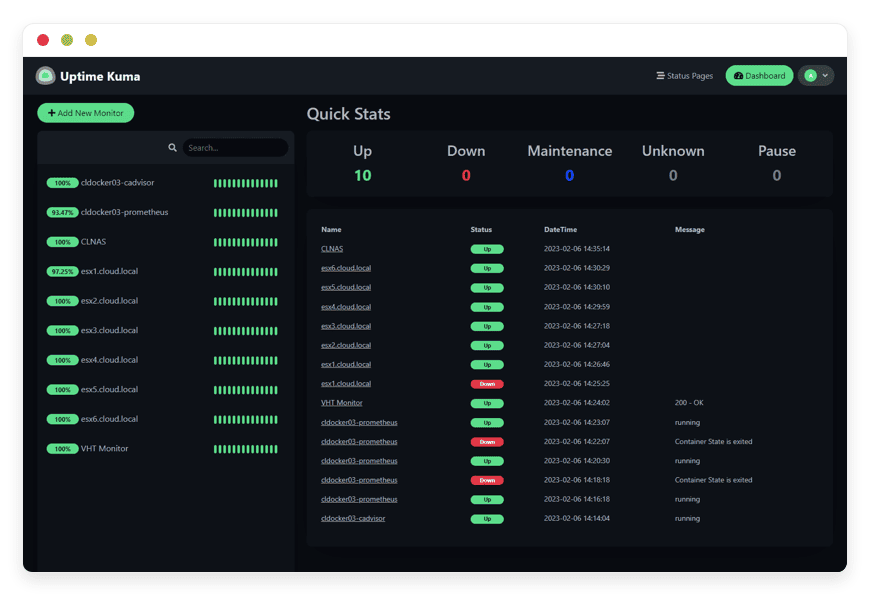
Managed Uptime Kuma Hosting: The Ultimate Monitoring Solution
TLDR: Quick Answer
If you are looking for a robust, self-hosted alternative to Uptime Robot but don't want the hassle of server management, Managed Uptime Kuma Hosting is the answer.
Instant Visibility: Get a clear, reactive dashboard showing the health of all your services.
Zero Maintenance: We handle the updates, security patches, and database optimization.
Secure by Default: SSL certificates and firewalls are configured automatically.
External Watchdog: By hosting outside your infrastructure, you ensure you are alerted even if your entire data center goes dark.
Status Pages: Create beautiful, public-facing status pages in seconds.
Introduction
And you sleep through it.
Why? Because your monitoring solution wasn't set up, or worse, it was hosted on the same server that just crashed.
What is Uptime Kuma?
Why is it Trending?
Why Choose Uptime Kuma?
The primary reason engineers and businesses choose Uptime Kuma is control. When you use a managed service, you are often forced into a specific workflow. With Hosting Uptime Kuma, you define the parameters.
Key Features of Uptime Kuma
Uptime Kuma is packed with features that rival expensive enterprise solutions. Here is a deep dive into what makes this software indispensable.
versatile Monitoring Types
It’s not just about "pinging" a server. Uptime Kuma supports a wide array of protocols to ensure every part of your stack is functional:
HTTP(s): The standard check. It loads a URL and checks for a 200 OK status. You can customize expected status codes (e.g., expecting a 401 on a protected route).
TCP/Port: Essential for checking services like databases (Port 5432) or email servers (Port 25) without needing a web interface.
Keyword Monitor: It checks the content of the response body. This is critical for catching "soft failures" where a site loads a 200 OK status but displays a "Database Connection Error" text on the page.
DNS Records: Monitors your DNS resolution to ensure your domain is pointing to the right IP.
Docker Containers: Monitors the health state of Docker containers directly.
Steam Game Server: Specifically for gaming communities, checking if a game server is online and accepting players.
90+ Notification Services
A monitor is useless if it doesn't tell you something is wrong. Uptime Kuma integrates with practically every communication platform available. You don't need to write custom webhooks (though you can if you want to). Native support includes:
Messengers: Telegram, Discord, Slack, Signal, Microsoft Teams.
Push Services: Gotify, Pushover, Pushbullet.
Email: SMTP support for standard email alerts.
Voice/SMS: Twilio, Vonage.
Incident Management: PagerDuty, Opsgenie.
Status Pages
Transparency builds trust. Uptime Kuma allows you to build public or private Status Pages. These are dashboards you share with your customers or team. If your app goes down, you don't have to answer 50 emails asking "Is the system down?" You simply point them to the status page. You can map these to custom domains and secure them with passwords if they are for internal eyes only.
Maintenance Windows
Real-world infrastructure needs maintenance. You don't want to spam your team with "DOWN" alerts when you are performing a scheduled reboot. Uptime Kuma allows you to schedule maintenance windows. During these times, checks are paused or alerts are suppressed, ensuring that your on-call team only wakes up for real emergencies.
SSL Certificate Monitoring
Expired SSL certificates are a leading cause of embarrassing downtime. Uptime Kuma automatically grabs certificate information from your HTTPS monitors and alerts you days before the certificate expires. This proactive feature alone can save your reputation.
Solutions per Industry
Managed Uptime Kuma Hosting fits into various professional workflows. Here is how different industries use it to solve specific problems.
eCommerce and Retail
In eCommerce, downtime translates directly to lost revenue. If your checkout API fails, you are losing money every second.
The Scenario: A store owner runs a Magento or WooCommerce site. The homepage loads fine, but the payment gateway API is timing out.
The Solution: They set up a "Keyword Monitor" on the checkout success page. If the specific confirmation text doesn't load, Uptime Kuma fires a high-priority alert to the dev team via Telegram. The issue is resolved before most customers even notice.
Digital Agencies
Agencies manage dozens, sometimes hundreds, of client websites. Keeping track of them manually is impossible.
The Scenario: A client calls the account manager screaming that their site is down. The agency didn't know.
The Solution: The agency uses Uptime Kuma to monitor all 50 client sites. They create a "Status Page" for each client, branded with the client's logo. This provides transparency and proves the agency is on top of things. When a site goes down, the agency knows first and starts fixing it before the client calls.
SaaS and DevOps Teams
For software companies, internal microservices are just as important as the public frontend.
The Scenario: A background worker processing image uploads crashes. The main site is up, but features are broken.
The Solution: The DevOps team uses TCP monitoring to check the specific ports of their Redis and Postgres databases. They also monitor the internal Docker containers. If a container exits unexpectedly, an alert is sent to a dedicated Slack channel for immediate remediation.
Uptime Kuma vs Other Softwares
It is important to understand where Uptime Kuma sits in the market compared to proprietary software alternatives. We are not comparing hosts here; we are comparing the software capabilities.
| Feature | Uptime Kuma | Proprietary Alternatives |
| Check Interval | Down to 20 seconds | Usually 5 minutes (Free), 1 minute (Paid) |
| Number of Monitors | Unlimited (Hardware dependent) | Strictly limited (e.g., 50 monitors) |
| Data Retention | Unlimited (You control the settings) | Limited (e.g., 3 months of logs) |
| Status Pages | Unlimited & Customizable | Limited number, branding often locked |
| Cost | Free (Open Source) | Monthly Subscription per feature |
| Notifications | All 90+ included | SMS/Voice often costs extra |
The proprietary alternatives charge you for the software limits. With Uptime Kuma, the software is free and unlimited; you only need a place to run it.
Use Cases and Applications
Beyond standard website monitoring, Uptime Kuma is versatile enough for creative applications.
1. Home Lab Monitoring
Enthusiasts running Plex, Home Assistant, or Pi-hole use Uptime Kuma to ensure their local network services are running. By connecting it via a secure tunnel or VPN, they get external verification of their home internet connection.
2. API Health Checks
Developers building REST or GraphQL APIs use the HTTP monitoring feature to send specific JSON payloads (POST requests) to their endpoints and verify the JSON response. This ensures that not only is the server up, but the logic is correct.
3. Cron Job Monitoring (Passive)
Uptime Kuma supports "Push" monitors. Instead of Kuma checking a URL, your script sends a "ping" to Kuma. If your nightly backup script finishes, it pings Kuma. If Kuma doesn't receive that ping by a certain time, it assumes the backup failed and alerts you.
4. Regional Availability
While Uptime Kuma is a single instance, you can use it to verify if your site is accessible from a specific geographic region (wherever your DANIAN service is located), helping to identify regional routing issues.
How DANIAN Helps
At DANIAN, we function as the "Quiet Enabler." We believe that you should spend your time configuring your monitors and analyzing your uptime metrics, not patching Linux kernels or debugging Docker compose files. We handle the mess; you get the glory.
Here is exactly what we provide:
Fully Managed: We handle the hosting completely. Our team manages the initial setup, ensuring the environment is optimized for Uptime Kuma's Node.js and SQLite architecture. You get a login, and you are ready to work.
Backup & Monitoring: We take automated daily backups of your configuration and history. These are stored securely off-site. If you accidentally delete a critical monitor or corrupt your settings, we can restore your environment with one click.
SSL & Firewall: Security is not an upsell; it is a standard. We provision your instance with a valid SSL certificate automatically. We also place your service behind a custom firewall to block malicious traffic and bots, ensuring your monitoring tool remains secure 24/7.
Updates: When Louis Lam and the community release a new version of Uptime Kuma with security patches or cool new features, we apply those updates. You don't have to worry about breaking changes; we ensure the upgrade path is smooth.
24/7 Monitoring: It sounds meta, but we monitor your monitor. Our systems track the health of your Uptime Kuma instance. If the service falters, our automated systems and support engineers detect and resolve the issue, often before you even notice.
Guaranteed Performance: Downtime is detrimental to your business, and a slow monitoring tool is frustrating. We run on scalable infrastructure that ensures your dashboard remains snappy, even as you add hundreds of monitors and years of history data.
7-Day Free Trial: We are confident in our platform. You can start today with absolutely no risk.
How to Get Started
Getting your managed Uptime Kuma instance running is faster than making a cup of coffee.
Visit DANIAN: Go to our signup page.
Select Uptime Kuma: Choose it from our curated catalog of open-source applications.
Launch: Click start. Relax for a moment while our automation provisions your secure container, generates your SSL keys, and initializes the database.
Login: You will receive your credentials. Log in and start adding your first monitor.
FAQ
Q: Is Uptime Kuma free?
A: The software itself is open-source and free (MIT License). However, running it requires server resources (CPU, RAM, Storage, Bandwidth). When you use Managed Uptime Kuma Hosting, you are paying for the infrastructure and the management service, not a software license.
Q: Can I use my own domain name?
A: Yes. You can connect a custom domain/subdomain (e.g., status.yourcompany.com) to your instance easily. We handle the SSL certificate generation for your custom domain automatically.
Q: How many monitors can I add?
A: Theoretically, unlimited. Practical limits depend on the server resources. Our standard plans are sized to handle hundreds of monitors without breaking a sweat.
Q: Does it support multi-factor authentication (2FA)?
A: Yes, Uptime Kuma supports 2FA for securing your account. We highly recommend enabling this to protect your monitoring data.
Q: Can I migrate my existing data to DANIAN?
A: Yes. Uptime Kuma has a built-in "Export" feature that generates a JSON file of your monitors and settings. You can import this directly into your new managed instance.
Q: How do alerts work if I don't have an email server?
A: Uptime Kuma allows you to use practically any external notification service (Slack, Discord, Telegram). If you need email alerts, we include the SMTP configuration by default.
Conclusion
However, self-hosting it introduces a point of failure that you cannot afford. By choosing Managed Uptime Kuma Hosting, you secure your monitoring infrastructure. You gain the peace of mind that comes with automated backups, professional security, and reliable performance.
Don't let your monitoring tool be another server you have to babysit. Let us handle the infrastructure so you can focus on keeping your services online.


