
Managed Umami Hosting: The Simple Alternative to Google Analytics
TL;DR: Quick Answer
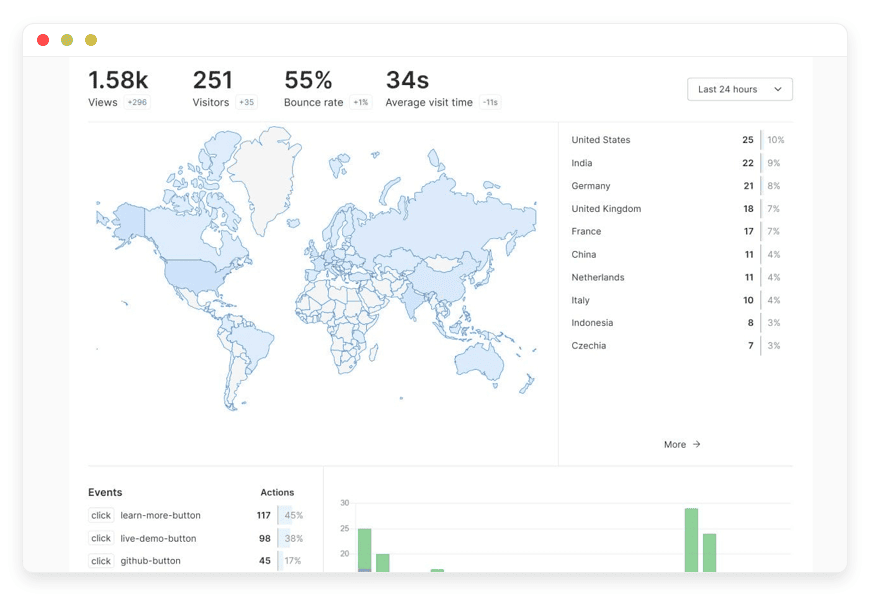
Umami is a simple, fast, and privacy-focused open-source analytics solution. It provides the essential data website owners need—traffic sources, visitor counts, and behavior flows—without the invasive tracking or bloated scripts of corporate alternatives.
Why Managed Hosting?
Instant Access: Start using Umami immediately without configuring servers, Docker, or databases.
Zero Maintenance: We handle all software updates, security patches, and database optimizations.
High Performance: Your dashboard remains fast and responsive, regardless of how much data you collect.
Reliability: Automated backups and 24/7 monitoring ensure you never lose critical historical data.
Compliance: You maintain full control over your analytics infrastructure without the technical debt.
Introduction
If you have ever opened Google Analytics 4 (GA4) just to check how many people visited your website yesterday, you know the frustration. You are greeted with a complex dashboard, confusing menus, and a steep learning curve that seems to require a specialized certification just to navigate. For 99% of website owners, developers, and marketers, modern enterprise analytics tools are overkill. They are slow, invasive, and difficult to use.
You just want to know who is visiting your site, where they are coming from, and what they are looking at. You want clarity, not a degree in data science.
Umami solves this. It is clean, fast, and respects user privacy. It strips away the noise and gives you the signal. However, running Umami yourself is a second job. You have to provision a Linux server, configure a PostgreSQL or MySQL database, manage Docker containers, handle SSL certificates, and set up reverse proxies. Then comes the maintenance: updating the software when new versions (like the recent V3) are released, patching the OS, and ensuring your database doesn't run out of storage space.
DANIAN acts as your invisible infrastructure team. We provide a fully managed environment where you can launch Umami in minutes. We handle the complexity of the backend so you can focus on analyzing your traffic and growing your business. We believe you should spend your time optimizing your content, not your server config files.
What is Umami?
Umami is an open-source web analytics solution created by Mike Cao and a dedicated community of contributors. It was built with a singular mission: to provide a friendly, privacy-focused alternative to the corporate giants tracking every move on the web. It is built using modern technologies like Next.js and Prisma, ensuring it is lightweight and incredibly fast.
Unlike traditional analytics tools that collect vast amounts of personal data to build ad profiles, Umami collects only the metrics that matter for website performance. It does not use cookies, does not track users across websites, and is fully GDPR and CCPA compliant right out of the box.
Why is it Trending?
The shift toward privacy is undeniable. Users are tired of cookie banners, and developers are tired of bloated scripts slowing down their sites. Umami is trending because it respects the visitor. It is lightweight (the tracking script is tiny, often less than 2KB), so your site loads faster. It provides a single-page dashboard that shows you everything you need at a glance, replacing the need for expensive courses just to learn how to read your own data.
Furthermore, with the sunsetting of Universal Analytics and the forced migration to GA4, thousands of businesses are looking for an exit ramp. They want a tool that feels familiar, works instantly, and doesn't sell their user data. Umami fits that requirement perfectly.
Why Choose Umami?
Choosing Umami is a vote for simplicity and transparency. Because the software is open-source, the code is available for audit on GitHub. You aren't trusting a black box with your traffic data; you are using software built by developers, for developers.
When you choose Hosting Umami on a managed platform, you get the best of both worlds. You get the software that treats your users with respect, and you get the stability of a professionally managed service. You aren't feeding data into a massive advertising ecosystem. You are simply measuring the success of your work.
It replaces the "surveillance capitalism" model with a "performance metrics" model. You get clarity without compromise. You get a tool that works for you, rather than you working for the tool.
Key Features of Umami
Umami packs a significant punch for such a lightweight tool. While it prides itself on simplicity, it offers advanced features that rival proprietary platforms. Here is a deep dive into what makes Umami a powerhouse for modern analytics
Real-Time Analytics
Umami provides a live view of your current website traffic. This isn't "near real-time" with a 24-hour delay; this is up-to-the-second data. You can see exactly how many people are on your site right now, which pages they are viewing, and where they are coming from. This is crucial for monitoring product launches, viral content, or newsletter blasts in the moment. You can watch the spike happen and react instantly.
Advanced Custom Events
Tracking page views is standard, but tracking interactions is where the true value lies. Umami allows you to track specific actions using Custom Events. You can tag any element on your site—buttons, forms, images—to see how users interact with them.
Examples: "Sign Up Button Click," "Newsletter Form Submit," "Video Play," or "Download PDF."
Metadata: You can capture dynamic data associated with these events. For example, if you have a "Add to Cart" button, you can pass the product name and price as event data. This allows you to run reports later to see which products are getting the most attention, not just which pages are being viewed.
Retention Analysis (Cohort Reporting)
Understanding if users come back is just as important as acquiring them. The Retention Report in Umami allows you to measure stickiness by analyzing how often users return to your app or website over time.
How it works: It groups users into cohorts based on when they first visited. You can then see what percentage of those users returned in Day 1, Day 7, or Day 30.
The Value: This is critical for measuring the "health" of your audience. If you spend money on ads to get users, but your retention rate is zero, you know you have a product problem, not a marketing problem.
Funnels and Conversion Paths
You can visualize the steps users take to complete a goal using the Funnel Report. Whether it is a checkout process or a signup flow, the Funnel Report shows you exactly where users drop off.
Visualization: It creates a bar chart showing the percentage of users who make it from Step A to Step B to Step C.
Optimization: If you see a 50% drop-off between "View Pricing" and "Start Trial," you know exactly which page to optimize. You can A/B test changes and watch the funnel improve in real-time.
User Journey Visualization
The Journey Report gives you a map of how users navigate through your site. It visualizes the most common paths taken from the landing page to the exit.
Discovery: You might discover that users are navigating to your "About" page immediately after reading a blog post, suggesting they want to trust the author before converting.
Flow: This helps you understand the natural flow of your visitors and optimize your internal linking structure to keep them engaged longer.
Comprehensive Filtering and Insights
Sometimes the standard dashboard isn't enough. The Insights feature allows you to dive deeper. You can slice and dice your data by URL, browser, country, device, OS, and referrer.
Granularity: You can filter your dashboard to show only "Mobile users from France who visited via Twitter."
Segments: This allows you to build custom segments to answer specific questions about your audience.
UTM Tracking and Campaign Management
Umami automatically parses UTM parameters (source, medium, campaign) from your URLs. This is essential for marketers running ads or email campaigns. You can see exactly which newsletter drove the most signups or which Twitter ad resulted in the longest time on site. It aggregates this data beautifully, allowing you to measure ROI on your marketing efforts without complex setup.
Teams and Multi-Site Support
Umami is built for collaboration. You can host analytics for unlimited websites from a single installation. You can also create teams, invite colleagues, and share dashboards with specific permissions.
Access Control: Give your content team access to the blog stats, but restrict them from seeing the main SaaS app stats.
Shareable Links: You can generate public (or password-protected) share links for dashboards. This is perfect for sharing stats with investors or clients who don't need a login account.
Solutions per Industry
Umami is versatile enough to serve a wide range of industries. Here is how specific sectors can utilize Managed Umami Hosting to solve their unique challenges.
1. eCommerce and Retail
For online store owners, understanding the "why" behind the "buy" (or the lack thereof) is critical. High traffic with low sales is a disaster.
The Problem: Traditional analytics are often blocked by ad-blockers, meaning store owners lose sight of 20-30% of their shoppers. Furthermore, complex funnels in tools like GA4 are difficult to configure.
The Umami Solution: Because Umami is lightweight and can be hosted on your own subdomain via DANIAN (e.g., stats.yourstore.com), it is less likely to be blocked.
Specific Workflow: An eCommerce manager sets up a Funnel Report tracking: Product Page -> Add to Cart -> View Cart -> Checkout -> Purchase. They notice a massive drop-off at "View Cart." They investigate and realize the shipping calculator is broken. They fix it, and the funnel data improves immediately. They also use Custom Events to track which product filters (e.g., "Sort by Price" vs. "Sort by Popularity") are used most, helping them arrange their default views to match customer intent.
2. Digital Marketing Agencies
Agencies face a dual problem: reporting is time-consuming, and clients find big analytics reports confusing.
The Problem: Account managers spend hours every month taking screenshots of GA4 to paste into PDF reports. Clients receive these reports, get overwhelmed by the jargon, and ignore them.
The Umami Solution: Agencies can use DANIAN to host a central analytics server for all their clients.
Specific Workflow: An agency creates a "Team" for each client. They invite the client to view their specific dashboard. The interface is so simple the client can understand it without explanation. The agency white-labels the experience, reinforcing their brand value. instead of sending a PDF, they send a link: "Here is your live dashboard." The client feels more in control, and the agency saves 10 hours of reporting time per month.
3. SaaS (Software as a Service)
SaaS companies live and die by churn and feature adoption. They need to know if people are actually using the tool they built.
The Problem: Engineering teams often hate installing heavy tracking scripts that slow down the application. Product managers need data on feature usage but can't get engineering time to implement complex telemetry.
The Umami Solution: Umami's script is negligible in size, keeping the app fast.
Specific Workflow: A Project Management SaaS uses Retention Analysis to track user cohorts. They see that users who sign up in January have a 40% retention rate after 4 weeks, but February users only have 10%. They dig into Journey Reports and realize the February cohort is getting stuck on the new "Onboarding Modal" they released. They revert the change, and retention stabilizes. They also use Custom Events to track every time a user clicks "Export to PDF," validating that this is a high-value feature worth improving.
4. Content Creators and Bloggers
For writers, the metric that matters is engagement. Are people reading the content, or just bouncing?
The Problem: Vanity metrics like "hits" don't tell the whole story. Bloggers need to know which topics resonate.
The Umami Solution: Clean, readable data on "Time on Page" and "Scroll Depth" (via events).
Specific Workflow: A tech blogger writes a long-form tutorial. They use Umami to track the Referrers. They see a sudden spike from "news.ycombinator.com." They immediately use Real-time View to see which specific paragraph is keeping people on the page. They use this insight to write a follow-up post on that specific sub-topic. They also share their public dashboard link in their media kit, proving their traffic numbers to potential sponsors with verified, live data.
5. Education and Course Creators
Online educators need to ensure students are progressing through the curriculum.
The Problem: Students often buy courses and never finish them. Identifying where they lose interest is key to reducing refund requests.
The Umami Solution: precise event tracking on lesson completion.
Specific Workflow: A course creator hosting on a custom platform uses Umami to track "Video Finished" events. They visualize this in a Funnel Report: Lesson 1 -> Lesson 2 -> Lesson 3. They see a 70% drop-off between Lesson 2 and 3. Reviewing Lesson 2, they realize the video is 45 minutes long and boring. They break it into three 15-minute chunks. The funnel data in Umami shows the completion rate for the module jumps to 90%.
6. Non-Profits and NGOs
Non-profits need to build trust. Using invasive trackers that sell donor data contradicts their ethical stance.
The Problem: They need analytics to optimize donation flows, but they must adhere to strict ethical guidelines regarding donor privacy.
The Umami Solution: Umami allows them to be transparent. "We do not track you; we only count you."
Specific Workflow: A Human Rights NGO runs a donation campaign. They use UTM Parameters to distinguish between traffic coming from their email newsletter vs. their Instagram bio. They see that while Instagram drives more traffic, the Email traffic converts at a higher rate. They shift their ad budget to list-building rather than social reach. They can assure their high-net-worth donors that their browsing habits on the donation portal are not being broadcast to Google or Facebook.
7. FinTech and Healthcare
These industries are bound by strict regulations (GDPR, HIPAA, etc.). Data minimisation is a legal requirement, not just a preference.
The Problem: Sending user data to third-party US-based servers (like Google's) can be a compliance nightmare or legally impossible in certain jurisdictions.
The Umami Solution: Hosting Umami on a private, managed server gives them full control over the data residency.
Specific Workflow: A HealthTech startup uses Umami to track usage of their public-facing symptom checker. Since Umami does not collect IP addresses or PII (Personally Identifiable Information) by default, they can gather usage statistics without triggering HIPAA violations regarding patient data. They can see which "symptom pages" are most popular during flu season without knowing who is looking at them, allowing them to scale their server resources appropriately.
8. Indie Hackers and Solo Developers
Speed of implementation is everything. Solo founders wear every hat and cannot waste time on DevOps.
The Problem: They need analytics yesterday. They don't have time to read documentation for complex enterprise tools.
The Umami Solution: Plug and play.
Specific Workflow: An indie developer launches a new AI tool on Product Hunt. They create a DANIAN account, launch Umami, and drop the script into their header in 5 minutes. As the Product Hunt traffic floods in, they watch the Real-time Dashboard on a second monitor. They see a lot of traffic from Japan. They quickly run a translation update for their landing page to capture that market. The agility of the tool matches the agility of the founder.
Umami vs Other Softwares
It is important to understand where Umami fits in the landscape compared to other software applications.
| Feature | Umami | Google Analytics | Matomo (Self-Hosted) | Plausible (Self-Hosted) |
| Privacy | GDPR/CCPA Compliant by defaul | Requires complex configuration | Good | Good |
| Cookies | Cookie-less | Heavy cookie usage | Optional cookies | Cookie-less |
| Script Weight | < 2KB | ~45KB+ (Heavy) | ~20KB | ~1KB |
| Interface | Single Page, Intuitive | Complex, Multi-menu | Dense, many sub-menus | Single Page |
| Data Control | You control the database | Google controls the data | You control the database | You control the database |
| Learning Curve | 5 Minutes | Weeks/Months | Moderate | 5 Minutes |
| Feature Set | Focused (Analytics Only) | Bloated (Ads, etc.) | Broad (Heatmaps, etc.) | Focused |
| Ad Blocker | Often bypassed | Frequently blocked | Often | Often bypassed |
The Verdict: GA4 is for enterprise data scientists. Matomo is for those who want every feature imaginable (heatmaps, A/B testing). Umami is for everyone else who wants speed, clarity, and respect for their users.
Use Cases and Applications
The Personal Portfolio
Developers and designers utilize Umami to track portfolio views. It offers just enough data to know if a potential employer looked at your resume page without feeling like you are spying on them. It validates your outreach efforts during a job hunt.
Corporate Landing Pages
Marketing teams use Umami for high-traffic landing pages where speed is critical for Quality Score (ads). A heavy analytics script can lower your ad rank; Umami keeps the page speed score green. This directly lowers the Cost Per Click (CPC) on advertising platforms.
Documentation Sites
Open-source projects often host their docs on static sites. Umami is the perfect companion for documentation because it helps maintainers see which articles are read most frequently and which search terms are leading people to the docs. If the "Getting Started" guide has a high exit rate, the maintainers know it needs to be rewritten.
Intranets and Internal Tools
Because Umami can be hosted privately via DANIAN, it is excellent for tracking usage on internal corporate tools where you cannot legally send data to a third-party cloud. You can track how employees are using the new HR portal or the internal wiki to ensure resources are being utilized effectively.
Event Microsites
For temporary websites set up for conferences, weddings, or festivals, you need something that spins up fast and costs little. You don't want to set up a complex property in a corporate tool for a site that will only exist for three months. Umami is disposable, lightweight, and perfect for these short-term projects.
How DANIAN Helps
We are the "Quiet Enabler." We handle the mess of infrastructure so you get the glory of a perfect analytics setup. When you choose DANIAN, you aren't just renting a server; you are hiring an automated DevOps team.
Fully Managed: We handle the hosting. Our team manages everything from initial setup to regular updates, security patches, and performance monitoring. Your software is always optimized without you having to lift a finger.
Backup & Monitoring: Your data is critical. We configure automated daily backups and store them securely. If anything goes wrong, or if you accidentally delete a dashboard, we offer one-click restores.
SSL & Firewall: Secure by default. With cybersecurity threats on the rise, we take security seriously. From automated updates to proactive monitoring and custom firewalls, we make sure your environment is secure 24/7.
Updates: When Umami releases a new version (like the major V3 update or minor patches), we apply the security patches and version upgrades without your intervention. You wake up to new features, not broken servers.
24/7 Monitoring: Issues are detected and often resolved before you even notice them. We monitor uptime, latency, and resource usage continuously.
Guaranteed Performance: Downtime can be detrimental to your business. With our scalable infrastructure, we ensure consistent performance even as your user base grows from 100 to 1,000,000 hits a month.
7-Day Free Trial: There is absolutely no risk to try it out.
The Narrative: Less setup, more analysis. Affordable from the start. Real help when you need it. We treat your analytics infrastructure with the same care we treat our own.
How to Get Started
Getting your own private analytics server running takes less time than making a cup of coffee.
Visit DANIAN: Go to danian.co and sign up for an account.
Select Umami: Browse our catalog of open-source applications and select Umami.
Launch: Click start. Relax while DANIAN builds your environment, issues your SSL certificate, and spins up your database.
Add Script: Once your server is live, copy the tracking code provided in your Umami dashboard and paste it into the <head> of your website.
Analyze: Watch the data roll in immediately.
FAQ
1. Is Umami completely free?
The software itself is open-source (MIT License) and free to use. However, running the software requires server resources (CPU, RAM, Storage, Bandwidth). DANIAN charges a small fee to manage these resources for you, saving you time and technical headaches.
2. Is Umami GDPR and CCPA compliant?
Yes. Umami does not collect any personally identifiable information (PII), does not use cookies, and anonymizes IP addresses. This makes it compliant with GDPR, CCPA, and PECR without needing complex cookie consent banners. You can finally remove that annoying pop-up from your site.
3. Can I export my data if I leave?
Absolutely. You have complete portability. You can export your data at any time via the Umami dashboard or API. We believe you should stay because you love the service, not because you are locked in.
4. How does Umami compare to Matomo?
Matomo is another great tool, but it is older and heavier. It tries to do everything (heatmaps, A/B testing, session recording), which makes it resource-intensive and slower. Umami is focused purely on web analytics, making it faster and easier to use for most people.
5. Can I track multiple websites?
Yes. A single Umami installation on DANIAN can track an unlimited number of websites and subdomains, subject only to the hardware resources of your plan. You can view all your projects from a single login.
6. Do I need to be a developer to use this?
No. While Umami is built by developers, it is designed for everyone. If you can copy and paste a snippet of code into your website builder (like WordPress, Wix, or Ghost), you can use Umami. DANIAN handles the "developer" part of setting up the server.
7. Does it work with Single Page Applications (SPAs)?
Yes, Umami works perfectly with SPAs built on React, Vue, Angular, Next.js, and Svelte. It automatically tracks route changes without extra configuration.
Conclusion
Privacy is not just a feature; it is the future of the web. Umami proves that you do not need to invade your users' privacy to get actionable data. It is the perfect tool for modern startups, agencies, and developers who value speed, clarity, and ethics.
The days of needing a specialized consultant to tell you how many people visited your homepage are over. With Umami, the data is yours, it is clear, and it is accessible.
Don't waste your valuable engineering time maintaining a database and fighting with Docker containers. Let us handle the infrastructure while you focus on interpreting the data and growing your traffic.


