
Managed Typebot Hosting: The Visual Builder Your Users Actually Like
TL;DR: The Quick Answer
If you are tired of high bounce rates on static contact forms and want to replace them with interactive, conversational experiences, Managed Typebot Hosting is the solution you have been looking for.
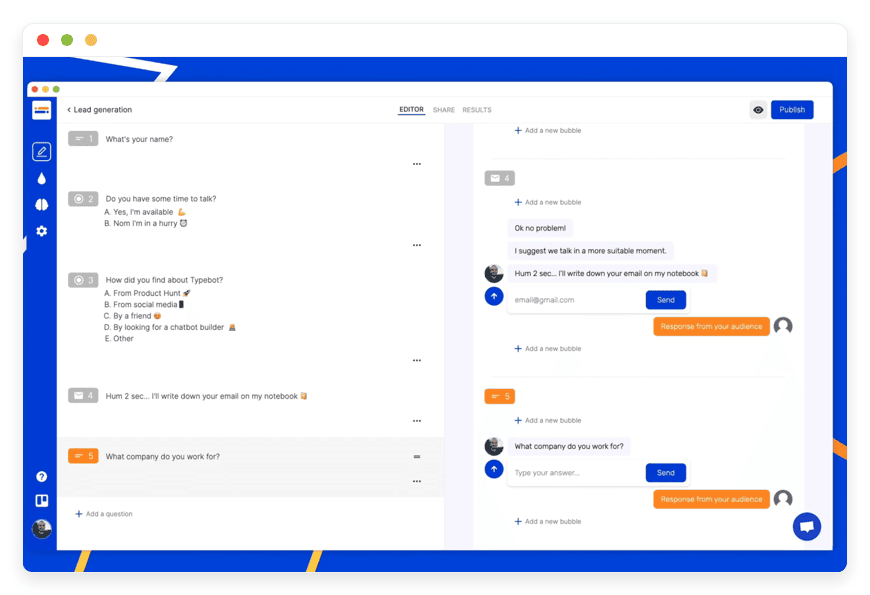
What is Typebot? It is a powerful, open-source visual builder for creating conversational apps, lead qualification forms, and logic-based workflows.
The Value: It makes data collection feel like a chat with a friend, drastically increasing response rates compared to traditional forms.
The Problem: Self-hosting Typebot requires advanced DevOps knowledge (Docker, PostgreSQL, S3, SMTP) and constant maintenance.
The Solution: DANIAN provides a fully managed environment. We run the infrastructure; you build the bots.
The Outcome: You get a secure, fast, and scalable Typebot environment ready for production in minutes.
Introduction
The internet is plagued by "Form Fatigue." We have all experienced it. You are interested in a service, you click "Get a Quote," and you are greeted by a wall of text fields asking for everything from your mother's maiden name to your budget for 2027. What do you do? You close the tab.
Static forms are conversion killers. They feel like administrative work. They lack context, empathy, and interactivity.
Typebot changes this dynamic entirely. It transforms data collection into a conversation. It asks one question at a time, reacts to the answers, and guides the user through a natural flow. It feels modern and engaging.
However, getting Typebot running on your own server is not a trivial task. To replicate the stability of a SaaS product, you need to configure Docker containers, manage a PostgreSQL database, set up Object Storage (S3) for file uploads, and handle SMTP for emails. That is a lot of overhead just to ask a customer for their email address.
This is where Managed Typebot Hosting comes in. DANIAN acts as your invisible infrastructure team. We provide the robust, secure, and updated environment you need to run this powerful tool without ever touching a command line or editing a YAML file.
What is Typebot?
Typebot is an open-source conversational form builder created by Baptiste Arnaud. It was built on the premise that good design should be accessible to everyone. Unlike legacy chatbot platforms that rely on confusing decision trees or complex AI training, Typebot uses a Graph Editor.
This visual approach allows developers, marketers, and product managers to build advanced chat experiences by simply dragging and dropping blocks. It sits perfectly in the "Sweet Spot" between a simple HTML form and a complex, code-heavy AI agent.
Why is it trending?
The platform has exploded in popularity because it respects the user's time and the developer's sanity.
Performance: The viewer is incredibly lightweight. It loads instantly, even on mobile connections.
Flexibility: It is not just for chat. It can be used to build quizzes, onboarding flows, newsletters, and even mini-apps.
Developer Experience: It allows for custom Javascript execution and API calls, meaning it can do almost anything a custom-coded application can do, but in a fraction of the time.
Why Choose Managed Typebot Hosting?
When you decide to use Typebot, you generally have two paths: pay per response on a shared cloud plan or self-host.
The shared cloud is great, but it can get expensive as you scale. Self-hosting offers unlimited potential, but it brings technical debt. You become responsible for uptime, security patches, and database backups.
Managed Typebot Hosting offers a third path. You get the unlimited freedom of the open-source version combined with the reliability of a professional hosting provider.
When you host with us, you are not sharing resources with thousands of free-tier users. Your database is isolated. Your file storage is dedicated. This results in faster response times for your bots and a smoother experience for your users. You gain the ability to integrate with your internal tools without hitting API rate limits imposed by shared platforms.
Key Features of Typebot
Typebot is not just a pretty interface; it is a logic engine disguised as a chat window. To truly understand its power, we need to look under the hood at the features that make it indispensable.
1. The Visual Graph Editor
The core of Typebot is its canvas. This is where you map out your conversation.
Drag-and-Drop: You have a sidebar full of blocks (Text, Image, Video, Embeds). You drag them onto the infinite canvas and connect them with lines.
Visualizing Flow: Unlike linear editors, the graph view lets you see the "Bird's Eye View" of your entire conversation. You can see exactly where a user might get stuck or where a conversation splits into two different paths.
Groups and Organization: You can group blocks together (e.g., "Intro Sequence," "Lead Qualification," "Closing"). This keeps your workspace clean, even for massive bots with hundreds of steps.
2. Advanced Input Types
Collecting data is an art, and Typebot gives you the right brushes. It goes far beyond simple text boxes.
Text & Email: Standard inputs with built-in validation.
Phone Numbers: Automatically validates formats based on country codes.
Date & Time: visual pickers that prevent formatting errors.
File Uploads: Users can upload documents or images directly in the chat. With Managed Hosting, these are stored securely in your dedicated storage buckets.
Payment Collection: Native integration with Stripe allows you to collect payments inside the chat flow. Perfect for booking fees or digital products.
Rating & Opinion Scales: Visual sliders and star ratings for feedback.
3. Logic, Branching, and Conditions
This is where Typebot becomes "smart." You can create non-linear conversations based on user behavior.
Conditional Logic: You can set rules like: IF "User Budget" IS GREATER THAN $5,000, THEN go to "Premium Service Flow," ELSE go to "Standard Flow."
AND/OR Operators: Combine multiple conditions for complex qualification.
Variable Checks: You can check if a variable exists or contains specific text to tailor the experience.
4. Variables and Hidden Fields
Data handling in Typebot is professional-grade.
Variables: Every answer a user gives can be stored in a variable (e.g., @email, @name, @reason). You can then use these variables later in the chat to personalize messages: "Thanks, @name! We will send the guide to @email."
Hidden Fields: You can pass data into the bot from the URL. For example, if you send a link like mysite.com/chat?source=facebook, Typebot can grab "facebook" and store it in a hidden variable without the user ever seeing it. This is critical for marketing attribution.
5. Native Integrations & Webhooks
Typebot plays nice with your existing stack.
Google Sheets: Append rows or update cells in real-time. You can use this as a simple CRM.
Zapier / Make: Trigger automation workflows instantly when a user reaches a specific point in the chat.
Webhooks: This is for the power users. You can make GET or POST requests to any external API. You can send data to your server, fetch data from a weather API, or query your own database and display the result back to the user in the chat.
Email Notifications: Configure the bot to email you (or the user) a summary of the conversation once it ends.
6. OpenAI (GPT) Integration
Typebot integrates directly with OpenAI. This allows you to bring AI into your structured flows.
Dynamic Responses: Instead of writing every possible answer, you can feed the user's input to OpenAI with a specific prompt (e.g., "You are a helpful travel assistant. The user wants to go to @destination. Give 3 tips.") and display the AI's generated response.
Sentiment Analysis: Use AI to analyze if a user is angry or happy, and route them to a human agent if necessary.
7. Theming and Customization
Your bot should look like your brand, not a generic tool.
Custom CSS: You have full control over the styling if the standard options aren't enough.
Brand Kit: Change colors, fonts, avatars, and chat bubble shapes.
White Labeling: On our managed instances, you can remove "Powered by Typebot" branding to make the experience fully yours.
8. Analytics and Results
You cannot improve what you do not measure.
Drop-off Analysis: See exactly which block causes users to leave the conversation. If 50% of people leave at the "Phone Number" question, you know you need to change your strategy.
Real-time Logs: View full transcripts of every conversation.
Export: Download all your data as CSV or JSON for deep analysis in Excel or BI tools.
Solutions per Industry
Typebot is industry-agnostic. Its flexibility means it can be adapted to solve specific pain points across virtually any sector. Here are detailed scenarios of how different industries use Typebot to automate workflows.
1. eCommerce & Retail
The Pain: High return rates and repetitive "Where is my order?" support tickets.
The Solution: An automated "Post-Purchase Support" bot.
The Workflow:
The user clicks "Support" on your site.
The bot asks: "Are you inquiring about an existing order?"
If yes, it asks for the Order ID.
Using a Webhook, the bot queries your Shopify/WooCommerce API to check the status.
It displays the tracking link and estimated delivery date immediately.
If the user wants a return, the bot asks for the reason (Wrong Size, Damaged, Changed Mind).
Based on the return policy logic, it either approves the return and generates a label (via API) or explains why the item is non-returnable.
The Result: Support ticket volume drops by 40%, and customers get instant answers 24/7.
2. Real Estate Agencies
The Pain: Agents waste hours driving to viewings for unqualified buyers who cannot afford the property.
The Solution: A "24/7 Virtual Leasing Agent."
The Workflow:
A potential buyer lands on a property listing.
Instead of a "Call Me" button, they see "Schedule a Viewing."
The bot starts a conversation: "Hi! I see you're interested in the Downtown Lofts. When are you looking to move?"
It collects critical data: Move-in date, Budget, Number of occupants, Pet ownership.
Logic Check: If the budget is below the property minimum, the bot politely suggests other listings. If the budget matches, it offers a calendar picker (synced via Cal.com or Google Calendar).
The bot sends the appointment details to the agent's CRM.
The Result: Agents only meet with qualified, serious leads.
3. Digital Marketing Agencies
The Pain: Client onboarding is messy. Collecting logos, brand guidelines, and login credentials usually involves endless email chains.
The Solution: An "Onboarding Concierge" bot.
The Workflow:
New clients receive a link to a secure Typebot.
The bot welcomes them and asks for their primary contact details.
It uses the File Upload block to collect their vector logo and brand guide.
It asks specific questions about their target audience and campaign goals.
It securely collects access credentials (or links to LastPass) for their social accounts.
Finally, it triggers a Zapier automation that creates a project in Asana/Trello and uploads the files to a Google Drive folder.
The Result: A professional first impression and zero lost files.
4. SaaS and Tech Companies
The Pain: Churn. Users sign up but don't understand how to use the software, so they cancel.
The Solution: An interactive "Product Tour & Feedback" bot.
The Workflow:
Embedded in the dashboard, the bot asks: "What are you trying to achieve today?"
Based on the answer (e.g., "Set up my profile"), the bot provides a step-by-step video tutorial directly in the chat window.
If the user clicks "Cancel Subscription," a different bot triggers.
It asks why (Price, Missing Feature, Bugs).
Logic Check: If the reason is "Price," the bot can automatically offer a 20% discount coupon to stay. If "Missing Feature," it logs the request for the product team.
The Result: Reduced churn and valuable product insights.
5. Healthcare and Clinics
The Pain: Front desk staff are overwhelmed with phone calls for simple appointment bookings and general inquiries.
The Solution: A "Patient Intake & Scheduling" bot.
The Workflow:
The bot sits on the clinic's homepage.
It asks: "Are you a new or returning patient?"
For new patients, it collects basic info (Name, DOB, Insurance Provider).
It asks for the reason for the visit (Checkup, Pain, Cleaning).
It presents available slots.
It can even ask pre-screening questions ("Are you currently experiencing a fever?") to triage urgent cases.
The Result: The phone stops ringing off the hook, allowing staff to focus on patients in the waiting room.
6. Education and Course Creators
The Pain: Low completion rates for online courses and lack of student engagement.
The Solution: A "Study Buddy" and Quiz Automation bot.
The Workflow:
At the end of a module, a Typebot pops up.
It runs a quick 5-question quiz to test knowledge.
Logic Check: If the student scores below 60%, the bot recommends reviewing specific video chapters. If they score 100%, it delivers a "Certificate of Achievement" PDF.
The bot can also collect feedback: "Was this lesson too fast, too slow, or just right?"
The Result: Higher engagement and immediate feedback loops for the instructor.
7. Event Management
The Pain: Managing RSVPs, dietary restrictions, and FAQs for large conferences or weddings.
The Solution: An "Event Concierge" bot.
The Workflow:
Guests scan a QR code on the invitation which opens the Typebot.
The bot confirms attendance.
It asks: "Do you have any dietary restrictions?" (Vegan, Gluten-Free, Allergies).
It allows guests to submit questions for the Q&A session in advance.
It provides logistical info: "Here is the map to the venue" and "Here is the list of recommended hotels."
The Result: A centralized database of all guest needs without a single spreadsheet data entry error.
8. Consulting and Coaching
The Pain: Spending 30 minutes on a "Discovery Call" only to realize the prospect isn't a good fit.
The Solution: A "Pre-Call Qualification" bot.
The Workflow:
Before a prospect can book a call, they must chat with the bot.
The bot asks deep questions: "What is your current revenue?", "What is your biggest hurdle?", "Are you ready to invest X amount in a solution?"
Logic Check: If the prospect indicates they are not ready to invest, the bot redirects them to free resources (blog, YouTube) instead of the booking calendar.
The Result: The coach's calendar is filled only with high-value prospects.
9. Finance and Insurance
The Pain: Customers want instant quotes but insurance logic is complex math.
The Solution: A "Smart Quote Calculator."
The Workflow:
The bot asks about the asset to be insured (Car, Home, Life).
It collects variables: Age, Car Model, Location, Coverage Amount.
It uses Typebot's Variable Calculation feature to run the math in the background.
It presents an estimated monthly premium instantly in the chat.
It offers a "Buy Now" button to finalize the policy.
The Result: Instant gratification for the customer leads to higher conversion rates than "We will call you back with a quote."
10. Hospitality and Restaurants
The Pain: Managing table reservations and private event inquiries during peak service hours.
The Solution: A "Booking & Menu" bot.
The Workflow:
The bot allows users to view the menu (via image carousels).
It handles table reservations (integration with OpenTable or internal email).
For private events, it asks: "How many guests?", "What is the date?", "What is the budget?"
It answers FAQs: "Do you have high chairs?", "Is there parking?", "Are you pet friendly?"
The Result: Staff can focus on serving food, not answering the same three questions over the phone.
Typebot vs Other Software
How does Typebot stack up against the proprietary giants like Typeform or JotForm?
| Feature | Typebot | Proprietary Alternatives |
| Builder Interface | Visual Graph / Flow | Linear List / Basic Logic |
| Logic & Branching | Advanced (Loops, Jumps, Conditions) | Basic (Linear jumps only) |
| Loading Speed | Extremely Fast (Performance First) | Often heavy / Slow load |
| Pricing Model | Flat Hosting Fee (via DANIAN) | Per Response / Tiered Limits |
| Integrations | Unrestricted Webhooks & API | Often restricted by Plan Tier |
| Data Control | You own the data | Data locked in their silo |
| Embed Options | Native, Popup, Bubble, Full Page | Limited embedding |
Use Cases and Applications
Beyond the industry solutions, Typebot is versatile enough for specific micro-tasks within any organization.
Internal IT Helpdesk: A bot that guides employees through basic troubleshooting (Restart router, Check cables) before logging a ticket with IT.
Influencer Marketing Application: A flow that asks influencers for their media kit, audience stats, and pricing before a brand deals with them.
Podcast Guest Intake: Automatically collect the guest's bio, headshot, and microphone check details before the recording day.
Churn Prediction Survey: Send a bot to users who haven't logged in for 30 days to ask if they need help or want to pause their account.
Viral Quizzes: Marketers can build "Which Character Are You?" style quizzes to generate cheap leads from social media traffic.
How DANIAN Helps
We understand that you want the tool, not the toil. We prefer to stay in the background. We handle the mess; you get the glory.
Fully Managed Infrastructure: We provision the server, install the dependencies, and configure the network. You skip the "Getting Started" guide and jump straight to "Building."
Backup & Monitoring: We configure automated daily backups stored securely off-site. If you accidentally delete a critical workflow, we have your back. Our monitoring systems watch your instance 24/7; if a service hiccups, we fix it before you even notice.
SSL & Firewall: Security is not optional. We provide SSL certificates by default and place your instance behind custom firewalls to block malicious traffic. You can trust that your data collection is secure.
Seamless Updates: Typebot moves fast. New features are released often. We handle the updates for you, ensuring you are always on the latest stable version without risking downtime or breaking changes.
Guaranteed Performance: We don't oversell our infrastructure. We ensure your bots have the CPU and RAM they need to handle traffic spikes, whether you have 10 visitors or 10,000.
7-Day Free Trial: We believe in our service. You can spin up a fully functional Typebot instance today at no cost and see the difference for yourself.
How to Get Started
Getting your own private Typebot instance running is easy.
Visit danian.co and sign up for an account.
Select Typebot from our catalog of open-source applications.
Relax while DANIAN launches your software. Within moments, you will receive your admin URL and credentials.
FAQ
1. Can I use my own domain name?
Yes. You can connect your custom domain/subdomain (e.g., chat.yourcompany.com) to your DANIAN instance. This is crucial for maintaining brand trust with your users.
2. Is the OpenAI integration included in the hosting price?
The functionality to use OpenAI is included and pre-configured in the software. However, you will need to input your own OpenAI API key. This is better for you: it means you pay OpenAI directly for exactly what you use, without a middleman markup.
3. How do I handle file uploads from users?
We configure the Object Storage (S3 compatible) for you automatically. When a user uploads a resume or an image in your chat, it is stored securely on our infrastructure, and you can access it via a link in your results tab.
4. Can I export my data to other tools?
Absolutely. You are never locked in. You can export your results to CSV or JSON at any time. Furthermore, using Webhooks or tools like Zapier/Make, you can stream data to your CRM or database in real-time.
5. What happens if I get a massive spike in traffic?
Our infrastructure is built to scale. Unlike shared hosting plans that might throttle you or shut down your bot if you go viral, our resources are designed to absorb traffic spikes so your business keeps running.
Conclusion
Typebot is transforming how businesses interact with the world. It turns passive visitors into active participants, leads into customers, and confusion into clarity. It is one of the most effective tools available today for increasing conversion rates.
But great software shouldn't require a great deal of server administration. Managed Typebot Hosting removes the technical barrier. You get the speed, the security, and the advanced features without the maintenance headaches.
It is time to stop building forms that people hate and start building conversations that people enjoy.


