
Managed Taiga Hosting: The Agile Tool Your Team Deserves
TLDR: Quick Answer
If you want to manage projects effectively without managing servers, Managed Taiga Hosting is your solution.
What is it? Taiga is a powerful, open-source project management platform designed for agile developers, designers, and project managers who value aesthetics and functionality.
The Hybrid Advantage: Seamlessly switch between Kanban and Scrum workflows in the same project, or run them in parallel.
The Problem: Self-hosting Taiga requires managing a complex stack: Docker containers, PostgreSQL databases, RabbitMQ asynchronous queues, Redis for caching, and Nginx reverse proxies.
The Fix: DANIAN provides fully managed hosting. We run the backend infrastructure so you can run the sprints.
The Offer: Experience premium hosting risk-free.
Introduction
Great software teams need focus. You need to break down epics into user stories, track bugs, and ensure your sprint velocity is on target. The last thing you need is to spend your Friday night debugging a failed PostgreSQL migration or figuring out why your RabbitMQ container isn't talking to your worker nodes.
Taiga is an incredible tool. It is beautiful, intuitive, and packed with features that proprietary tools charge a fortune for. But running it yourself is a second job. It demands constant attention to security patches, dependency updates, and server maintenance. When your project management tool goes down, your team stops working. That is a risk most teams cannot afford to take.
This is where DANIAN comes in. We provide the invisible infrastructure. We handle the complexity of the stack—the servers, the security, the backups—so you can focus entirely on your product. We ensure that your board is always green, your issues are always accessible, and your backups are always current.
What is Taiga?
Taiga is an open-source project management platform built specifically for cross-functional agile teams. Created by the team at Kaleidos, it was born out of frustration with existing tools that were either too complex, too ugly, or too expensive. It has won awards for "Best Agile Tool" because it focuses on the user experience rather than just ticking boxes on a feature sheet.
It allows you to define projects using Scrum or Kanban methodologies—or both simultaneously. It treats "Issues" as a first-class citizen, allowing for robust bug tracking alongside feature development. Because it is open-source, it focuses on community needs. It is built on a robust stack (Python/Django backend and Angular frontend), making it fast and responsive.
Why is it Trending?
Taiga is gaining massive traction because it respects the developer's workflow. It offers a clean, dark-mode-friendly interface that doesn't feel like a spreadsheet. It integrates with the tools you already use, like GitLab, GitHub, and Slack, making it the central nervous system for modern development teams. Unlike older, clunky enterprise tools, Taiga feels modern. It acknowledges that if a tool is painful to use, people won't update their tickets.
Why Choose Taiga?
Choosing Managed Taiga Hosting means choosing freedom and flexibility. Proprietary tools often lock features behind expensive "Enterprise" tiers, forcing you to upgrade just to get Single Sign-On or advanced reporting. Taiga gives you the full suite of agile tools right out of the box.
The platform is designed to be inclusive. It bridges the gap between developers who live in code and stakeholders who live in timelines. The visual nature of the boards makes project status transparent to everyone, reducing the need for endless status meetings. When you choose Taiga, you are choosing a tool that adapts to your process, rather than forcing you to adapt to it.
Furthermore, Taiga’s design philosophy—often referred to as "The Potlatch"—emphasizes visual beauty. This might sound superficial, but when your team stares at a project management tool for six hours a day, a clean, well-designed interface significantly reduces cognitive load and fatigue.
Key Features of Taiga
Taiga is feature-rich, but it avoids the "bloat" found in older enterprise software. Here is a deep dive into the tools that will change how you work.
Advanced Scrum Module
If your team works in sprints, Taiga’s Scrum module is a powerhouse that facilitates every Scrum ceremony.
Backlog Management: The backlog is the heart of your project. Taiga allows you to easily create, prioritize, and rank User Stories. You can estimate complexity using points (Fibonacci, T-shirt sizes, or custom scales) and drag-and-drop stories to plan upcoming sprints. The interface clearly distinguishes between "Ready" stories and those that need more refinement.
Sprint Task Board: Once a sprint begins, the view shifts to a dynamic task board. This visualizes who is working on what, ensuring no team member is overloaded. You can break User Stories down into smaller sub-tasks, ensuring that every step required to ship a feature is tracked.
Burn-down Charts: Taiga automatically generates burn-down charts based on your point estimation. These give you an instant visual metric of your sprint’s health. You know immediately if you are on track or falling behind, allowing for course correction before the deadline. It tracks both "points" and "tasks" so you can see if you are closing tickets but not shipping value.
Flexible Kanban Module
For continuous flow work, maintenance teams, or content pipelines, the Kanban board is indispensable.
Custom Swimlanes: Organize tasks not just by status (To Do, Doing, Done), but by swimlanes. You can create swimlanes for "Expedite" items, specific sub-teams, or different product lines. This adds a second dimension of organization to your board.
WIP Limits (Work In Progress): This is a critical Kanban feature often missing in lightweight tools. You can set strict limits for specific columns. If a column has a limit of 3, the system will visually warn you or block you from adding a 4th card. This prevents bottlenecks and forces the team to finish current tasks before starting new ones.
Filters and Zoom: As boards grow, they get cluttered. Taiga’s robust filtering allows you to view only what matters to you. You can filter by tags, assignees, or priority. The "Zoom" levels allow you to see a bird's-eye view of the whole board or a detailed view of specific cards.
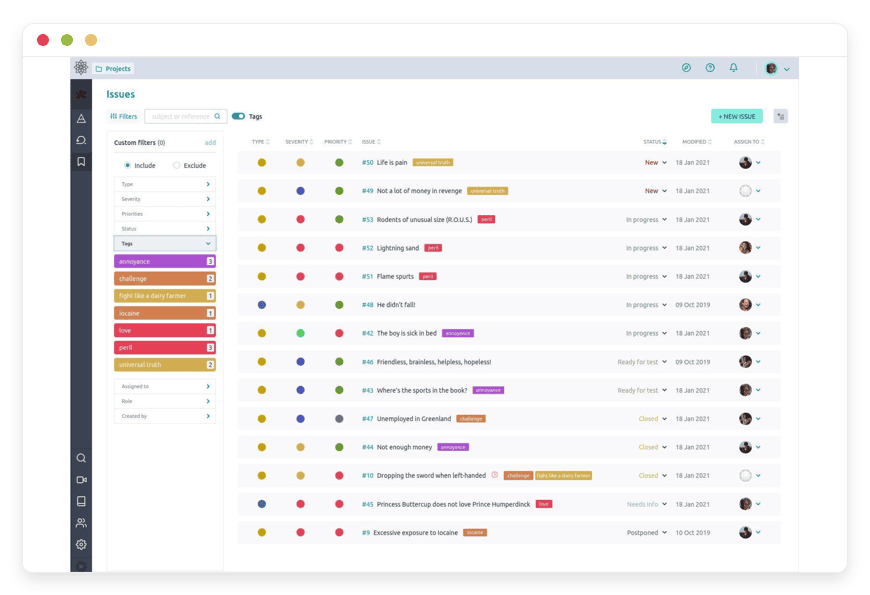
Integrated Issues and Bug Tracking
Taiga separates "User Stories" (features) from "Issues" (bugs/tasks), which keeps your roadmap clean.
Detailed Triage: Assign type, severity, and priority to every issue. Is it a "Critical UX Bug" or a "Minor Text Fix"? Taiga helps you categorize it instantly.
Promotion: If a bug turns out to be a major task requiring a full sprint, you can promote an Issue to a User Story with one click. It moves seamlessly from the issue tracker to the backlog, preserving all comments and history.
Custom Fields: Every project is different. Taiga allows you to add custom fields to issues. Need to track "Browser Version" for frontend bugs or "Operating System" for desktop apps? You can add these fields and make them mandatory.
Epics Management
For long-term planning, Epics allow you to group related User Stories across multiple projects or sprints. This is vital for tracking large initiatives that span months.
Multi-Project Tracking: An Epic in Taiga can link to stories in different projects. This is perfect for a launch that involves the "Mobile App Team" project, the "Backend API" project, and the "Marketing" project.
Visual Progress: You can see the progress of an Epic based on the completion rate of its child stories. It provides a percentage complete bar that aggregates the status of all linked items.
Wiki and Documentation
Every project gets a built-in Wiki.
Markdown Support: Write your documentation using standard Markdown. It supports code highlighting, tables, and embedding images.
Version History: Just like your code, your documentation has version control. You can revert changes or see who edited a specific page.
Linking: You can link directly from a User Story or Issue to a Wiki page. This is incredibly useful for linking a feature request to its technical specification document.
Robust API and Integrations
Taiga is API-first. Anything you can do in the UI, you can do via the API.
Webhooks: Configure webhooks to notify external services when cards move or comments are added.
Importers: If you are coming from Trello, Jira, Asana, or GitHub, Taiga has built-in importers to bring your history with you. This lowers the migration friction significantly.
Solutions per Industry
Software Development Agencies
Agencies often juggle multiple clients with different requirements and timelines.
The Workflow: Agencies can set up separate Taiga projects for each client. You can use the "Roles and Permissions" feature to invite client stakeholders as "Observers." This gives them read-only access to the Kanban board or specific User Stories.
The Benefit: This provides transparency on progress without letting clients accidentally delete tasks or mess up the sprint prioritization. The clear separation of Sprint planning helps in billing and timeline estimation. You can tag tasks as "Billable" or "Non-Billable" using custom fields to streamline end-of-month reporting.
Marketing and Creative Teams
Creative work is rarely linear, but it requires strict asset management.
The Workflow: A marketing team launching a new product can use Taiga’s Kanban view to track assets. Columns can be customized to: "Copywriting," "Design," "Legal Review," "Stakeholder Approval," and "Published."
The Benefit: The visual nature of the cards allows designers to attach thumbnails, making the board a visual status report that is easy for Creative Directors to scan. Swimlanes can separate "Social Media Assets" from "Print Assets," ensuring that a delay in printing doesn't confuse the social media schedule.
Game Development Studios
Game development is a complex beast involving artists, coders, sound engineers, and level designers.
The Workflow: Game Devs love Taiga because it handles the hybrid nature of games well. The coding team can use Scrum sprints for engine work, while the art team uses Kanban for asset production (Concept -> Model -> Texture -> Rig -> Animation).
The Benefit: Epics are used to track "Levels" or "Characters." You can have an Epic called "Level 1" that aggregates stories from the Art Project, the Code Project, and the Sound Project. This ensures that the Level doesn't launch until the audio is done, preventing the common "placeholder asset" bugs in shipped games.
Hardware and IoT Engineering
Hardware development follows a different rhythm than software, often resembling a waterfall process that iterates.
The Workflow: Hardware teams use Taiga to manage the firmware development lifecycle alongside the physical prototyping.
The Benefit: Issues are used to track hardware defects ("LED not blinking on boot"). These issues can be linked to the specific firmware version notes in the Wiki. The Wiki becomes the central repository for datasheets and pinout diagrams, ensuring that the firmware engineer always has the latest hardware specs attached to their tasks.
Education and Research
Universities and research labs use Taiga to manage grants and thesis projects.
The Workflow: A research group can treat a semester as a "Sprint." Tasks like "Literature Review," "Data Collection," "Analysis," and "Drafting" fit perfectly into the workflow.
The Benefit: The Wiki feature is excellent for storing shared citations and methodology notes, keeping the entire research team aligned. Professors can have a bird's-eye view of all student projects via the dashboard, quickly identifying which students are stuck on "Data Collection" and offering help before the semester ends.
Non-Profits and NGOs
Non-profits often rely on volunteers and need to maintain high transparency with low costs.
The Workflow: NGOs can use Taiga to manage volunteer tasks for events or fundraising campaigns. Since Taiga is open-source, it aligns with the ethical stance of many non-profits.
The Benefit: The intuitive interface means volunteers don't need a week of training to start helping. They can log in, see the "To Do" column, pick a task, and get to work. The "Gamification" features (giving kudos or points) help keep volunteer morale high by acknowledging their contributions publicly on the team dashboard.
Taiga vs Other Softwares
How does Taiga stack up against the proprietary giants?
| Feature | Taiga | Proprietary Alternatives (e.g., Jira, Trello) |
| Core Methodology | Hybrid (Scrum + Kanban) | Often specializes in one or requires plugins |
| Interface | Clean, Minimalist, Dark Mode | Often cluttered, complex menus, "Enterprise" feel |
| Self-Hostable | Yes (Open Source) | No (SaaS only) |
| Cost Model | Free Software (pay for hosting resources) | Per-user monthly licensing fees (can get very expensive) |
| Customization | High (API + Open Code) | Limited to marketplace apps |
| Community | Driven by users and contributors | Driven by shareholders |
| Performance | Lightweight and Fast | Can become slow with large backlogs |
Use Cases and Applications
Beyond standard software development, Managed Taiga Hosting facilitates various workflows:
Public Roadmaps: Open your project to the public (read-only) to show users what features are coming next. This builds community trust.
Internal Help Desk: Use the Issues module to track internal IT requests or HR tickets. Employees can submit an issue via email integration, and IT staff can track it on a Kanban board.
Content Calendars: Bloggers and media companies use the Kanban view as an editorial calendar, moving articles from "Idea" to "Draft" to "SEO Check" to "Live."
Event Planning: Treat the event date as the sprint deadline. Breakdown logistics (Catering, Venue, Speakers) into user stories. The burn-down chart helps visualize if you are on track to be ready by the event date.
How DANIAN Helps
We act as the "Quiet Enabler." You likely started your project to build something great, not to become a Linux system administrator. We handle the mess; you get the glory.
Fully Managed: We handle the hosting. Our team manages everything from initial setup to regular updates, security patches, and performance monitoring. Your software is always optimized without you having to lift a finger.
Backup & Monitoring: We implement automated daily backups, configured automatically and stored securely off-site. If something goes wrong—like an accidental deletion of a project—we offer a one-click restore to get you back on track instantly.
SSL & Firewall: With cybersecurity threats on the rise, we take security seriously. From automated updates to proactive monitoring and custom firewalls, we make sure your environment is secure 24/7. Your data is encrypted in transit and at rest.
Updates: When the Taiga team releases a new version with cool features or security fixes, we apply them. You wake up to a better tool without the downtime anxiety or the risk of breaking your Python dependencies.
24/7 Monitoring: Issues are often detected and resolved by our automated systems before you even notice them. If a service hangs, our watchers restart it automatically.
Guaranteed Performance: Downtime can be detrimental to your business. With our scalable infrastructure, we ensure consistent performance even as your user base and project history grow. We optimize the Nginx and PostgreSQL configurations specifically for Taiga’s workload.
7-Day Free Trial: There is absolutely no risk to try it out. Spin it up, import your data, and see the difference speed makes.
Less Setup, More Development. Affordable from the Start. Real Help When You Need It.
How to Get Started
Getting your own Taiga is faster than making a cup of coffee.
Sign Up: Visit danian.co and create your account.
Select Taiga: Browse our catalog of open-source apps and choose Taiga.
Launch: Click start. Relax for a few moments while we configure the server, database, asynchronous workers, and security certificates.
Login: You receive your credentials and can start creating projects immediately.
FAQ
1. Is Taiga free?
The Taiga software itself is open-source and free. However, running it requires server resources (CPU, RAM, Storage) and maintenance. At DANIAN, you pay a flat fee for these managed resources and our support, not for a software license. You are paying for the convenience and reliability.
2. Can I migrate my data from another Taiga installation?
Yes. Taiga has excellent import/export capabilities. You can export your projects from an existing instance (JSON format) and import them into your DANIAN hosted instance easily. We can assist with this process if needed.
3. Do you offer email support?
Absolutely. While we manage the infrastructure, we are also here to help if you get stuck with configuration questions or need advice on how to optimize your usage.
4. Can I use my own domain name?
Yes. You can map a custom domain/subdomain (e.g., projects.yourcompany.com) to your DANIAN Taiga instance for a professional look. We handle the SSL certificate generation for your custom domain automatically.
5. How secure is my data?
Very. We use industry-standard encryption, firewalls, and isolated environments. Your data is backed up daily to a secure, off-site location to prevent data loss from catastrophic events.
6. Is there a limit on users?
DANIAN charges by the server resources (RAM/CPU), not the number of seats. You can add as many team members as Taiga plan can handle without paying extra per person. This makes it significantly cheaper than per-seat SaaS pricing for medium-to-large teams.
Conclusion
Taiga represents the best of open-source: powerful, beautiful, and flexible. It removes the friction from agile management, allowing your team to focus on what they do best. It creates a workspace where developers and designers actually want to spend their time.
But the friction of hosting it yourself can undo all those benefits. The hours spent configuring Docker containers are hours not spent building your product.
Don't let server maintenance slow down your sprints. Choose a partner that understands the technology and cares about your uptime.


