
Managed Stirling PDF Hosting: The Ultimate Private PDF Platform
TLDR - Quick Answer
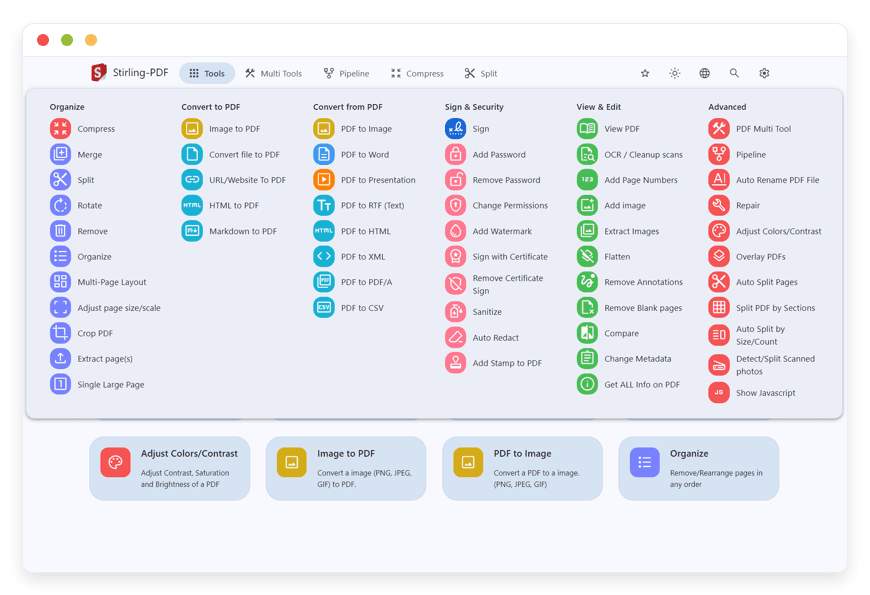
Stirling PDF is a completely isolated, open-source application that replaces expensive desktop PDF subscriptions. It gives you over 50 document manipulation features inside a single, unified interface. Managed Stirling PDF Hosting allows you to run this powerful software on your own private environment without writing a single line of code or managing complex backend servers.
Immediate Financial Savings: Eliminate recurring subscription fees for basic daily tasks like merging, splitting, compressing, and converting documents.
Total Document Privacy: Keep your sensitive business files completely private by processing everything inside an isolated environment. Your confidential documents never go to public third-party servers.
Advanced Workflow Automation: Build visual pipelines that automate repetitive PDF workflows instantly, saving your team hours of manual work every week.
Comprehensive Developer API: Integrate document manipulation directly into your own internal business applications using the extensive REST API.
Zero Server Maintenance: Get the full capabilities of the software without the headache of terminal commands, software updates, or hardware monitoring.
Introduction
Editing a PDF should be a simple, frictionless process. Yet, the modern landscape of PDF tools is incredibly expensive, fragmented, and notoriously bad for privacy. If you want to merge two contracts, convert a Word file into a secure document, or compress a massive graphical report, your choices are usually terrible. You either pay an exorbitant monthly fee for heavy proprietary desktop software, or you upload your highly sensitive business files to random, ad-supported websites to get the job done for free. Handing over your confidential documents, legal contracts, and financial statements to unknown third parties is a massive security risk.
You need a powerful tool that processes documents securely without charging you for every single click. You need an application that scales with your team, handles massive files effortlessly, and keeps everything strictly confidential. Stirling PDF solves this exact problem perfectly. It is a brilliant open-source alternative that puts you back in the driver's seat of your document workflows.
But running it yourself is a demanding second job. You have to configure server environments, install runtime dependencies, read through endless technical documentation, manage complex updates, and figure out what to do when a background process crashes unexpectedly. You want to edit PDFs, automate your workflows, and speed up your day. You do not want to become a full-time system administrator just to split a document in half.
This is exactly where DANIAN steps in as your invisible infrastructure. We handle the intense backend complexity, the security patching, and the continuous maintenance so you can focus entirely on your documents. Skip the terminal and the endless troubleshooting.
What is Stirling PDF?
Stirling PDF is a robust, web-based open-source PDF manipulation platform. Created by the Stirling-Tools development team (often credited to the developer Frooodle) and backed by a massive, highly active global community, the project is a runaway success. It has earned over 74,000 stars on GitHub and crossed a staggering 25 million downloads worldwide. It gives you a complete, professional suite of tools to edit, merge, split, sign, redact, convert, and automate your PDF files.
Under the hood, the platform is a technical marvel. It combines raw server-side processing power with modern, responsive browser capabilities. The backend is built on Spring Boot and Java, giving it incredible stability and speed. It relies on a stack of battle-tested open-source engines to perform the heavy lifting. For example, it uses Apache PDFBox for core document manipulation, LibreOffice for high-fidelity document conversions, Tesseract and OCRmyPDF for Optical Character Recognition (OCR), and OpenCV for advanced image processing.
The frontend interface is clean, intuitive, and extremely fast. It operates entirely within your browser, meaning it works flawlessly across Windows, macOS, Linux, and even mobile devices without requiring any local software installation.
Why is it trending?
Business users and individuals are incredibly tired of paying expensive monthly fees for basic document tasks. The classic frustration of hitting a paywall that says "You have reached your daily limit of 2 free document conversions" drives people crazy. At the same time, corporate privacy concerns are at an all-time high.
Stirling PDF is trending massively because it provides enterprise-grade document processing capabilities without the massive price tag or the severe privacy compromises of cloud-based proprietary tools. It runs completely offline from the perspective of the broader internet. This means your files are processed exactly where the software lives. They never leave your controlled environment, they are never used to train external AI models, and they are never scanned by third-party advertising trackers.
Why Choose Stirling PDF?
Choosing this platform means choosing the freedom of open-source software over restrictive corporate licenses. Proprietary PDF editors are famous for gating their best features behind increasingly higher pricing tiers. You might get basic page merging for free, but the moment you need to run OCR on a scanned contract, convert a massive Excel file, or automate a batch of hundreds of files, you hit a hard paywall.
Stirling PDF gives you every single feature upfront, entirely unlocked. It effectively replaces expensive desktop software installations and sketchy web-based converters completely. By Hosting Stirling PDF on a managed service, you get the absolute convenience of a modern web application combined with the strict security of a fully isolated environment.
You interact with the beautiful interface directly through your browser, but the intensive processing happens securely on the robust backend server. This client-server architecture means you can upload gigabytes of architectural blueprints, massive legal discovery bundles, or intricate technical manuals, and the system handles them with effortless ease. Your entire team can access the exact tools they need from any browser, anywhere in the office, without installing heavy, slow applications on every single computer.
Key Features of Stirling PDF
Stirling PDF brings an incredible amount of utility into a single, organized dashboard. The features are intentionally designed to save you time, eliminate technical friction, and speed up your daily workflows.
The Multi-Tool Workbench
This is a brilliant visual page editor workspace. You can upload your PDFs and manipulate pages intuitively with your mouse. You can see clear thumbnail previews of every single page, rotate pages individually, drag and drop to reorder them seamlessly, or split PDFs by marking specific page breaks. Because the tool uses persistent browser storage mechanics, you can upload a large file once and apply multiple different operations without constantly re-uploading the document. If you make a mistake, you can easily undo or redo your specific actions.Comprehensive File Conversions
The convert tool supports transforming over 50 different file types. You can convert Office documents (DOCX, XLSX, PPTX) to PDF with perfect layout preservation thanks to the powerful LibreOffice backend engine. You can also turn HTML files, live URLs, and Markdown documents into cleanly formatted PDFs. Conversely, you can extract text, pull high-resolution images, or export tables into CSV formats directly out of existing PDF files.Advanced Optical Character Recognition (OCR)
Scanned documents are essentially flat, unreadable images. Stirling PDF uses Tesseract and OCRmyPDF to read those images and generate a fully searchable, selectable text layer over the document. You can configure the specific language settings, clean up the image artifacts, and preserve the original visual formatting perfectly. This makes archiving, indexing, and searching through old paper contracts incredibly fast.Pipeline Automation (Automate)
Think of this as powerful macros for your PDFs. The Automate tool lets you build, save, and reuse complex processing workflows visually. You can chain multiple operations together. For example, you can create a single pipeline that applies OCR, crops the page margins, adds a confidential watermark, and then compresses the final file. You can even set up background folder scanning to process massive batches of files automatically the moment they are dropped into a specific directory.Security, Redaction, and Sanitization
Protecting sensitive information is wonderfully simple. You can add strong, encrypted passwords, restrict specific printing or copying permissions, or completely sanitize the document to remove hidden metadata that might compromise confidentiality. The redaction tool allows you to visually select and permanently black out specific text, names, or images before sharing a document externally.Document Comparison and Compression
If you have two different versions of a complex contract, the comparison tool highlights exactly what changed between the revisions, saving you hours of manual reading. When it is time to email the final approved document, the compression tool reduces the file size significantly without destroying the visual image quality, ensuring it passes through strict email attachment limits.Developer REST API
For technical teams, Stirling PDF exposes a comprehensive REST API documented via Swagger. This allows your developers to programmatically trigger any feature. You can integrate document merging, OCR, or format conversion directly into your internal company applications, completely automating your business logic.
Solutions per Industry
Different professions handle documents in vastly distinct ways. Stirling PDF adapts perfectly to various high-demand environments, solving specific pain points for specialized teams.
Financial Services and Accounting
Accountants, auditors, and financial advisors handle highly sensitive client statements, tax returns, and banking records daily. Uploading a client's tax return to a free online compressor violates strict confidentiality rules and breaks trust. With Stirling PDF, financial teams can securely compress large audit reports, merge hundreds of scanned expense receipts into a single chronological file, and apply strong encryption passwords to client deliverables. Everything is processed securely on the private backend, ensuring financial records remain strictly confidential and safe from public exposure.
Legal Services and Law Firms
Lawyers deal with massive volumes of evidence, contracts, depositions, and case files. Preparing a digital bundle for discovery often requires combining dozens of different file formats, images, and emails into a single, unified document. Legal teams use Stirling PDF to convert all these disparate files into a clean master PDF, apply sequential Bates numbering for court compliance, and run OCR so the entire massive bundle is instantly searchable during trial preparation. The robust visual redaction tools ensure that protected identities, social security numbers, and sensitive financial data are permanently and securely removed before submission to opposing counsel.
Education and Academia
Teachers, professors, and university administrators handle a continuous, chaotic stream of student submissions. Students often submit assignments in a wild mix of formats ranging from raw images to obscure text files. Educational institutions use the pipeline automation feature to standardize everything instantly. They can set up a background workflow that automatically converts incoming Word documents and image files into PDFs, standardizes the page size to standard Letter or A4 format, and applies a compression layer to save valuable institutional storage space. It makes grading significantly easier when every file looks exactly the same.
Real Estate and Property Management
Real estate agents and property managers handle massive, text-heavy documents like lease agreements, property disclosures, and inspection reports. These files often need to be split, signed, and distributed to multiple different parties quickly. A property manager can take a 200-page closing disclosure packet, use the Multi-Tool to quickly split out the specific pages the buyer actually needs to sign, add a transparent watermark containing the brokerage logo, and compress the high-resolution property photos so the final document can be easily emailed to the client's smartphone.
Architecture and Engineering
Architects and engineers work with massive, highly detailed visual files. Exporting CAD drawings often results in enormous PDF files that are impossible to share via standard email. These teams use Stirling PDF's advanced compression algorithms to reduce the file size of massive blueprints while retaining the crisp, zoomable vector lines necessary for construction. They can also use the merging tools to combine technical specification sheets, safety manuals, and visual renderings into a single, cohesive project bid document for contractors.
Healthcare Administration
Medical offices handle a massive influx of patient intake forms, insurance cards, and medical histories. Processing these documents requires absolute privacy. Healthcare administrators can use Stirling PDF to take a scanned image of an insurance card, convert it to a PDF, and merge it with the patient's digital intake form. They can easily sanitize the final document to strip out hidden metadata before routing it securely to the billing department. Because the software operates in complete isolation, it provides the strict document control required for handling sensitive patient information securely.
Marketing and Creative Agencies
Marketing agencies generate beautiful, high-resolution pitch decks, brand guidelines, and visual brochures. However, these files are notoriously huge. When an account manager needs to email a pitch deck to a prospective client, a 150MB file will simply bounce back. Agencies use Stirling PDF to dial in the exact compression settings, reducing the image DPI just enough to make the file web-friendly without making the graphics look pixelated. They can also use the extraction tools to quickly pull specific high-quality images or vector logos out of old PDF campaigns to reuse in new design projects.
Local Government and Public Sector
Government offices deal with a constant stream of public record requests and historical archiving. They must provide documents to the public while strictly protecting classified or sensitive personal information. Clerks use Stirling PDF to process Freedom of Information Act (FOIA) requests by applying permanent black-out redactions to sensitive paragraphs. They also use the software to convert decades-old scanned town records into the highly specific PDF/A format, which is the strict international standard for long-term digital document preservation and archiving.
Stirling PDF vs Other Softwares
When comparing Stirling PDF directly to proprietary document tools, the stark differences in accessibility, privacy, and feature gating become immediately obvious.
| Feature | Stirling PDF | Adobe Acrobat Pro | Smallpdf | ILovePDF |
Pricing Structure | Free and Open-Source | Expensive Monthly Subscription | Subscription required for pro features | Subscription required for full access |
Processing Location | Isolated completely on your server | Cloud servers or heavy Local Desktop | Public Cloud Servers | Public Cloud Servers |
Format Conversions | 50+ Formats Included instantly | Requires Paid Premium Plan | Limited daily tasks on free tier | Restricted file sizes on free tier |
Workflow Automation | Built-in Visual Pipeline Builder | Complex Desktop Action Wizard | None available | None available |
Storage & Size Limits | Only limited by your disk space | Cloud storage caps | Strict file size limits | Strict file size limits |
Access Method | Fast Web Browser across all devices | Heavy Desktop App | Web Browser | Web Browser |
API Access | Included, extensive REST API | Expensive separate enterprise tier | Expensive developer plans | Expensive developer plans |
Proprietary tools deliberately limit your productivity to force upgrades. Stirling PDF removes those limits entirely, giving you enterprise-grade power through a fast, lightweight browser interface.
Use Cases and Applications
Stirling PDF is incredibly versatile. It is powerful enough to handle nearly any complex document task you throw at it. Here are several practical applications.
Archiving Old Paper Records Securely
If your office has massive filing cabinets full of old paper, digitizing them is a massive chore. You can scan them into raw images, upload them to Stirling PDF in huge batches, and run an automated pipeline that converts the images to PDF/A (the strict archival format), applies accurate OCR for searchability, and compresses the final files to save hard drive space.
Standardizing HR Onboarding Files
New employees send in identification cards, tax forms, and signed direct deposit contracts in a chaotic variety of formats. Human Resources teams can use the visual Multi-Tool to merge these distinct, mismatched files into a single, clean master employee record. They can easily delete blank pages visually, rotate upside-down scans, and secure the final document with a strong password before filing it away in the HR database.
Watermarking Confidential Drafts
Before sending a draft proposal, a financial estimate, or an unreleased book chapter to an external contractor, you can use the watermark tool to overlay a transparent, bold "CONFIDENTIAL" or "DRAFT" stamp diagonally across every single page. This clearly marks the document status and strongly deters unauthorized sharing.
Sanitizing Metadata for External Sharing
PDFs often contain hidden metadata, including the name of the original author, the software used to create it, and the exact timestamps of every edit. Before a company publishes a press release or a sensitive legal statement, they use the sanitize tool to strip all of this hidden, potentially compromising data out of the file completely.
Extracting Images from Massive Manuals
If you need a specific diagram from a 500-page technical manual, taking a blurry screenshot is unprofessional. You can upload the manual to Stirling PDF and use the extraction tool to instantly pull all embedded images out of the document, downloading them as high-quality, original-resolution picture files ready for your next presentation.
How DANIAN Helps
Managing servers takes vital time away from your actual work. You have to configure the complex software environments, troubleshoot obscure database errors, manage reverse proxies, and monitor system resources constantly. DANIAN acts as your quiet, highly capable enabler. We handle the technical mess; you get the glory of a perfect workflow.
With Stirling PDF Managed through DANIAN, you get a premium, frictionless experience without the steep technical headache.
Fully Managed Infrastructure: We handle the hosting entirely from start to finish. Our expert team manages everything from the initial software setup to regular system updates, security patches, and background performance monitoring. Your software is always optimized without you having to lift a single finger.
Automated Backup & Monitoring: Your specific document configurations, custom pipeline workflows, and saved settings are vital to your daily operations. Backups are configured automatically, stored securely off-site, and are always available for a fast, one-click restore whenever you might need them.
Advanced SSL & Firewall Protection: Your environment is secure by default. With cybersecurity threats constantly on the rise, we take infrastructure security extremely seriously. From automated certificate updates to proactive traffic monitoring, we make sure your private environment is secure 24/7.
Seamless Software Updates: Critical security patches and exciting new versions of Stirling PDF are applied smoothly without your manual intervention. You always have immediate access to the latest powerful features the community releases.
24/7 Proactive Monitoring: Potential server issues, resource spikes, or memory leaks are detected early and often resolved completely before you even notice them.
Guaranteed High Performance: System downtime can be highly detrimental to your business speed. With our robust, scalable infrastructure, we ensure consistent, snappy performance even as your user base expands and your daily document volume grows significantly.
7-Day Free Trial: There is absolutely no financial risk to try it out and see the value immediately.
Less initial setup, more daily productivity. Affordable from the very start. Real, human help when you need it most.
How to Get Started
Moving your frustrating document workflows to a fast, private, managed environment is incredibly simple. You do not need any technical expertise, coding knowledge, or server experience to get your software running today.
Step 1: Visit danian.co and sign up for a fast account.
Step 2: Select Stirling PDF from the intuitive application catalog.
Step 3: DANIAN launches your software in the background. You will be notified when your secure, private URL will be fully ready.
FAQ
Is Stirling PDF completely free to use?
The software application itself is a brilliant open-source project and is completely free to use without any internal feature restrictions or artificial paywalls. When you choose Managed Stirling PDF Hosting, you are paying for the reliable server resources, the continuous maintenance, and the expert technical support that keeps the software running smoothly online 24/7.
Can I process multiple files at the exact same time?
Yes, absolutely. Most of the tools within the platform fully support rapid batch processing. You can easily select multiple images to convert into a single document, or apply a specific compression operation to an entire folder of files simultaneously, saving you massive amounts of time.
Does Stirling PDF require an active internet connection to process my files?
When you host it with DANIAN, you will access the visual interface through your web browser via the internet. However, all actual file processing happens securely on your private backend server. The software does not make external API calls to third-party corporate servers to process your sensitive data.
How exactly does the Automate pipeline feature work?
The Automate tool allows you to chain multiple distinct operations together using a clean visual builder. You can easily define a sequence—like extracting specific pages, applying a watermark, and then compressing the file—and save that sequence. You can then run incoming files through this exact sequence with one single click.
Can the software handle massive, gigabyte-sized documents?
Yes, it certainly can. Unlike free online web converters that crash immediately or outright reject files over 50MB, Stirling PDF is designed to handle massive files smoothly. Your only practical limit is the raw storage space allocated to your specific managed environment.
Will my saved custom pipelines and settings be backed up?
Yes. DANIAN automatically backs up your entire environment continuously. This means your custom pipeline configurations, user settings, and system preferences are safely stored and can be restored easily if needed.
Can I use the platform on my mobile phone or tablet?
Yes. The frontend interface is brilliantly built with responsive, modern web technologies. It scales perfectly to smaller mobile screens, allowing you to merge, sign, or convert documents quickly directly from your smartphone browser while you are on the go.
Do I need to know how to code to use the API?
To use the visual web interface, you need absolutely zero coding knowledge. However, if you want to use the developer API to integrate Stirling PDF into your own custom software, your developers will need basic experience working with standard REST APIs. The platform provides excellent Swagger documentation to make this easy.
Can I convert a PDF back into a completely editable Word document?
Yes. The conversion engine allows you to take a standard PDF and convert it back into a DOCX file. The system uses advanced parsing to recreate the layout, text, and tables as accurately as possible so you can edit it natively in Microsoft Word.
Is there a limit to how many users I can have?
Yes. The open-source community version of Stirling PDF supports up to 5 users max.
Conclusion
Taking complete control of your document processing does not mean you have to learn how to manage complex Linux servers. Stirling PDF provides an absolutely unmatched suite of tools for converting, editing, securing, and automating your files securely. By completely removing restrictive corporate paywalls and focusing heavily on strict document privacy, it represents the clear future of professional document management.
By choosing DANIAN, you completely skip the steep technical learning curve. We provide the robust, highly managed foundation so you can immediately start optimizing your workflows and saving your team hours of frustration. Experience the absolute power of fully managed open-source software today.


