
Secure Your Secrets: The Guide to Managed PrivateBin Hosting
TLDR - Quick Answer
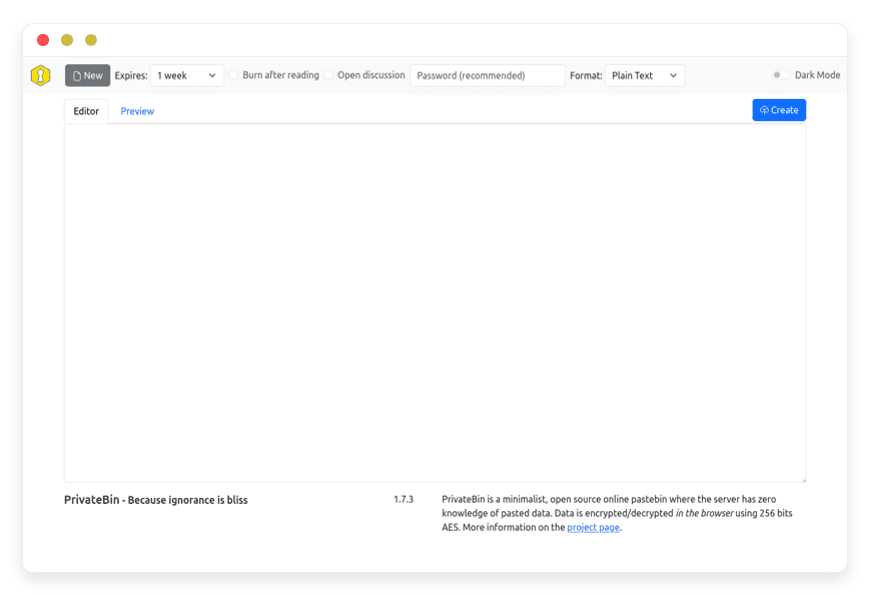
PrivateBin is a minimalist, open-source online pastebin. It encrypts and decrypts data directly in your browser. The server never sees your actual data. Opting for managed PrivateBin hosting means you get all this security without the headache of server maintenance.
Zero-Knowledge Architecture: Data is encrypted before it leaves your browser.
Burn After Reading: Set pastes to self-destruct after the first view.
Password Protection: Add an extra layer of security to your shared links.
Zero Maintenance: A managed setup handles updates, SSL, and server health for you.
Introduction
Sharing an API key or a database password with a colleague is a daily task. Doing it through standard email or chat tools is dangerous. These platforms store your secrets in plain text on their servers. You need a secure, temporary way to pass information back and forth.
But running a secure server yourself is a second job. You have to configure operating systems, manage SSL certificates, and constantly apply security patches. If you miss a crucial update, your secure pastebin suddenly becomes a liability. Managing Linux packages and web server permissions takes you away from your actual work.
DANIAN acts as your invisible infrastructure. We handle the technical heavy lifting so you can focus on building your business. We keep your tools fast, secure, and available.
What is PrivateBin?
PrivateBin is an open-source pastebin designed with privacy as its absolute core principle. It ensures the server has zero knowledge of the stored data. Every piece of text is encrypted and decrypted in your browser using 256-bit AES in Galois Counter mode.
The project began as a fork of ZeroBin. ZeroBin was originally developed by Sébastien Sauvage to solve the inherent trust issues with public paste sites. When ZeroBin stopped receiving updates, an active community stepped in to continue the work. The PrivateBin team heavily refactored the codebase. They added new features, improved the cryptographic security, and built a system that allows for cleaner extensions.
Why is it trending?
Privacy is no longer an afterthought. People actively seek tools that protect their communication from prying eyes. PrivateBin is trending because it completely solves the trust problem. Since the server only stores encrypted gibberish, server administrators have plausible deniability.
If forced to hand over server logs, the actual content of the pastes remains unreadable. The specific decryption key exists only in the URL fragment. This fragment is never transmitted to the web server. Users love the mathematical certainty that their secrets remain secure.
Why Choose PrivateBin?
Relying on proprietary platforms to share code or secrets introduces unnecessary risk. You are forced to trust their internal security policies. You have to hope their employees cannot access your database credentials. Choosing PrivateBin removes the need for trust entirely.
Hosting PrivateBin gives you a dedicated space to handle sensitive data transfers. You dictate the environment. You decide who gets access. You enjoy open-source freedom without sacrificing functionality. It easily replaces proprietary pastebin applications by offering superior security features built right into the core. You gain a massive security upgrade while keeping your daily workflow incredibly simple.
Key Features of PrivateBin
PrivateBin packs powerful tools into a very minimalist interface. The features focus on keeping your information safe while ensuring a smooth, highly readable workflow. We will break down exactly how these features protect your daily operations.
Zero-Knowledge Encryption Mechanics
The core feature of PrivateBin is its cryptography. The browser encrypts the data before sending it over the internet. It uses the Web Crypto API built into modern web browsers. The decryption key is attached to the URL as a hash fragment (the part after the #). Browsers strictly do not send hash fragments to web servers. Therefore, the server never sees the key. The server stores only the encrypted payload. This design mathematically guarantees your privacy.
Burn After Reading Execution
You can configure a paste to delete itself immediately after someone opens it. This is not a simple user-interface trick. The server delivers the encrypted text to the recipient and then instantly erases the file from the storage disk. This ensures the information is viewed exactly once. It completely eliminates the risk of an old link falling into the wrong hands days or weeks later.
Flexible Expiration Times and Cron Jobs
Not every paste needs to burn immediately. You can set pastes to expire after a few minutes, days, or months. Once the time limit passes, the system automatically purges the expired data. PrivateBin handles this through internal checks or automated scripts. You never have to manually clean up old secrets from the server.
Advanced Password Protection
You can require a password to decrypt the paste. This adds a secondary layer of security. Even if someone accidentally intercepts the PrivateBin URL, they cannot read the contents without the password. PrivateBin uses this password to strengthen the encryption key locally in the browser. The server never receives or stores this password.
Secure Encrypted Discussions
You can enable threaded, encrypted discussions directly on a paste. Users can chat about the shared code or text. They can comment anonymously or with automatically generated visual avatars called Vizhashes. These avatars are generated from the user's IP address, but the IP itself is never stored or transmitted in plain text. The entire discussion thread is encrypted end-to-end.
Safe Markdown Rendering
Format your pastes beautifully. PrivateBin supports HTML formatted pastes via Markdown using the marked.js library. It includes a live preview function so you can check your formatting before encrypting the text. To prevent malicious code execution, PrivateBin sanitizes the output using DOMPurify. This makes sharing technical documentation incredibly safe.
Broad Syntax Highlighting
Share source code easily. PrivateBin highlights code syntax cleanly using the highlight.js library. It recognizes dozens of programming languages automatically. You simply paste your raw code, and the tool formats it for optimal readability. This feature makes PrivateBin perfect for development teams reviewing complex code blocks.
Local File Encryption and Attachments
You can securely attach files, images, and PDFs to your pastes. The platform encrypts these attachments directly in the browser exactly like text. The file is converted into a secure format, encrypted, and then uploaded. The recipient downloads the encrypted file, and their browser decrypts it locally. This is a highly secure way to send sensitive documents without relying on email attachments.
Read-Only Modes and QR Codes
You can generate a read-only link for a paste. This allows you to share information while preventing the recipient from altering the document or leaving comments. Additionally, PrivateBin generates a QR code for every paste automatically. This makes transferring a secure link from your computer screen to a mobile device fast and effortless.
Solutions per Industry
PrivateBin provides massive value across multiple business sectors. Any industry that handles sensitive text or files benefits from zero-knowledge encryption.
eCommerce Operations
eCommerce teams constantly manage payment gateways, shipping APIs, and customer support portals. Sometimes, developers need to share live API keys to troubleshoot a broken checkout process. Using a standard chat tool risks exposing the entire storefront. PrivateBin allows the eCommerce team to share these keys securely. They set the paste to burn after reading. Once the lead developer views the key, the record is destroyed.
Software Development Agencies
Agencies work with dozens of different clients. Each client has their own servers, databases, and application credentials. Managing this safely is difficult. Developers frequently share code snippets and private tokens. PrivateBin provides automatic syntax highlighting, making code easy to read and review. Teams can share a production token using a password-protected link. The zero-knowledge architecture ensures that even if the agency's communication channels are compromised in the future, the old client keys remain safe.
IT Support and System Administration
IT teams constantly share server logs, configuration files, and root credentials. Sending a database password over a Slack message is a severe security violation. PrivateBin fixes this entirely. Administrators can create a self-destructing link containing the password. They send the link to the client. Once the client clicks the link and views the password, the data vanishes forever. The IT team leaves no insecure trails on the network.
Legal Practices and Compliance Teams
Lawyers handle highly sensitive client information daily. They must share case notes, settlement details, and confidential drafts with external partners. Standard email is rarely secure enough for this task. PrivateBin allows legal teams to send encrypted documents and text blocks. Because the server never reads the content, the team ensures strict client confidentiality at all times. The expiration feature guarantees that the documents do not live on the internet indefinitely.
Education and Academic Research
University professors and researchers handle private student data, unreleased test materials, and confidential research grants. A professor might need to share an exam grading rubric with teaching assistants before a major test. Using PrivateBin, the professor can share the document securely. They can set the link to expire immediately after the exam concludes. This keeps academic materials safe from unauthorized distribution.
Human Resources Departments
HR teams handle the most sensitive data in any company. They manage payroll information, social security numbers, and employee onboarding details. When a new employee starts, HR must send them their initial login passwords and VPN configurations securely. They can paste these credentials into PrivateBin, password-protect the link, and send it to the new hire's personal email. This prevents plain-text passwords from sitting permanently in an email inbox.
Journalism and Investigative Media
Investigative journalists rely on secure communication to protect their sources. They often need to receive documents from whistleblowers. Media organizations can launch a PrivateBin environment to accept anonymous pastes. Because the system strips identifying metadata and encrypts the content directly in the browser, sources can submit sensitive information safely. The encryption completely protects the contents of the message from interception.
Financial Services and Accounting
Accountants and financial advisors share routing numbers, audit logs, and tax documents constantly. Sharing a spreadsheet of quarterly earnings before a public release requires absolute secrecy. A financial team can use PrivateBin to share a temporary, read-only link containing the required data. The password protection feature ensures that only the authorized auditor can decrypt and view the sensitive financial information.
PrivateBin vs Other Softwares
When comparing PrivateBin to standard paste tools, the difference in security architecture is massive. Proprietary tools are built for fast, public sharing. PrivateBin is built for absolute secrecy.
| Feature | PrivateBin | Standard Proprietary Pastebins |
| Client-Side Encryption | Yes (AES-256) | No |
| Zero-Knowledge Server | Yes | No |
| Burn After Reading | Yes (Built-in) | Paid Tier Only |
| Encrypted Discussions | Yes | No |
| Password Protection | Yes (Local Decryption) | Paid Tier Only |
| Code Highlighting | Yes | Yes |
| Open-Source Codebase | Yes | No |
Use Cases and Applications
PrivateBin is highly versatile. It adapts to almost any situation where privacy is required. Here are practical ways you can use it to protect your daily communication.
Secure Credential Handoff
When onboarding a new employee or handing over a finished project to a client, you must pass them their initial login passwords. Use the "Burn after reading" feature. You send them the PrivateBin link via email. They open it, copy their password, and the paste destroys itself immediately. If an attacker breaches the email account later, the link is already dead and useless.
Error Log Transmission
Complex applications generate massive error logs. These logs often contain sensitive user details, internal IP addresses, or database structures. You need to share these logs with an external support team for troubleshooting. Paste the log into PrivateBin, set an expiration of one week, and share the link. The external team gets the data they need, and the internal structure is protected from permanent exposure.
Private Code Reviews
Sometimes a developer needs a quick second opinion on a block of code before committing it to a repository. They can post the code into PrivateBin and enable discussions. The two developers can debate the changes in the encrypted comment section. Once they find a solution, the paste expires. They leave no permanent record of the unfinished, potentially buggy code on any server.
Client Asset Collection
Freelance designers often need to collect FTP credentials or license keys from new clients. Clients usually send these in plain text emails, which is dangerous. You can send the client a blank PrivateBin page and ask them to paste their credentials there, set a password, and send you the link. You train your clients to handle data securely from day one.
How DANIAN Helps
Running secure software requires constant vigilance. Setting up the server is only the first step. Maintaining it is the real challenge. DANIAN is the quiet enabler behind your infrastructure. We handle the mess; you get the glory.
Fully Managed: We handle the hosting. Our team manages everything from initial setup to regular updates, security patches, and performance monitoring. Your software is always optimized without you having to lift a finger.
Backup & Monitoring: Automated daily backups are configured automatically and stored securely. If you ever need to roll back, we provide a simple one-click restore process.
SSL & Firewall: Secure by default. With cybersecurity threats on the rise, we take security seriously. From automated updates to proactive monitoring and robust network defenses, we make sure your environment is secure 24/7.
Updates: Security patches and new versions are applied without your intervention. PrivateBin frequently releases security enhancements. We apply them instantly.
24/7 Monitoring: Issues are detected and often resolved before you notice. We monitor server loads, memory usage, and uptime continuously.
Guaranteed Performance: Downtime can be detrimental to your business. With our scalable infrastructure, we ensure consistent performance even as your user base grows. Your pastebin will load instantly every time.
7-Day Free Trial: No risk. Less setup, more development. We make it affordable from the start, providing real help when you need it.
How to Get Started
You can get your secure pastebin running in minutes. There is no complex server configuration required.
Step 1: Visit danian.co and sign up for a quick account.
Step 2: Select PrivateBin from our open-source software catalog.
Step 3: Relax while DANIAN launches your software.
FAQ
Is the PrivateBin software entirely free to use?
Yes, the PrivateBin software itself is open-source and free. When you choose a managed service, you pay for the dedicated server resources, security configurations, and active maintenance that keep the application running flawlessly.
How exactly does PrivateBin encrypt the data?
PrivateBin uses 256-bit AES encryption in Galois Counter mode. The encryption and decryption operations happen entirely within your web browser using JavaScript. The server only receives and stores the resulting encrypted data.
What happens if I lose the paste URL?
If you lose the URL, the data is permanently gone. The decryption key is located in the URL fragment. The server does not store this key anywhere. Without the key, recovery of the text is mathematically impossible.
Can the server administrator read my pastes?
No. Because the encryption happens in your browser before the data is transmitted, the server administrator only sees scrambled ciphertext. They cannot decrypt the paste without the specific URL.
Does PrivateBin support file and image uploads?
Yes. PrivateBin supports file uploads, including images and PDF documents. These files are encrypted in the browser just like standard text. The server administrator can set specific size limits for these uploads.
Why does PrivateBin warn about insecure connections?
PrivateBin requires the Web Crypto API to perform secure browser encryption. Modern browsers restrict this API strictly to secure contexts. Therefore, PrivateBin must be served over an HTTPS connection. If you access it via plain HTTP, the browser disables the encryption tools.
Are the discussion comments also encrypted?
Yes. Every reply in the discussion thread is encrypted using unique salts. The server cannot read the comments, nor can it easily deduct if two discussion usernames are the same person without having the decryption key.
Can I download pastes using command-line tools like curl or wget?
No. Because the decryption process requires JavaScript execution to rebuild the text from the ciphertext, simple command-line fetch tools will only download the encrypted gibberish. You need a full browser environment to read the paste.
What parts of the paste are not encrypted?
While the actual message, attachments, and discussion comments are fully encrypted, a few metadata elements are not. The server knows the size of the encrypted payload and the time it was created. This is necessary for the server to manage storage and expiration times properly.
Why does the loading message sometimes stay on the screen?
If the loading screen does not disappear, it usually means your browser is blocking JavaScript. PrivateBin requires JavaScript to execute the encryption algorithms. Ensure you do not have aggressive script blockers preventing the application from running.
Conclusion
PrivateBin is an essential tool for anyone who takes digital privacy seriously. It transforms how you share sensitive information by removing the need to trust the server. The zero-knowledge architecture guarantees that your passwords, API keys, and private conversations remain yours alone.
By utilizing a managed platform, you eliminate the stress of server maintenance. You get all the security benefits of this incredible software without spending hours in a terminal.
Experience the power of fully managed open-source.


