
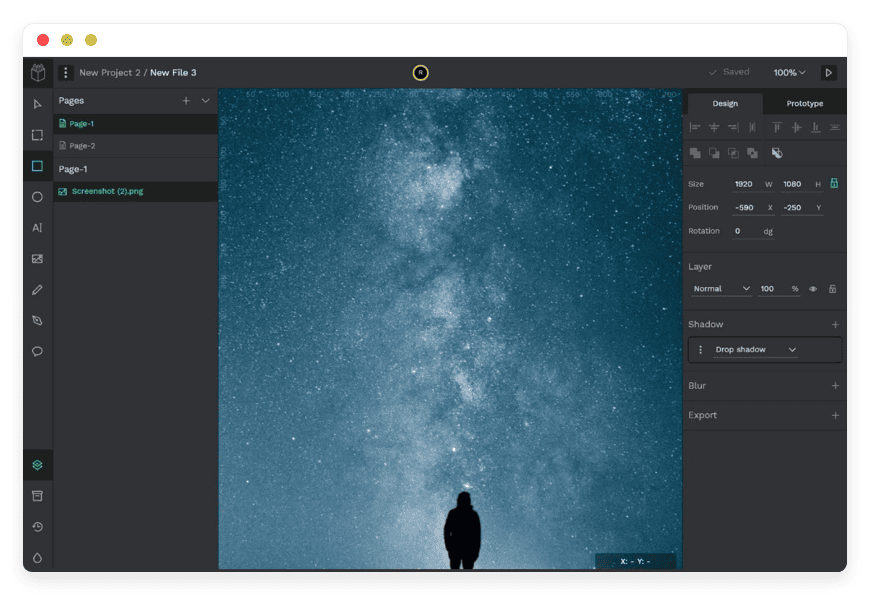
Managed Penpot Hosting: Design and Code in Harmony
Design tools have spent years trapping users in walled gardens. For a long time, the industry accepted a fragmented reality: designers drew pictures of websites, and developers struggled to translate those static pictures into working code. Then came Penpot, changing the landscape entirely by bringing open standards to professional design. But to truly benefit from this freedom, you need a reliable, high-performance environment. This is where Managed Penpot Hosting transforms your workflow.
Instead of fighting with server configurations, update scripts, and database backups, you should be focused on creating complex vector graphics and responsive layouts. We provide the infrastructure so your team can build the future of the web using the web's native languages.
TL;DR: The Quick Answer
If you are a designer, developer, or product manager looking for the best way to run Penpot without the technical overhead, managed hosting is your answer.
Native Web Standards: Penpot uses SVG, CSS Flexbox, and Grid, making the handoff to developers seamless and accurate.
Zero Infrastructure Stress: Forget about Docker containers, PostgreSQL tuning, Redis caches, or SMTP configurations.
High Performance: Run your heavy design files on optimized servers designed for high-speed rendering and low latency.
Instant Access: Skip the multi-hour installation process. You get a ready-to-use, secure environment immediately.
Security & Safety: Automated SSL and daily backups ensure your intellectual property and design systems are safe.
Introduction
The friction between designers and developers is a tale as old as the web itself. Designers create beautiful static images in proprietary tools; developers then have to reverse-engineer those pixels into code, often guessing at margins, padding, and responsive behavior. The result is often a product that looks "sort of" like the design, achieved through frustration and wasted hours.
Penpot solves this specific problem by allowing designers to build using the actual logic of the web. It is a brilliant piece of software that uses open standards like SVG and CSS. It doesn't fake the web; it is the web.
But here is the reality check: Great software needs great infrastructure.
What is Penpot?
Penpot is the first open-source design and prototyping platform specifically meant for cross-domain teams. Created by the team at Kaleidos, it was built to bridge the gap between creative design and frontend development. It was born out of a frustration with the "hand-off" process—the moment where design is thrown over a wall to developers.
Unlike other tools that treat the web as an afterthought, Penpot is web-native. It does not just simulate how a website might look; it uses SVG (Scalable Vector Graphics) as its core format. This means the designs you create are not just pictures—they are code-ready assets. When you draw a rectangle in Penpot, the underlying code is standard web code.
Why is it Trending?
The industry is tired of "view-only" restrictions, vendor lock-in, and expensive seat-based licensing that punishes growing teams. Penpot is trending because it democratizes design. It brings developers into the design process early by speaking their language. With the release of features like Grid Layout and advanced components, it has matured into a serious, professional alternative to proprietary giants. It allows teams to own their files and their workflow truly.
Why Choose Managed Penpot Hosting?
Choosing Managed Penpot Hosting is about prioritizing your time and valuing your sanity. While the software itself is free to download, the time required to maintain a secure, high-performance server is not.
When you host Penpot on a standard VPS without management, you are responsible for security patches, OS updates, and fixing things when they break. When you choose a managed solution from DANIAN, you are investing in reliability. You ensure that your design team has 24/7 access to their work without relying on a local server or a fragile internal setup.
You gain the freedom of open-source software—control over your files, your plugins, and your tools—backed by professional-grade infrastructure. It is the best of both worlds: total creative liberty with zero technical liability.
Key Features of Penpot
Penpot is packed with features that cater specifically to modern product teams. It goes far beyond simple drawing tools. Here is a deep dive into what makes it a powerhouse for professional workflows.
Flex Layout
This is perhaps the most critical feature for bridging the gap between design and code. In traditional design tools, you place elements on a canvas, and they stay there. But the web doesn't work like that; the web is fluid.
Penpot’s Flex Layout allows you to build designs that adapt. It works exactly like CSS Flexbox. You can define rows and columns, set alignment (justify-content, align-items), and control how elements wrap or shrink. When a designer uses Flex Layout, they are visually writing code. This means the developer doesn't have to guess how the layout should behave on different screen sizes—the designer has already defined the logic.
CSS Grid Support
Taking layout logic a step further, Penpot supports CSS Grid. This is a game-changer for complex dashboard designs and magazine-style layouts. You can define a grid structure (areas, columns, rows) and place elements into specific cells.
This feature allows for 2D layout control that Flexbox alone cannot achieve. It aligns perfectly with modern frontend development practices. A developer can look at a Penpot file using Grid and immediately know how to structure the HTML and CSS, saving hours of interpretation time.
Native SVG Support
Penpot does not use a proprietary binary format that requires conversion or export. It uses SVG. This means your files are compatible with the web by default. You can manipulate vector points with precision, knowing that the output will look exactly the same in a browser as it does on your canvas. This native support also means that files are often lighter and easier to parse programmatically if you are building custom automation pipelines.
Design Tokens
Consistency is the hardest part of scaling a product. Penpot’s Design Tokens allow you to define the "atoms" of your design system: colors, typographic styles, and spacing/radius values.
Unlike simple color palettes, these tokens can be named semantically (e.g., "Primary-Action-Blue" or "Error-Red"). When you update a token, that change propagates instantly across every screen in your project. This mirrors how developers use CSS variables or JSON theme files, making it incredibly easy to keep the design system and the code repository in sync.
Interactive Prototyping
Static screens do not tell the full story. Penpot allows you to connect boards to create interaction flows. You can simulate user journeys, test navigation paths, and present working concepts to stakeholders without writing a single line of code.
You can set triggers like "On Click" or "On Hover" and define transitions like "Push," "Dissolve," or "Slide." This allows for high-fidelity user testing early in the process, saving money by catching UX errors before development begins.
Code Inspect & Developer Handoff
Developers love Penpot because the "Inspect" tab provides usable code. Because the design is built on web standards, the CSS snippets generated are accurate. It doesn't just give you a hex code; it gives you the Flexbox rules, the font families, and the exact spacing values. It supports various code outputs, making the translation from visual to functional much faster.
Components and Variants
You can build robust design systems using reusable components and libraries. You can create a "Master Component" (like a button) and create instances of it throughout your project.
Penpot takes this further with component variants. You can define different states for a single component (e.g., Hover, Active, Disabled) or different sizes (Small, Medium, Large). This keeps your asset library clean and organized, preventing the "Button_Final_Final_v2" clutter that plagues many design teams.
The Penpot Hub
Penpot is not just a tool; it is a platform. The Penpot Hub is a community-driven repository where users share libraries, templates, and plugins. You can download UI kits for Material Design or Tailwind CSS to speed up your workflow. You can also find plugins that automate repetitive tasks, like generating lorem ipsum text, checking color contrast for accessibility, or managing icon sets.
Solutions per Industry
Penpot is versatile, but different industries use it to solve very specific problems. Here is how Managed Penpot Hosting applies to various sectors.
Software Development Agencies
Agencies live and die by their margins and their speed. They also juggle multiple clients, each with strict privacy requirements. Public cloud SaaS tools often pose a legal risk regarding where data is stored and who owns it.
The Pain: Slow handoffs between creative and dev teams eat into project budgets. Data privacy concerns with public clouds can lose contracts.
The Penpot Solution: Flex Layout speeds up the "design-to-dev" pipeline, improving project delivery times.
Managed Hosting Advantage: Agencies can launch separate, isolated Penpot instances for different clients if needed, or one central secure hub. You retain full data ownership, satisfying strict NDA requirements.
Education and EdTech
Universities, high schools, and coding bootcamps need affordable, accessible tools to teach UI/UX and frontend development.
The Pain: Professional design licenses are prohibitively expensive for students. Teaching design using tools that hide the underlying web logic creates "bad habits" for future developers.
The Penpot Solution: Penpot is the perfect educational tool because it exposes the underlying logic of web layout (Grid/Flex). It teaches students how the web works, not just how to draw pictures.
Managed Hosting Advantage: A managed environment allows instructors to launch a workspace for a class instantly. Students can log in from any browser (Chromebooks, iPads, old laptops) without needing powerful hardware or complex installations.
Enterprise Product Teams
Large organizations often struggle with the disconnect between their legacy design systems and their actual codebases.
The Pain: "Drift." The design system says one thing, but the coded product says another.
The Penpot Solution: By using Penpot, enterprise teams can maintain a "single source of truth" where the design system matches the code repository via Design Tokens and CSS/SVG standards.
Managed Hosting Advantage: Large enterprises often mandate that tools run on "private" infrastructure for compliance. Managed hosting provides this isolation and security without requiring the enterprise IT team to dedicate resources to maintaining it.
Healthcare and MedTech
This sector faces the strictest regulations (like HIPAA or GDPR constraints) regarding data handling. Even design files can contain sensitive patient data mocks or proprietary logic.
The Pain: Using multi-tenant public cloud software is often a compliance violation because you don't control the server's physical location or access logs.
The Penpot Solution: Open-source software means no telemetry data is sent back to a third-party vendor. You see exactly what the code does.
Managed Hosting Advantage: We secure the perimeter. With managed hosting, you can ensure your design environment is locked down, backed up to specific regions, and not shared with thousands of other users on a public cluster.
Government and Civic Tech
Governments are increasingly moving toward "Digital Sovereignty"—the idea that public infrastructure should rely on open standards, not leased proprietary software.
The Pain: Vendor lock-in. If a proprietary design tool changes its pricing or shuts down, the government loses access to years of public assets.
The Penpot Solution: SVG is an archival format. Penpot ensures that government digital assets remain accessible forever, regardless of software trends.
Managed Hosting Advantage: Governments need localized hosting. Managed services can ensure the software runs in specific jurisdictions, adhering to national data residency laws.
FinTech (Financial Technology)
FinTech relies heavily on trust, security, and rapid iteration of complex dashboards.
The Pain: Leaking upcoming features via insecure cloud tools is a massive risk. Also, financial UIs are complex (tables, data grids) and hard to design in vector-only tools.
The Penpot Solution: Penpot's Grid layout is superior for designing the complex data tables and dashboards central to FinTech products.
Managed Hosting Advantage: Security is paramount. Managed hosting offers features like strict firewall rules and dedicated environments that financial auditors appreciate.
Open Source Projects (OSS)
Open source software needs open source design. It is contradictory to build an open source Linux distro or library using a closed-source design tool.
The Pain: Community contributors cannot contribute to the design because they don't have a license for the expensive proprietary tool used by the core team.
The Penpot Solution: Penpot allows anyone with a browser to contribute. It aligns with the OSS philosophy.
Managed Hosting Advantage: The project maintainers don't have to waste donation money on expensive SaaS subscriptions. They get a managed, affordable instance where the whole community can collaborate.
Marketing and Content Teams
Marketing teams need to produce high volumes of social media assets, ad creatives, and blog headers rapidly.
The Pain: Bottlenecks. Waiting for a "designer" to change the text on a banner.
The Penpot Solution: Designers can create templates with restricted components. Marketers can log in, change the copy or image on a template, and export it immediately without breaking the brand guidelines.
Managed Hosting Advantage: A centralized asset library accessible via the web means the marketing team always grabs the latest logos and fonts, ensuring brand consistency across all channels.
Penpot vs Other Softwares
It is important to understand where Penpot fits in the landscape compared to other software applications. The comparison below highlights why Penpot is unique, particularly regarding its technical foundation.
| Feature | Penpot | Proprietary Alternatives |
| Native Format | SVG (Open Standard) | Proprietary / Binary |
| Layout Logic | CSS Flex & Grid (Web Native) | Auto-Layout (Simulated logic) |
| Operating System | Browser-based (Universal) | Browser or Mac Only |
| License | Open Source (Mozilla Public License) | Subscription / Seat-based |
| Developer Handoff | Native CSS Code | Interpreted / Translated Code |
| Hosting | Self or Managed | Vendor Cloud Only |
| Offline Capability | Yes (if self-hosted/local) | Usually Requires Internet |
| Community Libraries | Open / Free | Often Paid / Marketplace |
Use Cases and Applications
High-Fidelity UI Design: Create pixel-perfect interfaces for web and mobile applications using vector tools that behave like code.
Wireframing: Rapidly sketch out ideas and user flows using low-fidelity kits before committing to detailed design.
Design Systems Management: Build and maintain comprehensive libraries of buttons, inputs, and typography tokens that serve as the "truth" for your organization.
Slide Decks and Presentations: Use the infinite canvas to create visual presentations that can be exported to PDF or shared via a live link.
Developer Handoff: Use the file as a living spec sheet where developers can grab assets (SVG icons) and code attributes (CSS/Flex rules) directly.
Data Visualization Design: Use the vector tools to create complex charts and graphs that can be exported as clean SVG code for implementation in libraries like D3.js.
Social Media Management: Create a workspace dedicated to templates for Instagram, LinkedIn, and Twitter posts, allowing non-designers to generate content.
How DANIAN Helps
We are the "quiet enabler" behind your design process. We handle the complex server management so you can take all the credit for the work produced. We don't just "host" the software; we nurture the environment it lives in.
Fully Managed: We handle the hosting. Our team manages everything from the initial launch to regular system maintenance. Your design environment is always optimized without you having to lift a finger.
Backup & Monitoring: We configure automated daily backups and store them securely off-site. If you delete a critical project by accident, or if a team member overwrites a file, we can help you restore it.
SSL & Firewall: With cybersecurity threats on the rise, we take security seriously. From automated updates to proactive monitoring and custom firewalls, we make sure your environment is secure 24/7.
Updates: Security patches and new versions are applied without your intervention. When Penpot releases a cool new feature, you get it without the headache of reading migration guides.
24/7 Monitoring: Issues are detected and often resolved before you notice. We monitor CPU spikes, memory usage, and database health constantly.
Guaranteed Performance: Downtime can be detrimental to your business. With our scalable infrastructure, we ensure consistent performance even as your user base grows and your design files get larger.
7-Day Free Trial: No risk. You can spin up an instance, invite your team, and test the real-world performance of our managed service.
Our philosophy is simple: Less Setup, More Development. Affordable from the Start. Real Help When You Need It.
How to Get Started
Getting your own private, secure Penpot environment running is incredibly simple. We have removed the complexity of the command line entirely.
Visit DANIAN: Go to danian.co and sign up.
Select Penpot: Browse our catalog of open-source applications and select Penpot.
Launch: Click "Start." We automatically provision the server, configure the database, set up the SSL certificates, and launch the application.
Login: You receive your credentials and can start designing.
FAQ
Is Penpot free?
The software source code is free and open-source. However, running it online requires server resources (CPU, RAM, Storage). You pay us for the managed infrastructure and support, not for the software license.
Can I import files from other tools?
Yes, Penpot is actively developing import capabilities. There is a robust community creating plugins to help migrate SVGs and other assets into the platform. Additionally, because Penpot uses SVG, you can often copy-paste vectors directly from other tools.
Do I need to know Docker to use this?
No. That is the point of Managed Hosting. We handle all the Docker containers, environment variables, and technical configuration. You just log in via your web browser.
Can I use my own domain?
Absolutely. You can map a custom domain (e.g., design.yourcompany.com) to your managed Penpot instance to keep it on-brand for your organization.
What happens if I cancel my subscription?
You own your data. Before canceling, you can export all your Penpot files. Since the format is open standards-based, you are not locked in; you can take those files to a self-hosted instance or another managed provider.
Conclusion
Penpot is reshaping how we think about design tools by rooting them in open standards and developer-friendly logic. It removes the artificial barriers between the canvas and the code, fostering a culture where designers and developers work in harmony. However, the best tools require a stable foundation to function effectively.
Managed Penpot Hosting gives you that foundation. It removes the technical barriers and the maintenance burden, allowing your team to focus entirely on creativity and collaboration. Stop worrying about server uptime, database connections, or backup scripts. Start building the future of your product.


