
Managed Owncast Hosting: Build Your Own Live Streaming Server
TLDR - Quick Answer
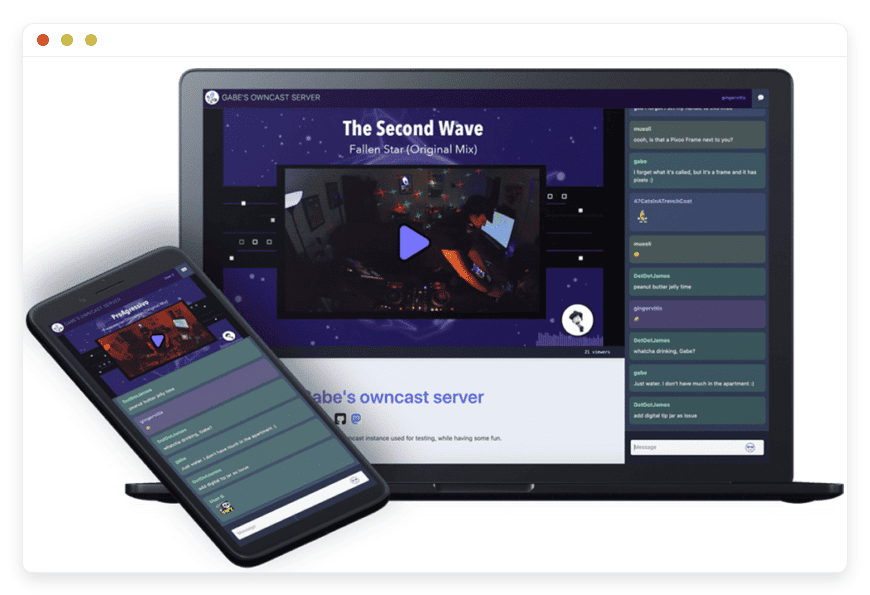
Owncast is an independent, open-source live video streaming and chat server. It gives you absolute control over your live broadcasts. You are completely free from the restrictive rules of large corporate tech platforms. Choosing Managed Owncast Hosting gives you all these benefits without the technical stress.
The immediate value of running Owncast includes:
Direct Broadcasting: Stream directly to your audience without a middleman interfering.
Built-In Chat: Engage with your viewers through a customized, integrated chat system.
Custom Branding: Make your streaming page match your exact brand colors and style.
Federation Support: Notify followers across the Fediverse automatically when you go live.
Zero Server Maintenance: With our hosting, you focus on your broadcast while we handle the backend.
Introduction
Streaming live video is a powerful way to reach your audience. However, relying on massive tech platforms often means giving up total control. You face unexpected rule changes constantly. You deal with random ads interrupting your content. You fight against algorithms that intentionally hide your streams from your own followers. You build an audience, but the platform holds them hostage.
Owncast fixes this massive problem. It allows you to run your own independent streaming platform. You control the video feed. You control the chat rules. You control the entire viewer experience from start to finish. But running it yourself is a second job. Setting it up requires serious technical effort. Managing video processing scripts takes hours. Configuring server ports and updating security patches is tedious work. You want to stream amazing content, not read endless server manuals.
This is exactly where Managed Owncast Hosting changes the game entirely. DANIAN acts as your invisible infrastructure. We handle all the difficult server tasks in the background. You get a perfect, ready-to-use streaming platform on day one. We manage the hard technical parts. You focus entirely on building your community and delivering great live video.
What is Owncast?
Owncast is a self-hosted, open-source live video and web chat server. It acts as your personal broadcasting station on the internet. You send your video feed directly to Owncast using standard software like OBS Studio. Owncast then processes that video instantly. It shows it to your audience on a web page you fully control. You do not need an entire engineering team to run a professional live stream.
The project was created by Gabe Kangas. It is maintained by a highly dedicated community of open-source contributors. They built it to ensure that creators have a free, independent alternative to massive corporate platforms. They wanted a tool that respects the creator. Owncast provides a complete solution out of the box. It includes the video player, the chat room, and the administrative dashboard. You do not need to stitch multiple different tools together.
Why is it trending?
Content creators are tired of losing their audience to sudden platform bans. They are frustrated by shifting algorithms that bury their hard work. Owncast is trending rapidly because it provides true independence. Creators keep their community intact. They define their own chat rules without outside interference. They stream exactly what they want without fear of sudden demonetization. The software is lightweight, efficient, and constantly improving thanks to its active community.
Why Choose Owncast?
Choosing to run Owncast means choosing absolute freedom. You dictate exactly how your content is presented to the world. You do not have to worry about competitor ads running in the middle of a crucial moment. You never have to ask viewers to subscribe to a third-party service just to watch your video without interruptions.
When you choose Hosting Owncast with a managed provider, you get the absolute best of both worlds. You keep all the open-source freedom. But you completely remove the heavy technical burden. Owncast easily replaces expensive proprietary streaming services. It offers a complete, elegant package. You get seamless video delivery, interactive chat, and powerful audience management in one simple interface. It is the ultimate tool for anyone serious about direct audience connection.
Key Features of Owncast
Owncast is packed with powerful features designed to make live streaming easy and professional. It handles complex video delivery behind a very simple interface. Here is a deep dive into what makes this software so highly capable.
Universal Video Broadcasting
Owncast accepts video using the standard RTMP protocol. This is the universal language of live video. This means it works perfectly with the broadcasting software you already use right now. OBS Studio, Streamlabs, Wirecast, and even hardware video encoders connect easily. You just paste your server URL and your secret stream key. Owncast takes that raw feed and turns it into an HLS video stream. HLS stands for HTTP Live Streaming. This format ensures smooth, adaptive playback for your viewers. It works beautifully whether they use a mobile phone or a powerful desktop computer.
Integrated and Customizable Chat
A live stream needs an active, healthy community. Owncast includes a powerful chat system built right into the main viewing page. Viewers can change their display names easily. They can chat instantly without creating complex user accounts. This removes barriers and increases interaction. As the server owner, you have full moderation tools at your disposal. You can ban offensive users quickly. You can block specific words automatically. You can even add your own custom emojis to make the chat feel completely unique to your brand.
Complete Visual Customization
Your streaming page should look exactly like your brand. Owncast allows deep, extensive customization of its web interface. You can upload your own custom logo. You can change the page background. You can set custom color themes to match your website. You can also add custom Markdown content directly below the video player. This is a fantastic place to put important links. You can list your stream schedule. You can post the rules for your chat room. You can even inject custom CSS if you want to alter the layout completely.
Fediverse Integration
Owncast connects seamlessly to the growing Fediverse. It fully supports the ActivityPub protocol. This means users on decentralized networks like Mastodon can follow your Owncast server directly. They just search for your server handle. When you go live, your server automatically sends a notification to all your followers across the entire network. Their timelines show that you are currently broadcasting. It is an amazing way to build an audience entirely outside of traditional social media silos.
Webhooks and API Support
If you want to build custom tools, Owncast makes it incredibly easy. It features a robust set of webhooks and a completely open API. You can trigger external actions instantly. You can trigger a script when a stream starts. You can grab data when a user sends a chat message. You can fire an event when someone changes their display name. You can use this powerful system to build custom chat bots. You can send live alerts directly to your Discord server. You can even update your main website automatically when you go live.
External Storage Support
Live video processing takes up a lot of space quickly. Owncast supports external S3-compatible storage. This means you can store your active video segments on a completely separate storage service. This keeps your main server running quickly. It prevents your hard drive from filling up during a long broadcast. Using external storage also allows you to handle many more simultaneous viewers without slowing down your server.
Multiple Video Qualities
Not all of your viewers have incredibly fast internet connections. Owncast supports adaptive bitrate streaming. If your server has enough processing power, Owncast can take your high-quality video feed and create multiple lower-quality versions simultaneously. A viewer on a fast connection gets crisp 1080p video. A viewer on a weak mobile connection automatically gets a smooth 480p version. The player handles this switch automatically without buffering.
Built-In Analytics and Metrics
Understanding your audience is crucial for growth. Owncast includes a straightforward metrics dashboard. You can see your current viewer count instantly. You can track your peak viewer numbers for past streams. You can monitor chat activity levels. For advanced users, Owncast even exports data in a format compatible with Prometheus. This allows you to build incredibly detailed custom dashboards to track your server performance over time.
Solutions per Industry
Owncast is flexible enough to work beautifully for many different types of organizations. Different industries use it to solve very specific communication problems. Here is a detailed look at how various sectors use this powerful software.
E-Commerce Brands
Brands frequently host live shopping events to boost their sales. Using public platforms often distracts potential buyers. Public platforms show related videos from other competing companies right next to your product. An e-commerce brand can use Owncast to host live product demonstrations directly on their own domain. This keeps the customer entirely focused on the brand. The chat allows buyers to ask questions about the product in real-time. This direct interaction builds immense trust and drives much higher conversion rates. You can put direct "Buy Now" links right in the Markdown section below the video.
Education and Schools
Teachers and schools need secure, distraction-free ways to deliver live lectures. Public platforms constantly show advertisements that completely disrupt the learning process. An educational institution can use Owncast to stream classes privately. The video remains clean, professional, and entirely uninterrupted. Students can use the integrated chat to ask questions during the lesson. This creates a highly focused, interactive classroom environment. The school controls the page, ensuring no inappropriate content ever appears next to the lecture.
Digital Agencies
Agencies frequently host webinars or internal company-wide meetings for their clients. Privacy and strict branding are absolutely vital for these events. Using Owncast, a digital agency can provide a fully branded, white-label live stream portal for a corporate client. The client gets a highly professional, completely ad-free environment for their quarterly town hall meeting. The chat is easily moderated by the agency to keep all discussions professional. The agency looks brilliant for providing a custom solution.
Gaming and Esports
Independent gaming tournaments need a reliable place to broadcast their matches. Public gaming platforms take a massive cut of subscriptions and run intrusive ads during crucial gameplay moments. Tournament organizers can use Owncast to host their own independent viewing portal. They can brand the page with tournament sponsors. They can use the chat to run specific giveaways. They keep all the revenue generated from external donation links. They maintain total control over their broadcast.
Local Government
City councils and municipalities must provide transparent public access to their meetings. Citizens need an easy way to watch local government in action. Owncast is perfect for this requirement. A city can set up a continuous stream of their council chambers. Citizens do not need to download special software or create accounts on social media platforms to watch. They simply visit the city's specific website link. The broadcast is clear, accessible, and serves the public interest perfectly without relying on private tech companies.
Religious Institutions
Churches, mosques, and temples often broadcast their weekly services to members who cannot attend in person. Many older members find navigating massive streaming platforms confusing. Owncast provides a wonderfully simple solution. The institution just shares one direct web link. The member clicks the link and the video plays immediately. There are no confusing sidebars, no autoplaying related videos, and no account requirements. The community stays connected easily and safely.
Musicians and Performing Arts
Live music venues and independent artists use live streams to reach global fans. Public platforms are notorious for aggressive, automated copyright strikes that can cut off a completely legal live performance abruptly. Owncast solves this problem entirely. Artists broadcast their original music directly from their venue. They can sell virtual tickets on their main website and direct buyers to the private Owncast page. Fans enjoy a pure, uninterrupted concert experience while chatting with other fans.
Fitness and Wellness
Personal trainers and yoga instructors offer live remote classes. Their clients pay for a premium, focused experience. Sending a paying client to a public video site filled with fitness supplement ads looks highly unprofessional. Instructors use Owncast to build a clean, branded fitness portal. The video is high quality. The chat allows the instructor to give quick shoutouts to attendees. The entire experience feels exclusive and justifies the premium price of the class.
Non-Profits and Charities
Charitable organizations host massive telethons and live fundraising events. Every single dollar counts. Public platforms often take a percentage of donations processed through their systems. A non-profit can run their entire telethon through Owncast. They place their own direct donation links right beneath the video player. They keep one hundred percent of the money raised. The chat builds incredible momentum as donors announce their contributions live during the event.
Owncast vs Other Softwares
How does Owncast compare to other streaming solutions available today? Here is a simple, direct breakdown comparing it to massive proprietary software and platforms.
| Feature | Owncast | YouTube Live | Twitch | Vimeo Premium |
Software Model | Open-Source | Proprietary | Proprietary | Proprietary |
Custom Domain | Yes | Embedded Only | No | Embedded Only |
No Advertisements | Yes | No (Forced Ads) | No (Forced Ads) | Yes |
Custom Emojis | Yes | Limited | Paid/Partner Only | No |
Fediverse Support | Yes | No | No | No |
Algorithm Interference | None | High | High | None |
Total Independence | Yes | No | No | No |
Use Cases and Applications
Owncast fits perfectly into many specific, practical scenarios. Here are a few detailed examples of how you can use it right now to improve your digital presence.
24/7 Community Radio Video Feeds
Radio stations thrive on listener connection. Many stations now put a simple camera in the broadcast studio. They use Owncast to broadcast a continuous live video feed of the DJs working. Listeners visit the station website, watch the DJ, and interact in the Owncast chat room. It transforms a purely audio experience into a highly engaging visual community hub.
Independent Podcast Shows
Podcasters often record their episodes live before editing the final audio version. They can broadcast this live recording session via Owncast. Core fans love watching the raw, unedited process. They can interact with the host in the chat, ask questions, and even provide real-time feedback that makes it into the final podcast episode.
Live Nature and Security Cameras
Many organizations maintain live feeds of wildlife reserves, city skylines, or even specific construction projects. Owncast is incredibly stable for continuous broadcasting. You can set up an RTMP feed from an IP camera and run it into Owncast 24/7. Viewers can drop in at any time to watch the eagles nest or see the weather in your city.
Corporate Internal Communications
Large companies need to run private broadcasts for CEO town hall meetings. Keeping highly sensitive company information off public streaming networks is a strict requirement. A company can run Owncast on an internal network or behind a strict password. Employees get a flawless viewing experience. The company gets total peace of mind regarding their private data.
How DANIAN Helps
Running a robust streaming server requires a massive amount of background work. Video processing uses heavy computing resources. Keeping the server secure requires constant attention. DANIAN acts as your quiet enabler. We handle the entire technical mess so you get the glory of a perfect broadcast. You focus entirely on creating great content.
Fully Managed
We handle the hosting. Our team manages everything from initial setup to regular updates, security patches, and performance monitoring. Your software is always optimized without you having to lift a finger. You never touch a command line.
Backup & Monitoring
Your specific settings, custom logos, and chat configurations are important. We provide automated daily backups. They are configured automatically, stored securely, and allow for a quick one-click restore if you ever make a mistake during a broadcast setup.
SSL & Firewall
With cybersecurity threats on the rise, we take security seriously. From automated updates to proactive monitoring and custom firewalls, we make sure your environment is secure 24/7. Your stream gets an automatic SSL certificate. This ensures all connections between you and your viewers remain safely encrypted.
Updates
The Owncast community releases exciting new features frequently. Security patches and new versions are applied without your intervention. You always have the absolute newest tools available without scheduling maintenance windows.
24/7 Monitoring
Video streams simply must not fail. Our advanced systems watch your server constantly. Issues are detected immediately and often resolved entirely before you or your viewers even notice a problem.
Guaranteed Performance
Downtime can be detrimental to your business and your brand reputation. With our scalable infrastructure, we ensure consistent performance even as your user base grows. Video processing remains incredibly smooth and highly reliable.
7-Day Free Trial
Testing our service carries absolutely no risk. You can try out the full power of Owncast right away. Less setup, more development. Affordable from the start, with real help when you need it.
How to Get Started
Getting your professional streaming server running takes only a few minutes. You do not need to touch a single line of complex code.
Step 1: Visit danian.co and quickly create your account.
Step 2: Select Owncast from our extensive software catalog.
Step 3: Relax while DANIAN launches your software in the background. You will receive your secure admin login details shortly.
FAQ
Does Owncast work with OBS Studio?
Yes. Owncast provides standard RTMP connection details. You simply copy and paste your server URL and your secret stream key into OBS Studio. It works exactly like configuring a stream for any major public platform.
Do I have to pay a license fee to use Owncast?
No. Owncast is free, open-source software. There are absolutely no hidden software license fees. You only pay for the managed server resources required to run the software smoothly. Our managed hosting completely covers those server costs in one simple price.
Can I limit who exactly watches my live stream?
Owncast is designed primarily for public broadcasting. However, you can hide your server from the public Owncast directory. You then share your direct website link only with the specific people you want to invite.
Does Owncast support multiple video qualities for mobile users?
Yes. If your server is configured with enough processing power, Owncast uses adaptive bitrate streaming. It takes your high-quality video feed and creates multiple lower-quality versions. This greatly helps viewers with slow internet connections or weak mobile signals.
Can I add automated chat bots to my stream?
Yes. Owncast has excellent webhook support and a very open API. You can connect third-party chat bots easily. You can also build your own custom bots to interact with your viewers, run games, or post automated links.
How many viewers can my server handle?
The number of simultaneous viewers depends entirely on your server resources, your bandwidth, and whether you use an external storage system like S3. Owncast is designed to be very efficient. We provide highly reliable infrastructure to ensure your viewers get a fantastic experience.
What is the video delay or latency?
Owncast uses HLS for video delivery. This provides incredible stability but introduces a small delay, typically between ten to twenty seconds. This is standard for HLS streaming. It ensures that your viewers do not experience annoying buffering during the broadcast.
Can I use my own domain name?
Yes. You can connect your own custom domain name directly to your Owncast server. Instead of a random IP address, your viewers will visit a professional link like live.yourwebsite.com to watch your broadcast.
How do I block offensive users in the chat?
The admin dashboard gives you complete control over the chat room. You can click on any user and ban their IP address instantly. You can also create a list of banned words. Any message containing those words is automatically blocked before anyone sees it.
How do I upgrade to the newest version of Owncast?
If you manage the server yourself, you must run update scripts manually. However, with our managed hosting, you do not do anything. We handle all software updates automatically in the background. You always have the latest features securely installed.
Conclusion
Owncast is an absolutely incredible tool for modern content creators. It gives you the raw power to stream high-quality video and chat directly with your community. You control the entire platform. You set the rules. You dictate the exact branding. You remove the middlemen completely.
By choosing Owncast Managed hosting, you completely eliminate the massive headache of server maintenance. You get a highly professional, secure, and blazing-fast streaming server ready to go. You bring the camera, the personality, and the content. We handle the rest.
Experience the power of fully managed open-source.


