
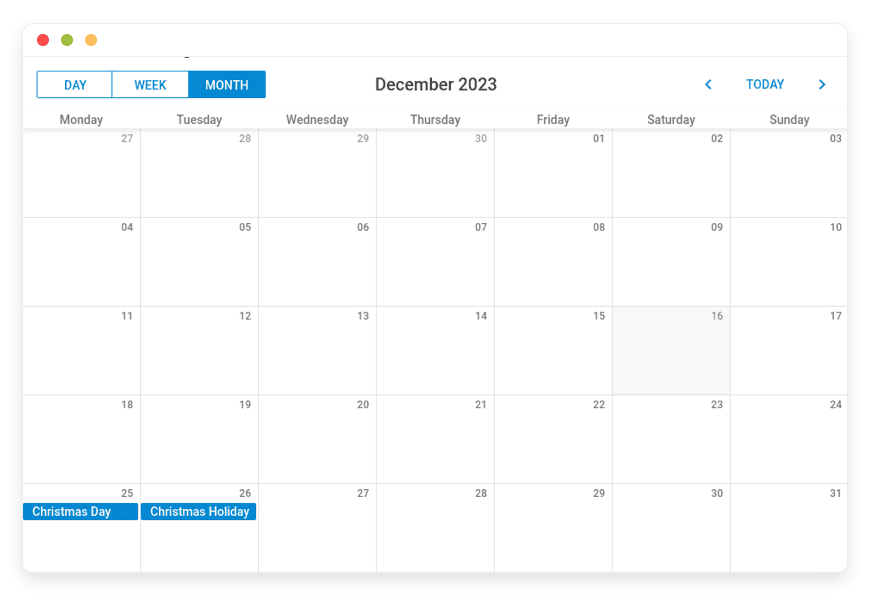
Effortless Managed Open Web Calendar Hosting for Your Website
TLDR: What is Managed Open Web Calendar Hosting?
Open Web Calendar is a flexible open-source tool that embeds ICS and CalDAV calendars onto your website.
Immediate Value: You get a beautifully styled, mobile-friendly schedule without relying on tracking-heavy providers.
Managed Hosting Benefit: Skip the tedious server setup, terminal commands, and ongoing maintenance.
The Result: We run the infrastructure. You simply copy the HTML embed code and paste it onto your site.
Stop Fighting with Clunky Calendar Embeds
Showing your schedule online should be simple. But most calendar widgets force you to compromise. You either accept ugly designs, annoying branding, or invasive tracking scripts. You want your website visitors to see your upcoming events easily. You do not want them tracked by large advertising companies just to see what time a meeting starts.
If you have an ICS link from Nextcloud or your email provider, you want to show it on your website beautifully. Open Web Calendar solves this exact problem. It turns simple calendar feeds into interactive, modern website widgets.
But running it yourself is a second job. You have to configure the server environment. You have to update the Python packages regularly. You have to monitor the uptime manually. One small server error, and your website calendar goes completely blank. That is a terrible experience for your visitors.
There is a better path. With Managed Open Web Calendar Hosting at DANIAN, we act as your invisible infrastructure team. You avoid the terminal entirely. You get the benefits of open-source software without the technical headache.
What is Open Web Calendar?
Open Web Calendar is a powerful tool to embed custom calendars on your website. It pulls event data from ICal (.ics) links and CalDAV servers. It processes that data and outputs a clean iframe that you can paste anywhere.
Nicco Kunzmann and the Open Web Calendar Contributors built this software. They recognized a clear issue on the web. Browser-only calendars struggle to read many ICS files due to strict security rules. People wanted a reliable way to show calendars from Nextcloud and other private platforms. They built a solution that processes the calendar on a server and sends a clean display to the browser.
The tool works brilliantly. It reads your calendar link applies your chosen styles, and gives you a simple HTML iframe. You paste that iframe on your site, and your schedule appears instantly.
Why is it trending?
People care about privacy again. Website owners refuse to pass their visitors' data to big search engines just to show a basic schedule. Open Web Calendar gives you total control over the display. You can change colors, combine multiple feeds, and allow direct event sign-ups. The project is highly respected and even secured funding from the European Commission’s Next Generation Internet programme. It is a serious tool for modern websites.
Why Choose Open Web Calendar?
Choosing this software means choosing open-source freedom. You are not trapped in a proprietary ecosystem. Hosting Open Web Calendar on your own terms means you control the environment completely.
Most proprietary solutions force their logo onto your site. They limit how many events you can show on a free tier. They restrict your design choices. Open Web Calendar removes these artificial limits. It replaces strict, paid widgets with a highly flexible alternative. You decide the time zone rules. You set the exact colors to match your brand. You combine as many calendars as you want into one view. It offers pure functionality without the usual commercial restrictions.
Key Features of Open Web Calendar
This is not just another basic calendar widget. It brings heavy capabilities to your daily workflow. Let us explore the specific features that make Open Web Calendar an essential part of your web strategy.
Instant Event Syncing via CalDAV: Your workflow speeds up when your tools talk to each other. By connecting directly to a CalDAV server, your website calendar updates instantly. If you add a meeting to your phone or desktop client, it appears on your site immediately. You never have to update your website manually again.
Direct Event Sign-Ups: You can allow visitors to register for events directly on your calendar. When they sign up, they get an email invite automatically. You no longer need a separate form builder to manage attendees. This creates a smooth experience for your community. They see the event and register in one place.
Multiple Calendar Sources in One View: Imagine you manage three different meeting rooms. Each room has its own ICS file. Open Web Calendar lets you merge all three into a single, color-coded view. Your team sees the entire schedule at a glance. This saves time and stops double-booking entirely.
Total Design Customization: Your website has a specific look. Your calendar should match it perfectly. You get full control over custom CSS. You can style individual events based on their category. You can make "Work" events blue and "Personal" events green. You can change the background, the fonts, and the borders.
Flexible Timezone Controls: If you work globally, timezones are a nightmare. This software lets you fix the timezone or set it to detect the viewer's location automatically. Visitors see the event times localized to their exact city. You avoid confusing emails asking what time the meeting starts.
Diverse Layout Options: A month view is great for general planning. A day view works better for a detailed conference schedule. You can easily switch between Day, Week, Month, Work Week, and Agenda views. You display the format that fits your specific content best.
Mobile-Friendly by Default: More than half of your visitors use a phone. Open Web Calendar scales perfectly to small screens. Your attendees will not have to zoom and scroll clumsily to find the event time. The touch interface feels native and responsive.
Multi-Language Support: Speak to your audience in their native language. The software supports dozens of languages effortlessly. You do not have to translate days of the week manually. It respects the browser language of the visitor automatically.
Solutions per Industry
Different businesses use scheduling in unique ways. Here is how Open Web Calendar solves specific problems across three distinct industries.
Education and Universities
Schools manage dozens of classrooms, lecture halls, and sports fields. Each space usually has its own scheduling link. An administrator can merge all these ICS feeds into one master calendar on the university website. Students simply check the site to see which rooms are available for group study. The automatic timezone feature also helps international students attending online classes from their home countries.
Freelance Agencies
Freelancers need to show clients when they are available for calls. However, they do not want to expose their private personal events. You can use the specific "Free and Busy" styling feature. The calendar simply shows blocks of time marked as "Occupied" or "Free". Clients see your availability without seeing the private details of your doctor appointment. It looks professional and protects your privacy.
Non-Profit Organizations
Community groups often host public events and need people to register. Using the CalDAV sign-up feature, a non-profit can show upcoming volunteer days. A visitor clicks the event, signs up, and receives an email confirmation. The organization manages attendance directly through their open-source tools. They do not have to pay expensive monthly fees to event management platforms.
Open Web Calendar vs Other Softwares
How does it compare to standard proprietary calendar embeds? Let us look at the clear facts.
| Feature | Open Web Calendar | Proprietary Alternative |
Source Type | Any ICS or CalDAV | Limited to their ecosystem |
Custom CSS | Full control | Very restricted |
| Privacy | High (No tracking scripts) | Low (Tracks visitor behavior) |
Combine Multiple Feeds | Yes (Unlimited) | Yes (If within the ecosystem) |
Event Sign-Ups | Yes (via CalDAV) | Usually requires a paid tier |
Open-Source | Yes | No |
Use Cases and Applications
Here are a few practical ways you can use Open Web Calendar today to improve your website.
Public Event Agendas: Launch a clean, vertical agenda for an upcoming tech conference. Attendees can quickly scroll through the daily speakers on their phones.
Office Room Booking Displays: Mount a tablet outside a physical conference room. Display the room's specific calendar in a daily view.
Christmas or Holiday Countdown: Create a single-day custom view to highlight specific holiday events hour by hour.
Tor Hidden Services: Because it works without external trackers, you can safely host event calendars behind a strict network or anonymous server.
Integrated Nextcloud Events: Connect your Nextcloud calendar straight to your public blog. Keep your entire workflow within secure, open-source tools.
How DANIAN Helps
Managing servers takes valuable time away from your real work. At DANIAN, we act as the quiet enabler behind your success. We handle the mess; you get the glory. Managed Open Web Calendar Hosting keeps your focus on your website design, not the backend code.
Fully Managed: We handle the hosting. Our team manages everything from initial setup to regular updates, security patches, and performance monitoring. Your software is always optimized without you having to lift a finger.
Backup & Monitoring: Automated daily backups are configured automatically and stored securely. If you ever make a mistake, you have a simple one-click restore.
SSL & Firewall: Secure by default. With cybersecurity threats on the rise, we take security seriously. From automated updates to proactive monitoring and strong network defenses, we make sure your environment is secure 24/7.
Updates: Security patches and new versions are applied without your intervention.
24/7 Monitoring: Issues are detected and often resolved before you notice them.
Guaranteed Performance: Downtime can be detrimental to your business. With our scalable infrastructure, we ensure consistent performance even as your user base grows.
7-Day Free Trial: No risk.
Less Setup, More Development. Affordable from the Start. Real Help When You Need It.
How to Get Started
Getting your calendar widget running takes just a few minutes. You do not need to read complex documentation.
Step 1: Visit danian.co and sign up for an account.
Step 2: Select Open Web Calendar from the catalog.
Step 3: Relax while DANIAN launches your software in the background.
Once the system is ready, you can paste your ICS links, adjust your CSS styles, and embed the code directly onto your web pages.
Frequently Asked Questions
Is Open Web Calendar free to use?
The software itself is fully open-source and free to use under its official license. When you use DANIAN, you only pay for the managed hosting service that keeps the server online and secure.
Do I need to know Python to use it?
Not if you use managed hosting. We handle the Python packages and server environment. You only need to know basic HTML to paste the embed iframe on your website.
Can I show calendars from Nextcloud?
Yes. It handles Nextcloud ICS feeds perfectly. It also supports CalDAV for instant syncing and sign-ups.
Will it slow down my website?
No. The calendar loads within an iframe asynchronously. It will not block the rest of your website from loading quickly.
Does it work on mobile phones?
Yes. The output is highly responsive and adapts to any screen size automatically.
Conclusion
Showing your schedule online should not require sacrificing your brand or privacy. Open Web Calendar offers a brilliant, highly customizable solution. It connects your existing calendar feeds and turns them into beautiful website displays.
You do not have to struggle with server maintenance to enjoy these benefits. Let DANIAN handle the technical heavy lifting so you can focus on your business.
Experience the power of fully managed open-source.


