
Stop Wasting Time: The Ultimate Guide to Managed NocoDB Hosting
TLDR - Quick Answer
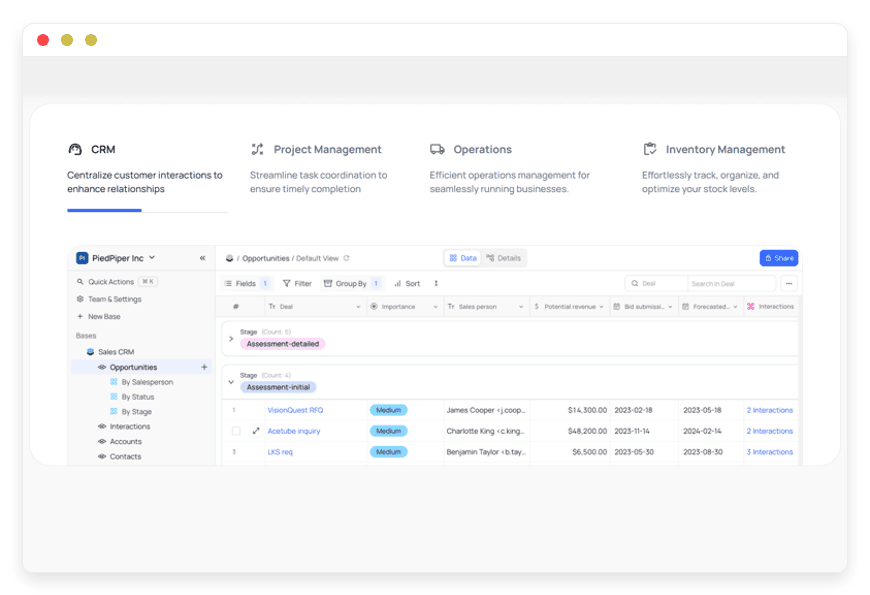
NocoDB is an open-source tool that turns any relational database into a smart spreadsheet. It gives your team a simple interface to build apps, manage information, and automate workflows.
Choosing Managed NocoDB Hosting means you get all the benefits of this powerful software without the technical headaches.
Here is the immediate value you get:
Instant API Creation: NocoDB automatically builds REST and GraphQL APIs from your database.
Visual Workflows: Manage your records using Grid, Kanban, Gallery, and Form views.
Simple Migration: Move thousands of existing bases from proprietary tools with one click.
Advanced Features: Use complex formulas, rollups, and linked records easily.
Zero Maintenance: A managed host handles all the server setups, backups, and security patches.
Introduction
Many teams struggle with a common problem. Your developers want the raw power of a real database. Your business teams want the simple interface of a spreadsheet. Trying to keep both sides happy usually results in messy spreadsheets or expensive internal tool requests.
NocoDB solves this problem perfectly. It connects directly to your database. It generates a familiar, easy-to-use interface on top of it. Your developers get clean APIs instantly. Your marketing and sales teams get a visual workspace.
But running it yourself is a second job. Setting up servers takes hours. Applying updates breaks dependencies. Fixing broken packages will drain your time. You want to build databases, not maintain infrastructure.
This is where DANIAN steps in. We provide the invisible infrastructure that makes your software run flawlessly. We handle the hard work in the background. You get a fast, secure environment ready for your team. You skip the tedious server setup. You focus entirely on building great workflows.
What is NocoDB?
NocoDB is a powerful open-source platform. It transforms standard relational databases into interactive spreadsheets. If you have data in MySQL, PostgreSQL, SQL Server, or SQLite, NocoDB connects to it. It builds a visual interface instantly.
The software was created by a dedicated open-source team. Developers like Naveen and Pranav saw a massive gap in the market. They noticed that teams were forced to choose. They either used complex database clients or limited spreadsheet tools. They built NocoDB to give people the best of both worlds.
The core engine reads your database structure. It instantly generates a complete set of REST and GraphQL APIs. At the same time, it creates a web-based dashboard. Users can filter, sort, and search records easily.
Why is it trending?
NocoDB is highly popular right now because it solves a painful bottleneck. Developers spend countless hours building simple admin panels for their colleagues. Business teams get frustrated waiting for these tools.
NocoDB bridges this gap. A developer connects the database in two minutes. The marketing team instantly gets a spreadsheet view to edit content. The sales team gets a Kanban board to track leads. Everyone works faster. Developers can go back to writing actual product code. The entire company moves quicker.
Why Choose NocoDB?
Choosing NocoDB brings pure open-source freedom to your daily operations. You escape the strict limits of proprietary software. When you use closed platforms, you face hard limits. They cap your API requests. They restrict your record counts. They charge heavy fees for user seats.
NocoDB removes those limits. Because it runs on your own connected databases, you dictate how much you store. You control the rules. It replaces expensive, closed-off tools with a flexible system. This system grows with you perfectly.
Hosting NocoDB correctly is the key to this freedom. When you rely on a solid host, you get a fast workspace. You can invite your whole team. You can build infinite workspaces. You can run complex filters without the software slowing down. It is the smartest way to manage large sets of records. It keeps your costs highly predictable.
Key Features of NocoDB
NocoDB is packed with features that speed up your daily work. The developers designed every function to save you time. Let us look at what makes this tool so effective for your team.
Smart Grid Views
The Grid view is the core of NocoDB. It looks exactly like a modern spreadsheet. You can freeze columns to keep important names visible. You can adjust row heights to see more text. You can hide specific columns to reduce visual noise. It allows bulk copying and pasting. It handles massive amounts of rows without lagging. This view is perfect for heavy data entry and quick edits.
Visual Kanban Boards
Projects often move through stages. The Kanban view helps you track this movement. It turns your rows into visual cards. You map these cards to a specific status field. For example, you can have columns for "To Do", "In Progress", and "Done". You drag and drop cards between these columns. The underlying database record updates instantly. This keeps project managers highly organized.
Interactive Gallery Views
Sometimes you need to focus on visual assets. The Gallery view turns your records into large visual cards. You choose an image attachment field to act as the cover photo. You select which text fields display underneath the image. This is excellent for product catalogs, employee directories, and real asset tracking. It presents information cleanly.
Custom Form Builders
Collecting information from outsiders is usually difficult. The Form view makes it simple. You select a table and generate a form instantly. You can hide certain fields from the public. You can make specific questions mandatory. You can add your own logo and custom success messages. You share the public URL with your audience. Their submissions land straight into your secure database table.
Instant API Generation
Writing custom CRUD APIs is boring work. NocoDB completely automates it. The moment you connect your database, NocoDB acts. It scans the tables. It builds fully documented REST and GraphQL APIs. It even generates a Swagger documentation page automatically. You can hand these APIs to your frontend developers immediately. This feature alone saves weeks of engineering time.
Advanced Relational Fields
Standard spreadsheets fail when things get complex. NocoDB handles complexity perfectly through relational fields. You can use the "LinkToAnotherRecord" field to connect tables. If you have a Customers table and an Orders table, you link them. You click a customer and see all their orders instantly.
Lookups and Rollups
Once your tables are linked, you can extract deeper insights. The Lookup field pulls specific information from a linked record. For example, it pulls a customer's phone number into the order table. The Rollup field does math on linked records. You can sum up the total value of all orders connected to one specific customer. This replaces complex SQL join queries with simple clicks.
Powerful Formula Fields
You do not need to write external scripts for basic logic. NocoDB includes a robust formula engine. You can write formulas to calculate taxes, combine text fields, or extract dates. The syntax is familiar to anyone who uses standard spreadsheets. These formulas run on the server and update instantly when source fields change.
Granular Access Control
Sharing sensitive information requires strict rules. NocoDB gives you deep control over who sees what. You assign roles like Creator, Editor, Commenter, or Viewer. You can set permissions at the workspace level or the base level. You can even restrict access at the exact field level. If you want a freelancer to see a table but hide the email addresses, you do it with two clicks.
Automations and Webhooks
Your database should not sit still. NocoDB lets you build active workflows. You set up webhooks that fire off messages when a record changes. If a new lead is added to a table, a webhook sends an alert. You can push notifications directly to Discord, Slack, or Microsoft Teams. You can trigger email alerts to keep your staff informed automatically.
Airtable Import Tool
Moving away from older tools is often painful. NocoDB makes it incredibly simple. They built a dedicated import feature. This tool lets you move thousands of Airtable bases directly into NocoDB. You paste your API key. You select your base. NocoDB pulls in your tables, fields, and records automatically. It even downloads your file attachments securely.
Noco AI Capabilities
Building a new structure takes thought. Noco AI speeds this up. You can describe what you need in plain text. You might type, "Create a base for a veterinary clinic." Noco AI will automatically generate the tables for Pets, Owners, and Appointments. It can also help you write complex formulas just by describing the math you want to happen.
Extensions and Page Designer
You can expand NocoDB beyond standard views. The Page Designer extension is incredibly useful. It lets you design custom print layouts. You map database fields to a visual document. You can generate custom invoices, ID cards, or event tickets directly from your records. You also get extensions for bulk CSV uploads and data exporting.
Custom Dashboards
Numbers matter. You can create visual dashboards using custom widgets. You track key metrics easily. You build bar charts and pie charts. You display important numbers right next to your tables. It gives managers a quick summary of team progress. You never need to export numbers to a different presentation tool again.
Solutions per Industry
NocoDB adapts to almost any business environment. Every sector deals with information bottlenecks. Here is exactly how NocoDB solves specific problems across multiple industries.
Software Agencies
Agencies juggle multiple clients, fast deadlines, and custom app builds. The backend infrastructure is always the bottleneck. NocoDB acts as the perfect backend generator. When a client needs a quick directory or a content portal, the agency connects a Postgres database to NocoDB. They get the instant APIs. They build the React frontend in days. The client gets NocoDB as their familiar admin panel to manage the app content. Everyone wins.
E-Commerce Brands
Managing product inventory across different platforms gets messy quickly. Spreadsheets break when multiple people edit them at once. E-commerce brands use NocoDB to centralize their massive catalogs. They create a table for products and a table for suppliers. They map SKUs using barcode fields. They use webhooks to sync inventory changes directly to their online store. This keeps stock levels accurate in real-time.
Higher Education
Universities deal with massive amounts of student records, class schedules, and facility requests. Proprietary tools are far too expensive to roll out to hundreds of staff members. By using NocoDB, a university builds a secure hub. They create Form views for students to submit club funding requests. Staff members use the Grid view to approve or deny these requests instantly. Custom permissions ensure students only see their own submissions.
Real Estate Firms
Real estate agents are always moving. They need mobile access to property details. A firm can build a central listing base in NocoDB. They use the Gallery view to display high-quality property photos. They add a linked field to connect properties to the assigned selling agent. They use the Rollup field to calculate total expected commissions for the month. Agents get a clean, visual tool to show clients on their tablets.
Manufacturing and Logistics
Factory floors run on strict schedules. Machine maintenance is critical. Manufacturers use NocoDB to track supply chain parts and quality assurance logs. They create a maintenance schedule base. Field engineers scan QR codes on factory machines using their phones. This opens the exact NocoDB record instantly. They update the status to "Inspected". Managers view the Kanban board to ensure no machine misses a checkup.
Non-Profit Organizations
Non-profits must track donations securely while keeping overhead costs low. Proprietary donor management software drains their tight budgets. NocoDB offers the perfect alternative. They create tables for Donors, Campaigns, and Contributions. They link these tables to track exactly who gave what. They use a formula field to calculate total lifetime donations per person. They set up webhooks to trigger automated thank-you emails to new donors.
Media and Production Companies
Video production has hundreds of moving parts. Directors manage props, talent, and shooting locations simultaneously. Production teams use Kanban boards in NocoDB to move scenes from "Pre-production" to "Filming" to "Editing". They use file attachment fields to store script PDFs and casting headshots directly in the record. The entire crew stays perfectly aligned without confusing email threads.
Human Resources Departments
Hiring new employees requires serious organization. Spreadsheets lose resumes. HR teams use NocoDB as a custom Applicant Tracking System (ATS). They create a Form view and embed it on the company careers page. Resumes and cover letters land straight into a secure database table. HR managers filter candidates by experience level. They use a rating field to score interviews cleanly.
Marketing Teams
Marketing departments manage massive ad spends across ten different platforms. Tracking campaign success requires a central dashboard. Teams use NocoDB to build editorial calendars. They set up fields for Drafts, Revisions, and Final Copy. They use the Calendar view to see exactly what publishes next week. They track SEO keywords in a linked table to ensure content matches search intent perfectly.
Legal Practices
Law firms handle highly sensitive case files. Strict access control is absolutely required. Firms use NocoDB to organize case files, track contracts, and log client meetings. They use NocoDB's granular permissions heavily. They give junior paralegals "Viewer" access to read briefs. They give senior partners "Editor" access to modify case strategies. Every client call is logged in a related table for accurate billing.
Healthcare Administration
Clinics manage complex scheduling challenges every day. Patient appointments, doctor shifts, and equipment checkouts must align perfectly. Clinic managers build a scheduling base in NocoDB. They link the doctor table to the appointment table. They use Form views for new patient intake details. The front desk staff uses a filtered Grid view to see only today's arrivals. This prevents double-booking and reduces patient wait times.
Event Management Companies
Planning a large conference requires extreme precision. Event planners track speakers, vendors, ticket sales, and catering menus. They build an event base in NocoDB. They create a public Form view for speaker proposals. They use the Page Designer extension to generate custom printable badges for attendees directly from the database rows. Everything is organized in one central location from day one to the final keynote.
NocoDB vs Other Softwares
How does NocoDB compare to proprietary spreadsheet tools? The differences are massive. Let us look at the facts.
| Feature | NocoDB | Proprietary Alternatives |
Code Base | Open-source | Closed and hidden |
Database Support | Connects to standard SQL databases | Locked into their custom system |
Record Limits | Unlimited (Based on your database) | Strict limits per pricing tier |
API Generation | Instant REST and GraphQL APIs | Limited rate-capped APIs |
Hosting Method | Can be self-hosted or fully managed | Only hosted on their servers |
Cost Scaling | Predictable | Increases rapidly per user and record |
NocoDB stands out because it respects your existing setup. It does not force you to migrate your raw records into a locked box. You connect it. You use it. You keep absolute freedom over your structure. If you ever decide to stop using NocoDB, your database remains perfectly intact.
Use Cases and Applications
You can build nearly anything with NocoDB. Teams around the world customize it daily. Here are practical examples of how teams use it to solve real problems.
Custom CRM (Customer Relationship Management)
Sales teams need a fast way to track leads. You create tables for Companies, Contacts, and Interactions. You link these tables together. You click a company name and see every contact associated with it instantly. You use the Kanban view to move deals from "New" to "Negotiating" to "Closed."
Content Editorial Calendar
Marketing teams manage hundreds of blog posts, social media updates, and videos. With NocoDB, you build an editorial calendar easily. You set up fields for Drafts, Revisions, and Final Copy. You add a file field to upload cover images securely. You use the Calendar view to see exactly what is publishing next week.
Bug and Issue Tracker
Developers need a clean way to track software bugs. Spreadsheets are too chaotic for code issues. You create a form for users to submit bugs. These submissions land straight into a NocoDB table. The QA team reviews them. They set a priority level. They assign them to a developer using a linked field.
Inventory and Asset Management
Companies with physical gear need to know where their equipment is at all times. You build a database of all laptops, cameras, and monitors. You use the barcode field type to scan items in and out quickly. You link each item to an employee table. You always know exactly who has the gear.
Employee Directory and Onboarding
HR departments use NocoDB to manage new hires flawlessly. You create a base that tracks the onboarding steps for each person. Did they sign their contract? Did they get their laptop? You build a checklist. You track their progress strictly through the first thirty days.
How DANIAN Helps
NocoDB is incredible software. But setting it up takes real effort. You have to configure the server. You have to link the database. You have to manage domains. You must keep the Node.js environment updated constantly. If something breaks, your whole team is locked out. Fixing it stops your actual work.
DANIAN acts as your quiet enabler. We handle the mess in the background. You get the glory of a fast, reliable system. We take the stress out of the process completely. We manage the infrastructure so you manage your business.
Fully Managed
We handle the hosting entirely. Our team manages everything from initial setup to regular updates, security patches, and performance monitoring. Your software is always optimized without you having to lift a finger.
Backup & Monitoring
Hardware fails. Mistakes happen. We protect you against this with automated daily backups. They are configured automatically, stored securely, and allow for a one-click restore if you ever delete something by accident.
SSL & Firewall
Secure by default. With cybersecurity threats on the rise, we take security seriously. From automated updates to proactive monitoring and custom firewalls, we make sure your environment is secure 24/7.
Updates
The open-source community moves fast. New features drop regularly. Security patches and new versions are applied without your intervention. You always have the latest features without reading release notes or running complex scripts.
24/7 Monitoring
We watch the system constantly. Issues are detected and often resolved before you even notice a slowdown. Your team stays productive.
Guaranteed Performance
Downtime can be detrimental to your business. With our scalable infrastructure, we ensure consistent performance even as your user base grows. Your database queries will remain fast.
7-Day Free Trial
No risk at all. Less setup, more development. It is affordable from the start. You get real help when you need it.
How to Get Started
Getting your workspace running takes just a few minutes. You do not need to touch a terminal. You do not need to configure a server manually. We simplified the entire process.
Step 1: Visit danian.co and create your account securely.
Step 2: Select NocoDB from our extensive software catalog.
Step 3: Relax while DANIAN launches your software.
Ready to build faster?
FAQ
What databases does NocoDB support exactly?
NocoDB connects to the most popular relational databases available today. You can use PostgreSQL, MySQL, MariaDB, SQLite, SQL Server, and Snowflake. This massive flexibility lets you use the database engine you already trust.
Is NocoDB completely free to use?
The core NocoDB software is open-source. It is released under the AGPLv3 license. You can use it freely. When you use Managed NocoDB Hosting, you are paying for the server resources, the maintenance, and the expert support. You are not paying for the software license itself.
Can I connect NocoDB to an existing database?
Yes. This is one of its strongest features. You do not have to start from scratch. You provide the connection details. NocoDB will generate the spreadsheet interface on top of your existing tables perfectly. It never destroys your current setup.
How does pricing work with hosting?
When you host with a managed provider, you pay a flat rate for the server power. Unlike proprietary tools, you do not pay extra fees every time you add a new team member. You do not pay more when you create a new record. Your costs stay entirely predictable month after month.
What are webhooks in NocoDB?
Webhooks are automated messages sent from NocoDB to other apps. If a record is updated, NocoDB can send a data payload to a specific URL automatically. This lets you integrate your database with services like Zapier, Make, Slack, or your own custom internal tools quickly.
Can I export my records easily?
Yes. You can download any view as a CSV file instantly. Because NocoDB sits on top of a standard database, your developers can also run standard SQL dumps. They can back up or move your raw records anytime they want.
Is it safe to use NocoDB for sensitive information?
Yes. NocoDB includes deep role-based access control. You can limit what specific users can see or edit down to the exact field. When paired with secure managed hosting, encrypted connections, and automated backups, your environment remains highly protected.
Does NocoDB replace my frontend applications?
No. NocoDB acts as your backend database and your internal admin panel. Your developers will still use the auto-generated REST or GraphQL APIs to build your public-facing websites or mobile applications. NocoDB simply makes building the backend much faster.
Conclusion
NocoDB completely changes how teams interact with databases. It strips away the complexity of writing SQL queries. It provides a visual, fast, and friendly interface. Developers get their instant APIs without writing boilerplate code. Business teams get their smart spreadsheets. It is the perfect balance for modern companies.
But dealing with servers, Node.js packages, and security updates will slow your momentum drastically. Running open-source software requires dedicated time and strict attention. Let the experts handle the infrastructure. You should focus entirely on building great internal tools and executing your workflows.
Experience the power of fully managed open-source.


