
The Ultimate Guide to Managed Navidrome Hosting
TLDR - Quick Answer
Navidrome is a fast, lightweight, open-source music server that transforms your personal audio collection into a fully functional streaming service.
The immediate value of Managed Navidrome Hosting is simple: you get the ultimate music streaming experience without the burden of system administration.
Enjoy a private, highly responsive interface for your exact music collection.
Connect instantly via any Subsonic-compatible mobile app on iOS or Android.
Skip complex network setups, router configurations, and terminal commands.
Rely on automated backups, continuous security, and seamless scalability.
Share your audio library with friends, family, or clients using dedicated user profiles.
Introduction
You spend years building the perfect digital music collection. You carefully tag every FLAC file, organize rare box sets, and archive obscure vinyl rips that do not exist on commercial streaming platforms. Naturally, you want to listen to these tracks everywhere you go. This specific problem requires a dedicated media server.
But running it yourself is a second job. Configuring a server requires setting up reverse proxies, mapping storage paths, managing security certificates, and fighting with network configurations. Every time an update drops, you risk breaking your entire setup. You want to listen to music, not debug server logs.
This is where DANIAN steps in as your invisible infrastructure. We provide the robust foundation your audio library needs, handling the complex technical maintenance behind the scenes. You get a flawless, high-speed connection to your music from any device, anywhere in the world.
What is Navidrome?
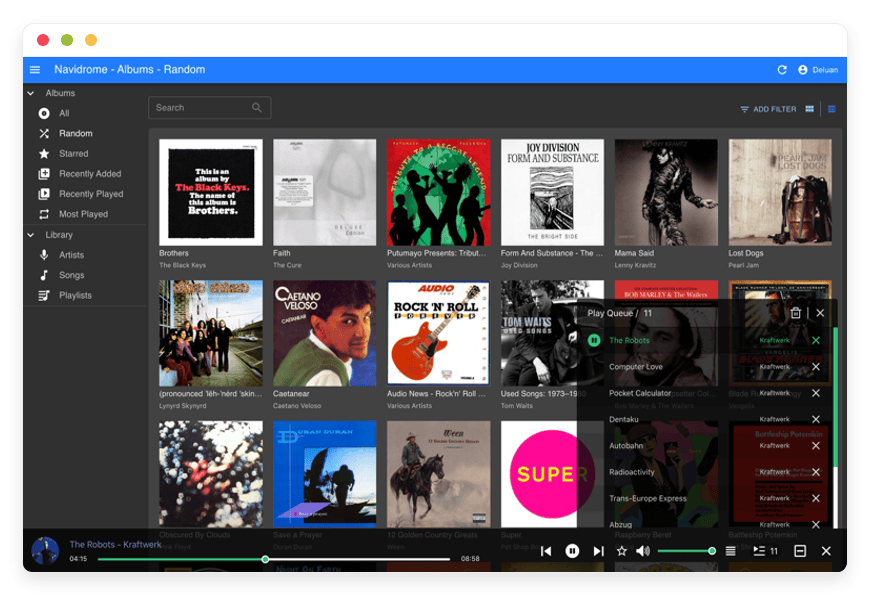
Navidrome is an open-source, web-based music collection server and streamer. Created by Deluan Quintão and maintained by a passionate open-source community, it serves as a personal, highly optimized alternative to commercial music platforms.
Navidrome scans the digital music files stored on your server and organizes them into a beautiful, modern web player. It indexes your artists, albums, and tracks, allowing you to search, filter, and stream your entire catalog. Written entirely in the Go programming language, the software is famous for its incredible speed and minimal system requirements. It runs efficiently, loading massive libraries in a fraction of a second.
Why is it trending?
People are tired of renting their music. Commercial streaming services frequently remove albums due to licensing disputes. They compress audio files, altering the original mastering. Audiophiles and music collectors are moving toward self-hosted solutions to maintain permanent access to their media. Navidrome is trending because it provides the polished, premium experience of a modern app while keeping your actual music files entirely under your control.
Why Choose Navidrome?
Choosing Navidrome means choosing open-source freedom. You dictate the quality of your audio files, the organization of your library, and the exact version of the album you want to hear.
When you look into Hosting Navidrome, you realize it replaces proprietary software entirely. You no longer have to rely on restrictive commercial platforms to access your favorite tracks. Instead, you have a private system that integrates seamlessly with a massive ecosystem of third-party mobile apps. Because Navidrome uses the standard Subsonic API, developers worldwide have built incredible, feature-rich applications specifically for it.
Key Features of Navidrome
Navidrome packs an impressive amount of power into a lightweight package. The developers focused strictly on audio playback, removing the bloat found in other media servers. Here is a deep dive into the specific features that make it the premier choice for music enthusiasts.
Subsonic API Compatibility
Navidrome communicates perfectly with the Subsonic API. This means you are never locked into a single web interface. You can download apps like Symfonium, Play:Sub, or DSub on your mobile device, enter your server details, and instantly access your library.
The workflow benefit here is monumental. You get a native application experience on your phone, complete with offline caching, widget support, and Android Auto or Apple CarPlay integration. All of this is powered silently by your private server.
Ultra-Low Resource Footprint
Because developers built Navidrome using Go, it operates with ruthless efficiency. It does not rely on heavy runtime environments.
The workflow benefit is raw speed and stability. You can load a library containing hundreds of thousands of tracks, and the web interface remains lightning-fast. It does not hog memory or overload the CPU. You experience instant search results and immediate playback, regardless of the size of your collection.
Multi-Library Support
Many collectors organize their audio into distinct categories. You might have a folder for standard music, a folder for classical albums, and a completely separate folder for audiobooks or podcasts. Navidrome supports multiple library paths.
The workflow benefit is exact organization. You can point the software to different directories and keep your media separated. When you shuffle your main music library, you will not suddenly hear a chapter of an audiobook playing in the middle of a playlist.
Smart Playlists and Advanced Filtering
Navidrome allows you to create dynamic, rules-based playlists. You can set criteria using standard .m3u files or through dynamic queries. You can build lists for "tracks added in the last month," "highly rated jazz songs," or "albums from 1994."
The workflow benefit is automated curation. The server automatically updates these playlists as your library grows. You always have fresh, relevant music ready to play without manual drag-and-drop management.
Multi-User Capabilities
You do not have to enjoy your music library alone. Navidrome supports multiple users out of the box. As an administrator, you can invite friends and family to the platform.
The workflow benefit is distinct personalization. Each person gets their own individual profile. Your family members can log in, create their own playlists, star their favorite tracks, and maintain individual play counts. Your listening history never gets mixed up with someone else's.
On-The-Fly Transcoding
You might have a library full of massive, uncompressed FLAC or WAV files. Streaming these over a weak cellular connection will buffer endlessly and drain your mobile data. Navidrome solves this through powerful on-the-fly transcoding using FFmpeg.
The workflow benefit is continuous playback anywhere. The server automatically converts heavy files into lighter formats, like MP3 or Opus, specifically for your mobile device. You get high fidelity at home and reliable, fast streaming on the road.
Last.fm and ListenBrainz Scrobbling
If you track your listening habits, Navidrome integrates directly with external tracking services like Last.fm and ListenBrainz. You simply enter your API credentials in your user profile.
The workflow benefit is seamless history tracking. The server automatically logs every track you play across all your devices. It builds your personal music statistics without requiring extra plugins or background apps running on your phone.
Public Sharing Links
Sometimes you want to share a specific album or a curated playlist with a friend who does not have an account on your server. Navidrome includes a sharing feature that generates a unique, secure public URL.
The workflow benefit is frictionless sharing. You copy the link and send it via text message. Your friend clicks the link and can immediately stream the selected music through their web browser without needing to log in or download any software.
Jukebox Mode
Navidrome usually streams music over the network to your local device. However, it also includes a Jukebox mode. This allows the server to send audio directly to the sound card or digital-to-analog converter (DAC) connected directly to the server hardware.
The workflow benefit is centralized control. You can connect your server directly to your home theater amplifier. You then use your phone or laptop as a remote control, commanding the server to play the music physically in your living room for the highest possible audio quality.
Advanced Metadata and Custom Tags
Music collectors care deeply about their metadata. Navidrome reads and respects the tags you embedded in your files. It provides excellent support for compilations, multiple artists on a single track, and multi-disc box sets.
The workflow benefit is highly accurate presentation. Your carefully curated library appears exactly as you intended. You do not have to fight the software to force albums into the correct order. Navidrome reads the raw embedded data and builds the interface around your exact specifications.
Solutions per Industry
While individuals love Navidrome for personal listening, professional teams and organizations also use it to solve complex audio management problems.
Audio Production Agencies
Recording studios and audio engineers manage massive amounts of raw stems, demo tracks, and final masters. Sending large WAV files via email or standard cloud drives is clunky. Clients often struggle to download the files or play them on their phones.
By starting Navidrome, a studio can create a private, high-resolution streaming platform for their clients. Engineers can upload the daily mixes directly to the server. Clients can log in securely from their phones to review the tracks in perfect quality while commuting or driving. It provides a highly professional, branded listening experience that removes all technical friction for the client.
Retail and Hospitality
Coffee shops, boutique retail stores, and restaurants need reliable background music. Relying on an employee's personal phone or a commercial streaming service often creates an inconsistent vibe.
A business owner can use Navidrome to curate exact playlists for different times of the day. They can set up dedicated user profiles for each store location. Managers simply open a web browser on the store's computer, press play, and the curated atmosphere runs flawlessly all day. The business maintains complete control over the auditory brand experience without relying on external algorithms.
Education and Archival Libraries
Universities, historical societies, and language schools often possess vast archives of recorded lectures, historical broadcasts, and oral histories. Organizing these audio files is difficult. Standard media players fail to handle massive archives effectively.
Navidrome offers a simple way to catalog these specific archives. Librarians can apply precise metadata to the recordings using custom tags. Students and researchers can then search for specific years, subjects, or speakers. They stream the educational material directly from the institution's private server, ensuring academic resources are accessible globally.
Independent Record Labels
Independent labels handle large catalogs of unreleased music, promotional tracks, and back catalogs. They frequently need to share full albums with music journalists, radio hosts, and internal staff securely. Sending ZIP files is outdated and slow.
A label manager can use Navidrome to host the entire catalog. They create private accounts for their staff to access any track at any time. When promoting a new release, they use the public sharing feature to generate direct streaming links for press contacts. The journalists receive an elegant, instantly playable link instead of a cumbersome download, increasing the chances they actually listen to the promo.
Fitness Studios and Gyms
Gyms require specific, high-energy music to keep classes moving. Fitness instructors spend hours building high-BPM playlists for spin classes, yoga sessions, or weightlifting circuits. Managing these files across multiple instructor phones is chaotic.
A gym owner can launch a central Navidrome server. Instructors upload their custom mixes to specific folders. During a class, the instructor logs into the server from the studio's tablet and plays their set. They can also use mobile apps to cache the playlists offline, ensuring the music never stops even if the gym's internet connection drops.
Theatre and Performing Arts
Live theatre productions require precise audio cues, background atmospheres, and rehearsal tracks. Actors need access to musical numbers to practice at home. Sound designers need a central repository to manage audio drafts.
A theatre company uses Navidrome as their central audio hub. The sound designer uploads the latest versions of the soundscape. The cast members log in from their phones to practice their vocal parts using the rehearsal tracks. The director can review the sound design from any location, streamlining the entire production workflow.
Radio Stations and Broadcasters
Community and internet radio stations generate hundreds of hours of recorded broadcasts every month. Listeners frequently request access to past shows. Archiving these shows on a standard website leads to poor playback experiences.
The station manager automatically routes recorded MP3s of past broadcasts into a Navidrome folder. Listeners can then access a dedicated archive portal. They can search for their favorite DJ, filter by the date of the broadcast, and stream the massive two-hour files without downloading them. It provides a professional, on-demand listen-back service for the station.
Game Development Studios
Video game development requires managing thousands of small audio files. This includes voiceover lines, ambient background loops, and hard sound effects like footsteps or explosions. Finding the right sound effect quickly is crucial for level designers.
An audio director organizes all the sound assets on a central Navidrome server. By properly tagging the files, level designers can instantly search for "metal footstep" or "laser blast." They can audition the sounds immediately in their web browser without downloading the entire audio repository to their local machine, speeding up the entire development cycle.
Navidrome vs Other Softwares
Understanding how Navidrome compares to other audio applications helps clarify its unique value. We focus strictly on the software differences.
| Feature | Navidrome | Spotify / Apple Music | Plexamp |
Media Source | Your private files | Rented commercial catalog | Your private files |
API Ecosystem | Open Subsonic API | Closed / Proprietary | Proprietary |
Resource Usage | Extremely low (Go) | Heavy mobile apps | Moderate to High |
| Cost | 100% Free Open-Source | Monthly Subscription | Requires Paid Plex Pass for best features |
Offline Syncing | Supported via mobile apps | Supported | Supported |
Metadata Control | Complete control | No control | Partial control |
| Focus | Audio only | Audio and Podcasts | Movies, TV, and Audio |
Use Cases and Applications
Navidrome adapts perfectly to various practical scenarios. Here is how people use the software every day to improve their audio experience.
The Audiophile Vault
Listeners who invest in high-end audio equipment need uncompressed source material. They use Navidrome to stream 24-bit/192kHz FLAC or ALAC files directly to their home theater receivers or desktop DACs. The software ensures the audio path remains bit-perfect. It supports ReplayGain tags, ensuring volume levels remain consistent without altering the original dynamic range. They get the highest possible fidelity without commercial compression getting in the way.
Family Music Sharing
A parent curates a massive library of classic rock, pop, and classical music. They create separate accounts for their children. The children can browse the curated, safe library, build their own study playlists, and listen on their tablets. The entire family shares one central library without paying for a costly commercial family plan. The parent retains control over exactly what audio is available on the platform.
Offline Syncing for Commuters
A commuter travels through subway tunnels or rural areas with poor cellular reception. Before leaving the house, they use a Subsonic-compatible app to connect to their Navidrome server. They select a few albums and download them locally to their phone. They enjoy uninterrupted music on the train. When they return home to an internet connection, the app silently syncs their play counts and favorite ratings back to the central server.
Custom DJ Libraries
Working DJs constantly acquire new tracks, bootlegs, and remixes. They need to audition these tracks while walking, driving, or working out to plan their upcoming sets. By placing their new acquisitions into a designated Navidrome directory, they can stream their setlists from anywhere. They quickly rate the tracks on their phone, and those ratings sync back to their main computer, saving them hours of preparation time.
The Personal Radio Station
Some listeners do not want to choose an album. They want an endless stream of music they know they love. They use Navidrome's shuffle mode combined with dynamic smart playlists. They tell the server to shuffle "all unplayed tracks from the 1980s." Navidrome instantly builds a massive, randomized queue. It acts as a highly personalized radio station, playing deep cuts and forgotten favorites without any commercial interruptions.
How DANIAN Helps
We believe you should spend your time enjoying your music, not troubleshooting Linux servers. DANIAN acts as the quiet enabler behind your audio library. We handle the mess; you get the glory.
Fully Managed
We handle the hosting. Our team manages everything from initial setup to regular updates, security patches, and performance monitoring. Your software is always optimized without you having to lift a finger. You simply log in and press play.
Backup & Monitoring
Losing your playlists, user data, and carefully constructed smart playlists is frustrating. We protect your setup with automated daily backups. These are configured automatically, stored securely, and feature a simple one-click restore process. If you ever make a mistake or accidentally delete a user profile, your library data is completely safe.
SSL & Firewall
With cybersecurity threats on the rise, we take security seriously. From automated updates to proactive monitoring and custom firewalls, we make sure your environment is secure 24/7. Your music streams and user passwords are encrypted by default, preventing unauthorized access to your media server.
Updates
Open-source software moves fast. The Navidrome community frequently releases new features, performance improvements, and bug fixes. Security patches and new versions are applied automatically without your intervention. You always run the latest, fastest version of the software without having to read release notes or run upgrade scripts.
24/7 Monitoring
Our systems watch your server around the clock. Issues are detected and often resolved before you notice a skip in your audio playback. We maintain the health of the hardware and the network, ensuring maximum uptime.
Guaranteed Performance
Downtime can be detrimental to your business or daily routine. With our scalable infrastructure, we ensure consistent performance even as your user base grows. Whether you are streaming a single MP3, scanning a massive new folder of music, or transcoding multiple FLAC files simultaneously, your server remains highly responsive and fast.
7-Day Free Trial
We remove the risk. Less setup, more development. Our service is affordable from the start, and we provide real help when you need it. You can test the platform completely free for a week to see exactly how fast Navidrome Managed hosting performs.
How to Get Started
Getting your own music server running is incredibly simple with DANIAN. You do not need to read technical manuals, manage storage volumes, or write a single line of code.
Step 1: Visit danian.co and sign up for an account.
Step 2: Select Navidrome from our software catalog.
Step 3: Relax while DANIAN launches your software.
FAQ
Do I need to pay for a Navidrome license?
No. Navidrome is completely free and open-source software. There are no premium tiers or hidden software fees. You only pay for the managed hosting infrastructure provided by DANIAN, which keeps the server online, fast, and secure.
How do I upload my music files to the server?
You can easily transfer your audio files to your DANIAN server using standard secure file transfer protocols like SFTP or WebDAV. Once the files are placed in your designated music folder, Navidrome automatically detects the changes, scans the new files, and updates your library interface instantly.
Which mobile apps work perfectly with Navidrome?
Because Navidrome uses the Subsonic API, it works seamlessly with dozens of mature applications. Popular choices include Symfonium, DSub, and ultrasonic for Android devices, as well as Play:Sub and Amperfy for iOS devices.
Can Navidrome handle high-resolution FLAC files?
Absolutely. It handles large FLAC files perfectly. You can stream them natively if your network and playback device support the bandwidth. Alternatively, you can configure the server to transcode them to a smaller format on the fly to save mobile data while commuting.
Does Navidrome support multiple users and accounts?
Yes. You can create as many user accounts as you need. Each user gets their own dedicated login credentials, personalized playlists, favorite tracks, and entirely independent play history.
How exactly does the on-the-fly transcoding work?
Transcoding happens automatically in the background using FFmpeg. If you configure your mobile app to request a lower bitrate (for example, 128kbps over a weak cellular connection), Navidrome takes your original heavy file, converts it instantly in real-time, and streams the lighter version directly to your phone.
What happens if my music collection grows significantly?
Navidrome is built precisely to handle massive collections. Whether you have one thousand tracks or one million tracks, the Go-based architecture ensures the software remains fast. If you run out of physical storage space on your server, you can easily upgrade your DANIAN plan to accommodate your growing library without interrupting your service.
Are my custom playlists and user data backed up?
Yes. While your actual music files are safely stored, Navidrome also maintains a database containing your user profiles, passwords, smart playlists, and play counts. DANIAN backs up this entire database daily. You can restore it with one click if needed.
Does the software support ReplayGain for volume normalization?
Yes. If your audio files contain ReplayGain tags, Navidrome reads them and sends that data to the compatible mobile apps or web player. This ensures that a quiet acoustic track and a loud rock track play at a consistent volume, saving you from constantly adjusting the volume knob.
Is it difficult to create dynamic smart playlists?
Not at all. Navidrome allows you to build smart playlists using a simple query language. You can combine different filters like genre, year, play count, and rating to generate lists that automatically update themselves based on your listening habits and new uploads.
Conclusion
Navidrome represents the ultimate way to organize, control, and enjoy your personal music collection. It offers incredible speed, seamless mobile app integration, and total freedom over your audio files. By combining this powerful open-source software with a reliable managed infrastructure, you get a premium streaming experience without the technical headaches.
You retain complete control over your media, enjoying high-fidelity playback anywhere in the world. You never have to worry about missing albums, compressed audio quality, or sudden price hikes from commercial streaming giants.
Experience the power of fully managed open-source.


