
Managed Lychee Hosting: The Ultimate Photo Management Guide
TLDR - Quick Answer
Lychee is a beautiful, fast, self-hosted photo management tool. It looks and feels exactly like a native desktop application, running directly inside your web browser.
Choosing Managed Lychee Hosting means you skip the complex server configuration and database management. You get a production-ready environment instantly, without ever touching a command terminal.
Immediate Value: Fast uploads and smooth batch editing using a familiar, desktop-like interface.
Immediate Value: Native support for accurate EXIF and IPTC metadata extraction from your raw files.
Immediate Value: Easy public sharing with one-click links and secure password-protected albums.
Immediate Value: Automatic image processing and sharp thumbnail generation via ImageMagick.
Immediate Value: Instant setup and automated daily maintenance handled entirely by your managed host.
Introduction
Managing thousands of high-resolution photos quickly becomes a massive chore. If you are a photographer, designer, or visual collector, your library grows rapidly. Cloud services often compress your precious files without asking. They restrict your storage limits based on arbitrary rules. They constantly push you toward expensive subscription tiers just to keep your own work safe. The monthly bills add up quickly. Furthermore, the interfaces are often cluttered with features you never requested.
But running a complex photo library on your own server is a second job. Configuring PHP environments takes incredible patience. Maintaining SQL databases requires specialized technical knowledge. Applying crucial security updates steals precious time away from actually doing your creative work. You want to organize photos, not debug server errors late at night.
DANIAN operates as your invisible infrastructure. We handle the heavy lifting of server management so you can focus entirely on organizing and sharing your images. We configure the servers, handle the daily backups, and keep the application running flawlessly in the background.
What is Lychee?
Lychee is a free, powerful photo-management tool that runs on your own web-space. It gives you the exact ability to upload, manage, and share photos like a native application. The software was originally created by Tobias Reich, known online as electerious. He wanted to build a beautiful, fast alternative to bulky, outdated gallery software. In 2018, the project transitioned to the LycheeOrg community. This ensured continuous improvement and long-term support for the software.
The interface is impressively clean, intuitive, and extremely fast. Built on reliable technologies like PHP and MySQL, it delivers a highly stable experience. You can upload files from your local computer, pull them from a remote URL, or import them from Dropbox. Everything stays securely stored on your own server. You are in complete control of your media.
Why is it trending?
Photographers and creative professionals are tired of subscriptions that offer diminishing returns. Lychee answers this exact frustration by offering unlimited storage potential. It never compresses your original files unless you specifically want it to. The platform gives you absolute control over your media architecture.
It provides essential professional features like password protection, custom plugins, and direct keyboard shortcuts. The active community around the software constantly builds useful extensions. This makes it highly adaptable for modern workflows. Because it looks and feels like a sleek native application, users do not have to learn a complicated new system. It simply works exactly the way you expect a modern gallery to work.
Why Choose Lychee?
Choosing open-source software means you dictate exactly how your system operates. When you rely on proprietary services, you are bound by their arbitrary limits. You face sudden price hikes and confusing policy changes. You lose control over how your files are processed and displayed to the world.
Hosting Lychee changes that dynamic entirely. You decide exactly how much storage you need. You decide who gets access to your private albums. It easily replaces massive, bulky applications by bringing all the core functionalities directly into your web browser. The tool extracts your EXIF and IPTC data automatically. This makes it incredibly easy to search through vast visual archives instantly.
You get an unrestricted, native-app experience tailored perfectly for professional photo management. There are no ads, no hidden tracking codes, and no artificial limits on your creativity. Hosting Lychee gives you the ultimate freedom to build a professional portfolio or private archive exactly the way you envision it.
Key Features of Lychee
Lychee stands out because it focuses on a seamless, uncompromised user experience. It avoids unnecessary clutter while delivering powerful, professional tools for serious image organization.
Desktop-Like Batch Editing and Drag-and-Drop
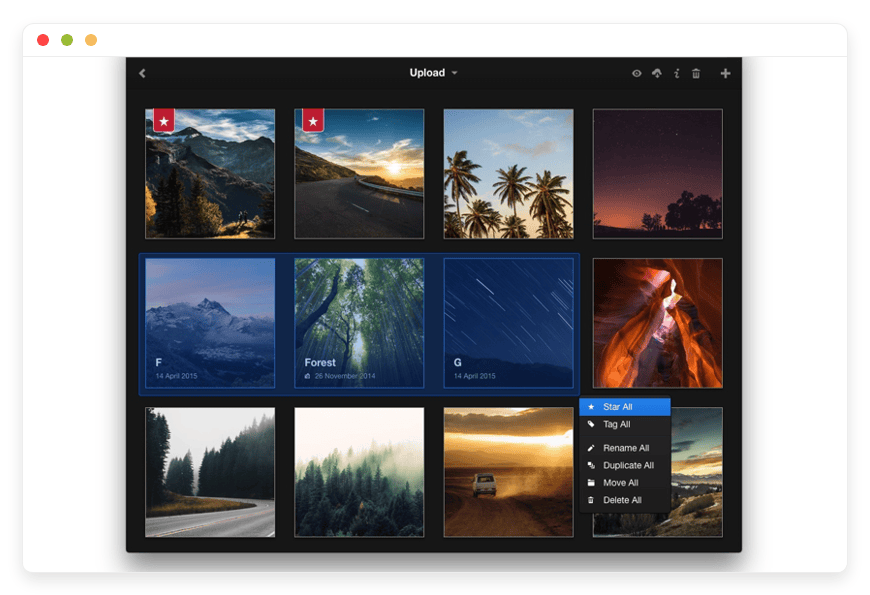
Organizing your gallery is incredibly fast. Lychee supports multi-select capabilities that feel exactly like using a modern desktop operating system. You can shift-click multiple images to highlight a massive batch at once. You can upload, move, rename, describe, delete, or search your photos in seconds. You can even drag and drop files directly from your computer into the browser. This workflow benefit means you spend less time clicking individual files and more time curating your actual portfolios.Smart Albums and Automated Organization
Keeping track of new uploads is effortless. Lychee includes built-in Smart Albums that automatically categorize your images. You get dedicated views for Recent, Starred, Public, and Unsorted photos. This workflow benefit guarantees that you never lose a file in a massive database. If you forget to assign an image to a specific client album, you can simply check the Unsorted folder and move it instantly.Comprehensive Metadata Support (EXIF and IPTC)
Professionals need exact details about their shots. Lychee natively reads and displays EXIF and IPTC metadata during the upload process. Every detail regarding the camera model, focal length, aperture, and shutter speed is always available. You never have to guess your settings because they are clearly listed right next to your image. This is a massive workflow improvement for photographers who need to reference their technical settings for future shoots or educational workshops.Secure and Flexible Sharing Options
Sharing your work should be simple but highly secure. With just one click, you can make any photo or album completely public. If you need privacy for sensitive client deliveries, you can easily protect specific albums with secure passwords. Lychee also supports Twitter Cards and Open Graph. When you share a direct image link on social media, it renders beautifully. Your audience sees a perfect preview instead of a generic, ugly text link.Advanced Image Processing with ImageMagick
When running properly configured, Lychee uses ImageMagick behind the scenes instead of standard GD processing. This integration provides a significant performance boost to the entire application. It handles faster processing of your raw uploads and generates incredibly sharp, professional-looking thumbnails. It also creates intermediate-sized images automatically. This workflow benefit ensures your high-resolution galleries load rapidly on small mobile devices without wasting cellular bandwidth.Diverse Import Methods and Dropbox Integration
You are not restricted to simple local file uploads. Lychee lets you import photos directly from a remote server or via direct URL. You can also import images directly from Dropbox using a valid drop-ins app key. This flexibility is perfect when you need to pull existing archives into your new library without downloading them to your hard drive first. It saves hours of transfer time when migrating large collections from external services.Extensive Plugin and Extension System
The software is built to be customized from the ground up. Lychee features a robust plugin system using custom hooks. You can extend its functionality based on your specific daily needs. Popular plugins include LycheeSync for mirroring local photo directories, Lychee-Watermark for automatically stamping uploaded images, and Lychee-RSS for generating automatic XML feeds. This workflow benefit allows you to tailor the software to do exactly what your business requires.Immersive Full-Screen Viewing and Keyboard Shortcuts
Presenting your photos matters just as much as storing them. Lychee features a stunning full-screen mode that eliminates all browser distractions. You can navigate forward and backward through your albums using dedicated keyboard shortcuts. These shortcuts make browsing and managing your library incredibly efficient. You save hundreds of unnecessary mouse clicks during a long review session, allowing you to fly through your daily edits rapidly.Multi-User Support for Collaborative Teams
You do not have to manage your entire library alone. Lychee supports multi-user functionality. You can create separate accounts for different team members, giving them specific login credentials. This workflow benefit is essential for small studios where multiple photographers need to upload files to the same central database safely.
Solutions per Industry
Lychee is highly versatile and fits perfectly into various professional environments. Here is exactly how different industries use it to streamline their daily operations and solve specific pain points.
Freelance Photographers
The Problem: Photographers generate massive raw files daily. Subscription services penalize them with high costs as their storage needs grow. They also struggle to deliver large, high-quality proofs to clients without looking unprofessional.
The Solution: Lychee allows a freelance photographer to store infinite high-resolution images safely. The built-in EXIF data reader helps them track exact camera settings used for specific shoots. Furthermore, the password-protected sharing feature is absolutely perfect. They can deliver private wedding or corporate event galleries to expecting clients securely. The client gets a beautiful, unbranded viewing experience.
Creative Agencies
The Problem: Agencies manage hundreds of visual assets across multiple fast-moving campaigns. Folders get lost on shared network drives, and the wrong design versions are frequently sent to clients for review.
The Solution: By using Lychee, an agency can create dedicated, password-protected albums for each active client. The team can batch-upload final design files rapidly using the drag-and-drop interface. The client then receives a clean gallery link. They can review the work smoothly in full-screen mode without downloading heavy files to their local machines. It keeps the feedback loop fast and highly organized.
E-commerce Businesses
The Problem: Online stores require vast, organized libraries of accurate product photography. Finding the exact angle of a specific product fast is critical for busy marketing teams during a product launch.
The Solution: Lychee acts as a highly efficient, centralized image hub for e-commerce operations. Marketing teams can tag and search for exact images in seconds. They can use the Dropbox import feature to quickly sync fresh assets from remote product photographers directly into the main database. This completely eliminates the need for messy email attachments and keeps the whole team aligned.
Real Estate Professionals
The Problem: Real estate agents must share dozens of high-resolution property photos with potential buyers. Sending massive zip files via email often bounces, and generic cloud folders look cheap and unprofessional.
The Solution: Lychee gives real estate agents a professional edge. They can create a dedicated, public-facing album for every new property listing. They can simply text or email the direct link to interested buyers. The buyer can click the link on their phone and instantly view a beautiful, fast-loading gallery of the home. The intermediate-sized image generation ensures the photos load quickly even on a poor cellular connection.
Journalists and Photojournalists
The Problem: When reporting from the field, photojournalists need to send images back to their editors rapidly. They also must ensure their copyright and IPTC metadata remains intact to prove ownership and context. Many social messaging apps strip this critical data away automatically.
The Solution: Lychee retains all original data. A journalist can upload a photo directly from their mobile device to their secure Lychee server. The editor back at the news desk can immediately download the image. All IPTC metadata, including captions, locations, and copyright details, remains perfectly preserved. This ensures accurate reporting and proper legal attribution.
Educators and Researchers
The Problem: University professors and field researchers accumulate massive amounts of visual data. Whether it is microscopic imagery, historical document scans, or field expedition photos, organizing these files for lectures is overwhelming.
The Solution: Lychee provides a clean visual archiving system. Educators can categorize thousands of images into specific academic albums. They can use the search functionality to pull up exact visual references during a live lecture. They can also create password-protected albums to share sensitive research imagery safely with their enrolled students.
Web Designers and Frontend Developers
The Problem: Building websites requires managing countless logos, background images, and optimized graphics. Storing all these heavy assets directly inside a Content Management System (CMS) media library often slows the website down significantly.
The Solution: Web developers can use Lychee as an external, centralized media repository. They can host all their high-quality raw assets there. When they need a specific hero image for a new web build, they can easily grab the direct URL from Lychee. This keeps their CMS lightweight and fast while keeping their design assets perfectly organized in one dedicated space.
Lychee vs Other Softwares
How does Lychee compare to mainstream proprietary alternatives? Here is a simple breakdown of the core differences between popular tools.
| Feature | Lychee | Google Photos / Apple iCloud | Adobe Lightroom (Web) |
| Image Compression | None (Original Quality) | Aggressive Compression | Limited by Cloud Tier |
| Storage Limits | Unlimited | Restricted Tiers | Restricted Tiers |
| Metadata Extraction | Full EXIF & IPTC | Basic EXIF | Full EXIF & IPTC |
| Password Protection | Yes (Per Album) | No | No |
| Cost Structure | Free Open-Source | Monthly Subscription | Expensive Subscription |
| Custom Plugins | Yes (Watermarks, RSS) | No | No |
| Multi-User Access | Yes | Limited Family Sharing | No |
Use Cases and Applications
Lychee is powerful enough to handle a variety of demanding photo management scenarios. Here are practical ways to use it.
Client Proofing Galleries: Deliver high-quality image previews directly to clients in a professional interface. The robust password protection ensures that only authorized viewers can access the specific event or portrait session. It looks highly professional and builds instant client trust.
Centralized Marketing Asset Library: Store all company logos, product shots, and social media banners in one accessible location. Fast tagging and search capabilities make retrieval instant for social media managers needing to post quickly.
Family Photo Archives: Consolidate decades of digital family photos into a single, beautifully organized system. Keep original file sizes intact without paying monthly cloud storage fees. Navigate through years of memories using simple keyboard shortcuts.
Remote Server Syncing: Use the popular LycheeSync plugin to automatically mirror a local directory of photos to your web-facing gallery. This creates an automated backup and display system in one simple step, saving hours of manual uploading.
Social Media Image Hosting: Use the built-in Twitter Cards and Open Graph support to host your own images for blogs and tweets. When you paste the link on social media platforms, the image previews perfectly every single time, driving much more engagement.
How DANIAN Helps
Less Setup, More Development. Affordable from the Start. Real Help When You Need It.
We act as the quiet enabler behind your software. We handle the messy technical details so you get the glory of a perfect, fast-loading photo gallery.
Fully Managed: We handle the hosting. Our team manages everything from initial setup to regular updates, security patches, and performance monitoring. Your software is always optimized without you having to lift a finger.
Backup & Monitoring: Configured automatically, stored securely, one-click restore. Automated daily backups mean your precious photos are always stored safely.
SSL & Firewall: Secure by default. With cybersecurity threats on the rise, we take security seriously. From automated updates to proactive monitoring and custom firewalls, we make sure your environment is secure 24/7.
Updates: Security patches and new versions of Lychee are applied without your intervention. This keeps your system entirely safe from modern vulnerabilities.
24/7 monitoring: Issues are detected and often resolved before you even notice them. This ensures a completely smooth viewing experience for your clients.
Guaranteed Performance: Downtime can be detrimental to your business. With our scalable infrastructure, we ensure consistent performance even as your user base and photo library grows massively.
7-Day Free Trial: Start exploring the platform today. There is absolutely no risk to try it out.
How to Get Started
Ready to build your ultimate photo library? Getting your system online is incredibly simple.
Visit danian.co and sign up for a new account.
Select Lychee from our extensive software catalog.
Relax while DANIAN gets your software running securely in the background.
FAQ
Does Lychee compress my uploaded photos?
No. Lychee uploads and stores your images in their original, unedited quality. It does not apply any aggressive compression, making it perfect for photographers who need flawless pixel quality for printing.
Does Lychee support video files?
Lychee is primarily built and optimized for robust photo management. While it excels at handling large image libraries, it is not designed as a dedicated video streaming platform.
Can I import my existing Dropbox photos directly?
Yes. You can import images straight from your Dropbox account. You simply need to configure a drop-ins app key within your Lychee settings panel to enable the direct connection.
Is Lychee free to use?
Yes. The software itself is entirely open-source and completely free under the MIT license. You only pay for the infrastructure and server resources required to keep it online.
Does Lychee support keyboard shortcuts?
Absolutely. Lychee includes extensive keyboard shortcuts for navigating between albums, viewing images in full-screen mode, and managing your files rapidly without reaching for a mouse.
Do I need to know how to code to use Lychee?
Not at all. The entire interface operates just like a standard desktop application. If you choose Managed Lychee Hosting, you will not even have to touch a command line to start using it.
Can I create private albums for my clients?
Yes. You can easily set a secure password for any specific album. Only people who have the exact link and the correct password will be able to view those photos.
Conclusion
Lychee is an exceptional tool for anyone serious about organizing, viewing, and sharing high-quality photos. It strips away the frustrating clutter and restrictive limits of corporate cloud drives. Instead, it gives you a beautiful, native-app experience directly inside your browser.
By choosing a managed approach, you completely remove the heavy burden of server administration. You get all the powerful features of this incredible software without experiencing any of the technical headaches.
Experience the power of fully managed open-source.


