
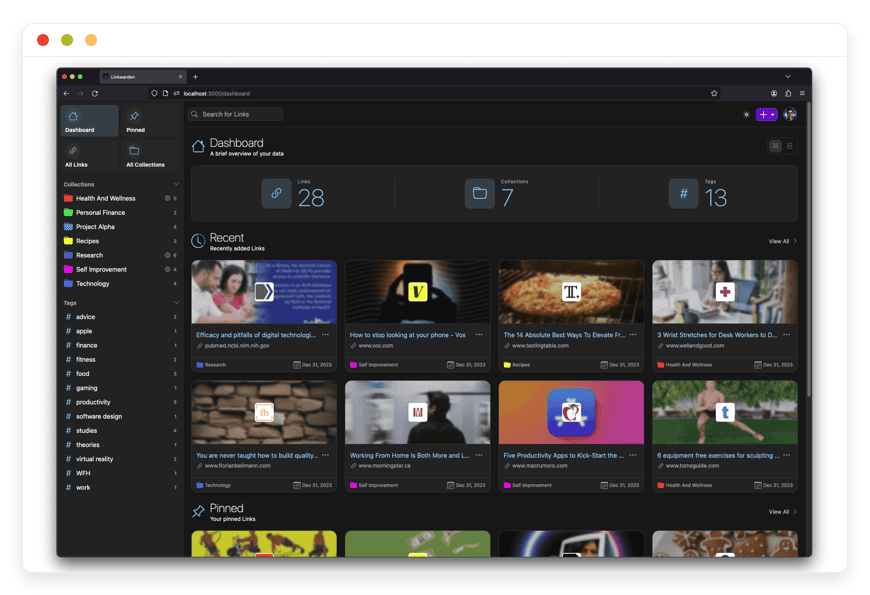
Managed Linkwarden Hosting - Stop Losing Your Links
You save a great web page to read later. Months pass. You finally click the link. The page is totally blank. The site is dead. The text is gone forever.
This happens all the time. The web changes fast. Authors delete old posts. Sites shut down without warning. Normal tools only save the web link. They do not save the real text.
Linkwarden fixes this exact flaw. It keeps the whole web page safely stored forever.
But running server tools yourself is hard work. You must set up data stores. You must run daily updates. You must watch server health. It turns into a painful second job.
DANIAN works as your hidden server team. We handle the tech mess so you can build your reading list.
Skip the hard work.
TLDR: Quick Answer
Linkwarden is a strong, open-source tool that collects, reads, tags, and safely keeps web pages offline. Managed Linkwarden hosting gives you the fastest path to running this app without the heavy tech burden.
The Immediate Value of Managed Hosting:
Zero Server Setup: Launch your strict reading vault in bare minutes without touching a command line.
Auto Server Care: We handle all the tough updates, deep backups, and safety patches behind the scenes.
Permanent Uptime: Your saved articles and shared team folders are always online and ready to view.
Flat Fair Costs: Avoid sudden cloud bill shocks. Get premium speed for a flat, steady price.
Instant Peace of Mind: Focus deeply on your research while our expert team handles the servers.
What is Linkwarden?
Linkwarden is an open-source tool built to save the web. It helps you collect, read, tag, and keep key facts from the internet.
Normal bookmarks break often. Linkwarden acts as your own private time machine. It grabs the real page and locks it down. Daniel Phiri built the core app. A massive group of coders helps keep it fast and secure. They built the tool for one pure reason: useful web pages vanish.
The app blends the clean feel of a modern reading tool with the rock-solid strength of a deep web vault. You can group links fast. You can add smart tags. You can share large folders with your peers.
Why is it Trending?
People hate losing good facts. The web shifts daily. Great posts get locked behind pay walls. Rich forums go dark.
Experts need a way to freeze pages exactly as they found them. Linkwarden is popular because it stops link rot. You never lose a key source again. You hold full power over your saved facts. It gives you a real safety net.
Why Choose Linkwarden?
Choosing Linkwarden means choosing pure open-source freedom. You get a full, rich tool that easily beats closed, paid apps.
Paid tools often hide their best traits behind steep monthly fees. They might limit how many highlights you can make. They might cap how many links you can save.
With Linkwarden, you face zero fake limits. You can make endless tags and groups. You can save as many pages as your disk holds.
Hosting Linkwarden gives you total rule over your reading habits. You pick who sees your groups. You control how your pages stay saved. You get the sleek feel of a modern mobile app with the clear truth of open code.
Key Features of Linkwarden
Linkwarden comes packed with strong tools. These tools make your daily reading and deep research much better. Here is a deep dive into what makes this app stand out.
Full Page Saving
Normal links break when a site updates. Linkwarden stops this by backing up each page in three distinct formats. When you save a link, the tool takes a full page image. It saves a high grade PDF. It also saves a raw HTML file. You always have the true text. You keep it even if the source site goes totally dark.
Local AI Tags
Sorting thousands of links by hand takes hours. Linkwarden features a local AI worker. This smart AI reads the text of your saved links. It can auto create and apply smart tags. Or, you can feed it a fixed list of tags. The AI will sort your new links into those exact tags. Your link vault stays neat with zero effort from you.
Clean Reader View
Modern web sites are full of pop up ads. They have huge banners and loud videos. Linkwarden strips all of this junk away. It gives you a clean, clear reading space. You can change the font style. You can make the text bigger for easy reading. You can switch to a dark theme at night.
Highlights and Notes
Just reading is not enough. You need to mark key facts. In the reader view, you can highlight parts of the text. You can add your own notes right on the page. These notes stay glued to the text forever. When you review the page months later, your exact thoughts are right there waiting for you.
Team Sharing
Research is often a group task. Linkwarden lets you invite friends or team mates to specific groups. You can set firm rules for each person. Some can add links. Some can only read. This gives you total rule over your shared space. You can also make a group public to share neat links with the whole web.
Cross System Apps
Your links should be with you at all times. Linkwarden offers sleek native apps for Apple and Android phones. It also supports a fast web app for desktop use. You can save web pages fast using their open source browser add-on. Your private vault is always exactly one click away.
Fast Apple Shortcuts
If you use an iPhone or a Mac, you can speed up your work. The app fully supports Apple Shortcuts. You can build custom daily flows. You can save links with fast voice prompts. You can set up smart actions that run deeply in the background.
Single File Uploads
Sometimes you save HTML files by hand. You might use other tools to scrape web pages. Linkwarden lets you upload these single files straight into your vault. It reads the file, extracts the text, and stores it safely. This makes moving old local files a total breeze.
Floccus Link Sync
If you have huge folders of browser links, moving them is a massive pain. Linkwarden works great with Floccus. Floccus syncs your old browser links right into your Linkwarden dashboard. Your move to a true web vault is fast and totally smooth.
Deep Text Search
Finding a specific post from three years ago is very hard. Linkwarden features a strong deep search tool. It searches through the actual text of your saved pages. It does not just search the title. You can use smart search terms. You can filter by tags. You find exactly what you need in brief seconds.
Wayback Machine Link
For the best safety, Linkwarden connects directly to the Internet Archive. You can choose to auto send your saved pages straight to the Wayback Machine. This makes a public snapshot of the page. It adds an extra layer of history keeping to your daily routine.
SSO and Fast Login
If you run a big team, logging in should be fast. The app supports main single sign on methods. You can connect it to your firm's central login system. Team members do not need to make new passwords. They just click one button and they are right in.
Solutions per Industry
Linkwarden is a highly flexible tool. Teams in all fields use it to solve tricky data problems every single day. Here is a deep look at how different trades use the app to stay ahead of the curve.
Research and Schools
Experts read hundreds of complex papers, journals, and essays. Citing a web source is a huge risk. The page might change or vanish before the final paper gets printed. Linkwarden solves this massive flaw perfectly. It builds a firm PDF and a raw HTML file for every single source. Experts can highlight key claims right in the reader view. They can add their own deep notes. They can group these sources into shared folders for their whole study group. When it is time to write the final piece, all the quotes are locked firmly in place. The exact text they read on day one is still there on day four hundred. This stops broken links in footnotes. It keeps hard facts safe for years to come.
Design and Ad Shops
Design pros constantly hunt for fresh visual ideas. They save rival websites, cool page layouts, and slick brand styles. But, websites go through visual tweaks very often. A cool layout you saw on Monday might be completely gone by Friday. Linkwarden helps creative teams build true, lasting swipe files. Because the app takes a full page screen shot, the exact visual design is frozen in time. The bright colors, unique fonts, and clean spacing are caught perfectly. Teams can build massive visual boards. They can share these rich boards fast with new clients. This keeps the whole team inspired. They never have to rely on broken links or fuzzy memories of cool designs.
Code and Software Build Teams
Coders rely daily on API guides, bug threads, and neat code tips. If a code library updates and the old guide is wiped out, a major project can fully stall. Broken code guides cost tech teams hours of lost work. Coders use Linkwarden to safely save the exact version of the guide they truly need. They can save specific GitHub problem threads. With the deep text search, they can instantly retrieve specific code blocks from their own private knowledge base months later. The tool strips away the noise and just leaves the raw code and plain text. This keeps the whole dev team moving fast without fearing lost guides.
Legal Experts and Law Firms
Law teams deal with massive piles of strict facts. They often need to save web pages as hard proof for a huge trial. A deleted tweet or a changed blog post can ruin a strong case. Legal experts use Linkwarden to freeze web pages exactly as they appear at a specific exact time. The screen shot and the clean PDF act as solid proof of what was truly posted. Law teams can group these saved pages strictly by client or by case number. They can add private notes about how a certain web page proves their main point. They can share these case groups safely with the lead trial team. This turns chaotic web surfing into a neat, locked vault of clear proof.
News Writers and Reporters
Writing deep news stories takes months of hard digging. Reporters track down vague web posts, shady press releases, and strange forum posts. Bad actors often try to scrub the web and delete their old posts to hide the clear truth. Linkwarden is a reporter's absolute best friend. It acts as an instant trap for hard facts. Once a reporter saves a link, it is locked down. The target can delete their site, but the reporter still has the firm PDF, the image, and the plain text. Reporters can group all clues for a single story into a shared team folder. They can invite their head editors to view the vault. This keeps the news desk backed up with hard, frozen facts that no one can erase.
Search Rank and Web Marketing
Marketing teams must watch their close rivals like hawks. They track how rival sites rank, what smart words they use, and how they pitch their fresh goods. When a rival changes their home page, the marketing team needs to know exactly what changed. Linkwarden lets marketers build a massive vault of rival web pages. They can tag pages by tactic, visual style, or ad spend. Since the app grabs a screen shot of the whole long page, marketers can look back over a full year and see exactly how a rival brand changed its look. They can also use the tool to save cool email forms, neat pop ups, and great ad copy. It is the perfect spy vault for digital teams.
Online Store Runners
Running a big web store means juggling hundreds of vendors, parts, and prices. Store managers often need to refer to old supplier lists or past price charts. Suppliers change their web sites all the time, breaking old safe links. With Linkwarden, store teams can save full vendor catalogs strictly offline. They can save neat links to rival product pages to track sudden price drops. If a rival puts an item on deep sale, the store manager can save the page, capture the price proof, and group it smartly by product type. They can also save good customer reviews from other sites to study much later. It keeps all retail facts neatly sorted and truly safe.
Money Analysts and Planners
Watching the fast stock market requires deep, pure focus. Analysts read long earnings calls, complex market charts, and fast news updates. Financial data changes by the strict minute. An article posted in the early morning might be completely rewritten by noon. Analysts use Linkwarden to catch specific market claims the exact moment they are posted. They freeze the charts and text safely in time. They can group these saved pages tightly by market sector, stock ticker, or known risk level. The deep text search lets them instantly recall what a CEO said in a minor blog post two years ago. It gives them a huge edge when trying to predict what the complex market will do next.
Linkwarden vs Other Softwares
How does Linkwarden truly stack up against popular paid choices? Here is a clear breakdown of the cold facts.
| Feature | Linkwarden | Paid Option (e.g., Pocket, Raindrop) |
Full Text Saving | Yes (PDF, HTML, Image) | Often limited or needs a high paid tier |
Reader View & Notes | Yes, fully free to use | Often strictly capped on free plans |
Local AI Tags | Yes, highly private local tool | Often sends data to big cloud AI tools |
Team Sharing | Yes, highly firm rules | Often needs a costly team pricing tier |
Wayback Machine Sync | Yes, clear built in option | Very rarely supported by default |
Clear Open Code | Yes | No, completely closed and hidden code |
Many people start with paid tools like Pocket or Raindrop. These are fine for casual daily reading. But they fail poorly when you need serious, long term saving. They only save the bare link. If the web site goes down, your saved item is gone for good. To get true offline saving with these paid apps, you often have to pay steep monthly fees forever.
Linkwarden gives you the full package. You get the PDF, the clear image, and the plain text. Plus, paid tools often lock team sharing behind costly group plans. Linkwarden lets you share your groups and set complex rules without any fake limits. It respects your strict privacy. It does not scan your reading habits to sell cheap ads.
Use Cases and Applications
Linkwarden fits exactly how you process complex facts. Here are clear, practical ways you can put the app to hard work right now.
The Ultimate Brain Vault
Stop trusting your frail memory. Use the app to build a huge, clear digital brain. When you find a cool post on space, money, or old cars, save it fast. Use the local AI tools to auto sort the long posts. Over time, you build a massive, rich library of pure facts that belongs entirely to you alone.
Rival Brand Spy Vault
Small firms must carefully track what bigger rivals do. Save their pricing pages, fresh blog posts, and new feature news. Because the app takes a full picture, you have a strict, visual record of exactly how their pitch changes over time. You can easily spot their exact weak points.
Weekly Email Builder
Writers consume a huge amount of daily text to find good links for their weekly emails. You can make a group named "Next Email Ideas." During the week, use your phone app or browser add-on to save neat links to this exact group. On writing day, you have a perfectly neat list of marked pages ready to quote.
Ad Free Recipe Book
Food blogs are infamous for huge, long stories and too many flash ads. If you find a meal you love, save it straight to the app. The clean reader view totally strips away all the life stories, loud pop ups, and video ads. It leaves you with just the raw prep steps and the clean food list. You can build a firm, permanent digital cook book.
Deep Travel Plans
Planning a long trip means saving dozens of hotel sites, tour guides, and map links. Travel sites change their prices and daily deals very often. Save them all cleanly to a "Trip Plan" group. You can access your saved guides on your phone while on the actual trip, even if you fully lose cell service, because the text is securely saved offline.
How DANIAN Helps
Linkwarden is superb software. But setting it up, linking the data store, making the AI worker run, and keeping the server highly safe is pure torture. It takes precious time totally away from your real daily tasks.
DANIAN acts as your quiet, hidden helper. We handle the dirty tech mess; you get the pure glory.
Fully Managed Setup
We handle the hosting from top to bare bottom. Our expert team handles everything from the very first setup to routine daily updates, fresh patches, and smooth speed checks. Your app is always tuned up perfectly without you having to lift a single finger.
Safe Backups and Checks
Losing your saved links is a highly scary thought. We stop this harsh fear with daily auto backups. These are set up right away, kept highly secure, and offer a simple one-click fix if things go poorly. Our active checks run all day and strict night. Server faults are found and totally fixed long before you ever notice a tiny glitch.
SSL and Strict Firewalls
We make sure you are safe by default. With web threats climbing daily, we take server safety extremely seriously. From auto updates to active strict checks and strict firewalls, we make sure your setup is completely secure round the clock. Your private reading vault stays cleanly hidden from bad actors.
Smooth Auto Updates
Apps strictly need to stay current to block fresh threats. We handle all software updates deeply behind the scenes. Key security patches and exciting new versions are applied without needing any help or wasted time from you.
Guaranteed Fast Speeds
A slow load time completely ruins your reading joy. Server drops can deeply hurt your daily business tasks. With our strong, scaling servers, we ensure smooth, fast speeds even as your saved links grow massively into the heavy thousands.
7-Day Free Trial
We want you to feel the deep ease with total zero risk. You can test the fast speeds directly and see exactly how much time managed hosting completely saves you.
Less tough setup. More time to build. Fair prices directly from day one. Real, clear help exactly when you truly need it.
How to Get Started
You do not need to read thick tech books to launch your safe vault. Getting your managed Linkwarden hosting setup running takes just three incredibly fast steps.
Step 1: Join Our Platform
Visit danian.co and sign up for an account. The process is incredibly fast & simple.
Step 2: Pick Your App
Browse our large app list and select Linkwarden from the clear choices.
Step 3: Launch and Rest
Click the launch button. Sit fully back while DANIAN handles the hard work. We build your server, load the app, link the data store, and lock the strict firewalls.
FAQ
Does Linkwarden really save the whole web page?
Yes. Linkwarden goes far past just saving a weak web link. It completely pulls down a high quality PDF, a local clean HTML file, and clearly takes a full image of the exact page. Even if the true source site is deleted forever, you keep the whole plain text.
Can I bring my old links from my current browser?
Yes, for sure. You can pull in and clearly push out your links right from the main settings screen. You can also safely use the smart Floccus add-on to keep your browser links in perfect daily sync with your web dashboard.
How does the AI smart tagging work?
The smart tagging tool safely uses a local AI worker to read the plain text of your saved link. You can tell it to auto create brand new tags, or you can tightly give it a fixed list of strict tags for the AI to smartly pick from.
Is there a mobile phone app I can easily use?
Yes. Linkwarden features highly clean, fast, official native apps for both Apple and strict Android phones. You can also quickly set up the sleek web app for a quick, fully native feel on any modern clear screen.
What is the contrast between a Group and a Tag?
A saved link can strictly only sit safely inside one single Group. But, a saved link can clearly hold many different Tags. Groups act like main rigid folders and you can share them fully with peers. Tags give an extra deep search layer but you strictly cannot share them.
Do I have to pay a license fee to use the app?
No. Linkwarden is fully clear open-source software. You strictly do not pay any software license fees at all. When you securely use DANIAN, you strictly pay for the premium, highly managed hosting servers that keep your tool running blazing fast.
Can I highlight and add notes to my saved posts?
Yes. Linkwarden includes a pure reader view. Inside this clean screen, you can mark key quotes, change the font look, and type private deep notes right directly on the saved file.
Can I upload my own offline HTML files?
Yes. If you have old HTML files neatly saved on your hard drive, you can directly upload them straight into the full app. The smart tool will clearly read them and fully keep them strictly safe in your cloud vault.
Does the smart app fully support dark mode for late night reading?
Yes. The smart app has a full clear dark mode setting. This makes reading highly long posts at night incredibly much easier on your tired eyes. It fully flips the bright white clear screen to a calm, deeply dark cool look.
Can I link the app to my firm's central login system?
Yes. The smart software supports major strict single sign on secure methods. Your whole staff can smoothly log in safely using the exact same facts they use for all other deep work apps. It highly makes secure team access very smooth.
Conclusion
The vast web is very incredibly frail. Great long posts safely vanish, big strong sites totally shut down, and deep intense research is fully lost every single day. Trusting standard weak browser links is totally no longer a highly safe bet for serious true experts.
Linkwarden fully gives the absolute perfect fix. It is a highly strong, truly open-source web vault that safely and deeply keeps your key pages strictly forever. With deep plain text search, smart secure AI sorting, and stellar tight team tools, it works fully as your absolutely perfect private secure library.
But, you strictly should fully spend your precious highly limited time deeply reading and smartly building, not strongly fighting with complex web servers. Managed Linkwarden hosting totally tears firmly down every strict technical wall. We safely keep your deep vault running blazing fast, highly completely secure, and totally perfectly updated.
Feel the deeply massive strong power of completely fully managed strictly open-source software.


