
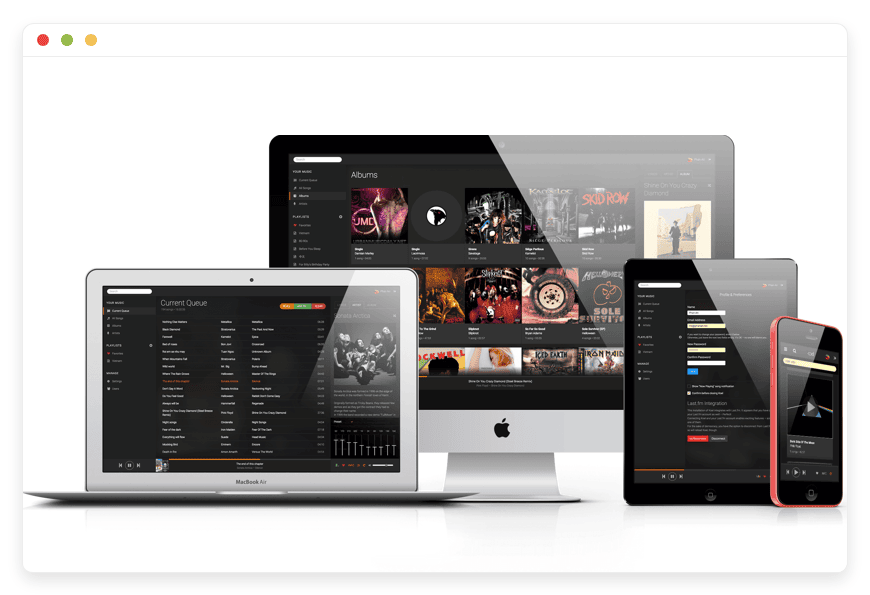
Managed Koel Hosting: Build Your Personal Music Sanctuary
TLDR - Quick Answer
What is Koel: A sleek web-based music streaming server. It looks exactly like popular commercial platforms. It runs entirely on your own audio files.
The Value of Managed Hosting: You skip the command-line setups. You avoid confusing database setups. You ignore ongoing server maintenance completely.
Immediate Value Points:
Get instant access to a pristine web-based music player.
Enjoy zero technical work or manual backend updates.
Rely on automated backups to protect your curated playlists.
Get built-in security and SSL for safe remote listening.
Stream your high-quality audio files from any device safely.
Introduction
You spend years building the perfect digital music collection. You rip high-quality lossless files from old CDs. You organize the artists carefully. You build the ultimate audio library. But listening to those files across different devices is frustrating. Moving files between phones and laptops feels like a massive chore. You end up relying on commercial streaming platforms. They compress your audio. They remove your favorite niche tracks without any warning. They charge annoying monthly fees. You want a much better way to listen to your own files.
You need a personal streaming server. But running it yourself is a second job. Managing server setups takes time. Fixing file permissions is annoying. Keeping the software updated takes time away from actually enjoying your music. A minor update can break your entire setup easily. You just want to press play. You do not want to read boring server logs.
DANIAN acts as your invisible infrastructure. We handle the technical heavy lifting for you. You get a flawless, ready-to-use audio platform on day one. We take care of the backend mess entirely. You get a beautiful frontend player.
What is Koel?
Koel is a complete web-based personal music streaming app. It was created by developer Phan An. It is built with proven web frameworks. It uses Vue on the frontend and Laravel on the backend. The interface is stunning and responsive. It is specifically designed to handle massive collections of audio files smoothly. It fetches album art automatically. It supports simple file uploads. It manages multi-user accounts flawlessly. The open-source code is licensed under MIT. This makes it a highly beloved project in the developer community.
Why is it trending?
Music lovers want total control over their listening experience. Koel is trending because it bridges a major gap. It connects local file storage with modern web convenience. It does not feel like clunky server software from a decade ago. It looks and moves exactly like the premium streaming apps you already know. The clean layout is perfect. The instant search is fast. The snappy playback makes it an absolute joy to use every single day.
Why Choose Koel?
When you choose Koel, you take back control of your media library. You are no longer subject to the changing catalogs of massive tech companies. You might have rare remixes. You might have local band recordings. You might have high-fidelity vinyl rips. Koel streams them directly to you. Your music stays exactly where you left it safely.
Hosting Koel gives you an independent audio hub. You set the rules. You organize the playlists. You decide who gets an account. It provides pure open-source freedom. It delivers a premium user experience. This experience easily rivals expensive paid subscriptions.
Key Features of Koel
Intuitive Web Interface
The interface draws deep inspiration from top commercial streaming apps. Your navigation sits cleanly on the left side. Your playback controls rest perfectly at the bottom. Everything is right where you expect it to be. You do not need a manual to start listening. It works perfectly on desktop screens. It adapts beautifully to mobile screens too.
Drag-and-Drop Media Uploads
Adding new tracks is incredibly easy. You just grab files from your computer. You drop them directly into the web interface. The system handles the background work automatically. It reads the audio tags quickly. It organizes the tracks by artist. It instantly adds them to your playable library.
Smart Playlists
You do not have to build every playlist manually. Koel lets you create smart playlists based on specific rules. You can group tracks by genre easily. You can sort by release year or play count. As your library grows, your smart playlists update automatically. They include any new matches right away. It saves you hours of manual sorting.
Broad Audio Format Support
Audiophiles love this software for a reason. It supports a massive range of audio formats. It handles standard MP3 and AAC files effortlessly. More importantly, it supports high-fidelity lossless formats. It plays FLAC, Ogg Vorbis, and WavPack files natively. You hear your music exactly as it was recorded. There is no forced compression.
Integrated Podcast Streaming
Koel goes beyond just normal music tracks. You can paste the RSS feed of your favorite podcasts directly into the app. The system subscribes to the feed right away. It fetches the latest episodes for you. It tracks your listening progress accurately. You can pause a long interview on your computer. You can resume it later from your phone at the exact same spot.
Automated Artwork Fetching
A music library without album art looks boring. It feels unfinished. The system automatically fetches missing artist images for you. It grabs album covers from the web instantly. It ensures your collection always looks vibrant. It keeps things organized and pretty. You never have to hunt down images manually again.
Live Internet Radio
You can add custom internet radio streams directly to your dashboard. You might have a favorite local station. You might like an international ambient music stream. Just paste the web link into the app. You can switch from your personal library to live radio with one simple click.
Multi-User Management
You do not have to keep your massive library to yourself. You can create separate accounts for your friends. You can add your family members easily. Each user gets their own private profile. They get their own custom playlists. They keep their own listening history. Your preferences and recommendations never mix with theirs.
Remote Playback Controller
You can control the music playing on your computer using your mobile phone. The software includes a slick remote controller feature. You open the app on your phone. You link it to your active desktop session. You can control the volume easily. You can skip tracks from across the room.
Custom Themes and Visualizers
You can customize the look of your entire player. Koel includes various color themes to match your mood. It also features a built-in visualizer. The visualizer reacts dynamically to the music playing. You can make the interface match your exact style perfectly.
Instant Unified Search
Finding a specific song in a huge library is hard. Koel makes it fast. You type a single letter in the search bar. The results appear instantly. It searches across artists, albums, and song titles all at once. It saves you from endless scrolling. You find what you want in seconds.
Music Discovery Tools
Sometimes you forget what you uploaded. The software helps you rediscover your own music. The home screen shows your recently played tracks. It highlights your top artists clearly. It recommends your most played albums automatically. It acts like a smart DJ for your own files.
Last.fm Scrobbling
Many people love tracking their listening habits over time. Koel links directly to Last.fm easily. You enter your account details in the settings. Every track you play is logged automatically. You build a rich history of your favorite tracks. You get detailed stats on your music tastes.
Command Line Scanning
Power users often have folders with thousands of songs. Uploading them via the web takes time. Koel includes fast command line tools. You can scan massive folders in seconds. It reads thousands of files almost instantly. It is perfect for users with huge digital archives.
Koel Plus Upgrades
The creator offers an upgraded version called Koel Plus. It adds even more powerful tools. You can connect cloud storage like Dropbox or S3. You can set up Single Sign-On for large teams. You can even link to Ticketmaster. This shows you when your favorite artists are playing live shows nearby.
Solutions per Industry
Creative Agencies
Creative teams need constant background music to stay focused. A shared office account on a commercial platform ruins everyone's recommendation algorithm. With a dedicated server, an agency can upload curated focus tracks. They can add royalty-free upbeat playlists. Every employee can log in safely. They access the shared agency library easily. They build their own workday soundtracks without interfering with anyone else.
Retail and Hospitality
Cafes, bars, and boutique shops require reliable ambient music. Streaming over public platforms often violates licensing terms. It also includes unwanted, loud ads that annoy customers. A business owner can upload legally acquired tracks to their server. They stream them directly to the store's sound system. The manager maintains total control over the daily vibe from a single dashboard.
Music and Language Education
Teachers need a reliable way to share audio clips with their students. Sending large files via email is messy. It often fails completely. A language school can use this software as a private listening lab. The teacher uploads pronunciation guides smoothly. They upload music theory examples. They grant private access to the students. The students stream the tracks clearly from any web browser.
Indie Game Developers
Game developers deal with hundreds of audio files. They have background music, voice lines, and sound effects. Storing them in standard folders is visually messy. Finding the right sound takes too long. A shared audio server organizes everything perfectly. A level designer can search for an explosion sound. They play it instantly in the browser. They do not need to download a massive zip file first.
Fitness Studios and Gyms
Gyms need high energy music to keep people moving. Commercial apps insert annoying ads between songs. This ruins the workout vibe completely. A gym owner can build perfect fitness playlists on their server. They upload custom mixes from local DJs. They stream them directly to the spin class speakers. The music flows smoothly without any sudden ad breaks.
Theater and Performing Arts
Stage plays require very precise sound cues. The audio booth needs quick access to specific tracks. Searching through a messy laptop folder during a live show is risky. A stage director can organize sound effects strictly by scene. The sound technician logs into the clean web interface. They play the right door knock sound instantly with one click.
Healthcare Waiting Rooms
Patients need a calm, soothing environment before seeing a doctor. Standard radio stations play loud, aggressive commercials. This causes unnecessary stress for the patients. A clinic manager can create a soothing ambient playlist. They upload gentle instrumental tracks. The music loops quietly all day long. There are no sudden interruptions or loud DJ voices.
Content Creators and YouTubers
Video creators buy hundreds of royalty-free songs for their videos. Finding the right track for a new edit takes hours. Uploading them to a personal server makes them highly searchable. A creator can search for an "upbeat" tag. They find the perfect track instantly. They preview it in the browser quickly. Then they download it for their video editor.
Event Planners and Wedding DJs
DJs take highly specific requests for big events. Clients want unique, rare versions of popular songs. The DJ can upload these specific files to their personal server. They keep them organized by event name. They can access them from a phone while walking around the venue. They are never tied down to a single laptop screen.
Koel vs Other Softwares
Choosing the right audio platform depends entirely on your daily listening habits. Here is how Koel compares to common alternatives on the current market.
| Feature | Koel | Commercial Streaming Apps | Traditional Media Servers |
| Media Source | Your personal files | Rented catalog | Your personal files |
| User Interface | Snappy, web-first design | Cluttered with promotions | Often rigid and complex |
| High-Res Audio | Yes (FLAC, Ogg) | Often restricted to paid tiers | Yes |
| Podcast Support | Yes (Built-in RSS) | Yes (Mixed heavily with music) | Requires extra plugins |
| Multi-User Accounts | Yes (Isolated profiles) | Requires costly family plans | Yes |
| Ad-Free Experience | Always | Requires monthly paid sub | Always |
Use Cases and Applications
Koel is highly versatile for different types of listeners. Here are practical ways to use it today.
The Audiophile Vault
You have massive FLAC files ripped carefully from rare vinyl records. You want to listen to them at work. You do not want to compress them onto your phone's limited storage. You keep the high-resolution files on your server securely. You stream them directly to your office computer. You get perfect, uncompromised fidelity every single time.
The Family Music Hub
Your household has wildly distinct music tastes. You still want a single central library for everyone. You upload all the household music to the server at once. You create an account for your partner. You create another for your kids. Everyone accesses the exact same source files. But their playlists, favorites, and history remain completely separate.
The Private Party Station
You host events and want a highly reliable music source. You build massive, curated playlists for different moods and energy levels. You connect a tablet to your living room speakers. You log into the web interface quickly. You let the smart playlists run the party seamlessly all night. You get no sudden drops or annoying ads.
The Independent Artist Portfolio
You are a sound designer or musician generating hundreds of audio drafts. Sharing these massive files with clients is annoying. You use the software as a private portfolio. You upload your latest album mixes. You grant private access to your clients easily. You let them stream the tracks in high quality directly from their web browser.
The Podcast Archive
You love listening to long-form audio interviews. You want to save them forever. Sometimes creators delete old episodes. You download the MP3 files manually. You upload them to your personal server. You tag them by topic or guest. You build a permanent archive of your favorite talks. They are always safe from random deletion.
How DANIAN Helps
We believe great software should be accessible to everyone. Running a server requires constant attention. It needs security patching and technical troubleshooting constantly. We remove all of that friction completely. We are the quiet enabler behind your music. We handle the mess; you get the glory.
Fully Managed
We handle the hosting entirely. Our team manages everything from initial setup to regular updates, security patches, and performance monitoring. Your software is always optimized without you having to lift a finger.
Backup & Monitoring
Your curated playlists and uploaded tracks are highly precious. We protect them constantly. Backups are configured automatically, stored securely, and ready for a simple one-click restore. You never lose your hard work.
SSL & Firewall
With cybersecurity threats on the rise, we take security seriously. Your server is secure by default. From automated updates to proactive monitoring and custom firewalls, we make sure your environment is secure 24/7.
Silent Updates
Software needs regular patching to stay fast and safe. We handle all security patches directly. New versions are applied without your intervention. This ensures you always have the latest features safely.
Proactive 24/7 Monitoring
You should never press play and hear total silence. We monitor the system around the clock. Issues are detected and often resolved smoothly before you even notice them.
Guaranteed Performance
Downtime can be detrimental to your listening vibe. With our scalable infrastructure, we ensure consistent performance even as your active user base grows. Your music streams smoothly every single time.
7-Day Free Trial
We want you to experience the platform with zero risk. Less setup, more development. It is highly affordable from the very start. You get real help exactly when you need it most.
How to Get Started
Getting your personal music server running is fast.
Step 1: Visit danian.co and sign up for a secure account.
Step 2: Select Koel from our extensive open-source software catalog.
Step 3: Relax while DANIAN launches your software in the background.
FAQ
Is Koel completely free to use?
The core open-source software is free under the permissive MIT license. There is also a paid tier called Koel Plus. It offers advanced tools directly from the creator. When you use our service, you pay for the managed hosting infrastructure. You do not pay for the core software license.
Can I use the software on my phone?
Yes. The web interface is highly responsive. It works beautifully on mobile web browsers. There are also dedicated community-built mobile apps available. You can find them for both iOS and Android platforms easily.
Do I need a massive server to run this?
No. The app is highly optimized and very lightweight. It requires minimal server resources to deliver incredibly fast streams. It works perfectly for normal personal and family use.
How do I get my music into the app?
The absolute easiest method is using the web interface. You can drag and drop your music files directly into the browser window. You can drag whole folders too. The system will process them and add them to your library automatically.
Does it support FLAC files?
Yes. It handles high-quality lossless formats like FLAC perfectly. Your web browser will need to support the format natively. Almost all modern web browsers handle it smoothly without any issues today.
Can multiple people listen at the same time?
Absolutely. You can easily create multiple user accounts from the admin dashboard. Each user can log in safely. They can stream different tracks simultaneously. They will not interrupt anyone else in the household.
Can I listen to podcasts?
Yes. You can paste the RSS feed of any standard podcast directly into the interface. The software will download the episode list quickly. It tracks your listening progress so you can pause and resume episodes later.
How do I update the software?
When you use DANIAN, you do not have to update anything. We handle all the version updates for you automatically. You simply log in and enjoy the new features as they arrive.
Conclusion
Koel is a true masterpiece of modern web development. It proves clearly that personal software can look and function just as beautifully as massive commercial apps. It gives you an independent, snappy, and highly reliable home for all your favorite audio files. You organize the library perfectly. You build the specific playlists you love. You strictly control the access for your friends.
Experience the power of fully managed open-source.


