
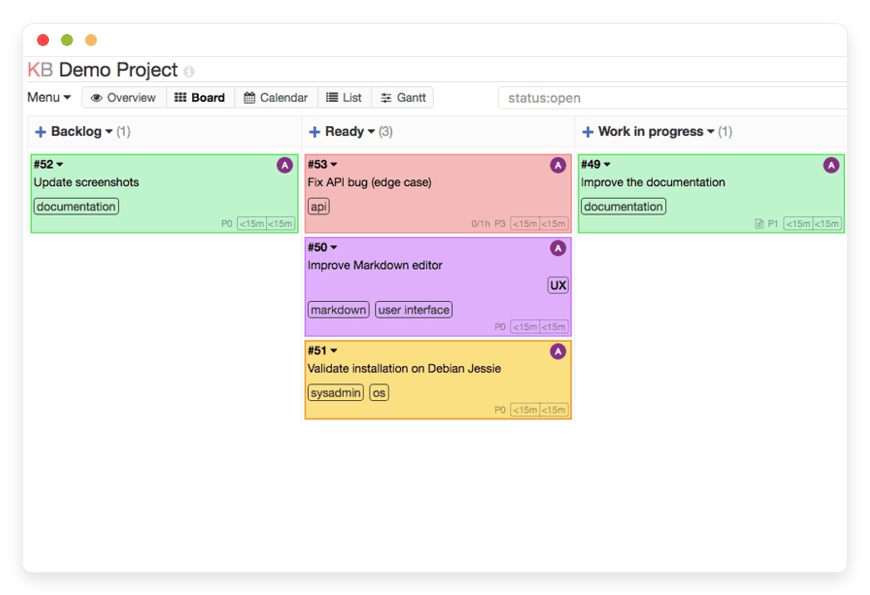
What is Managed Kanboard Hosting and Why Do Teams Need It?
Keeping track of daily tasks across a busy team easily turns into a chaotic mess. You deal with scattered spreadsheets, endless chat threads, and missed deadlines. You need a system that brings complete order to the chaos without adding unnecessary complexity to your day. That is exactly where Managed Kanboard Hosting provides a permanent solution. It gives you a clean, minimalist environment to visualize your work and push projects forward.
You need a reliable way to organize your daily tasks. Every project requires clear phases, assigned team members, and visible progress. You want a tool that gets out of your way and lets your team do the actual work.
But running it yourself is a second job. Setting up the server environment, configuring the software, managing the database, and handling security patches takes hours of your week. When a new version drops, you have to read the documentation, back up the database, and hope that the update does not break your active boards. Your team needs a project management tool, not a new IT headache.
DANIAN acts as your invisible infrastructure. We handle the entire backend process. You get a pristine, fast, and secure workspace ready for your team immediately.
TLDR: Quick Answer on Kanboard Managed Environments
Kanboard is a minimalist, open-source project management application. It uses the visual Kanban methodology to track tasks and limit work in progress. Choosing a Kanboard Managed environment means you get all the power of this visual tool without ever touching a server configuration.
Visual Task Management: See exactly who is working on what at any given moment.
Zero Server Maintenance: Skip the installation process and start organizing projects immediately.
Automated Backups: Your project boards and task histories are saved securely every single day.
Instant Scalability: Add endless columns, swimlanes, and users without crashing your database.
Focus on Delivery: Spend your time completing tasks instead of managing the infrastructure behind them.
What is Kanboard?
Kanboard is a free, open-source project management software focused heavily on the Kanban methodology. Created and actively developed by Frédéric Guillot, this application strips away the heavy bloat found in modern project tools. It provides a highly visual, clear overview of your tasks. The core philosophy of the software is simplicity and minimalism.
Instead of overwhelming you with hundreds of complex menus, it presents a simple board with vertical columns. You simply drag and drop tasks from left to right as work progresses. It supports multiple authentication backends like LDAP or OAuth2. Built using PHP, it translates into over 30 languages. This makes it a versatile, inclusive tool for international teams operating across borders.
Why is it Trending?
Teams are exhausted by complex software. Tools that take weeks to learn always decrease productivity. Kanboard is trending specifically because it requires zero training. A new team member can look at the board and instantly understand the current project status. It focuses strictly on getting things done. The inclusion of features like strict limits on active tasks forces teams to finish current work before starting new assignments. This prevents employee burnout and drastically improves delivery speed.
Why Choose Kanboard for Your Projects?
Proprietary project management tools charge you a fee per user. As your team grows, your monthly bill multiplies rapidly. They also force you to adapt to their specific, rigid workflows. If you want custom automation or specific calendar integrations, you have to upgrade to their most expensive tier.
Kanboard gives you open-source freedom. You get every single feature from day one. You can automate actions, create complex subtasks, and manage large teams without hitting artificial paywalls. By opting for Hosting Kanboard, you secure a dedicated environment where the software runs at absolute peak performance. You maintain full control over your workflow rules, user permissions, and board structures without answering to a corporate software giant. You own your environment completely.
Key Features of Kanboard
Understanding the mechanics of Kanboard reveals why it is so effective for team productivity. The tool is packed with powerful functions hidden behind a simple interface. Here is a deep dive into the features that make it stand out.
Work In Progress (WIP) Limits
Multitasking kills efficiency. Kanboard allows you to set a strict limit on how many tasks can exist in a specific column at one time. If your testing phase can only handle three tasks, the column will highlight in red if a fourth task drops in.
Workflow Benefit: This feature forces your team to clear the current bottleneck before pulling new work. It ensures faster project completion by keeping everyone focused on finishing tasks rather than just starting them. It highlights exactly where your team is getting stuck.
Automated Actions
You do not need to repeat manual updates all day. Kanboard includes a powerful internal automation engine. You can configure rules based on specific triggers and events. For example, you can say: "When I move a task to the 'Done' column, automatically close this task." Or, "When a task moves to 'Testing', assign it to the QA engineer."
Workflow Benefit: This reduces administrative clicking and keeps the board perfectly accurate without human intervention. Your team spends less time updating ticket statuses and more time doing the actual work required to move the project forward.
Swimlanes for Visual Separation
Sometimes a single board gets too crowded. Swimlanes are horizontal separations across your board. You can use them to divide tasks by different software releases, distinct products, or separate departments.
Workflow Benefit: This gives you a macro view of multiple initiatives inside a single project space. You can easily see how the marketing tasks align with the development tasks without needing to click back and forth between entirely different project boards. It keeps related work grouped together logically.
Subtasks and Time Tracking
Large tasks often hide smaller, complex steps. Kanboard lets you break down a primary task into manageable, bite-sized subtasks. You can assign different team members to these smaller subtasks. Furthermore, you can estimate the complexity and track the time spent on each specific subtask using a built-in timer.
Workflow Benefit: This gives project managers highly accurate data on how long specific features take to complete. It improves future project estimates and ensures that team members receive credit for the hidden hours they spend on complex, multi-step assignments.
Advanced Search and Filters
Finding an old task should not take five minutes of clicking around. Kanboard uses a simple, powerful query language that lets you filter tasks dynamically. You can search by assignee, category, due date, or specific text in the description by simply typing assignee:me status:open into the search bar.
Workflow Benefit: This means you instantly locate the exact file, comment, or task history you need during a fast-paced meeting. It turns your project board into a highly searchable database of company knowledge and past decisions.
Native Markdown Support
Formatting matters when writing complex task requirements. The software fully supports standard Markdown syntax. You can easily format text, create check-boxes, and insert code blocks directly into the task description or the comment section.
Workflow Benefit: This ensures your team reads clean, structured, and legible instructions every time. Developers can paste code snippets that actually look like code. Writers can use bold and italic text to emphasize important instructions, preventing costly miscommunications.
Comprehensive Analytics and Reports
You cannot improve what you do not measure. Kanboard includes native analytics that generate visual reports. You get access to tools like Cumulative Flow Diagrams, Burndown Charts, and Lead and Cycle time reports.
Workflow Benefit: These charts show you exactly how fast your team completes work. You can visually prove if a recent process change sped up your delivery time or slowed it down. It provides concrete numbers for your weekly review meetings.
iCal and RSS Subscriptions
You need to know your deadlines without keeping the project board open 24/7. Kanboard allows you to export your project deadlines as an iCal feed or an RSS feed.
Workflow Benefit: You can paste this feed link directly into your daily calendar application. Your project deadlines will show up next to your daily meetings. This keeps your schedule unified and ensures you never miss a critical project due date.
Flexible User Roles and Permissions
Security and access control are vital when working with external clients or large departments. Kanboard allows you to create custom roles and assign specific permissions to different users.
Workflow Benefit: You can invite a client to view a specific project board without letting them edit tasks or view internal comments. You can restrict junior staff from deleting tasks while giving project managers full control over the board settings. It ensures safe, controlled collaboration.
Extensive Plugin Ecosystem
Every team has unique needs. Kanboard supports a massive directory of community-built plugins. You can add new themes, integrate alternative authentication methods, or connect to external chat applications.
Workflow Benefit: You can extend the functionality of the software exactly how you need it without bloating the core application. You only install the tools you actually use, keeping the interface clean and the software running incredibly fast.
Keyboard Shortcuts
Navigating menus with a mouse slows down power users. Kanboard features a comprehensive set of keyboard shortcuts. You can press 'b' to open the board, 'c' to create a new task, or 'f' to jump straight to the search bar.
Workflow Benefit: This enables lightning-fast navigation. Once your team learns the shortcuts, they can update tasks, assign work, and navigate between projects in seconds without lifting their hands from the keyboard.
Solutions per Industry
Different teams face radically different organizational challenges. A tool that works for a developer might not work for a lawyer. However, Kanboard adapts perfectly to various professional environments because of its flexible nature. Here is exactly how different industries use it to solve their unique problems.
Software Development
Development teams deal with constant feature requests, bug reports, and code reviews. A cluttered backlog severely slows down coding. Developers lose time figuring out what to work on next.
With Kanboard, developers can use swimlanes to separate "Version 1.0" bugs from "Version 2.0" features. The automated actions instantly assign a ticket to the lead reviewer the moment a developer drags it into the "Code Review" column.
This completely eliminates the need to manually notify team members via chat. The entire development cycle becomes visual, predictable, and heavily automated.
Marketing and Advertising Agencies
Agencies juggle multiple clients, strict launch deadlines, and various asset approvals. Missing a publication date hurts the client relationship and damages the agency reputation. Managing these moving parts via email is a disaster.
Account managers use Kanboard to create a dedicated board for a specific marketing campaign. They set WIP limits on the "Copywriting" column to ensure writers are not overwhelmed with too many briefs at once.
The visual board lets the creative director see exactly which assets are waiting for client approval at a single glance. It keeps the entire creative team aligned and ensures no deadline slips through the cracks.
Education and Academic Research
University researchers and academic teams handle long-term studies with multiple distinct phases. Keeping track of literature reviews, raw data collection, and peer review submissions gets incredibly complicated over a multi-year project.
Researchers break down a massive thesis project into actionable subtasks within Kanboard. They create columns for "Research," "Drafting," "Review," and "Published."
By utilizing the internal time tracking feature, they accurately log the hours spent on lab work versus the hours spent on documentation. This makes grant reporting and administrative progress updates incredibly straightforward and mathematically accurate.
Event Planning and Coordination
Event planners manage hundreds of tiny details leading up to a massive launch day. They handle vendor contracts, catering menus, speaker schedules, and venue logistics. One forgotten detail ruins the entire event experience.
Planners use Kanboard to create a master checklist. They use the automated actions to trigger reminders as due dates approach. They assign tasks to specific team members for the day of the event.
The visual nature of the board provides absolute clarity. During the event, the team can pull up the board on their mobile devices and move tasks to "Done" in real-time. Everyone knows exactly what remains to be finished before the doors open.
Legal Practices and Law Firms
Law firms handle mountains of paperwork, discovery phases, and strict court deadlines. Managing multiple cases across different paralegals and junior partners requires absolute precision and zero errors.
A managing partner sets up a board for each major active case. They create columns for "Initial Intake," "Discovery," "Motion Drafting," and "Trial Prep." They use the robust permission settings to restrict case visibility to only the assigned legal team.
Kanboard allows the firm to track exactly where a specific document is in the review process. The strict access controls ensure client confidentiality while providing the legal team with a clear, visual roadmap of the case progress.
Construction and Architecture
Architects and construction managers deal with blueprints, permit applications, contractor scheduling, and material deliveries. A delay in one phase completely halts the next phase, costing thousands of dollars.
Project managers use Kanboard swimlanes to separate the different physical areas of a building project. One swimlane tracks the plumbing, another tracks the electrical work, and another tracks the interior finish.
The board provides a high-level view of the entire construction site. The manager sees instantly if the electrical permits are stuck in the "Pending Approval" column, allowing them to intervene before the framing contractors arrive on site.
IT Support and Helpdesks
Internal IT departments receive a constant stream of requests from employees. They handle password resets, broken hardware, and complex server access requests. Prioritizing these requests via a standard email inbox is nearly impossible.
The IT team configures a Kanboard specifically for incoming tickets. They use color-coding rules to automatically highlight critical server issues in red, while keeping standard software requests in grey.
This visual routing ensures the team tackles the most urgent problems first. The time tracking feature also allows the IT director to see exactly how much time the team spends fixing hardware versus managing software licenses.
Content Creators and Publishing Houses
Publishing teams process a massive volume of written content. They move articles from the initial pitch phase, through drafting, editing, artwork commissioning, and final publication. Tracking this across multiple freelance writers is chaotic.
The managing editor builds a highly structured Kanboard. They create specific columns for every stage of the editorial process. They use the subtask feature to ensure that every article includes a featured image, a meta description, and a social media blurb before it moves to "Published."
This workflow guarantees that no article goes live missing critical components. It gives the editor a bird's-eye view of exactly what content is ready for the upcoming week.
Non-Profit Organizations and NGOs
Non-profits run lean teams that manage volunteers, organize fundraising events, and write complex grant proposals. They need tools that are powerful but do not drain their limited budget with expensive per-user licenses.
The organization directors use Kanboard to manage their annual fundraising gala. They create tasks for booking the venue, printing the flyers, and contacting major donors.
Because Kanboard does not charge per user, the non-profit can invite all fifty of their volunteers into the system for free. This massive cost saving allows them to put their money directly into their specific cause instead of paying for software.
Manufacturing and Supply Chain
Manufacturing facilities track raw materials, monitor assembly lines, and perform strict quality assurance checks. A bottleneck on the assembly floor slows down the entire shipping department.
Floor managers use Kanboard on tablets at various workstations. When a batch of products finishes the assembly phase, the worker drags the card into the "Quality Assurance" column.
The WIP limits prevent the assembly team from pushing too many products to the inspectors at once. This visual flow ensures a steady, manageable pace of work across the entire manufacturing floor, preventing sudden backlogs.
Accounting and Financial Firms
Accountants manage tax returns, perform corporate audits, and handle strict compliance reporting. During tax season, the volume of work triples, and missing a filing deadline results in massive financial penalties for clients.
A senior accountant sets up a board to track client tax returns. They use the tagging feature to mark which returns are missing necessary client documents.
They set automated due dates based on the strict government deadlines. This visual pipeline guarantees that the accounting firm files every single return on time, completely eliminating the stress of last-minute rushing.
Kanboard vs Other Softwares
When evaluating how to manage your projects, it is extremely helpful to see how Kanboard directly compares to popular proprietary software alternatives on the market today.
| Feature | Kanboard | Proprietary Alternative (e.g., Jira, Asana) |
Pricing Model | Completely free software, all features included | Charges heavily per user, monthly subscriptions |
User Interface | Minimalist, fast, zero distractions | Often cluttered with upsells and complex, hidden menus |
Automation Limits | Unlimited automatic actions built natively into the core | Often strictly restricted to premium, expensive tiers |
| WIP Limits | Native core feature, easy to enforce on any column | Sometimes requires paid plugins or advanced administrative setup |
Swimlanes | Core feature available immediately for all boards | Often missing completely or locked behind high-tier enterprise plans |
Open Source | 100% transparent code, absolute software freedom | Closed ecosystem, hidden code, heavily restricted access |
Use Cases and Applications
The extreme flexibility of this software makes it perfect for a wide range of daily operations. You can adapt it to almost any workflow.
Editorial Calendar Management: Media teams use the board to track articles from the pitching phase, through drafting, editing, and final publication online.
Customer Relationship Management (CRM): Sales teams track potential leads by moving client cards through columns like "Initial Contact," "Demo Given," and "Contract Signed."
Recruitment and Hiring Pipelines: HR departments track job candidates by moving their profile cards through columns like "Initial Interview," "Technical Test," and "Offer Extended."
Personal Productivity: Freelancers use a simple three-column board (To Do, Doing, Done) to manage their daily client deliverables and visually track their billable hours.
Product Roadmap Planning: Product managers visually map out the features planned for the next four quarters, giving stakeholders a clear view of the company direction.
How DANIAN Helps You Succeed
Setting up a robust project management server requires serious technical effort. You have to configure the web server, set up the database, secure the connection, and plan a strict backup routine. This takes time away from your actual business.
We act as your quiet enabler. We handle the heavy lifting; you get the glory of a perfect workspace. Here is how our service fundamentally changes the way you work:
Fully Managed: We handle the hosting completely. Our team manages everything from the initial technical setup to regular software updates, security patches, and server performance monitoring. Your software is always optimized perfectly without you having to lift a single finger.
Backup & Monitoring: Automated daily backups are configured automatically, stored securely off-site, and available for a simple, one-click restore. You never lose your project history.
SSL & Firewall: Secure by default. With cybersecurity threats constantly on the rise, we take security incredibly seriously. From automated system updates to proactive threat monitoring and tailored security rules, we make sure your environment is secure 24/7.
Updates: Critical security patches and new software versions are applied instantly without any manual intervention from your team.
24/7 Monitoring: Technical issues are detected rapidly and often resolved completely before you ever notice a problem with your board.
Guaranteed Performance: System downtime can be highly detrimental to your daily business operations. With our highly scalable infrastructure, we ensure fast, consistent performance even as your active user base grows massively.
7-Day Free Trial: Zero risk involved. You test the full capabilities of the platform without committing upfront.
Less Setup, More Development. Affordable from the Start. Real Help When You Need It.
How to Get Started
Moving your team to a managed environment is incredibly fast. You can have your complete workspace ready for the team in a matter of minutes. Skip the complex server installations.
Step 1: Visit danian.co and create a new account.
Step 2: Select Kanboard from the extensive software catalog.
Step 3: Relax while DANIAN automatically launches your software.
Frequently Asked Questions
Is the software itself completely free to use?
Yes, the software is released under the MIT license and is completely open-source. You only pay for the managed hosting environment that keeps it running fast and securely on the internet.
Can I import my existing data from other project management tools?
Yes, the software fully supports importing tasks via standard formats. You can map your existing spreadsheet columns directly to your new board to resume your work immediately.
Does it support multiple users and distinct roles?
Absolutely. You can create different organizational groups, assign project managers, and strictly control who has access to view or modify specific project boards.
What happens if I make a mistake and delete an important task?
Because we provide automated daily backups, you can easily restore your database to a previous state and recover your deleted project information without any stress.
Do I need to know PHP or database management to use this?
Not at all. While the core software is built on PHP, our managed service hides all the technical backend completely. You only interact with the clean, visual user interface on your browser.
Can I precisely track the time spent on specific tasks?
Yes, detailed time tracking is a native feature. You can log time manually or use the start and stop timers on specific subtasks to measure team productivity highly accurately.
How does the email integration system work?
You can configure the system to send automatic email notifications for specific events, such as when you are assigned a new critical task or when a project due date is rapidly approaching.
Can I customize the look and feel of my board?
Yes, through the extensive plugin directory, you can install new visual themes and adjust the interface colors to match your company branding perfectly.
Does Kanboard work well on mobile devices?
Yes, the interface is completely responsive. You can easily drag and drop tasks, add comments, and review your project boards using the web browser on your smartphone or tablet.
Conclusion: Take Control of Your Projects Today
Kanboard is an incredibly powerful tool for teams that want to completely eliminate distractions and focus purely on executing their tasks. Its minimalist visual approach, combined with powerful native features like automated actions and strict work-in-progress limits, makes it a superior choice for serious professionals in any industry.
By choosing a managed environment, you entirely remove the technical burden of server administration. You give your team a fast, reliable, and secure workspace instantly.
Experience the power of fully managed open-source software.


