
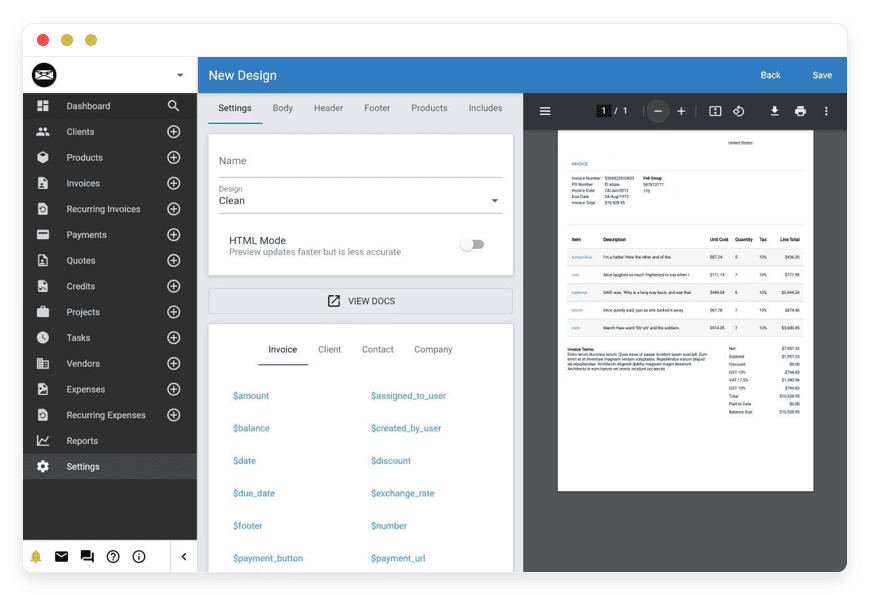
Managed Invoice Ninja Hosting
TLDR: Quick Answer
Invoice Ninja is the undisputed heavy hitter of open-source financial tools. It is a dedicated platform for invoicing, expense tracking, project management, and proposal generation. It offers a way to escape the monthly fees and user limits of proprietary SaaS giants.
Managed Invoice Ninja Hosting is the bridge between the code and your business. It removes the complex technical barrier to entry.
Zero Maintenance: Forget about PHP versions, Laravel migrations, or Cron job configurations.
Instant Start: Launch a fully configured, optimized environment in minutes, not hours.
Secure by Design: Automated SSL certificates, custom firewalls, and daily off-site backups come standard.
Focus on Revenue: Spend your time billing clients and closing deals, not fixing PDF generation errors or server timeouts.
Cost-Effective Scaling: Get enterprise-grade performance and unlimited potential without the enterprise price tag.
Introduction
Getting paid shouldn't be the hardest part of your job. Whether you are a solo freelancer, an agency owner, or a trade professional, the goal is simple: send the invoice, receive the money, and get back to work. You do not want to spend your Friday night debugging server logs because your invoicing software refused to send emails or generate a PDF.
In the modern digital economy, professionals are moving away from restrictive "big box" billing platforms. We are tired of the rising subscription costs, the arbitrary limits on how many clients we can have, and the lack of customization. Naturally, many turn to open-source solutions like Invoice Ninja to regain control.
But "free software" often comes with a hidden, expensive cost: your time.
Self-hosting a complex Laravel-based application like Invoice Ninja is not a "set it and forget it" task. It requires configuring web servers (Nginx/Apache), managing databases (MySQL/MariaDB), setting up queues for email dispatch, and ensuring your financial data—your livelihood—is backed up securely. This is a second job that you didn't apply for and likely don't want.
This is where DANIAN changes the equation. We provide the invisible infrastructure that powers your business. We take the raw, powerful code of Invoice Ninja and wrap it in a layer of managed reliability. You get the full power of the software—the custom branding, the automation, the unlimited history—without touching a single line of terminal code. We handle the noise so you can handle the revenue.
What is Invoice Ninja?
Invoice Ninja is a comprehensive suite designed for freelancers and small to medium-sized businesses (SMBs). It handles the entire financial lifecycle of a client relationship: from the first quote to the final payment, and every billable hour in between.
It was created to solve a specific problem: traditional invoicing software is too expensive for what it offers, and it is too rigid to adapt to modern workflows. Built on a cutting-edge technology stack—utilizing the Laravel framework for a robust backend and Flutter for a responsive, high-performance frontend—Invoice Ninja is designed for speed and flexibility.
Why is it Trending?
The shift toward remote work and the gig economy has exploded the demand for professional, independent billing tools. People are tired of sending amateurish Word documents or paying monthly fees for every extra user they add to their team. Invoice Ninja offers a client experience that rivals Fortune 500 companies—complete with branded portals and instant payment options—while remaining accessible to the solo developer. It puts the "Pro" in professional.
Why Choose Invoice Ninja?
Choosing Managed Invoice Ninja Hosting is about choosing sovereignty over your financial workflow. When you use proprietary platforms, you are renting their process. You are locked into their payment processors (often with higher fees), their design templates, and their feature roadmaps. If they raise prices or remove a feature you rely on, you are stuck.
With Invoice Ninja, the ecosystem adapts to you.
Payment Freedom: You can connect to dozens of different payment gateways, allowing you to shop around for the best transaction rates.
Brand Control: You can design invoices that actually match your brand guidelines, utilizing full HTML/CSS customization if you wish, rather than just swapping a logo on a generic template.
Growth without Penalty: Most importantly, the software grows with you. Whether you are sending five invoices a month or five thousand, the engine remains robust.
When you choose a managed solution through DANIAN, you bridge the gap between "powerful" and "usable." You get the freedom of open-source software combined with the reliability of a dedicated DevOps team watching your back.
Key Features of Invoice Ninja
Invoice Ninja is dense with features. However, listing them doesn't do them justice. You need to understand how they change your daily workflow and save you hours of administrative headaches.
Smart Invoicing and Quotes
This is the core of the system. You aren't just sending a static PDF; you are sending a dynamic, live link.
Real-time Visibility: You can see exactly when a client views an invoice. No more "I didn't get the email" excuses. You know they opened it.
Auto-billing & Subscriptions: Set up recurring invoices for retainers or subscriptions. The system generates and sends them automatically on the schedule you define. If you have a tokenized card on file (via Stripe, for example), it can even auto-charge the client.
Workflow Conversion: The journey from prospect to payment is seamless. Create a Quote/Proposal. Once the client approves it (digitally), one button converts that Quote into an Invoice. No re-typing data.
Late Fee Automation: Chasing money is awkward. Let the robot do it. You can configure automatic reminders (e.g., "3 days after due date") and even apply automatic late fees or interest to overdue bills.
Extensive Payment Gateway Integrations
You need to accept money where your clients are, and how they want to pay. Invoice Ninja integrates with over 40 payment gateways.
Global Flexibility: Use Stripe, PayPal, Mollie, Razorpay, Authorize.net, and many more. You aren't forced into a proprietary processor.
Direct Payments: Clients pay directly on the invoice view. They don't need to log in or create an account to pay you.
Partial Payments: Working on a large project? Allow clients to pay a deposit upfront. The system tracks the partial payment and updates the balance automatically.
The Client Portal
This feature elevates your professional image instantly. It gives your clients a "home" for their business with you.
Central Hub: Clients get a dedicated dashboard to view all past and current invoices, quotes, and payment history.
Self-Service: They can download statements for their own tax records or update their own billing details (credit cards/addresses).
Security: You control access with password protection or secure, unique links.
Project Management & Time Tracking
Stop switching between a timer app like Toggl and your billing software. Invoice Ninja brings them together.
Task-Based Billing: Create tasks for a project. Start a timer as you work. When you are done, click "Invoice Task." The system pulls the hours, your hourly rate, and the task description directly onto a bill.
Kanban Boards: Manage projects visually. Move tasks from "To Do" to "Doing" to "Done." This keeps your internal team aligned on what is billable.
Document Management: Attach contracts, specs, or project files directly to the client record or the specific invoice for easy reference.
Expense Tracking & Profitability
Knowing what you made is half the battle; knowing what you spent is the rest.
Bank Imports: Connect bank accounts (via Yodlee or GoCardless integration) or upload bank statements to reconcile expenses.
Billable Expenses: Did you buy a font license or web hosting for a client? Mark the expense as "billable," and it will be added to their next invoice automatically.
Profit Reports: See the real profit on a project by comparing the income against the logged expenses and the hours worked.
Multi-Company & Multi-User
Invoice Ninja is built for scale.
Multiple Businesses: If you run a design agency and a separate e-commerce store, you don't need two logins. You can run multiple companies under one installation, keeping data and branding completely separate.
Granular Permissions: Give your accountant "View Only" access to reports, give your project manager access to "Tasks," and keep "Settings" restricted to yourself.
Solutions per Industry
Different businesses have different pain points. Generic software tries to be everything to everyone and ends up helping no one. Here is how Managed Invoice Ninja Hosting solves specific problems for distinct sectors.
1. Digital Agencies & Web Development Shops
Agencies live and die by cash flow and retainer management. You likely have multiple clients on monthly maintenance plans (hosting, SEO, support).
The Pain: Manually creating 50 invoices on the 1st of the month is a massive waste of billable executive hours. Worse, forgetting to bill a "small" change request leads to revenue leakage.
The Workflow:
Retainers: Use the recurring invoice feature. Set it up once for the 1st of every month. The system sends the bills, charges the cards (if authorized), and sends you a report.
Ad-Hoc Work: Connect the task timer to the client's project. When a developer spends 30 minutes fixing a bug, they log it. At the end of the month, "bulk invoice" all pending tasks.
Result: You focus on the creative work and code, not the admin. Revenue leakage is plugged.
2. Legal, Consulting, and Professional Services
Trust and clarity are your currency. Your billing needs to be precise, down to the minute. Clients in this sector often dispute vague bills.
The Pain:Clients disputing vague line items like "Consulting Services - 5 hours." They want to knowwhatyou did.
The Workflow:
Detailed Logging:Use the task-based time tracker with detailed descriptions. Log every phone call, every research session, and every document review as it happens.
Trust Accounts:Use the "Credits" system to handle retainers/trust funds. The client pays $5,000 upfront. As you invoice for hours, the system draws down from that credit balance automatically.
Result:When you generate the invoice, it provides a forensic breakdown of exactly what was done and when. Transparency reduces disputes and speeds up payment.
The Pain: Clients disputing vague line items like "Consulting Services - 5 hours." They want to know what you did.
The Workflow:
Detailed Logging: Use the task-based time tracker with detailed descriptions. Log every phone call, every research session, and every document review as it happens.
Trust Accounts: Use the "Credits" system to handle retainers/trust funds. The client pays $5,000 upfront. As you invoice for hours, the system draws down from that credit balance automatically.
Result: When you generate the invoice, it provides a forensic breakdown of exactly what was done and when. Transparency reduces disputes and speeds up payment.
3. Field Service Providers (Trades, HVAC, Plumbing)
The Pain: Writing paper invoices in a van, losing them, or typing them up late at night. The lag time between finishing the job and sending the bill is where cash flow dies.
The Workflow:
Mobile HQ: Use the Invoice Ninja mobile app connected to your DANIAN managed instance.
On-Site Signoff: Create the quote while standing in the customer's living room. Have them sign it digitally on your tablet screen to approve the work.
Instant Billing: Convert that quote to an invoice and email it before you even start the engine to leave.
Result: You look more professional than the competition, and the invoice is in their inbox before they forget how great of a job you did.
4. Property Management & Landlords
Whether you manage two units or two hundred, chasing rent is exhausting.
The Pain: Tracking who has paid rent, who is late, and calculating late fees manually. It is a spreadsheet nightmare.
The Workflow:
Recurring Rent: Set up a recurring invoice for each tenant to go out 5 days before rent is due.
Auto-Late Fees: Configure the system to automatically add a 5% (or fixed fee) penalty if the invoice remains unpaid 3 days after the due date.
Portal: Tenants get a portal where they can see their lease history and pay online, reducing the "check is in the mail" excuses.
Result: The system acts as your bad cop. You don't have to be the villain applying the late fee; the software does it.
5. Subscription Box & Membership Services
You run a business based on recurring revenue, like a specialized gym, a veggie box delivery, or a coaching mastermind.
The Pain: Managing subscriptions without building a complex custom web app. You need to handle signups and failures.
The Workflow:
Auto-Pay: Utilize the Stripe integration to tokenize credit cards.
Groups: specific Client Groups (e.g., "Gold Members", "Silver Members") to apply automatic discounts or specific settings.
Dunning Management: If a card fails, Invoice Ninja retries on a schedule you set and emails the client to update their payment method.
Result: You have a subscription management engine without the high fees of specialized membership software.
6. IT Managed Service Providers (MSPs)
You manage hardware and software for other companies. You have high overhead on hardware costs that need to be reimbursed immediately.
The Pain: Buying a $2,000 server for a client and forgetting to bill them for it until weeks later, messing up your own cash flow.
The Workflow:
Expense Re-billing: As soon as you buy the hardware, snap a photo of the receipt in the mobile app and mark it as "Billable" to the client.
Vendor Management: Use the expense side to track your own software licensing costs to ensure your margins remain healthy.
Result: You never eat the cost of hardware again. Your "Accounts Payable" and "Accounts Receivable" are linked.
7. Non-Profits and NGOs
You need transparency for donors and low overhead for operations. Every dollar spent on software is a dollar not spent on the mission.
The Pain: Enterprise software is too expensive, and Excel is too messy for audits.
The Workflow:
Donation Receipts: Customize the "Invoice" template to act as a tax-deductible donation receipt.
Project Tracking: Use the "Project" feature to track restricted funds (e.g., Grant A vs. Grant B) to ensure money is spent where it was promised.
Result: Professional, audit-ready financial tracking at a fraction of the cost of major donor management systems.
Invoice Ninja vs Other Softwares
How does this stack up against the giants? It is easy to assume that because something is "industry standard" like QuickBooks, it is better. That is rarely the case in the modern web.
| Feature | Invoice Ninja | FreshBooks / QuickBooks |
| Source Code | Open Source (Auditable & Portable) | Proprietary / Closed (Black Box) |
| Payment Gateways | 40+ Options (Global freedom) | Limited to preferred partners (High fees) |
| Client Portal | Customizable | Standard / Rigid Templates |
| Recurring Billing | Unlimited | Often tiered / restricted by plan |
| User Limits | Unlimited (Self/Managed Hosted) | Pay per user / Per seat pricing |
| Custom Design | Full HTML/CSS control | Template selection only |
| Data Ownership | Full Export (JSON/PDF/SQL) | Difficult to migrate away (Vendor Lock-in) |
| API Access | Full REST API | Often rate-limited or restricted |
The proprietary alternatives charge you for growth. They want you to pay more as you add staff or clients. Invoice Ninja is designed to scale without punishing your success.
Use Cases and Applications
Beyond standard billing, power users utilize the platform in creative ways to solve complex business logic.
1. The "Productized Service" Engine
If you sell a service like "One Logo Design - $500," you can set this up as a "Product" in the library. You can then use the API or a Zapier integration to trigger an invoice generation automatically when someone fills out a form on your website. This creates a seamless bridge between your marketing site and your financial system.
2. Vendor & Contractor Portal
While primarily for clients, the system is excellent for managing outgoing money. You can set up your contractors as "Vendors." When they send you a bill, you log it as an expense. This acts as a lightweight Accounts Payable system, allowing you to see exactly how much you owe your freelancers at any given moment.
The world is flat. You might have a developer in Poland, a designer in Brazil, and clients in New York. Invoice Ninja handles multi-currency natively. You can invoice a client in Euros while your base currency is Dollars. The system pulls live exchange rates to ensure your reporting is accurate. You know exactly what that Euro invoice is worth to your bottom line in real-time.
4. Inventory Management for Wholesalers
Small wholesalers use the "Product Library" to track stock. While it isn't a full Warehouse Management System, it allows you to track SKU costs, default descriptions, and standard pricing. When a retailer orders 50 units, you pull the product from the library, and the line item is populated instantly.
How DANIAN Helps
We are the "quiet enablers". We don't want the spotlight; we want your software to run perfectly. When you choose managed hosting, you are buying peace of mind and the recovery of your time.
Fully Managed Infrastructure
We handle the hosting environment. This isn't just space on a server; it's a curated environment specifically tuned for Invoice Ninja. We manage the PHP versions, the Nginx configurations, and the database optimizations. We ensure the queue workers (the background robots that send emails) are always running.
Data loss is a business killer. If your server crashes and you lose your invoice history, you lose money. We implement automated daily backups that are stored securely off-site. If you mess up a configuration or delete the wrong client, we can restore your environment. We also monitor uptime 24/7. We often catch and resolve memory leaks or hiccups before you even open your browser.
Financial data requires bank-grade security. We provision SSL certificates automatically, ensuring your connection is always encrypted. Our custom firewalls block malicious traffic and bots, keeping your client data safe from prying eyes.
Seamless Updates
Invoice Ninja updates frequently with new features and security patches. Self-hosting users often dread updates because a failed migration can break the application completely. We test and apply security patches and version upgrades for you. You wake up to new features, not broken code.
Guaranteed Performance
Downtime costs you money. Our infrastructure is scalable. Whether you are generating ten PDFs a day or ten thousand, our servers ensure the interface remains snappy and responsive. We handle the "SnapPDF" or "PhantomJS" configurations required to generate PDFs, which is notoriously difficult to set up manually.
7-Day Free Trial
We are confident in our stack. That is why we offer a no-risk trial. You can spin up a server, import your data, and test the speed without paying a cent.
How to Get Started
Getting your financial center running takes less than five minutes.
Visit DANIAN: Go to our signup page.
Select Invoice Ninja: Find it in our curated catalog of open-source apps.
Launch: Click start. Sit back and enjoy.
We automate the installation, database creation, and security setup. You will receive a link to your fresh installation, ready for your admin login.
FAQ
1. Is the mobile app included?
Yes. You can download the official Invoice Ninja mobile app (iOS or Android) and connect it to your DANIAN managed URL. It works seamlessly and syncs in real-time.
2. Do I need to pay for an Invoice Ninja license?
The software itself is open-source and free to use. However, there is a distinct "White Label" license. If you want to remove the small "Created by Invoice Ninja" text in the footer of the PDFs and client portal to have a 100% branded experience, you need to purchase a license key directly from the developers (approx $30/year). You can enter this key into your DANIAN instance easily.
3. Can I import data from FreshBooks or QuickBooks?
Yes. Invoice Ninja has robust import tools. You can export your clients and invoices from your old software as CSV files and map them into Invoice Ninja.
4. How do you handle email delivery?
We provide an SMTP service with each Invoice Ninja. But if needed, you have the freedom in configuring an SMTP service (like SendGrid, Postmark, or AWS SES) within the application settings for the best deliverability. We ensure the ports and connections are open for you to do this. This ensures your invoices don't end up in the Spam folder.
5. What happens if I stop paying?
You can export all your data (JSON, CSV, PDF) at any time. We believe in freedom, not lock-in. If you decide to move to a self-hosted server later, you can take your data with you.
6. Is it difficult to customize the invoice design?
Not at all. There are drag-and-drop tools for basic changes. If you know HTML/CSS, you have complete control to make the invoice look exactly like your brand documents.
7. Does this support API access?
Yes. You have full access to the REST API. You can use tools like Zapier or Make (formerly Integromat) to connect your DANIAN instance to your other tools (like your CRM or Slack).
8. Can I have multiple users?
Yes. You can add as many team members as you need. You can set specific permissions for each user (e.g., Admin, View-Only, Edit-Invoices-Only).
Conclusion
Invoice Ninja is more than just billing software; it is a declaration of independence for your business. It gives you the tools to look professional, get paid faster, and understand your finances without handing over your profits and data to a SaaS giant.
It allows you to present a polished, "big company" image to your clients while maintaining the agility and low costs of a lean operation.
Self-hosting it is a noble goal, but it often becomes a distraction. Your time is worth more than the cost of a managed server. Let us handle the updates, the backups, the security, and the PDF generation engines. You handle the work that actually pays the bills.
Experience the power of fully managed open-source.


