
Managed Immich Hosting: Your Personal Photo Cloud, Perfected
TLDR: The Quick Answer
If you are looking for a Google Photos replacement that respects your privacy but doesn't require a degree in systems administration, Managed Immich Hosting is your answer.
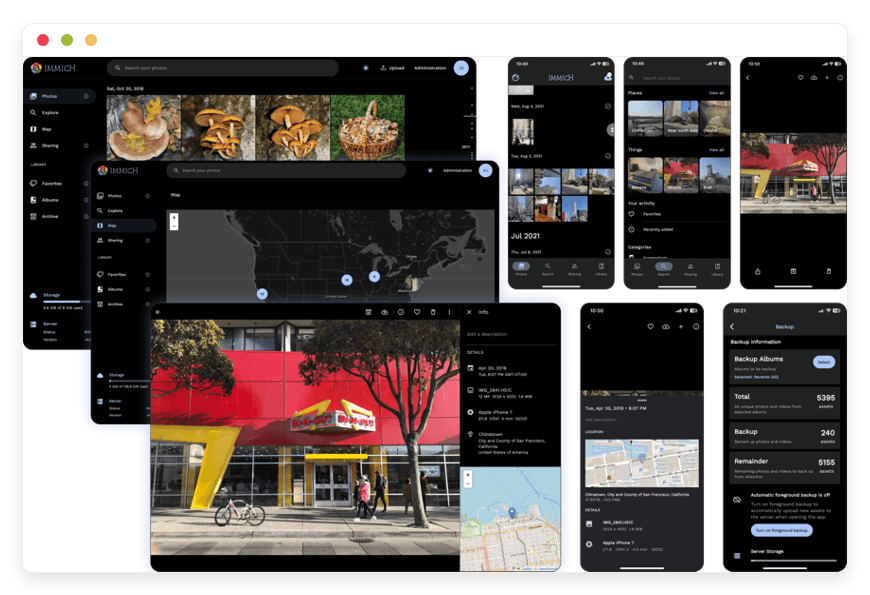
Immich is a high-performance, self-hosted photo and video management solution. It mimics the user experience of popular proprietary cloud galleries—offering features like facial recognition, memories, and map views—but gives you total control over your library.
Why Managed Hosting?
Zero Maintenance: We handle the Docker containers, database migrations, Redis queues, and breaking changes so you don't have to.
Instant AI Configuration: Machine learning features (facial recognition, smart search) are resource-intensive; we optimize the hardware environment specifically for these tasks.
Security First: Automated SSL certificates, reverse proxies, and firewalls are standard, protecting your most personal memories from the open internet.
Reliable Backups: Your library and database are backed up daily, ensuring you never lose a photo due to corruption or server error.
Seamless Updates: Immich evolves rapidly. We apply updates safely to keep your gallery running without interruption.
Introduction
We have all seen the notification. "Storage Full." It usually pops up right when you are trying to capture a video of your child's first steps, a crucial moment at a concert, or a receipt you need for an expense report. The immediate solution is usually to pay a monthly rent to a tech giant for a few more gigabytes of space. But as your library grows, so does the cost. And the nagging question remains: do you really control those photos?
The desire to break free from these closed ecosystems has led many to open-source software. The promise is enticing—your photos, your rules, no compression, and no scanning for advertising profiles. You want a "forever home" for your digital life, not a rental unit that scans your family albums to train public AI models.
However, the reality of running this software yourself is often a second job. You have to configure servers, manage ports, worry about off-site backups, handle complex reverse proxies, and troubleshoot when an update breaks your PostgreSQL database. You want to be a photographer or a family archivist, not a Linux system administrator debugging container logs at 2 AM.
This is where DANIAN steps in. We provide the invisible infrastructure that bridges the gap between open-source freedom and the convenience of a managed service. We handle the heavy lifting—security, uptime, hardware acceleration, and performance—so you can focus on organizing your albums.
What is Immich?
Immich is an open-source photo and video backup solution that has rapidly become the gold standard in the self-hosted community. Developed with a high-performance architecture, it allows users to upload, view, and organize their media assets from both web and mobile devices seamlessly.
The project was born out of a desire for a high-performance backup tool. Unlike older gallery software that often feels clunky, slow, or looks like a directory listing from the 90s, Immich is built using modern technologies like Flutter, TypeScript, and Dart. This results in a snappy, responsive interface that feels incredibly familiar to anyone who has used major commercial photo apps. It is designed to be a "drop-in" replacement for the apps you already use, minimizing the learning curve for you and your family.
Why is it Trending?
Immich is currently one of the most active and vibrant projects in the open-source space. Its popularity stems from its "mobile-first" approach. Most of us take 99% of our photos with our phones, and Immich provides a dedicated, polished app for iOS and Android that handles background backup flawlessly. It supports advanced features that used to be exclusive to big tech, such as interactive map views, "memory lane" flashbacks, and powerful semantic search capabilities, all without compromising privacy.
Why Choose Immich?
The primary driver for choosing Immich is the combination of superior user experience and absolute digital sovereignty. Most self-hosted galleries force you to choose between a good interface and privacy. Immich offers both.
When you opt for Managed Immich Hosting, you are choosing a platform that does not compress your images to save space on a corporate server. You keep your original quality, whether it is a RAW file from a DSLR or a 4K 60fps video from your phone.
Furthermore, Immich is designed for speed. It utilizes aggressive caching and efficient database queries to ensure that scrolling through a library of 100,000 photos feels instant. It separates the heavy lifting of processing images (thumbnail generation, transcoding, AI detection) from the user interface, ensuring a smooth experience even during bulk uploads.
Key Features of Immich
Immich is feature-rich and constantly evolving. While the list of capabilities is vast, here is a deep dive into the specific functionalities that make it a premier choice for photo management, and how they benefit your workflow.
Advanced Background Backup
The most critical feature of any photo solution is reliability. You need to know that if you drop your phone in a lake, your photos are safe. Immich offers a robust mobile app that backs up photos and videos in the background. It utilizes native platform APIs to ensure uploads happen efficiently without draining your battery. It supports mechanisms to upload only when on Wi-Fi or while charging, giving you granular control over data usage. It even handles "foreground" backup for when you need to dump thousands of photos immediately.
Machine Learning & Smart Search (CLIP)
This is where Immich truly shines. It leverages machine learning to automatically cluster faces. Once you identify a person, the system will tag them in past and future photos. But it goes beyond faces. It uses CLIP (Contrastive Language-Image Pre-Training) models to allow for "Smart Search." You can search for "sunset on the beach," "documents on a desk," or "red sports car," and the system will find relevant images even if you never manually tagged them. This processing happens on the server side, keeping your device fast, and because it's your server, the AI data never leaves your instance.
Interactive Map View
Visualizing where you have been is a powerful way to relive memories. Immich reads the GPS metadata from your assets and plots them on an interactive world map. You can zoom into a specific street in Paris or a hiking trail in the Rockies and see every photo taken at that spot. It also performs reverse geocoding, allowing you to search for photos by city, state, or country names automatically, even if you didn't organize them into folders.
Memories and Flashbacks
One of the most beloved features of modern photo apps is the "On this day" functionality. Immich replicates this beautifully. It surfaces photos from previous years, creating auto-generated collections that help you rediscover forgotten moments. These appear at the top of your timeline, offering a daily dose of nostalgia without you having to dig through archives.
External Libraries (Read-Only)
If you are a photographer or data hoarder, you might already have terabytes of photos organized in a folder structure on a NAS or server. You do not need to re-upload them or duplicate them. Immich supports "External Libraries," allowing it to mount existing directories in a read-only mode. This lets you view, search, and map your existing archive through the beautiful Immich interface without modifying your original file structure.
Multi-User Support with Granular Control
Immich is not just for you; it is for your whole family or organization. You can create multiple user accounts, each with their own private library. As an administrator, you can set storage quotas for each user to ensure no single person fills up the disk. Users can choose to share specific albums or use "Partner Sharing" to share their entire timeline with a spouse, complete with filters (e.g., only share photos containing specific faces).
Non-Destructive Editing
A recent and significant addition to the platform is the ability to edit photos directly within the browser or app. You can crop, rotate, and adjust lighting. Crucially, these edits are non-destructive. Immich saves the edit data separately, preserving your original file so you can always revert to the initial capture. This mimics the workflow of professional tools like Lightroom but in a lightweight web interface.
Comprehensive Format Support & Transcoding
From HEIC and RAW files to Live Photos and various video codecs, Immich handles a massive array of formats. It uses FFmpeg for transcoding, ensuring that high-bitrate videos stored on your server can be streamed smoothly to your mobile device, regardless of network conditions. It automatically generates optimized versions of videos for playback while keeping the original high-quality file for archival.
Command Line Interface (CLI) for Bulk Migration
For those moving from Google Photos or other services, migrating 50,000 photos via a web browser is tedious. Immich provides a powerful CLI tool that allows for bulk uploading from a server or local machine. It is robust, handles interruptions gracefully, and ensures that large migrations happen quickly and accurately.
Solutions per Industry
Immich is often viewed as a personal tool, but its feature set makes it an incredibly powerful asset for various professional industries. Here is how different sectors can utilize a Managed Immich instance to solve specific workflow pain points.
Professional Photographers & Studios
For photographers, client delivery and asset safety are paramount.
The Problem: Storing RAW files is expensive, and client delivery platforms often take a commission or have low storage caps.
The Immich Solution: Managed Immich Hosting serves as an excellent off-site archive. You can upload RAW files directly to the storage, creating a secure backup separate from your local NAS. The visual timeline allows you to quickly pull up references during client meetings without needing to carry hard drives.
Specific Use Case: A wedding photographer can use the "Shared Links" feature to create a password-protected album for a client to view a sneak peek. Unlike commercial galleries that might downscale the image, Immich displays it exactly as you intended.
Real Estate & Architecture Agencies
Agencies deal with high volumes of visual data organized by location.
The Problem: Agents have thousands of photos of properties on their phones, mixed with personal photos, making it hard to find that "one shot of the kitchen" from six months ago.
The Immich Solution: The Map View feature is a game-changer here. Agents can pull up properties based on geographic location instantly. The powerful search allows team members to type "kitchen with granite island" and immediately retrieve relevant assets for marketing materials.
Specific Use Case: An architecture firm can maintain a historical timeline of a construction project. By uploading site visit photos weekly, they build a searchable, dated visual log of the building's progress, which is invaluable for liability and client updates.
Educational Institutions & Schools
Schools accumulate vast amounts of media from events, sports, and classroom activities.
The Problem: Privacy regulations often make public cloud storage risky for student photos. Managing permissions for who can see which event photos is a nightmare on standard drive solutions.
The Immich Solution: A managed private instance allows institutions to archive decades of history securely. The facial recognition features can assist yearbook committees in finding photos of specific students or staff members efficiently, saving hundreds of hours of manual searching.
Specific Use Case: A university alumni association can digitize and upload physical archives. Using facial clustering, they can identify alumni across decades of photos, creating a rich, searchable history for upcoming reunions.
Genealogy & Family Historians
Preserving family history is a delicate task that requires organization and longevity.
The Problem: Old photos are often physical, or scattered across CDs, old hard drives, and various cloud accounts. Metadata (dates, locations) is often missing from scanned images.
The Immich Solution: Immich acts as the central "Digital Shoebox." Users can upload scanned photos and manually edit the metadata to reflect the correct date (e.g., "1955") and location.
Specific Use Case: A family historian can upload thousands of scanned slides. Immich's facial recognition will group photos of "Great Aunt Sarah" from her childhood through her old age. The "Description" field can be used to transcribe notes written on the back of physical photos, making those handwritten memories searchable text.
Construction & Field Operations
Field teams take hundreds of photos for compliance, safety checks, and progress logging.
The Problem: Photos are trapped in WhatsApp chats or email threads, with no easy way to reference them later or correlate them with a specific site location.
The Immich Solution: Field workers can install the Immich app and set it to upload only on Wi-Fi to save data. The GPS data attached to every photo means the head office can see exactly where a safety hazard was documented.
Specific Use Case: A construction manager needs to verify if wiring was installed before the drywall went up in Room 302. By zooming into the building on the Map View and filtering by date, they can instantly find the pre-drywall photos, potentially saving the cost of opening the wall.
Marketing & Graphic Design Agencies
Creative teams need quick access to visual assets, textures, and inspiration.
The Problem: Stock photography is expensive, and teams often forget they already have high-quality assets from previous shoots. "Where is that photo of the blue texture we took last year?"
The Immich Solution: Immich serves as a lightweight Digital Asset Management (DAM) system. The semantic search is incredibly useful here. A designer can search for "blue abstract texture" or "happy office meeting," and Immich will surface internal assets that match that description.
Specific Use Case: A social media agency manages five different brands. They can use Immich's "External Libraries" or separate User accounts to keep brand assets distinct while allowing the creative director to search across the board for specific visual themes.
Event Planners & Wedding Coordinators
Capturing the guest perspective at events is a growing trend.
The Problem: Getting guests to email photos or upload them to a Google Drive folder is clunky. Quality is lost via text message.
The Immich Solution: Immich allows for public upload links.
Specific Use Case: For a large corporate conference or a wedding, the organizers can generate a QR code that links to a specific album in Immich. Guests scan the code and upload their high-res photos directly to the server. This creates a crowdsourced, high-quality gallery of the event in real-time, without requiring guests to create accounts.
Immich vs Other Software
It is important to understand how Immich stacks up against the proprietary software you are likely using today. We are not comparing hosts here; we are comparing the software capabilities.
| Feature | Immich (Open Source) | Proprietary Alternatives (e.g., Google Photos, iCloud) |
| Privacy | High. No data mining, no ad profiling. Your data stays on your instance. | Low. Data often used to train public AI models or for ad targeting. |
| Storage Cost | Fixed. You pay for the hosting/disk. No penalty for growing libraries. | Tiered. Pricing scales aggressively. 2TB+ plans are expensive. |
| Image Quality | Original. No forced compression. RAWs and 4K video are untouched. | Variable. often compresses images ("Storage Saver") unless you pay premium. |
| Organization | Flexible. Directory-based + Virtual Albums + Tags + Face Clusters. | Limited. Mostly Virtual Albums. Hard to export organized files. |
| Multi-User | Unlimited. Create users for family/employees on one instance. | Restrictive. Requires family plans or separate accounts. |
| Updates | Rapid. Community-driven development; new features added weekly. | Slow/Controlled. Features often removed or locked behind paywalls. |
| Search | Private AI. Smart text and Face search (CLIP) runs on your server. | Public AI. Advanced search, but tied to data collection. |
| Exit Strategy | Easy. Your files are standard formats in standard directories. | Hard. "Takeout" processes are slow, messy, and strip metadata. |
Use Cases and Applications
The "De-Googled" Family Vault:
Consolidate photos from Mom’s iPhone, Dad’s Android, and the old digital camera SD cards into one unified timeline. The primary benefit here is unification. Apple users and Android users in the same family often struggle to share high-quality photos easily. Immich bridges this OS divide, ensuring no baby photo is ever lost to a broken phone or a forgotten password.
The Automated Backup Appliance:
For users who already have a Synology or QNAP NAS but hate the native photo apps (which are often slow), a Managed Immich instance can serve as the "frontend" for your photos. You keep your "cold storage" on your NAS, but you use the Managed Immich instance to view, share, and enjoy the photos on the go.
Digital Asset Management (Light):
Small businesses often struggle with managing brand assets. Instead of paying thousands for enterprise DAM software, marketing teams can use Immich to tag and organize brand assets. The ability to search for text inside images (OCR) means you can even find a photo of a document or a product with a specific label just by searching for the text.
The "Forever" Archive:
We are generating data faster than we can organize it. Immich is built for longevity. By using standard file formats and an open-source database, you ensure that your archive is future-proof. Even if you stop using the software in 10 years, your data is not locked in a proprietary format that requires a specific subscription to open.
How DANIAN Helps
We act as the "Quiet Enabler." Our philosophy is that you should enjoy the software, not fight with the server. Immich is brilliant, but it relies on a complex stack of microservices (Redis, Postgres, Machine Learning, Typesense, etc.).
Fully Managed Infrastructure: We launch and maintain the complex stack required to run Immich. This includes tuning the database (PostgreSQL) for image-heavy workloads and configuring the caching layer (Redis) for snappiness. You never need to see the backend complexity; you just see a login screen.
Backup & Monitoring: We configure automated daily backups of your database and essential configurations. These are stored securely, allowing for a one-click restore if necessary. We also monitor system health 24/7. If a container hangs or memory spikes, our automated systems detect and resolve it, often before you even notice.
SSL & Firewall: Security is not optional. We provision SSL certificates automatically (so you get the green padlock) and sit your instance behind a custom firewall and reverse proxy. This ensures your connection is encrypted and your data is safe from unauthorized access and bot scanners.
Effortless Updates: Immich moves fast, sometimes releasing updates weekly. These updates are exciting but can occasionally require manual database migrations or configuration file changes. We handle this entire process. We apply patches and updates safely, ensuring you always have the latest features without the risk of breaking your installation or corrupting your database.
Hardware Acceleration for AI: Transcoding video and running facial recognition requires significant CPU and RAM. Running this on a cheap VPS often crashes the server. Our scalable infrastructure is optimized for these bursts of activity, ensuring that your instance has the resources it needs to process thousands of photos without lagging.
7-Day Free Trial: We believe in the product. You can spin up a fully functional instance and test the mobile app syncing and AI search risk-free.
Less Setup, More Memories. Affordable from the Start. Real Help When You Need It.
How to Get Started
Getting your private photo cloud running takes less than five minutes.
Visit DANIAN: Go to our signup page.
Select Immich: Choose Immich from our catalog of supported open-source applications.
Launch: Sit back. We provision the server, configure the environment, and send you the login details.
Connect: Download the mobile app, point it to your new URL, and watch your photos stream in.
FAQ
Do I need to pay for the Immich software license?
No. Immich is open-source and free to use. When you use DANIAN, you are paying for the managed hosting service, server hardware, electricity, backups, and technical support, not the software license itself.
How do I connect the mobile app?
Once your instance is live, you will receive a custom URL (e.g., https://yourname.danian.cloud). Or you can use your own custom domain. Simply download the Immich app from the Apple App Store or Google Play Store, enter that URL in the server field, and log in with your credentials.
Can I import my existing Google Photos?
Yes. You can use Google Takeout to export your data. Once you have the files, you can use the Immich CLI (Command Line Interface) or the web interface to upload your library to your new managed instance. The CLI is recommended for large libraries as it is faster and more reliable.
Does Immich support RAW files?
Absolutely. Immich supports a wide variety of RAW formats (CR2, NEF, ARW, etc.). It will generate a JPEG preview for fast viewing on mobile devices while keeping the original heavy RAW file untouched for safe storage.
What happens if an update breaks things?
That is our job to prevent. We test updates to ensure stability before applying them. If a regression occurs or a bug appears, our team is on standby to restore service or rollback to a stable version immediately, protecting your data integrity.
Is my data really private?
Yes. Unlike free cloud tiers that scan your photos to build an advertising profile, your Managed Immich instance is yours alone. We do not look at your photos, and the software itself does not send data back to any central server.
Conclusion
Your photos are the documentation of your life. They differ from other files; they are memories, feelings, and history. They deserve better than to be compressed, scanned for data, or held hostage by rising subscription fees. Immich offers the freedom and power of a professional-grade asset management system, tailored for personal use.
By choosing managed hosting, you secure that freedom without inheriting the burden of server management. You get the best of both worlds: the privacy of self-hosting and the reliability of a professional service. You get to be the photographer, the historian, and the curator, without ever having to be the IT guy.


