
Managed Home Assistant Hosting: Build A Smarter Home
TLDR - Quick Answer
Home Assistant is an open-source platform that connects all your smart devices into one central system.
It focuses on local control, meaning your smart home runs fast and works without a constant internet connection.
Managed Home Assistant Hosting gives you the full power of the software without the headache of maintaining Linux servers.
You skip the complex terminal setups, missing files, and broken hardware updates.
DANIAN handles backups, security, and backend speed so you can focus on building your home.
Introduction
You buy a smart bulb. You download its required app. Then you buy a smart thermostat. You download another app. Soon, your phone has fifteen different apps just to control your own house. You cannot make the thermostat talk to the ceiling fan. The smart home promise quickly becomes a fragmented, frustrating mess. This is the exact problem that Home Assistant solves. It brings every single device together under one unified roof.
Managed Home Assistant Hosting is the fastest way to get this powerful system online. You get all the benefits of local smart home control without the heavy technical burden.
Many users start their journey by buying a small computer. They format SD cards, install operating systems, and configure networks. But running it yourself is a second job. SD cards corrupt. System updates break hardware. The small computers overheat. You spend your weekends fixing broken setups instead of actually enjoying your smart home.
DANIAN acts as your invisible infrastructure. We run the backend so you do not have to.
What is Home Assistant?
Home Assistant is an open-source home automation platform. It acts as the central brain for your smart house. Paulus Schoutsen created the project in 2013. He built it using Python and released it under the open Apache 2.0 license. Since then, it has grown into one of the largest open-source projects in the world. Thousands of developers write code for it every single month.
The platform supports thousands of brands and devices. It speaks directly to your lights, sensors, vacuums, and solar panels. Instead of sending your commands to a cloud server far away, it processes commands locally. When you press a button on the wall, the light turns on instantly. There is no delay.
Why is it trending?
People are tired of smart devices breaking permanently. When a smart home brand shuts down its cloud servers, your expensive hardware becomes useless. It turns into e-waste. This open-source platform relies on your local network. If your internet goes down, your automated lights still work perfectly. Your security sensors still trigger local alarms. Your house remains highly functional. This local-first approach makes the software highly popular among tech fans and everyday homeowners alike.
Why Choose Home Assistant?
You want a home that works for you, not against you. Proprietary hubs trap you in closed systems. If you buy an Apple Home hub, you must buy Apple-certified devices. If you use Samsung SmartThings, you are strictly tied to their supported partner list. Open-source freedom completely changes this rule.
Hosting Home Assistant allows you to mix and match any brand. You can use cheap Zigbee temperature sensors, high-end Philips Hue bulbs, and a generic WiFi smart plug in the exact same routine. The software does not care who made the physical device. It translates their different networking languages into one standard format.
You also gain massive privacy benefits. Smart speakers and cameras often send your data to large corporations. With this platform, you process voice commands and video feeds inside your own private network. You keep your personal habits entirely private.
Key Features of Home Assistant
This platform packs an incredible amount of tools. It replaces multiple apps and physical hubs entirely. Let us explore the core features that make it so powerful.
Visual Automations and Blueprints
Automations are the absolute heart of a smart home. The platform uses a simple logic structure: Triggers, Conditions, and Actions. A trigger is an event, like a door opening or the clock hitting 8:00 AM. A condition is a check, like confirming it is past sunset or someone is home. An action is the final result, like turning on the porch light. You build these using a clear visual editor or by writing YAML code.
If building logic sounds hard, you can use Blueprints. Blueprints are pre-made routines shared by the community. You download them, select your specific devices from a list, and start using them. This workflow benefit means you create complex routines quickly without writing a single line of code.
Advanced Lovelace Dashboards
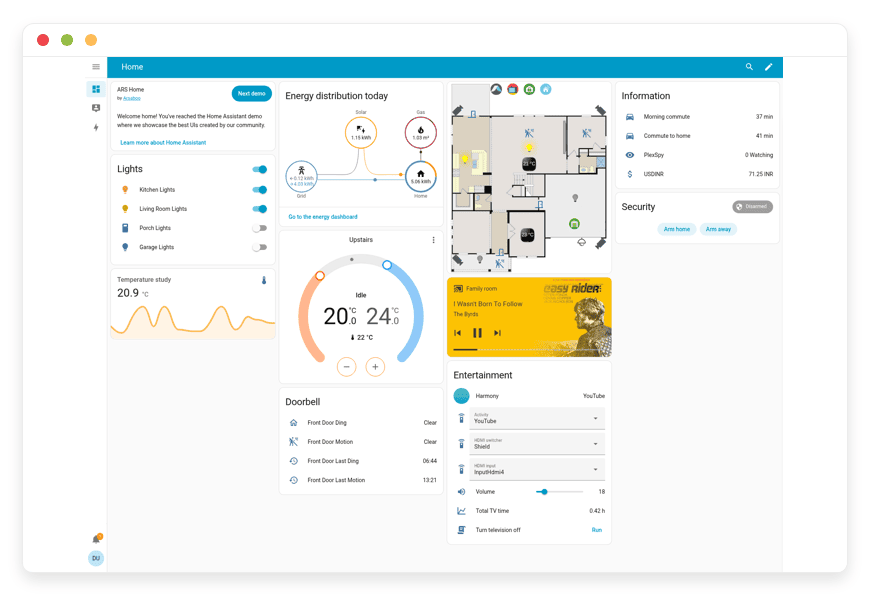
The user interface is highly flexible. You organize your controls using Views, Cards, and Badges. You can use a standard grid layout or a panel layout for large, full-screen charts. Cards range from simple toggle buttons to detailed history graphs and weather forecasts.
You can upload a 3D floor plan of your house and place clickable light icons exactly over each room. You can build custom sidebar menus. This workflow benefit allows you to build the exact control panel you want. You can create a detailed dashboard for yourself and a simple, safe dashboard with only three buttons for guests.
Comprehensive Energy Tracking
Utility bills are rising everywhere. The built-in energy dashboard helps you track every single watt you consume. You can connect it directly to your electricity grid meter, your solar panels, and your home battery storage system. It also tracks your gas and water usage using compatible sensors.
You see real-time graphs showing exactly where your energy goes. This workflow benefit helps you reduce monthly utility bills. You can set appliances, like your washing machine, to run automatically only when your solar panels produce excess free power.
Local Voice Control (Assist)
Voice assistants often raise massive privacy concerns. This software solves this with a feature called Assist. Assist allows you to talk to your home without sending your audio to the cloud. You can use an open-source Wake Word to activate the system hands-free. You can build custom sentences to control highly specific devices.
You can connect it to a local AI tool to give your house a unique voice. This workflow benefit lets you command your home safely. Your voice recordings never leave your property, protecting your family conversations.
Smart Organization and Tags
When you have hundreds of connected devices, management gets messy quickly. The software provides Areas, Floors, Labels, and Categories to keep things neat. You assign your television and lamps to the Living Room or the First Floor. You group all your security sensors with a specific red label.
This workflow benefit saves you immense time when building new automations. You tell the system to turn off all lights in the "Kitchen" area instead of picking ten individual bulbs from a massive list.
Companion Apps and Tracking
You do not need to sit at a computer to manage your home. The platform offers official companion apps for both Apple and Android phones. These apps provide quick access to your dashboards and send fast push notifications to your screen.
They use your phone to track your location. This workflow benefit allows your house to react to your presence. The system knows when you leave work and can start warming up your living room before you pull into the driveway.
Solutions per Industry
While it has "Home" in the name, this open-source software powers commercial spaces too. Its flexibility makes it perfect for various demanding industries.
Vacation Rentals and Property Management
Managing a rental property requires constant attention. Guests leave lights on all day. They run the air conditioning with the windows wide open. You can fix this by connecting your rental property to this platform. You install smart locks and generate unique entry codes for each new guest automatically.
When a guest checks out, the system deletes their PIN code. It resets the thermostat to an energy-saving mode. It turns off all forgotten lights and locks the doors. This workflow benefit reduces your electric bill and improves security without you driving to visit the property.
Boutique Hospitality and Small Hotels
Hotels want to provide memorable stays. A standard room feels boring and dated. You can use this software to elevate the guest experience instantly. When a guest swipes their keycard for the first time, the room runs a "Welcome" scene. The window blinds open, the lights fade up slowly, and soft background music plays.
You can mount a cheap tablet on the wall showing a custom dashboard. Guests tap simple buttons to request room service, adjust the climate, or set a "Do Not Disturb" mode. This provides a luxury feel without the massive cost of commercial hotel software.
Indoor Agriculture and Greenhouses
Growing plants indoors requires strict climate control. A small drop in humidity or a failed grow light can ruin an entire crop. You connect soil moisture sensors, temperature probes, and smart relays to this central system.
You build routines that water the plants automatically the exact moment the soil gets dry. You turn on exhaust fans when the heat peaks past a safe limit. The history graphs let you review the exact conditions of your greenhouse over the past thirty days. You protect your valuable crops with reliable, local logic.
Creative Agencies and Studios
Design studios and creative spaces need to adapt quickly. A meeting room serves multiple purposes throughout the day. You can build specific routines for pitch meetings, quiet work, or team lunches.
When you press the "Presentation" button, the software drops the projector screen, dims the overhead lights, and turns on the display screen. When the meeting ends, a single tap resets the room. You track the power usage of heavy editing computers to monitor studio costs. You create a polished, modern environment for your clients.
Education and Modern Classrooms
Teachers waste valuable class time adjusting room settings. You can automate the entire classroom environment. You connect the smart lights, projector, and audio system to a single dashboard on the teacher's desk.
When it is time for reading, the teacher taps one button to dim the front lights and brighten the desk lights. You can use smart speakers to play soft chimes when break time begins. The school saves money by ensuring all smart boards and lights power down automatically at the end of the school day.
Small Retail Shops and Cafes
Creating the right mood is vital for a cafe or retail store. Staff members often forget to turn on window displays or set the music volume correctly. You can automate the entire daily schedule.
At opening time, the software turns on the espresso machines, sets the main lights to a bright, welcoming level, and starts the morning music playlist. At closing time, it dims the lights, arms the security sensors, and turns off the heavy equipment. You ensure your store looks and sounds perfect every single day.
Home Assistant vs Other Softwares
Many hubs try to control the smart home. Most fall significantly short. Here is how this platform compares to popular proprietary software choices.
| Feature | Home Assistant | Apple Home | Samsung SmartThings |
| Local Processing | Fully Local | Mostly Local | Requires Cloud for many |
| Device Support | 2,500+ Brands | Apple-Certified Only | Approved Partners Only |
| Custom Dashboards | Highly Flexible | Fixed Grid Layout | Basic Layout |
| Voice Privacy | Local Processing | Cloud Processing | Cloud Processing |
| Energy Tracking | Advanced (Solar/Grid) | Basic / Third-party | Basic |
| Cost to Use | Free Software | Requires Apple Hub | Requires Hub Purchase |
Use Cases and Applications
Let us look at real-world examples. These practical setups show what you can achieve once your system is running smoothly.
Smart Lighting and Presence Detection
Walking into a dark house with full hands is annoying. You place small motion sensors in your hallways and living rooms. When you walk in, the lights turn on instantly. But you can make it much smarter. You add a condition checking the sun's exact position in your city. The lights only trigger if the sun has actually set. You also adjust the brightness based on the specific time. At 8:00 PM, the lights turn on at full brightness. At 2:00 AM, they turn on at a dim 10% so you do not blind yourself heading to the kitchen.
Comprehensive Home Security Routines
You do not need an expensive monthly plan for good security. You connect simple door sensors, window sensors, and local cameras. You add a "Night Mode" button to your bedside dashboard. When you tap it, the system checks if all external doors are locked. If the front door is open, it sends an alert to your phone. If a sensor trips while you sleep, it flashes the bedroom lights red and plays a loud siren sound through your smart speakers. You protect your family actively.
Automated Climate Control
Heating an empty house wastes serious money. You use the companion apps on your family's phones to track location safely. When everyone leaves the designated "Home" zone, the system turns off the air conditioning. When the first person crosses the boundary heading back, it turns the climate control back on. You return to a comfortable house without wasting energy all day. An automated energy monitoring system pays for itself.
Daily Voice Summaries
Morning routines set the tone for the entire day. You build a routine that triggers when you turn on your coffee maker in the morning. The local voice assistant wakes up and speaks through your kitchen speaker. It reads out the current weather forecast. It tells you your expected drive time to work based on current traffic. It reminds you of any important tasks on your smart calendar. You get vital information effortlessly while you pour your first cup.
Home Theater Automation
Watching a movie should be a fun event. You connect your smart TV, receiver, and bias lighting to the system. When you press play on a movie, the system dims the main room lights slowly over ten seconds. It turns on the color strips behind the television. If you pause the movie to get a snack, the main lights raise to 30% brightness so you can see where you are walking. When you press play again, the lights drop back down.
How DANIAN Helps
Running an open-source platform brings incredible benefits. Maintaining the server it runs on does not. You want a smart home, not an IT project. DANIAN provides the invisible infrastructure. We handle the mess; you get the glory.
Fully Managed
We handle the hosting. Our team manages everything from the initial setup to regular updates, security patches, and performance monitoring. Your software is always optimized without you having to lift a single finger. You get a clean, ready-to-use interface instantly.
Backup & Monitoring
Mistakes happen. You might accidentally delete an important routine or break a dashboard layout. We provide automated daily backups. These are configured automatically, stored securely, and offer a simple one-click restore. You experiment with your setup safely, knowing you can always go back in time.
SSL & Advanced Security
Secure by default. With cybersecurity threats on the rise, we take security seriously. From automated updates to proactive monitoring and strict network rules, we make sure your environment is secure 24/7. Your connection gets an SSL certificate automatically so your traffic remains fully encrypted.
Seamless Updates
The community releases new tools rapidly. Security patches and new core versions apply automatically without your intervention. You always have access to the latest tools and brand integrations without fighting the command line.
24/7 Monitoring
Technical issues are detected and often resolved entirely before you notice them. Our systems watch the backend constantly. If a core service stops responding, we restart it automatically.
Guaranteed Performance
Downtime can be highly frustrating for your household. With our scalable systems, we ensure consistent performance even as your connected devices grow. Whether you have ten smart bulbs or two hundred complex sensors, your commands process instantly.
7-Day Free Trial
There is zero risk to try. Experience less setup and more development. The platform is affordable from the start. You get real help when you need it.
How to Get Started
Moving your smart home to a professional platform is incredibly easy. You do not need to format drives or flash images. You follow three simple steps.
Visit danian.co and create your fast account.
Select Home Assistant from our wide software catalog.
Relax while DANIAN launches your software in the background.
FAQ
Is the software free?
Yes, the software itself is completely free and open-source. When you use our managed service, you pay for the professional hosting, backend maintenance, and reliable server speed, not a software license.
Do I need a fast internet connection?
No. The platform talks to most of your devices locally over your internal network. It does not need the internet to turn on a Zigbee light bulb or read a local temperature sensor. You only need internet access to control your home while you are away or to fetch external weather updates.
Can I use my smartphone to control it?
Yes. There are official companion apps for both Apple and Android phones. These apps allow you to view your dashboards, trigger actions manually, and use your phone's location for smart routines.
What devices are compatible?
Almost everything. The platform officially supports over 2,500 different brands and protocols. This includes modern Zigbee, Z-Wave, Matter, Thread, WiFi, and Bluetooth devices.
Can I use voice control safely?
Yes. The built-in Assist feature processes voice commands entirely within your system. You do not need to connect to external internet systems to turn on a light using your voice.
What happens if I make a mistake and break my setup?
Since we take automated daily backups, you are fully protected. If you delete something important, you restore your system to a previous working state quickly and easily.
Can I run it on a small computer at home?
You can, but it requires frequent maintenance. SD cards often fail, and updates can break your system. Managed hosting removes this technical burden entirely.
Conclusion
Home Assistant is the ultimate tool for anyone serious about home automation. It frees you from proprietary hubs, protects your privacy, and connects all your isolated devices into one powerful system. The deep visual routines, custom dashboards, and energy tracking tools offer unmatched control over your living space.
However, the hardware maintenance can drain your precious time. You deserve a system that just works. Let us handle the server administration, the daily backups, and the strict security. You should spend your time building clever routines, not fixing broken Linux updates.
Experience the power of fully managed open-source.


