
Managed HedgeDoc Hosting
TL;DR: Quick Answer
HedgeDoc is the definitive open-source solution for real-time, collaborative Markdown editing. It is the engine that allows developers, researchers, and teams to build documentation, meeting notes, and slide decks simultaneously in a unified workspace.
Managed HedgeDoc Hosting by DANIAN removes the technical friction of self-hosting.
Zero Configuration: No Docker containers, Nginx reverse proxies, or PostgreSQL database setups.
Enterprise-Grade Security: Automated SSL, custom firewalls, and regular security patching are standard.
Data Integrity: Automated daily backups ensure your intellectual property is never lost.
Optimized Performance: Infrastructure tuned specifically for the WebSocket connections required for real-time collaboration.
Introduction
If you work in a technical field—whether you are a developer, a systems engineer, a researcher, or a technical writer—you likely live in Markdown. It is the lingua franca of the web. It is fast, clean, version-controllable, and free from the bloat of proprietary word processors.
The problem arises when you need to collaborate.
We have all been there. You are writing a README file or a technical specification. You push it to Git. Your colleague pulls it, makes changes, and pushes it back. You get a merge conflict. Or, worse, you try to paste your code blocks into a Google Doc to get real-time feedback, and the smart quotes ruin your syntax, the indentation is lost, and the formatting breaks.
You need a tool that combines the real-time, multiplayer experience of a cloud office suite with the raw power and flexibility of a code editor.
HedgeDoc solves this perfectly. It is powerful, flexible, and completely open. It understands code, math, and diagrams natively. However, for all its power, running it yourself is a significant operational burden. You have to provision a server, secure the database, manage the persistent storage for image uploads, and keep the Node.js environment updated. Suddenly, the tool meant to save you time is costing you hours in maintenance.
DANIAN provides the invisible infrastructure you need. We handle the heavy lifting—the updates, the security, the backups—so you can focus on writing.
What is HedgeDoc?
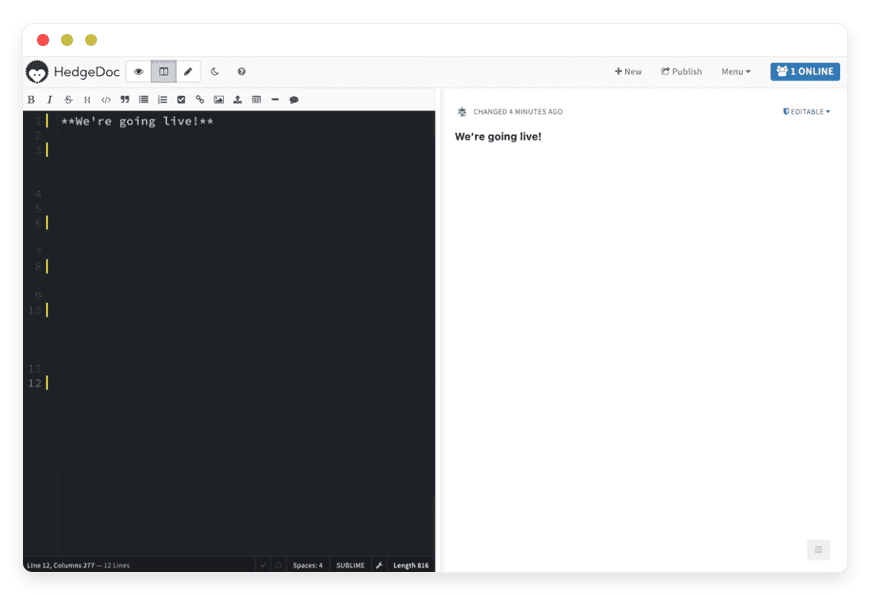
HedgeDoc is an open-source, web-based collaborative Markdown editor. It allows multiple people to edit the same document at the same time, seeing each other's cursor and changes instantly. It renders your plain text into beautiful HTML in real-time.
To understand HedgeDoc, you have to understand its lineage. It is a fork of CodiMD, which itself was the open-source version of HackMD. The project was renamed to HedgeDoc (a play on "Hedgehog" and "Docs") to distinguish itself as a purely community-driven project, free from commercial open-core limitations. It is licensed under the AGPLv3, ensuring it remains free and accessible forever.
Why is it trending?
The tech world is shifting toward a "Docs as Code" philosophy. Teams want their documentation to live alongside their code, written in the same formats. However, the drafting phase requires collaboration. HedgeDoc bridges the gap between the IDE and the whiteboard. It is trending because it respects user privacy and offers features that proprietary giants simply ignore, like native LaTeX support and code-defined diagrams.
Why Choose HedgeDoc?
Choosing HedgeDoc is a decision to prioritize structure, speed, and compatibility.
Most collaborative suites are designed for generalists. They hide the structure of the document behind a "What You See Is What You Get" (WYSIWYG) interface. This is fine for a letter to a client, but it is a nightmare for technical documentation. If you try to paste a JSON snippet into a standard word processor, it will try to spell-check your variable names and capitalize your keys.
HedgeDoc is different:
Dual View: You write in raw Markdown on the left, and see the rendered result on the right. You know exactly what the syntax is doing.
Vendor Independence: Your content is just text. You can copy-paste your entire document into any other text editor, and it works. You are never locked into a proprietary file format.
Lightweight: It runs in the browser but feels as snappy as a local text file.
When you choose Managed HedgeDoc Hosting, you get these software benefits without the burden of system administration. You get a clean URL (e.g., docs.yourcompany.com), a secure environment, and a tool that is always ready when inspiration strikes.
Key Features of HedgeDoc
HedgeDoc is often described as "Markdown on Steroids." It supports the standard CommonMark spec, but it adds a massive layer of functionality designed for power users.
1. Advanced Markdown & YAML Metadata
Standard Markdown is great, but HedgeDoc extends it significantly.
YAML Frontmatter: At the very top of your note, you can add metadata tags. You can define the title, tags, and even search descriptions. This allows you to treat your notes like a database.
Table of Contents: simply typing [TOC] anywhere in the document generates an auto-updating table of contents based on your headers.
Smart Paste: If you copy an image from your clipboard and paste it into the editor, HedgeDoc automatically uploads it to the server and inserts the correct Markdown image tag ![]().
2. Editor Modes for Developers
HedgeDoc knows its audience. If you rely on muscle memory from your local development environment, you can switch the keybinding mode in the settings.
Vim Mode: Use hjkl for navigation and standard Vim commands for editing.
Emacs Mode: Use standard Emacs keybindings.
Sublime Mode: Use standard Sublime Text shortcuts.
This ensures that you do not lose your "flow" when switching from your IDE to your documentation tool.
3. Native Diagramming (Mermaid, Graphviz, Vega)
This is perhaps the strongest feature for technical teams. You do not need to open Visio or Lucidchart to create a diagram. You define the diagram in code blocks.
Mermaid.js: Create flowcharts, sequence diagrams, Gantt charts, and class diagrams by typing text. For example, typing A -> B: Text renders an arrow from A to B.
Graphviz: For complex network graphs.
Vega-Lite: For data visualization. You can paste a JSON dataset and render a bar chart or scatter plot directly in the note.
PlantUML: Widely used in software architecture to visualize system design.
Because these diagrams are code, they are version-controllable and easily editable by anyone on the team.
4. Mathematical Expressions with MathJax
5. Slide Mode (Presentation via Reveal.js)
You can turn any note into a presentation instantly. By using the --- delimiter to separate slides, HedgeDoc renders your markdown as a Reveal.js slide deck.
No Context Switch: You do not need to copy your notes into PowerPoint. Your notes are the presentation.
Theming: You can specify themes in the YAML header (e.g., "black", "white", "solarized").
Speaker Notes: You can even add speaker notes that are only visible to you during the presentation.
6. Granular Permissions & Privacy
HedgeDoc offers a flexible permission system that respects your need for privacy:
Freely: Anyone with the link can edit (great for public brainstorming).
Editable: Anyone signed in can edit (great for company-wide wikis).
Limited: Anyone signed in can view, but only you can edit.
Locked: Only the owner can edit; others can view.
Protected: Only the owner can edit; specific users can view.
Private: Only the owner can read or edit.
Solutions per Industry
HedgeDoc is versatile enough to be used across the board, but it shines in specific industries where text structure and speed are paramount.
1. Software Development Agencies
The HedgeDoc Solution:
Live Specs: Developers use HedgeDoc to write "Live Specifications." They can paste JSON responses, use syntax highlighting for multiple languages (Python, JS, Go), and draw UML diagrams using Mermaid syntax to explain authentication flows.
Client Handover: Instead of sending a PDF that goes out of date instantly, agencies provide a HedgeDoc link. The client sees the rendered view, while the developers update the markdown source in real-time.
Readme Staging: Before committing a README.md to GitHub, teams draft it in HedgeDoc to ensure the formatting, images, and tables look perfect.
2. System Administration & DevOps
The HedgeDoc Solution:
Incident War Rooms: The moment an alert fires, a new HedgeDoc note is created. The URL is dropped in the chat. Engineers paste log snippets (which get proper syntax highlighting) and timestamp their actions.
Runbooks: Standard Operating Procedures (SOPs) are written in HedgeDoc. Because of the [TOC] feature, navigation is instant. If a command changes, updating the note takes seconds, unlike updating a PDF manual.
Post-Mortems: After the incident, the note serves as the single source of truth for writing the official Post-Mortem report.
3. Academic and Scientific Research
The HedgeDoc Solution:
Drafting Papers: Research groups use HedgeDoc for drafting abstracts and chapters. The native MathJax support means complex formulas render instantly on the right side of the screen.
Lab Notes: Researchers can keep running logs of their experiments. Since HedgeDoc is browser-based, it works perfectly on Linux machines in the lab, MacBooks in the office, and Windows PCs at home.
Bibliography Management: While not a full reference manager, the clean text format allows for easy integration with BibTeX workflows later in the process.
4. Education and Universities
The HedgeDoc Solution:
Flipped Classrooms: Professors create a "Locked" note containing the lecture syllabus. During class, they switch to "Slide Mode" to present directly from the text.
Collaborative Study Guides: A teacher can create a "Freely" note and share the link. The entire class can crowd-source notes during the lecture, creating a comprehensive study guide together in real-time.
Coding Assignments: For CS classes, students can submit code snippets in HedgeDoc, where the syntax highlighting makes grading easier for the TA.
5. Technical Writing & Content Strategy
The HedgeDoc Solution:
Native Drafting: Writers draft directly in the final format. They can see exactly how the headers, bold text, and links will behave.
Metadata Management: Writers can fill out the YAML frontmatter (SEO titles, descriptions, dates) at the start of the process, ensuring no metadata is missing when the file is moved to the CMS.
Editorial Review: Editors can leave comments (using standard HTML comment tags or specific markdown highlighting) without altering the structure of the document.
6. Game Design and Narrative Building
The HedgeDoc Solution:
Logic Visualization: Designers use the built-in Mermaid or Graphviz support to map out quest lines and dialogue trees visually, while keeping the dialogue script in the same document.
Mechanics Math: Balancing game economy often involves math formulas. MathJax allows designers to display the damage formulas or economy curves clearly.
Wiki-style Interlinking: By using standard markdown links, designers can create a personal wiki for their game world, linking characters to locations and items.
HedgeDoc vs. Other Softwares
It is crucial to position HedgeDoc correctly. It is not a replacement for Microsoft Word; it is a replacement for the chaos of unorganized text and code.
| Feature | HedgeDoc | Google Docs | Notion | Etherpad |
| Primary Format | Markdown (Plain Text) | Rich Text (WYSIWYG) | Block-based | Rich Text / Plain |
| Code Highlighting | Native & Excellent | Poor / Plugin required | Good | Moderate |
| Diagrams | Code-to-Diagram (Mermaid) | Drawing Tool (Manual) | Embeds / Manual | Plugins required |
| Math Support | Native LaTeX/MathJax | Equation Editor (Slow) | LaTeX Block | Plugins required |
| Speed | Extremely Lightweight | Heavy / Slow load | Heavy | Lightweight |
| Slideshows | Native (Reveal.js) | Separate App (Slides) | No | No |
| License | Open Source (AGPL) | Proprietary | Proprietary | Apache 2.0 |
The Verdict:
Use Google Docs for letters, print-ready documents, and non-technical teams.
Use Notion for databases and project management.
Use HedgeDoc for technical documentation, meeting notes, code-heavy collaboration, and rapid drafting. It is the fastest, cleanest option for anyone who prefers keyboard shortcuts over mouse clicks.
Use Cases and Applications
Beyond specific industries, HedgeDoc fits into various daily workflows for any digital team.
1. Daily Scrum and Agile Stand-ups
Teams can launch a new note for every sprint. With the checklist syntax (- [ ]), you can track action items in real-time. Because it is collaborative, everyone adds their updates simultaneously, cutting meeting times in half. At the end of the sprint, the note is archived or exported to the project management tool.
2. Knowledge Base & Wiki
Because HedgeDoc uses standard Markdown, many users treat it as a cloud-based "second brain" or Zettelkasten. You can link notes together, tag them, and easily export them to a local folder later if you want to archive them. It acts as a staging ground for a more permanent company wiki.
3. Technical Interviews
Instead of using expensive coding interview platforms, you can spin up a HedgeDoc note. The interviewer and candidate can type code in real-time with proper syntax highlighting. It is simple, effective, and free of the pressure of a compile button—allowing the interview to focus on logic and architecture rather than syntax errors.
4. Workshop and Conference Hubs
For workshop organizers, a single HedgeDoc link can serve as the "hub" for the event. The note can contain the schedule, links to other resources, Wi-Fi passwords, and a section for attendees to ask questions in real-time. It is a dynamic, living agenda.
5. RFCs (Request for Comments)
When proposing a new architectural change, engineers write an RFC. HedgeDoc is the ideal medium for this. The author outlines the proposal, adds diagrams for the architecture, and the team reviews it. The "Comments" feature (or simply writing below the text) allows for a threaded discussion that stays attached to the context.
How DANIAN Helps
We act as the "Quiet Enabler." You likely want the features of HedgeDoc—the collaboration, the math, the diagrams—not the hobby of maintaining a Linux server.
When you self-host HedgeDoc, you are responsible for:
Updating Node.js versions.
Migrating the PostgreSQL database when major versions change.
Renewing Let's Encrypt certificates every 90 days.
Fixing image upload paths when permissions break.
When you choose managed hosting with DANIAN, we handle the mess so you get the glory.
Fully Managed Lifecycle
We manage the entire lifecycle of the application. From the initial launch to configuring the environment variables and database connections, we ensure the software runs exactly as intended. You do not need to learn Docker, read through migration guides, or debug npm errors.
Backup & Monitoring
Data loss is not an option. We configure automated daily backups that are stored securely off-site. If you accidentally delete a critical note or the software encounters a database error, we can restore your environment. We also monitor your service 24/7; if a process hangs, we fix it, often before you even notice.
SSL & Firewall
Security is critical, especially when your notes contain intellectual property. We secure your connection with automatic SSL certificates (HTTPS) and place your service behind a custom firewall to block malicious traffic and botnets.
Guaranteed Performance
Self-hosting on a cheap VPS often leads to lag when multiple users type at once. Our infrastructure is scalable. We ensure consistent performance and low latency, which is vital for the real-time operational transformation (OT) algorithms that HedgeDoc uses to sync text between users.
7-Day Free Trial
We believe in the product. You can spin up a server, test the latency, try the features, and see if it fits your workflow without risking a cent.
How to Get Started
Getting your own private HedgeDoc suite running takes less than two minutes. We have streamlined the process to be as frictionless as possible.
Sign Up: Visit danian.co and create your account.
Select Software: Choose HedgeDoc from our extensive catalog of open-source tools.
Launch: Click start. We will provision the server, configure the database, and secure the domain.
FAQ
Q: Is HedgeDoc compatible with other Markdown editors?
A: Yes. HedgeDoc uses standard CommonMark. You can copy text from HedgeDoc and paste it into Obsidian, VS Code, Typora, or GitHub, and it will format correctly.
Q: Can I export my notes?
A: Absolutely. You can export any note as a raw Markdown file (.md), an HTML file, an ODT file (for Word/LibreOffice), or even a PDF (via the print-to-pdf browser function which HedgeDoc optimizes for).
Q: How do I handle images?
A: On our managed hosting, we configure the image upload path for you using secure object storage or local persistent volumes. You can simply drag and drop images onto the note, or paste them from your clipboard. They are hosted automatically and linked in the markdown.
Q: Is this the same as CodiMD or HackMD?
A: They share the same history. HackMD is the proprietary commercial version. CodiMD was the open-source fork, which was renamed to HedgeDoc to clarify the distinction and ensure the project remains community-governed. HedgeDoc is the active, open-source version.
Q: Can I use a custom domain?
A: Yes. DANIAN has the option for you to point your own domain (e.g., notes.myagency.com) to your managed HedgeDoc service for a professional look.
Q: Does it support version history?
A: Yes, HedgeDoc keeps a revision history of the document. You can revert to previous versions if a mistake is made or if content was deleted by accident.
Conclusion
HedgeDoc restores the joy of writing. It strips away the bloat of modern office suites and gives you a clean, fast, and powerful canvas that understands code and math. It is the tool of choice for those who build, research, and teach.
But the tool is only as good as the infrastructure it runs on. Don't let server maintenance distract you from your real work. Let DANIAN provide the stability, security, and speed you need.


